
Solved Hard Drive Partition Without Effecting Recovery Partition

raufjawaid

New member
Local time
4:57 AM
Messages
5
Hi,

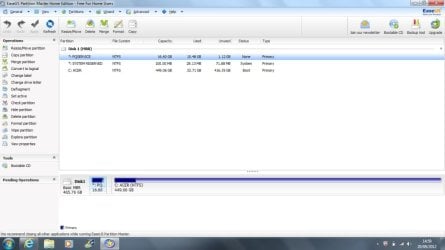
Need some help. I recently bought Acer Aspire 5560G. It comes with 500GB HDD with only one partition which is drive C. There are 2 hidden partitions as well. I would like to split my drive C in 2 partitions without effecting my Recovery partition. Is it possible??? if yes than what's the best way?? Help would be highly appreciated. Thanks in advance.
 

Attachments
  • system.jpg
    system.jpg
    44.6 KB · Views: 31

My Computer My Computer

At a glance

windows home premium 64
OS
windows home premium 64

My Computer My Computer

At a glance

Win 7 Pro 64-bitIntel i5 2.4 Ghz8GB DDR3Intel HD 3000
Computer type
Laptop
Computer Manufacturer/Model Number
Sony Vaio VPCEB47GM Laptop
OS
Win 7 Pro 64-bit
CPU
Intel i5 2.4 Ghz
Memory
8GB DDR3
Graphics Card(s)
Intel HD 3000
Sound Card
IDT High Definition
Monitor(s) Displays
15.6 WGXA Anti-Glare LED
Screen Resolution
1280x800
Hard Drives
640Gb 7200rpm
Antivirus
MSE
Browser
Opera (primary) with IE9 backup

My Computer My Computer

At a glance

windows home premium 64
OS
windows home premium 64
If you use Windows to create a "New Simple Volume" it will be a primary partition. As far as which one to use, primary or logical, I will leave that for someone else to answer as I have always used primary myself.
 

My Computer My Computer

At a glance

Windows 7 Home Premium 64bit SP 1Intel i5 2500k8 gigabytes Corsair PC3-12800 DDR3EVGA GeForce GTX 460 superclocked
Computer Manufacturer/Model Number
Customized build from CyberPower
OS
Windows 7 Home Premium 64bit SP 1
CPU
Intel i5 2500k
Motherboard
Asus P8P67 Deluxe
Memory
8 gigabytes Corsair PC3-12800 DDR3
Graphics Card(s)
EVGA GeForce GTX 460 superclocked
Sound Card
Integrated
Monitor(s) Displays
ViewSonic 23" LCD
Screen Resolution
1980 x 1080
Hard Drives
120 Gb Samsung 840 Pro SSD
120 Gb Kingston Hyper X SSD
1 Tb WD Caviar Black HDD
PSU
Coolermaster 1000 watt modular
Case
Coolermaster HAF X full tower
Cooling
Coolermaster Hyper 212 plus
Keyboard
Logitech USB
Mouse
Microsoft 3 button
Internet Speed
download 1.5 Mb/sec upload 300Kb/sec
I think the easiest way to accomplish that is to shrink your C: partition. That will create unallocated space. And the unallocated space can be used to create a new partition.

http://www.sevenforums.com/tutorials/2672-partition-volume-shrink.html

http://www.sevenforums.com/tutorials/2674-partition-volume-create-new.html


Thanks marsmimar. Will it be a primary or logical partition which one should I make?

The hard drive can have up to 4 primary partitions. Anything more than that and it would have to be changed to 3 primary + logical partitions (I believe up to a maximum of 60 logical partitions.) So for now, I'd just make the new partition a primary.
 

My Computer My Computer

At a glance

Win 7 Pro 64-bitIntel i5 2.4 Ghz8GB DDR3Intel HD 3000
Computer type
Laptop
Computer Manufacturer/Model Number
Sony Vaio VPCEB47GM Laptop
OS
Win 7 Pro 64-bit
CPU
Intel i5 2.4 Ghz
Memory
8GB DDR3
Graphics Card(s)
Intel HD 3000
Sound Card
IDT High Definition
Monitor(s) Displays
15.6 WGXA Anti-Glare LED
Screen Resolution
1280x800
Hard Drives
640Gb 7200rpm
Antivirus
MSE
Browser
Opera (primary) with IE9 backup
Many thanks for the help....Another concern is.....if later in the future I do a factory restore, will it effect my newly created partition and the data in it? I've read somewhere that a factory restore will delete all newly created partitions and will revert back to original as it came from the factory. Is that true ??? Secondly, I've tried shrinking drive C which holds only 30GB data at the moment. But disk management is not shrinking it more than 200GB. I would like to shrink it down to 100GB max as it is enough for my programs. Any workarounds please????
 

My Computer My Computer

At a glance

windows home premium 64
OS
windows home premium 64
Yes, a factory restore would wipe out all existing partitions on your hard drive. But if you use Windows Backup and Restore to create a sytem image of only the C partition, you can restore the OS without deleting the other partitions on your hard drive. You can use a partioning software, like Partition Wizard, or AOMEI Partition Assistant Home Addition, both are free, to shrink your current C partition if Windows won't do it.

PS: there are other softwares like Macrium Reflect, or Acronis True Image, Easeus Todo Backup, which you can use to create a system image with.
 

My Computer My Computer

At a glance

Windows 7 Home Premium 64bit SP 1Intel i5 2500k8 gigabytes Corsair PC3-12800 DDR3EVGA GeForce GTX 460 superclocked
Computer Manufacturer/Model Number
Customized build from CyberPower
OS
Windows 7 Home Premium 64bit SP 1
CPU
Intel i5 2500k
Motherboard
Asus P8P67 Deluxe
Memory
8 gigabytes Corsair PC3-12800 DDR3
Graphics Card(s)
EVGA GeForce GTX 460 superclocked
Sound Card
Integrated
Monitor(s) Displays
ViewSonic 23" LCD
Screen Resolution
1980 x 1080
Hard Drives
120 Gb Samsung 840 Pro SSD
120 Gb Kingston Hyper X SSD
1 Tb WD Caviar Black HDD
PSU
Coolermaster 1000 watt modular
Case
Coolermaster HAF X full tower
Cooling
Coolermaster Hyper 212 plus
Keyboard
Logitech USB
Mouse
Microsoft 3 button
Internet Speed
download 1.5 Mb/sec upload 300Kb/sec
Thanks for the help. I did the partitioning using "EaseUS Partition Master 9.1.1 Home Edition" and everything went well.

For Acer users, my recovery partition is still intact and everything is working fine. For testing purpose I did factory restore using both options, "Restore Operating System and Retain User Data" & "Restore Operating System to Factory Defaults", neither of them effected my newly created partition and the data in it.
 

My Computer My Computer

At a glance

windows home premium 64
OS
windows home premium 64
Thanks for the help. I did the partitioning using "EaseUS Partition Master 9.1.1 Home Edition" and everything went well.

For Acer users, my recovery partition is still intact and everything is working fine. For testing purpose I did factory restore using both options, "Restore Operating System and Retain User Data" & "Restore Operating System to Factory Defaults", neither of them effected my newly created partition and the data in it.

Good to hear that all went well for you. I have used Easeus Partition Master before and it does a good job. Thanks for the info about a factory restore not affecting the new partition. Its been a few years since I had an HP computer that came with the factory restore partition and from what I remember, that did indeed format the whole HDD.
 

My Computer My Computer

At a glance

Windows 7 Home Premium 64bit SP 1Intel i5 2500k8 gigabytes Corsair PC3-12800 DDR3EVGA GeForce GTX 460 superclocked
Computer Manufacturer/Model Number
Customized build from CyberPower
OS
Windows 7 Home Premium 64bit SP 1
CPU
Intel i5 2500k
Motherboard
Asus P8P67 Deluxe
Memory
8 gigabytes Corsair PC3-12800 DDR3
Graphics Card(s)
EVGA GeForce GTX 460 superclocked
Sound Card
Integrated
Monitor(s) Displays
ViewSonic 23" LCD
Screen Resolution
1980 x 1080
Hard Drives
120 Gb Samsung 840 Pro SSD
120 Gb Kingston Hyper X SSD
1 Tb WD Caviar Black HDD
PSU
Coolermaster 1000 watt modular
Case
Coolermaster HAF X full tower
Cooling
Coolermaster Hyper 212 plus
Keyboard
Logitech USB
Mouse
Microsoft 3 button
Internet Speed
download 1.5 Mb/sec upload 300Kb/sec
Glad to hear everything went well! Thanks for posting back. :thumbsup:
 

My Computer My Computer

At a glance

Win 7 Pro 64-bitIntel i5 2.4 Ghz8GB DDR3Intel HD 3000
Computer type
Laptop
Computer Manufacturer/Model Number
Sony Vaio VPCEB47GM Laptop
OS
Win 7 Pro 64-bit
CPU
Intel i5 2.4 Ghz
Memory
8GB DDR3
Graphics Card(s)
Intel HD 3000
Sound Card
IDT High Definition
Monitor(s) Displays
15.6 WGXA Anti-Glare LED
Screen Resolution
1280x800
Hard Drives
640Gb 7200rpm
Antivirus
MSE
Browser
Opera (primary) with IE9 backup
Back
Top