
Getting your Nikon Coolscan to work on W7 x64

Somehow I don't think you're reading steps 3 & 4 correctly. What is this....

I checked the drivers and they are showing as c:windows/system32/drivers/kskhunk.sys and
c:windows/system32/drivers/usbscan.sys

This despite having updated the driver from the Nikon Files folder as instructed where the scanners.inf and NKScnUSD.dll files are located

Any ideas ??

You need to re-read the instructions. And it would help if you stated if what model your scanner is, and whether it's USB or FireWire (1398).

You might want to look at these two post:

- http://www.sevenforums.com/drivers/44994-getting-your-nikon-coolscan-work-w7-x64-36.html#post1999177
- http://www.sevenforums.com/drivers/44994-getting-your-nikon-coolscan-work-w7-x64-36.html#post1999991
 

My Computer My Computer

At a glance

Windows 10 ProIntel Core i7-4770K (3.5Ghz)32 gig Corsair Dominator Platinum (4x8Gig)Sapphire Tri-X R9 Fury
Computer type
PC/Desktop
Computer Manufacturer/Model Number
Custom built by me.
OS
Windows 10 Pro
CPU
Intel Core i7-4770K (3.5Ghz)
Motherboard
Gigabyte G1 Sniper 5 (F10 Bios)
Memory
32 gig Corsair Dominator Platinum (4x8Gig)
Graphics Card(s)
Sapphire Tri-X R9 Fury
Sound Card
Soundblaster ZXR
Monitor(s) Displays
NEC PA242W 24" LCD Monitor
Screen Resolution
1920 x 1200
Hard Drives
Primary - Samsung 850 Pro (512gig), Samsung 840 Pro (256gig), 2TB WD Caviar Black.
PSU
EVGA Supernova 1000 G2
Case
Cooler Master HAF X
Cooling
Corsair H100i with Corsair Air Series SP120 Quiet Fans
Keyboard
Logitech Wireless Wave
Mouse
Logitech Performance MX
Internet Speed
High Speed Cable
Antivirus
Norton Security
Browser
IE11
Other Info
Memory Timings - 1866MHz @ 9-9-9-27-1T @ 1.5 volts
Thank you Sygnus for your reply. The scanner is a Coolscan 5000ED so its USB. Its working perfectly as I have an older work laptop which it works on, but thats not practical for day to day use.

I followed the instructions exactly (from a clean start - I carefully checked for Nikon Files and deleted everything I could find) and everything appears to install correctly. In Point 9 (driver update), browsing finds the "Nikon Files" folder I created and at the end of the update I get a message saying the drivers have installed correctly.

However, Nikon Scan still freezes immediately on opening.

So I then went back into Device Manager for the 5000ED and under "properties" looked at the driver details listed. It shows the Driver Provider as [email protected] and as this is the name on scanners.inf, I assume it is identifying your driver but the driver details are shown as

c:windows/system32/drivers/kskhunk.sys
c:windows/system32/drivers/usbscan.sys

I tried the same process with Vuescan drivers and exactly the same thing happens (and yes Vuescan was fully uninstalled when I tried it with your driver).

I am completely baffled - I have tried this now 4 or 5 times, each time trying to delete all evidence of previous attempts, including uninstalling the software and deleting everything Nikon or Vuescan I could find.

The computer is brand new out of the box and has had no other software installed other than what it came with (Windows 7 Home Premium came pre-installed).
 

My Computer My Computer

At a glance

windows 7 home premium 64 bit
Computer Manufacturer/Model Number
ZT
OS
windows 7 home premium 64 bit
First, since you have a USB scanner you need to make sure you got the NKScnUSD.dll from the ScanUSB folder!

You also need to make sure both the NKScnUSD.dll and scanners.inf file in the same folder!

That said....

However, Nikon Scan still freezes immediately on opening.

So I then went back into Device Manager for the 5000ED and under "properties" looked at the driver details listed. It shows the Driver Provider as [email protected] and as this is the name on scanners.inf, I assume it is identifying your driver but the driver details are shown as

c:windows/system32/drivers/kskhunk.sys
c:windows/system32/drivers/usbscan.sys.

Yes, that is correct. Steel Chn is the person that created the driver and I saw no need to remove his name since he deserves credit for the initial file. I just added the 5000 and built the file so others didn't, and wrote the instructions you see here.

Anyway the driver is reading correct.

I tried the same process with Vuescan drivers and exactly the same thing happens (and yes Vuescan was fully uninstalled when I tried it with your driver).

I am completely baffled - I have tried this now 4 or 5 times, each time trying to delete all evidence of previous attempts, including uninstalling the software and deleting everything Nikon or Vuescan I could find.

The computer is brand new out of the box and has had no other software installed other than what it came with (Windows 7 Home Premium came pre-installed).
Not sure why it's acting that way either as surely the 5000 works going by the posts here. I have the Coolscan 4000.

I also have Vuescan installed as well. In fact my driver points to Vuescan instead of steelchn's though I have no issue using either Vuescan or the Nikon Scan Software.

Bottom line is I'm not sure what's going on, especially since it works perfectly on your other computer.

The scanner is a Coolscan 5000ED so its USB. Its working perfectly as I have an older work laptop which it works on, but thats not practical for day to day use.

That to me say's there's an issue with the new machine accepting the scanner. Could be a USB connection issue. Is the USB you're connecting to powered (one on the back/side of PC)? Don't use a hub, they tend to cause issues.

Let me know.
 

My Computer My Computer

At a glance

Windows 10 ProIntel Core i7-4770K (3.5Ghz)32 gig Corsair Dominator Platinum (4x8Gig)Sapphire Tri-X R9 Fury
Computer type
PC/Desktop
Computer Manufacturer/Model Number
Custom built by me.
OS
Windows 10 Pro
CPU
Intel Core i7-4770K (3.5Ghz)
Motherboard
Gigabyte G1 Sniper 5 (F10 Bios)
Memory
32 gig Corsair Dominator Platinum (4x8Gig)
Graphics Card(s)
Sapphire Tri-X R9 Fury
Sound Card
Soundblaster ZXR
Monitor(s) Displays
NEC PA242W 24" LCD Monitor
Screen Resolution
1920 x 1200
Hard Drives
Primary - Samsung 850 Pro (512gig), Samsung 840 Pro (256gig), 2TB WD Caviar Black.
PSU
EVGA Supernova 1000 G2
Case
Cooler Master HAF X
Cooling
Corsair H100i with Corsair Air Series SP120 Quiet Fans
Keyboard
Logitech Wireless Wave
Mouse
Logitech Performance MX
Internet Speed
High Speed Cable
Antivirus
Norton Security
Browser
IE11
Other Info
Memory Timings - 1866MHz @ 9-9-9-27-1T @ 1.5 volts
Many thanks for the advice and clarifications. I still could not get the scanner to work so I upgraded the Windows 7 - 64 bit from Home Premium to Professional which has XP mode and now everything works perfectly in Virtual PC using XP mode.
 

My Computer My Computer

At a glance

windows 7 home premium 64 bit
Computer Manufacturer/Model Number
ZT
OS
windows 7 home premium 64 bit
Well I don't know why you can't get it to work considering it works for eveyone else; proof this thread. I also find it interesting that you also have issues with Vuescan which is specifically designed to work under Windows 7 (x64) with all types of scanners.

Anyway good luck.

Peace :cool:
 

My Computer My Computer

At a glance

Windows 10 ProIntel Core i7-4770K (3.5Ghz)32 gig Corsair Dominator Platinum (4x8Gig)Sapphire Tri-X R9 Fury
Computer type
PC/Desktop
Computer Manufacturer/Model Number
Custom built by me.
OS
Windows 10 Pro
CPU
Intel Core i7-4770K (3.5Ghz)
Motherboard
Gigabyte G1 Sniper 5 (F10 Bios)
Memory
32 gig Corsair Dominator Platinum (4x8Gig)
Graphics Card(s)
Sapphire Tri-X R9 Fury
Sound Card
Soundblaster ZXR
Monitor(s) Displays
NEC PA242W 24" LCD Monitor
Screen Resolution
1920 x 1200
Hard Drives
Primary - Samsung 850 Pro (512gig), Samsung 840 Pro (256gig), 2TB WD Caviar Black.
PSU
EVGA Supernova 1000 G2
Case
Cooler Master HAF X
Cooling
Corsair H100i with Corsair Air Series SP120 Quiet Fans
Keyboard
Logitech Wireless Wave
Mouse
Logitech Performance MX
Internet Speed
High Speed Cable
Antivirus
Norton Security
Browser
IE11
Other Info
Memory Timings - 1866MHz @ 9-9-9-27-1T @ 1.5 volts
Getting Digital ICE working??

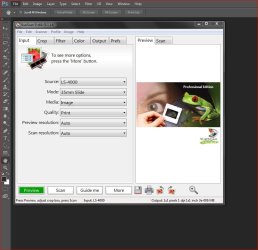
Does anybody know how to get digital ice working?? I have been unable to toggle it in the scanning window in photoshop.
 

My Computer My Computer

At a glance

window 7 64 bit
OS
window 7 64 bit
Does anybody know how to get digital ice working?? I have been unable to toggle it in the scanning window in photoshop.

Not going to happen.

You'll have to use ICE from the Nikon Scan software interface and since Digital ICE can only be used with the Nikon Scan software, you'll have to use it if you want to use ICE. It's a Nikon driver issue under Windows 7.

However, if you use Vuescan, you can use that under Photoshop, but the way that works, you're not really saving (that much) time launching it under Photoshop.

Capture.JPG

Good luck.
 

My Computer My Computer

At a glance

Windows 10 ProIntel Core i7-4770K (3.5Ghz)32 gig Corsair Dominator Platinum (4x8Gig)Sapphire Tri-X R9 Fury
Computer type
PC/Desktop
Computer Manufacturer/Model Number
Custom built by me.
OS
Windows 10 Pro
CPU
Intel Core i7-4770K (3.5Ghz)
Motherboard
Gigabyte G1 Sniper 5 (F10 Bios)
Memory
32 gig Corsair Dominator Platinum (4x8Gig)
Graphics Card(s)
Sapphire Tri-X R9 Fury
Sound Card
Soundblaster ZXR
Monitor(s) Displays
NEC PA242W 24" LCD Monitor
Screen Resolution
1920 x 1200
Hard Drives
Primary - Samsung 850 Pro (512gig), Samsung 840 Pro (256gig), 2TB WD Caviar Black.
PSU
EVGA Supernova 1000 G2
Case
Cooler Master HAF X
Cooling
Corsair H100i with Corsair Air Series SP120 Quiet Fans
Keyboard
Logitech Wireless Wave
Mouse
Logitech Performance MX
Internet Speed
High Speed Cable
Antivirus
Norton Security
Browser
IE11
Other Info
Memory Timings - 1866MHz @ 9-9-9-27-1T @ 1.5 volts
coolscan iv no active device

Scanner started to act erratic over several weeks time then stopped. Sent to Nikon repair. $314. Didn't work. No active device with either Nikon 4.0 or Vuescan. Returned it to Nikon. Had to return it three times. Still no work. Nikon claims it works fine on their end. I tried different power cords and at least three different USB cables. Have tried scanner on several different computers running Win7 ultimate and home, Virtual XP, Vista 32, and two computers running XP pro (32). Same error message. Nikon no longer responds to my help requests.

I've used the thing for umpteen years with no problem.

Suggestions

P.S. my first use of sevenforums so not sure if this is a new post or a reply or a thread
 

My Computer My Computer

At a glance

Windows 7 Ultimate x642.67 gigahertz Intel Core i7 9206136 Megabytes Installed MemoryATI Radeon HD 4800 Series [Display adapter]
Computer Manufacturer/Model Number
Dell Inc. Studio XPS 435MT
OS
Windows 7 Ultimate x64
CPU
2.67 gigahertz Intel Core i7 920
Motherboard
Dell Inc. 0R849J A00
Memory
6136 Megabytes Installed Memory
Graphics Card(s)
ATI Radeon HD 4800 Series [Display adapter]
Sound Card
High Definition Audio Device (2x) Total Recorder WDM audio d
Monitor(s) Displays
DELL S2409W [Monitor] (24.0"vis, s/n Y183D8AO146U, October 2
Hard Drives
3640.69 Gigabytes Usable Hard Drive Capacity
Hi PixGuy,

First off I'm surprised to hear that Nikon fixed your scanner as I was told by them two months back (Nikon F5 experieced people [Page 2]: Nikon D4 - D1 / D800 Forum: Digital Photography Review) that the only scanners they are repairing and have parts for are the 5000 & 9000 scanners. All others are obsolete, including mine, So you might want to look into that one, especially if they charged you $314 dollars.

Anyway as stated in the second paragraph of my fix.....

Note - This fix applies to the 4000, 5000, 8000, and 9000 series scanners. I can't guarantee older scanners will work but it's worth a try. If not, check this post for help or tips for older scanners. And credit Steel Chn for the inf file. I'm just providing an already built modified file that includes the Nikon 5000. Now...

Thus I can't say or guarantee these instructions to work with a Nikon Coolscan lV but you can check out these posts and see if they'll help. However I would advise you sort out your scanner issues before trying to get it to work on Windows 7. And if Nikon told you it's working on their end, well.... :confused:

Anyway the posts....

- http://www.sevenforums.com/drivers/44994-getting-your-nikon-coolscan-work-w7-x64-2.html#post570789
- http://www.sevenforums.com/drivers/44994-getting-your-nikon-coolscan-work-w7-x64-4.html#post601785

Also, if Vuescan isn't even working, than yeah, it's either the scanner, cable, or your computer.

Good luck.
 

My Computer My Computer

At a glance

Windows 10 ProIntel Core i7-4770K (3.5Ghz)32 gig Corsair Dominator Platinum (4x8Gig)Sapphire Tri-X R9 Fury
Computer type
PC/Desktop
Computer Manufacturer/Model Number
Custom built by me.
OS
Windows 10 Pro
CPU
Intel Core i7-4770K (3.5Ghz)
Motherboard
Gigabyte G1 Sniper 5 (F10 Bios)
Memory
32 gig Corsair Dominator Platinum (4x8Gig)
Graphics Card(s)
Sapphire Tri-X R9 Fury
Sound Card
Soundblaster ZXR
Monitor(s) Displays
NEC PA242W 24" LCD Monitor
Screen Resolution
1920 x 1200
Hard Drives
Primary - Samsung 850 Pro (512gig), Samsung 840 Pro (256gig), 2TB WD Caviar Black.
PSU
EVGA Supernova 1000 G2
Case
Cooler Master HAF X
Cooling
Corsair H100i with Corsair Air Series SP120 Quiet Fans
Keyboard
Logitech Wireless Wave
Mouse
Logitech Performance MX
Internet Speed
High Speed Cable
Antivirus
Norton Security
Browser
IE11
Other Info
Memory Timings - 1866MHz @ 9-9-9-27-1T @ 1.5 volts
hello, i'm new here (from france) alors, sorry for this bad english…
i have since today, a super coolscan 9000 ED but, i don't have the IEEE 1394 cable (firewire). it's an cable IEEE 1394 with six pins (connection) it takes? without 400 or 800 something… right?

thanks in advance for yours answers : )
 

My Computer My Computer

At a glance

Windows 7 Pro x64
OS
Windows 7 Pro x64
Cable question

i have since today, a super coolscan 9000 ED but, i don't have the IEEE 1394 cable (firewire). it's an cable IEEE 1394 with six pins (connection) it takes? without 400 or 800 something… right?

I'm not sure what you're asking but yes the Nikon 9000 uses a standard 6-pin (both ends) FireWire (IEEE 1394) cable.

- Scanner: Super COOLSCAN 9000 ED from Nikon
- Manual: http://www.nikonusa.com/pdf/manuals/noprint/LS9000ED_en_noprint.pdf
- Cable: Amazon.com: 3M Firewire 400 6PIN To 6PIN Firewire Cable: Computers & Accessories

And yes, my instructions will work with that scanner.

Hope this answers your question(s)?
 

My Computer My Computer

At a glance

Windows 10 ProIntel Core i7-4770K (3.5Ghz)32 gig Corsair Dominator Platinum (4x8Gig)Sapphire Tri-X R9 Fury
Computer type
PC/Desktop
Computer Manufacturer/Model Number
Custom built by me.
OS
Windows 10 Pro
CPU
Intel Core i7-4770K (3.5Ghz)
Motherboard
Gigabyte G1 Sniper 5 (F10 Bios)
Memory
32 gig Corsair Dominator Platinum (4x8Gig)
Graphics Card(s)
Sapphire Tri-X R9 Fury
Sound Card
Soundblaster ZXR
Monitor(s) Displays
NEC PA242W 24" LCD Monitor
Screen Resolution
1920 x 1200
Hard Drives
Primary - Samsung 850 Pro (512gig), Samsung 840 Pro (256gig), 2TB WD Caviar Black.
PSU
EVGA Supernova 1000 G2
Case
Cooler Master HAF X
Cooling
Corsair H100i with Corsair Air Series SP120 Quiet Fans
Keyboard
Logitech Wireless Wave
Mouse
Logitech Performance MX
Internet Speed
High Speed Cable
Antivirus
Norton Security
Browser
IE11
Other Info
Memory Timings - 1866MHz @ 9-9-9-27-1T @ 1.5 volts
Hello Sygnus,

Hope you can help me. I have been struggeling with connecting my CoolScan 8000ED (with FireWire 1394 interfece card) to PC Win7 64bit for a few days now. I tried your hack but it does not work with NikonScan I instaled. I instaled last VueScan version too to see if it works with my Nikon CoolScan 8000ED scanner but when VueScan software is opened I get information: "No scanner was found connected to PC".

Scanner is not seen in Device Menager, neither when Nikon Scan is instaled nor VueScan, althought my interface FireWire card is seen there. It seems I have original interface card that Nikon supplied with the scanner: Ratoc PCI-FW2 IEEE 1394, see here:

http://help.nikon.ca/app/answers/detail/a_id/5978/~/support-for-ratoc-pci-fw2-firewire-card

So, my PC do not see the scanner when connected via an original FireWire cable and an original FireWire interface card.

Is it possible that my Ratoc PCI-FW2 IEEE 1394 interface card does not work with Win7 64bit even though the Ratoc controller itself is seen (as NEC) in Device Menager (in the IEEE 1394 host controllers) and even though I have made Update Driver Software of it?

Do I need first instaled modern 64bit interface card which works with Windows 7 64bit before I will start your procedure?

On Ratoc Systems site in software section for WireWife IEEE 1394 cards my original Ratoc interface card (PCIFW2) seems to work only with Win XP/Me/2000/98SE/98. No Win 7 mentioned: RATOC Systems International,Inc : Software Download

So, it this a main reason I can not see the scanner in Device Manager, and instaled Nikon Scan or VueScan do not see the scanner?
 

My Computer My Computer

At a glance

Windows 7 Ultimate x64
OS
Windows 7 Ultimate x64
Check that card is working

Hi Bachus,

Yeah it is possible the card is bad or missing drivers. I've never used the card that came with my scanner as I've either had a different card, or more recently, my motherboards/system had FireWire (IEEE 1394) built in.

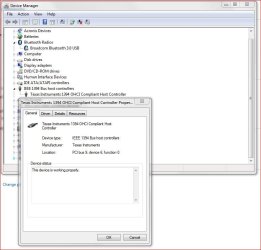
Anyway I suspect the card isn't working because as you've mentioned you've not installed drivers for it since there are none. However you can check this by going to Device Manager as looking to see if there is a yellow question mark or exclamation point next to the device, if so, it is missing drivers or not working.

If IEEE 1394 (FireWire) has a yellow mark or question mark next to it, it is NOT working and needs drivers or replacement.
FireWire Connection.JPG

That said, if your motherboard has have built in FireWire you should use it and see if the scanner is then working; if not, and the Nikon card isn’t working, you can buy an add-on card that contains both USB and FireWire connections such as this one - IOGEAR - GUF320 - Hi-Speed USB 2.0 / FireWire Combo PCI Card and use it.

And be aware those cards that came with the scanners are there if you need them, if your motherboard/system has a FireWire (IEEE1394) connection built in, then you don’t need the one Nikon gave you and you can get rid of since you have no drivers for it.

So check to see if you have another FireWire connection and use it, or check to see if the card Nikon gave you is working? If not, replace it.

Let me know.
 

My Computer My Computer

At a glance

Windows 10 ProIntel Core i7-4770K (3.5Ghz)32 gig Corsair Dominator Platinum (4x8Gig)Sapphire Tri-X R9 Fury
Computer type
PC/Desktop
Computer Manufacturer/Model Number
Custom built by me.
OS
Windows 10 Pro
CPU
Intel Core i7-4770K (3.5Ghz)
Motherboard
Gigabyte G1 Sniper 5 (F10 Bios)
Memory
32 gig Corsair Dominator Platinum (4x8Gig)
Graphics Card(s)
Sapphire Tri-X R9 Fury
Sound Card
Soundblaster ZXR
Monitor(s) Displays
NEC PA242W 24" LCD Monitor
Screen Resolution
1920 x 1200
Hard Drives
Primary - Samsung 850 Pro (512gig), Samsung 840 Pro (256gig), 2TB WD Caviar Black.
PSU
EVGA Supernova 1000 G2
Case
Cooler Master HAF X
Cooling
Corsair H100i with Corsair Air Series SP120 Quiet Fans
Keyboard
Logitech Wireless Wave
Mouse
Logitech Performance MX
Internet Speed
High Speed Cable
Antivirus
Norton Security
Browser
IE11
Other Info
Memory Timings - 1866MHz @ 9-9-9-27-1T @ 1.5 volts
Hi Bachus,

Yeah it is possible the card is bad or missing drivers. I've never used the card that came with my scanner as I've either had a different card, or more recently, my motherboards/system had FireWire (IEEE 1394) built in.

Anyway I suspect the card isn't working because as you've mentioned you've not installed drivers for it since there are none. However you can check this by going to Device Manager as looking to see if there is a yellow question mark or exclamation point next to the device, if so, it is missing drivers or not working.

If IEEE 1394 (FireWire) has a yellow mark or question mark next to it, it is NOT working and needs drivers or replacement.
View attachment 238854

That said, if your motherboard has have built in FireWire you should use it and see if the scanner is then working; if not, and the Nikon card isn’t working, you can buy an add-on card that contains both USB and FireWire connections such as this one - IOGEAR - GUF320 - Hi-Speed USB 2.0 / FireWire Combo PCI Card and use it.

And be aware those cards that came with the scanners are there if you need them, if your motherboard/system has a FireWire (IEEE1394) connection built in, then you don’t need the one Nikon gave you and you can get rid of since you have no drivers for it.

So check to see if you have another FireWire connection and use it, or check to see if the card Nikon gave you is working? If not, replace it.

Let me know.


Thanks for the answer. I forgot to mention that there is another FireWire connection in my computer and I tried to use it too, but it does not change nothing with scanner and Nikon Scan working, and scanner is also not seen in Device Menager. When I connect my scanner and turn it on, Windows does nothing to find a driver, it does not act at all as it usually does when any device is connected. My motherboard Asus P5K Pro has PCI slots and my FireWire Nikon (Rotec) sits there.

This FireWire card you linked does not support Win7 64bit, so it's similar to those I already have and I am affraid it will not change the situation.


There is not in Device Manager any yellow question mark or exclamation point next to the device (there is not in that list my scanner) , there are seen just controlers of the two FireWire cards I have in my PC, just two IEEE 1394 controlers, no "scanner" or Nikon LS-8000ED name:


obrazzy.jpg


It seems I need 64bit FireWire IEEEE 1394 card and it seems this is main reason I do not see my scanner in Device Manager...? and than consequently I can not start your procedure? When I read comments of all LS-8000ED scanner owners that passed your instruction and got LS-8000ED working on Win7 64bit, based on my bad experience with connecting my scanner, I come to conclussion that they have to have FireWire 64bit interface card, otherwise they would not be able to see LS-8000ED in Device Manager. Am I right?

If so, what FireWire 64bit IEEE 1394 card is good quality and should I buy?
 

My Computer My Computer

At a glance

Windows 7 Ultimate x64
OS
Windows 7 Ultimate x64
My motherboard Asus P5K Pro has PCI slots and my FireWire Nikon (Rotec) sits there.

Not sure if this could be of any help, but I'm using an Asus Sabertooth P67 and Sygnus21's fix works quite well.
In the Sabertooth, the IEEE1394a module cable plugs to a specific IEEE1394 connector on the P67.

I did have a bad moment _ after I had installed the latest Vuescan_ when w7 Ultimate recognized the scanner but reported a "hardware failure" which drove me mad. I cannot remember how did I solve that, the scanner was working fine but the warning prompted after making the Preview and shortly after starting Scan.

I threw away Vuescan, which I never liked nor completely understood. Older Vuescan software had not arised issues.

Wish you luck - I'm writting this just to make you feel you're not alone :D
 

My Computer My Computer

At a glance

Windows 7 Ultimate x64i78 GBnVidia Quadro
Computer Manufacturer/Model Number
Asus
OS
Windows 7 Ultimate x64
CPU
i7
Motherboard
Asus Sabertooth P67
Memory
8 GB
Graphics Card(s)
nVidia Quadro
Sound Card
Realtek
Monitor(s) Displays
Samsung SyncMaster P2370
Hard Drives
Western Digital Caviar Blue
PSU
CoolerMaster
Case
CoolerMaster
Cooling
CoolerMaster V6
Thanks for the answer. I forgot to mention that there is another FireWire connection in my computer and I tried to use it too, but it does not change nothing with scanner and Nikon Scan working, and scanner is also not seen in Device Menager. When I connect my scanner and turn it on, Windows does nothing to find a driver, it does not act at all as it usually does when any device is connected. My motherboard Asus P5K Pro has PCI slots and my FireWire Nikon (Rotec) sits there.

This FireWire card you linked does not support Win7 64bit, so it's similar to those I already have and I am affraid it will not change the situation.


There is not in Device Manager any yellow question mark or exclamation point next to the device (there is not in that list my scanner) , there are seen just controlers of the two FireWire cards I have in my PC, just two IEEE 1394 controlers, no "scanner" or Nikon LS-8000ED name:


obrazzy.jpg


It seems I need 64bit FireWire IEEEE 1394 card and it seems this is main reason I do not see my scanner in Device Manager...? and than consequently I can not start your procedure? When I read comments of all LS-8000ED scanner owners that passed your instruction and got LS-8000ED working on Win7 64bit, based on my bad experience with connecting my scanner, I come to conclussion that they have to have FireWire 64bit interface card, otherwise they would not be able to see LS-8000ED in Device Manager. Am I right?

If so, what FireWire 64bit IEEE 1394 card is good quality and should I buy?

Looking at you Device Manager you don't seem to need a FireWire card as you seem to have enough ports, unless you need more.

Anyway if nothing is happening when you plug in the scanner that could indicate that either the cable is bad, or the scanner is bad. That of course assumes you followed my instructions. If you did, you might want to check the scanner or it's cable.

One thing I might suggest: If you don't need the extra FireWire ports of the Nikon card, remove it and see what happens with the other ports.

I can't read the language your Device Manager is in, but I don't see that Nikon card. But again, I can't read the language. Anyway if you don't see the card either, than there's no use in having it installed, and it could be causing a problem with the other ports.

Oh and if the Scanner isn't even working with Vuescan, that is a sure sign that either the port(s), scanner, or cable isn't working.

Let me know.
 

My Computer My Computer

At a glance

Windows 10 ProIntel Core i7-4770K (3.5Ghz)32 gig Corsair Dominator Platinum (4x8Gig)Sapphire Tri-X R9 Fury
Computer type
PC/Desktop
Computer Manufacturer/Model Number
Custom built by me.
OS
Windows 10 Pro
CPU
Intel Core i7-4770K (3.5Ghz)
Motherboard
Gigabyte G1 Sniper 5 (F10 Bios)
Memory
32 gig Corsair Dominator Platinum (4x8Gig)
Graphics Card(s)
Sapphire Tri-X R9 Fury
Sound Card
Soundblaster ZXR
Monitor(s) Displays
NEC PA242W 24" LCD Monitor
Screen Resolution
1920 x 1200
Hard Drives
Primary - Samsung 850 Pro (512gig), Samsung 840 Pro (256gig), 2TB WD Caviar Black.
PSU
EVGA Supernova 1000 G2
Case
Cooler Master HAF X
Cooling
Corsair H100i with Corsair Air Series SP120 Quiet Fans
Keyboard
Logitech Wireless Wave
Mouse
Logitech Performance MX
Internet Speed
High Speed Cable
Antivirus
Norton Security
Browser
IE11
Other Info
Memory Timings - 1866MHz @ 9-9-9-27-1T @ 1.5 volts
Looking at you Device Manager you don't seem to need a FireWire card as you seem to have enough ports, unless you need more.

Anyway if nothing is happening when you plug in the scanner that could indicate that either the cable is bad, or the scanner is bad. That of course assumes you followed my instructions. If you did, you might want to check the scanner or it's cable.

One thing I might suggest: If you don't need the extra FireWire ports of the Nikon card, remove it and see what happens with the other ports.

I can't read the language your Device Manager is in, but I don't see that Nikon card. But again, I can't read the language. Anyway if you don't see the card either, than there's no use in having it installed, and it could be causing a problem with the other ports.

Oh and if the Scanner isn't even working with Vuescan, that is a sure sign that either the port(s), scanner, or cable isn't working.

Let me know.

Scanner works for sure, we have checked it in a seller home and it was working on XP 32bit Nicon Scan, so OC "seen" it and the device made scanning. It was connected with Nikon (Ratoc) FireWire card and FireWire cable I got together with LS-8000ED, so they are also good.

Yes, the Nikon FireWire card (Ratoc) is seen in Device Manager but as a NEC because it uses NEC driver - explanation is written in above link "This PCI card uses the NEC FireWarden driver". So I see in my Device Manager two cards (controllers) , one is from Nikon card (seen as Nec) and second is from supplied card with computer I bought (seen as VIA). When LS-8000ED is connected via cable in any of both ports scanner is not shown in the list of Device Manager. We already know that Ratoc card (which sits in PCI socked of my P5K Pro) does not support Win7 (last driver update was in 2005), so this card is useless - am I right? I updated second card controller (VIA) in Device Manager but nothing changes - this FireWire module is connected via cable with my P5K Pro, it does not sit in PCI socked, but I do not know if this driver works with Win7... I will uninstal Nikon (Ratoc) card and will use this port only, will see if something changes.

Scanner works, cable works, it seems to me the reason is with FireWire card/ports or Asus P5K Pro alhought Win7 64bit works well on it (all other devices work too including Epson 4990 scanner - but USB port). I am not a computer specialist, so I may be wrong.

My motherboard Asus P5K Pro has PCI slots and my FireWire Nikon (Rotec) sits there.

Not sure if this could be of any help, but I'm using an Asus Sabertooth P67 and Sygnus21's fix works quite well.In the Sabertooth, the IEEE1394a module cable plugs to a specific IEEE1394 connector on the P67.

Wish you luck - I'm writting this just to make you feel you're not alone :D

Thanks. Hope I will solve this problem, I just bought the scanner and want to scan lots of 6x9 black & white photos I made last 3 years.
 
Last edited:

My Computer My Computer

At a glance

Windows 7 Ultimate x64
OS
Windows 7 Ultimate x64
I don't know what to say then because if the scanner is working on another machine, but not on yours, even using Vuescan, it surely sounds to me like there is a problem with your system. Especially if you say you tried other FireWire ports on your system.

And I bring up Vuescan because I know it supports Nikon's scanners under Windows 7 (even supports Win 8) and it is very easy to install. So if Vuescan isn't even picking up the scanner, and you say the scanner works on a different computer, I'm fairly certain your system is at fault. You might want to check your connections and/or make sure the cable is properly seated.

Scanner works, cable works, it seems to me the reason is with FireWire card/ports or Asus P5K Pro alhought Win7 64bit works well on it (all other devices work too including Epson 4990 scanner - but USB port). I am not a computer specialist, so I may be wrong.

As for the Ratoc cards, well if it's connected, and Windows sees it, and there are no exclamation marks then yes, it should be working. Bottom line is the FireWire ports appears to be working and recognized according to Device Manager.

At this point I'm a little lost on what it could be, but I do know that if Vuescan isn't even seeing the Scanner, then it is either the scanner or you system that's having problems.
 

My Computer My Computer

At a glance

Windows 10 ProIntel Core i7-4770K (3.5Ghz)32 gig Corsair Dominator Platinum (4x8Gig)Sapphire Tri-X R9 Fury
Computer type
PC/Desktop
Computer Manufacturer/Model Number
Custom built by me.
OS
Windows 10 Pro
CPU
Intel Core i7-4770K (3.5Ghz)
Motherboard
Gigabyte G1 Sniper 5 (F10 Bios)
Memory
32 gig Corsair Dominator Platinum (4x8Gig)
Graphics Card(s)
Sapphire Tri-X R9 Fury
Sound Card
Soundblaster ZXR
Monitor(s) Displays
NEC PA242W 24" LCD Monitor
Screen Resolution
1920 x 1200
Hard Drives
Primary - Samsung 850 Pro (512gig), Samsung 840 Pro (256gig), 2TB WD Caviar Black.
PSU
EVGA Supernova 1000 G2
Case
Cooler Master HAF X
Cooling
Corsair H100i with Corsair Air Series SP120 Quiet Fans
Keyboard
Logitech Wireless Wave
Mouse
Logitech Performance MX
Internet Speed
High Speed Cable
Antivirus
Norton Security
Browser
IE11
Other Info
Memory Timings - 1866MHz @ 9-9-9-27-1T @ 1.5 volts
I don't know what to say then because if the scanner is working on another machine, but not on yours, even using Vuescan, it surely sounds to me like there is a problem with your system. Especially if you say you tried other FireWire ports on your system.

And I bring up Vuescan because I know it supports Nikon's scanners under Windows 7 (even supports Win 8) and it is very easy to install. So if Vuescan isn't even picking up the scanner, and you say the scanner works on a different computer, I'm fairly certain your system is at fault. You might want to check your connections and/or make sure the cable is properly seated.

As for the Ratoc cards, well if it's connected, and Windows sees it, and there are no exclamation marks then yes, it should be working. Bottom line is the FireWire ports appears to be working and recognized according to Device Manager.

At this point I'm a little lost on what it could be, but I do know that if Vuescan isn't even seeing the Scanner, then it is either the scanner or you system that's having problems.

I have another suspiction, correct me if I am wrong in my thinking: VueScan supports with driver Nikon Coolscan scanners under Windows 7 64bit which means the software can work with this scanner. But it has nothing to do with devices connection, if interface FireWire card works only on 32bit, VueScan still will not see the scanner. It's like "VueScan is ready to work with Nikon scanner under Win7 64bit". Win7 64bit sees the Ratoc FireWire driver 32bit card and shows its controller in Device Manager, but that's all - it sees it, what means Ratoc works and is not damaged. But it's still only 32bit card, which can not pass connection to OC 64bit system. 64bit system can see 32bit devices. But they will not work together.

I suppose the second Via FireWire card/module I have originally instaled in PC also supports only 32bit OC, and is not able to pass connection through Win7 64bit. I bought my PC just when Vista was put on the market, no Win7 was yet mentioned at all.

Is this possible that 32bit only FireWire cards could be the only reason that my scanner is not seen in Device Manager (under IEEE 1394 host controllers)?
 
Last edited:

My Computer My Computer

At a glance

Windows 7 Ultimate x64
OS
Windows 7 Ultimate x64
Check the other firewire ports

Since we see the card in device manager, and see no reported issues, we know the card is recognized in the system (whether 32 or 64-bit) and therfore is (presumably) working.

However, to be clear, you can check the properties by right clicking on the item and clicking Properties and you'll get something like this. It'll tell you if the item is working properly or not...

IEEE 1394 properties.JPG

With that said I need to know if you have tried the other ports??? If the other ports aren't working as well that says there's a problem with the system, scanner, or cable. Have you tried a different cable?

In this instance you need to know if ANY of the FireWire ports are working??? Not just that card.

And BTW since you have a 64-bit OS, you need to download the 64-bit version of Vuescan
 

My Computer My Computer

At a glance

Windows 10 ProIntel Core i7-4770K (3.5Ghz)32 gig Corsair Dominator Platinum (4x8Gig)Sapphire Tri-X R9 Fury
Computer type
PC/Desktop
Computer Manufacturer/Model Number
Custom built by me.
OS
Windows 10 Pro
CPU
Intel Core i7-4770K (3.5Ghz)
Motherboard
Gigabyte G1 Sniper 5 (F10 Bios)
Memory
32 gig Corsair Dominator Platinum (4x8Gig)
Graphics Card(s)
Sapphire Tri-X R9 Fury
Sound Card
Soundblaster ZXR
Monitor(s) Displays
NEC PA242W 24" LCD Monitor
Screen Resolution
1920 x 1200
Hard Drives
Primary - Samsung 850 Pro (512gig), Samsung 840 Pro (256gig), 2TB WD Caviar Black.
PSU
EVGA Supernova 1000 G2
Case
Cooler Master HAF X
Cooling
Corsair H100i with Corsair Air Series SP120 Quiet Fans
Keyboard
Logitech Wireless Wave
Mouse
Logitech Performance MX
Internet Speed
High Speed Cable
Antivirus
Norton Security
Browser
IE11
Other Info
Memory Timings - 1866MHz @ 9-9-9-27-1T @ 1.5 volts
Back
Top