
System Repair and System Restored, What does this mean?

Goji73

New member
Local time
3:43 PM
Messages
23
In my profile, I've stated that I have a Windows 7 64-bit computer. I usually turn it on and off whenever I'm done using it or wish to use it as the everyday man would.

However just last week I was turning on my computer as normally, but after the "Starting Windows" logo disappeared and went to black, instead of taking me to the "Welcome" image, the screen remained black for a minute and the system reset itself asking for the options seen in the picture sample below:
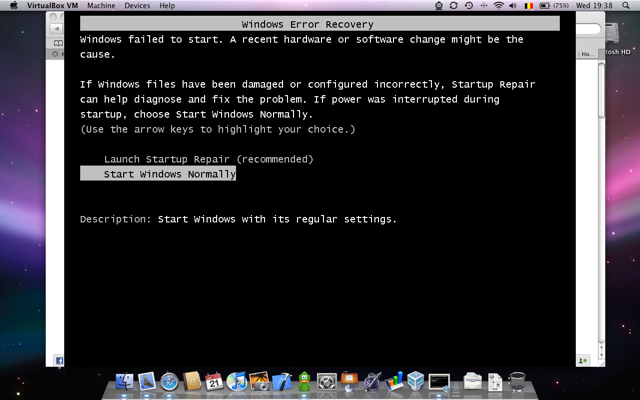
ErrorRecovery.png


Please note the image seen here is a MAC, while I myself have a PC. Regardless this is the image I saw. Upon hitting the recommended "Launch Startup Repair," I went through the process and it asked for System Restore, which it did. Afterwards, my computer reset yet again and turned on like it usually does as if nothing happened, with all the files from yesterday intact and unharmed.

While I shouldn't worry too much about it, what does/did this mean for my PC? Is/was there something wrong before? Does this happen often? What should I do to prevent it from happening again?
 

My Computer My Computer

At a glance

Windows 7 64bit
OS
Windows 7 64bit
An error recovery message could be caused by different things. Your computer could have picked up a virus or other malware that has damaged or corrupted system files. Some piece of hardware (motherboard, hard drive, RAM) might be failing. A one-time power glitch could have resulted in a "Single Event Upset" that can trigger the error recovery. As could using the power button rather than the shutdown command.

Hopefully this was just a one time event. But there are a couple of things you can do to see if your computer is having software or hardware issues. One of the Forum experts prepared a troubleshooting guide that contains links to many different diagnostic checks as well as procedures to repair system files, check for malware, look for problematic drivers, etc.

http://www.sevenforums.com/tutorials/220165-troubleshooting-steps-windows-7-a.html
 

My Computer My Computer

At a glance

Win 7 Pro 64-bitIntel i5 2.4 Ghz8GB DDR3Intel HD 3000
Computer type
Laptop
Computer Manufacturer/Model Number
Sony Vaio VPCEB47GM Laptop
OS
Win 7 Pro 64-bit
CPU
Intel i5 2.4 Ghz
Memory
8GB DDR3
Graphics Card(s)
Intel HD 3000
Sound Card
IDT High Definition
Monitor(s) Displays
15.6 WGXA Anti-Glare LED
Screen Resolution
1280x800
Hard Drives
640Gb 7200rpm
Antivirus
MSE
Browser
Opera (primary) with IE9 backup
An error recovery message could be caused by different things. Your computer could have picked up a virus or other malware that has damaged or corrupted system files. Some piece of hardware (motherboard, hard drive, RAM) might be failing. A one-time power glitch could have resulted in a "Single Event Upset" that can trigger the error recovery. As could using the power button rather than the shutdown command.

Hopefully this was just a one time event. But there are a couple of things you can do to see if your computer is having software or hardware issues. One of the Forum experts prepared a troubleshooting guide that contains links to many different diagnostic checks as well as procedures to repair system files, check for malware, look for problematic drivers, etc.

http://www.sevenforums.com/tutorials/220165-troubleshooting-steps-windows-7-a.html

If it helps any, so far this has only been a one time event. I use Trend Micro for Internet Protection and it found no viruses of any sort. As for Hardware, I had a new Seagate 500 gbs Hard Drive installed back in August last year, and I also usually shut down my computer the usually way ("Start" -> "Shut down")
 

My Computer My Computer

At a glance

Windows 7 64bit
OS
Windows 7 64bit
If it helps any, so far this has only been a one time event. I use Trend Micro for Internet Protection and it found no viruses of any sort. As for Hardware, I had a new Seagate 500 gbs Hard Drive installed back in August last year, and I also usually shut down my computer the usually way ("Start" -> "Shut down")

Since this appears to have been a one time event I wouldn't be overly concerned. In very technical terms, sometimes "stuff" happens for no apparent reason. :) If this becomes a regular issue, then by all means start going through the troubleshooting tutorial to see if you can isolate the problem.
 

My Computer My Computer

At a glance

Win 7 Pro 64-bitIntel i5 2.4 Ghz8GB DDR3Intel HD 3000
Computer type
Laptop
Computer Manufacturer/Model Number
Sony Vaio VPCEB47GM Laptop
OS
Win 7 Pro 64-bit
CPU
Intel i5 2.4 Ghz
Memory
8GB DDR3
Graphics Card(s)
Intel HD 3000
Sound Card
IDT High Definition
Monitor(s) Displays
15.6 WGXA Anti-Glare LED
Screen Resolution
1280x800
Hard Drives
640Gb 7200rpm
Antivirus
MSE
Browser
Opera (primary) with IE9 backup
A similar event happened today:

As I was turning on my computer as normally, after the "Starting Windows" logo disappeared and went to black again, instead of taking me to the "Welcome" image, the screen remained black for half-a-minute. Fortunately the system reset itself and this time took me to the welcome screen without asking for the options seen in the picture.

THIS has happened before my hard drive change and have been more "common" than the one on the first thread. Also by "common" I mean it would appear about 3-4 times a year. what would this mean?
 

My Computer My Computer

At a glance

Windows 7 64bit
OS
Windows 7 64bit
Back
Top