
Solved External Hard Drive error ~$WV.FAT32

Jumanji

Yeah! I learned a lot from you guys. Thanks so much,
After backing up my files, i decided to format my drive using your instructions, but something went wrong, again. haha
Capture2.JPG

Now i can't see my drive on my computer, i tried using WinRar and Disk management but it still wont show.
Strange that the Safety Remove Hardware icon on my taskbar is still there when i plug my drive.


Bout the question, The "Letrang shortcut" from my HD directory was created by the virus. but the name "Letrang" was created by me. I renamed my HD to Letrang.


Layback Bear

Those "Unimportant stuffs" were my applications and game cracks, it has been there for a long time and I've used them and nothing goes wrong, so I'm pretty sure that those were not the cause of the shortcut virus, knowing that some anti virus see Cracks as suspicious and threat to the computer.
 

My Computer My Computer

Computer type
Laptop
Computer Manufacturer/Model Number
acer
OS
windows 7 ultimate 32bit
Cripes I would have just off loaded data ages ago and just wiped the thing - good thing Yoda Jumanji was about cos all that lost me :)
 

My Computer My Computer

Computer type
PC/Desktop
Computer Manufacturer/Model Number
Own build (new) Desk1 / Asus ROG Win 7 / Desk2 1st build
OS
Desk1 7 Home Prem / Desk2 10 Pro / Main lap Asus ROG 10 Pro 2 laptop Toshiba 7 Pro Asus P2520 7 & 10
CPU
Desk1 i5 3750K / Laptop i7 GTX 860M / Desk2 i5 2500
Motherboard
Desk1 Asus P877-V / Desk2 Gigabyte H67 UD3H / Laptop ?
Memory
Desk1 8GB (1866) / Desk2 16GB (1333) / Laptop 8Gb DDR3
Graphics Card(s)
Desk 1& 2NVidia GTX 650 & Laptops on board Intel
Sound Card
Desk 1 & 2 -XONAR DG Realtek High Def audio Laptop
Monitor(s) Displays
Desk 1 Benq HD 2450 / Desk2 Philips 24" / Laptop 17.5"
Screen Resolution
1920x1080 D1 & D2 & Laptop 1
Hard Drives
Desk1 Samsung 120GB 830 SSD
Asus ROG 256GB 850 Pro SSD
Desk2 Samsung 840 256 SSD
Toshiba 120GB EVO
PSU
Desk 1 Corsair HX 1050/ Laptop ? / Desk 2 Corsair HX 650
Case
Desk 1 Cooler HAF XM ? Toshiba laptop / Desk2 Coolermaster
Cooling
Fans on all Desk1 -2 Desk2 - all Coolermasters 5 Laptop ?
Keyboard
Desk 1 MS Sidewinder X6 Desk 2 MS Sidewinder X 4
Mouse
Desk 1&2 - Gigabyte MS 900 gamer - laptop - Logitec wireless
Internet Speed
ADSL2+
Other Info
One other Desktop (tester) and spare Toshba laptop both with SSD's
Running Kaspersky 2016 ISS on all machines config'd identically
Logitec audio stereo systems on each machine (x3)
Canon MG5250MFC
Router/modem TP-Link running WPA2SK
OT (Off Topic)

Hi ICit2lol,

Yoda: A short, ugly female/chick :eek:

Yoda: The most powerful Jedi to ever grace the order. His wisdom and knowledge of the force was unmatched. :cool:

Which one do you mean?
Either way it doesn't fit me. Wrong call.:roflmao:
OT: (On Track)


Hi Flippylumpy,

Sorry to know that sanitising the ext. HDD failed. For the time being keep it off and concentrate on your PC.

I am afraid it is very intensively infected with malware of more than one kind as was your ext. HDD. The error message, to my thinking, indicates the presence of some malware in the user temp folder. I know how to delete all temporary files in your user folder but a bit by bit approach is not going to help here. You have to deal with the whole computer.

Seek help in the System Security sub-forum here on how best to cleanse your PC, quoting this thread.

( ICit2lol had recommended malwarebytes in his post #2, among others. Most other experts here also recommend that. Keep your dialogue there open till your computer is clean and then return to this thread on the HDD problem.)

Till your computer is clean, do not connect any external storage devices.
 

My Computer My Computer

OS
Windows 7 Home Premium 32 bit
LOL!!

Jumanji (Yodalite) - umm somewhere in between then say Attila the Hun - big and nasty, plenty of followers, heaps of cash, some rather nasty habits, and still attracts a lot of women :devil2:
 

My Computer My Computer

Computer type
PC/Desktop
Computer Manufacturer/Model Number
Own build (new) Desk1 / Asus ROG Win 7 / Desk2 1st build
OS
Desk1 7 Home Prem / Desk2 10 Pro / Main lap Asus ROG 10 Pro 2 laptop Toshiba 7 Pro Asus P2520 7 & 10
CPU
Desk1 i5 3750K / Laptop i7 GTX 860M / Desk2 i5 2500
Motherboard
Desk1 Asus P877-V / Desk2 Gigabyte H67 UD3H / Laptop ?
Memory
Desk1 8GB (1866) / Desk2 16GB (1333) / Laptop 8Gb DDR3
Graphics Card(s)
Desk 1& 2NVidia GTX 650 & Laptops on board Intel
Sound Card
Desk 1 & 2 -XONAR DG Realtek High Def audio Laptop
Monitor(s) Displays
Desk 1 Benq HD 2450 / Desk2 Philips 24" / Laptop 17.5"
Screen Resolution
1920x1080 D1 & D2 & Laptop 1
Hard Drives
Desk1 Samsung 120GB 830 SSD
Asus ROG 256GB 850 Pro SSD
Desk2 Samsung 840 256 SSD
Toshiba 120GB EVO
PSU
Desk 1 Corsair HX 1050/ Laptop ? / Desk 2 Corsair HX 650
Case
Desk 1 Cooler HAF XM ? Toshiba laptop / Desk2 Coolermaster
Cooling
Fans on all Desk1 -2 Desk2 - all Coolermasters 5 Laptop ?
Keyboard
Desk 1 MS Sidewinder X6 Desk 2 MS Sidewinder X 4
Mouse
Desk 1&2 - Gigabyte MS 900 gamer - laptop - Logitec wireless
Internet Speed
ADSL2+
Other Info
One other Desktop (tester) and spare Toshba laptop both with SSD's
Running Kaspersky 2016 ISS on all machines config'd identically
Logitec audio stereo systems on each machine (x3)
Canon MG5250MFC
Router/modem TP-Link running WPA2SK
I can't see my External HDD on my computer.

Hi,

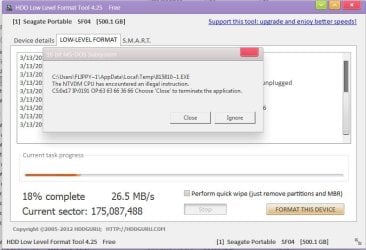
I was trying to format my HDD with HDD Lowlevel format tool when suddenly this error appears,
Capture2.JPG
Now my ext. HDD won't show on My Computer, even in Disk Management and WinRAR. But the Safely Remove Hardware icon in the Taskbar is there, whenever i plug my ext. Hdd.

One senior member here thinks that it indicates the presence of some malware in the user temp folder and i should ask help here.
He also recommends that i should use malwarebytes anti-malware. After scanning my drive C, this is what it founds.

Capture3.JPG
 

My Computer My Computer

Computer type
Laptop
Computer Manufacturer/Model Number
acer
OS
windows 7 ultimate 32bit
That senior member was right that a lot of spyware/viruses will hide disk drives.

Why are you using a third-party software to do something Windows can do just fine? Does the hard drive work on any other computers? Try booting in Safe-Mode and checking if the drive exists. Worst case scenario is your hard drive could have died which makes me curious what brand & model is it? You can try running hard drive diagnostics by downloading the software from a manufacturer and booting from it or using Hiren's Boot CD.
 
Last edited:

My Computer My Computer

Computer Manufacturer/Model Number
Me
OS
Windows 7 Pro x64
CPU
Intel Core i7 920
Motherboard
ASUS P6T Deluxe V2
Memory
Corsair XMS3 12GB (3x2GB) DDR3 1333
Graphics Card(s)
EVGA GTX 470 1280MB GDDR5 DX11
Monitor(s) Displays
ASUS VW246H | ACER AL2216W
Screen Resolution
3600x1080
Hard Drives
1x Corsair Vertex 3 SSD (120GB)
1x Corsair Vertex 2 SSD (60GB)
2x Western Digital Black (500GB/1TB)
1x External WD Green eSATA (1TB)
PSU
Corsair 850HX
Case
Velocity Micro FullTower
Keyboard
Logitech G110
Mouse
Logitech G500
Internet Speed
http://www.speedtest.net/result/1226664359.png
Antivirus
MSE
Browser
Chrome
Other Info
Logitech Z-5500 5.1 Surround Sound
Logitech C260 Webcam
Creative Fatal1ty Headset
Hi Flippylumpy,

I wanted you to ask the question "How do I cleanse my PC of all malware?"

Anyway since you are here, I shall give a brief history so that System Security experts can take over and help you.

The OP had a problem. He couldn't open his external HDD. (Seagate)

http://www.sevenforums.com/hardware-devices/281289-external-hard-drive-error-wv-fat32.html

I guided him to eliminate all non-data folders that could hide any malware. After doing that and unhiding his data folders, he was able to see his folder and open it too. He has since backed up all data into another drive.

He was just carrying out my suggestion to lowlevel format the external drive and reformat it to sanitise when this error appeared. It is evident his PC is infested and needs to be cleaned.

Not well-versed in malware elimination, I had advised him to seek expert help here. The external drive disappearing during the zerowriting process is now a secondary issue which perhaps can wait till he gets his computer clean.

So the help needed here is how best to cleanse his PC.

Over to the experts here.

EDIT: OK, I had failed to see that he has also given the results of Malwarebytes run.
 

My Computer My Computer

OS
Windows 7 Home Premium 32 bit
Download and run the following on-demand scanners,
identify what Real-time Malware protection you're currently running (none? - choose one of the listed) - run a full system scan
Download and create the WDO bootable disc on a system known to be clean. Then boot your machine using the disc you created and scan .

Report any Maleware each finds and the disposition (deleted, quarantined....)

There are other scans that might be required or suggested.


On Demand scans


Real time protection (use only one)


Bootable Offline scanners:
 

My Computer My Computer

Computer type
Laptop
Computer Manufacturer/Model Number
HP Pavilion dv6-6c10us
OS
x64 (6.3.9600) Win8.1 Pro & soon dual boot x64 (6.1.7601) Win7_SP1 HomePrem
CPU
AMD A6-3420M APU with Radeon(tm) HD Graphics
Motherboard
Hewlett-Packard 1805
Memory
6.00 GB
Graphics Card(s)
AMD Radeon(TM) HD 6520G
Sound Card
(1) AMD High Definition Audio Device (2) IDT High Definiti
Monitor(s) Displays
HP W2072a 20" LCD (1600 x 900) @ 60 Hz
Screen Resolution
1366 x 768 x 32 bits (4294967296 colors) @ 60 Hz
Hard Drives
ST640LM0 00 HM641JI SATA Disk Device
Keyboard
Logitech k520 wireless KB
Mouse
Logitech m320 wireless mouse (bundled with KB)
Internet Speed
15/5 | 54 MB Wireless 'n'
Antivirus
Realtime: Defender or Avast | On-demand: Malwarebytes, ESET
Browser
IE 11 on Win8, IE 10 on win 7
Other Info
Media: [Gimp, Audacity, VLC] || Comm: [WEmail 2012, Skype] || Productivity: [OpenOffice,| Textpad] || Utils: [Sysinternals, cCleaner, Speccy, Defraggler]
Flippylumpy,

On the malware issue...

Here is a short program you can run quickly. It will help point out the root of the problem, and then we'll take it from there.

Please download RogueKiller:
Tlcharger RogueKiller (Site Officiel)

When you get to the website, go to where it says:
(Download link) Lien de téléchargement:
Select the version that applies to your 32-bit system: (the one without the x64)
Click the dark-blue button that applies.
Save to the Desktop

Close all windows and browsers
Right-click RogueKiller and select: Run as Administrator

Press: SCAN

When done, a report opens on the Desktop: RKreport.txt

Please provide the RKreport.txt (Mode: Scan) in your reply.
(Please do not delete anything!)

>>Edit:
Also, please do not run any programs that clean out temporary files, since we do not know for certain which virus this is. If you do, you may not be able to recover any files.
 
Last edited:

My Computer My Computer

Computer type
PC/Desktop
Computer Manufacturer/Model Number
An ol' eMachines
OS
Windows 7 Home Premium
Internet Speed
Fine for me...I'm retired!
Jumanji

Thank you for clearing the issue. :) I haven't been doing this kind of malware scans on my pc for a while, i mean, it has never been a habit. The results of the Malwarebytes run is on the 2nd pic that i have attached on my post.


Slartybart

I've only tried the kaspersky TDSSKiller and it does not found any threats, neutralized and quarantine.


Cottonball

Here's the RKreport.txt,
View attachment RKreport[1]_S_03142013_02d0300.txt
 

My Computer My Computer

Computer type
Laptop
Computer Manufacturer/Model Number
acer
OS
windows 7 ultimate 32bit
Malware scans are an essential ,imho, part of your machines maintenance. I use Malwarebytes and SuperAntispyware at least once a week if not more often. You should get into the habit of regular scans with your A/V also, it will save you a lot of trouble in the long run.
 

My Computer My Computer

Computer type
Laptop
Computer Manufacturer/Model Number
MSI GE72VR Apache Pro-416
OS
Windows 10x64 Build 1709
CPU
Intel i7 7700HQ Kaby Lake
Motherboard
Micro-Star Intl. MS-179B (U3C1)
Memory
16 GB DDR4 @2400
Graphics Card(s)
Nvidia Geforce GTX 1060
Screen Resolution
1920x1080 120Hz
Hard Drives
256 GB Nvme M.2 SSD

1TB HDD@7200
Cooling
Cooler Blast 4
Keyboard
Steel Series
Antivirus
Bit Defender Free
Browser
Edge
@jumanji,

"Over to the experts here."

Experts????? Not this old dog...learn something new every day.


@Flippylumpy,


Next...
  • Close all open windows and browsers
  • Right-click RogueKilller and select: Run as Administrator
  • Wait for the PreScan to finish.
  • Press:Delete
A new RKreport.txt opens on your Desktop.
Please provide the RKreport.txt (Mode: Delete) in your reply.

~~~~
Also, let's use unhide.exe to see if we can reveal Files and Folders hidden by the infection...

Download unhide.exe:
http://download.bleepingcomputer.com/grinler/unhide.exe
Save to the Desktop.

Double-click on the Unhide icon to run the program.
When done, the program displays an alert stating that your files are restored.

Reboot your computer for the settings to go into effect.

~~~~
There is a program that provides a means of securing USB drives, memory cards, external hard drives, etc., and is designed to prevent infections transmitted via removable drives. It is called MCShield. (This program has no association with McAfee.)

Let's see if it helps...

First, unplug the external HDD.

Next, download MCShield:
MCShield ::Anti-Malware Tool::
Save to the Desktop.

Double-click the MCShield-Setup to install the program.
Follow the prompts.

Once at the program console, click Run for MCShield to finish its initial scan.
Under the General and Scanner tabs, use the defaults items already checked.
Click: OK

Plug in your USB storage device to the computer (only one device at a time).
Scanning is done automatically. (Uses a heuristic engine to detect and neutralize threats in real-time.)


When done, a report is created.
The report can be found by going to: Start > All Programs > MCShield > Logs

If any malware is found, please post the McShield report in your reply.

Is the external hard drive visible again again?
 
Last edited:

My Computer My Computer

Computer type
PC/Desktop
Computer Manufacturer/Model Number
An ol' eMachines
OS
Windows 7 Home Premium
Internet Speed
Fine for me...I'm retired!
@jumanji,

"Over to the experts here."

Experts????? Not this old dog...learn something new every day........

Expert is a relative term. Anyone who knows something more than me in a specified topic gets an Expert tag . By that criterion anyone who preaches here in this sub-forum is an Expert. :) ( I am not and that is why I diverted the OP here. :D )

Yep, all experts need to learn and that is a continuous process. Unless he learns himself, he cannot preach. :)

........Also, let's use unhide.exe to see if we can reveal Files and Folders hidden by the infection...

Download unhide.exe:
http://download.bleepingcomputer.com/grinler/unhide.exe
Save to the Desktop.

Double-click on the Unhide icon to run the program.
When done, the program displays an alert stating that your files are restored.

Reboot your computer for the settings to go into effect............

In the parent thread from which I diverted the OP here, I recommended WinRAR to see the hidden/superhidden files.

When the need to unhide those arose, I had half-a-mind to recommend Unhide, but since I myself did not learn using it, I did not want to. I recommended the conventional commands to unhide. See how learning makes a difference.:)
 

My Computer My Computer

OS
Windows 7 Home Premium 32 bit
@jumanji,

...recommended WinRAR to see the hidden/superhidden files

You taught me something new. Never thought of using WinRAR for this purpose.

It is great when different minds work together to solve a problem. :D
 

My Computer My Computer

Computer type
PC/Desktop
Computer Manufacturer/Model Number
An ol' eMachines
OS
Windows 7 Home Premium
Internet Speed
Fine for me...I'm retired!
Soon enough FlippyLumpy will be an expert.

Yep we all learn from each other - life is good!

I'll step back and watch the real experts - if cotton & jumanji can't find a resolution, I'll jump back in.

Good luck Flippy - you're in good hands.

Bill
.
 

My Computer My Computer

Computer type
Laptop
Computer Manufacturer/Model Number
HP Pavilion dv6-6c10us
OS
x64 (6.3.9600) Win8.1 Pro & soon dual boot x64 (6.1.7601) Win7_SP1 HomePrem
CPU
AMD A6-3420M APU with Radeon(tm) HD Graphics
Motherboard
Hewlett-Packard 1805
Memory
6.00 GB
Graphics Card(s)
AMD Radeon(TM) HD 6520G
Sound Card
(1) AMD High Definition Audio Device (2) IDT High Definiti
Monitor(s) Displays
HP W2072a 20" LCD (1600 x 900) @ 60 Hz
Screen Resolution
1366 x 768 x 32 bits (4294967296 colors) @ 60 Hz
Hard Drives
ST640LM0 00 HM641JI SATA Disk Device
Keyboard
Logitech k520 wireless KB
Mouse
Logitech m320 wireless mouse (bundled with KB)
Internet Speed
15/5 | 54 MB Wireless 'n'
Antivirus
Realtime: Defender or Avast | On-demand: Malwarebytes, ESET
Browser
IE 11 on Win8, IE 10 on win 7
Other Info
Media: [Gimp, Audacity, VLC] || Comm: [WEmail 2012, Skype] || Productivity: [OpenOffice,| Textpad] || Utils: [Sysinternals, cCleaner, Speccy, Defraggler]
@Cottonball

Sorry for the late reply, here's the new Rkreport.txt
View attachment RKreport[3]_D_03152013_02d2109.txt

I also did the unhide.exe and after following all your steps, I installed the MCshield program, set things into default. After plugging my ext.Hd, MCshield didn't do any automatic scan and still my ext.HD won't be visible on My Computer and Device Manager.


@Slartybart

yeah I hope so, haha. Thank you sir! :D
 

My Computer My Computer

Computer type
Laptop
Computer Manufacturer/Model Number
acer
OS
windows 7 ultimate 32bit
Hmmmm....

Go to Start > Computer

Right-click Computer, and select: Manage

In the Computer Management window, click on Disk Management (under Storage)

Does the external HDD show there?
 

My Computer My Computer

Computer type
PC/Desktop
Computer Manufacturer/Model Number
An ol' eMachines
OS
Windows 7 Home Premium
Internet Speed
Fine for me...I'm retired!
@Cottonball

Umm as I mentioned on my previous post, it doesn't show there. What should i do next?
 

My Computer My Computer

Computer type
Laptop
Computer Manufacturer/Model Number
acer
OS
windows 7 ultimate 32bit
In Disk Management, do you see any unallocated space?
If so, what is the size?

Is this the External HDD that RogueKiller sees:

+++++ PhysicalDrive1: TOSHIBA External USB 3.0 USB Device +++++
--- User ---
[MBR] aa015c32ffb1e9c0ff66fd475fdef3b6
[BSP] e5423c156306790658c93a7a5d034be1 : Windows 7/8 MBR Code
Partition table:
0 - [XXXXXX] NTFS (0x07) [VISIBLE] Offset (sectors): 2048 | Size: 953867 Mo

Is the external hard drive bootable?
 
Last edited:

My Computer My Computer

Computer type
PC/Desktop
Computer Manufacturer/Model Number
An ol' eMachines
OS
Windows 7 Home Premium
Internet Speed
Fine for me...I'm retired!
One more time, with the external HD plugged in:

  • Close all open windows and browsers
  • Right-click RogueKilller and select: Run as Administrator
  • Wait for the PreScan to finish.
  • Press: Shortcut Fix
A new RKreport.txt opens on your Desktop.

Please provide the RKreport.txt (Mode: Shortcut Fix) in your reply.
 

My Computer My Computer

Computer type
PC/Desktop
Computer Manufacturer/Model Number
An ol' eMachines
OS
Windows 7 Home Premium
Internet Speed
Fine for me...I'm retired!
Back
Top
