CPU power saving too aggressive - freezing 1080p stream

VeilSide

New member
Local time
6:37 AM
Messages
11
Once in a while, when streaming at 1080p, the video freezes for around 5 seconds and then resumes, meanwhile the audio continues as normal. The freezing does not occur at 720p. It also does not happen on a lesser spec'ed computer at 1080p. Watching youtube at 1080p is no problem.

I have observed that the issue is due to the low CPU MHz. Using HWinfo and 0.5 seconds update rate on my and another laptop, I can see the freeze occurs when the average of the four cores is around 1 GHz. The duration of this average speed coincides with the duration of the freeze. On the other laptop, running an Intel i3, the average does not reach 1 GHz, or if it does, it's not for more than half a second.

Is the problem due to some driver? I have all the latest ones. It shouldn't be a power profile issue because all settings are set to maximum performance. It's not the temps as playing games produces much higher temps and there's no stuttering/freezing. One thing to note is that the Intel PCH (HM65 chipset) is 85 degrees, and up to 90 when gaming. I don't think it's a HDD problem, otherwise the sound would freeze too.

TIA for any help :)
 

My Computer My Computer

Computer type
Laptop
Computer Manufacturer/Model Number
Clevo (Sager)
OS
Windows 7 Ultimate x64
CPU
i7 2630QM
Motherboard
HM65 chipset
Graphics Card(s)
GeForce 555M
Hard Drives
Seagate Momentus XT 500gb (SSHD)
Antivirus
Microsoft Security Essentials
Browser
Google Chrome
Have you tried resetting the power plan to defaults?. I have similar CPU as your i7 which also idles at 798 MHz. I know that if I set my laptop on power saver plan, Windows will try to saturate the CPU load at 798 to 1.2 GHz before it even goes to the Turbo boost mode. On the other hand, in balance mode or high performance mode CPU will always reach Turbo Mode (2.2 GHz or more) when streaming a 1080p video is then the CPU goes to 1.6 GHz with 10 % CPU load while playing 1080p. On power saver mode, my CPU goes to 20 - 30 % load at 798 MHz when streaming 1080p though I don't experience the dropped frames except when I need to multitask while watching the video.

Try to reset your power plan to defaults and see if the problem still occurs.
http://www.sevenforums.com/tutorials/950-power-plan-restore-default-settings.html
 

My Computer My Computer

Computer type
Laptop
Computer Manufacturer/Model Number
Dell Optiplex SX270, Lenovo Z470
OS
Windows 7 Professional x64 SP1
CPU
Intel® Pentium® 4 @ 2.26 GHz, Intel Core i7-2670QM @ 2.20 GH
Motherboard
Dell, Lenovo
Memory
512MB Dual channel DDR SDRAM @ 400MHz 2.5-3-3-7, 8 GB DDR3
Graphics Card(s)
Intel 82865G, Nvidia GeForce 520M Graphics
Sound Card
SoundMax Integrated Audio, Integrated HD Audio
Monitor(s) Displays
LG W1952
Screen Resolution
1440x900, 1366 x 768
Hard Drives
40 GB 2.5" IDE 4200 RPM HDD, 500 GB 5400 RPM Sata 1.5 + 32 GB SSD
PSU
Dell 145 Watt, Lenovo 120 Watt Power Adapter
Case
Optiplex SX270 Small Form Factor, Laptop
Cooling
Dell Proprietary Air Cooling, Stock laptop cooling
Keyboard
Dell SK-8125 USB Keyboard
Mouse
Dell PS/2 2 button ball mouse with wheel scroll
Internet Speed
300 Mbit down / 20 Mbps up Time Warner Cable
Antivirus
MSE, Malwarebytes Scanner
Browser
Internet (Aizawa) Explorer 11
Other Info
Running Windows Server 2012 Datacenter on a virtual machine to run Metro Apps.
I was using a tweaked Balanced profile with all performance settings on high while plugged in. I just tried resetting all profiles, as well as using both performance and balanced profiles (with and without rebooting between changing, just to have tried everything). The problem still persists, and it actually seems worse.

I've thought about increasing the "Minimum processor state" from 5%, however, on the i3 laptop this setting is at 5%, so this wouldn't be the true solution imo.
 

My Computer My Computer

Computer type
Laptop
Computer Manufacturer/Model Number
Clevo (Sager)
OS
Windows 7 Ultimate x64
CPU
i7 2630QM
Motherboard
HM65 chipset
Graphics Card(s)
GeForce 555M
Hard Drives
Seagate Momentus XT 500gb (SSHD)
Antivirus
Microsoft Security Essentials
Browser
Google Chrome
How much memory do you have and what's the pagefile size? It may be that you have too much "Bloatware" running. The process and memory manager will try to keep a process threaded to one core but this isn't always possible if too many tasks are running.
 

My Computer My Computer

Computer type
PC/Desktop
Computer Manufacturer/Model Number
Built 2/11/2011
OS
Windows 7 Pro-x64
CPU
i7-2600 3.4GHz - 3.8GHz Turbo
Motherboard
Intel DH67BL-B3
Memory
8Gb - 2x4GB, Muskin 991770 PC3-1333
Graphics Card(s)
Integrated Intel HD 2000
Sound Card
Integrated Intel 10.1 HD, RealTek ALC892
Monitor(s) Displays
Asus LCD VH222H, Haier HL24XSL2a
Screen Resolution
1920x1080, 1920x1080
Hard Drives
Crucial SSD C300-128Gb,
Western Digital WD5002AALX - 500Gb,
Western Digital WD7501AALS - 750Gb
PSU
Seasonic 650W 80+ Gold Modular
Case
Rosewill Defender
Cooling
Stock CPU, Four 120mm case fans, PCH fan added
Keyboard
Logitech EX100 Y-RBH94 Wireless
Mouse
Logitech EX100 M-RCE95 Wireless
Internet Speed
3.0/1.5 Mbs
Antivirus
Microsoft Security Essentials
Browser
Microsoft Internet Explorer 11
Other Info
Antec Veris Premier-Multimedia IR Station,
Cyber Accoustics-3602 Speakers,
AFT XM-5U Card Reader,
Hauppauge TV-HVR-2250,
Sony LX300 USB Turntable
I have 8 GB of memory, with pagefile manually set to a fixed 4 GB. This is a week-old installation of Windows, with minimal software installed (23, under Control Panel). Also, no tweaks have been performed on this computer, i.e. CCleaner, msconfig, windows services, etc.

The freezing happens even when the only program running is Chrome.
 

My Computer My Computer

Computer type
Laptop
Computer Manufacturer/Model Number
Clevo (Sager)
OS
Windows 7 Ultimate x64
CPU
i7 2630QM
Motherboard
HM65 chipset
Graphics Card(s)
GeForce 555M
Hard Drives
Seagate Momentus XT 500gb (SSHD)
Antivirus
Microsoft Security Essentials
Browser
Google Chrome
Have you tried removing both the Intel HD and the Nvidia drivers through "add or remove programs (not using the device manager)" and reinstalling them? 1080p videos also use GPU hardware decoding to help alleviate CPU load while streaming. I'm not sure about your internet latency and speed as these can also cause the video to drop frames. One thing for sure is that the GPU (either Nvidia or intel) downclocks when the CPU is at the minimum state (800 to 1 GHz).
 

My Computer My Computer

Computer type
Laptop
Computer Manufacturer/Model Number
Dell Optiplex SX270, Lenovo Z470
OS
Windows 7 Professional x64 SP1
CPU
Intel® Pentium® 4 @ 2.26 GHz, Intel Core i7-2670QM @ 2.20 GH
Motherboard
Dell, Lenovo
Memory
512MB Dual channel DDR SDRAM @ 400MHz 2.5-3-3-7, 8 GB DDR3
Graphics Card(s)
Intel 82865G, Nvidia GeForce 520M Graphics
Sound Card
SoundMax Integrated Audio, Integrated HD Audio
Monitor(s) Displays
LG W1952
Screen Resolution
1440x900, 1366 x 768
Hard Drives
40 GB 2.5" IDE 4200 RPM HDD, 500 GB 5400 RPM Sata 1.5 + 32 GB SSD
PSU
Dell 145 Watt, Lenovo 120 Watt Power Adapter
Case
Optiplex SX270 Small Form Factor, Laptop
Cooling
Dell Proprietary Air Cooling, Stock laptop cooling
Keyboard
Dell SK-8125 USB Keyboard
Mouse
Dell PS/2 2 button ball mouse with wheel scroll
Internet Speed
300 Mbit down / 20 Mbps up Time Warner Cable
Antivirus
MSE, Malwarebytes Scanner
Browser
Internet (Aizawa) Explorer 11
Other Info
Running Windows Server 2012 Datacenter on a virtual machine to run Metro Apps.
Veilside


-Click Start
-then click Control Panel.
-Click Appearance and Personalization, and then click on Personalization.
-In the Personalize appearance and sounds, click Display Settings.
-Click Advanced Settings, click the Troubleshoot tab, and then click Change Settings.
-Move the Hardware acceleration slider to Medium, and then click OK three times.
-Close Personalize appearance and sounds.
-By default the hardware acceleration will be high, so reduce the hardware acceleration to medium level and check.

hopefully it will be helpful.....
 

My Computer My Computer

Computer type
PC/Desktop
OS
microsoft window7 Ultimate x64
I have 8 GB of memory, with pagefile manually set to a fixed 4 GB. This is a week-old installation of Windows, with minimal software installed (23, under Control Panel). Also, no tweaks have been performed on this computer, i.e. CCleaner, msconfig, windows services, etc.

The freezing happens even when the only program running is Chrome.

I would leave the page file at default settings.
 

My Computer My Computer

Computer type
PC/Desktop
Computer Manufacturer/Model Number
Dude Build
OS
Windows 10 Pro X64
CPU
Intel(R) Core(TM) i5-3570K CPU OC@ 4.5GHZ Turbo
Motherboard
MSI Z77A-G45 Gaming
Memory
8.00 GB DDR3 1600Mhz
Graphics Card(s)
MSI Gaming X GTX 1070
Sound Card
Realtek High Definition
Monitor(s) Displays
Dell S23O9W, HP L1710
Screen Resolution
DELL-1920 x 1080 HP-1280 x1024
Hard Drives
Crucial m4 256 SSD, WD 7200RPM 500GB WD 1TB
PSU
Seasonic X650 GOLD
Case
Zalman Z12
Cooling
Antec Kuhler 920
Keyboard
Logitech
Mouse
MSI DS100 Interceptor
Internet Speed
50 down and 5 up
Antivirus
MSE
Browser
Chrome, IE 11
Other Info
Logitech X-620 Speakers
Since a HDD is only ~ 1/50th the transfer speed of DDR3 RAM (not to mention if there is any fragmentation involved in the current virtual memory), Windows may not be thinking a lot about what you're trying to do with this storage and therefore is happily shuffling RAM I/O for this media task to the pagefile.

Click START → type perfmon.exe and hit ENTER. Click Open Resource Monitor. Select Memory tab. Run your testing again and watch the PID corresponding to the media player you are using. Are there any Hard Faults going on? That's virtual memory in action. Next check out the Disk tab for a look at the HDD activity. Something there should provide more clarity on next steps. But definitely 1st thing to do after this little experiment is to let windows manage all pagefile sizing. How much actual RAM is being used during playback?
 
Last edited:

My Computer My Computer

Computer type
PC/Desktop
Computer Manufacturer/Model Number
Custom build
OS
Windows 7 Professional 64 bit
CPU
AMD Phenom II X6 1055T 2.8 GHz (3.51 over clocked)
Motherboard
Asus M4A87TD-EVO
Memory
Corsair 8 GB CMX4GX3M2A1600C9R (1333 mHz)
Graphics Card(s)
Saphire Radeon 5830HD + Hauppauge WinTV-HVR-2250 Dual Tuner
Sound Card
VIA VT1818 High Definition Audio 8-Channel, AMD Radeon HDMI
Monitor(s) Displays
23" Samsung SyncMaster PX2370 + 47" LG 47LH90 LED HDTV
Screen Resolution
1920x1080p
Hard Drives
Western Digital --> WD10EARS-00Y5B1 1 TB 5200 rpm (Backup)
Seagate --> ST2000DM001-1CH164 2 TB 7200 rpm (Media) Mirrored to
Seagate --> ST2000DM001-1CH164 2 TB 7200 rpm
BUSlink --> "USB2.0 Disk-On-The-Go/Lite" 18 GB mini HDD (Bootable Win 7 Insta
PSU
850 WATT OCZ --> OCZ850GXSSLI RTL
Case
Cool Master Scout --> SGC-2000-KKN1-GP RT
Cooling
CM 140mm front & top, 120mm rear & 2x side, stock CPU fan
Keyboard
Razer Lycosa Mirror, Logitech MX3200 wireless
Mouse
Logitech G9x, Logitech MX3200 wireless
Internet Speed
10 Mbps
Antivirus
Microsoft Security Essentials
Browser
Chrome & Internet Explorer 11
Other Info
Custom rig self build.
Recently upgraded for part time Media Center DVR duties.
Thanks for the replies!

- I have tried reinstalling the Intel graphics drivers.
- What britny suggested is not possible for me, as the "Change settings" button is greyed out.
- I've put the pagefile back to system controlled.
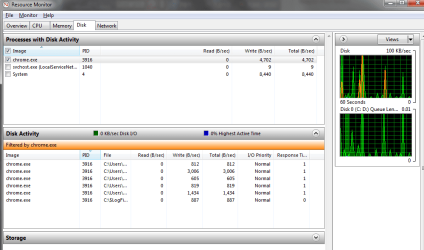
- Looking at Resource Monitor:
- There are barely any Hard Faults (as good as none)​
- Disk activity is very low (see attached screenshot)​
- 165 MB commited memory for the specific PID (for all chrome.exe it's around 900 MB)​

After all that nothing has changed, unfortunately.

In the meantime, the same freezing now happens on the i3 laptop. The freeze happens at the same segment of video, while the stream on the two computers are a few seconds apart. The stream in question is WCS America (it's live right now) There is no freezing at 720p.

I don't think it's my internet since it's 60/60 fiber, with wireless provided by an Asus RT-N66U router. I ran some tests on three bandwidth test sites and ping, jitter, and stability are all very good. Wireless signal reception is full bars, and I've tried both 2.4 and 5 GHz bands.

I plan to call up a friend and ask him to test this and/or go over and test it with my computer.
 

Attachments

  • diskactivity.png
    diskactivity.png
    25 KB · Views: 2
Last edited:

My Computer My Computer

Computer type
Laptop
Computer Manufacturer/Model Number
Clevo (Sager)
OS
Windows 7 Ultimate x64
CPU
i7 2630QM
Motherboard
HM65 chipset
Graphics Card(s)
GeForce 555M
Hard Drives
Seagate Momentus XT 500gb (SSHD)
Antivirus
Microsoft Security Essentials
Browser
Google Chrome
Before you go crazy changing settings I would recommend hard wire router to the laptop, (no wifi) and see if things get better. That should help isolate the problem.
 

My Computer My Computer

Computer type
PC/Desktop
Computer Manufacturer/Model Number
Home made Desktop
OS
Windows 10 Pro. 64/ version 1709 Windows 7 Pro/64
CPU
Intel i7-6800K @ 4.3
Motherboard
ASUS X-99 Deluxe II
Memory
Corsair Platinum 16 gig @2400
Graphics Card(s)
EVGA GTX 1070 OC
Monitor(s) Displays
Asus 27" LED LCD/VE278Q
Screen Resolution
1920-1080 or 1280-720 HDMI
Hard Drives
INTEL SSD 730-240 Gb Sata 3.0/
PSU
EVGA Platium 1200W
Case
Phanteks Luxe Tempered Glass 8 fans/ one radiator
Cooling
XSPC/ Water Cooled CPU
Keyboard
Das 4 Professional
Mouse
Logitech M705/MX Anywhere 2-S
Internet Speed
100 mbits
Antivirus
Microsoft Security Essentials/ Malwarebytes Premium 3.0/ SAS
Browser
I.E. 11 default/Firefox/ ISP Time Warner Cable/Spectrum
Other Info
LG BluRay Burner/
Sound system-KLipsch-THX/
Icy Dock ssd Hot Swap bays.
It is totally normal for it to happen, you are trying to view 1080p content on the fly. It`s a lot to ask of any pc. :(
 

My Computer My Computer

Computer type
PC/Desktop
Computer Manufacturer/Model Number
Skylake Special #666
OS
Windows 10 Pro x64
CPU
Intel Core i7 6700K
Motherboard
Asus Sabertooth Z170 Mark 1
Memory
GSkill TridentZ RGB 16GB 3600 16-16-16-36
Graphics Card(s)
EVGA GTX 980 Ti SC x2
Sound Card
Realtek High Definition
Monitor(s) Displays
AOC G2460PG
Screen Resolution
1920 x 1080 144Hz
Hard Drives
Samsung 860 Pro 256GB, Seagate Barracuda 4TB x2
PSU
EVGA 1000 P2, EVGA White Custom Braided Cables
Case
Corsair Vengeance C70 Gunmetal Black
Cooling
Corsair H100i v2, Corsair ML120 x2, Thermal Grizzly Kryonaut
Keyboard
Logitech G910 Orion Spectrum
Mouse
Logitech G700s
Internet Speed
Verizon Fios Quantum Gateway 75/75
Antivirus
Windows Defender, Malwarebytes Free 3.8.3
Browser
Chrome
Other Info
Corsair SP120 x4, LG Blu-ray Drive, Durabrand HT-395 100 Watt Dolby Digital Amp, Corsair H2100 Wireless 7.1 Headset
What about CPU% demand during playback? I didn't see that mentioned, did I miss it?

1080p30fps CODEC processing is nothing to sneeze at for a system or network. Both have to be in top form. And being this comes from a browser, it basically comes from Flash or similar lightweight decoders which rely on the local CPU to make up for the lack of better and more advanced CODECs. This is why Flash is staying on desktops or large portable devices with big batteries like tablets.

I also wouldn't be surprised if your network plays some part too. Run a few SpeedTests on both computers, replicating as much as you can from your real playback scenarios (settings, time of day, background data needs of the PCs and rest of your home and neighborhood network) to get an idea of how much data your indoor pipes are flowing on average. If you have 2 simultaneous streams going as you mentioned earlier, that's a solid AVERAGE of up to 20 mbps demand to get smooth A/V playback x 2.

Control Panel\All Control Panel Items\Performance Information and Tools\Advanced Tools --> click on Generate a System Health Report. Try using this as a repeatable Perfmon controlset to be run using various scenarios one by one to see what changes and when. It's a 60 second trace of major performance categories for Windows. If you want to get even more fancy create some custom runs, modifying as you go based on previous results.

To go full circle here, has a root cause been identified for massive underclocking going on with your PC yet? I think that was the original question/issue, right?.
 

My Computer My Computer

Computer type
PC/Desktop
Computer Manufacturer/Model Number
Custom build
OS
Windows 7 Professional 64 bit
CPU
AMD Phenom II X6 1055T 2.8 GHz (3.51 over clocked)
Motherboard
Asus M4A87TD-EVO
Memory
Corsair 8 GB CMX4GX3M2A1600C9R (1333 mHz)
Graphics Card(s)
Saphire Radeon 5830HD + Hauppauge WinTV-HVR-2250 Dual Tuner
Sound Card
VIA VT1818 High Definition Audio 8-Channel, AMD Radeon HDMI
Monitor(s) Displays
23" Samsung SyncMaster PX2370 + 47" LG 47LH90 LED HDTV
Screen Resolution
1920x1080p
Hard Drives
Western Digital --> WD10EARS-00Y5B1 1 TB 5200 rpm (Backup)
Seagate --> ST2000DM001-1CH164 2 TB 7200 rpm (Media) Mirrored to
Seagate --> ST2000DM001-1CH164 2 TB 7200 rpm
BUSlink --> "USB2.0 Disk-On-The-Go/Lite" 18 GB mini HDD (Bootable Win 7 Insta
PSU
850 WATT OCZ --> OCZ850GXSSLI RTL
Case
Cool Master Scout --> SGC-2000-KKN1-GP RT
Cooling
CM 140mm front & top, 120mm rear & 2x side, stock CPU fan
Keyboard
Razer Lycosa Mirror, Logitech MX3200 wireless
Mouse
Logitech G9x, Logitech MX3200 wireless
Internet Speed
10 Mbps
Antivirus
Microsoft Security Essentials
Browser
Chrome & Internet Explorer 11
Other Info
Custom rig self build.
Recently upgraded for part time Media Center DVR duties.
I've thought about increasing the "Minimum processor state" from 5%, however, on the i3 laptop this setting is at 5%, so this wouldn't be the true solution imo.
I must have missed this earlier and assumed we were working with no access to pstate controls for your CPU or they were already maxed out. Change minimum to 100% and test again.
 

My Computer My Computer

Computer type
PC/Desktop
Computer Manufacturer/Model Number
Custom build
OS
Windows 7 Professional 64 bit
CPU
AMD Phenom II X6 1055T 2.8 GHz (3.51 over clocked)
Motherboard
Asus M4A87TD-EVO
Memory
Corsair 8 GB CMX4GX3M2A1600C9R (1333 mHz)
Graphics Card(s)
Saphire Radeon 5830HD + Hauppauge WinTV-HVR-2250 Dual Tuner
Sound Card
VIA VT1818 High Definition Audio 8-Channel, AMD Radeon HDMI
Monitor(s) Displays
23" Samsung SyncMaster PX2370 + 47" LG 47LH90 LED HDTV
Screen Resolution
1920x1080p
Hard Drives
Western Digital --> WD10EARS-00Y5B1 1 TB 5200 rpm (Backup)
Seagate --> ST2000DM001-1CH164 2 TB 7200 rpm (Media) Mirrored to
Seagate --> ST2000DM001-1CH164 2 TB 7200 rpm
BUSlink --> "USB2.0 Disk-On-The-Go/Lite" 18 GB mini HDD (Bootable Win 7 Insta
PSU
850 WATT OCZ --> OCZ850GXSSLI RTL
Case
Cool Master Scout --> SGC-2000-KKN1-GP RT
Cooling
CM 140mm front & top, 120mm rear & 2x side, stock CPU fan
Keyboard
Razer Lycosa Mirror, Logitech MX3200 wireless
Mouse
Logitech G9x, Logitech MX3200 wireless
Internet Speed
10 Mbps
Antivirus
Microsoft Security Essentials
Browser
Chrome & Internet Explorer 11
Other Info
Custom rig self build.
Recently upgraded for part time Media Center DVR duties.
Back
Top