Windows 7 Boot Manager- Multiple Entries

amaze904

New member
Member
Local time
9:50 AM
Messages
29
Hello, glad to be apart of this forum, have came here alot in the past for issues and never had to register to solve one...until now lol

Ok, so recently i put together a custom build and did a fresh install of windows 7 OS Home Premium onto my SSD by creating a install disc from my old one. Had everything running fine and then i put my old HDD in the new PC and again no problems.

Then like always, i get bored and and start customizing my new toy/OS and ended up tweaking the login screen (like on my old system- but i think i used a different method) and then windows goes X.X

Luckily i made a image of the OS right before i did so and restored the OS back to normal. But now, and only now, do i have the boot manager up everytime i boot.

so i opened up msconfig.exe and peeps over to the boot tab and saw that instead of picking up the original OS and the iso, its picking up the one from my old HDD that never showed up before, and its labeled *recovered*

o.O

im am lost lol

i dont wanna delete it as that may cause problems if i ever need to use it as a master, but i dont want it to show up everytime i boot.

and also im not sure if it is booting off the backup or the SSD, though i have made sure that my Bios is pointing to the SSD and not the HDD.

Thanx for your time and help.
 

My Computer My Computer

Computer type
PC/Desktop
Computer Manufacturer/Model Number
Custom Build
OS
Windows 7 Home Premium x64
CPU
AMD 8350-FX
Motherboard
MSI 990XA-GD55
Memory
Patriot Viper 3 1866 16GB
Graphics Card(s)
Gigabyte HD 7970 3GB OC
Monitor(s) Displays
Sync Master BX2331 23' 2MS
Hard Drives
3 TB-WD-72k-64MB-6.0-3.5
1 TB WD-72k-64MB-6.0-2.5
500 GB WD-72k-64MB-3.0-2.5
64 GB ScanDisk SSD 2.5
PSU
OC Z Series 1000W
Case
Thermaltake MS-1 Commander Snow
Cooling
Cooler Master V6 GT
Antivirus
Bitdefender 2013
Browser
Firefox
This is a good time to use EasyBCD to look at and edit the boot info.

Use it to remove the entry for the old hard drive or set the default to your SSD and the timeout to 2-3 seconds.
 

My Computer My Computer

Computer type
PC/Desktop
Computer Manufacturer/Model Number
Lenovo IdeaCenter 450
OS
Windows 10 Pro X64
CPU
Intel Quad Core i7-4770 @ 3.4Ghz
Memory
16.0GB PC3-12800 DDR3 SDRAM 1600 MHz
Graphics Card(s)
Intel Integrated HD Graphics
Sound Card
Realtek HD Audio
Monitor(s) Displays
HP 22" LCD
Screen Resolution
1680 x 1050
Hard Drives
250GB Samsung EVO SATA-3 SSD
2TB Seagate ST2000DM001 SATA-2
1.5TB Seagate ST3150041AS SATA
Keyboard
Dell USB
Mouse
Lenovo USB
Internet Speed
Cable via Road Runner 3MB Upload, 30MB Download
Antivirus
Windows Defender, MBAM Pro, MBAE
Browser
Seamonkey
Other Info
UEFI/GPT
PLDS DVD-RW DH16AERSH
removing the old HDD entry wont cause it to be lost forever?
meaning if i ever need it again as a back up drive if my main OS spontaneously combusts, it will still be recognized and i can boot off it instead.
 

My Computer My Computer

Computer type
PC/Desktop
Computer Manufacturer/Model Number
Custom Build
OS
Windows 7 Home Premium x64
CPU
AMD 8350-FX
Motherboard
MSI 990XA-GD55
Memory
Patriot Viper 3 1866 16GB
Graphics Card(s)
Gigabyte HD 7970 3GB OC
Monitor(s) Displays
Sync Master BX2331 23' 2MS
Hard Drives
3 TB-WD-72k-64MB-6.0-3.5
1 TB WD-72k-64MB-6.0-2.5
500 GB WD-72k-64MB-3.0-2.5
64 GB ScanDisk SSD 2.5
PSU
OC Z Series 1000W
Case
Thermaltake MS-1 Commander Snow
Cooling
Cooler Master V6 GT
Antivirus
Bitdefender 2013
Browser
Firefox
You would have to add it back via EasyBCD. Maybe instead of removing it, you can just set the default to the one you want and set the timeout to 2-3 seconds. That way if you ever want to boot it, it will be there for you.
 

My Computer My Computer

Computer type
PC/Desktop
Computer Manufacturer/Model Number
Lenovo IdeaCenter 450
OS
Windows 10 Pro X64
CPU
Intel Quad Core i7-4770 @ 3.4Ghz
Memory
16.0GB PC3-12800 DDR3 SDRAM 1600 MHz
Graphics Card(s)
Intel Integrated HD Graphics
Sound Card
Realtek HD Audio
Monitor(s) Displays
HP 22" LCD
Screen Resolution
1680 x 1050
Hard Drives
250GB Samsung EVO SATA-3 SSD
2TB Seagate ST2000DM001 SATA-2
1.5TB Seagate ST3150041AS SATA
Keyboard
Dell USB
Mouse
Lenovo USB
Internet Speed
Cable via Road Runner 3MB Upload, 30MB Download
Antivirus
Windows Defender, MBAM Pro, MBAE
Browser
Seamonkey
Other Info
UEFI/GPT
PLDS DVD-RW DH16AERSH

My Computer My Computer

Computer type
Laptop
Computer Manufacturer/Model Number
ACER ASPIRE 5742G
OS
Microsoft Windows 7 Home Premium 64-bits 7601 Multiprocessor Free Service Pack 1
CPU
Intel(R) Core(TM) i3 CPU M 370 @ 2.40GHz
Motherboard
Acer Aspire 5742G
Memory
4,00 GB
Graphics Card(s)
ATI Mobility Radeon HD 5400 Series
Sound Card
(1) AMD High Definition Audio Device (2) Realtek High Defi
Screen Resolution
1366 x 768 x 32 bits (4294967296 colors) @ 60 Hz
Hard Drives
WDC WD5000BEVT-22ZAT0
Disk Managment.png
 

My Computer My Computer

Computer type
PC/Desktop
Computer Manufacturer/Model Number
Custom Build
OS
Windows 7 Home Premium x64
CPU
AMD 8350-FX
Motherboard
MSI 990XA-GD55
Memory
Patriot Viper 3 1866 16GB
Graphics Card(s)
Gigabyte HD 7970 3GB OC
Monitor(s) Displays
Sync Master BX2331 23' 2MS
Hard Drives
3 TB-WD-72k-64MB-6.0-3.5
1 TB WD-72k-64MB-6.0-2.5
500 GB WD-72k-64MB-3.0-2.5
64 GB ScanDisk SSD 2.5
PSU
OC Z Series 1000W
Case
Thermaltake MS-1 Commander Snow
Cooling
Cooler Master V6 GT
Antivirus
Bitdefender 2013
Browser
Firefox
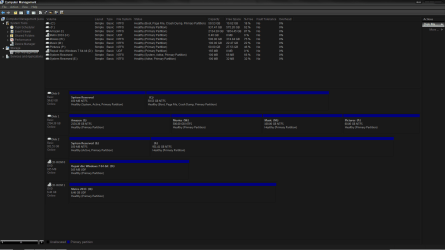
System boots from "system reserved" on DISK 0. Your win7 OS is on disk 0 as well. I assume that's SSD(?)
"system reserved" has the SYSTEM flag, so that's the boot partition with bootmgr and bootmenu.
 

My Computer My Computer

Computer type
Laptop
Computer Manufacturer/Model Number
ACER ASPIRE 5742G
OS
Microsoft Windows 7 Home Premium 64-bits 7601 Multiprocessor Free Service Pack 1
CPU
Intel(R) Core(TM) i3 CPU M 370 @ 2.40GHz
Motherboard
Acer Aspire 5742G
Memory
4,00 GB
Graphics Card(s)
ATI Mobility Radeon HD 5400 Series
Sound Card
(1) AMD High Definition Audio Device (2) Realtek High Defi
Screen Resolution
1366 x 768 x 32 bits (4294967296 colors) @ 60 Hz
Hard Drives
WDC WD5000BEVT-22ZAT0
is it healthy to have it boot from the reserve partition? shouldnt that be a "backup" rather then the primary?

so is everything good? or is something out of line?
 

My Computer My Computer

Computer type
PC/Desktop
Computer Manufacturer/Model Number
Custom Build
OS
Windows 7 Home Premium x64
CPU
AMD 8350-FX
Motherboard
MSI 990XA-GD55
Memory
Patriot Viper 3 1866 16GB
Graphics Card(s)
Gigabyte HD 7970 3GB OC
Monitor(s) Displays
Sync Master BX2331 23' 2MS
Hard Drives
3 TB-WD-72k-64MB-6.0-3.5
1 TB WD-72k-64MB-6.0-2.5
500 GB WD-72k-64MB-3.0-2.5
64 GB ScanDisk SSD 2.5
PSU
OC Z Series 1000W
Case
Thermaltake MS-1 Commander Snow
Cooling
Cooler Master V6 GT
Antivirus
Bitdefender 2013
Browser
Firefox

My Computer My Computer

Computer type
PC/Desktop
Computer Manufacturer/Model Number
Home Built Desktop By DataTech
OS
Windows 7 Ultimate X64 SP1
CPU
Intel i5-2550K, Differing ~4.4-4.8GHz No built in GPU
Motherboard
ASUS P8Z68-V PRO/GEN3
Memory
16GB G.Skill Sniper 1866MHz @ 2133MHz 2x8GB
Graphics Card(s)
ASUS GTX650TIB-DC2OC-2GD5, (650TI Boost)
Sound Card
Onboard Realtek 5-1
Monitor(s) Displays
Samsung P2570HD
Screen Resolution
1920x1080
Hard Drives
Samsung 840 Pro 256GB SSD for OS, 500GB Seagate Constellation (Enterprise drive) for Data
PSU
Corsair HX650W
Case
Inwin Dragon Rider
Cooling
Hyper 212 EVO w/two Noctua fans, push-pull, @1300 RPM
Keyboard
E-Z Eyes, bright yellow keys with large characters
Mouse
steelseries SENSEI Laser Pro Gaming
Internet Speed
48-51Mbs Mbs down, 11 Mbs up Xfinity Cable
Antivirus
Norton Internet Security 2013
Browser
IE 10, Opera, Pale Moon if needed
Other Info
4 case fans, LG BluRay-RE, ASUS DVD-RW, Mr. Fusion power supply, 1.21 gigawatts.
I can't believe I failed to mention, but when I select the recovered option of win7- it fails to load-
It blinks bsod and restarts
 

My Computer My Computer

Computer type
PC/Desktop
Computer Manufacturer/Model Number
Custom Build
OS
Windows 7 Home Premium x64
CPU
AMD 8350-FX
Motherboard
MSI 990XA-GD55
Memory
Patriot Viper 3 1866 16GB
Graphics Card(s)
Gigabyte HD 7970 3GB OC
Monitor(s) Displays
Sync Master BX2331 23' 2MS
Hard Drives
3 TB-WD-72k-64MB-6.0-3.5
1 TB WD-72k-64MB-6.0-2.5
500 GB WD-72k-64MB-3.0-2.5
64 GB ScanDisk SSD 2.5
PSU
OC Z Series 1000W
Case
Thermaltake MS-1 Commander Snow
Cooling
Cooler Master V6 GT
Antivirus
Bitdefender 2013
Browser
Firefox

My Computer My Computer

Computer type
PC/Desktop
Computer Manufacturer/Model Number
Dude Build
OS
Windows 10 Pro X64
CPU
Intel(R) Core(TM) i5-3570K CPU OC@ 4.5GHZ Turbo
Motherboard
MSI Z77A-G45 Gaming
Memory
8.00 GB DDR3 1600Mhz
Graphics Card(s)
MSI Gaming X GTX 1070
Sound Card
Realtek High Definition
Monitor(s) Displays
Dell S23O9W, HP L1710
Screen Resolution
DELL-1920 x 1080 HP-1280 x1024
Hard Drives
Crucial m4 256 SSD, WD 7200RPM 500GB WD 1TB
PSU
Seasonic X650 GOLD
Case
Zalman Z12
Cooling
Antec Kuhler 920
Keyboard
Logitech
Mouse
MSI DS100 Interceptor
Internet Speed
50 down and 5 up
Antivirus
MSE
Browser
Chrome, IE 11
Other Info
Logitech X-620 Speakers
is it healthy to have it boot from the reserve partition? shouldnt that be a "backup" rather then the primary?

so is everything good? or is something out of line?
bootmanager and bootmenu are on ACTIVE partition. Only a PRIMARY partition can be ACTIVE.
When system powers on it loads the MBR boot code from sector 0 on disk and executes it. It searches an ACTIVE partition and jumps to its bootsector.
 

My Computer My Computer

Computer type
Laptop
Computer Manufacturer/Model Number
ACER ASPIRE 5742G
OS
Microsoft Windows 7 Home Premium 64-bits 7601 Multiprocessor Free Service Pack 1
CPU
Intel(R) Core(TM) i3 CPU M 370 @ 2.40GHz
Motherboard
Acer Aspire 5742G
Memory
4,00 GB
Graphics Card(s)
ATI Mobility Radeon HD 5400 Series
Sound Card
(1) AMD High Definition Audio Device (2) Realtek High Defi
Screen Resolution
1366 x 768 x 32 bits (4294967296 colors) @ 60 Hz
Hard Drives
WDC WD5000BEVT-22ZAT0
ok will do, but now that i got to prying into my OS- theres no minidumps in the folder....

I am so confused as to whats going....

i know for a fact exactly what caused all these problems- modifying the logon folder- though i cant remember where its located or where to start as its been several months since i did what i did...


and just to verify, my system is NOT booting off the SSD? correct?

FML
 

My Computer My Computer

Computer type
PC/Desktop
Computer Manufacturer/Model Number
Custom Build
OS
Windows 7 Home Premium x64
CPU
AMD 8350-FX
Motherboard
MSI 990XA-GD55
Memory
Patriot Viper 3 1866 16GB
Graphics Card(s)
Gigabyte HD 7970 3GB OC
Monitor(s) Displays
Sync Master BX2331 23' 2MS
Hard Drives
3 TB-WD-72k-64MB-6.0-3.5
1 TB WD-72k-64MB-6.0-2.5
500 GB WD-72k-64MB-3.0-2.5
64 GB ScanDisk SSD 2.5
PSU
OC Z Series 1000W
Case
Thermaltake MS-1 Commander Snow
Cooling
Cooler Master V6 GT
Antivirus
Bitdefender 2013
Browser
Firefox
bootmgr and bootmenu are on disk0 "system reserved". win7 is on disk 0 ( C drive) as well. Disk 0 is 59Gb. Is that SSD?
disk 1 is about 3TB
disk 2 is about 1TB

So it must be SSD. See #6
 

My Computer My Computer

Computer type
Laptop
Computer Manufacturer/Model Number
ACER ASPIRE 5742G
OS
Microsoft Windows 7 Home Premium 64-bits 7601 Multiprocessor Free Service Pack 1
CPU
Intel(R) Core(TM) i3 CPU M 370 @ 2.40GHz
Motherboard
Acer Aspire 5742G
Memory
4,00 GB
Graphics Card(s)
ATI Mobility Radeon HD 5400 Series
Sound Card
(1) AMD High Definition Audio Device (2) Realtek High Defi
Screen Resolution
1366 x 768 x 32 bits (4294967296 colors) @ 60 Hz
Hard Drives
WDC WD5000BEVT-22ZAT0
yes the OS is on the SSD
 

My Computer My Computer

Computer type
PC/Desktop
Computer Manufacturer/Model Number
Custom Build
OS
Windows 7 Home Premium x64
CPU
AMD 8350-FX
Motherboard
MSI 990XA-GD55
Memory
Patriot Viper 3 1866 16GB
Graphics Card(s)
Gigabyte HD 7970 3GB OC
Monitor(s) Displays
Sync Master BX2331 23' 2MS
Hard Drives
3 TB-WD-72k-64MB-6.0-3.5
1 TB WD-72k-64MB-6.0-2.5
500 GB WD-72k-64MB-3.0-2.5
64 GB ScanDisk SSD 2.5
PSU
OC Z Series 1000W
Case
Thermaltake MS-1 Commander Snow
Cooling
Cooler Master V6 GT
Antivirus
Bitdefender 2013
Browser
Firefox
Back
Top