This is a new built computer, I have installed win7 64bit on a 500 gig hard drive (tosheba), this is drive C. Everything works fine!
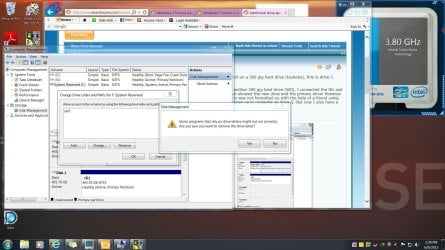
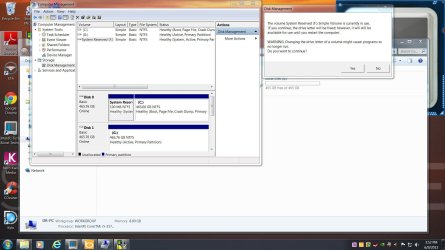
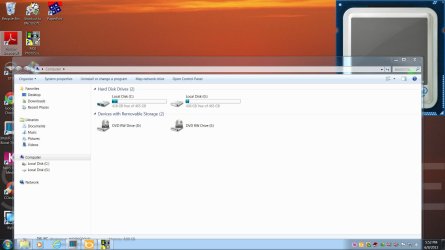
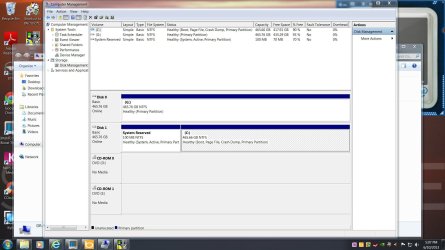
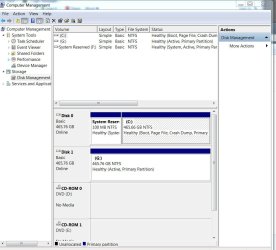
I was wanting to use windows 7 backup, so I went and got another 500 gig hard drive (WD), I connected the HD and powered up the computer and that's all I did! Device manager showed the new drive and the primary drive! However the computer did not show the new WD drive, . The new drive was not formatted so with the help of a friend using partdisk I formatted the new WD drive, the new drive now shows up in computer as drive G. But now I also have a drive F, and its 100MB in size. (see screen shot)
What have I done? and how can I fix it?
I was wanting to use windows 7 backup, so I went and got another 500 gig hard drive (WD), I connected the HD and powered up the computer and that's all I did! Device manager showed the new drive and the primary drive! However the computer did not show the new WD drive, . The new drive was not formatted so with the help of a friend using partdisk I formatted the new WD drive, the new drive now shows up in computer as drive G. But now I also have a drive F, and its 100MB in size. (see screen shot)
What have I done? and how can I fix it?
Attachments

My Computer
At a glance
Windows home premium 64 bitI58 gigZotac
- Computer type
- PC/Desktop
- Computer Manufacturer/Model Number
- built
- OS
- Windows home premium 64 bit
- CPU
- I5
- Motherboard
- gigabyte GA-z77-Ds3h
- Memory
- 8 gig
- Graphics Card(s)
- Zotac
- Hard Drives
- Tosheba 500 gig
WD 500 gig
- Antivirus
- nortain
- Browser
- bing