I cant uninstall internet explorer 9

xdmelasxx

New member
Local time
2:46 PM
Messages
20
i think it seems to be corrupted, it works good though.
however i want to install Internet Explorer 10, when i try to uninstall IE-9 with Command prompt and it didnt work., i tryed on going to view installed updates

2vaksis.png


and it didnt work too it said


2ykj1aw.png


i tryed to use windows feature, but when i open it , its like empty, i dont see anything.

i think internet explorer 9 is corrupted so what should i do in this case? is there any program o something to erase updates?

UPDATED POST KEEP READING THE LASTS REPLIES, WE ARE TRYING TO UNINSTALL IT WITH WINDOWS REGISTRY PLZ SOME HELP.? read page 3
 
Last edited:

My Computer My Computer

Computer type
Laptop
Computer Manufacturer/Model Number
HP
OS
windoes 7, 64 bith
Antivirus
Norton 360
Browser
Internet Explorer

My Computer My Computer

Computer type
PC/Desktop
Computer Manufacturer/Model Number
Own build (new) Desk1 / Asus ROG Win 7 / Desk2 1st build
OS
Desk1 7 Home Prem / Desk2 10 Pro / Main lap Asus ROG 10 Pro 2 laptop Toshiba 7 Pro Asus P2520 7 & 10
CPU
Desk1 i5 3750K / Laptop i7 GTX 860M / Desk2 i5 2500
Motherboard
Desk1 Asus P877-V / Desk2 Gigabyte H67 UD3H / Laptop ?
Memory
Desk1 8GB (1866) / Desk2 16GB (1333) / Laptop 8Gb DDR3
Graphics Card(s)
Desk 1& 2NVidia GTX 650 & Laptops on board Intel
Sound Card
Desk 1 & 2 -XONAR DG Realtek High Def audio Laptop
Monitor(s) Displays
Desk 1 Benq HD 2450 / Desk2 Philips 24" / Laptop 17.5"
Screen Resolution
1920x1080 D1 & D2 & Laptop 1
Hard Drives
Desk1 Samsung 120GB 830 SSD
Asus ROG 256GB 850 Pro SSD
Desk2 Samsung 840 256 SSD
Toshiba 120GB EVO
PSU
Desk 1 Corsair HX 1050/ Laptop ? / Desk 2 Corsair HX 650
Case
Desk 1 Cooler HAF XM ? Toshiba laptop / Desk2 Coolermaster
Cooling
Fans on all Desk1 -2 Desk2 - all Coolermasters 5 Laptop ?
Keyboard
Desk 1 MS Sidewinder X6 Desk 2 MS Sidewinder X 4
Mouse
Desk 1&2 - Gigabyte MS 900 gamer - laptop - Logitec wireless
Internet Speed
ADSL2+
Other Info
One other Desktop (tester) and spare Toshba laptop both with SSD's
Running Kaspersky 2016 ISS on all machines config'd identically
Logitec audio stereo systems on each machine (x3)
Canon MG5250MFC
Router/modem TP-Link running WPA2SK
Hello xd have you tried Revo?? Download Revo Uninstaller Freeware - Free and Full Download - Uninstall software, remove programs, solve uninstall problems

you get a trial period of a month if you hit the wrong one but it is the more thorough version if you want to keep it permanently.

Otherwise it means going to the regedit and deleting the IE from there BUT first download what IE version you want to Downloads BEFORE you go there!!

one more question, i found out i have IE 64bit installed and iE 86bit and mymoperating system is 64bit, do you think revo will work?

and i have dowloaded IE 10 , i wanted to install windows IE 10 but i coudnt so i thought deleting IE 9 could be the solution but that was the moment i found out i couldnt uninstall IE 9, so ithink first i need to uninstal IE 9 that is corrupted i think, do you think i will work? and could you tell me how does revo work, i will see tutorials about revo though.
 

My Computer My Computer

Computer type
Laptop
Computer Manufacturer/Model Number
HP
OS
windoes 7, 64 bith
Antivirus
Norton 360
Browser
Internet Explorer

My Computer My Computer

Computer type
PC/Desktop
OS
Windows 10 Home x64
CPU
INTEL Core i5-750 Quad-Core 3.37GHz
Motherboard
ASUS P7P55D
Memory
HyperX Fury Black Series 8GB (2 x 4GB) 1866Mhz
Graphics Card(s)
EVGA GeForce GTX 750 Superclocked 1GB 128-Bit GDDR5
Monitor(s) Displays
LG 32MA68HY 32" IPS
Screen Resolution
1920 x 1080
Hard Drives
Samsung 840 Evo 120GB, SEAGATE 500GB Barracuda® 7200.12, SATA 3 Gb/s, 7200 RPM, 16MB cache
PSU
ANTEC TruePower New TP-550, 80 PLUS, 550W
Case
ANTEC Three Hundred Illusion
Cooling
COOLER MASTER Hyper 212 Plus, 4 x 120mm 1 x 140mm Noctua's
Internet Speed
85 + Mbps
Antivirus
Avast
Browser
Vivaldi

My Computer My Computer

Computer type
Laptop
Computer Manufacturer/Model Number
HP
OS
windoes 7, 64 bith
Antivirus
Norton 360
Browser
Internet Explorer

My Computer My Computer

Computer type
PC/Desktop
OS
Windows 10 Home x64
CPU
INTEL Core i5-750 Quad-Core 3.37GHz
Motherboard
ASUS P7P55D
Memory
HyperX Fury Black Series 8GB (2 x 4GB) 1866Mhz
Graphics Card(s)
EVGA GeForce GTX 750 Superclocked 1GB 128-Bit GDDR5
Monitor(s) Displays
LG 32MA68HY 32" IPS
Screen Resolution
1920 x 1080
Hard Drives
Samsung 840 Evo 120GB, SEAGATE 500GB Barracuda® 7200.12, SATA 3 Gb/s, 7200 RPM, 16MB cache
PSU
ANTEC TruePower New TP-550, 80 PLUS, 550W
Case
ANTEC Three Hundred Illusion
Cooling
COOLER MASTER Hyper 212 Plus, 4 x 120mm 1 x 140mm Noctua's
Internet Speed
85 + Mbps
Antivirus
Avast
Browser
Vivaldi

My Computer My Computer

Computer type
PC/Desktop
Computer Manufacturer/Model Number
Custom assembled by me :}
OS
Win-7-Pro64bit 7-H-Prem-64bit
CPU
i7-5930K 2nd i9-9940x both water blocked VRM's too
Motherboard
ASUS SABERTOOTH X99 2nd ASUS x299 Apex
Memory
Trident-z 3200C14 2nd Trident-z 3600C16
Graphics Card(s)
EVGA 1080ti ftw3 2nd Titan Xp both water blocked
Sound Card
Built-in Realtek
Monitor(s) Displays
1-AOC G2460PG 24"G-Sync 144Hz/ 2nd 1-ASUS VG248QE 24" 144Hz
Screen Resolution
1920 x 1080 144Hz
Hard Drives
2-Samsung M.2 Evo & Evo Plus
2-Samsung 850 EVO 500GB SSD's/ 3-2.5 W.D. Black 1tb-&3-1tb/3-3.5 WD Black 1tb hdd's
PSU
EVGA SuperNOVA 1000-P2 2nd 1200-P2
Case
2-Corsair Obsidian Series 450D Black ATX Mid Tower
Cooling
Custom water loops
Keyboard
Logitech G710+/ 2nd Logitech G910
Mouse
2-RedDragon M901 Perdition 16400 dpi Gaming mouse = wired
Internet Speed
Comcast Ping 19ms 89.31mbps download speed 6.12mbps upload
Antivirus
Malwarebytes Pro/ Superantispyware Pro
Browser
FireFox & Pale moon
Other Info
2nd ASUS X299 Apex/Intel i9-9940x with Custom water loop/7H-Prem-x64/Corsair 450D case/Ram Trident-z 3600C16 4x8gb / Samsung970Evo plus 500gb SSD/Dual ssd EZ swap evo/PSU EVGA SuperNova 1200w-P2 80+Platinum/GPU Titan Xp /8-ML-140 on push-pull on 2-280GTX rads
You might run disc check 1st to confirm no problems there

http://www.sevenforums.com/tutorials/433-disk-check.html

If Disc check finds no problems, try running SFC in Safe mode

Or, at boot

http://www.sevenforums.com/tutorials/139810-sfc-scannow-run-command-prompt-boot.html

A Guy

it found no problems and but it still freezes my pc when i run SFC it freezes at 91%, and i found out when i run my norton 360 full scan it freezes my laptop too, do you know why?

and about the internet explorer i found out i have internet explorer 9 x64 and x86 too, do you think is it the problem i cant uninstall IE9?
 

My Computer My Computer

Computer type
Laptop
Computer Manufacturer/Model Number
HP
OS
windoes 7, 64 bith
Antivirus
Norton 360
Browser
Internet Explorer
Last edited:

My Computer My Computer

Computer type
Laptop
Computer Manufacturer/Model Number
HP
OS
windoes 7, 64 bith
Antivirus
Norton 360
Browser
Internet Explorer
Try this,
Close any open windows,
Click Start and type (turn windows features on or off) click on the suggestion,
Uncheck the box for internet explorer of which ever version is listed/ Okay/ Boot when prompted,
Repeat the above Checking the box for internet explorer.
 

My Computer My Computer

Computer type
PC/Desktop
Computer Manufacturer/Model Number
Custom assembled by me :}
OS
Win-7-Pro64bit 7-H-Prem-64bit
CPU
i7-5930K 2nd i9-9940x both water blocked VRM's too
Motherboard
ASUS SABERTOOTH X99 2nd ASUS x299 Apex
Memory
Trident-z 3200C14 2nd Trident-z 3600C16
Graphics Card(s)
EVGA 1080ti ftw3 2nd Titan Xp both water blocked
Sound Card
Built-in Realtek
Monitor(s) Displays
1-AOC G2460PG 24"G-Sync 144Hz/ 2nd 1-ASUS VG248QE 24" 144Hz
Screen Resolution
1920 x 1080 144Hz
Hard Drives
2-Samsung M.2 Evo & Evo Plus
2-Samsung 850 EVO 500GB SSD's/ 3-2.5 W.D. Black 1tb-&3-1tb/3-3.5 WD Black 1tb hdd's
PSU
EVGA SuperNOVA 1000-P2 2nd 1200-P2
Case
2-Corsair Obsidian Series 450D Black ATX Mid Tower
Cooling
Custom water loops
Keyboard
Logitech G710+/ 2nd Logitech G910
Mouse
2-RedDragon M901 Perdition 16400 dpi Gaming mouse = wired
Internet Speed
Comcast Ping 19ms 89.31mbps download speed 6.12mbps upload
Antivirus
Malwarebytes Pro/ Superantispyware Pro
Browser
FireFox & Pale moon
Other Info
2nd ASUS X299 Apex/Intel i9-9940x with Custom water loop/7H-Prem-x64/Corsair 450D case/Ram Trident-z 3600C16 4x8gb / Samsung970Evo plus 500gb SSD/Dual ssd EZ swap evo/PSU EVGA SuperNova 1200w-P2 80+Platinum/GPU Titan Xp /8-ML-140 on push-pull on 2-280GTX rads
Try this,
Close any open windows,
Click Start and type (turn windows features on or off) click on the suggestion,
Uncheck the box for internet explorer of which ever version is listed/ Okay/ Boot when prompted,
Repeat the above Checking the box for internet explorer.

turn windows features on or off is blank for me, and im trying to fix it but nothing works :S what should i do now?
 

My Computer My Computer

Computer type
Laptop
Computer Manufacturer/Model Number
HP
OS
windoes 7, 64 bith
Antivirus
Norton 360
Browser
Internet Explorer
If a suggestion did not appear to click on ?
Click Start/ Control panel/ Uninstall a program or Programs and features/ On the top left click on turn windows features on or off.
This list is empty ?
Win-features%20on-off.jpg
 

My Computer My Computer

Computer type
PC/Desktop
Computer Manufacturer/Model Number
Custom assembled by me :}
OS
Win-7-Pro64bit 7-H-Prem-64bit
CPU
i7-5930K 2nd i9-9940x both water blocked VRM's too
Motherboard
ASUS SABERTOOTH X99 2nd ASUS x299 Apex
Memory
Trident-z 3200C14 2nd Trident-z 3600C16
Graphics Card(s)
EVGA 1080ti ftw3 2nd Titan Xp both water blocked
Sound Card
Built-in Realtek
Monitor(s) Displays
1-AOC G2460PG 24"G-Sync 144Hz/ 2nd 1-ASUS VG248QE 24" 144Hz
Screen Resolution
1920 x 1080 144Hz
Hard Drives
2-Samsung M.2 Evo & Evo Plus
2-Samsung 850 EVO 500GB SSD's/ 3-2.5 W.D. Black 1tb-&3-1tb/3-3.5 WD Black 1tb hdd's
PSU
EVGA SuperNOVA 1000-P2 2nd 1200-P2
Case
2-Corsair Obsidian Series 450D Black ATX Mid Tower
Cooling
Custom water loops
Keyboard
Logitech G710+/ 2nd Logitech G910
Mouse
2-RedDragon M901 Perdition 16400 dpi Gaming mouse = wired
Internet Speed
Comcast Ping 19ms 89.31mbps download speed 6.12mbps upload
Antivirus
Malwarebytes Pro/ Superantispyware Pro
Browser
FireFox & Pale moon
Other Info
2nd ASUS X299 Apex/Intel i9-9940x with Custom water loop/7H-Prem-x64/Corsair 450D case/Ram Trident-z 3600C16 4x8gb / Samsung970Evo plus 500gb SSD/Dual ssd EZ swap evo/PSU EVGA SuperNova 1200w-P2 80+Platinum/GPU Titan Xp /8-ML-140 on push-pull on 2-280GTX rads
Try a SFC in safe mode X.

I would suggest looking in the registry but I don't know how comfortable you are with that.
 

My Computer My Computer

Computer type
PC/Desktop
Computer Manufacturer/Model Number
Own build (new) Desk1 / Asus ROG Win 7 / Desk2 1st build
OS
Desk1 7 Home Prem / Desk2 10 Pro / Main lap Asus ROG 10 Pro 2 laptop Toshiba 7 Pro Asus P2520 7 & 10
CPU
Desk1 i5 3750K / Laptop i7 GTX 860M / Desk2 i5 2500
Motherboard
Desk1 Asus P877-V / Desk2 Gigabyte H67 UD3H / Laptop ?
Memory
Desk1 8GB (1866) / Desk2 16GB (1333) / Laptop 8Gb DDR3
Graphics Card(s)
Desk 1& 2NVidia GTX 650 & Laptops on board Intel
Sound Card
Desk 1 & 2 -XONAR DG Realtek High Def audio Laptop
Monitor(s) Displays
Desk 1 Benq HD 2450 / Desk2 Philips 24" / Laptop 17.5"
Screen Resolution
1920x1080 D1 & D2 & Laptop 1
Hard Drives
Desk1 Samsung 120GB 830 SSD
Asus ROG 256GB 850 Pro SSD
Desk2 Samsung 840 256 SSD
Toshiba 120GB EVO
PSU
Desk 1 Corsair HX 1050/ Laptop ? / Desk 2 Corsair HX 650
Case
Desk 1 Cooler HAF XM ? Toshiba laptop / Desk2 Coolermaster
Cooling
Fans on all Desk1 -2 Desk2 - all Coolermasters 5 Laptop ?
Keyboard
Desk 1 MS Sidewinder X6 Desk 2 MS Sidewinder X 4
Mouse
Desk 1&2 - Gigabyte MS 900 gamer - laptop - Logitec wireless
Internet Speed
ADSL2+
Other Info
One other Desktop (tester) and spare Toshba laptop both with SSD's
Running Kaspersky 2016 ISS on all machines config'd identically
Logitec audio stereo systems on each machine (x3)
Canon MG5250MFC
Router/modem TP-Link running WPA2SK
If a suggestion did not appear to click on ?
Click Start/ Control panel/ Uninstall a program or Programs and features/ On the top left click on turn windows features on or off.
This list is empty ?
Win-features%20on-off.jpg

yes its empty its in blank
 

My Computer My Computer

Computer type
Laptop
Computer Manufacturer/Model Number
HP
OS
windoes 7, 64 bith
Antivirus
Norton 360
Browser
Internet Explorer
Try a SFC in safe mode X.

I would suggest looking in the registry but I don't know how comfortable you are with that.

When i run SFC in safe mode X. it says another system repair is pending and i need to restart and do it again sfc again it says. when i restart nothing happens and i go to mode X and says the same, what should i do?
 

My Computer My Computer

Computer type
Laptop
Computer Manufacturer/Model Number
HP
OS
windoes 7, 64 bith
Antivirus
Norton 360
Browser
Internet Explorer
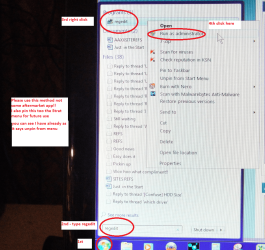
Well I would check in regedit see my pics I am running 9 through necessity so the number s if there match up then it is still there.

But please do not touch anything until you see what you have got!!

If you don't know how to get to the register - Start > type regedit and click on the blue (when hovered on) box that will appear in the Start menu box. But please do not do anything until you let us know what is there.
 

Attachments

  • IE9XX.PNG
    IE9XX.PNG
    18.1 KB · Views: 5
  • IE9X.PNG
    IE9X.PNG
    26.7 KB · Views: 7

My Computer My Computer

Computer type
PC/Desktop
Computer Manufacturer/Model Number
Own build (new) Desk1 / Asus ROG Win 7 / Desk2 1st build
OS
Desk1 7 Home Prem / Desk2 10 Pro / Main lap Asus ROG 10 Pro 2 laptop Toshiba 7 Pro Asus P2520 7 & 10
CPU
Desk1 i5 3750K / Laptop i7 GTX 860M / Desk2 i5 2500
Motherboard
Desk1 Asus P877-V / Desk2 Gigabyte H67 UD3H / Laptop ?
Memory
Desk1 8GB (1866) / Desk2 16GB (1333) / Laptop 8Gb DDR3
Graphics Card(s)
Desk 1& 2NVidia GTX 650 & Laptops on board Intel
Sound Card
Desk 1 & 2 -XONAR DG Realtek High Def audio Laptop
Monitor(s) Displays
Desk 1 Benq HD 2450 / Desk2 Philips 24" / Laptop 17.5"
Screen Resolution
1920x1080 D1 & D2 & Laptop 1
Hard Drives
Desk1 Samsung 120GB 830 SSD
Asus ROG 256GB 850 Pro SSD
Desk2 Samsung 840 256 SSD
Toshiba 120GB EVO
PSU
Desk 1 Corsair HX 1050/ Laptop ? / Desk 2 Corsair HX 650
Case
Desk 1 Cooler HAF XM ? Toshiba laptop / Desk2 Coolermaster
Cooling
Fans on all Desk1 -2 Desk2 - all Coolermasters 5 Laptop ?
Keyboard
Desk 1 MS Sidewinder X6 Desk 2 MS Sidewinder X 4
Mouse
Desk 1&2 - Gigabyte MS 900 gamer - laptop - Logitec wireless
Internet Speed
ADSL2+
Other Info
One other Desktop (tester) and spare Toshba laptop both with SSD's
Running Kaspersky 2016 ISS on all machines config'd identically
Logitec audio stereo systems on each machine (x3)
Canon MG5250MFC
Router/modem TP-Link running WPA2SK
Well I would check in regedit see my pics I am running 9 through necessity so the number s if there match up then it is still there.

But please do not touch anything until you see what you have got!!

If you don't know how to get to the register - Start > type regedit and click on the blue (when hovered on) box that will appear in the Start menu box. But please do not do anything until you let us know what is there.


HERE IS THE PICTURE YOU WANTED TO SEE:

2zr2k43.png


ok thats what i was asking in other theard i will retell it and i will show you pictures

uninstalling internet explorer with windows registry is safe?

Hellow i tryed all the steps to uninstall IE9 and i cant uninstall it, i think its corrupted and i dont have windows 7 CD to make a restore startup, when i try to restore system the point of any update of IE9 is not there, i intalled IE9 2 years ago i think thats why it doesnt appear as a system restore point.

i think the only solution is to detele IE9 from Windows Registry. to do this i downloadedRegistrar Registry Manager, it helped me to fix the windows feature when it was blank, if someone needs help or have you windows feature in blank just let me know (i tryed like 4 method and none work, but it worked for me).

Well, i was wondering if i delete IE9 from Windows Registry could be safe and if i am going to be avaliable to install it again or any version of IE , i want to make sure if it could help my problem with IE9 corrupted,(I want to install IE10)

Some screenshots:

14iiphc.png


is the location right?

2i7vdl5.png


is it safe? please answer.
 

My Computer My Computer

Computer type
Laptop
Computer Manufacturer/Model Number
HP
OS
windoes 7, 64 bith
Antivirus
Norton 360
Browser
Internet Explorer
Now before you do anything I would Google the IE9 and IE10 download and save them to downloads first - I keep my downloads in a desktop folder called Downloads.
Start > type downloads right click on that highlighted blue box > send to desktop.

http://windows.microsoft.com/en-au/internet-explorer/ie-9-worldwide-languages

http://windows.microsoft.com/en-au/internet-explorer/ie-10-worldwide-languages

These are the refs for here in Australia you will probably get the site from wherever you are.

Now do not use anything but the Windows system of pulling up the regedit that is
Start > type regedit - it will show the highlighted box see my pic the quality isn't good as you cannot snip it.
It sounds as if you have a few of add on apps to make the machine go better or improve the performance I would urge you to look at some of those and if they do things with the registry like cleaning it and defragging it they need getting rid of as most cause more problems than they are worth. The only exception is the CCleaner app from piriform.

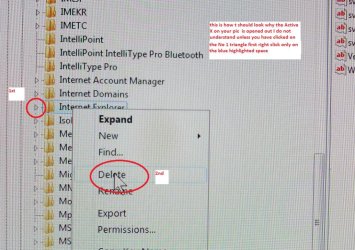
If I were doing this I would then go to regedit and open to the HKEY_USER_MACHINE > Microsoft > Software > Internet Explorer don't open it right click on the whole ref and then delete. It will ask you if you want to delete this entry and all its sub entries.

Go to Downloads and run the IE10 - if that is what you are after and run / install it or you could try that through updates.

If that does not install then you still have the IE9 in the Downloads to do the same with.

AS I have said this is what I would do but the choice is yours as the outcome could be that you have to do a complete reinstall of the OS if things are a bit messed up.
 

Attachments

  • REGEDIT.PNG
    REGEDIT.PNG
    576 KB · Views: 3

My Computer My Computer

Computer type
PC/Desktop
Computer Manufacturer/Model Number
Own build (new) Desk1 / Asus ROG Win 7 / Desk2 1st build
OS
Desk1 7 Home Prem / Desk2 10 Pro / Main lap Asus ROG 10 Pro 2 laptop Toshiba 7 Pro Asus P2520 7 & 10
CPU
Desk1 i5 3750K / Laptop i7 GTX 860M / Desk2 i5 2500
Motherboard
Desk1 Asus P877-V / Desk2 Gigabyte H67 UD3H / Laptop ?
Memory
Desk1 8GB (1866) / Desk2 16GB (1333) / Laptop 8Gb DDR3
Graphics Card(s)
Desk 1& 2NVidia GTX 650 & Laptops on board Intel
Sound Card
Desk 1 & 2 -XONAR DG Realtek High Def audio Laptop
Monitor(s) Displays
Desk 1 Benq HD 2450 / Desk2 Philips 24" / Laptop 17.5"
Screen Resolution
1920x1080 D1 & D2 & Laptop 1
Hard Drives
Desk1 Samsung 120GB 830 SSD
Asus ROG 256GB 850 Pro SSD
Desk2 Samsung 840 256 SSD
Toshiba 120GB EVO
PSU
Desk 1 Corsair HX 1050/ Laptop ? / Desk 2 Corsair HX 650
Case
Desk 1 Cooler HAF XM ? Toshiba laptop / Desk2 Coolermaster
Cooling
Fans on all Desk1 -2 Desk2 - all Coolermasters 5 Laptop ?
Keyboard
Desk 1 MS Sidewinder X6 Desk 2 MS Sidewinder X 4
Mouse
Desk 1&2 - Gigabyte MS 900 gamer - laptop - Logitec wireless
Internet Speed
ADSL2+
Other Info
One other Desktop (tester) and spare Toshba laptop both with SSD's
Running Kaspersky 2016 ISS on all machines config'd identically
Logitec audio stereo systems on each machine (x3)
Canon MG5250MFC
Router/modem TP-Link running WPA2SK
Now before you do anything I would Google the IE9 and IE10 download and save them to downloads first - I keep my downloads in a desktop folder called Downloads.
Start > type downloads right click on that highlighted blue box > send to desktop.

http://windows.microsoft.com/en-au/internet-explorer/ie-9-worldwide-languages

http://windows.microsoft.com/en-au/internet-explorer/ie-10-worldwide-languages

These are the refs for here in Australia you will probably get the site from wherever you are.

Now do not use anything but the Windows system of pulling up the regedit that is
Start > type regedit - it will show the highlighted box see my pic the quality isn't good as you cannot snip it.
It sounds as if you have a few of add on apps to make the machine go better or improve the performance I would urge you to look at some of those and if they do things with the registry like cleaning it and defragging it they need getting rid of as most cause more problems than they are worth. The only exception is the CCleaner app from piriform.

If I were doing this I would then go to regedit and open to the HKEY_USER_MACHINE > Microsoft > Software > Internet Explorer don't open it right click on the whole ref and then delete. It will ask you if you want to delete this entry and all its sub entries.

Go to Downloads and run the IE10 - if that is what you are after and run / install it or you could try that through updates.

If that does not install then you still have the IE9 in the Downloads to do the same with.

AS I have said this is what I would do but the choice is yours as the outcome could be that you have to do a complete reinstall of the OS if things are a bit messed up.

I run Regedit as you said administrator well it just deleted it but it didnt delete everything on internet explorer folder and gives me an Error look the picture

2888s3n.png
 

My Computer My Computer

Computer type
Laptop
Computer Manufacturer/Model Number
HP
OS
windoes 7, 64 bith
Antivirus
Norton 360
Browser
Internet Explorer
Ok now it looks as if the IE is opened up - did it do that by itself or did you click on the main entry triangle of IE? see my pic again here. If it does this again try deleting that Active X Compatibility entry first using the same process.
 

Attachments

  • NEWIE.jpg
    NEWIE.jpg
    169.8 KB · Views: 3

My Computer My Computer

Computer type
PC/Desktop
Computer Manufacturer/Model Number
Own build (new) Desk1 / Asus ROG Win 7 / Desk2 1st build
OS
Desk1 7 Home Prem / Desk2 10 Pro / Main lap Asus ROG 10 Pro 2 laptop Toshiba 7 Pro Asus P2520 7 & 10
CPU
Desk1 i5 3750K / Laptop i7 GTX 860M / Desk2 i5 2500
Motherboard
Desk1 Asus P877-V / Desk2 Gigabyte H67 UD3H / Laptop ?
Memory
Desk1 8GB (1866) / Desk2 16GB (1333) / Laptop 8Gb DDR3
Graphics Card(s)
Desk 1& 2NVidia GTX 650 & Laptops on board Intel
Sound Card
Desk 1 & 2 -XONAR DG Realtek High Def audio Laptop
Monitor(s) Displays
Desk 1 Benq HD 2450 / Desk2 Philips 24" / Laptop 17.5"
Screen Resolution
1920x1080 D1 & D2 & Laptop 1
Hard Drives
Desk1 Samsung 120GB 830 SSD
Asus ROG 256GB 850 Pro SSD
Desk2 Samsung 840 256 SSD
Toshiba 120GB EVO
PSU
Desk 1 Corsair HX 1050/ Laptop ? / Desk 2 Corsair HX 650
Case
Desk 1 Cooler HAF XM ? Toshiba laptop / Desk2 Coolermaster
Cooling
Fans on all Desk1 -2 Desk2 - all Coolermasters 5 Laptop ?
Keyboard
Desk 1 MS Sidewinder X6 Desk 2 MS Sidewinder X 4
Mouse
Desk 1&2 - Gigabyte MS 900 gamer - laptop - Logitec wireless
Internet Speed
ADSL2+
Other Info
One other Desktop (tester) and spare Toshba laptop both with SSD's
Running Kaspersky 2016 ISS on all machines config'd identically
Logitec audio stereo systems on each machine (x3)
Canon MG5250MFC
Router/modem TP-Link running WPA2SK
Back
Top