
Hi,
I have a new Lenovo x230 with W7 Pro initially installed to the 300 GB HDD, then shortly afterwards I bought an SSD (120 GB mSATA) and installed W7 to the SSD. I did not disconnect the HDD when I installed W7 on the SSD (so effectively have 2 copies of W7). The SSD is now the C: drive and the HDD is the D: drive. The laptop clearly boots from the C: drive (SSD) so I am ok there.
Nothing seems to run quickly. Wake-up from hibernation is very slow and even browsing the web is much slower than the previous Vaio Z series I had that died a while ago. I am trying to get my system optimized so that it runs as efficiently and quickly as possible.
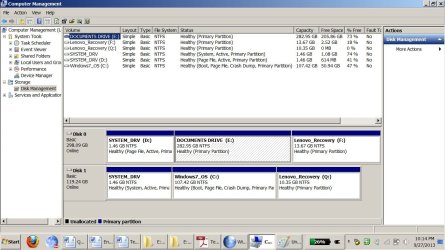
I am good at following computer directions (I can customize things, install drives, jailbreak phones and things) but the research I have done on on things like moving the system reserve partition (which is what I suspect is wrong) is too advanced for poor ol' me. Here is a pic attached showing my systems drives, does this help? Glad to post more info, just tell me what you want to see.
Thanks!
I have a new Lenovo x230 with W7 Pro initially installed to the 300 GB HDD, then shortly afterwards I bought an SSD (120 GB mSATA) and installed W7 to the SSD. I did not disconnect the HDD when I installed W7 on the SSD (so effectively have 2 copies of W7). The SSD is now the C: drive and the HDD is the D: drive. The laptop clearly boots from the C: drive (SSD) so I am ok there.
Nothing seems to run quickly. Wake-up from hibernation is very slow and even browsing the web is much slower than the previous Vaio Z series I had that died a while ago. I am trying to get my system optimized so that it runs as efficiently and quickly as possible.
I am good at following computer directions (I can customize things, install drives, jailbreak phones and things) but the research I have done on on things like moving the system reserve partition (which is what I suspect is wrong) is too advanced for poor ol' me. Here is a pic attached showing my systems drives, does this help? Glad to post more info, just tell me what you want to see.
Thanks!
Attachments
My Computer
- Computer type
- Laptop
- Computer Manufacturer/Model Number
- Lenovo
- OS
- 64 bit W7 Pro
- CPU
- i5
- Hard Drives
- 300GB HDD; 120 GB SSD
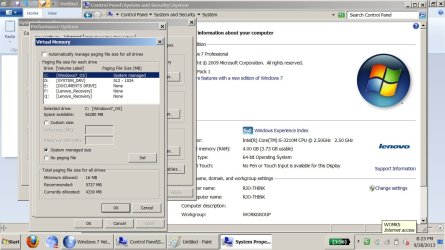
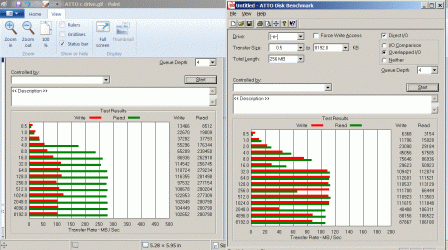
 it usually doesnt break down half as fast as an HDD. But that can depend on many factors. HTH