low disc space partition color

tylor

New member
Local time
10:19 PM
Messages
27
Hi Guys,

I have a quick newby question for Windows 7 RTM (64bit).. it's not a major problem or anything like that but more of an annoyance!

Is there a way in which to stop Windows changing your partition color to red when the drive is low on space?

Regards
Tylor
:)
 

My Computer

OS
7 RTM 64 bit
Why would you want it to...?
Its there for a reason. And to stop it, add more disk space.

~Lordbob
 

My Computer

Computer Manufacturer/Model Number
Hera
OS
Windows 7 Ultimate x64, Mint 9
CPU
Intel i5-2500k
Motherboard
ASUS P8P67 Pro
Memory
2x 4Gb Corsair VENGEANCE DDR3-1600
Graphics Card(s)
NVidia GeForce N260GTX Twin Frozr
Sound Card
Realtek HD OnBoard Audio
Monitor(s) Displays
ASUS 24" Monitor
Screen Resolution
1920x1080
Hard Drives
G.SKILL Phoenix Series 60GB SATA II MLC Internal Solid State Drive (SSD)
SAMSUNG Spinpoint F3R 1TB 7200 RPM 32MB Cache SATA II
PSU
Cooler Master Real Power Pro 750W
Case
Cooler Master Haf 932
Cooling
Fans
Keyboard
Razer Tarantula
Mouse
Razer Lachesis
Internet Speed
not fast enough
The reason I want to is simply for cosmetic purposes, the drives/partitions in question are simply for storing media. Therefore no apps/user settings or user data are stored on there. I do not need 7 to tell me I have 20gig left on a partition when it's clear to see from Windows Explorer.

I realise the feature has a purpose, my question was simply to see if this could be turned on/off
 

My Computer

OS
7 RTM 64 bit
I doubt it. You may be able to change the color from the registry, but I don't know how.

~Lordbob
 

My Computer

Computer Manufacturer/Model Number
Hera
OS
Windows 7 Ultimate x64, Mint 9
CPU
Intel i5-2500k
Motherboard
ASUS P8P67 Pro
Memory
2x 4Gb Corsair VENGEANCE DDR3-1600
Graphics Card(s)
NVidia GeForce N260GTX Twin Frozr
Sound Card
Realtek HD OnBoard Audio
Monitor(s) Displays
ASUS 24" Monitor
Screen Resolution
1920x1080
Hard Drives
G.SKILL Phoenix Series 60GB SATA II MLC Internal Solid State Drive (SSD)
SAMSUNG Spinpoint F3R 1TB 7200 RPM 32MB Cache SATA II
PSU
Cooler Master Real Power Pro 750W
Case
Cooler Master Haf 932
Cooling
Fans
Keyboard
Razer Tarantula
Mouse
Razer Lachesis
Internet Speed
not fast enough

My Computer

Computer Manufacturer/Model Number
Hera
OS
Windows 7 Ultimate x64, Mint 9
CPU
Intel i5-2500k
Motherboard
ASUS P8P67 Pro
Memory
2x 4Gb Corsair VENGEANCE DDR3-1600
Graphics Card(s)
NVidia GeForce N260GTX Twin Frozr
Sound Card
Realtek HD OnBoard Audio
Monitor(s) Displays
ASUS 24" Monitor
Screen Resolution
1920x1080
Hard Drives
G.SKILL Phoenix Series 60GB SATA II MLC Internal Solid State Drive (SSD)
SAMSUNG Spinpoint F3R 1TB 7200 RPM 32MB Cache SATA II
PSU
Cooler Master Real Power Pro 750W
Case
Cooler Master Haf 932
Cooling
Fans
Keyboard
Razer Tarantula
Mouse
Razer Lachesis
Internet Speed
not fast enough

My Computer

Computer type
PC/Desktop
Computer Manufacturer/Model Number
Dwarf Dwf/11/2012 r09/2013
OS
Windows 8.1 Pro RTM x64
CPU
Intel Core-i5-3570K 4-core @ 3.4GHz (Ivy Bridge) (OC 4.4GHz)
Motherboard
ASRock Z77 Extreme4-M
Memory
4 x 4GB DDR3-1600 Corsair Vengeance CMZ8GX3M2A1600C9B (16GB)
Graphics Card(s)
MSI GeForce GTX770 Gaming OC 2GB
Sound Card
Realtek High Definition on board solution (ALC 898)
Monitor(s) Displays
ViewSonic VA1912w Widescreen (VGA)
Screen Resolution
1440x900
Hard Drives
OCZ Agility 3 SSD 120GB SATA III x2 (RAID 0)
Samsung HD501LJ 500GB SATA II x2
Hitachi HDS721010CLA332 1TB SATA II
Iomega 1.5TB Ext USB 2.0
WD 2.0TB Ext USB 3.0
PSU
XFX Pro Series 850W Semi-Modular
Case
Gigabyte IF233
Cooling
1 x 120mm Front Inlet 1 x 120mm Rear Exhaust
Keyboard
Microsoft Comfort Curve Keyboard 3000 (USB)
Mouse
Microsoft Comfort Mouse 3000 for Business (USB)
Internet Speed
NetGear DG834Gv3 ADSL Modem/Router (Ethernet) ~4.0 Mb/s (O2)
Antivirus
Avast! 8.0.1497
Browser
IE 11
Other Info
Optical Drive: HL-DT-ST BD-RE BH10LS30 SATA Bluray
Lexmark S305 Printer/Scanner/Copier (USB)
WEI Score: 8.1/8.1/8.5/8.5/8.25
Asus Eee PC 1011PX Netbook (Windows 7 x86 Starter)
I really want to to change the colors of the 'percentage full indicators' from those ugly vista colors to my own choice. It would be also nice to change the settings of the percentages, cause on a 125 gb partition the indicator already turns red, with still 15 GB free. I think the warning must be relative/ adjustable
 

My Computer

Computer type
PC/Desktop
OS
Windows 7 x64
CPU
Intel Core2Duo P8500
Motherboard
Asus P5Q3
Memory
2x 2048 DDR3
Graphics Card(s)
Asus GTX280
Sound Card
24/96 Audiophile
Screen Resolution
1900x1080
Case
Coolermaster
Cooling
Zallman CPU Cooling
Mouse
Logitech G500
Hi,

I am looking for the same thing as Tylor that started this thread and UnderBoac with the last input. Windows 7 seems to make the the partition bar color red when over 90% of the disk free space. I would like this color change to be disabled because todays discs of over 1.5TB when you have over 100GB left the disc is not out of space I think. The red bar only draws attention of users that think they are out of space without reading the values. Can this be changed from being 90% of the disk to be for example 500MB left of free space of the disc?

//Ase
 

My Computer

OS
Windows 7
Hi,

I am looking for the same thing as Tylor that started this thread and UnderBoac with the last input. Windows 7 seems to make the the partition bar color red when over 90% of the disk free space. I would like this color change to be disabled because todays discs of over 1.5TB when you have over 100GB left the disc is not out of space I think. The red bar only draws attention of users that think they are out of space without reading the values. Can this be changed from being 90% of the disk to be for example 500MB left of free space of the disc?

//Ase
I like the idea.

I am sure there is a way, let me look around.

~Lordbob
 

My Computer

Computer Manufacturer/Model Number
Hera
OS
Windows 7 Ultimate x64, Mint 9
CPU
Intel i5-2500k
Motherboard
ASUS P8P67 Pro
Memory
2x 4Gb Corsair VENGEANCE DDR3-1600
Graphics Card(s)
NVidia GeForce N260GTX Twin Frozr
Sound Card
Realtek HD OnBoard Audio
Monitor(s) Displays
ASUS 24" Monitor
Screen Resolution
1920x1080
Hard Drives
G.SKILL Phoenix Series 60GB SATA II MLC Internal Solid State Drive (SSD)
SAMSUNG Spinpoint F3R 1TB 7200 RPM 32MB Cache SATA II
PSU
Cooler Master Real Power Pro 750W
Case
Cooler Master Haf 932
Cooling
Fans
Keyboard
Razer Tarantula
Mouse
Razer Lachesis
Internet Speed
not fast enough
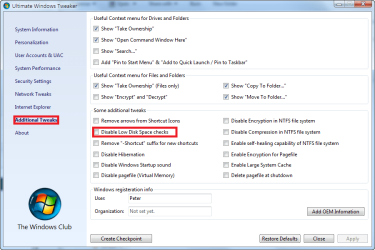
I think there is a way to turn off low disk space notification by using a free app called Ultimate Windows Tweaker

Haven't tried this particular setting but it looks like it might do what you want.
 

Attachments

  • 2009-10-01_151742.png
    2009-10-01_151742.png
    31.8 KB · Views: 1,056

My Computer

Computer Manufacturer/Model Number
HP DV8t quad
OS
Windows 7 Ultimate x64 (Retail)
CPU
i7-Q 720
Motherboard
Motherboard Chipset Intel Ibex Peak-M PM55, Intel Lynnfield
Memory
6 GB
Graphics Card(s)
nVidia GeForce GT 230M (1GB)
Sound Card
IDT High Definition Audio CODEC
Monitor(s) Displays
18.4 inch HP Infinity FHD (Samsung 184HT03-001)
Screen Resolution
1920 x 1080
Hard Drives
Hitachi 500GB 7200 rpm (x2)
Seagate FreeAgent 1.5 TB External USB (x2)
Thermaltake BlacX eSATA/USB 2.0 3.5/2.5 HD dock
Cooling
Zalman NC-2000 notebook cooling pad
Keyboard
laptop
Mouse
Logitech VX Revolution
Other Info
Backup Unit: Lenovo T61p
I really want to to change the colors of the 'percentage full indicators' from those ugly vista colors to my own choice. It would be also nice to change the settings of the percentages, cause on a 125 gb partition the indicator already turns red, with still 15 GB free. I think the warning must be relative/ adjustable

Hi,

I am looking for the same thing as Tylor that started this thread and UnderBoac with the last input. Windows 7 seems to make the the partition bar color red when over 90% of the disk free space. I would like this color change to be disabled because todays discs of over 1.5TB when you have over 100GB left the disc is not out of space I think. The red bar only draws attention of users that think they are out of space without reading the values. Can this be changed from being 90% of the disk to be for example 500MB left of free space of the disc?

//Ase

Don't think this will change the color of the low disk space warning, but it will change the other colors.

Start Orb,
Right click 'Computer',
Click 'Manage',
Select 'Disk Management' under storage,
Click the last Icon on the tool bar 'Settings',
In the 'Appearance' tab you can change the 'Color and Pattern' for the disks

The other suggested ways you can turn it off.
 
Last edited:

My Computer

Computer type
PC/Desktop
Computer Manufacturer/Model Number
76~2.0
OS
Windows 7 Ult x64 - SP1/ Windows 8 Pro x64
CPU
Intel Core i5-3570K 4.6GHz
Motherboard
Gigabyte GA-Z77X UD3H, f18
Memory
8GB (2X4GB) DDR3 1600 Corsair Vengeance CL8 1.5v
Graphics Card(s)
Sapphire HD 7770 Vapor-X OC 1GB DDR5
Sound Card
Onboard VIA VT2021
Monitor(s) Displays
22" LCD Dell
Screen Resolution
1680x1050
Hard Drives
Samsung 840Pro 128GB SSD,
Seagate Barracuda 500GB SATA2 7200rpm 32MB cache, Seagate Barracuda 1TB SATA2 7200rpm 32MB cache,
PSU
Corsair HX650W
Case
Cooler Master Storm Scout
Cooling
Corsair H80 2x12cm Noctua NF P12 , 2x14cm case fans
Keyboard
Logitech Wave
Mouse
CM Sentinel
Internet Speed
Dismal
Antivirus
Avast
Browser
Opera Next
Other Info
Haswell laptop: HP Envy 17t-j, i7-4700MQ, GeForce 740M 2GB DDR3, 17.3" Full HD 1920x1080, 16GB RAM, Samsung 840 Pro 128GB, 1TB Hitachi 7200 HDD,
Desktop: eSATA ports,
External eSATA Seagate 500GB SATA2 7200rpm,
External WD USB 500GB
I think there is a way to turn off low disk space notification by using a free app called Ultimate Windows Tweaker

Haven't tried this particular setting but it looks like it might do what you want.

Hi Harpua,

Tried it but it did not change the behavior of the bars.

//Ase
 

My Computer

OS
Windows 7
Hi,

I am looking for the same thing as Tylor that started this thread and UnderBoac with the last input. Windows 7 seems to make the the partition bar color red when over 90% of the disk free space. I would like this color change to be disabled because todays discs of over 1.5TB when you have over 100GB left the disc is not out of space I think. The red bar only draws attention of users that think they are out of space without reading the values. Can this be changed from being 90% of the disk to be for example 500MB left of free space of the disc?

//Ase
I like the idea.

I am sure there is a way, let me look around.

~Lordbob

Hi,

Lordbob, Did you find anything?

//Ase
 

My Computer

OS
Windows 7
No, I have not, sorry.

~Lordbob
 

My Computer

Computer Manufacturer/Model Number
Hera
OS
Windows 7 Ultimate x64, Mint 9
CPU
Intel i5-2500k
Motherboard
ASUS P8P67 Pro
Memory
2x 4Gb Corsair VENGEANCE DDR3-1600
Graphics Card(s)
NVidia GeForce N260GTX Twin Frozr
Sound Card
Realtek HD OnBoard Audio
Monitor(s) Displays
ASUS 24" Monitor
Screen Resolution
1920x1080
Hard Drives
G.SKILL Phoenix Series 60GB SATA II MLC Internal Solid State Drive (SSD)
SAMSUNG Spinpoint F3R 1TB 7200 RPM 32MB Cache SATA II
PSU
Cooler Master Real Power Pro 750W
Case
Cooler Master Haf 932
Cooling
Fans
Keyboard
Razer Tarantula
Mouse
Razer Lachesis
Internet Speed
not fast enough
Old issue now, any new info

Hi,

Issue is pretty old now, but still as annoying.
Anyone with new info?

//Ase
 

My Computer

OS
Windows 7
this thing happens when you have less than 10% free space. so on a 2TB HDD it will happen when the free space fall under 186GB.
 

My Computer

OS
Windows 7 Ultimate x86
Graphics Card(s)
Nvidia GeForce 8400M GS
I have a USB hard drive I am storing the digital copies of DVD's I buy. I have over 20GB free and its RED and makes it look like something is wrong with the drive more then it tells me about the space avail. I know nothing is wrong with the drive as I use it to watch movies on the laptop but when I have a friend over to watch a movie or bring it with me some place people always think something is wrong with the drive and I need to disconnect it.

Its a feature that to me at least wasn't clearly thought out how to best implement it to express the true nature of the condition of the drive. Like others I know how much space I have left and I don't need a big red bar to tell me every time I connect some media that's full like my USB flash drives and HDD's.
 

My Computer

Computer Manufacturer/Model Number
Alienware M17x R3
OS
Windows 7 Ultimate x64
CPU
Intel Core i7 2670QM 2.2GHz 3.3GHz Turbo Mode
Memory
12GB Dual Channel DDR3 at 1333MHz
Graphics Card(s)
2GB GDDR5 AMD Radeon 6990M
Sound Card
Audio Powered by Klipsch
Monitor(s) Displays
17.3-inch WideFHD 1920 x 1080 60Hz WLED
Screen Resolution
1920x1080
Hard Drives
120GB SSD slot 1
1TB HDD slot 2
Case
alienware laptop case
Cooling
Dual heatsink and fans
Keyboard
Alienware multi color keyboard
Mouse
logitech G300 gaming mouse
Other Info
Intel® Centrino Advanced-N 6230 2x2 agn+ Bluetooth

finally got it!!!
Back
Top