
Multipule Explorer.exe using a lot of memory.

Thanks for the cam shots.

I'll step back and let Icit2lol walk you thru the Ubuntu stuff. I that works, that's great... you don't need to to the other stuff in my post. If you hit a dead end, then you can try my suggestions.

It will save us all from going batty :)

Bill
.
 

My Computer My Computer

At a glance

x64 (6.3.9600) Win8.1 Pro & soon dual boot x6...AMD A6-3420M APU with Radeon(tm) HD Graphics6.00 GBAMD Radeon(TM) HD 6520G
Computer type
Laptop
Computer Manufacturer/Model Number
HP Pavilion dv6-6c10us
OS
x64 (6.3.9600) Win8.1 Pro & soon dual boot x64 (6.1.7601) Win7_SP1 HomePrem
CPU
AMD A6-3420M APU with Radeon(tm) HD Graphics
Motherboard
Hewlett-Packard 1805
Memory
6.00 GB
Graphics Card(s)
AMD Radeon(TM) HD 6520G
Sound Card
(1) AMD High Definition Audio Device (2) IDT High Definiti
Monitor(s) Displays
HP W2072a 20" LCD (1600 x 900) @ 60 Hz
Screen Resolution
1366 x 768 x 32 bits (4294967296 colors) @ 60 Hz
Hard Drives
ST640LM0 00 HM641JI SATA Disk Device
Keyboard
Logitech k520 wireless KB
Mouse
Logitech m320 wireless mouse (bundled with KB)
Internet Speed
15/5 | 54 MB Wireless 'n'
Antivirus
Realtime: Defender or Avast | On-demand: Malwarebytes, ESET
Browser
IE 11 on Win8, IE 10 on win 7
Other Info
Media: [Gimp, Audacity, VLC] || Comm: [WEmail 2012, Skype] || Productivity: [OpenOffice,| Textpad] || Utils: [Sysinternals, cCleaner, Speccy, Defraggler]
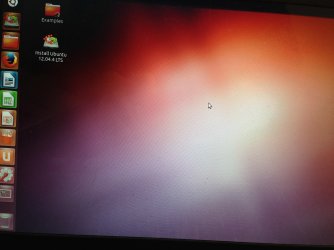
So here is what I'm getting when I start up Ubuntu on it's current version. (I did in fact burn it to a DVD so it would run)

- I'm not seeing any drive under the workspace switcher.


Thoughts?

-Steve
 

Attachments

  • photo.jpg
    photo.jpg
    1,006.6 KB · Views: 0

My Computer My Computer

At a glance

Windows 7 Home Premium 64-bit OSIntel(R) Core(TM)i5-2410M CPU @ 2.30GHz6.00 GB
Computer type
Laptop
Computer Manufacturer/Model Number
Asus - U56E Series
OS
Windows 7 Home Premium 64-bit OS
CPU
Intel(R) Core(TM)i5-2410M CPU @ 2.30GHz
Memory
6.00 GB
So since ubuntu was a dead end. I did download both Farbar Listparts and Old Timer-Listit, saved them both to a CD but can not get them to run, I can't figure out how to get into a recovery boot state?

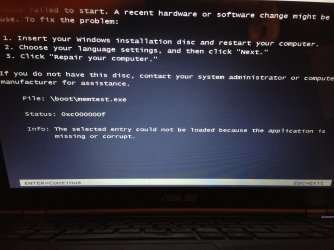
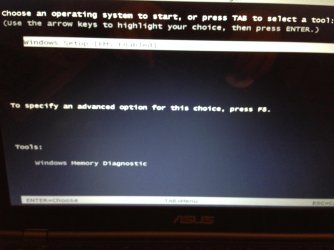
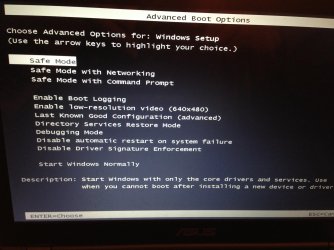
I tried going into Windows Boot manager by pressing F9 and it allows me to start windows up or under "tools" i can select windows memory diagnostic. Attached is a screen shot of my Windows Boot Manager along with the advanced boot options menu. I also tried to start the windows memory diagnostic and was prompted with the first attachment.

Any thoughts?
 

Attachments

  • photo 1.jpg
    photo 1.jpg
    617.3 KB · Views: 0
  • photo 2.jpg
    photo 2.jpg
    436.6 KB · Views: 0
  • photo 3.jpg
    photo 3.jpg
    501.1 KB · Views: 1

My Computer My Computer

At a glance

Windows 7 Home Premium 64-bit OSIntel(R) Core(TM)i5-2410M CPU @ 2.30GHz6.00 GB
Computer type
Laptop
Computer Manufacturer/Model Number
Asus - U56E Series
OS
Windows 7 Home Premium 64-bit OS
CPU
Intel(R) Core(TM)i5-2410M CPU @ 2.30GHz
Memory
6.00 GB
the 1st screenshot says it all.

Now the tricky part. Do you have a Repair disc or Win7 install disc?

You would have created the reapir disc from Start Menu -> Maintenance so you'd probably remebr doing that.

No Repair disc or install disc?

No problem. Find a friend with Win7 HomePrem x64 and sk them to make a repair disc for you (you buy the disc - only needs a CD-R). They must be the same bit depth (64 bit)

No friend with Win7 HomePrem x64? See if your public library or newarby University cna help you.

Failing those, plead your case to the mercy of the big box tech folks - you might find a nice tech that will help you "off the clock".

Once you have either disc - see the instructions on your screenshot above (insert disc. choose lang -> next, click repair)

You'll want to open a command prompt (cmd) and run the two utilities in cmd.

I'm heading out in a bit, see how far you get and we'll pick this up tomorrow.

Bill
.
 

My Computer My Computer

At a glance

x64 (6.3.9600) Win8.1 Pro & soon dual boot x6...AMD A6-3420M APU with Radeon(tm) HD Graphics6.00 GBAMD Radeon(TM) HD 6520G
Computer type
Laptop
Computer Manufacturer/Model Number
HP Pavilion dv6-6c10us
OS
x64 (6.3.9600) Win8.1 Pro & soon dual boot x64 (6.1.7601) Win7_SP1 HomePrem
CPU
AMD A6-3420M APU with Radeon(tm) HD Graphics
Motherboard
Hewlett-Packard 1805
Memory
6.00 GB
Graphics Card(s)
AMD Radeon(TM) HD 6520G
Sound Card
(1) AMD High Definition Audio Device (2) IDT High Definiti
Monitor(s) Displays
HP W2072a 20" LCD (1600 x 900) @ 60 Hz
Screen Resolution
1366 x 768 x 32 bits (4294967296 colors) @ 60 Hz
Hard Drives
ST640LM0 00 HM641JI SATA Disk Device
Keyboard
Logitech k520 wireless KB
Mouse
Logitech m320 wireless mouse (bundled with KB)
Internet Speed
15/5 | 54 MB Wireless 'n'
Antivirus
Realtime: Defender or Avast | On-demand: Malwarebytes, ESET
Browser
IE 11 on Win8, IE 10 on win 7
Other Info
Media: [Gimp, Audacity, VLC] || Comm: [WEmail 2012, Skype] || Productivity: [OpenOffice,| Textpad] || Utils: [Sysinternals, cCleaner, Speccy, Defraggler]
Zero luck so far on finding a win7 repair disk. - It's not looking good for my hard disk.

I've started to contemplate purchasing a new laptop and trying to transfer data via usb to an external drive. I understand the data may be 'corrupt' but atleast I would have it contained in an external drive and would know it's safe. To be honest, most of my fear is loosing the data which I'm still not even sure I'll retrieve.

I guess I'm just venting a bit. Sorry. - I could be jumping the gun too soon. I'm going to keep looking for a win7 repair disk tomorrow.

Thanks
-Steve
 

My Computer My Computer

At a glance

Windows 7 Home Premium 64-bit OSIntel(R) Core(TM)i5-2410M CPU @ 2.30GHz6.00 GB
Computer type
Laptop
Computer Manufacturer/Model Number
Asus - U56E Series
OS
Windows 7 Home Premium 64-bit OS
CPU
Intel(R) Core(TM)i5-2410M CPU @ 2.30GHz
Memory
6.00 GB
I've been involved in a number of threads where all seemed hopeless. If you're thinking about a new machine anyway, don't let me influence that decision. I'll work with you to get this machine back in a stable state and call on other members to help if I get stuck.

If you decide it's better to get a new machine and recover your data, let me know and I'll switch gears. All is not lost, yet...... we're really only in the beginning stages trying to access the drive. You are collecting the tools you need to accomplish that and it does take some time to prepare and even longer to repair. The choice is your, just let me know what direction you want to take.

In either case, fix the current machine or get a new machine, you will have to get to your data.

I'm still on the fix this machine track.

There are a few other tacts you can take
  • Use the Kaspersky Rescue disc to boot and then get to cmd. I'm not certain if OTL or ListParts will run in that boot, but it's worth a try.
    -
  • Make a Windows 7 install DVD or USB from official MS ISO. Then use that to boot up and get to the repair options.


       Note
    If you do not have a Windows 7 with SP1 installation DVD/USB, then you can download the latest official Windows 7 with SP1 ISO file here: Microsoft: Windows 7 Direct Download Links, and use Windows 7 USB-DVD Download Tool to create a bootable DVD or USB flash drive with the ISO to do the clean install with.
    • You want this ISO: X17-58997.iso - Windows 7 Home Premium x64 SP1 U (media refresh)
    • It's fairly easy
      • Download the Win7 ISO
      • Download the tool
      • Run the tool and point to the Win7 ISO and tell it whether you want to make USB boot or DVD boot install media.
Bill
.
 
Last edited:

My Computer My Computer

At a glance

x64 (6.3.9600) Win8.1 Pro & soon dual boot x6...AMD A6-3420M APU with Radeon(tm) HD Graphics6.00 GBAMD Radeon(TM) HD 6520G
Computer type
Laptop
Computer Manufacturer/Model Number
HP Pavilion dv6-6c10us
OS
x64 (6.3.9600) Win8.1 Pro & soon dual boot x64 (6.1.7601) Win7_SP1 HomePrem
CPU
AMD A6-3420M APU with Radeon(tm) HD Graphics
Motherboard
Hewlett-Packard 1805
Memory
6.00 GB
Graphics Card(s)
AMD Radeon(TM) HD 6520G
Sound Card
(1) AMD High Definition Audio Device (2) IDT High Definiti
Monitor(s) Displays
HP W2072a 20" LCD (1600 x 900) @ 60 Hz
Screen Resolution
1366 x 768 x 32 bits (4294967296 colors) @ 60 Hz
Hard Drives
ST640LM0 00 HM641JI SATA Disk Device
Keyboard
Logitech k520 wireless KB
Mouse
Logitech m320 wireless mouse (bundled with KB)
Internet Speed
15/5 | 54 MB Wireless 'n'
Antivirus
Realtime: Defender or Avast | On-demand: Malwarebytes, ESET
Browser
IE 11 on Win8, IE 10 on win 7
Other Info
Media: [Gimp, Audacity, VLC] || Comm: [WEmail 2012, Skype] || Productivity: [OpenOffice,| Textpad] || Utils: [Sysinternals, cCleaner, Speccy, Defraggler]
I backtracked to post 1 and researched some of your inofrmation.

uhobco / ienmeramkel antibibus: seems to be a rootkit and part of a botnet called ZBot
There's a Google reference in the search results for uhobco.exe:
Sites Banned for Illegal Sex Acts as of: 2010-28-04. Removed from the Google index

Who knows what the bug did to your machine. I will say this though. regardless of your decison to proceed fixing this machine or get a new machine, you need to change all of your passwords on all sites - especially finanacial and other sensitive inofrmation sites. This must be done on a machine that is not infected!

For emphasis: On a clean machine you need to change all of your passwords on all sites - especially finanacial and other sensitive information sites

Bill
.
 

My Computer My Computer

At a glance

x64 (6.3.9600) Win8.1 Pro & soon dual boot x6...AMD A6-3420M APU with Radeon(tm) HD Graphics6.00 GBAMD Radeon(TM) HD 6520G
Computer type
Laptop
Computer Manufacturer/Model Number
HP Pavilion dv6-6c10us
OS
x64 (6.3.9600) Win8.1 Pro & soon dual boot x64 (6.1.7601) Win7_SP1 HomePrem
CPU
AMD A6-3420M APU with Radeon(tm) HD Graphics
Motherboard
Hewlett-Packard 1805
Memory
6.00 GB
Graphics Card(s)
AMD Radeon(TM) HD 6520G
Sound Card
(1) AMD High Definition Audio Device (2) IDT High Definiti
Monitor(s) Displays
HP W2072a 20" LCD (1600 x 900) @ 60 Hz
Screen Resolution
1366 x 768 x 32 bits (4294967296 colors) @ 60 Hz
Hard Drives
ST640LM0 00 HM641JI SATA Disk Device
Keyboard
Logitech k520 wireless KB
Mouse
Logitech m320 wireless mouse (bundled with KB)
Internet Speed
15/5 | 54 MB Wireless 'n'
Antivirus
Realtime: Defender or Avast | On-demand: Malwarebytes, ESET
Browser
IE 11 on Win8, IE 10 on win 7
Other Info
Media: [Gimp, Audacity, VLC] || Comm: [WEmail 2012, Skype] || Productivity: [OpenOffice,| Textpad] || Utils: [Sysinternals, cCleaner, Speccy, Defraggler]
Hi Bill,

I've already started to change passwords from a clean machine and am 100% still on track to fixing this machine. To be honest, my concern is the lost data which is why I keep jumping on just trying to recover it. Been a long weekend with this issue for me, so excuse my previous post.

I'm in the process of burning the Win ISO will update the post after I run the repair options. :D

Thanks everyone. I sincerely do appreciate it all.
- Steve
 

My Computer My Computer

At a glance

Windows 7 Home Premium 64-bit OSIntel(R) Core(TM)i5-2410M CPU @ 2.30GHz6.00 GB
Computer type
Laptop
Computer Manufacturer/Model Number
Asus - U56E Series
OS
Windows 7 Home Premium 64-bit OS
CPU
Intel(R) Core(TM)i5-2410M CPU @ 2.30GHz
Memory
6.00 GB
Hi again, I've ran the win7 ISO and got into the repair features. It did allow me to boot back up properly.

Explorer.exe is still acting up, but we have it bootable.

How should I proceed now?

- Steve
 

My Computer My Computer

At a glance

Windows 7 Home Premium 64-bit OSIntel(R) Core(TM)i5-2410M CPU @ 2.30GHz6.00 GB
Computer type
Laptop
Computer Manufacturer/Model Number
Asus - U56E Series
OS
Windows 7 Home Premium 64-bit OS
CPU
Intel(R) Core(TM)i5-2410M CPU @ 2.30GHz
Memory
6.00 GB
Been a long weekend with this issue for me, so excuse my previous post.

I'm in the process of burning the Win ISO will update the post after I run the repair options. :D

Thanks everyone. I sincerely do appreciate it all.
- Steve

No problem Steve. I understand these issues can be quite frustrating.

Ok, so you ran repair using the ISO mediand you can boot normally - correct?

Back to IE Windows Explorer behaving badly.


I'd like to see the OTL and Listpart outputs. OTL will tell me a lot about the services and applications. Looks like I'll have a lot of reading to do.

Please run those two utilities and post the output.

And then I'd like you to do a quick malware scan on your system.

Download Malwarebytes Anti-Malware Free (click here to download, select the free version)
"Save as" the install package to your Desktop
Double click the mbam-setup file on your desktop to install and run Malwarebytes (Mbam)

Answer YES to all authorization prompts and then follow the Mbam setup prompts.
Do not make any changes to default settings.
When the install is finished, verify that only the following two options have checkmarks,
change to match if necessary.
[[FONT=Webdings, serif]a[/FONT]] Update Malwarebytes’ Anti-Malware
[a] Launch Malwarebytes’ Anti-Malware

Make sure that there is NOT a checkmark next to:
[ ] Enable free trial of Malwarebytes Anti-Malware PRO

Then click the Finish button.

Allow Mbam to update, then
Select Perform Quick Scan from the options on the Scanner tab, then
Click the Scan button.

After the scan is complete
Click on Show Results
A window displaying any detected malware is shown
Select all malware (make sure all objects are ticked [a]), then
Click on Remove Selected

The Mbam report file pops up in your text editor when Mbam has completed the removal process.

:ar: Select all of the text in the report (Ctrl+A) and paste the text in a new post on this thread.

   Note
If MBAM encounters a file that is difficult to remove, you are asked to restart the computer.
The restart is REQUIRED to allow Mbam to complete the removal of the malware.
Failure to restart means that the malware is still present on your machine.

:info: You want to restart in Normal mode, not in Safe mode.
 
Last edited:

My Computer My Computer

At a glance

x64 (6.3.9600) Win8.1 Pro & soon dual boot x6...AMD A6-3420M APU with Radeon(tm) HD Graphics6.00 GBAMD Radeon(TM) HD 6520G
Computer type
Laptop
Computer Manufacturer/Model Number
HP Pavilion dv6-6c10us
OS
x64 (6.3.9600) Win8.1 Pro & soon dual boot x64 (6.1.7601) Win7_SP1 HomePrem
CPU
AMD A6-3420M APU with Radeon(tm) HD Graphics
Motherboard
Hewlett-Packard 1805
Memory
6.00 GB
Graphics Card(s)
AMD Radeon(TM) HD 6520G
Sound Card
(1) AMD High Definition Audio Device (2) IDT High Definiti
Monitor(s) Displays
HP W2072a 20" LCD (1600 x 900) @ 60 Hz
Screen Resolution
1366 x 768 x 32 bits (4294967296 colors) @ 60 Hz
Hard Drives
ST640LM0 00 HM641JI SATA Disk Device
Keyboard
Logitech k520 wireless KB
Mouse
Logitech m320 wireless mouse (bundled with KB)
Internet Speed
15/5 | 54 MB Wireless 'n'
Antivirus
Realtime: Defender or Avast | On-demand: Malwarebytes, ESET
Browser
IE 11 on Win8, IE 10 on win 7
Other Info
Media: [Gimp, Audacity, VLC] || Comm: [WEmail 2012, Skype] || Productivity: [OpenOffice,| Textpad] || Utils: [Sysinternals, cCleaner, Speccy, Defraggler]
Some time soon, you might want to make a backup of your important data.

Might as well do that after OTL, Listparts, and Malwarebytes but before beginning more intensive scans

Bill
.
 

My Computer My Computer

At a glance

x64 (6.3.9600) Win8.1 Pro & soon dual boot x6...AMD A6-3420M APU with Radeon(tm) HD Graphics6.00 GBAMD Radeon(TM) HD 6520G
Computer type
Laptop
Computer Manufacturer/Model Number
HP Pavilion dv6-6c10us
OS
x64 (6.3.9600) Win8.1 Pro & soon dual boot x64 (6.1.7601) Win7_SP1 HomePrem
CPU
AMD A6-3420M APU with Radeon(tm) HD Graphics
Motherboard
Hewlett-Packard 1805
Memory
6.00 GB
Graphics Card(s)
AMD Radeon(TM) HD 6520G
Sound Card
(1) AMD High Definition Audio Device (2) IDT High Definiti
Monitor(s) Displays
HP W2072a 20" LCD (1600 x 900) @ 60 Hz
Screen Resolution
1366 x 768 x 32 bits (4294967296 colors) @ 60 Hz
Hard Drives
ST640LM0 00 HM641JI SATA Disk Device
Keyboard
Logitech k520 wireless KB
Mouse
Logitech m320 wireless mouse (bundled with KB)
Internet Speed
15/5 | 54 MB Wireless 'n'
Antivirus
Realtime: Defender or Avast | On-demand: Malwarebytes, ESET
Browser
IE 11 on Win8, IE 10 on win 7
Other Info
Media: [Gimp, Audacity, VLC] || Comm: [WEmail 2012, Skype] || Productivity: [OpenOffice,| Textpad] || Utils: [Sysinternals, cCleaner, Speccy, Defraggler]
Hi again,

After I boot up Explorer.exe still consumes over 300k memory. I find myself doing one of two things;

1) Going into task manager and ending the task and 1 minute later after memory gets back up to 300k ending it again, again and again. This process continues until I close out explorer.exe and the task bar along with desktop icons then disappear. Thus forcing me to re-start my machine.

or

2) Allowing my laptop to run and memory to increase so high it crashes. (I believe leaving it unattended while running mal-ware bytes last time caused this to happen) It just got higher and higher then shut it self down.

How do I go around this problem?

- Steve
 

My Computer My Computer

At a glance

Windows 7 Home Premium 64-bit OSIntel(R) Core(TM)i5-2410M CPU @ 2.30GHz6.00 GB
Computer type
Laptop
Computer Manufacturer/Model Number
Asus - U56E Series
OS
Windows 7 Home Premium 64-bit OS
CPU
Intel(R) Core(TM)i5-2410M CPU @ 2.30GHz
Memory
6.00 GB
Does the RAM run up on Explorer happen if you disconnect from the internet?

edit: If so, then creating a firewall rule should stop the issue with Explorer.
We can walk you thru that - if need be.
 

My Computer My Computer

At a glance

W7 Pro SP1 64biti78GBIntel HD Graphics
Computer type
Laptop
Computer Manufacturer/Model Number
Employer provided Dell Latitude
OS
W7 Pro SP1 64bit
CPU
i7
Memory
8GB
Graphics Card(s)
Intel HD Graphics
Hard Drives
crappy SSD
Antivirus
Employer mandated Symantec Endpoint Protection
Browser
Pale Moon 64bit, IE11 64bit & Chrome 64bit
You're probably going to have to work in safe mode until the malware is contained.

After that you can see if further work on explorer is needed. But until then..... you're just spinning wheels.
 

My Computer My Computer

At a glance

x64 (6.3.9600) Win8.1 Pro & soon dual boot x6...AMD A6-3420M APU with Radeon(tm) HD Graphics6.00 GBAMD Radeon(TM) HD 6520G
Computer type
Laptop
Computer Manufacturer/Model Number
HP Pavilion dv6-6c10us
OS
x64 (6.3.9600) Win8.1 Pro & soon dual boot x64 (6.1.7601) Win7_SP1 HomePrem
CPU
AMD A6-3420M APU with Radeon(tm) HD Graphics
Motherboard
Hewlett-Packard 1805
Memory
6.00 GB
Graphics Card(s)
AMD Radeon(TM) HD 6520G
Sound Card
(1) AMD High Definition Audio Device (2) IDT High Definiti
Monitor(s) Displays
HP W2072a 20" LCD (1600 x 900) @ 60 Hz
Screen Resolution
1366 x 768 x 32 bits (4294967296 colors) @ 60 Hz
Hard Drives
ST640LM0 00 HM641JI SATA Disk Device
Keyboard
Logitech k520 wireless KB
Mouse
Logitech m320 wireless mouse (bundled with KB)
Internet Speed
15/5 | 54 MB Wireless 'n'
Antivirus
Realtime: Defender or Avast | On-demand: Malwarebytes, ESET
Browser
IE 11 on Win8, IE 10 on win 7
Other Info
Media: [Gimp, Audacity, VLC] || Comm: [WEmail 2012, Skype] || Productivity: [OpenOffice,| Textpad] || Utils: [Sysinternals, cCleaner, Speccy, Defraggler]
Turning my internet worked like a charm. I'm going to run malware-bytes in a few.'

Thanks for the idea.

-Steve
 

My Computer My Computer

At a glance

Windows 7 Home Premium 64-bit OSIntel(R) Core(TM)i5-2410M CPU @ 2.30GHz6.00 GB
Computer type
Laptop
Computer Manufacturer/Model Number
Asus - U56E Series
OS
Windows 7 Home Premium 64-bit OS
CPU
Intel(R) Core(TM)i5-2410M CPU @ 2.30GHz
Memory
6.00 GB
Turning my internet worked like a charm. I'm going to run malware-bytes in a few.'

Thanks for the idea.

-Steve
If I had thought of the safe mode (without networking) - I would have suggested that. That is why we pay Slartybart the big bucks :-)

My guess is, you have a root kit that uses Explorer to download other malware. I've "cured" this via a firewall rule so that I can continue to work on cleaning up computers via remote control (Teamviewer). The safe mode is probably the best mode for doing cleanup - if you can get to all of the buttons on the windows of the tools that you are cleaning with.

I'll leave you with Slartybart as I must step away from the forum for a bit. Silly real life:-)
 

My Computer My Computer

At a glance

W7 Pro SP1 64biti78GBIntel HD Graphics
Computer type
Laptop
Computer Manufacturer/Model Number
Employer provided Dell Latitude
OS
W7 Pro SP1 64bit
CPU
i7
Memory
8GB
Graphics Card(s)
Intel HD Graphics
Hard Drives
crappy SSD
Antivirus
Employer mandated Symantec Endpoint Protection
Browser
Pale Moon 64bit, IE11 64bit & Chrome 64bit
Hi again,

Attached are the three reports both OLT & Listparts produced. I used a spare USB stick and backed everything up to be safe. I'm running malware bytes at the moment, it will take some time to complete.

Thanks again,

- Steve
 

Attachments

My Computer My Computer

At a glance

Windows 7 Home Premium 64-bit OSIntel(R) Core(TM)i5-2410M CPU @ 2.30GHz6.00 GB
Computer type
Laptop
Computer Manufacturer/Model Number
Asus - U56E Series
OS
Windows 7 Home Premium 64-bit OS
CPU
Intel(R) Core(TM)i5-2410M CPU @ 2.30GHz
Memory
6.00 GB
Turning my internet worked like a charm. I'm going to run malware-bytes in a few.'

Thanks for the idea.

-Steve

Turning my internet worked like a charm. I'm going to run malware-bytes in a few.'

Thanks for the idea.

-Steve
If I had thought of the safe mode (without networking) - I would have suggested that. That is why we pay Slartybart the big bucks :-)

My guess is, you have a root kit that uses Explorer to download other malware. I've "cured" this via a firewall rule so that I can continue to work on cleaning up computers via remote control (Teamviewer). The safe mode is probably the best mode for doing cleanup - if you can get to all of the buttons on the windows of the tools that you are cleaning with.

I'll leave you with Slartybart as I must step away from the forum for a bit. Silly real life:-)

Steve: I'm not sure the credit goes to me, You figured out that I meant Safe mode / no networking. It was implied, but not stated. Good job Steve!

Username: All I get around here is credit, no bucks... oh and those pips. I've been told that therre's a nice lounge, but no one has told me where it is yet. :p

Ok, I'll wait for the 3 reports before figuring out where to go next. Steve, anytime you get tired or frustrated it's best to stop and pick it up later. This can be a long process.... not difficult, just run this post the report, wait, run this next..... Also try not to run other things in druing the process, it might and more time or a return to step one. If something repopulates what you just cleaned up... well you get teh idea.

Bill
.
 

My Computer My Computer

At a glance

x64 (6.3.9600) Win8.1 Pro & soon dual boot x6...AMD A6-3420M APU with Radeon(tm) HD Graphics6.00 GBAMD Radeon(TM) HD 6520G
Computer type
Laptop
Computer Manufacturer/Model Number
HP Pavilion dv6-6c10us
OS
x64 (6.3.9600) Win8.1 Pro & soon dual boot x64 (6.1.7601) Win7_SP1 HomePrem
CPU
AMD A6-3420M APU with Radeon(tm) HD Graphics
Motherboard
Hewlett-Packard 1805
Memory
6.00 GB
Graphics Card(s)
AMD Radeon(TM) HD 6520G
Sound Card
(1) AMD High Definition Audio Device (2) IDT High Definiti
Monitor(s) Displays
HP W2072a 20" LCD (1600 x 900) @ 60 Hz
Screen Resolution
1366 x 768 x 32 bits (4294967296 colors) @ 60 Hz
Hard Drives
ST640LM0 00 HM641JI SATA Disk Device
Keyboard
Logitech k520 wireless KB
Mouse
Logitech m320 wireless mouse (bundled with KB)
Internet Speed
15/5 | 54 MB Wireless 'n'
Antivirus
Realtime: Defender or Avast | On-demand: Malwarebytes, ESET
Browser
IE 11 on Win8, IE 10 on win 7
Other Info
Media: [Gimp, Audacity, VLC] || Comm: [WEmail 2012, Skype] || Productivity: [OpenOffice,| Textpad] || Utils: [Sysinternals, cCleaner, Speccy, Defraggler]
All three reports have been submitted. No worries - I don't plan to use the machine at all until it has been fully repaired. Most of the stress and worry is over - My data has been backed up. :)

So I must ask, could I just buy a copy of Win8 and install over all of this? I ask because I was thinking about upgrading about a month ago. I could use this opportunity to do so. Unless we think that the issue would carry over to the following OS (then I'd be chatting with you on eightforums.com) Lol

Just a thought -

- Steve
 

My Computer My Computer

At a glance

Windows 7 Home Premium 64-bit OSIntel(R) Core(TM)i5-2410M CPU @ 2.30GHz6.00 GB
Computer type
Laptop
Computer Manufacturer/Model Number
Asus - U56E Series
OS
Windows 7 Home Premium 64-bit OS
CPU
Intel(R) Core(TM)i5-2410M CPU @ 2.30GHz
Memory
6.00 GB
Win8 sounds like a plan to me.

I just looked at the 3 logs and there are some nasties on the system. A cursory look says it will take some time to clean up the machine - I might have to dig deeper on a few nasties, but there are telltale signs that indicate bad things.

If your data is safe, and you're going to go with Win8, I suggest that you wipe the drive before installing Win8

The following cannot be undone - make sure BEFORE executing
In an elevated command prompt (run as administrator) enter the following commands to list disks, select disk 0, list disks (* is the selected disk - make sure it's the one you want to clean), then clean *writes over first 100 mb and last 100 mb

Diskpart
lis dis
sel dis 0
lis dis

clean
exit
exit

You might want to run ask any questions now - ok?


See Win8 info:
Upgrade Assistant: FAQ - Microsoft Windows Help
Update to Windows 8.1: FAQ - Microsoft Windows Help

There are a few things you might want to look into. A Win7 shell if you don't like the Win8 GUI (I'm trying to see what all the fuss is about - a firend has Win8 and I want to see what the shell looks like, but he put on a Win7 shell.)

Appearantly Win8 is great, most peolpe complain about the touch screen precedence given to the OS. All I know is that it's different, as were XP and Win95 and Win3.

Bill
.
 

My Computer My Computer

At a glance

x64 (6.3.9600) Win8.1 Pro & soon dual boot x6...AMD A6-3420M APU with Radeon(tm) HD Graphics6.00 GBAMD Radeon(TM) HD 6520G
Computer type
Laptop
Computer Manufacturer/Model Number
HP Pavilion dv6-6c10us
OS
x64 (6.3.9600) Win8.1 Pro & soon dual boot x64 (6.1.7601) Win7_SP1 HomePrem
CPU
AMD A6-3420M APU with Radeon(tm) HD Graphics
Motherboard
Hewlett-Packard 1805
Memory
6.00 GB
Graphics Card(s)
AMD Radeon(TM) HD 6520G
Sound Card
(1) AMD High Definition Audio Device (2) IDT High Definiti
Monitor(s) Displays
HP W2072a 20" LCD (1600 x 900) @ 60 Hz
Screen Resolution
1366 x 768 x 32 bits (4294967296 colors) @ 60 Hz
Hard Drives
ST640LM0 00 HM641JI SATA Disk Device
Keyboard
Logitech k520 wireless KB
Mouse
Logitech m320 wireless mouse (bundled with KB)
Internet Speed
15/5 | 54 MB Wireless 'n'
Antivirus
Realtime: Defender or Avast | On-demand: Malwarebytes, ESET
Browser
IE 11 on Win8, IE 10 on win 7
Other Info
Media: [Gimp, Audacity, VLC] || Comm: [WEmail 2012, Skype] || Productivity: [OpenOffice,| Textpad] || Utils: [Sysinternals, cCleaner, Speccy, Defraggler]
Back
Top