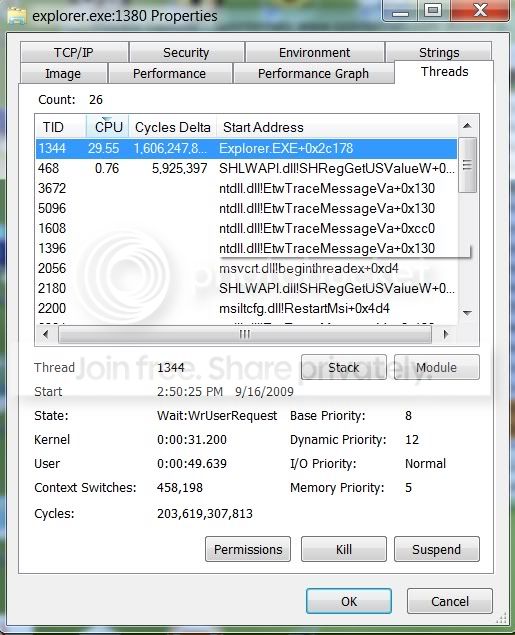
Explorer.exe taking up 15-30% CPU usage when moving mou

kevindd992002

New member
Power User
Local time
11:11 PM
Messages
373
I don't have any programs opened just the task manager. When I'm not moving the mouse my CPU usage stay from 0-2% but as soon as I move the mouse pointer, even though just a bit, it shoots up to 30%!!!!

Why is that happening? I'm really frustrated about it.

Thanks.
 

My Computer My Computer

Computer Manufacturer/Model Number
Sager NP8130
OS
Windows 7 Ultimate x6
CPU
i5 2670QM
Memory
2x4GB RAM Kingston HyperX Memory DDR3 1600 MHz Sticks
Graphics Card(s)
Nvidia GeForce GTX 560M
Sound Card
Realtek HD Audio (Built-in)
Screen Resolution
1920x1080
Hard Drives
128GB Crucial M4 SSD
500GB Seagate 7200RPM HDD
Internet Speed
12Mbps down/4Mbps up
I don't have any programs opened just the task manager. When I'm not moving the mouse my CPU usage stay from 0-2% but as soon as I move the mouse pointer, even though just a bit, it shoots up to 30%!!!!

Why is that happening? I'm really frustrated about it.

Thanks.


In order to help you we need you to fill in your system specs (lower left corner) so we know what hardware you have.

thanks

Ken
 

My Computer My Computer

Computer Manufacturer/Model Number
HP Pavillion dv-7 1005 Tx
OS
Win 8 Release candidate 8400
CPU
[email protected]
Memory
4 gigs
Graphics Card(s)
Nvidia 9600M
Sound Card
HD built-in
Monitor(s) Displays
17" Wxga
Screen Resolution
1440x900
Cooling
none
Internet Speed
45Mb down 5Mb up
What version of windows 7 are you running?

Did you obtain it legitly?
If not do the MD5 sums match up?

If its hacked im assuming your using an activation hack. Which could be causing it.
 

My Computer My Computer

Computer Manufacturer/Model Number
SMN-Productions
OS
Windows 7 x86/x64, Server 2008r2, Web Server 2008
CPU
i7 v2 3930K Steping stone 2
Motherboard
ASUS Rampage IV Extreme
Memory
G.SKILL Ripjaws Z Series 32GB
Graphics Card(s)
AMD HD 5770
Monitor(s) Displays
Acer 21" and Samsung 20"
Hard Drives
Patriot Pyro 80GB
PSU
1000 Watt
Case
HAF-X
Cooling
4 Fans
Keyboard
Black Widow Ultimate
RTM 7500 x64.. I got it from torrent but yes the MD5 sums match up perfectly with the original one.

I'm not using an activation hack. Still on trial mode.
 

My Computer My Computer

Computer Manufacturer/Model Number
Sager NP8130
OS
Windows 7 Ultimate x6
CPU
i5 2670QM
Memory
2x4GB RAM Kingston HyperX Memory DDR3 1600 MHz Sticks
Graphics Card(s)
Nvidia GeForce GTX 560M
Sound Card
Realtek HD Audio (Built-in)
Screen Resolution
1920x1080
Hard Drives
128GB Crucial M4 SSD
500GB Seagate 7200RPM HDD
Internet Speed
12Mbps down/4Mbps up
I don't have any programs opened just the task manager. When I'm not moving the mouse my CPU usage stay from 0-2% but as soon as I move the mouse pointer, even though just a bit, it shoots up to 30%!!!!

Why is that happening? I'm really frustrated about it.

Thanks.


In order to help you we need you to fill in your system specs (lower left corner) so we know what hardware you have.

thanks

Ken

Updated my specs list.
 

My Computer My Computer

Computer Manufacturer/Model Number
Sager NP8130
OS
Windows 7 Ultimate x6
CPU
i5 2670QM
Memory
2x4GB RAM Kingston HyperX Memory DDR3 1600 MHz Sticks
Graphics Card(s)
Nvidia GeForce GTX 560M
Sound Card
Realtek HD Audio (Built-in)
Screen Resolution
1920x1080
Hard Drives
128GB Crucial M4 SSD
500GB Seagate 7200RPM HDD
Internet Speed
12Mbps down/4Mbps up
What program can I use (and how do I use it) to monitor the thread activities of the explorer.exe process?

Is this the only way to determine which thread is causing explorer.exe to be using high cpu usage?

I just noticed that even though I totally don't move the mouse pointer, after 30 seconds or so, the CPU usage just boosts up high and after 1 second it drops to 0-1% again.

BUT, continually moving the mouse pointer will maintain the high CPU usage 20-30%.
 

My Computer My Computer

Computer Manufacturer/Model Number
Sager NP8130
OS
Windows 7 Ultimate x6
CPU
i5 2670QM
Memory
2x4GB RAM Kingston HyperX Memory DDR3 1600 MHz Sticks
Graphics Card(s)
Nvidia GeForce GTX 560M
Sound Card
Realtek HD Audio (Built-in)
Screen Resolution
1920x1080
Hard Drives
128GB Crucial M4 SSD
500GB Seagate 7200RPM HDD
Internet Speed
12Mbps down/4Mbps up
The best tools for this type of investigation are those in the sysinternals suite

Windows Sysinternals: Documentation, downloads and additional resources

In particular for this case I would look at

Autoruns - what automatically starts

Process Explorer - Enhanced task manager with more in depth information

Process Monitor - list process use over time for particular process or processes

Full details and instructions are available on the site
 

My Computers My Computers

System One System Two

  • Computer type
    PC/Desktop
    Computer Manufacturer/Model Number
    ChillBlast - Custom to my design
    OS
    Windows 11 Pro x64 [Latest Release and Release Preview]
    CPU
    Ryzen 9 5950X, 3.8 - 5.2 MHz
    Motherboard
    Asus Prime X570-Pro
    Memory
    64GB [2 x 32GB] DDR4 3200MHz
    Graphics Card(s)
    4GB NVIDIA GEFORCE GTX 1650 Ti
    Sound Card
    On-board SPDIF to 5.1 System + HDMI [5.1 system]
    Monitor(s) Displays
    32" UHD 32 Bit HDR Monitor + 43" UHD 4K 32Bit HDR TV
    Screen Resolution
    2 x 3840 x 2160 @60Hz
    Hard Drives
    1TB M2 SSD OS, 500GB Fast Access SSD, 2 x 8TB Data + Various Externals from 1TB to 4TB, 10TB NAS
    PSU
    NZXT C750 80 PLUS Gold 750W Modular PSU
    Case
    Workstation Case [Matt Black]
    Cooling
    NZXT Kraken X63 280mm CPU Cooler +2x Quiet Case fans
    Keyboard
    Logitech Wireless MX Keys & K400 + others
    Mouse
    Logitech Wireless MX Master 3S
    Internet Speed
    920 MB Down 50 MB Up
    Antivirus
    BitDefender Total Security Pro
    Browser
    Chrome (always run latest Non-Beta)
    Other Info
    Also run ...
    Laptop - Quad 8GB - Windows 10 Pro x64
    Nexus 7 Android tablet x2
    Samsung 10.2" tablet
    Blackview TAB 8 4G Android Tablet c/w Keyboard
    Wacom Intuos Pro Medium Pen Pad
    Wacom Intuos Pro Small Pen Pad
    Wacom Expresskeys Remote
    Loopdeck+ Graphics Controller
    Shuttle Pro v2 Control
  • Computer type
    Laptop
    System Manufacturer/Model Number
    Dell XPS 17 10750H
    OS
    Windows 11 Pro x64 Latest RP
    CPU
    Intel I7 10750H 5.0GHz
    Motherboard
    Dell XPS
    Memory
    32GB [2x16GB] DDR4 2933 MHz
    Graphics Card(s)
    nVidia GTX1650Ti 4 GB GDDR6
    Sound Card
    Stock [Realtek] 4 Speaker
    Monitor(s) Displays
    17" IPS UHD+ Infinity Edge Touchscreen
    Screen Resolution
    3840 x 2400
    Hard Drives
    2TB M2 NVMe, 4TB External + various 500GB & 1TB External NVMe (also have access to spinner HDD from
    PSU
    Stock
    Case
    Stock XPS Aluminium & Carbon Fibre
    Cooling
    Stock - Active Fan Control
    Keyboard
    Backlit + Various Logitech
    Mouse
    Stock Track Pad + Logitech MX Trackball
    Internet Speed
    72 MB Down 18MB Up
    Browser
    Chrome
    Other Info
    Also run ...
    Laptop - Quad 8GB - Windows 10 Pro x64
    Nexus 7 Android tablet x2
    10.2" tablet
    Sony Z3 Android Smartphone
    Wacom Intuos Pro Medium Pen Pad
    Wacom Intuos Pro Small Pen Pad
    Wacom Expresskeys Remote
    Loopdeck+ Graphics Controller
    Shuttle Pro v2 Control Pad
    10TB NAS
Here's the output of Process Explorer while moving my mouse pointer:

Untitled-4.jpg
 

My Computer My Computer

Computer Manufacturer/Model Number
Sager NP8130
OS
Windows 7 Ultimate x6
CPU
i5 2670QM
Memory
2x4GB RAM Kingston HyperX Memory DDR3 1600 MHz Sticks
Graphics Card(s)
Nvidia GeForce GTX 560M
Sound Card
Realtek HD Audio (Built-in)
Screen Resolution
1920x1080
Hard Drives
128GB Crucial M4 SSD
500GB Seagate 7200RPM HDD
Internet Speed
12Mbps down/4Mbps up
build 7500? Wasnt aware of such a build.
 

My Computer My Computer

Computer Manufacturer/Model Number
self built
OS
Windows 7 Professional 64-bit
CPU
Intel E8400 3GHz
Motherboard
Intel DX48BT2
Memory
Kingston PC3-10700H 4Gb
Graphics Card(s)
XFX Radeon HD 5850 BlackEd.
Sound Card
Asus Xonar DG
Monitor(s) Displays
2x Samsung SM-T220HD 22"
Screen Resolution
1680x1050 on two monitors
Hard Drives
OCZ Vertex 2 120gb 3.5" (OS)
Seagate Momentus XT 500gb
Samsung F3 1Tb (games)
2x Samsung F1 1Tb
PSU
Thermaltake ToughPower 850w
Case
Thermaltake Armor
Cooling
Scythe Mugen II
Keyboard
Microsoft Comfort Curve USB
Mouse
Razer Diamondback 3G
Internet Speed
8128/443
Looking at your specs - are you using the Logitec drivers for the mouse? - if so you may want to disable these (uninstall) and try running with just the default Microsoft drivers.
It may be an incompatibility between the current drivers and windows 7.

I have seen this with other Logitec product drivers during the Windows 7 Development.
 

My Computers My Computers

System One System Two

  • Computer type
    PC/Desktop
    Computer Manufacturer/Model Number
    ChillBlast - Custom to my design
    OS
    Windows 11 Pro x64 [Latest Release and Release Preview]
    CPU
    Ryzen 9 5950X, 3.8 - 5.2 MHz
    Motherboard
    Asus Prime X570-Pro
    Memory
    64GB [2 x 32GB] DDR4 3200MHz
    Graphics Card(s)
    4GB NVIDIA GEFORCE GTX 1650 Ti
    Sound Card
    On-board SPDIF to 5.1 System + HDMI [5.1 system]
    Monitor(s) Displays
    32" UHD 32 Bit HDR Monitor + 43" UHD 4K 32Bit HDR TV
    Screen Resolution
    2 x 3840 x 2160 @60Hz
    Hard Drives
    1TB M2 SSD OS, 500GB Fast Access SSD, 2 x 8TB Data + Various Externals from 1TB to 4TB, 10TB NAS
    PSU
    NZXT C750 80 PLUS Gold 750W Modular PSU
    Case
    Workstation Case [Matt Black]
    Cooling
    NZXT Kraken X63 280mm CPU Cooler +2x Quiet Case fans
    Keyboard
    Logitech Wireless MX Keys & K400 + others
    Mouse
    Logitech Wireless MX Master 3S
    Internet Speed
    920 MB Down 50 MB Up
    Antivirus
    BitDefender Total Security Pro
    Browser
    Chrome (always run latest Non-Beta)
    Other Info
    Also run ...
    Laptop - Quad 8GB - Windows 10 Pro x64
    Nexus 7 Android tablet x2
    Samsung 10.2" tablet
    Blackview TAB 8 4G Android Tablet c/w Keyboard
    Wacom Intuos Pro Medium Pen Pad
    Wacom Intuos Pro Small Pen Pad
    Wacom Expresskeys Remote
    Loopdeck+ Graphics Controller
    Shuttle Pro v2 Control
  • Computer type
    Laptop
    System Manufacturer/Model Number
    Dell XPS 17 10750H
    OS
    Windows 11 Pro x64 Latest RP
    CPU
    Intel I7 10750H 5.0GHz
    Motherboard
    Dell XPS
    Memory
    32GB [2x16GB] DDR4 2933 MHz
    Graphics Card(s)
    nVidia GTX1650Ti 4 GB GDDR6
    Sound Card
    Stock [Realtek] 4 Speaker
    Monitor(s) Displays
    17" IPS UHD+ Infinity Edge Touchscreen
    Screen Resolution
    3840 x 2400
    Hard Drives
    2TB M2 NVMe, 4TB External + various 500GB & 1TB External NVMe (also have access to spinner HDD from
    PSU
    Stock
    Case
    Stock XPS Aluminium & Carbon Fibre
    Cooling
    Stock - Active Fan Control
    Keyboard
    Backlit + Various Logitech
    Mouse
    Stock Track Pad + Logitech MX Trackball
    Internet Speed
    72 MB Down 18MB Up
    Browser
    Chrome
    Other Info
    Also run ...
    Laptop - Quad 8GB - Windows 10 Pro x64
    Nexus 7 Android tablet x2
    10.2" tablet
    Sony Z3 Android Smartphone
    Wacom Intuos Pro Medium Pen Pad
    Wacom Intuos Pro Small Pen Pad
    Wacom Expresskeys Remote
    Loopdeck+ Graphics Controller
    Shuttle Pro v2 Control Pad
    10TB NAS

My Computer My Computer

Computer Manufacturer/Model Number
Sager NP8130
OS
Windows 7 Ultimate x6
CPU
i5 2670QM
Memory
2x4GB RAM Kingston HyperX Memory DDR3 1600 MHz Sticks
Graphics Card(s)
Nvidia GeForce GTX 560M
Sound Card
Realtek HD Audio (Built-in)
Screen Resolution
1920x1080
Hard Drives
128GB Crucial M4 SSD
500GB Seagate 7200RPM HDD
Internet Speed
12Mbps down/4Mbps up
Looking at your specs - are you using the Logitec drivers for the mouse? - if so you may want to disable these (uninstall) and try running with just the default Microsoft drivers.
It may be an incompatibility between the current drivers and windows 7.

I have seen this with other Logitec product drivers during the Windows 7 Development.

I never used those drivers :) I just plug in the nano receiver of my mouse in Win7 and do nothing with the drivers.
 

My Computer My Computer

Computer Manufacturer/Model Number
Sager NP8130
OS
Windows 7 Ultimate x6
CPU
i5 2670QM
Memory
2x4GB RAM Kingston HyperX Memory DDR3 1600 MHz Sticks
Graphics Card(s)
Nvidia GeForce GTX 560M
Sound Card
Realtek HD Audio (Built-in)
Screen Resolution
1920x1080
Hard Drives
128GB Crucial M4 SSD
500GB Seagate 7200RPM HDD
Internet Speed
12Mbps down/4Mbps up
Next step would be, if possible, to try a different mouse, Wired USB or PS2 to eliminate the hardware.

Other than that If you use process monitor, set a trace going filtered to explorer processes, give a second or two to let the system settle, then move the mouse to raise the CPU activity then stop the trace and see what processes are called within explorer. once you know what processes are actually causing the issue a google of each process should identify the problem
 

My Computers My Computers

System One System Two

  • Computer type
    PC/Desktop
    Computer Manufacturer/Model Number
    ChillBlast - Custom to my design
    OS
    Windows 11 Pro x64 [Latest Release and Release Preview]
    CPU
    Ryzen 9 5950X, 3.8 - 5.2 MHz
    Motherboard
    Asus Prime X570-Pro
    Memory
    64GB [2 x 32GB] DDR4 3200MHz
    Graphics Card(s)
    4GB NVIDIA GEFORCE GTX 1650 Ti
    Sound Card
    On-board SPDIF to 5.1 System + HDMI [5.1 system]
    Monitor(s) Displays
    32" UHD 32 Bit HDR Monitor + 43" UHD 4K 32Bit HDR TV
    Screen Resolution
    2 x 3840 x 2160 @60Hz
    Hard Drives
    1TB M2 SSD OS, 500GB Fast Access SSD, 2 x 8TB Data + Various Externals from 1TB to 4TB, 10TB NAS
    PSU
    NZXT C750 80 PLUS Gold 750W Modular PSU
    Case
    Workstation Case [Matt Black]
    Cooling
    NZXT Kraken X63 280mm CPU Cooler +2x Quiet Case fans
    Keyboard
    Logitech Wireless MX Keys & K400 + others
    Mouse
    Logitech Wireless MX Master 3S
    Internet Speed
    920 MB Down 50 MB Up
    Antivirus
    BitDefender Total Security Pro
    Browser
    Chrome (always run latest Non-Beta)
    Other Info
    Also run ...
    Laptop - Quad 8GB - Windows 10 Pro x64
    Nexus 7 Android tablet x2
    Samsung 10.2" tablet
    Blackview TAB 8 4G Android Tablet c/w Keyboard
    Wacom Intuos Pro Medium Pen Pad
    Wacom Intuos Pro Small Pen Pad
    Wacom Expresskeys Remote
    Loopdeck+ Graphics Controller
    Shuttle Pro v2 Control
  • Computer type
    Laptop
    System Manufacturer/Model Number
    Dell XPS 17 10750H
    OS
    Windows 11 Pro x64 Latest RP
    CPU
    Intel I7 10750H 5.0GHz
    Motherboard
    Dell XPS
    Memory
    32GB [2x16GB] DDR4 2933 MHz
    Graphics Card(s)
    nVidia GTX1650Ti 4 GB GDDR6
    Sound Card
    Stock [Realtek] 4 Speaker
    Monitor(s) Displays
    17" IPS UHD+ Infinity Edge Touchscreen
    Screen Resolution
    3840 x 2400
    Hard Drives
    2TB M2 NVMe, 4TB External + various 500GB & 1TB External NVMe (also have access to spinner HDD from
    PSU
    Stock
    Case
    Stock XPS Aluminium & Carbon Fibre
    Cooling
    Stock - Active Fan Control
    Keyboard
    Backlit + Various Logitech
    Mouse
    Stock Track Pad + Logitech MX Trackball
    Internet Speed
    72 MB Down 18MB Up
    Browser
    Chrome
    Other Info
    Also run ...
    Laptop - Quad 8GB - Windows 10 Pro x64
    Nexus 7 Android tablet x2
    10.2" tablet
    Sony Z3 Android Smartphone
    Wacom Intuos Pro Medium Pen Pad
    Wacom Intuos Pro Small Pen Pad
    Wacom Expresskeys Remote
    Loopdeck+ Graphics Controller
    Shuttle Pro v2 Control Pad
    10TB NAS
Next step would be, if possible, to try a different mouse, Wired USB or PS2 to eliminate the hardware.

Other than that If you use process monitor, set a trace going filtered to explorer processes, give a second or two to let the system settle, then move the mouse to raise the CPU activity then stop the trace and see what processes are called within explorer. once you know what processes are actually causing the issue a google of each process should identify the problem

Tried using a separate mouse, same result. Take note, this problem was not occuring when I was on Vista x64.

Also, as I've mentioned in my above posts even WITHOUT moving the mouse pointer, the explorer.exe CPU usage still goes up after 30 seconds and comes back to 0-1% again after 2 seconds.

About the process monitor steps you mentioned, how do you exactly do that? Sorry, I'm not familiar with using process monitor and similar programs.
 

My Computer My Computer

Computer Manufacturer/Model Number
Sager NP8130
OS
Windows 7 Ultimate x6
CPU
i5 2670QM
Memory
2x4GB RAM Kingston HyperX Memory DDR3 1600 MHz Sticks
Graphics Card(s)
Nvidia GeForce GTX 560M
Sound Card
Realtek HD Audio (Built-in)
Screen Resolution
1920x1080
Hard Drives
128GB Crucial M4 SSD
500GB Seagate 7200RPM HDD
Internet Speed
12Mbps down/4Mbps up
What process monitor is basically is a recorder for task manager.

It produces a stream of data organised by time, showing each change in the system changes which are often missed while watching live.

The detailed page here ...

Process Monitor

gives much better information, and presented much better, than I can ;)

The right hand panel links to examples of using the tool

I've used the tool for many years and have only scratched the surface, It's not a solution to a problem in itself but can enable you to see what is really happening.
 

My Computers My Computers

System One System Two

  • Computer type
    PC/Desktop
    Computer Manufacturer/Model Number
    ChillBlast - Custom to my design
    OS
    Windows 11 Pro x64 [Latest Release and Release Preview]
    CPU
    Ryzen 9 5950X, 3.8 - 5.2 MHz
    Motherboard
    Asus Prime X570-Pro
    Memory
    64GB [2 x 32GB] DDR4 3200MHz
    Graphics Card(s)
    4GB NVIDIA GEFORCE GTX 1650 Ti
    Sound Card
    On-board SPDIF to 5.1 System + HDMI [5.1 system]
    Monitor(s) Displays
    32" UHD 32 Bit HDR Monitor + 43" UHD 4K 32Bit HDR TV
    Screen Resolution
    2 x 3840 x 2160 @60Hz
    Hard Drives
    1TB M2 SSD OS, 500GB Fast Access SSD, 2 x 8TB Data + Various Externals from 1TB to 4TB, 10TB NAS
    PSU
    NZXT C750 80 PLUS Gold 750W Modular PSU
    Case
    Workstation Case [Matt Black]
    Cooling
    NZXT Kraken X63 280mm CPU Cooler +2x Quiet Case fans
    Keyboard
    Logitech Wireless MX Keys & K400 + others
    Mouse
    Logitech Wireless MX Master 3S
    Internet Speed
    920 MB Down 50 MB Up
    Antivirus
    BitDefender Total Security Pro
    Browser
    Chrome (always run latest Non-Beta)
    Other Info
    Also run ...
    Laptop - Quad 8GB - Windows 10 Pro x64
    Nexus 7 Android tablet x2
    Samsung 10.2" tablet
    Blackview TAB 8 4G Android Tablet c/w Keyboard
    Wacom Intuos Pro Medium Pen Pad
    Wacom Intuos Pro Small Pen Pad
    Wacom Expresskeys Remote
    Loopdeck+ Graphics Controller
    Shuttle Pro v2 Control
  • Computer type
    Laptop
    System Manufacturer/Model Number
    Dell XPS 17 10750H
    OS
    Windows 11 Pro x64 Latest RP
    CPU
    Intel I7 10750H 5.0GHz
    Motherboard
    Dell XPS
    Memory
    32GB [2x16GB] DDR4 2933 MHz
    Graphics Card(s)
    nVidia GTX1650Ti 4 GB GDDR6
    Sound Card
    Stock [Realtek] 4 Speaker
    Monitor(s) Displays
    17" IPS UHD+ Infinity Edge Touchscreen
    Screen Resolution
    3840 x 2400
    Hard Drives
    2TB M2 NVMe, 4TB External + various 500GB & 1TB External NVMe (also have access to spinner HDD from
    PSU
    Stock
    Case
    Stock XPS Aluminium & Carbon Fibre
    Cooling
    Stock - Active Fan Control
    Keyboard
    Backlit + Various Logitech
    Mouse
    Stock Track Pad + Logitech MX Trackball
    Internet Speed
    72 MB Down 18MB Up
    Browser
    Chrome
    Other Info
    Also run ...
    Laptop - Quad 8GB - Windows 10 Pro x64
    Nexus 7 Android tablet x2
    10.2" tablet
    Sony Z3 Android Smartphone
    Wacom Intuos Pro Medium Pen Pad
    Wacom Intuos Pro Small Pen Pad
    Wacom Expresskeys Remote
    Loopdeck+ Graphics Controller
    Shuttle Pro v2 Control Pad
    10TB NAS
What process monitor is basically is a recorder for task manager.

It produces a stream of data organised by time, showing each change in the system changes which are often missed while watching live.

The detailed page here ...

Process Monitor

gives much better information, and presented much better, than I can ;)

The right hand panel links to examples of using the tool

I've used the tool for many years and have only scratched the surface, It's not a solution to a problem in itself but can enable you to see what is really happening.

I clicked the link but I don't seem to find the examples in the right hand panel you were talking about :(

I also want to know which specific process is causing this.
 

My Computer My Computer

Computer Manufacturer/Model Number
Sager NP8130
OS
Windows 7 Ultimate x6
CPU
i5 2670QM
Memory
2x4GB RAM Kingston HyperX Memory DDR3 1600 MHz Sticks
Graphics Card(s)
Nvidia GeForce GTX 560M
Sound Card
Realtek HD Audio (Built-in)
Screen Resolution
1920x1080
Hard Drives
128GB Crucial M4 SSD
500GB Seagate 7200RPM HDD
Internet Speed
12Mbps down/4Mbps up
I was already able to trace explorer.exe and all processes I get have a PID of 1380.
 

My Computer My Computer

Computer Manufacturer/Model Number
Sager NP8130
OS
Windows 7 Ultimate x6
CPU
i5 2670QM
Memory
2x4GB RAM Kingston HyperX Memory DDR3 1600 MHz Sticks
Graphics Card(s)
Nvidia GeForce GTX 560M
Sound Card
Realtek HD Audio (Built-in)
Screen Resolution
1920x1080
Hard Drives
128GB Crucial M4 SSD
500GB Seagate 7200RPM HDD
Internet Speed
12Mbps down/4Mbps up

My Computer My Computer

Computer Manufacturer/Model Number
Sager NP8130
OS
Windows 7 Ultimate x6
CPU
i5 2670QM
Memory
2x4GB RAM Kingston HyperX Memory DDR3 1600 MHz Sticks
Graphics Card(s)
Nvidia GeForce GTX 560M
Sound Card
Realtek HD Audio (Built-in)
Screen Resolution
1920x1080
Hard Drives
128GB Crucial M4 SSD
500GB Seagate 7200RPM HDD
Internet Speed
12Mbps down/4Mbps up
Is this actually causing a problem, or are you pursuing this just because your curious?? You have plenty of CPU power, so I wouldnt spend a lot of time worrying about it.... Spend it on enjoying your new laptop...:D

PS... I'm jealous!!
 

My Computer My Computer

Computer type
PC/Desktop
Computer Manufacturer/Model Number
LENOVO K450 @3.0GHZ
OS
64-bit Windows 8.1 Pro
CPU
Core(TM) i5 CPU 4330 Haswell @ 3.20GHz
Motherboard
LENOVO
Memory
12.00 GB
Graphics Card(s)
Intel(R) HD Graphics
Sound Card
Intel HD integtrated
Monitor(s) Displays
HP 25' ISP Monitor
Screen Resolution
1900/1020
Hard Drives
(1) ST1000DM003-1CH162 (2) Generic STORAGE DEVICE USB Device (3) Generic STORAGE DEVICE USB Device
Internet Speed
100mb down/10mb up
I tried moving the mouse faster and the CPU moves at 5-7 %. Yours is a bit high than what it should be. Does it happen everytime?
 

My Computer My Computer

Computer Manufacturer/Model Number
Samsung NP530U4B-S02IN
OS
Windows® 8 Pro (64-bit)
CPU
Intel® Core™ i5 Processor 2467M (1.60GHz, 3MB L3 Cache)
Motherboard
Samsung Electronics
Memory
6GB DDR3 System Memory at 1,333MHz (on BD 4GB + 2GB x 1)
Graphics Card(s)
AMD Radeon™ HD7550M 1GB DDR3 (Ext. Graphic)
Sound Card
Realtek High Definition Audio
Monitor(s) Displays
35.56cm (14.0) SuperBright 300nit HD LED Display
Screen Resolution
1366x768
Hard Drives
1TB S-ATA II Hard Drive (5400RPM) with ExpressCache 16GB SSD
Internet Speed
sucks
Antivirus
Microsoft Security Essentials
Browser
Google Chrome (Sync enabled)
Back
Top