Solved SSD on Fujitsu Laptop Not Recognized Now - Error Code 00410001

ArchiMark

New member
Member
Local time
3:28 AM
Messages
38
Hope someone can please advise....

Have little Fujitsu laptop (UH900) with a SSD.

Overall, has worked OK, running Win7HP...

However, periodically, have had some crashes. But in the past, always able to recover.

Now, when I start up, I get the 'no operating system' found message.

So, tried to reinstall Win7 from disk. Problem is that it does not see the SSD, so, can't install.

Ran the Fujitsu diagnostic program at startup (checks cpu, memory, storage).

Got error code '00410001, May be hardware error on HDD'.

Thought I'd try running chkdsk from Win 7 install disk, at command prompt. However, can't seem to get it to run command. Always get 'The syntax of the command is incorrect'.

Here's what I try to do:

X:\Sources>X: chkdsk C: /R


At this point, not sure what to do....

Obviously, one scenario is that the SSD or controller failed. But before trying to get laptop fixed somewhere, I'd like to make sure I've tried everything reasonable that I can do to see if I can get SSD recognized by system and thus reinstall Windows.

Any suggestions????

Thanks for any and all input!

Mark
 

My Computer My Computer

Computer type
PC/Desktop
Computer Manufacturer/Model Number
NewPad Q20
OS
Windows 7 Home Premium
CPU
Atom N2600 1.6GHz
Memory
2GB
Graphics Card(s)
GMA 3600
Monitor(s) Displays
8.9" Touch
Screen Resolution
1024 x 600
Hard Drives
32GB SSD
Is the SSD seen in the BIOS?
 

My Computer My Computer

Computer type
PC/Desktop
Computer Manufacturer/Model Number
Ignatz Special; 4 speed manual gearbox; factory air conditioning; one of one
OS
Windows 7 Home Premium SP1, 64-bit
CPU
Intel Skylake i5-6600K, not overclocked
Motherboard
AsRock Z170M Extreme 4, micro ATX
Memory
8 GB HyperX DDR4-2666 (2 x 4 GB)
Graphics Card(s)
none; graphics are integrated on CPU
Sound Card
onboard: Realtek ALC1150; external: USB Behringer UF0-202
Monitor(s) Displays
Dell S2340M 23 inch IPS
Screen Resolution
1600 x 900
Hard Drives
System: Crucial MX100 series SSD, 128 GB;
Data: Samsung Spinpoint 103SJ, 1 TB;
Backup: WD Caviar Green WD30EZRX-00D8PB0, 3 TB
PSU
Rosewill SilentNight 500 watt fanless, semi-modular
Case
Antec Solo II
Cooling
Noctua NH-U12S; Noctua F12 intake, Noctua S12A exhaust
Keyboard
Microsoft 200 6JH-00001 USB
Mouse
Dell or Microsoft optical wired; USB
Antivirus
Microsoft Security Essentials and Malwarebytes Premium
Browser
Pale Moon
Other Info
All fans PWM; speeds at idle: CPU circa 500 rpm; intake circa 600 rpm; exhaust circa 600 rpm; CPU temps 27 idle and 47 C load in a warm room (27 C/81 F) when running Intel Extreme Tuning Utility stress test.

My Computer My Computer

Computer type
PC/Desktop
Computer Manufacturer/Model Number
NewPad Q20
OS
Windows 7 Home Premium
CPU
Atom N2600 1.6GHz
Memory
2GB
Graphics Card(s)
GMA 3600
Monitor(s) Displays
8.9" Touch
Screen Resolution
1024 x 600
Hard Drives
32GB SSD

My Computer My Computer

Computer type
PC/Desktop
Computer Manufacturer/Model Number
Custom Build
OS
Windows 7 Home Premium 32-Bit - Build 7600 SP1
CPU
Intel Core i3-2120 3.30Ghz
Motherboard
Asus P8Z68-V LX Intel Z68 Socket H2 ATX
Memory
Kingston 4 GB DDR3 1333 mhz
Graphics Card(s)
AMD Radeon HD6670
Sound Card
Sound Blaster Audigy SE 24-Bit
Monitor(s) Displays
Asus VE228
Screen Resolution
1440 X 900
Hard Drives
OCZ Vertex 3 120 GB Sata 3 SSD ==
Kingston SH103/S3 120 G Hyper X 120 GB SSD ==
Western Digital 500 GB Caviar Green 7200 RPM ==
PSU
Corsair CX600M == 600 Watt
Case
NZXT Apollo - Silver with Clear Side Panel
Cooling
Three 120 mm Fans
Keyboard
Microsoft Natural 4000
Mouse
Microsoft Custom Optical 3000
Internet Speed
AT&T Fiber Optic Wireless Network
Antivirus
Microsoft Security Essentials
Browser
Chrome
Other Info
120 mm Blue LED Fan -- Three Blue LED Lazer Light Sticks
Hmmm...............

I know almost nothing about laptops. My first inclination would be to reseat or replace any cables that might be connected to the hard drive and/or removing the SSD and see if it is recognized when connected to some other computer.

Googling that error gives a few ideas:

Is the drive over 80% full?

Is the BIOS set to defaults?
 

My Computer My Computer

Computer type
PC/Desktop
Computer Manufacturer/Model Number
Ignatz Special; 4 speed manual gearbox; factory air conditioning; one of one
OS
Windows 7 Home Premium SP1, 64-bit
CPU
Intel Skylake i5-6600K, not overclocked
Motherboard
AsRock Z170M Extreme 4, micro ATX
Memory
8 GB HyperX DDR4-2666 (2 x 4 GB)
Graphics Card(s)
none; graphics are integrated on CPU
Sound Card
onboard: Realtek ALC1150; external: USB Behringer UF0-202
Monitor(s) Displays
Dell S2340M 23 inch IPS
Screen Resolution
1600 x 900
Hard Drives
System: Crucial MX100 series SSD, 128 GB;
Data: Samsung Spinpoint 103SJ, 1 TB;
Backup: WD Caviar Green WD30EZRX-00D8PB0, 3 TB
PSU
Rosewill SilentNight 500 watt fanless, semi-modular
Case
Antec Solo II
Cooling
Noctua NH-U12S; Noctua F12 intake, Noctua S12A exhaust
Keyboard
Microsoft 200 6JH-00001 USB
Mouse
Dell or Microsoft optical wired; USB
Antivirus
Microsoft Security Essentials and Malwarebytes Premium
Browser
Pale Moon
Other Info
All fans PWM; speeds at idle: CPU circa 500 rpm; intake circa 600 rpm; exhaust circa 600 rpm; CPU temps 27 idle and 47 C load in a warm room (27 C/81 F) when running Intel Extreme Tuning Utility stress test.
Is the SSD seen in the BIOS?

Thanks for your help.....

No, does not see drive now....says:

Drive0 [None]

When I was installing my SSD, I had the same problem. I then took the cover off and reseated the SSD. It just wasn't in correctly. You might try that.

Hmmmm.....sounds like it worth a try.....although opening up this lil' laptop may be a bit of a challenge...but will try it.....

Thanks....
 

My Computer My Computer

Computer type
PC/Desktop
Computer Manufacturer/Model Number
NewPad Q20
OS
Windows 7 Home Premium
CPU
Atom N2600 1.6GHz
Memory
2GB
Graphics Card(s)
GMA 3600
Monitor(s) Displays
8.9" Touch
Screen Resolution
1024 x 600
Hard Drives
32GB SSD
Hmmmm.....sounds like it worth a try.....although opening up this lil' laptop may be a bit of a challenge...but will try it.....

Thanks....

Mine has five screws on the back that come out. Even after the screws were out, the cover was still in place. I had to put a screw driver under the edge of the cover and pull GENTLY to snap it up.
 

My Computer My Computer

Computer type
PC/Desktop
Computer Manufacturer/Model Number
Custom Build
OS
Windows 7 Home Premium 32-Bit - Build 7600 SP1
CPU
Intel Core i3-2120 3.30Ghz
Motherboard
Asus P8Z68-V LX Intel Z68 Socket H2 ATX
Memory
Kingston 4 GB DDR3 1333 mhz
Graphics Card(s)
AMD Radeon HD6670
Sound Card
Sound Blaster Audigy SE 24-Bit
Monitor(s) Displays
Asus VE228
Screen Resolution
1440 X 900
Hard Drives
OCZ Vertex 3 120 GB Sata 3 SSD ==
Kingston SH103/S3 120 G Hyper X 120 GB SSD ==
Western Digital 500 GB Caviar Green 7200 RPM ==
PSU
Corsair CX600M == 600 Watt
Case
NZXT Apollo - Silver with Clear Side Panel
Cooling
Three 120 mm Fans
Keyboard
Microsoft Natural 4000
Mouse
Microsoft Custom Optical 3000
Internet Speed
AT&T Fiber Optic Wireless Network
Antivirus
Microsoft Security Essentials
Browser
Chrome
Other Info
120 mm Blue LED Fan -- Three Blue LED Lazer Light Sticks
Hmmm...............

I know almost nothing about laptops. My first inclination would be to reseat or replace any cables that might be connected to the hard drive and/or removing the SSD and see if it is recognized when connected to some other computer.

Googling that error gives a few ideas:

Is the drive over 80% full?

Is the BIOS set to defaults?


Thanks for your input....

Drive may have been quite full....but don't remember exactly and of course right now have no way to check....[UPDATE: checked now that I can boot and drive is only about 20% full...]

I reset BIOS to defaults, I read that sometimes that helps fix this...but didn't in this case...

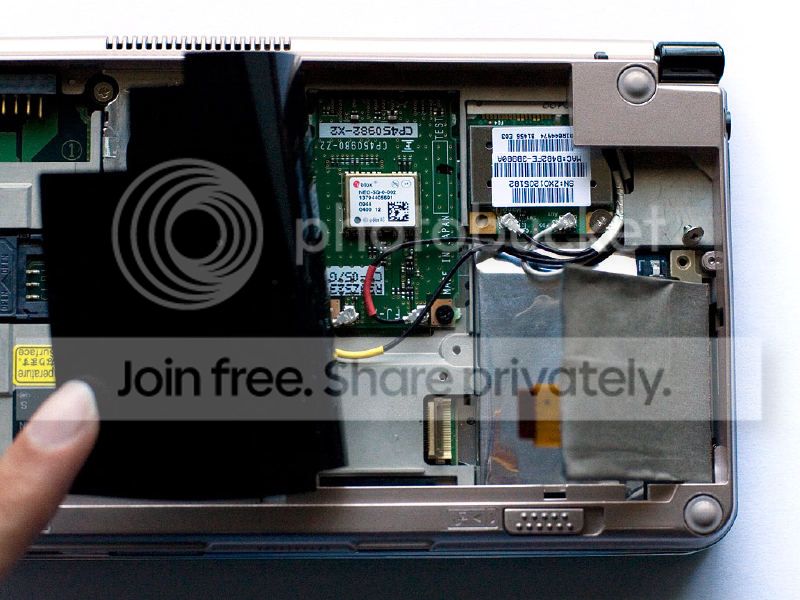
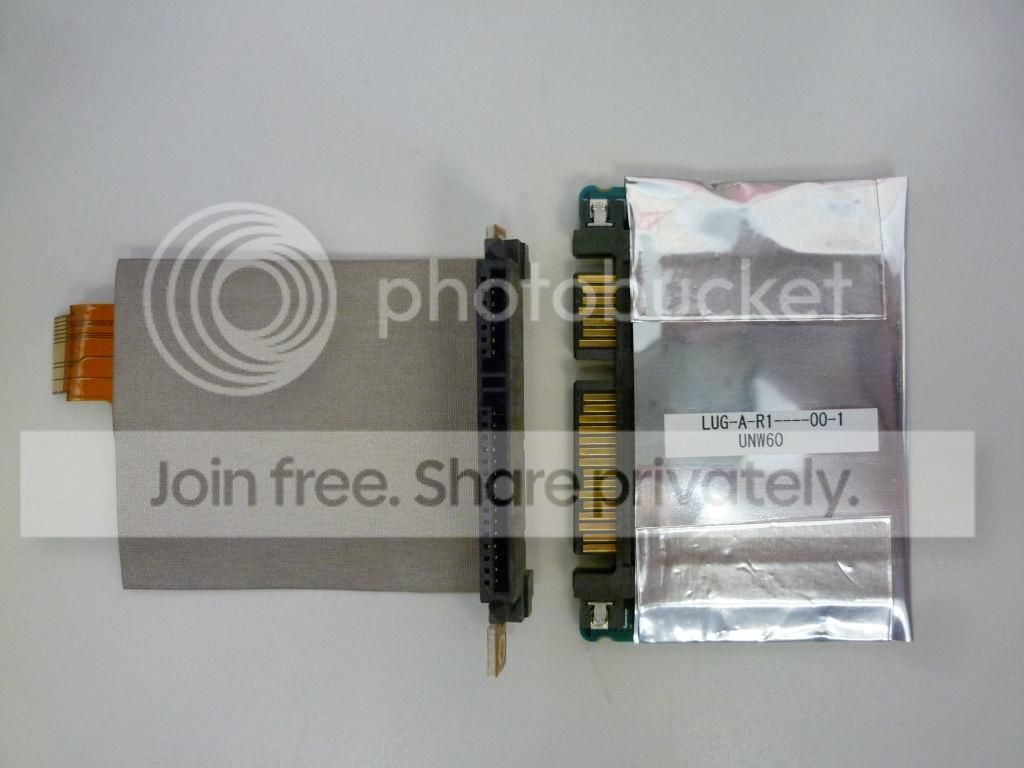
Meanwhile, SSD is more accessible that I had thought...after removing battery, I lifted up a thin plastic sheet in one corner and there it was underneath. Bit awkward to remove, but I got it out now...seemed like it was seated in there OK, but that's just from looking at it....

So, put SSD back in and reconnected cable, etc...

Just tried booting up and Voila!!! BIOS sees the SSD now and I can boot up normally!!!

Guess you just never know about these things....

Thank you all for your help!

For fun, I'm including the pics below of what it looked like under battery and the SSD and connector..

uh900ssd_zps712206c0.jpg

P1060461_zps0faba207.jpg
 

My Computer My Computer

Computer type
PC/Desktop
Computer Manufacturer/Model Number
NewPad Q20
OS
Windows 7 Home Premium
CPU
Atom N2600 1.6GHz
Memory
2GB
Graphics Card(s)
GMA 3600
Monitor(s) Displays
8.9" Touch
Screen Resolution
1024 x 600
Hard Drives
32GB SSD
Hmmmm.....sounds like it worth a try.....although opening up this lil' laptop may be a bit of a challenge...but will try it.....

Thanks....

Mine has five screws on the back that come out. Even after the screws were out, the cover was still in place. I had to put a screw driver under the edge of the cover and pull GENTLY to snap it up.

Thanks for your input.....posted pics of what mine looks like in post above...
 

My Computer My Computer

Computer type
PC/Desktop
Computer Manufacturer/Model Number
NewPad Q20
OS
Windows 7 Home Premium
CPU
Atom N2600 1.6GHz
Memory
2GB
Graphics Card(s)
GMA 3600
Monitor(s) Displays
8.9" Touch
Screen Resolution
1024 x 600
Hard Drives
32GB SSD
When I purchased a new laptop, I inserted an SSD that had been my computer.

I had to insert it a number of times - it simply wasn't connected totally- a little push got it recognized.
 

My Computer My Computer

Computer type
PC/Desktop
Computer Manufacturer/Model Number
Self-Built
OS
Windows 7 Professional X64
CPU
Core i7 (2nd gen) i7-2600K / 3.40GHz
Motherboard
ASUS P8Z77-V Intel 7 Series Motherboard
Memory
DDR3 2400MHz (OC) 16gb
Graphics Card(s)
Intel(R) HD Graphics 3000, -1988 Mb
Sound Card
8 ChannelsAudio Chipset Realtek ALC892
Monitor(s) Displays
LG 29UM65 Black 29"
Screen Resolution
2560 x 1080
Hard Drives
840 EVO 250 GB SSD ;2tb (2);Seagate;1tb Seagate; 750 gb Seagate; wd ext (2) 750 gb,WD 2tb X 2;WD 3TB Black
PSU
750 watt
Case
Thermaltake RX -1
Cooling
2120mm Fans Included 1Other Fan Ports 5x 200mm Fan Ports
Keyboard
Microsoft Digital Media Pro
Mouse
Microsoft Wireless 6000
Internet Speed
U-verse 18 mbps
Antivirus
MSE
Browser
Firefox, Chrome and my favorite: Pale Moon
Other Info
HdHomerun Dual Tuner.
SRS Audio Lab,
Pioneer BDR 208-DBK
PS3-What a difference in my Surround Sound Receiver!
HP 4540s - My new Toy.
Epson R280 Printer- To personalize my Dvds.
Canon MP 560 - For scanning.
When I purchased a new laptop, I inserted an SSD that had been my computer.

I had to insert it a number of times - it simply wasn't connected totally- a little push got it recognized.

Thanks for sharing your experience....

This has been a good lesson....

:geek:
 

My Computer My Computer

Computer type
PC/Desktop
Computer Manufacturer/Model Number
NewPad Q20
OS
Windows 7 Home Premium
CPU
Atom N2600 1.6GHz
Memory
2GB
Graphics Card(s)
GMA 3600
Monitor(s) Displays
8.9" Touch
Screen Resolution
1024 x 600
Hard Drives
32GB SSD
Glad you got it sorted out.:D
 

My Computer My Computer

Computer type
PC/Desktop
Computer Manufacturer/Model Number
Self-Built
OS
Windows 7 Professional X64
CPU
Core i7 (2nd gen) i7-2600K / 3.40GHz
Motherboard
ASUS P8Z77-V Intel 7 Series Motherboard
Memory
DDR3 2400MHz (OC) 16gb
Graphics Card(s)
Intel(R) HD Graphics 3000, -1988 Mb
Sound Card
8 ChannelsAudio Chipset Realtek ALC892
Monitor(s) Displays
LG 29UM65 Black 29"
Screen Resolution
2560 x 1080
Hard Drives
840 EVO 250 GB SSD ;2tb (2);Seagate;1tb Seagate; 750 gb Seagate; wd ext (2) 750 gb,WD 2tb X 2;WD 3TB Black
PSU
750 watt
Case
Thermaltake RX -1
Cooling
2120mm Fans Included 1Other Fan Ports 5x 200mm Fan Ports
Keyboard
Microsoft Digital Media Pro
Mouse
Microsoft Wireless 6000
Internet Speed
U-verse 18 mbps
Antivirus
MSE
Browser
Firefox, Chrome and my favorite: Pale Moon
Other Info
HdHomerun Dual Tuner.
SRS Audio Lab,
Pioneer BDR 208-DBK
PS3-What a difference in my Surround Sound Receiver!
HP 4540s - My new Toy.
Epson R280 Printer- To personalize my Dvds.
Canon MP 560 - For scanning.

My Computer My Computer

Computer type
PC/Desktop
Computer Manufacturer/Model Number
NewPad Q20
OS
Windows 7 Home Premium
CPU
Atom N2600 1.6GHz
Memory
2GB
Graphics Card(s)
GMA 3600
Monitor(s) Displays
8.9" Touch
Screen Resolution
1024 x 600
Hard Drives
32GB SSD
Back
Top