Strange USB Drive Showing in Device Manager

My Computer My Computer

At a glance

Desk 1: Win 7 Pro x32; Desk 2: Windows 10 x64
Computer type
PC/Desktop
Computer Manufacturer/Model Number
Dell Optiplex 360 and Optiplex 755
OS
Desk 1: Win 7 Pro x32; Desk 2: Windows 10 x64
Hard Drives
500GB Crucial SSD in both Desktops
Other Info
Buffalo 6TB NAS, Raid 1
That may be the way to go as the drive in question is most definitely not connected.
 

My Computer My Computer

At a glance

W7 Pro x64 SP1 | W10 Pro IP x64 | W8.1 Pro x6...i7-4790k @ 4GHz (4.4GHz Boost)16GB DDR3 Kingston HyperX Fury @ 1600MHz CL 9...EVGA GTX 980 Classified
Computer type
PC/Desktop
Computer Manufacturer/Model Number
Custom Build
OS
W7 Pro x64 SP1 | W10 Pro IP x64 | W8.1 Pro x64 VM | Linux Mint VM
CPU
i7-4790k @ 4GHz (4.4GHz Boost)
Motherboard
ASUS Sabertooth Z87 (BIOS Rev 2004)
Memory
16GB DDR3 Kingston HyperX Fury @ 1600MHz CL 9-9-9-27
Graphics Card(s)
EVGA GTX 980 Classified
Sound Card
Realtek Onboard
Monitor(s) Displays
Samsung S27D390
Screen Resolution
1920 x 1080
Hard Drives
240GB Intel 520 Series SSD |
Samsung 850 EVO 120GB SSD |
2TB WD Caviar Black |
2TB WD Caviar Green
PSU
Corsair HX850-80 Gold Modular
Case
Cooler Master Silencio 650
Cooling
Corsair H80i w/2 x Corsair SP120 | 2 x 120mm Noctua NF-S12B
Keyboard
Microsoft Sidewinder X4
Mouse
Gigabyte M6900 optical
Internet Speed
152mb
Antivirus
F-Secure
Browser
Firefox 38.0
Other Info
Backup Rig: Win 7 Pro 64-bit | AMD A10-5800k | ASUS F2A85-V Pro | 8GB Samsung DDR3 @1600MHz | 120GB Toshiba SDD | 2TB Seagate HDD | Cooler Master Silencio 550
I just had an idea

Burn a Knoppix Live CD (or use any other other free Linux variant). Look at the hardware IDs Linux reports (HW IDs are burned into device firmware. They're not Windows specific).

If you boot into an OS, and the OS reports that same USB id from Genesys, then you know that h/w is real and must be somewhere on your machine. Otherwise, not.

I think it should be straight forward. You just need to know the right Linux commands to create a hardware report. Unfortunately, i'm not a linux person. But if you post in one of the Linux forums, i'm sure some one could tell you how to do it

/* EDIT */
But should you did try a boot CD approach, you'd need make sure it support USB 3.0 since that device is showing up on the 3.0 controller
 
Last edited:

My Computer My Computer

At a glance

Desk 1: Win 7 Pro x32; Desk 2: Windows 10 x64
Computer type
PC/Desktop
Computer Manufacturer/Model Number
Dell Optiplex 360 and Optiplex 755
OS
Desk 1: Win 7 Pro x32; Desk 2: Windows 10 x64
Hard Drives
500GB Crucial SSD in both Desktops
Other Info
Buffalo 6TB NAS, Raid 1
Suggestion

I'll just throw in this suggestion as it might show a hidden drive. (unlikely but you never know)

Any change in what you see if you set your folder view and empty drive view options like this?

Drives View.jpg

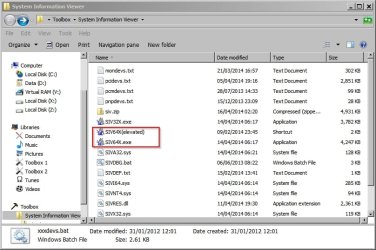
I don't know if you want to install software? SIV - System Information Viewer

It's probably a shot in the dark and I'm no expert on this but it might give you more info to go on.

Download is a zip (siv.zip) for Windows 64bit. If you extract and run siv64x.exe as administrator or elevated it should work okay. Basically it presents a lot of information a lot of which I'm still struggling to understand.

System Information Viewer.jpg

However from what I can determine from your posts I reckon that if you click the PCI BUS dropdown list arrow near the bottom right of the window then Device Tree then Computer (top left) then click through each one of the Depth fields at the bottom of the window it might possibly give you a clue.

device Tree.jpg

Or maybe one of the other options in the PCI BUS dropdown list?
 

My Computer My Computer

At a glance

Microsoft Windows 7 Home Premium 64-bit 7601 ...AMD C-60 APU with Radeon(tm) HD Graphics4.00 GBAMD Radeon HD 6290 Graphics
Computer type
Laptop
Computer Manufacturer/Model Number
ASUS
OS
Microsoft Windows 7 Home Premium 64-bit 7601 Multiprocessor Free Service Pack 1
CPU
AMD C-60 APU with Radeon(tm) HD Graphics
Motherboard
ASUSTeK COMPUTER INC. X501U
Memory
4.00 GB
Graphics Card(s)
AMD Radeon HD 6290 Graphics
Sound Card
(1) AMD High Definition Audio Device (2) Realtek High Defi
Screen Resolution
1366 x 768 x 32 bits (4294967296 colors) @ 60 Hz
Hard Drives
Hitachi HTS545050A7E380 SATA Disk Device
Antivirus
Comodo CIS & FW, SecureAplus App Whitelisting, Threatfire
Browser
Cyberfox 64bit, Opera 64bit, Airfox
Other Info
Spy-The-Spy, HitmanPro.Alert, Norton Connect Safe, MJRegWatcher, BitDefender TrafficLight, Voodoo Shield, Zemana AntiMalware
One more thought.... You may have done something similar much earlier in the thread, but i want you to do the following step by step.

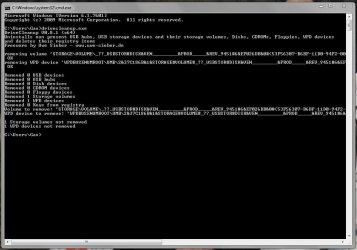
See if it has an affect on the WPD. See How to Safely Cleanup and Remove old USB Mass Storage drivers.

Right, tried this suggestion first. I used DriveCleanup to remove known working flash drives (all disconnected beforehand) then uninstalled the weird drive through Device Manager and ran DriveCleanup again. Here's the result.

DriveCleanup.JPG

As you can see the weird drive and the WPD have now disappeared after being uninstalled. I'll reboot now and I'll bet a pound to a penny that it reinstalls.

Capture.JPG

Capture 2.JPG

Capture 3.JPG

EDIT: Yep, upon reboot the non-existant drive reinstalls itself. The only USB peripherals I have connected are my keyboard and mouse. Nothing else is connected via USB. This is driving me mad now.

Reinstalled.JPG
 

My Computer My Computer

At a glance

W7 Pro x64 SP1 | W10 Pro IP x64 | W8.1 Pro x6...i7-4790k @ 4GHz (4.4GHz Boost)16GB DDR3 Kingston HyperX Fury @ 1600MHz CL 9...EVGA GTX 980 Classified
Computer type
PC/Desktop
Computer Manufacturer/Model Number
Custom Build
OS
W7 Pro x64 SP1 | W10 Pro IP x64 | W8.1 Pro x64 VM | Linux Mint VM
CPU
i7-4790k @ 4GHz (4.4GHz Boost)
Motherboard
ASUS Sabertooth Z87 (BIOS Rev 2004)
Memory
16GB DDR3 Kingston HyperX Fury @ 1600MHz CL 9-9-9-27
Graphics Card(s)
EVGA GTX 980 Classified
Sound Card
Realtek Onboard
Monitor(s) Displays
Samsung S27D390
Screen Resolution
1920 x 1080
Hard Drives
240GB Intel 520 Series SSD |
Samsung 850 EVO 120GB SSD |
2TB WD Caviar Black |
2TB WD Caviar Green
PSU
Corsair HX850-80 Gold Modular
Case
Cooler Master Silencio 650
Cooling
Corsair H80i w/2 x Corsair SP120 | 2 x 120mm Noctua NF-S12B
Keyboard
Microsoft Sidewinder X4
Mouse
Gigabyte M6900 optical
Internet Speed
152mb
Antivirus
F-Secure
Browser
Firefox 38.0
Other Info
Backup Rig: Win 7 Pro 64-bit | AMD A10-5800k | ASUS F2A85-V Pro | 8GB Samsung DDR3 @1600MHz | 120GB Toshiba SDD | 2TB Seagate HDD | Cooler Master Silencio 550
If misery likes company, I'm feelingl that frustration too! ARGHHHHH! :banghead:

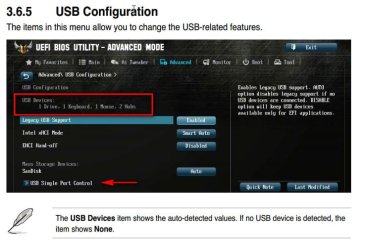
Here's another thought. Download the Sabertooth Z87 manual

Boot into BIOS and checkout the USB Configuration panel. (page 3-33, section 3.6.5 )
  • Look at USB Devices display. How many devices does BIOS detect? What's listed?
  • Try the above test both with and without other USB 3.0 devices connected on boot - just to double check BIOS is enumerating 3.0 correctly and seeing what we know are real devices
  • There's also a USB Port Conrol display. Not sure what it all does but might be something else to check out
 

Attachments

  • Sabertooth.jpg
    Sabertooth.jpg
    48.5 KB · Views: 0

My Computer My Computer

At a glance

Desk 1: Win 7 Pro x32; Desk 2: Windows 10 x64
Computer type
PC/Desktop
Computer Manufacturer/Model Number
Dell Optiplex 360 and Optiplex 755
OS
Desk 1: Win 7 Pro x32; Desk 2: Windows 10 x64
Hard Drives
500GB Crucial SSD in both Desktops
Other Info
Buffalo 6TB NAS, Raid 1
If you start Windows in safe mode is it still there ?
 

My Computer My Computer

At a glance

Windows 7 Ultimate x64
Computer type
PC/Desktop
OS
Windows 7 Ultimate x64
I haven't forgot this thread and I'll get back to it soon, not ignoring you in here people.
 

My Computer My Computer

At a glance

W7 Pro x64 SP1 | W10 Pro IP x64 | W8.1 Pro x6...i7-4790k @ 4GHz (4.4GHz Boost)16GB DDR3 Kingston HyperX Fury @ 1600MHz CL 9...EVGA GTX 980 Classified
Computer type
PC/Desktop
Computer Manufacturer/Model Number
Custom Build
OS
W7 Pro x64 SP1 | W10 Pro IP x64 | W8.1 Pro x64 VM | Linux Mint VM
CPU
i7-4790k @ 4GHz (4.4GHz Boost)
Motherboard
ASUS Sabertooth Z87 (BIOS Rev 2004)
Memory
16GB DDR3 Kingston HyperX Fury @ 1600MHz CL 9-9-9-27
Graphics Card(s)
EVGA GTX 980 Classified
Sound Card
Realtek Onboard
Monitor(s) Displays
Samsung S27D390
Screen Resolution
1920 x 1080
Hard Drives
240GB Intel 520 Series SSD |
Samsung 850 EVO 120GB SSD |
2TB WD Caviar Black |
2TB WD Caviar Green
PSU
Corsair HX850-80 Gold Modular
Case
Cooler Master Silencio 650
Cooling
Corsair H80i w/2 x Corsair SP120 | 2 x 120mm Noctua NF-S12B
Keyboard
Microsoft Sidewinder X4
Mouse
Gigabyte M6900 optical
Internet Speed
152mb
Antivirus
F-Secure
Browser
Firefox 38.0
Other Info
Backup Rig: Win 7 Pro 64-bit | AMD A10-5800k | ASUS F2A85-V Pro | 8GB Samsung DDR3 @1600MHz | 120GB Toshiba SDD | 2TB Seagate HDD | Cooler Master Silencio 550
Right, I've been up to a few different things lately so haven't been digging into this, I think I needed another break from it. But before I start looking at Callender's suggestion and checking in Safe Mode there are a couple of things I've noticed while doing those other things that are relevant and make the problem even more puzzling.

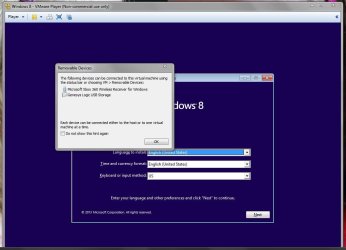
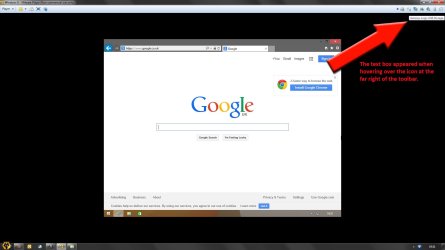
I checked in my BIOS while setting my X.M.P. profile for my RAM and noticed that the USB 'device' is listed in there, I've since realised I do actually have an SD card reader on my case on the top panel. It's never been used though, maybe that's what it is? It does lend credence to what Geek mentioned earlier in the thread when you see what popped up as I created a Virtual Machine earlier this evening. The strange drive has now been renamed Generic USB Storage Device in Device Manager, how and when that happened I have no idea.
Unfortunately I couldn't screenshot my BIOS as it kept saying there was no compatible USB device present, even though there was. I give up.

I initially thought this was a Windows problem but it's obviously not. At least I something concrete to work with now instead of yyyyyyyy yyyy!

Capture.JPG

Capture 2.JPG

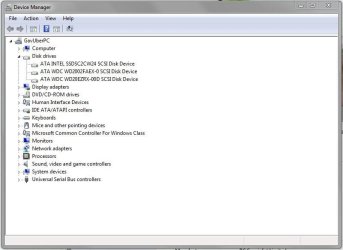
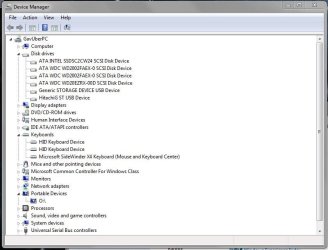
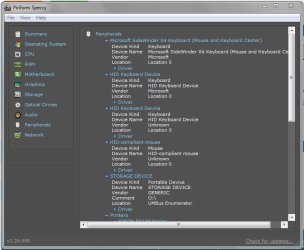
What I also noticed in my BIOS is that there were three keyboards listed. That really blew my mind as I've only ever used my SideWinder X4 on this rig. So I checked in Device Manager and double checked with Speccy and hey ho, what do you know? When did they appear? Your guess is as good as mine. I have absolutely no idea what's going on with this rig now.

Capture 3.JPG

Capture 4.JPG
 

My Computer My Computer

At a glance

W7 Pro x64 SP1 | W10 Pro IP x64 | W8.1 Pro x6...i7-4790k @ 4GHz (4.4GHz Boost)16GB DDR3 Kingston HyperX Fury @ 1600MHz CL 9...EVGA GTX 980 Classified
Computer type
PC/Desktop
Computer Manufacturer/Model Number
Custom Build
OS
W7 Pro x64 SP1 | W10 Pro IP x64 | W8.1 Pro x64 VM | Linux Mint VM
CPU
i7-4790k @ 4GHz (4.4GHz Boost)
Motherboard
ASUS Sabertooth Z87 (BIOS Rev 2004)
Memory
16GB DDR3 Kingston HyperX Fury @ 1600MHz CL 9-9-9-27
Graphics Card(s)
EVGA GTX 980 Classified
Sound Card
Realtek Onboard
Monitor(s) Displays
Samsung S27D390
Screen Resolution
1920 x 1080
Hard Drives
240GB Intel 520 Series SSD |
Samsung 850 EVO 120GB SSD |
2TB WD Caviar Black |
2TB WD Caviar Green
PSU
Corsair HX850-80 Gold Modular
Case
Cooler Master Silencio 650
Cooling
Corsair H80i w/2 x Corsair SP120 | 2 x 120mm Noctua NF-S12B
Keyboard
Microsoft Sidewinder X4
Mouse
Gigabyte M6900 optical
Internet Speed
152mb
Antivirus
F-Secure
Browser
Firefox 38.0
Other Info
Backup Rig: Win 7 Pro 64-bit | AMD A10-5800k | ASUS F2A85-V Pro | 8GB Samsung DDR3 @1600MHz | 120GB Toshiba SDD | 2TB Seagate HDD | Cooler Master Silencio 550
YIPEEE! :thumbsup: Feels good to actually crack a Windows mystery! And NO worry as to time to respond. As i said from the start "at your leisure" :)

Re: Safe Mode. Try but I don't believe it should make a difference. Safe Mode starts the minimal software needed for Windows to run. But that shouldn't affect PnP h/w detection. If it's a real device (not disabled by BIOS) Windows will still detect it

I've since realised I do actually have an SD card reader on my case on the top panel. It's never been used though, maybe that's what it is?
Absolutely! That's the card reader. Look back at post #34. It was identified as a Genesys card reader back then. Genesys re-confirmed by the snap shot of your VM message

The strange drive has now been renamed Generic USB Storage Device in Device Manager, how and when that happened I have no idea.
I think I can explain some of what you're seeing.

The disk name that appears in Device Manager is called the "Friendly Name" (and yes, "Friendly Name" is the technical term for it!). The USB Mass Storage driver generates its hardware IDs by first querying name information stored in device firmware. The name data received from the device is used by the driver when it generates the USBSTOR hardware ids

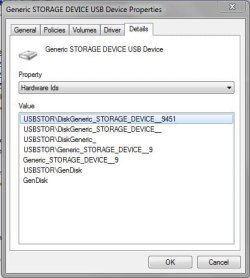
  • Look at the Hardware IDs for the disk that belongs to the card reader. Back in #31 you only see underscores in the IDs (the lower snapshot). Windows is receiving non-printable characters for the name. My guess is the non-printing characters appear as underscores in the Hardware ids. They appear a those funny looking y's when displayed in Device Manager
  • Look at the Hardware IDs for each of your disks now. You'll see the friendly name buried within the strings (I predict now INCLUDING the card reader disk drive)
I don't know why Windows seemed to receive unprintable characters before but seems to be correct now :confused: But that's the reason you're seeing the difference

/* EDIT */
Although, some underscore in USBSTOR Hardware Ids really ARE underscores! Of course, Windows just make that more confusing to tell which is which!
 
Last edited:

My Computer My Computer

At a glance

Desk 1: Win 7 Pro x32; Desk 2: Windows 10 x64
Computer type
PC/Desktop
Computer Manufacturer/Model Number
Dell Optiplex 360 and Optiplex 755
OS
Desk 1: Win 7 Pro x32; Desk 2: Windows 10 x64
Hard Drives
500GB Crucial SSD in both Desktops
Other Info
Buffalo 6TB NAS, Raid 1
Here's the Hardware IDs for it now. If it is indeed the card reader (and I'm not implying you're wrong at all) how come a) it's showing as a storage device when nothing's actually plugged into it and never has been, and b) why hasn't it always been there?!

And what connection does it have to the WPD as the two are definitely linked?

Capture.JPG
 

My Computer My Computer

At a glance

W7 Pro x64 SP1 | W10 Pro IP x64 | W8.1 Pro x6...i7-4790k @ 4GHz (4.4GHz Boost)16GB DDR3 Kingston HyperX Fury @ 1600MHz CL 9...EVGA GTX 980 Classified
Computer type
PC/Desktop
Computer Manufacturer/Model Number
Custom Build
OS
W7 Pro x64 SP1 | W10 Pro IP x64 | W8.1 Pro x64 VM | Linux Mint VM
CPU
i7-4790k @ 4GHz (4.4GHz Boost)
Motherboard
ASUS Sabertooth Z87 (BIOS Rev 2004)
Memory
16GB DDR3 Kingston HyperX Fury @ 1600MHz CL 9-9-9-27
Graphics Card(s)
EVGA GTX 980 Classified
Sound Card
Realtek Onboard
Monitor(s) Displays
Samsung S27D390
Screen Resolution
1920 x 1080
Hard Drives
240GB Intel 520 Series SSD |
Samsung 850 EVO 120GB SSD |
2TB WD Caviar Black |
2TB WD Caviar Green
PSU
Corsair HX850-80 Gold Modular
Case
Cooler Master Silencio 650
Cooling
Corsair H80i w/2 x Corsair SP120 | 2 x 120mm Noctua NF-S12B
Keyboard
Microsoft Sidewinder X4
Mouse
Gigabyte M6900 optical
Internet Speed
152mb
Antivirus
F-Secure
Browser
Firefox 38.0
Other Info
Backup Rig: Win 7 Pro 64-bit | AMD A10-5800k | ASUS F2A85-V Pro | 8GB Samsung DDR3 @1600MHz | 120GB Toshiba SDD | 2TB Seagate HDD | Cooler Master Silencio 550
how come it's showing as a storage device when nothing's actually plugged into it and never has been
Think of what you see when you connect a USB CD/DVD drive (USB CD drive is also USB Mass Storage device). When you connect a USB CD drive:
> The CD/DVD drive appears as a CD drive device, whether or not a CD actually inserted
> You just can't open/use the CD device until media is inserted

Likewise, a card reader appears as disk storage device whether or not media is present. You just can't open/use the reader device until media is there.
And what connection does it have to the WPD as the two are definitely linked?
At some point during the evolution of Portable devices, Windows started considering a flash drive (and all removable storage devcies) as Portable devices.

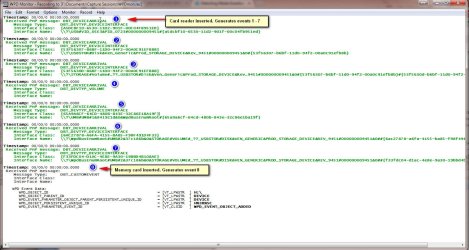
Everything that happens is best demonstrated by example (see snapshot below) what happens inside Windows when a card reader is connected. I have a WPD Monitor trace tool. It shows you the Plug and Play events when a Portable device is inserted/removed. Here's a trace of my card reader.

First, I connect the card reader with NO media card inserted. Note events 1 -7 are all generated before a media card is present. Only event 8 (which I guess reports media is now available) occurs when i insert the media card

Note that events 1,2 and 3 are device interface events. Each one registers an interface
> Event 1 - A USB Mass Storage Device
> Event 2 - A Disk (this is the Storage device - generated regardless if media inserted)
> Event 3 - A Storage Volume

My guess is Event 4 notifies Windows that the Device interfaces are done and the hardware device is now connected.

Events 5, 6 and 7 immediately follow 4 (ie. media card still not inserted). Event 5 notifies the UMB Bus enumerator of a new device (UMB enumerates WPD devices) Events 6 and 7 show that the card reader is being enumerated as a Portable device.

That's the end of the card reader connect sequence. Only upon inserting media, Event 8 occurs.. It looks like that event tells Windows media is now present and the media volume gets mounted to drive letter H:\

So notice all those devices (including the Disk Storage device) appear before any media inserted (Will follow up later with your question about why you believe you'r e just seeing the storage device now)

 

Attachments

  • WPD Trace2.jpg
    WPD Trace2.jpg
    145.5 KB · Views: 4
Last edited:

My Computer My Computer

At a glance

Desk 1: Win 7 Pro x32; Desk 2: Windows 10 x64
Computer type
PC/Desktop
Computer Manufacturer/Model Number
Dell Optiplex 360 and Optiplex 755
OS
Desk 1: Win 7 Pro x32; Desk 2: Windows 10 x64
Hard Drives
500GB Crucial SSD in both Desktops
Other Info
Buffalo 6TB NAS, Raid 1
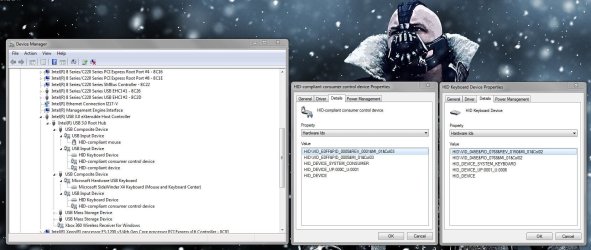
Appreciate the response as usual mate. I don't know if you want to get your teeth into this one, but as I mentioned earlier I've only ever used my Microsoft SideWinder X4 with this rig, no other keyboard ever. But then I noticed these other two non-existent keyboards in my BIOS the other day and subsequently in Device Manager. I've no idea what these are or when they appeared, all I know is they've never been attached.

Capture.JPG
 

My Computer My Computer

At a glance

W7 Pro x64 SP1 | W10 Pro IP x64 | W8.1 Pro x6...i7-4790k @ 4GHz (4.4GHz Boost)16GB DDR3 Kingston HyperX Fury @ 1600MHz CL 9...EVGA GTX 980 Classified
Computer type
PC/Desktop
Computer Manufacturer/Model Number
Custom Build
OS
W7 Pro x64 SP1 | W10 Pro IP x64 | W8.1 Pro x64 VM | Linux Mint VM
CPU
i7-4790k @ 4GHz (4.4GHz Boost)
Motherboard
ASUS Sabertooth Z87 (BIOS Rev 2004)
Memory
16GB DDR3 Kingston HyperX Fury @ 1600MHz CL 9-9-9-27
Graphics Card(s)
EVGA GTX 980 Classified
Sound Card
Realtek Onboard
Monitor(s) Displays
Samsung S27D390
Screen Resolution
1920 x 1080
Hard Drives
240GB Intel 520 Series SSD |
Samsung 850 EVO 120GB SSD |
2TB WD Caviar Black |
2TB WD Caviar Green
PSU
Corsair HX850-80 Gold Modular
Case
Cooler Master Silencio 650
Cooling
Corsair H80i w/2 x Corsair SP120 | 2 x 120mm Noctua NF-S12B
Keyboard
Microsoft Sidewinder X4
Mouse
Gigabyte M6900 optical
Internet Speed
152mb
Antivirus
F-Secure
Browser
Firefox 38.0
Other Info
Backup Rig: Win 7 Pro 64-bit | AMD A10-5800k | ASUS F2A85-V Pro | 8GB Samsung DDR3 @1600MHz | 120GB Toshiba SDD | 2TB Seagate HDD | Cooler Master Silencio 550
I don't know if you want to get your teeth into this one, but as I mentioned earlier I've only ever used my Microsoft SideWinder X4 with this rig, no other keyboard ever. But then I noticed these other two non-existent keyboards in my BIOS the other day and subsequently in Device Manager. I've no idea what these are or when they appeared, all I know is they've never been attached
Sure. Let's take a crack at those too

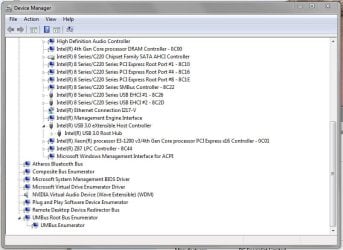
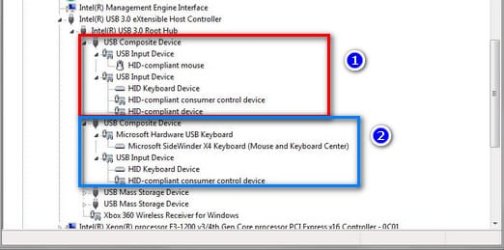
First thing i see in your DevMgr snapshot: all devices in question connect through TWO composite devices connected to your USB 3.0 controller
  • Each composite device corresponds to a single, physical USB male plug
  • A composite device has two or more "peer" devices connected to it. Example: A USB transceiver is a composite device. It gives Windows a single interface to both the wireless mouse and keyboard, which are peers
  • This, in contrast to last case. While the USB Mass Storage device also represents a single plug interface. Its child devices aren't peers. Rather, they're daisy chained along a single path
It looks like USB Composite #2 connects to the MS keyboard so is the male plug for the keyboard. (It's possible the numeric key pad is being presented as an additional, separate input device. Just a possible scenario). Looks like your USB Composite #1 is generated by a different male plug? Is that possible? We can look deeper if need be on this one

/* EDIT */
Maybe a simpler way to view the distinction, is that a USB composite device provides a multi-branch device connection to the USB port. While non-composite devices are only one device or a single branch of layered devices

/* EDIT 2 */
I suppose is also possible composite device #1 could also be something wired to the USB bus vs. being a removable male plug? But i'm guessing more likely the latter
 

Attachments

  • DEvices.jpg
    DEvices.jpg
    20.9 KB · Views: 27
Last edited:

My Computer My Computer

At a glance

Desk 1: Win 7 Pro x32; Desk 2: Windows 10 x64
Computer type
PC/Desktop
Computer Manufacturer/Model Number
Dell Optiplex 360 and Optiplex 755
OS
Desk 1: Win 7 Pro x32; Desk 2: Windows 10 x64
Hard Drives
500GB Crucial SSD in both Desktops
Other Info
Buffalo 6TB NAS, Raid 1
SUCCESS!!!

Finally, the weird drive is gone! I've been looking into this still on and off over the last week as it's still been niggling at me. So eventually while skirting through the BIOS I noticed that Legacy USB was enabled so I switched to Auto and voila! No more weird drive and the WPD has disappeared too. That really feels like a win, I can now relax.

Capture.JPG
 
Last edited:

My Computer My Computer

At a glance

W7 Pro x64 SP1 | W10 Pro IP x64 | W8.1 Pro x6...i7-4790k @ 4GHz (4.4GHz Boost)16GB DDR3 Kingston HyperX Fury @ 1600MHz CL 9...EVGA GTX 980 Classified
Computer type
PC/Desktop
Computer Manufacturer/Model Number
Custom Build
OS
W7 Pro x64 SP1 | W10 Pro IP x64 | W8.1 Pro x64 VM | Linux Mint VM
CPU
i7-4790k @ 4GHz (4.4GHz Boost)
Motherboard
ASUS Sabertooth Z87 (BIOS Rev 2004)
Memory
16GB DDR3 Kingston HyperX Fury @ 1600MHz CL 9-9-9-27
Graphics Card(s)
EVGA GTX 980 Classified
Sound Card
Realtek Onboard
Monitor(s) Displays
Samsung S27D390
Screen Resolution
1920 x 1080
Hard Drives
240GB Intel 520 Series SSD |
Samsung 850 EVO 120GB SSD |
2TB WD Caviar Black |
2TB WD Caviar Green
PSU
Corsair HX850-80 Gold Modular
Case
Cooler Master Silencio 650
Cooling
Corsair H80i w/2 x Corsair SP120 | 2 x 120mm Noctua NF-S12B
Keyboard
Microsoft Sidewinder X4
Mouse
Gigabyte M6900 optical
Internet Speed
152mb
Antivirus
F-Secure
Browser
Firefox 38.0
Other Info
Backup Rig: Win 7 Pro 64-bit | AMD A10-5800k | ASUS F2A85-V Pro | 8GB Samsung DDR3 @1600MHz | 120GB Toshiba SDD | 2TB Seagate HDD | Cooler Master Silencio 550
That is good news. I was not following this thread once I came to know that it is not due to a non-present device. So I was curious when the solved tick mark appeared, to find what actually did it.:)

And what a surprise! It was a surprise that no one ever thought of or even remotely connect.. Hope that strange device really stays off henceforth. Good going and thanks for sharing the secret.:) ( though we really don't know the why of it - atleast I don't know.)
 

My Computer My Computer

At a glance

Windows 7 Home Premium 32 bit
OS
Windows 7 Home Premium 32 bit
I'm still certain this was caused by my trying to apply USB 3.0 Boost to one of my Kingston Data Travellers. It's been so long ago now that I can't remember exactly what I did so any assumption would be mainly guesswork, I suppose I'll just have to take solace in the fact that it's finally sorted!
 

My Computer My Computer

At a glance

W7 Pro x64 SP1 | W10 Pro IP x64 | W8.1 Pro x6...i7-4790k @ 4GHz (4.4GHz Boost)16GB DDR3 Kingston HyperX Fury @ 1600MHz CL 9...EVGA GTX 980 Classified
Computer type
PC/Desktop
Computer Manufacturer/Model Number
Custom Build
OS
W7 Pro x64 SP1 | W10 Pro IP x64 | W8.1 Pro x64 VM | Linux Mint VM
CPU
i7-4790k @ 4GHz (4.4GHz Boost)
Motherboard
ASUS Sabertooth Z87 (BIOS Rev 2004)
Memory
16GB DDR3 Kingston HyperX Fury @ 1600MHz CL 9-9-9-27
Graphics Card(s)
EVGA GTX 980 Classified
Sound Card
Realtek Onboard
Monitor(s) Displays
Samsung S27D390
Screen Resolution
1920 x 1080
Hard Drives
240GB Intel 520 Series SSD |
Samsung 850 EVO 120GB SSD |
2TB WD Caviar Black |
2TB WD Caviar Green
PSU
Corsair HX850-80 Gold Modular
Case
Cooler Master Silencio 650
Cooling
Corsair H80i w/2 x Corsair SP120 | 2 x 120mm Noctua NF-S12B
Keyboard
Microsoft Sidewinder X4
Mouse
Gigabyte M6900 optical
Internet Speed
152mb
Antivirus
F-Secure
Browser
Firefox 38.0
Other Info
Backup Rig: Win 7 Pro 64-bit | AMD A10-5800k | ASUS F2A85-V Pro | 8GB Samsung DDR3 @1600MHz | 120GB Toshiba SDD | 2TB Seagate HDD | Cooler Master Silencio 550
Good find! even tho i'm not sure why that works, good info to know! :)

/* EDIT */
And a curiosity question should you ever have the will or opportunity to try: Does the card reader (that seemed responsible for the extra disk device) work when USB Legacy is set to Auto?
 
Last edited:

My Computer My Computer

At a glance

Desk 1: Win 7 Pro x32; Desk 2: Windows 10 x64
Computer type
PC/Desktop
Computer Manufacturer/Model Number
Dell Optiplex 360 and Optiplex 755
OS
Desk 1: Win 7 Pro x32; Desk 2: Windows 10 x64
Hard Drives
500GB Crucial SSD in both Desktops
Other Info
Buffalo 6TB NAS, Raid 1
I'll give it a go, I don't think I even own an SD card any more so I'll have to get one.
 

My Computer My Computer

At a glance

W7 Pro x64 SP1 | W10 Pro IP x64 | W8.1 Pro x6...i7-4790k @ 4GHz (4.4GHz Boost)16GB DDR3 Kingston HyperX Fury @ 1600MHz CL 9...EVGA GTX 980 Classified
Computer type
PC/Desktop
Computer Manufacturer/Model Number
Custom Build
OS
W7 Pro x64 SP1 | W10 Pro IP x64 | W8.1 Pro x64 VM | Linux Mint VM
CPU
i7-4790k @ 4GHz (4.4GHz Boost)
Motherboard
ASUS Sabertooth Z87 (BIOS Rev 2004)
Memory
16GB DDR3 Kingston HyperX Fury @ 1600MHz CL 9-9-9-27
Graphics Card(s)
EVGA GTX 980 Classified
Sound Card
Realtek Onboard
Monitor(s) Displays
Samsung S27D390
Screen Resolution
1920 x 1080
Hard Drives
240GB Intel 520 Series SSD |
Samsung 850 EVO 120GB SSD |
2TB WD Caviar Black |
2TB WD Caviar Green
PSU
Corsair HX850-80 Gold Modular
Case
Cooler Master Silencio 650
Cooling
Corsair H80i w/2 x Corsair SP120 | 2 x 120mm Noctua NF-S12B
Keyboard
Microsoft Sidewinder X4
Mouse
Gigabyte M6900 optical
Internet Speed
152mb
Antivirus
F-Secure
Browser
Firefox 38.0
Other Info
Backup Rig: Win 7 Pro 64-bit | AMD A10-5800k | ASUS F2A85-V Pro | 8GB Samsung DDR3 @1600MHz | 120GB Toshiba SDD | 2TB Seagate HDD | Cooler Master Silencio 550
Back
Top