Solved Internet not working yet network is connected.

Download Process Monitor to a USB flash drive.
There is nothing to install.
Just unzip and copy Procmon.exe to the desktop of the problematic computer.

Start Process Monitor (run as admin).
Accept the EULA.

When it starts for the first time, it automatically starts gathering data.
You can stop that via the button/icon with the magnifying glass.
Then de-select the 3 buttons/icons shown in the right part of this image:

View attachment 318163


Clear the data that was gathered:

View attachment 318164


Add a filter for the IP address of interest:

View attachment 318165


Add a second filter for the registry action of interest:

View attachment 318167


Start the data collection process.
(Use the same magnifying glass button/icon that you see in screenshot #1.)

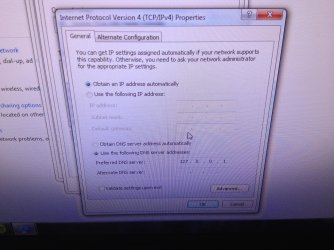
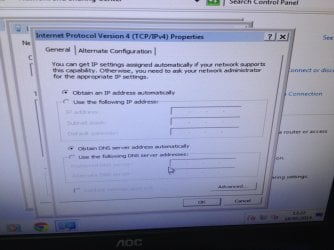
Manually change the DNS setting back to automatic.
Then let's see if Process Monitor can find the app that changes it back to 127....


If I use the Windows interface to set the 127... IP as the DNS value, then I see this:

View attachment 318168


Hopefully, these steps will find the offending app on your computer. Unfortunately, there is a chance that the offending app calls another app to do that actual change to the registry and/or the offending app hides itself from Process Monitor.

No luck I'm afraid, the process monitor didn't show anything.

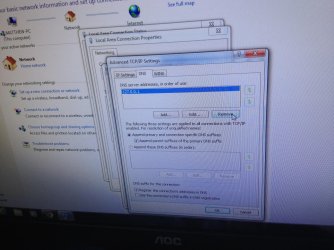
I looked at the advanced DNS settings and removed the DNS server ip shown in the picture but it keeps popping up. Is there anything else that's wrong with the advanced DNS settings?
 

Attachments
  • image.jpg
    image.jpg
    1,010 KB · Views: 1

My Computer My Computer

Computer type
PC/Desktop
Computer Manufacturer/Model Number
custom build
OS
Windows 7 Home Premium 64 Bit
CPU
AMD A-10 6800k
Motherboard
ASUS F2A55-M LE
Memory
Samsung 8GB dual DDR3 1333MHz
Graphics Card(s)
EVGA 770 2GB
Monitor(s) Displays
acer LED 1920X1080
Hard Drives
Seagate 500GB
Velociraptor 1TB
Antivirus
Microsoft Security Essentials
Browser
Google Chrome
Please start Process Monitor again.

Process Monitor should show you the filter dialog box. If it doesn't, then stop the data collection, clear the data and manually open the filter dialog box.

Click on the button named Reset to remove all of the filters that we added (including the ones applied by the steps shown in the first image).

Let Process Monitor run and gather data while you manually change back to the "automatic" DNS setting.

Once you close all of the dialog boxes for making that manual change, open them again to see if the 127... address is back already. If it is, please stop the Process Monitor's data gathering.

Use Ctrl-F to search for 127.0.0.1 within Process Monitor.
 

My Computer My Computer

Computer type
Laptop
Computer Manufacturer/Model Number
Employer provided Dell Latitude
OS
W7 Pro SP1 64bit
CPU
i7
Memory
8GB
Graphics Card(s)
Intel HD Graphics
Hard Drives
crappy SSD
Antivirus
Employer mandated Symantec Endpoint Protection
Browser
Pale Moon 64bit, IE11 64bit & Chrome 64bit
~~~
Is there anything else that's wrong with the advanced DNS settings?
No - nothing looks out of place on that screen except what we already know about...
...that pesky 127.... address.


We might need to involve some forum members that search for infections.
 

My Computer My Computer

Computer type
Laptop
Computer Manufacturer/Model Number
Employer provided Dell Latitude
OS
W7 Pro SP1 64bit
CPU
i7
Memory
8GB
Graphics Card(s)
Intel HD Graphics
Hard Drives
crappy SSD
Antivirus
Employer mandated Symantec Endpoint Protection
Browser
Pale Moon 64bit, IE11 64bit & Chrome 64bit
Open a cmd prompt and type ipconfig /flushdns.

Re-boot com[puter for the flush dns to work.

Change DNS to obtain a DNS server automatically.

Re-boot Computer.

If an infection then it should return.

Edit: check DNS client in services that it is set to automatic and is started.
 

My Computer My Computer

Computer Manufacturer/Model Number
HP Compaq 6715B
OS
Windows 7 Ultimate x64
CPU
AMD turion 64x2 TL-64 2.2Ghz
Motherboard
HC030
Memory
Sodimm DDR2 4GB
Graphics Card(s)
ATI Radeon 1250 128MB IGP
Hard Drives
Fujitsu Siemens 500GB sata 3.0 Gb/s
On my third cup of coffee and got a thought.

Iobit Advanced System Care and their other programs.
If Iobit has been on this computer all kinds of goofy things could be happening.
Including Iobits trying to call home to China.

I will go back to watching.
 

My Computer My Computer

Computer type
PC/Desktop
Computer Manufacturer/Model Number
Home made Desktop
OS
Windows 10 Pro. 64/ version 1709 Windows 7 Pro/64
CPU
Intel i7-6800K @ 4.3
Motherboard
ASUS X-99 Deluxe II
Memory
Corsair Platinum 16 gig @2400
Graphics Card(s)
EVGA GTX 1070 OC
Monitor(s) Displays
Asus 27" LED LCD/VE278Q
Screen Resolution
1920-1080 or 1280-720 HDMI
Hard Drives
INTEL SSD 730-240 Gb Sata 3.0/
PSU
EVGA Platium 1200W
Case
Phanteks Luxe Tempered Glass 8 fans/ one radiator
Cooling
XSPC/ Water Cooled CPU
Keyboard
Das 4 Professional
Mouse
Logitech M705/MX Anywhere 2-S
Internet Speed
100 mbits
Antivirus
Microsoft Security Essentials/ Malwarebytes Premium 3.0/ SAS
Browser
I.E. 11 default/Firefox/ ISP Time Warner Cable/Spectrum
Other Info
LG BluRay Burner/
Sound system-KLipsch-THX/
Icy Dock ssd Hot Swap bays.
Please start Process Monitor again.

Process Monitor should show you the filter dialog box. If it doesn't, then stop the data collection, clear the data and manually open the filter dialog box.

Click on the button named Reset to remove all of the filters that we added (including the ones applied by the steps shown in the first image).

Let Process Monitor run and gather data while you manually change back to the "automatic" DNS setting.

Once you close all of the dialog boxes for making that manual change, open them again to see if the 127... address is back already. If it is, please stop the Process Monitor's data gathering.

Use Ctrl-F to search for 127.0.0.1 within Process Monitor.

Ok so I did that and it highlighted this...
 

Attachments

  • image.jpg
    image.jpg
    1 MB · Views: 2

My Computer My Computer

Computer type
PC/Desktop
Computer Manufacturer/Model Number
custom build
OS
Windows 7 Home Premium 64 Bit
CPU
AMD A-10 6800k
Motherboard
ASUS F2A55-M LE
Memory
Samsung 8GB dual DDR3 1333MHz
Graphics Card(s)
EVGA 770 2GB
Monitor(s) Displays
acer LED 1920X1080
Hard Drives
Seagate 500GB
Velociraptor 1TB
Antivirus
Microsoft Security Essentials
Browser
Google Chrome
Open a cmd prompt and type ipconfig /flushdns.

Re-boot com[puter for the flush dns to work.

Change DNS to obtain a DNS server automatically.

Re-boot Computer.

If an infection then it should return.

Edit: check DNS client in services that it is set to automatic and is started.

Did everything you said and yep, it returned...
 

Attachments

  • image.jpg
    image.jpg
    1,007.1 KB · Views: 0

My Computer My Computer

Computer type
PC/Desktop
Computer Manufacturer/Model Number
custom build
OS
Windows 7 Home Premium 64 Bit
CPU
AMD A-10 6800k
Motherboard
ASUS F2A55-M LE
Memory
Samsung 8GB dual DDR3 1333MHz
Graphics Card(s)
EVGA 770 2GB
Monitor(s) Displays
acer LED 1920X1080
Hard Drives
Seagate 500GB
Velociraptor 1TB
Antivirus
Microsoft Security Essentials
Browser
Google Chrome
Thank you for gathering that Process Monitor info again, Unfortunately, the WMI app highlighted is started by Windows - then the WMI app listens for commands for other apps. We could turn on WMI tracing, but that can be a mess to read and it too could lead to a dead end :-(

Let's see what TheCyberMan wants to try next.
 

My Computer My Computer

Computer type
Laptop
Computer Manufacturer/Model Number
Employer provided Dell Latitude
OS
W7 Pro SP1 64bit
CPU
i7
Memory
8GB
Graphics Card(s)
Intel HD Graphics
Hard Drives
crappy SSD
Antivirus
Employer mandated Symantec Endpoint Protection
Browser
Pale Moon 64bit, IE11 64bit & Chrome 64bit
I am unclear about what all you tried while you were in the safe mode with networking. If you manually set DNS to automatic while in the safe mode with networking - does the offending app change it back to 127...?
 

My Computer My Computer

Computer type
Laptop
Computer Manufacturer/Model Number
Employer provided Dell Latitude
OS
W7 Pro SP1 64bit
CPU
i7
Memory
8GB
Graphics Card(s)
Intel HD Graphics
Hard Drives
crappy SSD
Antivirus
Employer mandated Symantec Endpoint Protection
Browser
Pale Moon 64bit, IE11 64bit & Chrome 64bit
I am unclear about what all you tried while you were in the safe mode with networking. If you manually set DNS to automatic while in the safe mode with networking - does the offending app change it back to 127...?

No, in safe mode the DNS settings stay the way they should be. When I change the settings they don't change back.
 

Attachments

  • image.jpg
    image.jpg
    847.9 KB · Views: 1

My Computer My Computer

Computer type
PC/Desktop
Computer Manufacturer/Model Number
custom build
OS
Windows 7 Home Premium 64 Bit
CPU
AMD A-10 6800k
Motherboard
ASUS F2A55-M LE
Memory
Samsung 8GB dual DDR3 1333MHz
Graphics Card(s)
EVGA 770 2GB
Monitor(s) Displays
acer LED 1920X1080
Hard Drives
Seagate 500GB
Velociraptor 1TB
Antivirus
Microsoft Security Essentials
Browser
Google Chrome
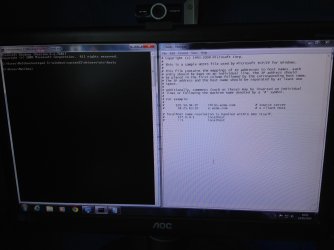
I tried to look at the HOSTS file and got this... Is this any help?
Forgive me but I have no idea what I'm doing...
 

Attachments

  • image.jpg
    image.jpg
    641.4 KB · Views: 4

My Computer My Computer

Computer type
PC/Desktop
Computer Manufacturer/Model Number
custom build
OS
Windows 7 Home Premium 64 Bit
CPU
AMD A-10 6800k
Motherboard
ASUS F2A55-M LE
Memory
Samsung 8GB dual DDR3 1333MHz
Graphics Card(s)
EVGA 770 2GB
Monitor(s) Displays
acer LED 1920X1080
Hard Drives
Seagate 500GB
Velociraptor 1TB
Antivirus
Microsoft Security Essentials
Browser
Google Chrome
Thank you for clarifying the safe mode with networking stuff.
So - your settings stay normal, but no internet in that mode.

Fewer things are running in the safe mode. Whatever is changing this DNS setting to 127.... is not running in that mode or it is aware that the computer is in the safe mode and opts not to change the DNS IP. I would have thought that the clean boot process would have come close to doing what the safe mode does.


The HOSTS file looks fine. It looks like the default one and it is doing nothing. All lines are commented out.


A few posts back, Layback Bear mentioned "Iobit Advanced System Care and their other programs." Do you recall ever having installed anything from that company?
 

My Computer My Computer

Computer type
Laptop
Computer Manufacturer/Model Number
Employer provided Dell Latitude
OS
W7 Pro SP1 64bit
CPU
i7
Memory
8GB
Graphics Card(s)
Intel HD Graphics
Hard Drives
crappy SSD
Antivirus
Employer mandated Symantec Endpoint Protection
Browser
Pale Moon 64bit, IE11 64bit & Chrome 64bit
Thank you for clarifying the safe mode with networking stuff.
So - your settings stay normal, but no internet in that mode.

Fewer things are running in the safe mode. Whatever is changing this DNS setting to 127.... is not running in that mode or it is aware that the computer is in the safe mode and opts not to change the DNS IP. I would have thought that the clean boot process would have come close to doing what the safe mode does.


The HOSTS file looks fine. It looks like the default one and it is doing nothing. All lines are commented out.


A few posts back, Layback Bear mentioned "Iobit Advanced System Care and their other programs." Do you recall ever having installed anything from that company?

I don't think I have no, oh and the internet does work in safe mode with networking.
TBH I think I will call the PC doctor tomorrow to see if they can figure out the problem and how to fix it.

Thanks for all the help though, I really apriciate it :)
 

My Computer My Computer

Computer type
PC/Desktop
Computer Manufacturer/Model Number
custom build
OS
Windows 7 Home Premium 64 Bit
CPU
AMD A-10 6800k
Motherboard
ASUS F2A55-M LE
Memory
Samsung 8GB dual DDR3 1333MHz
Graphics Card(s)
EVGA 770 2GB
Monitor(s) Displays
acer LED 1920X1080
Hard Drives
Seagate 500GB
Velociraptor 1TB
Antivirus
Microsoft Security Essentials
Browser
Google Chrome
Boot into safe mode with networking download Malwarebytes and update it by run as administrator and run it.

No virus should be running in safe mode with networking.

Let us know if there are any nasties by posting the log.

Malwarebytes download The free version.
Malwarebytes Anti-Malware - Protect, Detect & Remove Malware From Your PC

EDIT: Backup fisrt your data and current system and data.

Ensure you have backup disks
 

My Computer My Computer

Computer Manufacturer/Model Number
HP Compaq 6715B
OS
Windows 7 Ultimate x64
CPU
AMD turion 64x2 TL-64 2.2Ghz
Motherboard
HC030
Memory
Sodimm DDR2 4GB
Graphics Card(s)
ATI Radeon 1250 128MB IGP
Hard Drives
Fujitsu Siemens 500GB sata 3.0 Gb/s
I've fixed it!!!! :) I looked in my installed programs and saw that there was a program that I was unfamilier with that I had apparently installed around the time the problem occurred. I just uninstalled it and now the DNS settings aren't changing WOOP!
 

My Computer My Computer

Computer type
PC/Desktop
Computer Manufacturer/Model Number
custom build
OS
Windows 7 Home Premium 64 Bit
CPU
AMD A-10 6800k
Motherboard
ASUS F2A55-M LE
Memory
Samsung 8GB dual DDR3 1333MHz
Graphics Card(s)
EVGA 770 2GB
Monitor(s) Displays
acer LED 1920X1080
Hard Drives
Seagate 500GB
Velociraptor 1TB
Antivirus
Microsoft Security Essentials
Browser
Google Chrome
Come on Matt tell us what the programs you remove was.
 

My Computer My Computer

Computer type
PC/Desktop
Computer Manufacturer/Model Number
Home made Desktop
OS
Windows 10 Pro. 64/ version 1709 Windows 7 Pro/64
CPU
Intel i7-6800K @ 4.3
Motherboard
ASUS X-99 Deluxe II
Memory
Corsair Platinum 16 gig @2400
Graphics Card(s)
EVGA GTX 1070 OC
Monitor(s) Displays
Asus 27" LED LCD/VE278Q
Screen Resolution
1920-1080 or 1280-720 HDMI
Hard Drives
INTEL SSD 730-240 Gb Sata 3.0/
PSU
EVGA Platium 1200W
Case
Phanteks Luxe Tempered Glass 8 fans/ one radiator
Cooling
XSPC/ Water Cooled CPU
Keyboard
Das 4 Professional
Mouse
Logitech M705/MX Anywhere 2-S
Internet Speed
100 mbits
Antivirus
Microsoft Security Essentials/ Malwarebytes Premium 3.0/ SAS
Browser
I.E. 11 default/Firefox/ ISP Time Warner Cable/Spectrum
Other Info
LG BluRay Burner/
Sound system-KLipsch-THX/
Icy Dock ssd Hot Swap bays.
You are glad i can see, that I am glad the Malwarebytes would have turned up nothing.

I am with Layback bear here and can you mark solved after please.

Have a great day.
 

My Computer My Computer

Computer Manufacturer/Model Number
HP Compaq 6715B
OS
Windows 7 Ultimate x64
CPU
AMD turion 64x2 TL-64 2.2Ghz
Motherboard
HC030
Memory
Sodimm DDR2 4GB
Graphics Card(s)
ATI Radeon 1250 128MB IGP
Hard Drives
Fujitsu Siemens 500GB sata 3.0 Gb/s
Come on Matt tell us what the programs you remove was.

The program was called "PenWes", no idea what it was and i can't remember installing it.
 

My Computer My Computer

Computer type
PC/Desktop
Computer Manufacturer/Model Number
custom build
OS
Windows 7 Home Premium 64 Bit
CPU
AMD A-10 6800k
Motherboard
ASUS F2A55-M LE
Memory
Samsung 8GB dual DDR3 1333MHz
Graphics Card(s)
EVGA 770 2GB
Monitor(s) Displays
acer LED 1920X1080
Hard Drives
Seagate 500GB
Velociraptor 1TB
Antivirus
Microsoft Security Essentials
Browser
Google Chrome

My Computer My Computer

Computer type
PC/Desktop
Computer Manufacturer/Model Number
Home built
OS
Windows 7 Ult, Windows 8.1 Pro,
CPU
Q9650-4.275GHz, E8600 4.5GHz, E6750-3.8GHz
Motherboard
Evga 780i FTW
Memory
G.Skill PC2 9600 1200Mhz 5 5 5 15 2T
Graphics Card(s)
GTX480
Sound Card
Asus Xonar D2
Monitor(s) Displays
HannsG
Screen Resolution
1680X1050
Hard Drives
GSkill Phoenix Pro 120GB SSD
PSU
ThermalTake Toughpower 1000Watt modular
Case
ThermalTake XaserV
Cooling
Xigmatek S1283
Keyboard
Logitech G15
Mouse
Logitech G9
Internet Speed
T1
A program like PenWes can do something else not what you want can be used by malware processes I imagine best thing you did uninstalling it.
 

My Computer My Computer

Computer Manufacturer/Model Number
HP Compaq 6715B
OS
Windows 7 Ultimate x64
CPU
AMD turion 64x2 TL-64 2.2Ghz
Motherboard
HC030
Memory
Sodimm DDR2 4GB
Graphics Card(s)
ATI Radeon 1250 128MB IGP
Hard Drives
Fujitsu Siemens 500GB sata 3.0 Gb/s
Back
Top