Solved WD EXTERNAL HARD DISK 1TB suddenly "unallocated" and "not initialized"

The problem is we don't know exactly what caused the drive to acquire the Read only configuration.

My own guess is that a surge during the sudden power failure or sudden switch on when power resumed could have done some damage to the electronics.

If it were so, then you can't reverse that status by any means.

Apart from PhotoRec, is there anything else one can try that would maintain the file/folder structure and recover data as it was?

The answer is may be but one has to experiment. Personally I won't experiment before I get the data in some form and so I would stick to PhotoRec which we know for sure is not going to manipulate the drive in any way to make things worse.:)

And yes, I am not averse to experimenting but will do that only on a cloned drive - if I can successfully clone the drive.

So my own prescription - Get data first in any form ( you can always restructure the data and restore the folder/file structure reasonably well, I presume) and then experiment whatever you want with no holds barred.

I would also advise you to stick to one Windows 7 PC - I am least prepared to deal with any surprises that Windows 8 may throw.:)

The only other thing I may want you to try - till you get another drive - is using WinRAR to check whether it can see your problem drive and show the data in it. If your Windows 7 is 64bit download and run 64 bit version of WinRAR and navigate to the problem drive if it can. If it shows the data in it, you can copy. Most probably this may not work since there is no file system. But who knows? Sometimes miracles do happen.
 

My Computer My Computer

At a glance

Windows 7 Home Premium 32 bit
OS
Windows 7 Home Premium 32 bit
So the advice is to run Photorec to recover the data first
 

My Computer My Computer

At a glance

x64 (6.3.9600) Win8.1 Pro & soon dual boot x6...AMD A6-3420M APU with Radeon(tm) HD Graphics6.00 GBAMD Radeon(TM) HD 6520G
Computer type
Laptop
Computer Manufacturer/Model Number
HP Pavilion dv6-6c10us
OS
x64 (6.3.9600) Win8.1 Pro & soon dual boot x64 (6.1.7601) Win7_SP1 HomePrem
CPU
AMD A6-3420M APU with Radeon(tm) HD Graphics
Motherboard
Hewlett-Packard 1805
Memory
6.00 GB
Graphics Card(s)
AMD Radeon(TM) HD 6520G
Sound Card
(1) AMD High Definition Audio Device (2) IDT High Definiti
Monitor(s) Displays
HP W2072a 20" LCD (1600 x 900) @ 60 Hz
Screen Resolution
1366 x 768 x 32 bits (4294967296 colors) @ 60 Hz
Hard Drives
ST640LM0 00 HM641JI SATA Disk Device
Keyboard
Logitech k520 wireless KB
Mouse
Logitech m320 wireless mouse (bundled with KB)
Internet Speed
15/5 | 54 MB Wireless 'n'
Antivirus
Realtime: Defender or Avast | On-demand: Malwarebytes, ESET
Browser
IE 11 on Win8, IE 10 on win 7
Other Info
Media: [Gimp, Audacity, VLC] || Comm: [WEmail 2012, Skype] || Productivity: [OpenOffice,| Textpad] || Utils: [Sysinternals, cCleaner, Speccy, Defraggler]
Hello guys. So i'm back. I finally figured why did the PW showed my disk as an offline. Apparently the USB cable i attached to my work PC is not compatible for USB 3.0 thus it ejecting the disk automatically in about 3 minutes when I try to scan. Also, it was on Windows 8.

So I tried on the 3.0 USB port available on my friend's pc (thank you to that youtube video, for showing the difference between USB 2.0 and 3.0 - the color blue) and I tried to scan for another partition recovery, hoping this would solve the problem. But it takes so long, it has been on 3 days straight and still 2% (UGH!). It could be the bad sectors etc so I really wanna solve this without further damage to my external drive, and my friend advice me to clone the hard disk into another one, so that I get the data image and I can work on the recovery there. - But Im not sure if it's gonna take the same amount of time though. Will it gonna be the same? 100000+ hours left will break my computer (and my friend's laptop) :(

I havent tried the PhotoRec since I notice that the computer I'm using has only one port of USB 3.0 and I worry about the data transfer will be interrupted during the super time consuming process, and thus decreasing my chance to get the file back.

So i'm opted with working on the image file on a new external drive, since i believe it's safer. And also I notice that the external hard disk making some tiny scratching sound (really tiny sound, but noticeable enough when no one's in the room). That's the sign of the hardware problem right?
 

My Computer My Computer

At a glance

Windows 7 Ultimate x64
Computer type
Laptop
Computer Manufacturer/Model Number
Acer
OS
Windows 7 Ultimate x64
Cloning the hard drive and performing data recovery on a cloned drive is indeed a good idea and should work if your drive is failing because of some physical damage.

In your case, the overwhelming evidence - the sudden power failure - ,to my thinking, has made the electronics fail.

Nonetheless I wouldn't stop you from cloning the drive for I can be wrong. Who knows?

Here is the best cloning method. ( Do not clone with conventional imaging software that is principally designed for back-up.)

Tool: ddrescue Source: SystemRescueCD

1. Download the SystemRescueCD from Download - SystemRescueCd systemrescuecd-x86-4.2.0.iso 380MB and create a bootable pen drive with that ISO using Rufus Rufus - Create bootable USB drives the easy way

2. Boot your computer with that pen drive with your source disk (your current problem disk) and a destination disk (formatted empty disk of capacity not less than that of your source disk) plugged in.

3.Against the command prompt type: fdisk -l [ENTER] This will list all your drives. Note the nomenclature of your source disk(1 TB faulty drive) and destination disk ( 1TB or greater empty drive). The option is lower case L = l and not one 1

4. Next against the command prompt type: ddrescue -r3 -n -v /dev/sdb /dev/sdc recovery.log [ENTER]
( Note: ddrescue[space]-r3[space]-n[space]-v[space]/dev/sdb[space]/dev/sdc[space]recovery.log

Note: Replace sdb and sdc with the correct device nomenclature of Source disk and Destination disk as obtained in step 3.

Make doubly sure that you replace sdb with the correct nomenclature of your 1TB faulty drive (source drive), and sdc with the correct nomenclature of the 1 TB or greater empty drive (destination drive)

5. Sit back and relax. The cloning process may take hours/days depending upon how bad your Source disk is. The saving grace is you can stop the process any time with Ctrl -C and then restart. It will take the cue from the log file and start from where it left

Once the cloning is over, reboot, and check how the drives looks like in Windows Disk Management.

Now you can perform any data recovery operation on the cloned disk.

EDIT: Please read all documentation on System Rescue CD http://www.sysresccd.org/SystemRescueCd_Homepage
 

My Computer My Computer

At a glance

Windows 7 Home Premium 32 bit
OS
Windows 7 Home Premium 32 bit
DDRescue unable to read my faulty hard drive when I boot from the pendrive. Damn. What hope do I have now? :((
 

My Computer My Computer

At a glance

Windows 7 Ultimate x64
Computer type
Laptop
Computer Manufacturer/Model Number
Acer
OS
Windows 7 Ultimate x64
Did it detect the good external drive?
 

My Computer My Computer

At a glance

Windows 7 Home Premium 32 bit
OS
Windows 7 Home Premium 32 bit
Hello guys. So i'm back. I finally figured why did the PW showed my disk as an offline. Apparently the USB cable i attached to my work PC is not compatible for USB 3.0 thus it ejecting the disk automatically in about 3 minutes when I try to scan. Also, it was on Windows 8.

So I tried on the 3.0 USB port available on my friend's pc (thank you to that youtube video, for showing the difference between USB 2.0 and 3.0 - the color blue) and I tried to scan for another partition recovery, hoping this would solve the problem.
.....

@Jon: The following comments are notes for jumanji to consider.

There is no action you need to take at this point. Please do nothing until jumanji has a chance to read this post


@jumanji: There are a few things I'd like to eliminate from the equation

USB 3.0 -> Jon might have better luck on a 2.0 port. The speed difference between 2.0 and 3.0 isn't a factor for in this case with a faulty drive. And since I don't know the exact WD model, I don't know if it is USB 3.0 capable.

Readonly flag -> Diskpart showed it was set on the Win8 machine (the command failed on the Win7 machine for reason unknown). I'd like to reset that flag using the Win8 machine to do it.

I'm not opposed to Jon using the Win8 machine and think it might benefit the recovery since Win7 choked on Diskpart. I understand reservations you might have about adding an unknown into the resolution. I recently upgraded to Win8 and for the most part it's Win7 with a new face.

Of the three, the USB is probably the first thing I'd try, just to get past the non-native USB support.

There are paid applications that might help - GetDataBack and a few others. It's not clear at this point if the expense is warranted.

Bill
.
 

My Computer My Computer

At a glance

x64 (6.3.9600) Win8.1 Pro & soon dual boot x6...AMD A6-3420M APU with Radeon(tm) HD Graphics6.00 GBAMD Radeon(TM) HD 6520G
Computer type
Laptop
Computer Manufacturer/Model Number
HP Pavilion dv6-6c10us
OS
x64 (6.3.9600) Win8.1 Pro & soon dual boot x64 (6.1.7601) Win7_SP1 HomePrem
CPU
AMD A6-3420M APU with Radeon(tm) HD Graphics
Motherboard
Hewlett-Packard 1805
Memory
6.00 GB
Graphics Card(s)
AMD Radeon(TM) HD 6520G
Sound Card
(1) AMD High Definition Audio Device (2) IDT High Definiti
Monitor(s) Displays
HP W2072a 20" LCD (1600 x 900) @ 60 Hz
Screen Resolution
1366 x 768 x 32 bits (4294967296 colors) @ 60 Hz
Hard Drives
ST640LM0 00 HM641JI SATA Disk Device
Keyboard
Logitech k520 wireless KB
Mouse
Logitech m320 wireless mouse (bundled with KB)
Internet Speed
15/5 | 54 MB Wireless 'n'
Antivirus
Realtime: Defender or Avast | On-demand: Malwarebytes, ESET
Browser
IE 11 on Win8, IE 10 on win 7
Other Info
Media: [Gimp, Audacity, VLC] || Comm: [WEmail 2012, Skype] || Productivity: [OpenOffice,| Textpad] || Utils: [Sysinternals, cCleaner, Speccy, Defraggler]
I was also thinking that he should try whatever he does on a Windows 7 machine with adequate USB 2 ports. Any USB 3 device will work with USB 2. So I also see no problem in it. In fact he should stick to USB 2 ports.

I don't mind OP removing the read only flag with a Windows 8 machine or even doing everything on a Windows 8 machine short of writing any recovery onto Windows 8 machine. The blinkernate story is working in my mind, though I could not understand what exactly happened.

EDIt: GetDataBack for NTFS - Yes, Anshad had recommended it to Shokan2 http://www.sevenforums.com/hardware-devices/334380-disk-structure-corrupt-unreadable.html and we are waiting for any report from him.
 

My Computer My Computer

At a glance

Windows 7 Home Premium 32 bit
OS
Windows 7 Home Premium 32 bit
Im considering to send my Hard drive to the specialist though. Ugh it's so expensive, but I dont know what i want to do :(
Few questions
What does "bad disk" mean? does it mean my HD is dead? It's still spinning for all I know. No clicking sound.
I stumbled upon an article that mention about bad sector on 1st sector which cause all of this happen, and the recommended software was HDD regenerator. Any review about this product? From this point im considering everything to get my precious hard disk back.
Some videos showed that it could be because of the head platter. But there's no weird sound like clicking, beeping, only the tiny screeching once in a while.
 

My Computer My Computer

At a glance

Windows 7 Ultimate x64
Computer type
Laptop
Computer Manufacturer/Model Number
Acer
OS
Windows 7 Ultimate x64
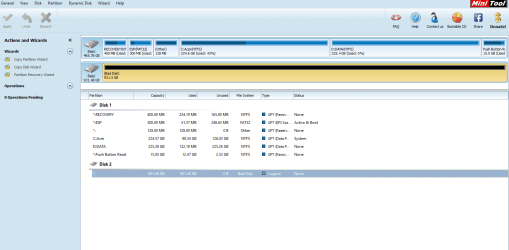
As far as I can see Partition Wizard showed your disk as Read only and not a Bad Disk. So I don't know why you are catching on Bad Disk.

Slartybart says he can help you remove the read only tag on Windows 8.

To me it looks like a fault in the interface electronics inside the HDD. Remember I recommended that if you want to buy an external HDD for saving the data, you may better buy the same brand same model so that the interface card can finally be changed if data recovery efforts by any software fails. Even the read only tag removal suggested by Slartybart will fail in such a case. ( If it goes through, well and good and that is not going to change your data.) But then if that fails we will surely know there is an electronic fault.

(The first sector only contains MBR code (which is not of much relevance to an external data only disk) and partition table. There is nothing in it which can make your drive Read only. So a corrupt or a bad first sector cannot make your drive read only. This is as far as theory goes, as I understand.)

In any case changing the interface card is better left to a capable professional.

Every individual's temperament is different and if the tasks seem daunting, exasperating and gets on your nerves, you may sure pass it on to data recovery experts and save your health.
 

My Computer My Computer

At a glance

Windows 7 Home Premium 32 bit
OS
Windows 7 Home Premium 32 bit
Ok, jumanji is ok with resetting the readonly flag, and I agree that will not change the characteristic drive failure.

It will eliminate one item and possibly show that the electronics are the cause.

When you're ready to reset the readonly flag:
  1. Disconnect any other external drives form the Win8 machine

    picture.php
  2. Connect the faulty drive to a USB 2.0 port on the Win8 machine

    picture.php
  3. Post a Disk Management screen shot. See: http://www.sevenforums.com/tutorials/274797-disk-management-post-screen-capture-image.html

    picture.php
  4. Open an http://www.sevenforums.com/tutorials/783-elevated-command-prompt.html
    Enter the following commands and post a screen shot of Command Prompt.
    After I see the lists of disk, partitions and volumes as presented by Diskpart; and know that the correct disk is selected, I'll post exact commands.

    I based the disk selection on your previous Diskpart that showed it as disk 1 when it was connected to the Win8 machine. This can change if you have other drives connected or are on a different machine with more internal drives.

    If you are certain that the faulty disk is disk 1, then you can enter the next commands. You might want to check that the readonly flag is set with a det dis command. It won't hurt anything to reset the flag on a drive that isn't marked readonly, but it makes Windows refresh a lot of stuff.

    Diskpart
    sel dis 1
    lis dis
    lis par
    lis vol​

Are you sure disk 1 is the faulty drive?
You might want to check that the readonly flag is set with a det dis command. It won't hurt anything to reset the flag on a drive that isn't marked readonly, but it makes Windows refresh a lot of stuff.

Ok, if you're sure
Still in command prompt and
still in Diskpart
:note: I can't give you the select and attribute commands for the volumes since I won't know if any volumes are presented for that drive (doubtful, but possible) .
attrib dis clear readonly
det dis​


Post another screen shot of the command prompt that shows the resulting details for the disk. Once you have the screen captured, you can exit out of Diskpart and exit out of command prompt.
 

My Computer My Computer

At a glance

x64 (6.3.9600) Win8.1 Pro & soon dual boot x6...AMD A6-3420M APU with Radeon(tm) HD Graphics6.00 GBAMD Radeon(TM) HD 6520G
Computer type
Laptop
Computer Manufacturer/Model Number
HP Pavilion dv6-6c10us
OS
x64 (6.3.9600) Win8.1 Pro & soon dual boot x64 (6.1.7601) Win7_SP1 HomePrem
CPU
AMD A6-3420M APU with Radeon(tm) HD Graphics
Motherboard
Hewlett-Packard 1805
Memory
6.00 GB
Graphics Card(s)
AMD Radeon(TM) HD 6520G
Sound Card
(1) AMD High Definition Audio Device (2) IDT High Definiti
Monitor(s) Displays
HP W2072a 20" LCD (1600 x 900) @ 60 Hz
Screen Resolution
1366 x 768 x 32 bits (4294967296 colors) @ 60 Hz
Hard Drives
ST640LM0 00 HM641JI SATA Disk Device
Keyboard
Logitech k520 wireless KB
Mouse
Logitech m320 wireless mouse (bundled with KB)
Internet Speed
15/5 | 54 MB Wireless 'n'
Antivirus
Realtime: Defender or Avast | On-demand: Malwarebytes, ESET
Browser
IE 11 on Win8, IE 10 on win 7
Other Info
Media: [Gimp, Audacity, VLC] || Comm: [WEmail 2012, Skype] || Productivity: [OpenOffice,| Textpad] || Utils: [Sysinternals, cCleaner, Speccy, Defraggler]
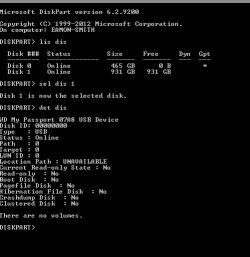
Disk Part (on my work computer) in Windows 8

Here it is.
 

Attachments

  • List Disk 2.png
    List Disk 2.png
    6.6 KB · Views: 2

My Computer My Computer

At a glance

Windows 7 Ultimate x64
Computer type
Laptop
Computer Manufacturer/Model Number
Acer
OS
Windows 7 Ultimate x64
Ok, that drive exhibits symptoms one of my drives exhibited.
Rescan tells windows to update drive information.

Go ahead and rescan the disks
in Diskpart type
rescan
- then repeat all of the the commands to clear readonly

If you get the Disk Service error again, follow the instructions at the bottom of the screen
 

My Computer My Computer

At a glance

x64 (6.3.9600) Win8.1 Pro & soon dual boot x6...AMD A6-3420M APU with Radeon(tm) HD Graphics6.00 GBAMD Radeon(TM) HD 6520G
Computer type
Laptop
Computer Manufacturer/Model Number
HP Pavilion dv6-6c10us
OS
x64 (6.3.9600) Win8.1 Pro & soon dual boot x64 (6.1.7601) Win7_SP1 HomePrem
CPU
AMD A6-3420M APU with Radeon(tm) HD Graphics
Motherboard
Hewlett-Packard 1805
Memory
6.00 GB
Graphics Card(s)
AMD Radeon(TM) HD 6520G
Sound Card
(1) AMD High Definition Audio Device (2) IDT High Definiti
Monitor(s) Displays
HP W2072a 20" LCD (1600 x 900) @ 60 Hz
Screen Resolution
1366 x 768 x 32 bits (4294967296 colors) @ 60 Hz
Hard Drives
ST640LM0 00 HM641JI SATA Disk Device
Keyboard
Logitech k520 wireless KB
Mouse
Logitech m320 wireless mouse (bundled with KB)
Internet Speed
15/5 | 54 MB Wireless 'n'
Antivirus
Realtime: Defender or Avast | On-demand: Malwarebytes, ESET
Browser
IE 11 on Win8, IE 10 on win 7
Other Info
Media: [Gimp, Audacity, VLC] || Comm: [WEmail 2012, Skype] || Productivity: [OpenOffice,| Textpad] || Utils: [Sysinternals, cCleaner, Speccy, Defraggler]
If you HDD/Hard Disk Drive is dead it's unlikely any data can be retrieved although there's companies that will try but usually costs for the diagnostic which can be applied to the full cost if going that way [I've use this company a couple of times: http://www.krollontrack.com/data-recovery/].

I boot to a Linux LiveCD or LiveDVD such as Linux Mint or Ubuntu with a large-enough External USB HDD plugged in then if the questionable HDD can be read I'll start copying everything I can find, especially pictures and documents as a priority but anything else that exists nowhere else.
 

My Computer My Computer

At a glance

Windows 7 Ultimate 64-bit, Windows 8.1 64-bit...
Computer type
PC/Desktop
Computer Manufacturer/Model Number
Customs, Dell, Gateway, HP, Toshiba, Acer, ASUS
OS
Windows 7 Ultimate 64-bit, Windows 8.1 64-bit, Mac OS X 10.10, Linux Mint 17, Windows 10 Pro TP
Keyboard
Microsoft
Mouse
Microsoft
Alright so now my External is no more in "read only" state. What should i do next? :)
 

Attachments

  • List Dis 3.png
    List Dis 3.png
    3.7 KB · Views: 41

My Computer My Computer

At a glance

Windows 7 Ultimate x64
Computer type
Laptop
Computer Manufacturer/Model Number
Acer
OS
Windows 7 Ultimate x64
I ran the PW tool again, and now it shows my disk as 'bad disk" :/
 

Attachments

  • Minitool.png
    Minitool.png
    32.3 KB · Views: 1

My Computer My Computer

At a glance

Windows 7 Ultimate x64
Computer type
Laptop
Computer Manufacturer/Model Number
Acer
OS
Windows 7 Ultimate x64
.....
To me it looks like a fault in the interface electronics inside the HDD. Remember I recommended that if you want to buy an external HDD for saving the data, you may better buy the same brand same model so that the interface card can finally be changed if data recovery efforts by any software fails. Even the read only tag removal suggested by Slartybart will fail in such a case. ( If it goes through, well and good and that is not going to change your data.) But then if that fails we will surely know there is an electronic fault.

In any case changing the interface card is better left to a capable professional.

Every individual's temperament is different and if the tasks seem daunting, exasperating and gets on your nerves, you may sure pass it on to data recovery experts and save your health.

Ok, it's definitive then. junmaji pointed to hardware and now we know.

A last ditch effort, safely remove the drive
Restart the computer
connect the drive
run PW
 

My Computer My Computer

At a glance

x64 (6.3.9600) Win8.1 Pro & soon dual boot x6...AMD A6-3420M APU with Radeon(tm) HD Graphics6.00 GBAMD Radeon(TM) HD 6520G
Computer type
Laptop
Computer Manufacturer/Model Number
HP Pavilion dv6-6c10us
OS
x64 (6.3.9600) Win8.1 Pro & soon dual boot x64 (6.1.7601) Win7_SP1 HomePrem
CPU
AMD A6-3420M APU with Radeon(tm) HD Graphics
Motherboard
Hewlett-Packard 1805
Memory
6.00 GB
Graphics Card(s)
AMD Radeon(TM) HD 6520G
Sound Card
(1) AMD High Definition Audio Device (2) IDT High Definiti
Monitor(s) Displays
HP W2072a 20" LCD (1600 x 900) @ 60 Hz
Screen Resolution
1366 x 768 x 32 bits (4294967296 colors) @ 60 Hz
Hard Drives
ST640LM0 00 HM641JI SATA Disk Device
Keyboard
Logitech k520 wireless KB
Mouse
Logitech m320 wireless mouse (bundled with KB)
Internet Speed
15/5 | 54 MB Wireless 'n'
Antivirus
Realtime: Defender or Avast | On-demand: Malwarebytes, ESET
Browser
IE 11 on Win8, IE 10 on win 7
Other Info
Media: [Gimp, Audacity, VLC] || Comm: [WEmail 2012, Skype] || Productivity: [OpenOffice,| Textpad] || Utils: [Sysinternals, cCleaner, Speccy, Defraggler]
What does the bad disk mean? Does it mean it cant be fixed?
 

My Computer My Computer

At a glance

Windows 7 Ultimate x64
Computer type
Laptop
Computer Manufacturer/Model Number
Acer
OS
Windows 7 Ultimate x64
I updated my post 58 to include the information jumanji posted. Please read and follow.

Bad disk? It most likely means a trip to the shop, jumanji offered some advice on a possible do it yourself solution, but that might be a challenge for most people - other members might disagree and offer suggestions.

I'll wait to see how the restart and next PW report on the drive. Then I'm off to bed.

Best of luck,

Bill
 

My Computer My Computer

At a glance

x64 (6.3.9600) Win8.1 Pro & soon dual boot x6...AMD A6-3420M APU with Radeon(tm) HD Graphics6.00 GBAMD Radeon(TM) HD 6520G
Computer type
Laptop
Computer Manufacturer/Model Number
HP Pavilion dv6-6c10us
OS
x64 (6.3.9600) Win8.1 Pro & soon dual boot x64 (6.1.7601) Win7_SP1 HomePrem
CPU
AMD A6-3420M APU with Radeon(tm) HD Graphics
Motherboard
Hewlett-Packard 1805
Memory
6.00 GB
Graphics Card(s)
AMD Radeon(TM) HD 6520G
Sound Card
(1) AMD High Definition Audio Device (2) IDT High Definiti
Monitor(s) Displays
HP W2072a 20" LCD (1600 x 900) @ 60 Hz
Screen Resolution
1366 x 768 x 32 bits (4294967296 colors) @ 60 Hz
Hard Drives
ST640LM0 00 HM641JI SATA Disk Device
Keyboard
Logitech k520 wireless KB
Mouse
Logitech m320 wireless mouse (bundled with KB)
Internet Speed
15/5 | 54 MB Wireless 'n'
Antivirus
Realtime: Defender or Avast | On-demand: Malwarebytes, ESET
Browser
IE 11 on Win8, IE 10 on win 7
Other Info
Media: [Gimp, Audacity, VLC] || Comm: [WEmail 2012, Skype] || Productivity: [OpenOffice,| Textpad] || Utils: [Sysinternals, cCleaner, Speccy, Defraggler]
Back
Top