How do I fix my Windows Firewall?

Yes I'm still here watching.

DoeZ slow down a little and read the instruction completely.
It's absolutely critical that you follow instruction.

From Andrews post # 14

Run it/install it. Then check to fix only windows firewall. Do not check anything else.

I will go back to watching.
 

My Computer My Computer

Computer type
PC/Desktop
Computer Manufacturer/Model Number
Home made Desktop
OS
Windows 10 Pro. 64/ version 1709 Windows 7 Pro/64
CPU
Intel i7-6800K @ 4.3
Motherboard
ASUS X-99 Deluxe II
Memory
Corsair Platinum 16 gig @2400
Graphics Card(s)
EVGA GTX 1070 OC
Monitor(s) Displays
Asus 27" LED LCD/VE278Q
Screen Resolution
1920-1080 or 1280-720 HDMI
Hard Drives
INTEL SSD 730-240 Gb Sata 3.0/
PSU
EVGA Platium 1200W
Case
Phanteks Luxe Tempered Glass 8 fans/ one radiator
Cooling
XSPC/ Water Cooled CPU
Keyboard
Das 4 Professional
Mouse
Logitech M705/MX Anywhere 2-S
Internet Speed
100 mbits
Antivirus
Microsoft Security Essentials/ Malwarebytes Premium 3.0/ SAS
Browser
I.E. 11 default/Firefox/ ISP Time Warner Cable/Spectrum
Other Info
LG BluRay Burner/
Sound system-KLipsch-THX/
Icy Dock ssd Hot Swap bays.
Yes I'm still here watching.

DoeZ slow down a little and read the instruction completely.
It's absolutely critical that you follow instruction.

From Andrews post # 14

Run it/install it. Then check to fix only windows firewall. Do not check anything else.
I will go back to watching.

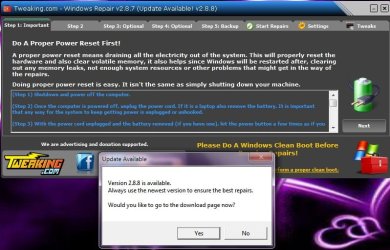
I have been following those instructions and if I got stuck or had a question you can see that I posted it...I DID NOT & I'll repeat this for the last time...I DID NOT check anything on that page that is how it came up with all those checkmarks in place...I DID NOT click anything at all I actually sat there with it like that for over an hour and then I posted a pix of it asking what I should do or if I was in the right place or what...so please...don't jump down my throat telling me I'm not following directions when I'm doing exactly what is being asked of me and when I'm not sure I'm posting it. So now when I click on this folder Tweaking.com Windows Repair to continue there's a new version that's available...Do I download the new version or continue on with what I have done so far?
 

My Computer My Computer

Computer type
PC/Desktop
Computer Manufacturer/Model Number
Toshiba HP
OS
Windows7 Home Premium 32-bit SP-1
CPU
Intel(R) Celeron(R) CPU 900 @ 2.20GHz
Motherboard
TOSHIBA NBWAA
Memory
2.00 GB USABLE 1.87 GB
Graphics Card(s)
(1) Mobile Intel(R) 4 Series Express Chipset Family (2) Mo
Sound Card
Realtek High Definition Audio
Hard Drives
TOSHIBA MK2555GSX
Antivirus
Panda Free Antivirus
Browser
I'm a new FireFox Browser user~
Other Info
Do Not Mess With Your Computer~
Unless You Know What You're Doing~
Unlike Me~I Had No Clue At All~I Thought I Did~
Do Not Mess With Your Computer~
No no I'm not jumping down your throat I'm trying to save you head aches.
I was trying emphasize how important following instruction was.

Sometimes doing these things is a little easier after a some rest.

We know you didn't put those 24 + check marks in there when their should only be 1 check mark as recommended.

What I'm trying to do is to slow you down and maybe read the instructions a couple of times so you understand them.
It will make your repairs a lot easier for you.

We understand that some of these things can be a little taunting at times.

No body on this forum is here to jump down your throat. That is not what we are about.
Our desire is to guide you through repairing your computer.
That is what we do.

I hope you understand.
 

My Computer My Computer

Computer type
PC/Desktop
Computer Manufacturer/Model Number
Home made Desktop
OS
Windows 10 Pro. 64/ version 1709 Windows 7 Pro/64
CPU
Intel i7-6800K @ 4.3
Motherboard
ASUS X-99 Deluxe II
Memory
Corsair Platinum 16 gig @2400
Graphics Card(s)
EVGA GTX 1070 OC
Monitor(s) Displays
Asus 27" LED LCD/VE278Q
Screen Resolution
1920-1080 or 1280-720 HDMI
Hard Drives
INTEL SSD 730-240 Gb Sata 3.0/
PSU
EVGA Platium 1200W
Case
Phanteks Luxe Tempered Glass 8 fans/ one radiator
Cooling
XSPC/ Water Cooled CPU
Keyboard
Das 4 Professional
Mouse
Logitech M705/MX Anywhere 2-S
Internet Speed
100 mbits
Antivirus
Microsoft Security Essentials/ Malwarebytes Premium 3.0/ SAS
Browser
I.E. 11 default/Firefox/ ISP Time Warner Cable/Spectrum
Other Info
LG BluRay Burner/
Sound system-KLipsch-THX/
Icy Dock ssd Hot Swap bays.
No no I'm not jumping down your throat I'm trying to save you head aches.
I was trying emphasize how important following instruction was.

Sometimes doing these things is a little easier after a some rest.

We know you didn't put those 24 + check marks in there when their should only be 1 check mark as recommended.

What I'm trying to do is to slow you down and maybe read the instructions a couple of times so you understand them.
It will make your repairs a lot easier for you.

We understand that some of these things can be a little taunting at times.

No body on this forum is here to jump down your throat. That is not what we are about.
Our desire is to guide you through repairing your computer.
That is what we do.

I hope you understand.


Well that's not exactly how I feel right at the moment. I did what he asked of me...run in/install it...that's what I'm trying to do...there are steps at the top am I not supposed to do all of that? I thought I was and I followed everything that was asked of me. And now do I download the new version or do I just continue and finish the way it was...
 

Attachments

  • 7forums2.jpg
    7forums2.jpg
    69.6 KB · Views: 0

My Computer My Computer

Computer type
PC/Desktop
Computer Manufacturer/Model Number
Toshiba HP
OS
Windows7 Home Premium 32-bit SP-1
CPU
Intel(R) Celeron(R) CPU 900 @ 2.20GHz
Motherboard
TOSHIBA NBWAA
Memory
2.00 GB USABLE 1.87 GB
Graphics Card(s)
(1) Mobile Intel(R) 4 Series Express Chipset Family (2) Mo
Sound Card
Realtek High Definition Audio
Hard Drives
TOSHIBA MK2555GSX
Antivirus
Panda Free Antivirus
Browser
I'm a new FireFox Browser user~
Other Info
Do Not Mess With Your Computer~
Unless You Know What You're Doing~
Unlike Me~I Had No Clue At All~I Thought I Did~
Do Not Mess With Your Computer~
Yes, and sorry if my wording caused you frustration. Layback Bear and I didn't mean to aggravate you. Yes download the newest version if one is available, and then you may skip the optional items listed in the screenshot there. I know it opened with all those checkmarks, uncheck them all except the repair windows firewall and then start the repair.

You are doing fine :)

When that is done, move onto the security check.
 

My Computer My Computer

Computer type
PC/Desktop
Computer Manufacturer/Model Number
Custom Built
OS
Windows 10 Pro
CPU
AMD Ryzen 5 2400G Processor with Radeon RX Vega 11 Graphics
Motherboard
ASRock X470 Master SLI/AC AM4 AMD Promontory X470 SATA 6Gb/s
Memory
G.SKILL Ripjaws V Series 16GB (2 x 8GB) 288-Pin DDR4 SDRAM D
Graphics Card(s)
2047MB NVIDIA GeForce GTX 1060 6GB (EVGA)
Sound Card
Motherboard Built in
Monitor(s) Displays
Acer R240HY bidx 23.8-Inch IPS HDMI DVI VGA (1920 x 1080) Wi
Screen Resolution
1920 x 1080
Hard Drives
1TB Sandisk SSD PLUS (Main drive)
500 GB Seagate 7200 RPM (Games)
500 GB Western Digital 7200 RPM (Virtual Machines)
PSU
CORSAIR TX Series TX650M 650W 80+ Gold Modular Power Supply
Case
CORSAIR CARBIDE SPEC-02 Mid-Tower Gaming Case, Red LED Fan
Cooling
220mm, two 120mm, and four 60mm fans
Keyboard
Wired Dell keyboard
Mouse
Wireless Logitech mouse
Internet Speed
250mb down, 30mb up
Antivirus
Panda Cloud Antivirus
Browser
Chrome-ish x64
Other Info
Your awesome for reading this.
Yes, and sorry if my wording caused you frustration. Layback Bear and I didn't mean to aggravate you. Yes download the newest version if one is available, and then you may skip the optional items listed in the screenshot there. I know it opened with all those checkmarks, uncheck them all except the repair windows firewall and then start the repair.

You are doing fine :)

When that is done, move onto the security check.

Apology accepted. So I just downloaded the new version...did I just lose everything I did last night? Do I have to start with taking the battery out again and step 2? And if I have to do all that again...you just want me to skip over the Step 3 4 & 5 and go right to Start Repairs but uncheck everything except Windows Firewall? O am I just going right to that Start Repairs?

I'll be back in an hr or so :/
 
Last edited:

My Computer My Computer

Computer type
PC/Desktop
Computer Manufacturer/Model Number
Toshiba HP
OS
Windows7 Home Premium 32-bit SP-1
CPU
Intel(R) Celeron(R) CPU 900 @ 2.20GHz
Motherboard
TOSHIBA NBWAA
Memory
2.00 GB USABLE 1.87 GB
Graphics Card(s)
(1) Mobile Intel(R) 4 Series Express Chipset Family (2) Mo
Sound Card
Realtek High Definition Audio
Hard Drives
TOSHIBA MK2555GSX
Antivirus
Panda Free Antivirus
Browser
I'm a new FireFox Browser user~
Other Info
Do Not Mess With Your Computer~
Unless You Know What You're Doing~
Unlike Me~I Had No Clue At All~I Thought I Did~
Do Not Mess With Your Computer~
Hello? Can you tell me if I'm starting at the beginning with taking the battery out again because of downloading the new version or am I going right to the Start Repairs? Just waiting for that answer to move on please...don't want to mess anything up here:D
 

My Computer My Computer

Computer type
PC/Desktop
Computer Manufacturer/Model Number
Toshiba HP
OS
Windows7 Home Premium 32-bit SP-1
CPU
Intel(R) Celeron(R) CPU 900 @ 2.20GHz
Motherboard
TOSHIBA NBWAA
Memory
2.00 GB USABLE 1.87 GB
Graphics Card(s)
(1) Mobile Intel(R) 4 Series Express Chipset Family (2) Mo
Sound Card
Realtek High Definition Audio
Hard Drives
TOSHIBA MK2555GSX
Antivirus
Panda Free Antivirus
Browser
I'm a new FireFox Browser user~
Other Info
Do Not Mess With Your Computer~
Unless You Know What You're Doing~
Unlike Me~I Had No Clue At All~I Thought I Did~
Do Not Mess With Your Computer~
Hello? Can you tell me if I'm starting at the beginning with taking the battery out again because of downloading the new version or am I going right to the Start Repairs? Just waiting for that answer to move on please...don't want to mess anything up here:D

I'm still waiting for directions :(
 

My Computer My Computer

Computer type
PC/Desktop
Computer Manufacturer/Model Number
Toshiba HP
OS
Windows7 Home Premium 32-bit SP-1
CPU
Intel(R) Celeron(R) CPU 900 @ 2.20GHz
Motherboard
TOSHIBA NBWAA
Memory
2.00 GB USABLE 1.87 GB
Graphics Card(s)
(1) Mobile Intel(R) 4 Series Express Chipset Family (2) Mo
Sound Card
Realtek High Definition Audio
Hard Drives
TOSHIBA MK2555GSX
Antivirus
Panda Free Antivirus
Browser
I'm a new FireFox Browser user~
Other Info
Do Not Mess With Your Computer~
Unless You Know What You're Doing~
Unlike Me~I Had No Clue At All~I Thought I Did~
Do Not Mess With Your Computer~
Sorry, I know you are waiting for an answer. I have been pretty busy lately. You can safely move to the repairs section, and just simply repair only windows firewall. Then restart the pc when it is done, and post the security check. Ill post it again here so you do not need to go back a few pages.


1.) Download security check below.

This will show me what security software you use and what the status is of them:

Downloading SecurityCheck

Open and run: SecurityCheck.exe
Follow the instructions inside the window that appears.

When done, a Notepad report opens automatically, called: checkup.txt

Please post the checkup.txt in your reply using the paperclip:

picture.php


My Computer My Computer

Computer type
PC/Desktop
Computer Manufacturer/Model Number
Custom Built
OS
Windows 10 Pro
CPU
AMD Ryzen 5 2400G Processor with Radeon RX Vega 11 Graphics
Motherboard
ASRock X470 Master SLI/AC AM4 AMD Promontory X470 SATA 6Gb/s
Memory
G.SKILL Ripjaws V Series 16GB (2 x 8GB) 288-Pin DDR4 SDRAM D
Graphics Card(s)
2047MB NVIDIA GeForce GTX 1060 6GB (EVGA)
Sound Card
Motherboard Built in
Monitor(s) Displays
Acer R240HY bidx 23.8-Inch IPS HDMI DVI VGA (1920 x 1080) Wi
Screen Resolution
1920 x 1080
Hard Drives
1TB Sandisk SSD PLUS (Main drive)
500 GB Seagate 7200 RPM (Games)
500 GB Western Digital 7200 RPM (Virtual Machines)
PSU
CORSAIR TX Series TX650M 650W 80+ Gold Modular Power Supply
Case
CORSAIR CARBIDE SPEC-02 Mid-Tower Gaming Case, Red LED Fan
Cooling
220mm, two 120mm, and four 60mm fans
Keyboard
Wired Dell keyboard
Mouse
Wireless Logitech mouse
Internet Speed
250mb down, 30mb up
Antivirus
Panda Cloud Antivirus
Browser
Chrome-ish x64
Other Info
Your awesome for reading this.
Sorry, I know you are waiting for an answer. I have been pretty busy lately. You can safely move to the repairs section, and just simply repair only windows firewall. Then restart the pc when it is done, and post the security check. Ill post it again here so you do not need to go back a few pages.


1.) Download security check below.

This will show me what security software you use and what the status is of them:

Downloading SecurityCheck

Open and run: SecurityCheck.exe
Follow the instructions inside the window that appears.

When done, a Notepad report opens automatically, called: checkup.txt

Please post the checkup.txt in your reply using the paperclip:

picture.php


Ok so do the repairs first then restart and come back here and download the security check and go from there? Is that correct?
 

My Computer My Computer

Computer type
PC/Desktop
Computer Manufacturer/Model Number
Toshiba HP
OS
Windows7 Home Premium 32-bit SP-1
CPU
Intel(R) Celeron(R) CPU 900 @ 2.20GHz
Motherboard
TOSHIBA NBWAA
Memory
2.00 GB USABLE 1.87 GB
Graphics Card(s)
(1) Mobile Intel(R) 4 Series Express Chipset Family (2) Mo
Sound Card
Realtek High Definition Audio
Hard Drives
TOSHIBA MK2555GSX
Antivirus
Panda Free Antivirus
Browser
I'm a new FireFox Browser user~
Other Info
Do Not Mess With Your Computer~
Unless You Know What You're Doing~
Unlike Me~I Had No Clue At All~I Thought I Did~
Do Not Mess With Your Computer~
Ok I hope I did it all right...
 

Attachments

My Computer My Computer

Computer type
PC/Desktop
Computer Manufacturer/Model Number
Toshiba HP
OS
Windows7 Home Premium 32-bit SP-1
CPU
Intel(R) Celeron(R) CPU 900 @ 2.20GHz
Motherboard
TOSHIBA NBWAA
Memory
2.00 GB USABLE 1.87 GB
Graphics Card(s)
(1) Mobile Intel(R) 4 Series Express Chipset Family (2) Mo
Sound Card
Realtek High Definition Audio
Hard Drives
TOSHIBA MK2555GSX
Antivirus
Panda Free Antivirus
Browser
I'm a new FireFox Browser user~
Other Info
Do Not Mess With Your Computer~
Unless You Know What You're Doing~
Unlike Me~I Had No Clue At All~I Thought I Did~
Do Not Mess With Your Computer~
Ok so do the repairs first then restart and come back here and download the security check and go from there? Is that correct?

Yes :)
 

My Computer My Computer

Computer type
PC/Desktop
Computer Manufacturer/Model Number
Custom Built
OS
Windows 10 Pro
CPU
AMD Ryzen 5 2400G Processor with Radeon RX Vega 11 Graphics
Motherboard
ASRock X470 Master SLI/AC AM4 AMD Promontory X470 SATA 6Gb/s
Memory
G.SKILL Ripjaws V Series 16GB (2 x 8GB) 288-Pin DDR4 SDRAM D
Graphics Card(s)
2047MB NVIDIA GeForce GTX 1060 6GB (EVGA)
Sound Card
Motherboard Built in
Monitor(s) Displays
Acer R240HY bidx 23.8-Inch IPS HDMI DVI VGA (1920 x 1080) Wi
Screen Resolution
1920 x 1080
Hard Drives
1TB Sandisk SSD PLUS (Main drive)
500 GB Seagate 7200 RPM (Games)
500 GB Western Digital 7200 RPM (Virtual Machines)
PSU
CORSAIR TX Series TX650M 650W 80+ Gold Modular Power Supply
Case
CORSAIR CARBIDE SPEC-02 Mid-Tower Gaming Case, Red LED Fan
Cooling
220mm, two 120mm, and four 60mm fans
Keyboard
Wired Dell keyboard
Mouse
Wireless Logitech mouse
Internet Speed
250mb down, 30mb up
Antivirus
Panda Cloud Antivirus
Browser
Chrome-ish x64
Other Info
Your awesome for reading this.

My Computer My Computer

Computer type
PC/Desktop
Computer Manufacturer/Model Number
Toshiba HP
OS
Windows7 Home Premium 32-bit SP-1
CPU
Intel(R) Celeron(R) CPU 900 @ 2.20GHz
Motherboard
TOSHIBA NBWAA
Memory
2.00 GB USABLE 1.87 GB
Graphics Card(s)
(1) Mobile Intel(R) 4 Series Express Chipset Family (2) Mo
Sound Card
Realtek High Definition Audio
Hard Drives
TOSHIBA MK2555GSX
Antivirus
Panda Free Antivirus
Browser
I'm a new FireFox Browser user~
Other Info
Do Not Mess With Your Computer~
Unless You Know What You're Doing~
Unlike Me~I Had No Clue At All~I Thought I Did~
Do Not Mess With Your Computer~
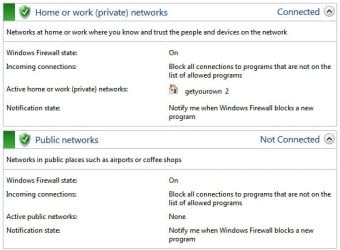
1.) Great news! According to the log, windows firewall is enabled and working. Can you confirm this under the control panel-system and security-windows firewall?

2.) Java is out of date. Please uninstall it. Almost nothing needs java anymore, and it is a very large security risk to have it on your machine. Should you ever need java again, whatever program needs it it will prompt you to install it. But try to not have java installed on your pc. It is a very large cause for infections. As it is targeted a lot.

3.) I also see you have adobe reader installed. This program is just like java and is a very known cause of infections as it is very often attacked. I suggest uninstalling it as well. Many web browsers like chrome and firefox have pdf readers built in, so there is no reason for it. The web browsers have a more secure implementation of opening pdfs as well. (I see you have firefox installed)

A benefit to uninstallling java and adobe reader is also a performance boost.

You can keep adobe flash, unfortunately it is still very needed for many websites.

4.) We are going to double check some things before proceeding with malware removal:


* Download the Farbar Service Scanner.

* Once download, right click the fss.exe file, and choose run as administrator. Click yes on the uac prompt.

*Checkmark the following boxes:

-Internet services
-Windows firewall
-System Restore
-Security center/action center
-Windows Update
-Windows defender

*Click Scan. A notepad window will appear with your log file. Save it to the desktop. Then upload the log here in your next reply using the paperclip on the reply box.
 

My Computer My Computer

Computer type
PC/Desktop
Computer Manufacturer/Model Number
Custom Built
OS
Windows 10 Pro
CPU
AMD Ryzen 5 2400G Processor with Radeon RX Vega 11 Graphics
Motherboard
ASRock X470 Master SLI/AC AM4 AMD Promontory X470 SATA 6Gb/s
Memory
G.SKILL Ripjaws V Series 16GB (2 x 8GB) 288-Pin DDR4 SDRAM D
Graphics Card(s)
2047MB NVIDIA GeForce GTX 1060 6GB (EVGA)
Sound Card
Motherboard Built in
Monitor(s) Displays
Acer R240HY bidx 23.8-Inch IPS HDMI DVI VGA (1920 x 1080) Wi
Screen Resolution
1920 x 1080
Hard Drives
1TB Sandisk SSD PLUS (Main drive)
500 GB Seagate 7200 RPM (Games)
500 GB Western Digital 7200 RPM (Virtual Machines)
PSU
CORSAIR TX Series TX650M 650W 80+ Gold Modular Power Supply
Case
CORSAIR CARBIDE SPEC-02 Mid-Tower Gaming Case, Red LED Fan
Cooling
220mm, two 120mm, and four 60mm fans
Keyboard
Wired Dell keyboard
Mouse
Wireless Logitech mouse
Internet Speed
250mb down, 30mb up
Antivirus
Panda Cloud Antivirus
Browser
Chrome-ish x64
Other Info
Your awesome for reading this.
3.) I also see you have adobe reader installed. This program is just like java and is a very known cause of infections as it is very often attacked. I suggest uninstalling it as well. Many web browsers like chrome and firefox have pdf readers built in, so there is no reason for it. The web browsers have a more secure implementation of opening pdfs as well. (I see you have firefox installed)

I have quite a few different Adobe items...the flashplayer plugin and the flashplayer ax and shockwave...what should I do with those?

According to the log, windows firewall is enabled and working. Can you confirm this under the control panel-system and security-windows firewall?
 

Attachments

  • 7forums3.jpg
    7forums3.jpg
    35.2 KB · Views: 8

My Computer My Computer

Computer type
PC/Desktop
Computer Manufacturer/Model Number
Toshiba HP
OS
Windows7 Home Premium 32-bit SP-1
CPU
Intel(R) Celeron(R) CPU 900 @ 2.20GHz
Motherboard
TOSHIBA NBWAA
Memory
2.00 GB USABLE 1.87 GB
Graphics Card(s)
(1) Mobile Intel(R) 4 Series Express Chipset Family (2) Mo
Sound Card
Realtek High Definition Audio
Hard Drives
TOSHIBA MK2555GSX
Antivirus
Panda Free Antivirus
Browser
I'm a new FireFox Browser user~
Other Info
Do Not Mess With Your Computer~
Unless You Know What You're Doing~
Unlike Me~I Had No Clue At All~I Thought I Did~
Do Not Mess With Your Computer~
Looks good. Uninstall adobe anything except flash. Adobe flash should be version 14, that is the latest version. Make sure you have flash active x 14 and plugin 14. Shockwave, adobe reader, and java should be uninstalled. If you have adobe photoshop or something obviously do not uninstall that.

Go here to update flash in each of your browsers:

http://get.adobe.com/flashplayer/

Then continue to step 4
 

My Computer My Computer

Computer type
PC/Desktop
Computer Manufacturer/Model Number
Custom Built
OS
Windows 10 Pro
CPU
AMD Ryzen 5 2400G Processor with Radeon RX Vega 11 Graphics
Motherboard
ASRock X470 Master SLI/AC AM4 AMD Promontory X470 SATA 6Gb/s
Memory
G.SKILL Ripjaws V Series 16GB (2 x 8GB) 288-Pin DDR4 SDRAM D
Graphics Card(s)
2047MB NVIDIA GeForce GTX 1060 6GB (EVGA)
Sound Card
Motherboard Built in
Monitor(s) Displays
Acer R240HY bidx 23.8-Inch IPS HDMI DVI VGA (1920 x 1080) Wi
Screen Resolution
1920 x 1080
Hard Drives
1TB Sandisk SSD PLUS (Main drive)
500 GB Seagate 7200 RPM (Games)
500 GB Western Digital 7200 RPM (Virtual Machines)
PSU
CORSAIR TX Series TX650M 650W 80+ Gold Modular Power Supply
Case
CORSAIR CARBIDE SPEC-02 Mid-Tower Gaming Case, Red LED Fan
Cooling
220mm, two 120mm, and four 60mm fans
Keyboard
Wired Dell keyboard
Mouse
Wireless Logitech mouse
Internet Speed
250mb down, 30mb up
Antivirus
Panda Cloud Antivirus
Browser
Chrome-ish x64
Other Info
Your awesome for reading this.
Looks good. Uninstall adobe anything except flash. Adobe flash should be version 14, that is the latest version. Make sure you have flash active x 14 and plugin 14. Shockwave, adobe reader, and java should be uninstalled. If you have adobe photoshop or something obviously do not uninstall that.

Go here to update flash in each of your browsers:

Adobe - Install Adobe Flash Player

I downloaded the new version from above...I'm not sure if I have the active x or plug in anymore...I might have just uninstalled everything from adobe to start out fresh...what should I do? Not sure if I need them but I do play games on FB so I don't know what to do here:(


Also I've completed your step #4 with the scanner...I've attached it for you :)
 

Attachments

My Computer My Computer

Computer type
PC/Desktop
Computer Manufacturer/Model Number
Toshiba HP
OS
Windows7 Home Premium 32-bit SP-1
CPU
Intel(R) Celeron(R) CPU 900 @ 2.20GHz
Motherboard
TOSHIBA NBWAA
Memory
2.00 GB USABLE 1.87 GB
Graphics Card(s)
(1) Mobile Intel(R) 4 Series Express Chipset Family (2) Mo
Sound Card
Realtek High Definition Audio
Hard Drives
TOSHIBA MK2555GSX
Antivirus
Panda Free Antivirus
Browser
I'm a new FireFox Browser user~
Other Info
Do Not Mess With Your Computer~
Unless You Know What You're Doing~
Unlike Me~I Had No Clue At All~I Thought I Did~
Do Not Mess With Your Computer~
Looks good. Uninstall adobe anything except flash. Adobe flash should be version 14, that is the latest version. Make sure you have flash active x 14 and plugin 14. Shockwave, adobe reader, and java should be uninstalled. If you have adobe photoshop or something obviously do not uninstall that.

Go here to update flash in each of your browsers:

Adobe - Install Adobe Flash Player

I downloaded the new version from above...I'm not sure if I have the active x or plug in anymore...I might have just uninstalled everything from adobe to start out fresh...what should I do? Not sure if I need them but I do play games on FB so I don't know what to do here:(

To find out, go under control panel - uninstall a program. See what's listed there. Read the instructions again. Go there in each web browser. For example internet explorer and firefox. You can uninstall everything adobe and then reinstall flash if you want. That is fine. You do need adobe flash.


your fss log looks good!
 
Last edited:

My Computer My Computer

Computer type
PC/Desktop
Computer Manufacturer/Model Number
Custom Built
OS
Windows 10 Pro
CPU
AMD Ryzen 5 2400G Processor with Radeon RX Vega 11 Graphics
Motherboard
ASRock X470 Master SLI/AC AM4 AMD Promontory X470 SATA 6Gb/s
Memory
G.SKILL Ripjaws V Series 16GB (2 x 8GB) 288-Pin DDR4 SDRAM D
Graphics Card(s)
2047MB NVIDIA GeForce GTX 1060 6GB (EVGA)
Sound Card
Motherboard Built in
Monitor(s) Displays
Acer R240HY bidx 23.8-Inch IPS HDMI DVI VGA (1920 x 1080) Wi
Screen Resolution
1920 x 1080
Hard Drives
1TB Sandisk SSD PLUS (Main drive)
500 GB Seagate 7200 RPM (Games)
500 GB Western Digital 7200 RPM (Virtual Machines)
PSU
CORSAIR TX Series TX650M 650W 80+ Gold Modular Power Supply
Case
CORSAIR CARBIDE SPEC-02 Mid-Tower Gaming Case, Red LED Fan
Cooling
220mm, two 120mm, and four 60mm fans
Keyboard
Wired Dell keyboard
Mouse
Wireless Logitech mouse
Internet Speed
250mb down, 30mb up
Antivirus
Panda Cloud Antivirus
Browser
Chrome-ish x64
Other Info
Your awesome for reading this.
To find out, go under control panel - uninstall a program. See what's listed there. Read the instructions again. Go there in each web browser. For example internet explorer and firefox. You can uninstall everything adobe and then reinstall flash if you want. That is fine. You do need adobe flash.

In the control panel it says I have Adobe Flash Player 14 Plug in and that's the only thing Adobe I have now.
 

My Computer My Computer

Computer type
PC/Desktop
Computer Manufacturer/Model Number
Toshiba HP
OS
Windows7 Home Premium 32-bit SP-1
CPU
Intel(R) Celeron(R) CPU 900 @ 2.20GHz
Motherboard
TOSHIBA NBWAA
Memory
2.00 GB USABLE 1.87 GB
Graphics Card(s)
(1) Mobile Intel(R) 4 Series Express Chipset Family (2) Mo
Sound Card
Realtek High Definition Audio
Hard Drives
TOSHIBA MK2555GSX
Antivirus
Panda Free Antivirus
Browser
I'm a new FireFox Browser user~
Other Info
Do Not Mess With Your Computer~
Unless You Know What You're Doing~
Unlike Me~I Had No Clue At All~I Thought I Did~
Do Not Mess With Your Computer~
To find out, go under control panel - uninstall a program. See what's listed there. Read the instructions again. Go there in each web browser. For example internet explorer and firefox. You can uninstall everything adobe and then reinstall flash if you want. That is fine. You do need adobe flash.

In the control panel it says I have Adobe Flash Player 14 Plug in and that's the only thing Adobe I have now.

Ok, I edited my post above btw.

You also need adobe flash player active x if you use internet explorer. Otherwise, you do not need it. If you need it, open internet explorer and go the link I gave you. Then install adobe flash.
 

My Computer My Computer

Computer type
PC/Desktop
Computer Manufacturer/Model Number
Custom Built
OS
Windows 10 Pro
CPU
AMD Ryzen 5 2400G Processor with Radeon RX Vega 11 Graphics
Motherboard
ASRock X470 Master SLI/AC AM4 AMD Promontory X470 SATA 6Gb/s
Memory
G.SKILL Ripjaws V Series 16GB (2 x 8GB) 288-Pin DDR4 SDRAM D
Graphics Card(s)
2047MB NVIDIA GeForce GTX 1060 6GB (EVGA)
Sound Card
Motherboard Built in
Monitor(s) Displays
Acer R240HY bidx 23.8-Inch IPS HDMI DVI VGA (1920 x 1080) Wi
Screen Resolution
1920 x 1080
Hard Drives
1TB Sandisk SSD PLUS (Main drive)
500 GB Seagate 7200 RPM (Games)
500 GB Western Digital 7200 RPM (Virtual Machines)
PSU
CORSAIR TX Series TX650M 650W 80+ Gold Modular Power Supply
Case
CORSAIR CARBIDE SPEC-02 Mid-Tower Gaming Case, Red LED Fan
Cooling
220mm, two 120mm, and four 60mm fans
Keyboard
Wired Dell keyboard
Mouse
Wireless Logitech mouse
Internet Speed
250mb down, 30mb up
Antivirus
Panda Cloud Antivirus
Browser
Chrome-ish x64
Other Info
Your awesome for reading this.
Back
Top