Windows Cannot be Installed to Disk 0 Partition 1

If you click on the screenshots they turn rightside up.

Click on Tests tab on Seatools to proceed with Long Test. http://www.sevenforums.com/tutorials/313457-seatools-dos-windows-how-use.html

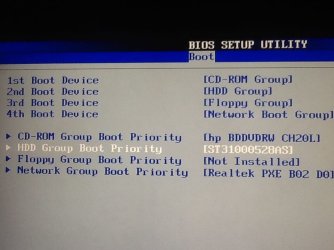
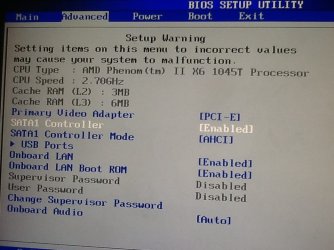
Lets see the Advanced and Boot tabs of the BIOS.

So far I see no evidence you have a UEFI BIOS. But you also have a 2010 BIOS version so there may be an Update for it on the HP Support Downloads webpage. Look over that carefully to see what changes it offers as you may or may not need them.

So if HD passes Long Test and nothing else indicates a UEFI BIOS then work through the steps for Overcoming Windows 7 Installation Failures - Windows 7 Help Forums.
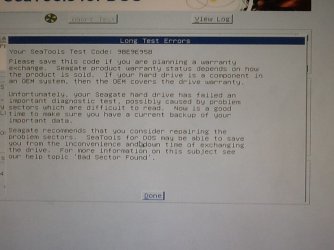
 
So the long test gave me a test code and said i had a failed sector
 

Attachments

  • image.jpg
    image.jpg
    60.8 KB · Views: 1

My Computer My Computer

Computer type
PC/Desktop
Computer Manufacturer/Model Number
Hp
OS
Windows 7 professional 32-bit
CPU
Amd phenom ll 1045T
Memory
8gb ddr3
Graphics Card(s)
Ati radeon HD 5570
Hard Drives
1TB seagate
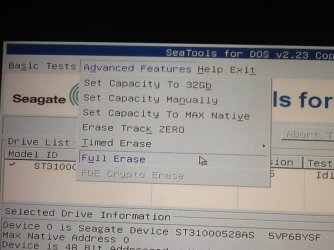
On there site to repair this they say to do preform a full zero fill im not sure what that is there are 3 erase options here...
 

Attachments

  • image.jpg
    image.jpg
    67.9 KB · Views: 1

My Computer My Computer

Computer type
PC/Desktop
Computer Manufacturer/Model Number
Hp
OS
Windows 7 professional 32-bit
CPU
Amd phenom ll 1045T
Memory
8gb ddr3
Graphics Card(s)
Ati radeon HD 5570
Hard Drives
1TB seagate
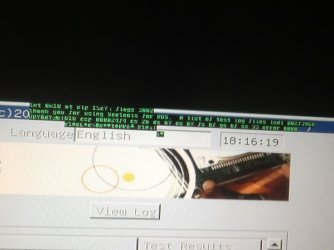
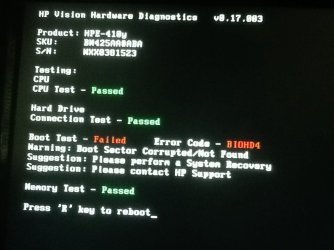
This has happened twice idk what it is
 

Attachments

  • image.jpg
    image.jpg
    51.4 KB · Views: 1

My Computer My Computer

Computer type
PC/Desktop
Computer Manufacturer/Model Number
Hp
OS
Windows 7 professional 32-bit
CPU
Amd phenom ll 1045T
Memory
8gb ddr3
Graphics Card(s)
Ati radeon HD 5570
Hard Drives
1TB seagate
Green lettering and a loud constant beep sound
 

Attachments

  • image.jpg
    image.jpg
    59.2 KB · Views: 1

My Computer My Computer

Computer type
PC/Desktop
Computer Manufacturer/Model Number
Hp
OS
Windows 7 professional 32-bit
CPU
Amd phenom ll 1045T
Memory
8gb ddr3
Graphics Card(s)
Ati radeon HD 5570
Hard Drives
1TB seagate
Ill use clean all insted since the full erase keeps erroring
 

My Computer My Computer

Computer type
PC/Desktop
Computer Manufacturer/Model Number
Hp
OS
Windows 7 professional 32-bit
CPU
Amd phenom ll 1045T
Memory
8gb ddr3
Graphics Card(s)
Ati radeon HD 5570
Hard Drives
1TB seagate
I`ll ask one more time, did you try to install on unallocated space ?

Meaning, did you delete all the partitions to unallocated space then clicked next ?????
 

My Computer My Computer

Computer type
PC/Desktop
Computer Manufacturer/Model Number
Skylake Special #666
OS
Windows 10 Pro x64
CPU
Intel Core i7 6700K
Motherboard
Asus Sabertooth Z170 Mark 1
Memory
GSkill TridentZ RGB 16GB 3600 16-16-16-36
Graphics Card(s)
EVGA GTX 980 Ti SC x2
Sound Card
Realtek High Definition
Monitor(s) Displays
AOC G2460PG
Screen Resolution
1920 x 1080 144Hz
Hard Drives
Samsung 860 Pro 256GB, Seagate Barracuda 4TB x2
PSU
EVGA 1000 P2, EVGA White Custom Braided Cables
Case
Corsair Vengeance C70 Gunmetal Black
Cooling
Corsair H100i v2, Corsair ML120 x2, Thermal Grizzly Kryonaut
Keyboard
Logitech G910 Orion Spectrum
Mouse
Logitech G700s
Internet Speed
Verizon Fios Quantum Gateway 75/75
Antivirus
Windows Defender, Malwarebytes Free 3.8.3
Browser
Chrome
Other Info
Corsair SP120 x4, LG Blu-ray Drive, Durabrand HT-395 100 Watt Dolby Digital Amp, Corsair H2100 Wireless 7.1 Headset
Did you disable EFI in the bios ?

Did you convert the hard drive from GPT to MBR ?

When you get to the page that says windows can`t be installed to this disk, read the details and tell us exactly what it says.
 

My Computer My Computer

Computer type
PC/Desktop
Computer Manufacturer/Model Number
Skylake Special #666
OS
Windows 10 Pro x64
CPU
Intel Core i7 6700K
Motherboard
Asus Sabertooth Z170 Mark 1
Memory
GSkill TridentZ RGB 16GB 3600 16-16-16-36
Graphics Card(s)
EVGA GTX 980 Ti SC x2
Sound Card
Realtek High Definition
Monitor(s) Displays
AOC G2460PG
Screen Resolution
1920 x 1080 144Hz
Hard Drives
Samsung 860 Pro 256GB, Seagate Barracuda 4TB x2
PSU
EVGA 1000 P2, EVGA White Custom Braided Cables
Case
Corsair Vengeance C70 Gunmetal Black
Cooling
Corsair H100i v2, Corsair ML120 x2, Thermal Grizzly Kryonaut
Keyboard
Logitech G910 Orion Spectrum
Mouse
Logitech G700s
Internet Speed
Verizon Fios Quantum Gateway 75/75
Antivirus
Windows Defender, Malwarebytes Free 3.8.3
Browser
Chrome
Other Info
Corsair SP120 x4, LG Blu-ray Drive, Durabrand HT-395 100 Watt Dolby Digital Amp, Corsair H2100 Wireless 7.1 Headset
Im still doing the clean its taking a long time because its 1TB ill let you know After its finished if it will let me install
 

My Computer My Computer

Computer type
PC/Desktop
Computer Manufacturer/Model Number
Hp
OS
Windows 7 professional 32-bit
CPU
Amd phenom ll 1045T
Memory
8gb ddr3
Graphics Card(s)
Ati radeon HD 5570
Hard Drives
1TB seagate
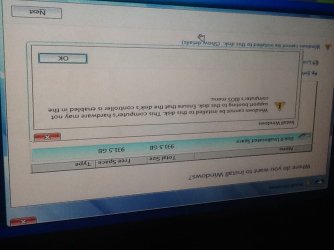
Also theres a photo of the entire message on page 3
 

My Computer My Computer

Computer type
PC/Desktop
Computer Manufacturer/Model Number
Hp
OS
Windows 7 professional 32-bit
CPU
Amd phenom ll 1045T
Memory
8gb ddr3
Graphics Card(s)
Ati radeon HD 5570
Hard Drives
1TB seagate
About the changing from gtp to mbr i might have i was following a tutorial and remember them saying after the clean to type some MBR command like that. i dont know if it was gtp or mbr originally. Im not sure what ufi efi or any of these things are i do t think i touched them but i will check after the clean is finished and i try the install
 

My Computer My Computer

Computer type
PC/Desktop
Computer Manufacturer/Model Number
Hp
OS
Windows 7 professional 32-bit
CPU
Amd phenom ll 1045T
Memory
8gb ddr3
Graphics Card(s)
Ati radeon HD 5570
Hard Drives
1TB seagate
Try install again. Does it boot as UEFI device? Error?

If it fails trying either UEFI or Legacy boot then test the HD again as it is suspect. You may ask Arc for help in Seatools tutorial to be certain.
 
Ok so here is where im at after the "clean all"
1: Try install
 

Attachments

  • image.jpg
    image.jpg
    58 KB · Views: 3

My Computer My Computer

Computer type
PC/Desktop
Computer Manufacturer/Model Number
Hp
OS
Windows 7 professional 32-bit
CPU
Amd phenom ll 1045T
Memory
8gb ddr3
Graphics Card(s)
Ati radeon HD 5570
Hard Drives
1TB seagate
2: check BIOS
 

Attachments

  • image.jpg
    image.jpg
    58.7 KB · Views: 1

My Computer My Computer

Computer type
PC/Desktop
Computer Manufacturer/Model Number
Hp
OS
Windows 7 professional 32-bit
CPU
Amd phenom ll 1045T
Memory
8gb ddr3
Graphics Card(s)
Ati radeon HD 5570
Hard Drives
1TB seagate
More bios
 

Attachments

  • image.jpg
    image.jpg
    72.2 KB · Views: 1

My Computer My Computer

Computer type
PC/Desktop
Computer Manufacturer/Model Number
Hp
OS
Windows 7 professional 32-bit
CPU
Amd phenom ll 1045T
Memory
8gb ddr3
Graphics Card(s)
Ati radeon HD 5570
Hard Drives
1TB seagate
This stuff
 

Attachments

  • image.jpg
    image.jpg
    57.2 KB · Views: 1

My Computer My Computer

Computer type
PC/Desktop
Computer Manufacturer/Model Number
Hp
OS
Windows 7 professional 32-bit
CPU
Amd phenom ll 1045T
Memory
8gb ddr3
Graphics Card(s)
Ati radeon HD 5570
Hard Drives
1TB seagate
Look sorry if I am repeating myself but try a surface test with Partition Wizard it is a physical test as opposed to a generally software one. It also to some extent checks the ability of the read / write heads as well.

Now I ma not sure if this will run from the bootable PW Boot partition manager from USB Flash disk directly to manage disk partition - Partition Wizard Bootable Flash Drive. if it doesn't then if you have access to another machine you could run it using a USB to SATA gadget running PW on the secondary machine. It seems to me that the drive is probably the problem and you seem to be chasing your tail trying to catch the cause.
 

My Computer My Computer

Computer type
PC/Desktop
Computer Manufacturer/Model Number
Own build (new) Desk1 / Asus ROG Win 7 / Desk2 1st build
OS
Desk1 7 Home Prem / Desk2 10 Pro / Main lap Asus ROG 10 Pro 2 laptop Toshiba 7 Pro Asus P2520 7 & 10
CPU
Desk1 i5 3750K / Laptop i7 GTX 860M / Desk2 i5 2500
Motherboard
Desk1 Asus P877-V / Desk2 Gigabyte H67 UD3H / Laptop ?
Memory
Desk1 8GB (1866) / Desk2 16GB (1333) / Laptop 8Gb DDR3
Graphics Card(s)
Desk 1& 2NVidia GTX 650 & Laptops on board Intel
Sound Card
Desk 1 & 2 -XONAR DG Realtek High Def audio Laptop
Monitor(s) Displays
Desk 1 Benq HD 2450 / Desk2 Philips 24" / Laptop 17.5"
Screen Resolution
1920x1080 D1 & D2 & Laptop 1
Hard Drives
Desk1 Samsung 120GB 830 SSD
Asus ROG 256GB 850 Pro SSD
Desk2 Samsung 840 256 SSD
Toshiba 120GB EVO
PSU
Desk 1 Corsair HX 1050/ Laptop ? / Desk 2 Corsair HX 650
Case
Desk 1 Cooler HAF XM ? Toshiba laptop / Desk2 Coolermaster
Cooling
Fans on all Desk1 -2 Desk2 - all Coolermasters 5 Laptop ?
Keyboard
Desk 1 MS Sidewinder X6 Desk 2 MS Sidewinder X 4
Mouse
Desk 1&2 - Gigabyte MS 900 gamer - laptop - Logitec wireless
Internet Speed
ADSL2+
Other Info
One other Desktop (tester) and spare Toshba laptop both with SSD's
Running Kaspersky 2016 ISS on all machines config'd identically
Logitec audio stereo systems on each machine (x3)
Canon MG5250MFC
Router/modem TP-Link running WPA2SK
Back
Top