
- Local time
- 4:30 AM
- Messages
- 50,634
I didn't search Indra because he said his PC was named that.


 icnic: Why did I not think of that? Of course the windows security log would help. It looks something similar to group policy or what gregrocker said. Is this pc used for work? Is it a work laptop?
It would involve a few minutes by ij2014 to check if any of his profiles were corrupt and then go from there to create new ones.You've been put into a temporary user profile because the original one was corrupted. You can try the techniques below. If that doesn't work, let me know and I'll give you an alternate path.
The critical files are under %systemdrive%\users\user-account\ntuser. The ntuser.dat file is actually a registry hive. Run regedit elevated and select HKEY_USERS and "load hive" from the menu. Now navigate to:
HKEY_LOCAL_MACHINE\SOFTWARE\Microsoft\Windows NT\CurrentVersion\ProfileList
There is one line for each profile. If a profile is bad, check:
a) That the key name doesn't end in ".bak" (remove .bak if there)
b) That the RefCount value is 0 (change it if different)
c) That the State value is 0 (change if different)
Source, second answer by Malkeleah: System Reboot created new user profile - Microsoft Community
It sounds like the Anti-Theft feature of your ESET Smart Security 8 install.....What might be the possible reason behind this? Thanks in advance.
I was not able to disable ESET via msconfig:gregrocker, I unchecked all of those, except Eset. Touchpad lost its scrolling functionality. Next, I unchecked Eset too. But even then, result was the same - the user got created perfectly each time.
There may be a couple on this list: Sysinternals Process Utilities Process Monitor is usually recommended also:Is there any way to track this user creation? Any tool that will track the user creation and corresponding process that initiates the activity?
So your State Count of 204 would be:Hey Mark,
I got this from a MS technician:
The State information for each profile is stored in the following location:
Key: HKLM\Software\Microsoft\Windows NT\CurrentVersion\ProfileList\SID
Value: State
DataType: REG_DWORD
Data:
A value of 256 in the State would be decoded in this manner:
256 = 200 + 040 + 010 + 002 + 004
You can math the numbers with the following terms to determine the flag
settings on the profile:
001 = PROFILE_MANDATORY
Profile is mandatory.
002 = PROFILE_USE_CACHE
Update locally Cached profile.
004 = PROFILE_NEW_LOCAL
Using a new local profile.
008 = PROFILE_NEW_CENTRAL
Using a new central profile.
010 = PROFILE_UPDATE_CENTRAL
Need to update central profile.
020 = PROFILE_DELETE_CACHE
Need to delete cached profile.
040 = PROFILE_UPGRADE
Need to upgrade profile.
080 = PROFILE_GUEST_USER
Using guest user profile.
100 = PROFILE_ADMIN_USER
Using administrator profile.
200 = DEFAULT_NET_READY
Default net profile is available & ready.
400 = PROFILE_SLOW_LINK
Identified slow network link.
800 = PROFILE_TEMP_ASSIGNED
Temporary profile loaded.
It wouldn't be the first time one of these features went FUBAR especially with the rounds of security updates Windows has been sending down the pipe and the third-party anti-virus companies trying to keep up.ESET claims, when device theft is reported, other accounts are hidden and only the phantom account is shown. I haven't tested it though. Moreover, in the present case, all other accounts are shown and most importantly, no device theft was ever reported.
.... sounds like you can reset the protection.How to revert the status of a device to normal
To revert a device to a normal state, click I recovered my device. The device will reboot and your normal user account will be re-enabled. After selecting I recovered my device, a device status change confirmation message will appear in a pop-up window which will include additional summary information.
.... sounds like you can reset the protection.
It's never a good sign IMO when an AV needs a special removal tool since it points to bloatware. I suspect we are seeing an example of that here.
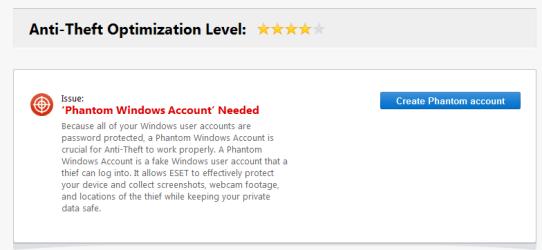
Ever since UsernameIssues mentioned that Phantom account, I started to suspect ESET badly. And after reading Greg's suggestion of uninstalling ESET, I knew what to get hold of. And yes Anak, you were spot on. A while ago I disabled the Anti-theft feature, deleted the evil account and restarted. For the first time during the last 8/9 days, there was no other account (other than the ones I created) showing in "Manage Accounts". Next, I enabled the feature again and had to create a Phantom account, with a nice friendly name, once again. Restarted. In the login screen the Phantom account showed up. Next, I deleted this account from the control panel. The next restart gave birth to an awful account in the "Manage Accounts" again, only with a different name.
When I activated Anti-theft a year back, I had to create a Phantom account which is the standard user account I was having all the time. I think, somehow, ESET lost track of this account and went on creating account on its own. Any way, have to check a few days before I can really breathe a sigh of relief.
Isn't that what you want?Thats basically resetting the "missing" status of the device - it changes the status of the protected device to "Not missing" and the anti-theft mechanism becomes inactive.This.....The device will reboot and your normal user account will be re-enabled.
As I recall, there are 3 states: something like missing, found and test.Isn't that what you want?Thats basically resetting the "missing" status of the device - it changes the status of the protected device to "Not missing" and the anti-theft mechanism becomes inactive.This.....
Isn't that what you want?Thats basically resetting the "missing" status of the device - it changes the status of the protected device to "Not missing" and the anti-theft mechanism becomes inactive.This.....

I don't think that ESET thinks that the device is missing... so there will be no button to push to change the computer from missing to found. The OP's normal user account on this computer is already enabled. See post #1 where the OP seems to be using a normal admin account to delete the phantom standard account.
If the device were in the missing mode, then all normal accounts would be hidden. Only the phantom standard user account will be on the Welcome screen - and since that account has no password - the computer boots straight to the desktop for that phantom account. The OP could not delete the phantom account while logged into that account... hence my guess that the OP is using a normal admin account for the actions mentioned in post #1.
Either way - I think that we can say that the phantom account is not malicious. The OP can uninstall and re-install ESET's software to see if that fixes the issue. Or live with the extra account. Or contact ESET for diagnostics of their app. I'm not sure that we will know the answer as to why the phantom account is being created at times when it should not be.
Ever since UsernameIssues mentioned that Phantom account, I started to suspect ESET badly. And after reading Greg's suggestion of uninstalling ESET, I knew what to get hold of. And yes Anak, you were spot on. A while ago I disabled the Anti-theft feature, deleted the evil account and restarted. For the first time during the last 8/9 days, there was no other account (other than the ones I created) showing in "Manage Accounts". Next, I enabled the feature again and had to create a Phantom account, with a nice friendly name, once again. Restarted. In the login screen the Phantom account showed up. Next, I deleted this account from the control panel. The next restart gave birth to an awful account in the "Manage Accounts" again, only with a different name.
When I activated Anti-theft a year back, I had to create a Phantom account which is the standard user account I was having all the time. I think, somehow, ESET lost track of this account and went on creating account on its own. Any way, have to check a few days before I can really breathe a sigh of relief.


