1TWD external hard disk unknown,not initialized,unallocated,i/o error

thought western digital is top brand, just 1 year it died!! (faint)
Any other good brand of hard disk recommand?
 

My Computer My Computer

At a glance

windows 7i5 -2410 M 2.3Ghz4GB
Computer type
Laptop
Computer Manufacturer/Model Number
sony E Series VPCEG18FG
OS
windows 7
CPU
i5 -2410 M 2.3Ghz
Memory
4GB
Hard Drives
500GB
Use Mushkin SSDs. They stand behind their products and replace defective SSDs even after a couple of years.
 

My Computer My Computer

At a glance

Vista, Windows7, Mint Mate, Zorin, Windows 8from 1.6GHz Duo to i7
Computer Manufacturer/Model Number
HP, Dell, Gateway, Toshiba - 4 laptops and 2 desktops
OS
Vista, Windows7, Mint Mate, Zorin, Windows 8
CPU
from 1.6GHz Duo to i7
Monitor(s) Displays
2x HP w2207
Hard Drives
5x HDD, 7x SSD, 12x Externals
Keyboard
with trackball - no mices
Mouse
Trackball mice
Internet Speed
DSL 6000
I think reliability of HDDs internal and external is the luck of the draw. I have quite a number of external WD HDDs (portable and powered) and they have all served me well with no reallocated sectors. I go for the base models (Elements and My Book Essentials). I'd never install any WD backup type software on the drives.

I use CrystalDiskInfo to monitor the state of both HDDs and SSDs. It picks up some interesting settings on your SSDs (eg. APM, DevSleep). I use the portable versions which avoid OpenCandy Ads. The latest i chose was "Shizuku Edition [Simple&Update]". In the SMART data the reallocated sector count is an important measure to keep an eye on for HDDs. If it starts to climb unexpectedly you probably have a failing disk. If the controller fails you probably have no warning and I understand SSDs fail in the same manner.
 
Last edited:

My Computer My Computer

At a glance

Windows 7x64 Home Premium SP1Intel i7 2600kG.Skill Ripjaws (DDR3-1600) 2x4GBNvidia GeForce GTS 450; Intel HD Graphics 300...
Computer type
PC/Desktop
Computer Manufacturer/Model Number
Own build
OS
Windows 7x64 Home Premium SP1
CPU
Intel i7 2600k
Motherboard
ASUS P8Z68 Deluxe
Memory
G.Skill Ripjaws (DDR3-1600) 2x4GB
Graphics Card(s)
Nvidia GeForce GTS 450; Intel HD Graphics 3000(GT2+)
Monitor(s) Displays
Dell Ultrasharp IPS panel U2311H, Samsung SyncMaster P2350
Screen Resolution
1920x1080
Hard Drives
Samsung 850 Pro SSD 256GB, Samsung SSD 840 120GB, Seagates 1TB Barracuda ST31000528AS x2
PSU
Seasonic M12II 520W
Case
Lian Li Lancool PC-K60
Cooling
Case: 1x120mm, 3x140mm CPU: Hyper 212+
Keyboard
Logitech MK520 (wireless)
Mouse
Logitech MK520
Internet Speed
6-7 Mbps
Antivirus
Norton Security Premium, Malwarebytes on 2 (MSE on 3rd PC)
Browser
FireFox
Other Info
Audio: Logitech Z523 2.1
So said wasted a week for no result on this minitool :sick:

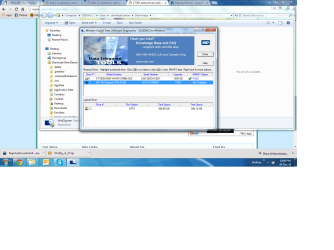
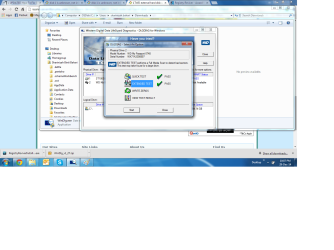
I also facing the same problem, but different fro gcrazy, when I run a WD testing, I manage to pass the test. But I don't know what else to do ?
 

My Computer My Computer

At a glance

Windows 7 Professional SP1Intel (R) Core (TM) i5-4200U CPU @ 1.60 GHz4 GB
Computer type
Laptop
Computer Manufacturer/Model Number
Lenovo
OS
Windows 7 Professional SP1
CPU
Intel (R) Core (TM) i5-4200U CPU @ 1.60 GHz
Memory
4 GB
Hard disks these days have extensive error-correcting capabilities; when you start seeing I/O errors, that means that the built-in error correction is no longer able to correct for the errors. That normally means the disk is very close to outright failing, if it hasn't already failed.

Manufacturer's Diagnostic/repair uiility : Western Digital Data Life Guard Diagnostic for Windows. WD Support / Downloads / My Cloud Apps + Other Products / Data Lifeguard Diagnostic for Windows

Go ahead and check your hard disk with this utility. If the Short Test fails, then Long Test. If the Long Test also fails, then RMA.

Hi Jumanji, I've similar problem like gcrazy, but I managed to run the WD test and pass the test. What shall I do next ? I got a lot of my precious data in there.. really sickening almost 4 days try to recover it.
 

Attachments

  • MyHDD1.png
    MyHDD1.png
    140 KB · Views: 7
  • MyHDD2.png
    MyHDD2.png
    112.2 KB · Views: 3
Last edited:

My Computer My Computer

At a glance

Windows 7 Professional SP1Intel (R) Core (TM) i5-4200U CPU @ 1.60 GHz4 GB
Computer type
Laptop
Computer Manufacturer/Model Number
Lenovo
OS
Windows 7 Professional SP1
CPU
Intel (R) Core (TM) i5-4200U CPU @ 1.60 GHz
Memory
4 GB
If, as you say, your drive passes the WD test, then there is nothing you can do with WD, as they will not replace the drive if it passes the test.

Best thing to do at this point is migrate stuff off the drive to another drive as soon as you can.

I've had drives go from unreliable to totally failed in a couple of days. The more you delay migrating stuff off, the greater the likelihood that when you go to do it, the drive will be dead and you won't be able to recover anything.

The last WD drive that failed me was only a few months old.
 

My Computer My Computer

At a glance

Win7 Pro 32-bit, Win8 Pro 32-bitAMD Phenom II X6 1090T4GB ddr3 1300AMD HD 4290 onboard
Computer type
PC/Desktop
Computer Manufacturer/Model Number
Custom
OS
Win7 Pro 32-bit, Win8 Pro 32-bit
CPU
AMD Phenom II X6 1090T
Motherboard
Gigabyte
Memory
4GB ddr3 1300
Graphics Card(s)
AMD HD 4290 onboard
Sound Card
Builtin Realtek HD Audio
Monitor(s) Displays
Samsung 24" widescreen, LG 23" widescreen
Screen Resolution
1920x1200/1920x1080
Hard Drives
Kingston 256GB SSD
Keyboard
Logitech Illuminated Keyboard
Mouse
Logitech M705 wireless mouse
Antivirus
Norton Av 2013
Browser
IE v10
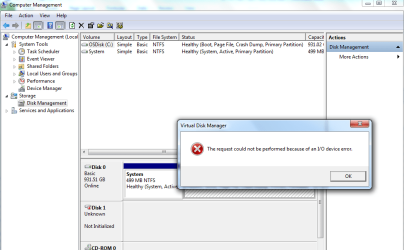
Mark, I've tried Chkdsk before this, and it's seems running correcting the error, but somehow it's stop and since that I can't see my disk any longer. I even try Minitool partition yesterday, it's seems running fine but after that nothing came out too. But last night, using Minitool partition wizard, testdisk, photorec, all can't locate any longer my HD except in my Disk Management and Device Manager. In Disk Management,it's show bad disk.. not initialized..

How can I transfer when I even can't see the disk any more?
 

My Computer My Computer

At a glance

Windows 7 Professional SP1Intel (R) Core (TM) i5-4200U CPU @ 1.60 GHz4 GB
Computer type
Laptop
Computer Manufacturer/Model Number
Lenovo
OS
Windows 7 Professional SP1
CPU
Intel (R) Core (TM) i5-4200U CPU @ 1.60 GHz
Memory
4 GB
Please post a screenshot of Windows Disk Management with only your problem HDD plugged in.

http://www.sevenforums.com/tutorials/274797-disk-management-post-screen-capture-image.html

Please make sure to hide the Console Tree and Action Pane by hitting the icons in the top Menu Bar so that we get a full view.

Also post a screenshot of Partition Wizard with that HDD.

Also tell us whether other external HDDs and pen drives are OK with your PC.

Did you try the problem HDD on another PC and check whether it could be read??

( I am out to Dental Care and can see it only after 12 hours.).

EDIT: You seem to have run Datalifeguard Diagnostics on your system drive and not the WD external drive.:) The external drive is listed . Did you really run the Short Test and Long Test? If not run it again. How to test a drive for problems using Data Lifeguard Diagnostics for Windows
 
Last edited:

My Computer My Computer

At a glance

Windows 7 Home Premium 32 bit
OS
Windows 7 Home Premium 32 bit
Hi Jumanji, TQ so much for replying my message.

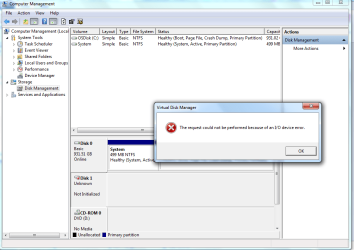
Here the snapshot when I plugged in my WD Hardisk 1TB .Yes, I've tried using another PC and laptop, the result still the same. Emm.. I run again the WD Diagnostic, but the SMART not available and no size of my HDD is listed.. no wonder when I run short and extended test, it's finish very fast.

For other driver/external HDD, no problem, I still can read and explore them.
 

Attachments

  • DiskManagement1Error.png
    DiskManagement1Error.png
    42.1 KB · Views: 2
  • DiskManagement2Error.png
    DiskManagement2Error.png
    33.9 KB · Views: 4

My Computer My Computer

At a glance

Windows 7 Professional SP1Intel (R) Core (TM) i5-4200U CPU @ 1.60 GHz4 GB
Computer type
Laptop
Computer Manufacturer/Model Number
Lenovo
OS
Windows 7 Professional SP1
CPU
Intel (R) Core (TM) i5-4200U CPU @ 1.60 GHz
Memory
4 GB
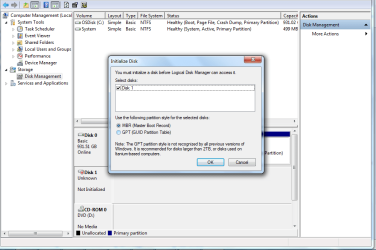
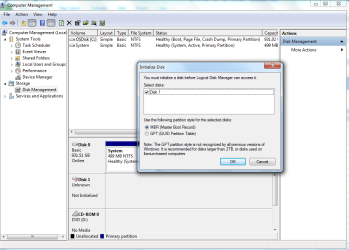
If we are talking about disk1, you have to initialize it. Right click on the smaller box where it says Disk1.
 

My Computer My Computer

At a glance

Vista, Windows7, Mint Mate, Zorin, Windows 8from 1.6GHz Duo to i7
Computer Manufacturer/Model Number
HP, Dell, Gateway, Toshiba - 4 laptops and 2 desktops
OS
Vista, Windows7, Mint Mate, Zorin, Windows 8
CPU
from 1.6GHz Duo to i7
Monitor(s) Displays
2x HP w2207
Hard Drives
5x HDD, 7x SSD, 12x Externals
Keyboard
with trackball - no mices
Mouse
Trackball mice
Internet Speed
DSL 6000
Hi whs, I already try to initialize the disk, but the error come out as snapshot below.
 

Attachments

  • Initialize1Disk.png
    Initialize1Disk.png
    36 KB · Views: 1
  • Initialize2Disk.png
    Initialize2Disk.png
    31.8 KB · Views: 1
  • Initialize3Disk.png
    Initialize3Disk.png
    38.9 KB · Views: 1

My Computer My Computer

At a glance

Windows 7 Professional SP1Intel (R) Core (TM) i5-4200U CPU @ 1.60 GHz4 GB
Computer type
Laptop
Computer Manufacturer/Model Number
Lenovo
OS
Windows 7 Professional SP1
CPU
Intel (R) Core (TM) i5-4200U CPU @ 1.60 GHz
Memory
4 GB

My Computer My Computer

At a glance

Vista, Windows7, Mint Mate, Zorin, Windows 8from 1.6GHz Duo to i7
Computer Manufacturer/Model Number
HP, Dell, Gateway, Toshiba - 4 laptops and 2 desktops
OS
Vista, Windows7, Mint Mate, Zorin, Windows 8
CPU
from 1.6GHz Duo to i7
Monitor(s) Displays
2x HP w2207
Hard Drives
5x HDD, 7x SSD, 12x Externals
Keyboard
with trackball - no mices
Mouse
Trackball mice
Internet Speed
DSL 6000
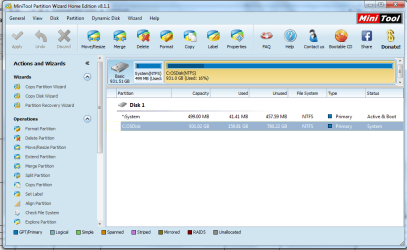
I've tried before the Minitool Partition Magic, it's run well , then nothing happened, I still can't explore the file as prescribed earlier by Jumanji in another thread. Then I try again to run the Minitool Partition Magic, it won't detect anymore my HDD.
 

Attachments

  • MiniTool.png
    MiniTool.png
    46.3 KB · Views: 1

My Computer My Computer

At a glance

Windows 7 Professional SP1Intel (R) Core (TM) i5-4200U CPU @ 1.60 GHz4 GB
Computer type
Laptop
Computer Manufacturer/Model Number
Lenovo
OS
Windows 7 Professional SP1
CPU
Intel (R) Core (TM) i5-4200U CPU @ 1.60 GHz
Memory
4 GB
Hi Nizah,

If your HDD is still under warranty, get an RMA from Western Digital for a replacement.

If your HDD is not under warranty, you may take the HDD out from the case ( carefully pry it open) connect it as an internal drive on a desktop and see whether you can access it.

(Note: In some WD externals the Sata to USB bridge interface card is integrated with the HDD and the HDD cannot be separated.. If that is the case you are out of luck and can't do that.)
 

My Computer My Computer

At a glance

Windows 7 Home Premium 32 bit
OS
Windows 7 Home Premium 32 bit
Hi Jumanji, thanks for your reply. I will try the last option to send it to WD. It's really make me feels so sad having lost this precious data here..
 

My Computer My Computer

At a glance

Windows 7 Professional SP1Intel (R) Core (TM) i5-4200U CPU @ 1.60 GHz4 GB
Computer type
Laptop
Computer Manufacturer/Model Number
Lenovo
OS
Windows 7 Professional SP1
CPU
Intel (R) Core (TM) i5-4200U CPU @ 1.60 GHz
Memory
4 GB
Back up, Back up, Back up . All data you consider important and would regret losing, should always be available on two physical drives.
 

My Computer My Computer

At a glance

Windows 7 Home Premium 32 bit
OS
Windows 7 Home Premium 32 bit

My Computer My Computer

At a glance

Vista, Windows7, Mint Mate, Zorin, Windows 8from 1.6GHz Duo to i7
Computer Manufacturer/Model Number
HP, Dell, Gateway, Toshiba - 4 laptops and 2 desktops
OS
Vista, Windows7, Mint Mate, Zorin, Windows 8
CPU
from 1.6GHz Duo to i7
Monitor(s) Displays
2x HP w2207
Hard Drives
5x HDD, 7x SSD, 12x Externals
Keyboard
with trackball - no mices
Mouse
Trackball mice
Internet Speed
DSL 6000
Jumanji : I did backup.. but not the latest photos.. so busy to do some housekeeping on my precious photos.. bad me!

Whs : ok , I will try this one..
 

My Computer My Computer

At a glance

Windows 7 Professional SP1Intel (R) Core (TM) i5-4200U CPU @ 1.60 GHz4 GB
Computer type
Laptop
Computer Manufacturer/Model Number
Lenovo
OS
Windows 7 Professional SP1
CPU
Intel (R) Core (TM) i5-4200U CPU @ 1.60 GHz
Memory
4 GB
Except for WD elements HDD externals you are likely to have problems even when they have an internal sata connection. WD for some ridiculous reason apply hardware encryption so if you plug it into a sata connection (internal or Docking station) it may be impossible to read the data. WD sata drives are ok but they are best used with a third party external case or a docking station IMO. Also, I'd always have at least 2 backups of special things like photos and certain documents. For photos I tend to keep the old SD cards when they fill up and buy new ones.
 

My Computer My Computer

At a glance

Windows 7x64 Home Premium SP1Intel i7 2600kG.Skill Ripjaws (DDR3-1600) 2x4GBNvidia GeForce GTS 450; Intel HD Graphics 300...
Computer type
PC/Desktop
Computer Manufacturer/Model Number
Own build
OS
Windows 7x64 Home Premium SP1
CPU
Intel i7 2600k
Motherboard
ASUS P8Z68 Deluxe
Memory
G.Skill Ripjaws (DDR3-1600) 2x4GB
Graphics Card(s)
Nvidia GeForce GTS 450; Intel HD Graphics 3000(GT2+)
Monitor(s) Displays
Dell Ultrasharp IPS panel U2311H, Samsung SyncMaster P2350
Screen Resolution
1920x1080
Hard Drives
Samsung 850 Pro SSD 256GB, Samsung SSD 840 120GB, Seagates 1TB Barracuda ST31000528AS x2
PSU
Seasonic M12II 520W
Case
Lian Li Lancool PC-K60
Cooling
Case: 1x120mm, 3x140mm CPU: Hyper 212+
Keyboard
Logitech MK520 (wireless)
Mouse
Logitech MK520
Internet Speed
6-7 Mbps
Antivirus
Norton Security Premium, Malwarebytes on 2 (MSE on 3rd PC)
Browser
FireFox
Other Info
Audio: Logitech Z523 2.1

My Computer My Computer

At a glance

Windows 7 Home Premium 32 bit
OS
Windows 7 Home Premium 32 bit
Back
Top