Multiboot HDD-W7 + HDD-XP + SSD-W7

Unallocated should not be a problem. I was afraid the disk was formatted in Fat32. Let's see what the Paragon people say. That would be interesting. That program has always worked for me.
 

My Computer My Computer

At a glance

Vista, Windows7, Mint Mate, Zorin, Windows 8from 1.6GHz Duo to i7
Computer Manufacturer/Model Number
HP, Dell, Gateway, Toshiba - 4 laptops and 2 desktops
OS
Vista, Windows7, Mint Mate, Zorin, Windows 8
CPU
from 1.6GHz Duo to i7
Monitor(s) Displays
2x HP w2207
Hard Drives
5x HDD, 7x SSD, 12x Externals
Keyboard
with trackball - no mices
Mouse
Trackball mice
Internet Speed
DSL 6000
Unallocated should not be a problem.

Thinking while I wait for Paragon (they're not as quick as you at responding :) ) I notice that as unallocated space with no name or drive letter - should I run the New Simple Volume wizard for the drive (right click over drive space in disk management display and select from dropdown options)?

This would then assign name drive letter and permit a Quick Format. This may not solve the problem but would there be any potential harm or problem from doing so?
 

My Computer My Computer

At a glance

Windows 7 - 32bitIntel Core2Duo E84002GBAsus NVIDIA GT640
Computer type
PC/Desktop
Computer Manufacturer/Model Number
self build
OS
Windows 7 - 32bit
CPU
Intel Core2Duo E8400
Motherboard
ASUS P5Q SE
Memory
2GB
Graphics Card(s)
Asus NVIDIA GT640
Sound Card
Realtek on mobo
Monitor(s) Displays
2 identical IIyama 19"
Screen Resolution
1280 x 1024
Hard Drives
4 HDD + 1 SSD all SATA
PSU
520W Corsair HX series modular.
Case
Gigabyte - Triton
Cooling
Fans
Keyboard
Logitech
Mouse
Logitech wireless
Internet Speed
2.8M on a good day
Browser
IE11
Other Info
Wacom Bamboo Tablet CTH-470
Unallocated should not be a problem.

Thinking while I wait for Paragon (they're not as quick as you at responding :) ) I notice that as unallocated space with no name or drive letter - should I run the New Simple Volume wizard for the drive (right click over drive space in disk management display and select from dropdown options)?

This would then assign name drive letter and permit a Quick Format. This may not solve the problem but would there be any potential harm or problem from doing so?

Nah, I don't think that would help. The Paragon program found the SSD and 'unallocated' is what they want. I guess we'll have to wait what they say. I think Paragon is in Germany. So there is a 7 hour time difference right now. Be patient, LOL.
 

My Computer My Computer

At a glance

Vista, Windows7, Mint Mate, Zorin, Windows 8from 1.6GHz Duo to i7
Computer Manufacturer/Model Number
HP, Dell, Gateway, Toshiba - 4 laptops and 2 desktops
OS
Vista, Windows7, Mint Mate, Zorin, Windows 8
CPU
from 1.6GHz Duo to i7
Monitor(s) Displays
2x HP w2207
Hard Drives
5x HDD, 7x SSD, 12x Externals
Keyboard
with trackball - no mices
Mouse
Trackball mice
Internet Speed
DSL 6000
Have you tried the migration with all HD's disconnected except those needed to migrate from and to ?
Maybe having unneeded devices connected is causing a problem ?
 

My Computer My Computer

At a glance

Multi-Boot W7_Pro_x64 W8.1_Pro_x64 W10_Pro_x6...AMD Athlon II x4 6206GB GSkill DDR2 800AMD 4670 GPU + AMD 4200 IGP
Computer type
PC/Desktop
Computer Manufacturer/Model Number
home built
OS
Multi-Boot W7_Pro_x64 W8.1_Pro_x64 W10_Pro_x64 +Linux_VMs +Chromium_VM
CPU
AMD Athlon II x4 620
Motherboard
Gigabyte GA-MA785G-UD3H
Memory
6GB GSkill DDR2 800
Graphics Card(s)
AMD 4670 GPU + AMD 4200 IGP
Sound Card
on board Realtek ALC889A
Monitor(s) Displays
RCA 40" LCD TV, Insignia 32" LCD TV, HP 15" LCD monitor
Screen Resolution
1680 x 1050
Hard Drives
OCZ Vertex 3 120GB,
Samsung F3 1TB (3),
Several others - WD, Seagate, Hitachi, ...
PSU
Corsair 500 W
Case
Rosewill mid tower
Cooling
CM 90mm rifle
Keyboard
Gyration wireless, Logitech wireless, Dell USB wired
Mouse
Gyration wireless, Logitech wireless, V7 USB wired
Internet Speed
Spectrum - 100Mbps D / 10Mbps U
Antivirus
Avast, MBAM3, EMET, WinPatrol
Browser
Pale Moon, Firefox, IE
Other Info
2 multi-boot PC's
Mainly HTPC/Office/Gen purpose (no gaming).
Trendnet USB KVM.
LG DVD burner/Blue Ray Player.
Tray system for removable SATA backup drives.

Not currently OCd, under-volted.
I use Hybrid sleep, rarely re-boot or shutdown.

Hauppauge HD-PVR, Avermedia PCIe TV Tuner, Hauppauge PCI TV Tuner.
  • Like
Reactions: whs
Have you tried the migration with all HD's disconnected except those needed to migrate from and to ?
Maybe having unneeded devices connected is causing a problem ?

That's a good idea. There may be system stuff on other partitions that Paragon wants to round up. But if it is unaccessible, we may get another error. At least then we know what the problem is.
 

My Computer My Computer

At a glance

Vista, Windows7, Mint Mate, Zorin, Windows 8from 1.6GHz Duo to i7
Computer Manufacturer/Model Number
HP, Dell, Gateway, Toshiba - 4 laptops and 2 desktops
OS
Vista, Windows7, Mint Mate, Zorin, Windows 8
CPU
from 1.6GHz Duo to i7
Monitor(s) Displays
2x HP w2207
Hard Drives
5x HDD, 7x SSD, 12x Externals
Keyboard
with trackball - no mices
Mouse
Trackball mice
Internet Speed
DSL 6000
Are you wintering in Florida Wolfgang?

Germany is only 1 hour ahead of us here in the UK - so I guess the Paragon people are at home watching TV - hopefully get a reply from them sometime tomorrow.
 

My Computer My Computer

At a glance

Windows 7 - 32bitIntel Core2Duo E84002GBAsus NVIDIA GT640
Computer type
PC/Desktop
Computer Manufacturer/Model Number
self build
OS
Windows 7 - 32bit
CPU
Intel Core2Duo E8400
Motherboard
ASUS P5Q SE
Memory
2GB
Graphics Card(s)
Asus NVIDIA GT640
Sound Card
Realtek on mobo
Monitor(s) Displays
2 identical IIyama 19"
Screen Resolution
1280 x 1024
Hard Drives
4 HDD + 1 SSD all SATA
PSU
520W Corsair HX series modular.
Case
Gigabyte - Triton
Cooling
Fans
Keyboard
Logitech
Mouse
Logitech wireless
Internet Speed
2.8M on a good day
Browser
IE11
Other Info
Wacom Bamboo Tablet CTH-470
Yeah I am in Florida right now and enjoy the 30C.

Question: did you move your user folders to another partition/drive and how - with the location tab in Properties or did you make new folders and Included those into the libraries.
 

My Computer My Computer

At a glance

Vista, Windows7, Mint Mate, Zorin, Windows 8from 1.6GHz Duo to i7
Computer Manufacturer/Model Number
HP, Dell, Gateway, Toshiba - 4 laptops and 2 desktops
OS
Vista, Windows7, Mint Mate, Zorin, Windows 8
CPU
from 1.6GHz Duo to i7
Monitor(s) Displays
2x HP w2207
Hard Drives
5x HDD, 7x SSD, 12x Externals
Keyboard
with trackball - no mices
Mouse
Trackball mice
Internet Speed
DSL 6000
My user data has traditionally lived an independent life on separate drives well away from the OS partitions - in XP IIRC I had the ability to move the MyDocuments special folder. In W7 which I am fairly new to I have not really tried to integrate them into W7 libraries or locations.

Only been running W7 for a few months and MyDocs was already on a different drive and has quite happily remained there when W7 moved in. I have always valued the independence of having "my files" well away from the OS. OS's need reformatting and rebuilding when things go pear shaped and my user data has existed almost untouched since my W98 days. For photographs (and I take quite a lot) they are on a drive of their own "mounted" on an empty folder on the MyDocs drive. Works very well in practice. Oh and then there's the backup drive all on its own that I daily run Uranium backups to. So 5 hard drives altogether (that's if we can get the SSD to join the team).

Either tonight (its 00:20 now) or sometime tomorrow if I am still waiting for Paragon I will disconnect my userdata, images and backup drives just leaving my XP/W7 drive and the SSD drive and see what MigrateOStoSSD does - not too optimistic ATM but worth a try to see what happens. Will get back to y'all as soon as I have something to report.

Thanks.
 

My Computer My Computer

At a glance

Windows 7 - 32bitIntel Core2Duo E84002GBAsus NVIDIA GT640
Computer type
PC/Desktop
Computer Manufacturer/Model Number
self build
OS
Windows 7 - 32bit
CPU
Intel Core2Duo E8400
Motherboard
ASUS P5Q SE
Memory
2GB
Graphics Card(s)
Asus NVIDIA GT640
Sound Card
Realtek on mobo
Monitor(s) Displays
2 identical IIyama 19"
Screen Resolution
1280 x 1024
Hard Drives
4 HDD + 1 SSD all SATA
PSU
520W Corsair HX series modular.
Case
Gigabyte - Triton
Cooling
Fans
Keyboard
Logitech
Mouse
Logitech wireless
Internet Speed
2.8M on a good day
Browser
IE11
Other Info
Wacom Bamboo Tablet CTH-470
If you clone the Win7 drive to the SSD it will not have its boot files unless you first move them to C from the XP partition. You can use Bootmgr - Move to C:\ with EasyBCD - Windows 7 Forums or mark C Active to run Startup Repair - Run 3 Separate Times with all other drives unplugged.

There is no guessing or other testing needed to know for sure that XP holds the boot files because it has the "System" flag.

Just be sure to change the SSD in BIOS setup to boot first after running the migration.

You can achieve the same now for free using Macrium Imaging - Windows 7 Help Forums
installed to C, just drag the C partition to SSD, click the Properties link to adjust the partition size if needed, proceed.
 
If those are images you made with Windows imaging, it could be those that Paragon is looking for. Can you think of any other files that are on the spinners and might belong to the OS.
 

My Computer My Computer

At a glance

Vista, Windows7, Mint Mate, Zorin, Windows 8from 1.6GHz Duo to i7
Computer Manufacturer/Model Number
HP, Dell, Gateway, Toshiba - 4 laptops and 2 desktops
OS
Vista, Windows7, Mint Mate, Zorin, Windows 8
CPU
from 1.6GHz Duo to i7
Monitor(s) Displays
2x HP w2207
Hard Drives
5x HDD, 7x SSD, 12x Externals
Keyboard
with trackball - no mices
Mouse
Trackball mice
Internet Speed
DSL 6000
Thanks for that Greg - you're probably right about the boot file - but as you can see ATM we are pushing to get a solution from Paragon - but a macrium or even EaseUS solution is not off the cards by any means.

Appreciate your interest - thanks.
 

My Computer My Computer

At a glance

Windows 7 - 32bitIntel Core2Duo E84002GBAsus NVIDIA GT640
Computer type
PC/Desktop
Computer Manufacturer/Model Number
self build
OS
Windows 7 - 32bit
CPU
Intel Core2Duo E8400
Motherboard
ASUS P5Q SE
Memory
2GB
Graphics Card(s)
Asus NVIDIA GT640
Sound Card
Realtek on mobo
Monitor(s) Displays
2 identical IIyama 19"
Screen Resolution
1280 x 1024
Hard Drives
4 HDD + 1 SSD all SATA
PSU
520W Corsair HX series modular.
Case
Gigabyte - Triton
Cooling
Fans
Keyboard
Logitech
Mouse
Logitech wireless
Internet Speed
2.8M on a good day
Browser
IE11
Other Info
Wacom Bamboo Tablet CTH-470
I would not hold my breath waiting for Paragon to reply, but go ahead and try Macrium which has no downside anyway.

Then if ever they reply you can ask for your money back. ;)
 
Wolfgang - the partition called Images is full of photographs only, and there are no other W7 system files other than on C:

The report from Paragon Migrate I think is quite clear - it announced an intention to copy 22.4GB from C: to an SSD it believes is 119.2GB - the ball is very much in their court ATM.
 

My Computer My Computer

At a glance

Windows 7 - 32bitIntel Core2Duo E84002GBAsus NVIDIA GT640
Computer type
PC/Desktop
Computer Manufacturer/Model Number
self build
OS
Windows 7 - 32bit
CPU
Intel Core2Duo E8400
Motherboard
ASUS P5Q SE
Memory
2GB
Graphics Card(s)
Asus NVIDIA GT640
Sound Card
Realtek on mobo
Monitor(s) Displays
2 identical IIyama 19"
Screen Resolution
1280 x 1024
Hard Drives
4 HDD + 1 SSD all SATA
PSU
520W Corsair HX series modular.
Case
Gigabyte - Triton
Cooling
Fans
Keyboard
Logitech
Mouse
Logitech wireless
Internet Speed
2.8M on a good day
Browser
IE11
Other Info
Wacom Bamboo Tablet CTH-470
Greg - I hope you're wrong :) - but then Wolfgang has set the bar very high :cool:
 

My Computer My Computer

At a glance

Windows 7 - 32bitIntel Core2Duo E84002GBAsus NVIDIA GT640
Computer type
PC/Desktop
Computer Manufacturer/Model Number
self build
OS
Windows 7 - 32bit
CPU
Intel Core2Duo E8400
Motherboard
ASUS P5Q SE
Memory
2GB
Graphics Card(s)
Asus NVIDIA GT640
Sound Card
Realtek on mobo
Monitor(s) Displays
2 identical IIyama 19"
Screen Resolution
1280 x 1024
Hard Drives
4 HDD + 1 SSD all SATA
PSU
520W Corsair HX series modular.
Case
Gigabyte - Triton
Cooling
Fans
Keyboard
Logitech
Mouse
Logitech wireless
Internet Speed
2.8M on a good day
Browser
IE11
Other Info
Wacom Bamboo Tablet CTH-470
Wolfgang - the partition called Images is full of photographs only, and there are no other W7 system files other than on C:

The report from Paragon Migrate I think is quite clear - it announced an intention to copy 22.4GB from C: to an SSD it believes is 119.2GB - the ball is very much in their court ATM.

I guess you are right. They better come up with a good answer. I am disappointed myself because I have migrated nearly 20 systems of my own and my friends and never had a problem - except once where the SSD was defunct.

Greg is right. Nothing should hold you back to make a clone with Macrium - you can always scrap it later. I just made one the other day (only for testing) and that worked fine. It booted flawlessly from my eSata attached SSD. Mine was from a 60GB SSD to a 60GB SSD. I always have a few of those older SSDs lying around for testing things. Another one I use to run my virtual Mint on my $99 laptop.
 

My Computer My Computer

At a glance

Vista, Windows7, Mint Mate, Zorin, Windows 8from 1.6GHz Duo to i7
Computer Manufacturer/Model Number
HP, Dell, Gateway, Toshiba - 4 laptops and 2 desktops
OS
Vista, Windows7, Mint Mate, Zorin, Windows 8
CPU
from 1.6GHz Duo to i7
Monitor(s) Displays
2x HP w2207
Hard Drives
5x HDD, 7x SSD, 12x Externals
Keyboard
with trackball - no mices
Mouse
Trackball mice
Internet Speed
DSL 6000
The good news - I am now running my Windows 7 off SSD :D

The not so good news - it was somewhat traumatic getting here :eek:

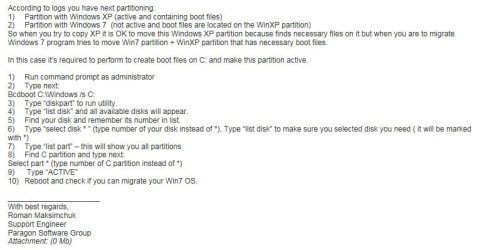
Paragon were very prompt and replied they needed 4 log files (from Migrate installation folder) which I was able to supply. They then promptly replied as per attachment 1 of which my understand is . . . .

Due to the existence of XP(H) and W7(C) MigrateOStoSSD (MIG) reasoned XP had the boot files that W7 needed and MIG in its wisdom thought - to get the boot files I need to copy the XP partition as well but not tell anybody about it - so that explains why it reported the SSD as not large enough! :mad:

The solution they suggested was along the lines previously discussed here - namely to ensure W7 partition had the necessary boot files etc. Faced with the choice of doing it our way - or do it the Paragon way I opted to follow Paragon instructions (latter part of image 1).

However it sort of didn't work quite as expected. When rebooting it always hung with

NTLDR is missing
Press Ctrl+Alt+Del to restart
(this was a never ending loop however) :cry:

Fortunately I had made a Windows Repair disc last week so I booted off this - it needed running twice but eventually repaired whatever was sick and I was then able to boot into W7(HDD) again.

Ran MIG and all worked as expected - tweaked BIOS boot things and now sys boots to W7(SSD) in around 15s as opposed to 45-60s previously. Impressions are good at this moment.

So did Paragon miss something important off their instructions that caused NTLDR missing problem?

 

Attachments

  • Reply1.JPG
    Reply1.JPG
    47 KB · Views: 1

My Computer My Computer

At a glance

Windows 7 - 32bitIntel Core2Duo E84002GBAsus NVIDIA GT640
Computer type
PC/Desktop
Computer Manufacturer/Model Number
self build
OS
Windows 7 - 32bit
CPU
Intel Core2Duo E8400
Motherboard
ASUS P5Q SE
Memory
2GB
Graphics Card(s)
Asus NVIDIA GT640
Sound Card
Realtek on mobo
Monitor(s) Displays
2 identical IIyama 19"
Screen Resolution
1280 x 1024
Hard Drives
4 HDD + 1 SSD all SATA
PSU
520W Corsair HX series modular.
Case
Gigabyte - Triton
Cooling
Fans
Keyboard
Logitech
Mouse
Logitech wireless
Internet Speed
2.8M on a good day
Browser
IE11
Other Info
Wacom Bamboo Tablet CTH-470
This Bcdboot command is popular but never seems to work. There are another 3 commands that don't seem to work either.

But I am a bit confused. Did we not copy the bootmgr from the XP partition earlier - like this.
 

My Computer My Computer

At a glance

Vista, Windows7, Mint Mate, Zorin, Windows 8from 1.6GHz Duo to i7
Computer Manufacturer/Model Number
HP, Dell, Gateway, Toshiba - 4 laptops and 2 desktops
OS
Vista, Windows7, Mint Mate, Zorin, Windows 8
CPU
from 1.6GHz Duo to i7
Monitor(s) Displays
2x HP w2207
Hard Drives
5x HDD, 7x SSD, 12x Externals
Keyboard
with trackball - no mices
Mouse
Trackball mice
Internet Speed
DSL 6000
The solution they suggested was along the lines previously discussed here - namely to ensure W7 partition had the necessary boot files etc. Faced with the choice of doing it our way - or do it the Paragon way I opted to follow Paragon instructions (latter part of image 1).

I gave you the automated method to move the Bootmgr - Move to C:\ with EasyBCD - Windows 7 Forums, same as Wolfgang had given you five days earlier.

The manual method is to mark the target partition Active then run Startup Repair - Run 3 Separate Times which is apparently what ended up working for you.

Once you have it cloned, let us know what you want to do with the old XP and Windows 7. At least the old Win7 should be bootable using the one-time BIOS Boot menu key at boot. You could add XP to a Dual Boot with it by installing EasyBCD to Win7, or we can help you make XP bootable again if you want to delete the old Win7.
 
whs: No we did not copy the boot mngr from the XP partition because at the time the Paragon solution was not on the horizon, and then when it was we agreed to try without doing so - what caught us out was that without that data on the C: Drive - Migrate was going to fail in the way that it did.

greg: yes you did - but see above - Migrate failed in a way that fooled us all :shock:

My lack of understand/familiarity on this subject probably did not help so apologies for that.

So were Paragon instructions correct? Or was the fact that I had to run the Repair disc 3 times to have been expected?

Thanks to you both for your support.
 

My Computer My Computer

At a glance

Windows 7 - 32bitIntel Core2Duo E84002GBAsus NVIDIA GT640
Computer type
PC/Desktop
Computer Manufacturer/Model Number
self build
OS
Windows 7 - 32bit
CPU
Intel Core2Duo E8400
Motherboard
ASUS P5Q SE
Memory
2GB
Graphics Card(s)
Asus NVIDIA GT640
Sound Card
Realtek on mobo
Monitor(s) Displays
2 identical IIyama 19"
Screen Resolution
1280 x 1024
Hard Drives
4 HDD + 1 SSD all SATA
PSU
520W Corsair HX series modular.
Case
Gigabyte - Triton
Cooling
Fans
Keyboard
Logitech
Mouse
Logitech wireless
Internet Speed
2.8M on a good day
Browser
IE11
Other Info
Wacom Bamboo Tablet CTH-470
Again, had you moved the boot files as Wolfgang advised six days ago and I advised again yesterday, this could have been avoided because the Paragon error would not have arose.

I would not give BCD commands because we have more consumer-friendly automated methods that work better, and another manual method that always works - thousands of times here. Paragon is not the top tech forums on the web.

Have you cloned your drive successfully now? What do you wish to do with XP and old Win7?
 
Back
Top