Bootmgr - Move to C:\ with EasyBCD

Bootmgr - Copy to C:\ with EasyBCD

   Information
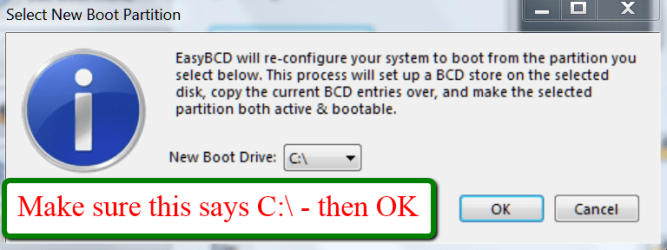
Copying the bootmgr from the 100MB active partition or the recovery partition to C:\ is extremely simple with EasyBCD. You can download a free EasyBCD from this website.

The bootmgr will not be moved from the original location - it will only be copied to the C:\ partition. The C:\ partition will be activated and the 100MB partition will be deactivated.

NOTE: The free version download of EasyBCD is at the bottom under "Download free for limited, non-commercial use". Registration is not required to download.


The steps to take are very simple and explained in the 2 pictures. The first screen you get after starting EasyBCD and the second screen after step3 of the first screen. That is really all you need to know.

2012-01-21_2344.png

2012-01-21_2348.png
 
Last edited:
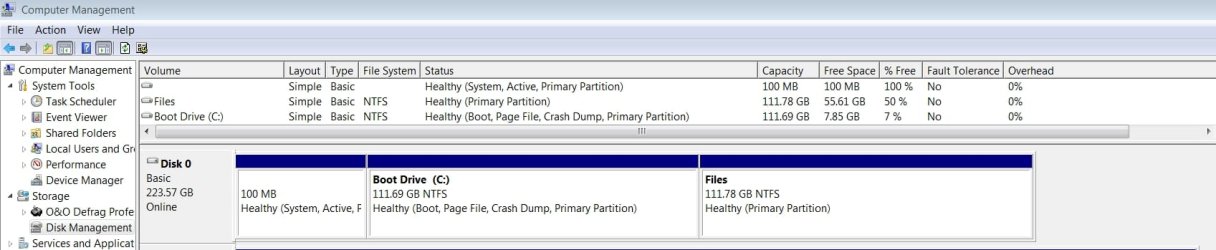
Here is the screenshot of the drive
 

Attachments

  • disk management 20150104.gif
    disk management 20150104.gif
    9 KB · Views: 201

My Computer My Computer

Computer type
PC/Desktop
Computer Manufacturer/Model Number
Custom
OS
Win7 64 Pro
CPU
i7-3770
Motherboard
ASUS P8Z77 WS
Memory
Corsair DDR3 16 GB
Graphics Card(s)
GTX 560
Hard Drives
Intel SSD 240GB
Is this better? I don't want to show the rest of the drives - they are all Simple; Basic; NTFS; Primary Partition.
 

Attachments

  • Comp Mgmt 20150106 .jpg
    Comp Mgmt 20150106 .jpg
    72.7 KB · Views: 225

My Computer My Computer

Computer type
PC/Desktop
Computer Manufacturer/Model Number
Custom
OS
Win7 64 Pro
CPU
i7-3770
Motherboard
ASUS P8Z77 WS
Memory
Corsair DDR3 16 GB
Graphics Card(s)
GTX 560
Hard Drives
Intel SSD 240GB
It looks correct.

I haven't seen anything that indicates you are not using all of your cores, as explained earlier by others.

I also see no reason to cut out the System Reserved partition.

But if you want to experiment save a backup image using Macrium Imaging
then you can follow this tutorial you are posting within to move Bootmgr to C, see if the settings you desire are available.

However those settings are not for the purpose you want, to enable more cores. Those are for testing only. I would not adjust them as we've seen problems before in such cases.

What I would do is assess my install as to its performance compared to the perfect install compiled in Clean Reinstall Windows 7 based on what's worked best in tens of thousands of installs we've helped with here, and which has been used by over a million consumers to get and keep perfect installs without a single complaint. If you add the step to wipe the HD first of all boot code using Diskpart Clean Command then you will have the cleanest possible slate to do a perfect install upon.

If this is not a satisfactory answer, let us know so we can help further.
 
As I stated in my original post, reinstalling Windows is not an option for me. Can anyone help with my original query on how to get the EasyBCD Bootmgr process to work?

'When I run the free Easy BCD I get the message "The boot configuration data store could not be opened. The system cannot find the file specified. Would you like to manually load a BCD registry for EasyBCD to manage? ..."

Would I give the 100 MB partition a drive letter so I can point EasyBCD to it, or is that not what it is asking for? If I give the partition a letter, will it mess up the booting process somehow? Thanks! '
 

My Computer My Computer

Computer type
PC/Desktop
Computer Manufacturer/Model Number
Custom
OS
Win7 64 Pro
CPU
i7-3770
Motherboard
ASUS P8Z77 WS
Memory
Corsair DDR3 16 GB
Graphics Card(s)
GTX 560
Hard Drives
Intel SSD 240GB
I've seen that notice before with EasyBCD and am almost sure I had to accept it to proceed. Did you do this?
 
Wolfgang there is a newer version of EasyBCD v.2.2 than the one linked here from Major Geeks. It corrects several problems including failure to load the BCD store error which was previously common in 2.1.2.

Sorry I only noticed it now when I called this up to move a friend's bootloader without my toolstick.
 

My Computers My Computers

System One System Two

  • Computer type
    PC/Desktop
    Computer Manufacturer/Model Number
    ALWAYS UNDER CONSTRUCTION
    OS
    Windows 11 Pro
    CPU
    Ryzen 9 5900X
    Motherboard
    Asus X570 Crosshair Viii Hero
    Memory
    32GB G Skill DDR4-3600
    Graphics Card(s)
    EVGA RTX 3080 FTW 3 Ultra
    Sound Card
    On Board/Sennheiser PC37X Headset
    Monitor(s) Displays
    3 X Asus 27"
    Screen Resolution
    2560x1440
    Hard Drives
    2 X 1 TB NVME drives
    PSU
    EVGA 850
    Case
    Phanteks Eclipse P400A
    Cooling
    EVGA 280 AIO
    Keyboard
    Logitech G510s/ Logitech G13
    Mouse
    Logitech G502
    Internet Speed
    24/1
    Antivirus
    ESET/MBAM Pro/SAS Pro
    Browser
    Chrome/ Firefox/ Edge
  • Computer type
    Laptop
    System Manufacturer/Model Number
    Dell 16 Plus
    OS
    Windows 11 Pro
    CPU
    Intel Ultra 9 288V
    Memory
    32 GB LPDDR5X 8533
    Monitor(s) Displays
    16" Mini-LED HDR600 Touch 90 Hz
    Screen Resolution
    2560X1600
    Hard Drives
    1 TB NVME
MajorGeeks was the only one where I found a free version at the time. I will update with Steve's link.
 

My Computer My Computer

Computer Manufacturer/Model Number
HP, Dell, Gateway, Toshiba - 4 laptops and 2 desktops
OS
Vista, Windows7, Mint Mate, Zorin, Windows 8
CPU
from 1.6GHz Duo to i7
Monitor(s) Displays
2x HP w2207
Hard Drives
5x HDD, 7x SSD, 12x Externals
Keyboard
with trackball - no mices
Mouse
Trackball mice
Internet Speed
DSL 6000
Weird. I could swear the link at top of tutorial opened up to 2.1.2 Download page just an hour ago. Don't see where I could have clicked wrong either. :confused: Oh, well. All's good!
 
Thank you guys anyhow. It's always good to be on alert.
 

My Computer My Computer

Computer Manufacturer/Model Number
HP, Dell, Gateway, Toshiba - 4 laptops and 2 desktops
OS
Vista, Windows7, Mint Mate, Zorin, Windows 8
CPU
from 1.6GHz Duo to i7
Monitor(s) Displays
2x HP w2207
Hard Drives
5x HDD, 7x SSD, 12x Externals
Keyboard
with trackball - no mices
Mouse
Trackball mice
Internet Speed
DSL 6000
Can I do this in reverse ei. create a new partition for use as system reserved, then move my boot-loader to that partition? the reason I want to do this is because upgrading to Win 10 requires a system reserved partition which I don't have; my boot-loader is already on C:
 

My Computer My Computer

Computer type
PC/Desktop
OS
Windows7 64 bit

My Computer My Computer

Computer type
PC/Desktop
Computer Manufacturer/Model Number
Custom assembled by me :}
OS
Win-7-Pro64bit 7-H-Prem-64bit
CPU
i7-5930K 2nd i9-9940x both water blocked VRM's too
Motherboard
ASUS SABERTOOTH X99 2nd ASUS x299 Apex
Memory
Trident-z 3200C14 2nd Trident-z 3600C16
Graphics Card(s)
EVGA 1080ti ftw3 2nd Titan Xp both water blocked
Sound Card
Built-in Realtek
Monitor(s) Displays
1-AOC G2460PG 24"G-Sync 144Hz/ 2nd 1-ASUS VG248QE 24" 144Hz
Screen Resolution
1920 x 1080 144Hz
Hard Drives
2-Samsung M.2 Evo & Evo Plus
2-Samsung 850 EVO 500GB SSD's/ 3-2.5 W.D. Black 1tb-&3-1tb/3-3.5 WD Black 1tb hdd's
PSU
EVGA SuperNOVA 1000-P2 2nd 1200-P2
Case
2-Corsair Obsidian Series 450D Black ATX Mid Tower
Cooling
Custom water loops
Keyboard
Logitech G710+/ 2nd Logitech G910
Mouse
2-RedDragon M901 Perdition 16400 dpi Gaming mouse = wired
Internet Speed
Comcast Ping 19ms 89.31mbps download speed 6.12mbps upload
Antivirus
Malwarebytes Pro/ Superantispyware Pro
Browser
FireFox & Pale moon
Other Info
2nd ASUS X299 Apex/Intel i9-9940x with Custom water loop/7H-Prem-x64/Corsair 450D case/Ram Trident-z 3600C16 4x8gb / Samsung970Evo plus 500gb SSD/Dual ssd EZ swap evo/PSU EVGA SuperNova 1200w-P2 80+Platinum/GPU Titan Xp /8-ML-140 on push-pull on 2-280GTX rads
It was there 8 months ago when the link was posted.
 

My Computers My Computers

System One System Two

  • Computer type
    PC/Desktop
    Computer Manufacturer/Model Number
    ALWAYS UNDER CONSTRUCTION
    OS
    Windows 11 Pro
    CPU
    Ryzen 9 5900X
    Motherboard
    Asus X570 Crosshair Viii Hero
    Memory
    32GB G Skill DDR4-3600
    Graphics Card(s)
    EVGA RTX 3080 FTW 3 Ultra
    Sound Card
    On Board/Sennheiser PC37X Headset
    Monitor(s) Displays
    3 X Asus 27"
    Screen Resolution
    2560x1440
    Hard Drives
    2 X 1 TB NVME drives
    PSU
    EVGA 850
    Case
    Phanteks Eclipse P400A
    Cooling
    EVGA 280 AIO
    Keyboard
    Logitech G510s/ Logitech G13
    Mouse
    Logitech G502
    Internet Speed
    24/1
    Antivirus
    ESET/MBAM Pro/SAS Pro
    Browser
    Chrome/ Firefox/ Edge
  • Computer type
    Laptop
    System Manufacturer/Model Number
    Dell 16 Plus
    OS
    Windows 11 Pro
    CPU
    Intel Ultra 9 288V
    Memory
    32 GB LPDDR5X 8533
    Monitor(s) Displays
    16" Mini-LED HDR600 Touch 90 Hz
    Screen Resolution
    2560X1600
    Hard Drives
    1 TB NVME
Yea I realize that I was giving Wolfgang a heads up he just posted a link to the tutorial
Only Greg's link still works.
 

My Computer My Computer

Computer type
PC/Desktop
Computer Manufacturer/Model Number
Custom assembled by me :}
OS
Win-7-Pro64bit 7-H-Prem-64bit
CPU
i7-5930K 2nd i9-9940x both water blocked VRM's too
Motherboard
ASUS SABERTOOTH X99 2nd ASUS x299 Apex
Memory
Trident-z 3200C14 2nd Trident-z 3600C16
Graphics Card(s)
EVGA 1080ti ftw3 2nd Titan Xp both water blocked
Sound Card
Built-in Realtek
Monitor(s) Displays
1-AOC G2460PG 24"G-Sync 144Hz/ 2nd 1-ASUS VG248QE 24" 144Hz
Screen Resolution
1920 x 1080 144Hz
Hard Drives
2-Samsung M.2 Evo & Evo Plus
2-Samsung 850 EVO 500GB SSD's/ 3-2.5 W.D. Black 1tb-&3-1tb/3-3.5 WD Black 1tb hdd's
PSU
EVGA SuperNOVA 1000-P2 2nd 1200-P2
Case
2-Corsair Obsidian Series 450D Black ATX Mid Tower
Cooling
Custom water loops
Keyboard
Logitech G710+/ 2nd Logitech G910
Mouse
2-RedDragon M901 Perdition 16400 dpi Gaming mouse = wired
Internet Speed
Comcast Ping 19ms 89.31mbps download speed 6.12mbps upload
Antivirus
Malwarebytes Pro/ Superantispyware Pro
Browser
FireFox & Pale moon
Other Info
2nd ASUS X299 Apex/Intel i9-9940x with Custom water loop/7H-Prem-x64/Corsair 450D case/Ram Trident-z 3600C16 4x8gb / Samsung970Evo plus 500gb SSD/Dual ssd EZ swap evo/PSU EVGA SuperNova 1200w-P2 80+Platinum/GPU Titan Xp /8-ML-140 on push-pull on 2-280GTX rads

My Computer My Computer

Computer Manufacturer/Model Number
HP, Dell, Gateway, Toshiba - 4 laptops and 2 desktops
OS
Vista, Windows7, Mint Mate, Zorin, Windows 8
CPU
from 1.6GHz Duo to i7
Monitor(s) Displays
2x HP w2207
Hard Drives
5x HDD, 7x SSD, 12x Externals
Keyboard
with trackball - no mices
Mouse
Trackball mice
Internet Speed
DSL 6000
Trying to Move to C:\ with EasyBCD

Hello, This is my first post here. I found your site by googling how to move a bootmgr. I read several pages of this thread: Bootmgr - Move to C:\ with EasyBCD; then I followed the simple instructions and when I rebooted I got the error: "An operating system wasn't found. Try disconnecting any drives that don't contain an operating system."

Note that I am trying to move my Bootmgr from the 100MB system Partition to my C: drive where Windows 7 resides. I placed most of my computer specs under my UserCP. I am including an image of my Computer Management screen.

I have tried several things, but EasyBCD actually moved a BCD file into my C:\Boot folder. I am curious as to whether or not that should be the only file in that folder or not.

My ultimate goal is to remove the 100MB system Partition so that I can dual boot a Windows 7 x64 with my 32 bit version. I have plenty of programs on my computer now and I don't want to take all the time to reinstall them all, so I will just use my 32 bit version as I migrate over to a 64 bit version of Windows 7; plus I like the bonus of being able to access all of my other files without moving everything.

I actually did try unplugging my external USB drive, but that still left me with an E: and F: partition which as you can see are both just logical drives on my Disk 0.

Note that when I do attempt to boot from my c: drive and can't, I just use my Acronis boot disk and change the system partition back to active again and I can boot fine...

I have been wondering if someone has an exact list of files that Windows 7 needs in it's root directory to boot and what if any other files have to be in the boot folder. If these were restored, I am pretty sure I could get this to work.

The more I think about it, the more I think this is in the wrong place...

OK! Now I am getting somewhere!!!

I deactivated the system partition by making the c: partition active, and then ran sfc /scannow. I rebooted and then then windows opened up! I checked Computer Management and saw that the C: partition is activated! So now I will proceed to attempt to delete the system partition! I think it important to note that before I ran sfc that I had at that point activated the C: partition so that any repairs made would do it in such a way as to "repair" the c: partition's bootmgr.

I deleted the system partition and rebooted! Everything is working great! I think that sfc used in this way may help a lot of people out having this same problem.

Well, it is fixed now, but I am going to do some upgrades on my computer so it will last another year or so. By that time I will have more than a new computer case for my new and very expensive build that I am doing. I will probably be back for help with that in the future...
 

Attachments

  • Computer Management.jpg
    Computer Management.jpg
    163.8 KB · Views: 501
Last edited:

My Computer My Computer

Computer type
PC/Desktop
Computer Manufacturer/Model Number
ECS, custom build
OS
Windows 7 Ultimate x86
CPU
AMD Athlon 64x Dual Core Processor 3.1 GHZ 6000+
Motherboard
GeForce6100PM-M2 Socket AMD2+
Memory
8 GB 2x4GB DDR2-SDRAM PC2-6400
Graphics Card(s)
Nvidia Quadro FX 3800
Hard Drives
Drive 0: 2TB SATA Western Digital WD20 NTFS
C: E: F:

Drive 1: 300GB USB MAXTOR S TM3320620AS
G: H: I:
Case
Antec NSK6580B
Antivirus
Symantec Endpoint Protection
Browser
Firefox 46.0.1
I have Dual boot on my laptop, but it's set up weird. My primary OS is on my D: drive (Windows 10) and the one I want to get rid of (Vista) is on my C: drive. What would I do in this case?
 

My Computer My Computer

Computer type
Laptop
Computer Manufacturer/Model Number
Acer
OS
Windows 10 Home 32bit
CPU
Pentium Dual Core
Memory
2 GiB
Hard Drives
C:, D:
Antivirus
Windows Defender
Browser
Microsoft Edge
Would this work with dual boot Win 7 & 10 which both use system reserved to boot on a solid state drive with 4 partitions. Would I need to use easy bcd for each op system, Win 7 (c) & Win 10 (D) or am I better off leaving it as it is? at present Im ending up with 3 backups

1. Win 7
2. Win 10
3.Sys reserved

Thank you
Smokes
 

My Computer My Computer

Computer type
PC/Desktop
OS
Win7 & Win10 both Pro x64 Dual Boot
CPU
AMD X8 FX-8350 4.0Ghz
Motherboard
ASUS M5A78L-M USB3
Memory
2x8 16GB DDR3
Graphics Card(s)
Nvidia Ge 610
Sound Card
OB
Monitor(s) Displays
Samsung 225BW
Screen Resolution
Native Recommended
Hard Drives
1x Samsung EVO 250GB

2 WD Blue Sata 500GB
PSU
Corsair 550w
Case
Cheap one :-)
Cooling
Stock AMD
Keyboard
Logitech ultra thin illuminated
Mouse
Logitech M570
Internet Speed
7Mb
Antivirus
Kaspersky Total Security
Browser
Opera & Firefox
Back
Top