
Solved External hard disk unaccessible

dragonballz4

New member
Local time
12:15 AM
Messages
27
Hi, my toshiba 1tb external drive has become unaccessible after working fine till yesterday. When i plug in the drive the green bar ontop keeping forward and if i click on drive Explorer hangs. It also doesn't disply detail in my computer like free space. On previous threads you have asked for picture of disk management, i cant post it as it becomes unresponsive as soon as i plug in the drive. After searching for a while i am using photorec to recover files but it going slowly. Should i use ddrescue or clonezilla? Any other software?please any help would be appreciated. It is important that i recover my files.
 

My Computer

Computer type
PC/Desktop
Computer Manufacturer/Model Number
Asus
OS
Windows 7
CPU
Intel Quad Core
Memory
2 Gb
Graphics Card(s)
Built in
Hard Drives
Sata 500gb

My Computer

Computer type
PC/Desktop
Computer Manufacturer/Model Number
Own build
OS
Windows 7x64 Home Premium SP1
CPU
Intel i7 2600k
Motherboard
ASUS P8Z68 Deluxe
Memory
G.Skill Ripjaws (DDR3-1600) 2x4GB
Graphics Card(s)
Nvidia GeForce GTS 450; Intel HD Graphics 3000(GT2+)
Monitor(s) Displays
Dell Ultrasharp IPS panel U2311H, Samsung SyncMaster P2350
Screen Resolution
1920x1080
Hard Drives
Samsung 850 Pro SSD 256GB, Samsung SSD 840 120GB, Seagates 1TB Barracuda ST31000528AS x2
PSU
Seasonic M12II 520W
Case
Lian Li Lancool PC-K60
Cooling
Case: 1x120mm, 3x140mm CPU: Hyper 212+
Keyboard
Logitech MK520 (wireless)
Mouse
Logitech MK520
Internet Speed
6-7 Mbps
Antivirus
Norton Security Premium, Malwarebytes on 2 (MSE on 3rd PC)
Browser
FireFox
Other Info
Audio: Logitech Z523 2.1
Thanks fof the reply will check and tell you in some time. A question-can puppy linux run ddrescue or i need knoppix for that?
 

My Computer

Computer type
PC/Desktop
Computer Manufacturer/Model Number
Asus
OS
Windows 7
CPU
Intel Quad Core
Memory
2 Gb
Graphics Card(s)
Built in
Hard Drives
Sata 500gb
Download lupu-528.005.iso (132.6 MB) from http://puppylinux.org/main/Long-Term-Supported%20Puppy.htm#lucidpuppy

Create your bootable Lucid Puppy pendrive with this ISO using Rufus 2.2 (808KB) https://rufus.akeo.ie/ (All data on the pendrive will be lost when rufus formats the pendrive before writing the ISO and so backup any data on the pendrive elsewhere before running Rufus)

Boot your PC with this pendrive using the onetime boot menu Check whether that faulty drive is shown and you can access it and see your data. If seen copy all data to the empty drive.( You must have plugged in the empty drive before booting into Lucid Puppy)

Guide on how to use Lucid Puppy :Go to the topic Recovering files from the non-bootable Internal Drive: in my thread
http://www.sevenforums.com/software/198909-lucid-puppy-way-recover-files-non-bootable-computer.html

ddrescue: http://www.sevenforums.com/general-...-failing-hdd-data-recovery-2.html#post2780161
 

My Computer

OS
Windows 7 Home Premium 32 bit
I created a lucid puppy cd and when i connected the drive it was read only-"ntfs bitmap error. Inconsistency or hardware fault.run checkdsk."
So i was able to virw the files{2hrs to scan} but could not copy. I am currently using pupp universal dd to copy the drive as i think its the hardware failing. Should i do something else or continue with this?
 

My Computer

Computer type
PC/Desktop
Computer Manufacturer/Model Number
Asus
OS
Windows 7
CPU
Intel Quad Core
Memory
2 Gb
Graphics Card(s)
Built in
Hard Drives
Sata 500gb
Ok ill be able to download rescue cd till tomorrow.pupp universal dd is i think similar to ddrescue you can copy whole drive or partition. Ignoring read errors.
In your experience what are my chances of recovering the data?
 

My Computer

Computer type
PC/Desktop
Computer Manufacturer/Model Number
Asus
OS
Windows 7
CPU
Intel Quad Core
Memory
2 Gb
Graphics Card(s)
Built in
Hard Drives
Sata 500gb
Can't say anything about data recovery.There is no one size fits all here. You have to try everything possible.

But if you suspect that the HDD is failing, then cloning the drive ASAP and running data recovery on the cloned drive will be the best option and in that ddrescue excels since it makes repeated attempts to read the bad sectors trying to get the data out of it. In your case you may require a >1TB drive.

If cloning is successful, you may then try running TestDisk to check whether it can repair any file system corruption like bad NTFS boot sector or MFT and list the files.
 

My Computer

OS
Windows 7 Home Premium 32 bit
Your drive is 1TB so if it is one partition you will need another large drive to clone to. I'm not sure how cloning deals with bad sectors.
Alternatively you could try making a Macrium system image and force macrium to ignore bad sectors.
v5: Imaging disks with bad sectors (Bad Sectors)
then double click to try and mount the image.
 

My Computer

Computer type
PC/Desktop
Computer Manufacturer/Model Number
Own build
OS
Windows 7x64 Home Premium SP1
CPU
Intel i7 2600k
Motherboard
ASUS P8Z68 Deluxe
Memory
G.Skill Ripjaws (DDR3-1600) 2x4GB
Graphics Card(s)
Nvidia GeForce GTS 450; Intel HD Graphics 3000(GT2+)
Monitor(s) Displays
Dell Ultrasharp IPS panel U2311H, Samsung SyncMaster P2350
Screen Resolution
1920x1080
Hard Drives
Samsung 850 Pro SSD 256GB, Samsung SSD 840 120GB, Seagates 1TB Barracuda ST31000528AS x2
PSU
Seasonic M12II 520W
Case
Lian Li Lancool PC-K60
Cooling
Case: 1x120mm, 3x140mm CPU: Hyper 212+
Keyboard
Logitech MK520 (wireless)
Mouse
Logitech MK520
Internet Speed
6-7 Mbps
Antivirus
Norton Security Premium, Malwarebytes on 2 (MSE on 3rd PC)
Browser
FireFox
Other Info
Audio: Logitech Z523 2.1
...... I'm not sure how cloning deals with bad sectors....

https://wiki.gentoo.org/wiki/Ddrescue

The strategy is to read and copy as much data as possible in the first round, since every access to the storage device could be the last one before it totally fails. Then try to copy the data off the failed/failing areas of the drive.

ddrescue can use direct disk access and ignore the kernel’s cache.

First round, copy every block without read error and log the errors to /root/rescue.log

Second round, copy only the bad blocks and try 3 times ( or as many as you may want ) to read from the source before giving up.

Now the new drive could be mounted and the file system checked for corruption.

Software that is used for System Image backup like Macrium Reflect cannot do all these or most of these :). By trying these you will be taking a potential risk "since every access to the storage device could be the last one before it totally fails"
 

My Computer

OS
Windows 7 Home Premium 32 bit
Hi,i am wondering i have the exact same drive from same company with same number of sectors.can i use that?


and i tried to run http://www.sevenforums.com/hardware...-not-responding-stops-programs-working-5.html dmde but on search it shows i/o error.does that help?

Meanwhile while i am preparing the rescue disk should i run photorec or is it dangerous to run?

should i use ddrescue -r3 -n -S -v /dev/sdb /dev/sdc recovery.log [ENTER] or this ddrescue -d -f -r3 /dev/sda /dev/sdb /media/sdc1/Log/rescue.logfile???

can i stop ddrescue it between(turn off computer?)
 

My Computer

Computer type
PC/Desktop
Computer Manufacturer/Model Number
Asus
OS
Windows 7
CPU
Intel Quad Core
Memory
2 Gb
Graphics Card(s)
Built in
Hard Drives
Sata 500gb
It is long since I worked with ddrescue. Please go through this whole thread http://www.sevenforums.com/general-...d-tool-cloning-failing-hdd-data-recovery.html and also the many help articles on the net on how to use ddrescue especially what command string you should use. What all I can say is it is not very difficult.

Some people write the command string such that the log file is written to a third drive. If you use that strategy then you can use the exact same drive you have mentioned as your destination drive.. But if you start and stop then you should use the same setup with the same drives, so that when you start again, ddrescue could take the stop point from the log file on the third drive and continue.

This synchronisation problem won't be there if you write the logfile to the same destination drive.But this will require a destination drive larger than the source drive.

If you are confident that you can take care of the synchronisation then go ahead with 1TB Toshiba to 1TB Toshiba cloning.

Decide upon the appropriate command string accordingly.
 

My Computer

OS
Windows 7 Home Premium 32 bit
I am using the following command
ddrescue -f -d -r3 -v /dev/sdb /dev/sdc /dev/sda6/recovery.logfile
Sdb is failing hd sdc is new one and sda6 is my laptop partition on while iam trying to save logfile.
It shows :error writing logfile /dev/sda6/recovery.logfile not a directory
Even when i replace dev with media:no such file or directory

Edit:Nevermind got it its copy.fingers crossed:confused:
 
Last edited:

My Computer

Computer type
PC/Desktop
Computer Manufacturer/Model Number
Asus
OS
Windows 7
CPU
Intel Quad Core
Memory
2 Gb
Graphics Card(s)
Built in
Hard Drives
Sata 500gb
What exactly did you do to overcome that problem?
 

My Computer

OS
Windows 7 Home Premium 32 bit
i had mount the partition using mount /dev/sda6 /mnt
and use
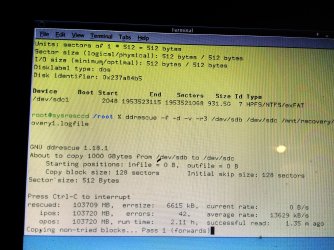
ddrescue -f -r3 -d -v /dev/sda /dev/sdb /mnt/recovery/recovery.logfile

btw the speed is good it has done 100gb.does it mean it is not hardware problem?
Now going very very slow
 

Attachments

  • IMG_20150707_185836_HDR.jpg
    IMG_20150707_185836_HDR.jpg
    1.6 MB · Views: 2
Last edited:

My Computer

Computer type
PC/Desktop
Computer Manufacturer/Model Number
Asus
OS
Windows 7
CPU
Intel Quad Core
Memory
2 Gb
Graphics Card(s)
Built in
Hard Drives
Sata 500gb
Good going. Good info that should help others trying to run ddrescue.

Looks like it has finished copying all the good sectors - that is always fast.

6615 KB in bad sectors.Now it is in the first pass trying to read the bad sectors so marked in the log file. Naturally it is a slow process.

Then second pass and then third.

When cloning is finished, let us see how and what your cloned drive presents.
 

My Computer

OS
Windows 7 Home Premium 32 bit
Quick question how to pause and resume ddrescue?
 

My Computer

Computer type
PC/Desktop
Computer Manufacturer/Model Number
Asus
OS
Windows 7
CPU
Intel Quad Core
Memory
2 Gb
Graphics Card(s)
Built in
Hard Drives
Sata 500gb
My internet is a pain. Painfully slow I abhor doing anything with it.

Interrupt: CTRL+C.
Resume: re-run your initial ddrescue command.
 

My Computer

OS
Windows 7 Home Premium 32 bit
Ok thanks
 

My Computer

Computer type
PC/Desktop
Computer Manufacturer/Model Number
Asus
OS
Windows 7
CPU
Intel Quad Core
Memory
2 Gb
Graphics Card(s)
Built in
Hard Drives
Sata 500gb
About 963344 mb was done when my computer crashed.so i put the hard disk in computer and was able to run chkdsk /f which found most of my files.but some files are damaged and some are completely missing.should i run the ddrescue again in case it missed them(it was still at 1st Pass)?
 

My Computer

Computer type
PC/Desktop
Computer Manufacturer/Model Number
Asus
OS
Windows 7
CPU
Intel Quad Core
Memory
2 Gb
Graphics Card(s)
Built in
Hard Drives
Sata 500gb
Back
Top