
Windows Calendar - Import into Windows 7

How to Import Windows Calendar from Vista into Windows 7

   Information
This will show you how to import Windows Calendar from Vista into Windows 7, and to enable using Windows Calendar from the toolbar button in Windows Mail in Windows 7 if you also imported it.

There is no Windows Calendar feature included in Windows 7 by default.
   Note
Credit to Greg S for researching and creating the WinCalEdit.zip file which allows the button in the desktop WinMail.exe interface to open Windows Calendar.
   Warning
If running 64bit Windows 7 it is essential to import Windows Calendar from a 64bit Vista installation into the normal 64bit program files. And the same for 32 to 32bit.


Step 1
  • In Vista open: Program Files --> Windows Calendar.
  • Copy the entire Windows Calendar folder.
  • Paste this folder into Program files in Win7.
  • Still in program files, open the pasted Windows Calendar folder --> Right click: WinCal --> Send to desktop as shortcut.
  • If desired create a Windows Calendar shortcut in Start menu programs as follows:
  • Choose View options to show hidden folders.
  • Open: Computer --> C: Drive --> Program Data --> Microsoft --> Windows --> Start Menu --> Programs.
  • Paste copy of WinCal shortcut into Start Menu Programs & re-name to: Windows Calendar.
Step 2
  • In Vista open: Control Panel --> Administrative Tools --> Task Scheduler.
  • In left window pane expand tree for: Task Scheduler Library --> Microsoft --> Windows.
  • Scroll down Windows tree to: WindowsCalendar --> Click to highlight --> In right window pane click: Export.
  • It opens a file named "Reminders - 'Your User name'.XML"
  • Save this file to desk top or storage folder.
Step 3
  • Open saved "Reminders.XML" file with Notepad, but do not set Notepad as default opener.
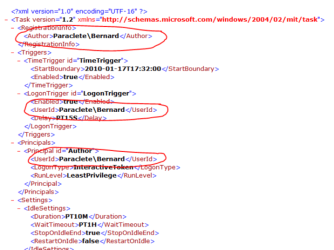
  • Wherever your user name and computer name appear, it must be changed to exactly match your user name and computer name in Windows 7. To find Computer name, right click: Computer --> Properties.
  • See following pic to find where changes need to be made. Note: This image shows "Reminder file" opened in normal view, but it must be opened with Notepad to make changes. Click image to enlarge.
RemindersXML.PNG


  • For example, "Paraclete/Bernard" becomes "Lizzi's Computer/Lizzi".​
  • Once changes are made click: Save. Changes will be saved as XML file.​
Step 4
  • In Windows 7 open: Control Panel --> Administrative Tools --> Task Scheduler.
  • In left window pane expand tree for: Task Scheduler Library --> Microsoft --> Windows.
  • Click: Windows to highlight --> Right click again & select: New Folder.
  • Name new folder exactly as follows: WindowsCalendar with no spaces.
  • Click: OK. The new WindowsCalendar folder is added to the Windows tree in the left pane.
Step 5
  • Click new folder: "WindowsCalendar" in the Windows tree to highlight --> Right click again to open menu.
  • Select: Import Task --> Browse to where you have saved the "Reminders - .XML" file.
  • Click: "Reminders - .XML" file to import it. If a message appears saying: "The format of the task is not valid" it means you have not changed the computer and user names correctly.
  • In bottom of new window that appears, open: Drop down menu --> Select: Windows 7 --> Click: OK.
Step 6
  • Open and run the regedit file WinCalEdit.zip attached here View attachment WinCalEdit.zip. This enables Windows Calendar to open in the desktop WinMail.exe interface.
Step 7
  • For help in using Windows Calendar go to the following web site here.
You're done. Cheers PB


Last edited by a moderator:
Can You say another words used please? Your phrase is out of my English knowlege
 

My Computer My Computer

Computer type
Laptop
OS
Windows 7 Professional
In plain English, my method worked fine for me and had no problems.
Maybe your set-up is different.
 

My Computer My Computer

Computer type
PC/Desktop
Computer Manufacturer/Model Number
Alienware® ALX X58
OS
Win 7 Ult SP1/Win 10 Pro (all x64)
CPU
Intel® Core™ i7-975 Extreme O/C to 4.02 GHz, 8MB Cache
Motherboard
Asus® P6T Deluxe V2 X58 LGA1366
Memory
24GB Corsair Vengeance DDR3 SDRAM at 1600MHz - 6 x 4096MB
Graphics Card(s)
1792 MB NVIDIA® GeForce® GTX 295 Dual Core
Sound Card
Onboard Soundmax® High-Definition 7.1 Performance Audio
Monitor(s) Displays
Samsung XL2370 LED backlit 23" W/S 2ms response time
Screen Resolution
1920 X 1080
Hard Drives
2 x 500gb SATA II
1 x 1TB SATA II
1 external eSATA LaCie 3TB
(Non-RAID)
PSU
Alienware® 1200 Watt Multi-GPU
Case
Alienware® P2 ALX Chassis with AlienIce™ 3.0 Video Cooling
Cooling
Alienware® High-Perf. Liquid Cooling + Acoustic Dampening
Keyboard
Microsoft® Wireless Entertainment 8000 + Logitech® G15 Wired
Mouse
Microsoft® Wireless Laser 8000 + Logitech® G9 Wired
Internet Speed
1Gb/s
Antivirus
McAfee LiveSafe
Browser
Firefox - latest
Other Info
Using non-RAID on purpose as I find RAID to be too temperamental.
Now set to AHCI
You fall into illusion, I think.
Popup properly appears only first time when You set it within app. So, if You close Calendar, wait for popup and try to set repeat notification, let say, after 5 min, popup never come again.
Again, if You set time of notification, let's say, on 6:05 PM and start computer earlier, let's say, at 6:00 PM, appropriate popup never come until You restart computer or force to start app.
I made popups come on appropriate time exactly in the same manner they work on Vista. I mean, You start computer and don't need to start Calendar. Simply on time of notification popup comes and You can close it or set repeat it.
 

My Computer My Computer

Computer type
Laptop
OS
Windows 7 Professional
Silly question time. Does Windows Calendar work without Windows Mail?
 

My Computer My Computer

Computer type
PC/Desktop
Computer Manufacturer/Model Number
Custom Build
OS
Win 7 Ultimate 64 bit
CPU
Intel i7-3930K
Motherboard
ASUS P9X79 WS
Memory
Kingston HyperX Genesis 32GB Kit (8x4GB Modules) 1600MHz DDR
Graphics Card(s)
MSI R7850 Twin Frozr 2GD5/OC Radeon HD 7850 2GB 256-bit GDDR
Sound Card
Asus Xonar Essence STX
Monitor(s) Displays
3x Asus VG248QE 24", Vizio 32" TV
Screen Resolution
1920 x 1080, ?
Hard Drives
Samsung 128GB 840 Pro SSD (1),
Samsung 4TB 850 EVO SSDs (4)
Samsung 4TB 850 EVO SSDs (16) external backup drives used in 2.5" hot swap bays in the computer.
PSU
Corsair HX750w
Case
Antec Two Hundred v2 (modified)
Cooling
Cooler Master GeminII S524 120mm (fan replaced with a 140mm)
Keyboard
Logitech G510s
Mouse
Logitech M525 (two in use)
Internet Speed
=< 32Mbps down, 8Mbps up
Antivirus
AVAST!, MBAM, SAS, Spybot S&D (all but MBAM free) Glary Util
Browser
IE11
Other Info
LSI 9211-8i HBA card (8 SATA III ports), 2.5" & 3.5" Hot Swap Bays, HooToo HT-CR001 PCI-E to USB 3.0 Internal Hub + 6 Slot Card Reader, and LG Model CH12LS28 BD-ROM Optical Drive. Also, ScanSnap S1500 ADF duplexing scanner, Canon 9000F flat bed scanner, Corsair SP2500 2.1 speakers, Samsung CLP 415nw laser color printer, Cyberpower PP2200SW UPS
Lady Fitzgerald saif;
Silly question time. Does Windows Calendar work without Windows Mail?

Yes.
 
Last edited:

My Computer My Computer

Computer type
PC/Desktop
Computer Manufacturer/Model Number
Alienware® ALX X58
OS
Win 7 Ult SP1/Win 10 Pro (all x64)
CPU
Intel® Core™ i7-975 Extreme O/C to 4.02 GHz, 8MB Cache
Motherboard
Asus® P6T Deluxe V2 X58 LGA1366
Memory
24GB Corsair Vengeance DDR3 SDRAM at 1600MHz - 6 x 4096MB
Graphics Card(s)
1792 MB NVIDIA® GeForce® GTX 295 Dual Core
Sound Card
Onboard Soundmax® High-Definition 7.1 Performance Audio
Monitor(s) Displays
Samsung XL2370 LED backlit 23" W/S 2ms response time
Screen Resolution
1920 X 1080
Hard Drives
2 x 500gb SATA II
1 x 1TB SATA II
1 external eSATA LaCie 3TB
(Non-RAID)
PSU
Alienware® 1200 Watt Multi-GPU
Case
Alienware® P2 ALX Chassis with AlienIce™ 3.0 Video Cooling
Cooling
Alienware® High-Perf. Liquid Cooling + Acoustic Dampening
Keyboard
Microsoft® Wireless Entertainment 8000 + Logitech® G15 Wired
Mouse
Microsoft® Wireless Laser 8000 + Logitech® G9 Wired
Internet Speed
1Gb/s
Antivirus
McAfee LiveSafe
Browser
Firefox - latest
Other Info
Using non-RAID on purpose as I find RAID to be too temperamental.
Now set to AHCI
You fall into illusion, I think.
Popup properly appears only first time when You set it within app. So, if You close Calendar, wait for popup and try to set repeat notification, let say, after 5 min, popup never come again.
Again, if You set time of notification, let's say, on 6:05 PM and start computer earlier, let's say, at 6:00 PM, appropriate popup never come until You restart computer or force to start app.
I made popups come on appropriate time exactly in the same manner they work on Vista. I mean, You start computer and don't need to start Calendar. Simply on time of notification popup comes and You can close it or set repeat it.

Sorry but it's working for me.
 

My Computer My Computer

Computer type
PC/Desktop
Computer Manufacturer/Model Number
Alienware® ALX X58
OS
Win 7 Ult SP1/Win 10 Pro (all x64)
CPU
Intel® Core™ i7-975 Extreme O/C to 4.02 GHz, 8MB Cache
Motherboard
Asus® P6T Deluxe V2 X58 LGA1366
Memory
24GB Corsair Vengeance DDR3 SDRAM at 1600MHz - 6 x 4096MB
Graphics Card(s)
1792 MB NVIDIA® GeForce® GTX 295 Dual Core
Sound Card
Onboard Soundmax® High-Definition 7.1 Performance Audio
Monitor(s) Displays
Samsung XL2370 LED backlit 23" W/S 2ms response time
Screen Resolution
1920 X 1080
Hard Drives
2 x 500gb SATA II
1 x 1TB SATA II
1 external eSATA LaCie 3TB
(Non-RAID)
PSU
Alienware® 1200 Watt Multi-GPU
Case
Alienware® P2 ALX Chassis with AlienIce™ 3.0 Video Cooling
Cooling
Alienware® High-Perf. Liquid Cooling + Acoustic Dampening
Keyboard
Microsoft® Wireless Entertainment 8000 + Logitech® G15 Wired
Mouse
Microsoft® Wireless Laser 8000 + Logitech® G9 Wired
Internet Speed
1Gb/s
Antivirus
McAfee LiveSafe
Browser
Firefox - latest
Other Info
Using non-RAID on purpose as I find RAID to be too temperamental.
Now set to AHCI
"Yes" what?
I'm sorry for my limited lang
 

My Computer My Computer

Computer type
Laptop
OS
Windows 7 Professional
Oh, it was answer for different person. Sorry.
 

My Computer My Computer

Computer type
Laptop
OS
Windows 7 Professional
You fall into illusion, I think.
Popup properly appears only first time when You set it within app. So, if You close Calendar, wait for popup and try to set repeat notification, let say, after 5 min, popup never come again.
Again, if You set time of notification, let's say, on 6:05 PM and start computer earlier, let's say, at 6:00 PM, appropriate popup never come until You restart computer or force to start app.
I made popups come on appropriate time exactly in the same manner they work on Vista. I mean, You start computer and don't need to start Calendar. Simply on time of notification popup comes and You can close it or set repeat it.

Sorry but it's working for me.
My congrats to You (No any irony absolutely)
Because Google will help You understand You are lucky enough, if You haven't any problems.
And honestly, I think You have, but it's my fault not to be clear when I describe problem
 

My Computer My Computer

Computer type
Laptop
OS
Windows 7 Professional
Well I don't use Calendar for reminders, only for reference and that works as it should for me.
 

My Computer My Computer

Computer type
PC/Desktop
Computer Manufacturer/Model Number
Alienware® ALX X58
OS
Win 7 Ult SP1/Win 10 Pro (all x64)
CPU
Intel® Core™ i7-975 Extreme O/C to 4.02 GHz, 8MB Cache
Motherboard
Asus® P6T Deluxe V2 X58 LGA1366
Memory
24GB Corsair Vengeance DDR3 SDRAM at 1600MHz - 6 x 4096MB
Graphics Card(s)
1792 MB NVIDIA® GeForce® GTX 295 Dual Core
Sound Card
Onboard Soundmax® High-Definition 7.1 Performance Audio
Monitor(s) Displays
Samsung XL2370 LED backlit 23" W/S 2ms response time
Screen Resolution
1920 X 1080
Hard Drives
2 x 500gb SATA II
1 x 1TB SATA II
1 external eSATA LaCie 3TB
(Non-RAID)
PSU
Alienware® 1200 Watt Multi-GPU
Case
Alienware® P2 ALX Chassis with AlienIce™ 3.0 Video Cooling
Cooling
Alienware® High-Perf. Liquid Cooling + Acoustic Dampening
Keyboard
Microsoft® Wireless Entertainment 8000 + Logitech® G15 Wired
Mouse
Microsoft® Wireless Laser 8000 + Logitech® G9 Wired
Internet Speed
1Gb/s
Antivirus
McAfee LiveSafe
Browser
Firefox - latest
Other Info
Using non-RAID on purpose as I find RAID to be too temperamental.
Now set to AHCI
So, it was my faulty explaination, as I said :)

Nevertheless, if one needs really full functional Calendar, he needs totally different install sequence.
 

My Computer My Computer

Computer type
Laptop
OS
Windows 7 Professional
WinCal is already installed on Windows 10...look for it in your apps. That was why I posted what I did.
 

My Computer My Computer

Computer type
PC/Desktop
Computer Manufacturer/Model Number
Alienware® ALX X58
OS
Win 7 Ult SP1/Win 10 Pro (all x64)
CPU
Intel® Core™ i7-975 Extreme O/C to 4.02 GHz, 8MB Cache
Motherboard
Asus® P6T Deluxe V2 X58 LGA1366
Memory
24GB Corsair Vengeance DDR3 SDRAM at 1600MHz - 6 x 4096MB
Graphics Card(s)
1792 MB NVIDIA® GeForce® GTX 295 Dual Core
Sound Card
Onboard Soundmax® High-Definition 7.1 Performance Audio
Monitor(s) Displays
Samsung XL2370 LED backlit 23" W/S 2ms response time
Screen Resolution
1920 X 1080
Hard Drives
2 x 500gb SATA II
1 x 1TB SATA II
1 external eSATA LaCie 3TB
(Non-RAID)
PSU
Alienware® 1200 Watt Multi-GPU
Case
Alienware® P2 ALX Chassis with AlienIce™ 3.0 Video Cooling
Cooling
Alienware® High-Perf. Liquid Cooling + Acoustic Dampening
Keyboard
Microsoft® Wireless Entertainment 8000 + Logitech® G15 Wired
Mouse
Microsoft® Wireless Laser 8000 + Logitech® G9 Wired
Internet Speed
1Gb/s
Antivirus
McAfee LiveSafe
Browser
Firefox - latest
Other Info
Using non-RAID on purpose as I find RAID to be too temperamental.
Now set to AHCI
I haven't Win10, moreover, I haven't any plan for that OS; hence, I won't discuss about things I didn't explore enough. All I can say, Windows Calendar doesn't work properly on Win7 & Win8.1. And problem appears because of absolutely wrong tutorial from this topic. In fact, single right instruction is copy Vista "Windows Calendar" folder into "Program Files" folder. Everything else is different if You want working reminders. You have to use Calendar for very specific purposes, I think, because I simply can't understand for why they have calendar without reminders about all those things they set in it
 

My Computer My Computer

Computer type
Laptop
OS
Windows 7 Professional
I see your point and understand.
 

My Computer My Computer

Computer type
PC/Desktop
Computer Manufacturer/Model Number
Alienware® ALX X58
OS
Win 7 Ult SP1/Win 10 Pro (all x64)
CPU
Intel® Core™ i7-975 Extreme O/C to 4.02 GHz, 8MB Cache
Motherboard
Asus® P6T Deluxe V2 X58 LGA1366
Memory
24GB Corsair Vengeance DDR3 SDRAM at 1600MHz - 6 x 4096MB
Graphics Card(s)
1792 MB NVIDIA® GeForce® GTX 295 Dual Core
Sound Card
Onboard Soundmax® High-Definition 7.1 Performance Audio
Monitor(s) Displays
Samsung XL2370 LED backlit 23" W/S 2ms response time
Screen Resolution
1920 X 1080
Hard Drives
2 x 500gb SATA II
1 x 1TB SATA II
1 external eSATA LaCie 3TB
(Non-RAID)
PSU
Alienware® 1200 Watt Multi-GPU
Case
Alienware® P2 ALX Chassis with AlienIce™ 3.0 Video Cooling
Cooling
Alienware® High-Perf. Liquid Cooling + Acoustic Dampening
Keyboard
Microsoft® Wireless Entertainment 8000 + Logitech® G15 Wired
Mouse
Microsoft® Wireless Laser 8000 + Logitech® G9 Wired
Internet Speed
1Gb/s
Antivirus
McAfee LiveSafe
Browser
Firefox - latest
Other Info
Using non-RAID on purpose as I find RAID to be too temperamental.
Now set to AHCI
Quiet old topic, huh :)
So, does someone interesting for turn on notifications on constant basis, not only when calendar has active window?

Hi !

It's been 1 week I'm trying to turn on notifications with no success... Please, help ! I'm very, very, very interesting in.

BTW, it's on Win10 64 bit and I already have all files (wincal.exe FR 64 bit....)

Thank you so much !
 

My Computer My Computer

Computer type
PC/Desktop
Computer Manufacturer/Model Number
ASUS
OS
Windows 10 - 64 bit

My Computer My Computer

Computer type
PC/Desktop
Computer Manufacturer/Model Number
Alienware® ALX X58
OS
Win 7 Ult SP1/Win 10 Pro (all x64)
CPU
Intel® Core™ i7-975 Extreme O/C to 4.02 GHz, 8MB Cache
Motherboard
Asus® P6T Deluxe V2 X58 LGA1366
Memory
24GB Corsair Vengeance DDR3 SDRAM at 1600MHz - 6 x 4096MB
Graphics Card(s)
1792 MB NVIDIA® GeForce® GTX 295 Dual Core
Sound Card
Onboard Soundmax® High-Definition 7.1 Performance Audio
Monitor(s) Displays
Samsung XL2370 LED backlit 23" W/S 2ms response time
Screen Resolution
1920 X 1080
Hard Drives
2 x 500gb SATA II
1 x 1TB SATA II
1 external eSATA LaCie 3TB
(Non-RAID)
PSU
Alienware® 1200 Watt Multi-GPU
Case
Alienware® P2 ALX Chassis with AlienIce™ 3.0 Video Cooling
Cooling
Alienware® High-Perf. Liquid Cooling + Acoustic Dampening
Keyboard
Microsoft® Wireless Entertainment 8000 + Logitech® G15 Wired
Mouse
Microsoft® Wireless Laser 8000 + Logitech® G9 Wired
Internet Speed
1Gb/s
Antivirus
McAfee LiveSafe
Browser
Firefox - latest
Other Info
Using non-RAID on purpose as I find RAID to be too temperamental.
Now set to AHCI
Quiet old topic, huh :)
So, does someone interesting for turn on notifications on constant basis, not only when calendar has active window?

Hi !

It's been 1 week I'm trying to turn on notifications with no success... Please, help ! I'm very, very, very interesting in.

BTW, it's on Win10 64 bit and I already have all files (wincal.exe FR 64 bit....)

Thank you so much !

As Ex_Brit said, Your first try should be at Win10 forum, because I tested my method at Win7 & Win8.1 only, but not at Win10, and I don't think I have any interest with Win10 at all.
But If You'll can't to find any solution, please feel free to go back here again and we'll try work it out:). Who knows, maybe Win10 has the same way for turn notifications on.
But please keep in mind, You should to have some skill in computers, not as great as mr.Gates:), but some skill should be needed definitely, and I'm not a greatest teacher in the world if something will go wrong way
 

My Computer My Computer

Computer type
Laptop
OS
Windows 7 Professional
Quiet old topic, huh :)
So, does someone interesting for turn on notifications on constant basis, not only when calendar has active window?

Hi !

It's been 1 week I'm trying to turn on notifications with no success... Please, help ! I'm very, very, very interesting in.

BTW, it's on Win10 64 bit and I already have all files (wincal.exe FR 64 bit....)

Thank you so much !

As Ex_Brit said, Your first try should be at Win10 forum, because I tested my method at Win7 & Win8.1 only, but not at Win10, and I don't think I have any interest with Win10 at all.
But If You'll can't to find any solution, please feel free to go back here again and we'll try work it out:). Who knows, maybe Win10 has the same way for turn notifications on.
But please keep in mind, You should to have some skill in computers, not as great as mr.Gates:), but some skill should be needed definitely, and I'm not a greatest teacher in the world if something will go wrong way

Hi !

(¯`v´¯)
.`•.¸.•´ ★
¸.•´.•´¨) ¸.•¨)
(¸.•´(¸.•´ (¸.•¨¯`* ♥
Happy New Year !!

I'm back to Win 8.1 just because of the calendar. May you tell me the way to install it on this OS ?
Thank you so much !
 

My Computer My Computer

Computer type
PC/Desktop
Computer Manufacturer/Model Number
ASUS
OS
Windows 10 - 64 bit

My Computer My Computer

Computer type
PC/Desktop
Computer Manufacturer/Model Number
Alienware® ALX X58
OS
Win 7 Ult SP1/Win 10 Pro (all x64)
CPU
Intel® Core™ i7-975 Extreme O/C to 4.02 GHz, 8MB Cache
Motherboard
Asus® P6T Deluxe V2 X58 LGA1366
Memory
24GB Corsair Vengeance DDR3 SDRAM at 1600MHz - 6 x 4096MB
Graphics Card(s)
1792 MB NVIDIA® GeForce® GTX 295 Dual Core
Sound Card
Onboard Soundmax® High-Definition 7.1 Performance Audio
Monitor(s) Displays
Samsung XL2370 LED backlit 23" W/S 2ms response time
Screen Resolution
1920 X 1080
Hard Drives
2 x 500gb SATA II
1 x 1TB SATA II
1 external eSATA LaCie 3TB
(Non-RAID)
PSU
Alienware® 1200 Watt Multi-GPU
Case
Alienware® P2 ALX Chassis with AlienIce™ 3.0 Video Cooling
Cooling
Alienware® High-Perf. Liquid Cooling + Acoustic Dampening
Keyboard
Microsoft® Wireless Entertainment 8000 + Logitech® G15 Wired
Mouse
Microsoft® Wireless Laser 8000 + Logitech® G9 Wired
Internet Speed
1Gb/s
Antivirus
McAfee LiveSafe
Browser
Firefox - latest
Other Info
Using non-RAID on purpose as I find RAID to be too temperamental.
Now set to AHCI
Hi !

(¯`v´¯)
.`•.¸.•´ ★
¸.•´.•´¨) ¸.•¨)
(¸.•´(¸.•´ (¸.•¨¯`* ♥
Happy New Year !!

I'm back to Win 8.1 just because of the calendar. May you tell me the way to install it on this OS ?
Thank you so much !
Same congrats for You! :)

Definitely I'll try to help You, but I need a couple of days to write instructions, so wait please :)
 

My Computer My Computer

Computer type
Laptop
OS
Windows 7 Professional
Back
Top