Windows Explorer Status Bar: does not show file size

Let's just hope that next week when Windows 7 is launched, the final release has fixed this bug in Explorer, so we can all see our filesizes as we so wish. Maybe it's just something in the release candidate version - (build 7100)

I'm afraid not.
It's in 7600 too, and MS hasn't changed any features.

I agree that MS could have left the things people are used to in,
without compromising their new features.

Lets hope that once Win7 is released to the public,
MS will hear the complaints, and bring it back in some update.
 

My Computer My Computer

OS
Win7 Build 7600 x86
CPU
Pentium II 300MHz
Motherboard
Asus
Memory
32mb EDO RAM
Graphics Card(s)
Diamond Viper
Sound Card
Soundblaster 16
Monitor(s) Displays
14" AOC CRT 16K color
Screen Resolution
800x600
Hard Drives
300mb Quantum fireball
PSU
110 Watts
Cooling
Passive
Keyboard
Trust Ergonomic
Mouse
Generic
Internet Speed
256K u 128K d
Let's just hope that next week when Windows 7 is launched, the final release has fixed this bug in Explorer, so we can all see our filesizes as we so wish. Maybe it's just something in the release candidate version - (build 7100)

I'm afraid not.
It's in 7600 too, and MS hasn't changed any features.

I agree that MS could have left the things people are used to in,
without compromising their new features.

Lets hope that once Win7 is released to the public,
MS will hear the complaints, and bring it back in some update.

I don't know if they will do that, if MS is that stubborn with the windows start menu. In fact, they said if use the classic start menu and classic toolbars in Vista or Windows xp. They said don't get windows 7. You are not being forced to get it. (My opinion at least not tell 2014 (Longer for Vista).

MS claims windows 7 is the way the user wants it, they never asked me.

Off topic question
Can Vista be made to run faster (I read a lot of reports that vista is slower than xp sp3 or even windows 98se)
 
Last edited:

My Computer My Computer

OS
Windows xp sp3
MS claims windows 7 is the way the user wants it, they never asked me.
Windows has over a billion users, not everyone is going to get there voice across that many heads.
 

My Computer My Computer

Computer type
PC/Desktop
Computer Manufacturer/Model Number
Alienware Aurora ALX R4
OS
Windows 10 Pro (x64)
CPU
Intel Core i7-3930K (3.2GHz - 4.5GHz)
Motherboard
Alienware Aurora-R4 x79
Memory
4x Samsung 4GB PC3-12800 DDR3 (16GB 1600MHz)
Graphics Card(s)
Nvidia Geforce GTX 690
Sound Card
SteelSeries Siberia Elite
Monitor(s) Displays
Dell UltraSharp U3011
Screen Resolution
2560x1600
Hard Drives
Samsung 850 Pro 256 GB, Seagate 1TB Desktop Hybrid HDD, 2x Western Digital 4TB Green HDD
PSU
875W Some Dell PSU <.<
Case
Alienware Aurora ALX
Cooling
Custom Liquid Cooling (EK CPU & GPU blocks) dual EK 480RAD
Keyboard
Logitech G710+ Mechanical
Mouse
Logitech G700s
Internet Speed
Verizon Fios (50 mbps average)
Other Info
Server: Intel NUC D54250WYK: i5-4250U, 16GB, 256 GB mSATA, Windows Server 2012 R2
Curious question, A little off topic. I know in xp you can. Do they still have it where you can use windows classic toolbars and classic start menu?

no, classic is history, i'm afraid.
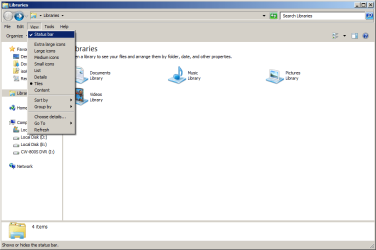
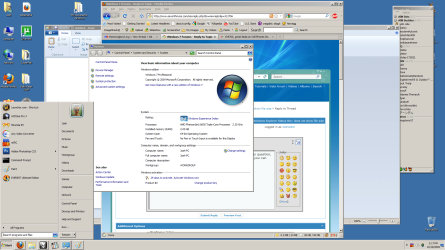
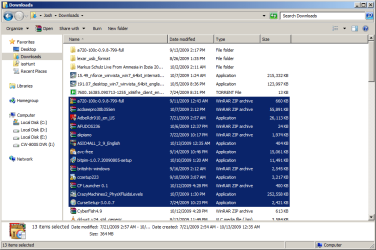
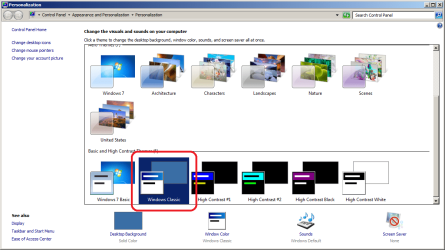
You can enable Status Bar but it only shows number of files selected, and there is Classic Theme.
 

Attachments

  • w7_classic-01.png
    w7_classic-01.png
    21.4 KB · Views: 134
  • w7_classic-02.png
    w7_classic-02.png
    154.1 KB · Views: 189
  • w7_classic-03.png
    w7_classic-03.png
    36.4 KB · Views: 210
  • w7_classic.png
    w7_classic.png
    56.8 KB · Views: 146

My Computer My Computer

Computer Manufacturer/Model Number
Asus V2-M3M8200 Barebones
OS
Windows 7 Professional x64
CPU
AMD Phenom II X4 925
Motherboard
V2-M3M8200 (basically a M3N78-VM)
Memory
4x1024mb Kingston HyperX DDR2-1066 KHX8500D2/1G
Graphics Card(s)
Asus GTS 450 OC
Sound Card
Creative Sound Blaster X-Fi Titanium PCIe
Monitor(s) Displays
Asus 24" LCD VH242H
Screen Resolution
1920x1080
Hard Drives
WDC WD5000AAKS
WDC WD5002ABYS
Seagate ST325062 USB-to-IDE
Fujitsu 160GB Pocket USB HDD
PSU
Antec Earthwatts EA-430D
Case
Asus V2-M3M8200
Cooling
120mm side fan & 80mm front & 92mm rear fan
Keyboard
Dell USB mini Multimedia
Mouse
Logitech MX518
Internet Speed
Comcast Xfinity
Other Info
Logitech Webcam Pro 9000
Accurian 40-1462 Speakers
little dot MKII Headphone Amp

My Computer My Computer

Computer Manufacturer/Model Number
mickey megabyte 1234
OS
ultimate 64 sp1
CPU
i5 2500K [email protected]
Motherboard
MSI P67A-GD53
Memory
8 gigs GSkill Ripjaws 1600
Graphics Card(s)
amd hd6950
Sound Card
creative x-fi gamer
Monitor(s) Displays
samsung 24"
Screen Resolution
1920x1080
Hard Drives
ocz vertex 2e 60 gig, samsung f3 1tb, buffalo 2tb ext
PSU
antec 550
Case
antec three hundred
Cooling
i'm a cooling fan
Keyboard
saitek eclipse ii
Mouse
logitech g3
Internet Speed
about 4 Mbps
Other Info
i love win7
I agree that this is a small, but significant issue for me. I find it problematic, because say I have a number of .rar and .par files in a directory (over 15), and I've repaired and extracted the content, and want to delete those .rar and .par files. With XP, I'd always glance at the total file size to make sure I hadn't accidentally selected something I didn't want to delete. It is even more important, now that I am new to W7, and I don't recognize all the filetype icons yet, so I want to make sure the files I have selected are the expected size. To do that, I now have to click "show more details" which then steals focus. So I can no longer simply hit "delete" on my keyboard, as the focus is on the bottom bar. To get focus back on the 15+ selected items, you can't click one item, as the deselects the list, or you can't click on the background either for the same reason. You have to right click on one of the selections. And at this point, I'm better off selecting "delete" from the right-click menu than using the keyboard stroke. Yeah, it may be a nitpick, but still it is annoying. Moving the curser halfway across the screen, clicking, then moving the curser halfway back and right clicking and selecting "delete" from the menu, when before I didn't have to do any of that since I could select 15+ items, glance at the size, and hit delete on my keyboard. Much more streamlined.

It seems like there should be a simple registry item to change the number of items selectable. I know even XP stopped showing details after a certain amount as well, but that number was much higher (maybe around 50 selected items?) I hope someone figures out a way to make an adjustment so either "show more details" is always selected, or the number of items can be raised from 15. If not, I really hope that Windows considers adding this functionality in the future (doesn't seem as likely).

But I can understand other situations where knowing the file size of a group of 15+ files can be helpful, such as transferring files to other media such as CDs and flash drives (and at least the selection focus issue doesn't affect copying and moving, you can still click and move the 15+ files, even if the bottom bar has the focus. I just tested it).

So if anyone figures out a way around this (or a way to "fix" it), please send me a message. Thanks!

 

My Computer My Computer

OS
W7 Pro x64
CPU
AMD|A64 X2 5400+ 2.8G
Motherboard
ASUS M3A78-EM AM2+ 780G
Memory
1Gx2|OCZ DII1066OCZ2N10662GK R
Graphics Card(s)
onboard Radeon 3200HD
Sound Card
M-Audio Revolution 7.1
Monitor(s) Displays
Dell 30" 3007wfp-HC
Hard Drives
320G WD3200AAKS
1T WD10EACS
1.5T SAMSUNG HD154UI
PSU
SEASONIC|SS-550HT 550W
Case
ANTEC|SOLO BK/SIL
Cooling
Scythe Ninja 2
So if anyone figures out a way around this (or a way to "fix" it), please send me a message. Thanks!

Right-click on the right pane > Group by > Type
 

My Computer My Computer

Computer type
PC/Desktop
Computer Manufacturer/Model Number
Alienware Aurora ALX R4
OS
Windows 10 Pro (x64)
CPU
Intel Core i7-3930K (3.2GHz - 4.5GHz)
Motherboard
Alienware Aurora-R4 x79
Memory
4x Samsung 4GB PC3-12800 DDR3 (16GB 1600MHz)
Graphics Card(s)
Nvidia Geforce GTX 690
Sound Card
SteelSeries Siberia Elite
Monitor(s) Displays
Dell UltraSharp U3011
Screen Resolution
2560x1600
Hard Drives
Samsung 850 Pro 256 GB, Seagate 1TB Desktop Hybrid HDD, 2x Western Digital 4TB Green HDD
PSU
875W Some Dell PSU <.<
Case
Alienware Aurora ALX
Cooling
Custom Liquid Cooling (EK CPU & GPU blocks) dual EK 480RAD
Keyboard
Logitech G710+ Mechanical
Mouse
Logitech G700s
Internet Speed
Verizon Fios (50 mbps average)
Other Info
Server: Intel NUC D54250WYK: i5-4250U, 16GB, 256 GB mSATA, Windows Server 2012 R2
Ha. Very funny logicearth. But seriously, though... come on now.
 

My Computer My Computer

OS
W7 Pro x64
CPU
AMD|A64 X2 5400+ 2.8G
Motherboard
ASUS M3A78-EM AM2+ 780G
Memory
1Gx2|OCZ DII1066OCZ2N10662GK R
Graphics Card(s)
onboard Radeon 3200HD
Sound Card
M-Audio Revolution 7.1
Monitor(s) Displays
Dell 30" 3007wfp-HC
Hard Drives
320G WD3200AAKS
1T WD10EACS
1.5T SAMSUNG HD154UI
PSU
SEASONIC|SS-550HT 550W
Case
ANTEC|SOLO BK/SIL
Cooling
Scythe Ninja 2
MS claims windows 7 is the way the user wants it, they never asked me.
Windows has over a billion users, not everyone is going to get there voice across that many heads.
+1. For example, there were significantly more beta testers than with Vista only a couple of years ago.
 

My Computer My Computer

Computer type
Laptop
Computer Manufacturer/Model Number
HP ENVY 17-1150eg
OS
Windows 10 Pro x64 EN-GB
CPU
1.6 GHz Intel Core i7-720QM Processor
Memory
6 GB
Graphics Card(s)
ATI Mobility Radeon HD 5850 Graphics
Sound Card
Beats sound system with integrated subwoofer
Monitor(s) Displays
17" laptop display, 22" LED and 32" Full HD TV through HDMI
Screen Resolution
1600*900 (1), 1920*1080 (2&3)
Hard Drives
Internal: 2 x 500 GB SATA Hard Disk Drive 7200 rpm
External: 2TB for backups, 3TB USB3 network drive for media
Cooling
As Envy runs a bit warm, I have it on a Cooler Master pad
Keyboard
Logitech diNovo Media Desktop Laser (bluetooth)
Mouse
Logitech Performance Mouse MX
Internet Speed
50/10 Mbps VDSL
Antivirus
Windows Defender 4.3.9431.0
Browser
Maxthon 3.5.2., IE11
. . .I don't want to play anymore so I am going to take my ball and go home. . .:rolleyes:
 

My Computer My Computer

Computer Manufacturer/Model Number
HP Pavilion a4302f
OS
Win 7 Pro x64, VM Win XP, Win7 Pro Sandbox, Kubuntu 11
CPU
AMD Athlon(tm) II X4 640 @ 3.0 Gbz
Memory
12GB 1066MHz DDR3 SDRAM - 2x4GB, 2x2GB
Graphics Card(s)
ATI Radeon HD 4350 HD Graphics/Audio with 512MB
Sound Card
Realtek High Definition Audio
Monitor(s) Displays
1. Dell 23" SP2307, 2. Mitsublishi 40" HDTV, Hannspree 25"
Screen Resolution
1. 2048x1152, 2. 1920-1080, 3. 1920x1200
Hard Drives
Int: 1 120 Gig SSD i
1 - 2.5" 500 USB External HDD
1 -1 Tb USB External HDD
Case
Mid Tower
Cooling
Standard Fans - 5 fans (very quiet)
Keyboard
Microsoft Wireless 2000
Mouse
Microsoft Wireless Mouse 5000
Internet Speed
10 Mbit (realistically 500 Kbit - 1.2 Mbit)
Other Info
Speakers - Bose Desktop (Excellent Sound)
1 external CD|DVD\Blue-ray Recorders/Players (Sony)
Half a loaf

I, too, like the XP-style status bar, and I was disappointed that the volume free space report seemed to have been removed from Windows 7.

After further exploration, I'm happy to report that volume free space is reported by Win7, but not quite the way XP does it.

From the Desktop, click on Computer (the new My Computer). The status bar will show the info for Drive C. Click on any other drive in the right pane and you'll get the info for that drive.

Or, if already in Windows Explorer, in the left pane tree view click on Computer.

If you use the Tile or Content view for Computer, the free space appears alongside the drive icon, as well as in the status bar.

Clicking a file in the right pane brings its info to the status bar.

And, if, in the right pane, you right-click on a folder (or group of folders) and select Properties from the context menu, you will get a file count, folder count, and byte count -- as with XP.
 

My Computer My Computer

OS
WinXP, Win7, PCLinuxOS
Here is the screenshot

As you can see, there is no file size info at the bottom, in the middle frame. That is my problem, with Windows 7.
 

My Computer My Computer

OS
Windows 7
No size info

Not size info.
 

Attachments

  • No size info.jpg
    No size info.jpg
    10.6 KB · Views: 2,181

My Computer My Computer

OS
Windows 7
Switch to the tree view, and then highlight the file in the right pane. Does that bring up the desired info?
 

My Computer My Computer

OS
WinXP, Win7, PCLinuxOS
Switch to the tree view, and then highlight the file in the right pane. Does that bring up the desired info?

Could you tell us how to swith to tree view, i just couldn't guess and then we'll try : )
 

My Computer My Computer

OS
Windows 7
Motherboard
MSI
Memory
240GB
Graphics Card(s)
Nvidia Geforce 9400 1GB
Monitor(s) Displays
SyncMaster 931BF
Solution: Install Classic Shell

I have been very unhappy with the OP problem as well. A basic Windows function (that even mac :sick: has). MS really lit a match in the dynamite shed on this one:rolleyes:. Solution: install the open source Windows Classic Explorer:

Welcome to Classic Shell

You will get your classic status bar back :cool:, can hide the oversized (and frustratingly unhelpful) Details Pane, and be happy with Windows again:party:. It shows remaining disk size as well as the sum of the size of folder contents/selected files/folders - even in the Recycle Bin. Restores what MS tried to rob us of. I am running it on Win 7 64-bit.

They also have a classic start menu, but I am fine with the Win 7 start menu so I unchecked it during the install.

Now if they only had a donate link! (I am not affiliated with them at all).

Regards and Happy New Year.

MYD
 
Last edited:

My Computer My Computer

Computer Manufacturer/Model Number
MSI
OS
Win 7 64-bit
Monitor(s) Displays
17"

My Computer My Computer

Computer Manufacturer/Model Number
Averatec 6130HS-20
OS
Windows 7 Professional 32-bit (6.1, Build 7600)
CPU
Intel(R) Pentium(R) 4 3.00 GHz HT
Memory
2.0 GB
Graphics Card(s)
ATI Mobility Radeon 9600 64MB
Sound Card
Realtek AC'97 Audio
Screen Resolution
1280 x 800
Hard Drives
Seagate 96023A 60GB 7200RPM -
Seagate FreeAgentDesktop 250GB
Cooling
20 Inch Box Fan
Mouse
Targus PAWM10 Wireless Optical Laptop Mouse
Back
Top