
KB3083324 Any Info please

Okay I just remembered that I already have software installed that logs connections and has a log search feature.
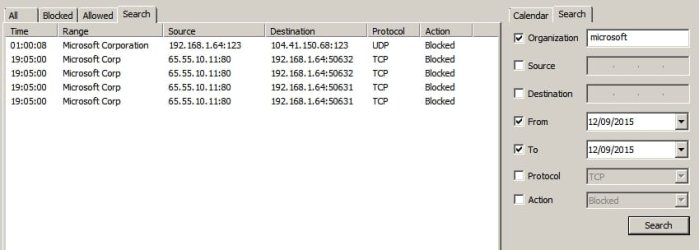
ip address log.jpg
 

My Computer My Computer

Computer type
Laptop
Computer Manufacturer/Model Number
ASUS
OS
Microsoft Windows 7 Home Premium 64-bit 7601 Multiprocessor Free Service Pack 1
CPU
AMD C-60 APU with Radeon(tm) HD Graphics
Motherboard
ASUSTeK COMPUTER INC. X501U
Memory
4.00 GB
Graphics Card(s)
AMD Radeon HD 6290 Graphics
Sound Card
(1) AMD High Definition Audio Device (2) Realtek High Defi
Screen Resolution
1366 x 768 x 32 bits (4294967296 colors) @ 60 Hz
Hard Drives
Hitachi HTS545050A7E380 SATA Disk Device
Antivirus
Comodo CIS & FW, SecureAplus App Whitelisting, Threatfire
Browser
Cyberfox 64bit, Opera 64bit, Airfox
Other Info
Spy-The-Spy, HitmanPro.Alert, Norton Connect Safe, MJRegWatcher, BitDefender TrafficLight, Voodoo Shield, Zemana AntiMalware
Update for Windows 7 for based Systems KB3083324


This update replaced the following update

Update for Windows 7 based Systems KB2990214
Update for Windows 7 based Systems KB3050265
Update for Windows 7 based Systems KB3065987
Update for Windows 7 based Systems KB3075851

Information got via windows update catalog package details.

My opinion even with k2990214 being replaced. I say it is ok to install KB3083324. The reason I say that is looking at windows update catalog. It only show this update applies to windows 7 and the Windows Server 2008 R2 systems not other windows systems.
 

My Computer My Computer

Computer type
PC/Desktop
Computer Manufacturer/Model Number
Dell All in one Inspiron 2020
OS
W10 32 bit, XUbuntu 18.xx 64 bit
CPU
Intel(R) Celeron(R) CPU G1620T @ 2.40GHz, 2400 Mhz
Motherboard
Dell
Memory
4GB
Graphics Card(s)
Intel HD graphics
Sound Card
High Definition Audio Device
Monitor(s) Displays
20 inch Screen
Screen Resolution
W7=1280 x 720 & Linux Mint Xfce=1360 x 768
Hard Drives
500 GB hard drive
Keyboard
Usb
Mouse
Usb
Internet Speed
High-Speed
Antivirus
MSE
Browser
Main Browser Firefox
Other Info
I have done a clean install of Windows 7 using Dell re-installation disk (Dell sent me one). I also use Free Macrium reflect backup and restore.
I've been getting a stack of WER errors each Windows Update (only update the security updates) for the last mew months - hopefully this update will address this?
I haven't updated this one yet.
 

My Computer My Computer

Computer type
PC/Desktop
Computer Manufacturer/Model Number
custom build
OS
Microsoft Windows 7 Professional 64-bit SP 1
CPU
Intel(R) Core(TM)2 Quad CPU Q9400 @ 2.66GHz
Motherboard
MICRO-STAR INTERNATIONAL CO.,LTD P45 Neo3 (MS-7514)
Memory
6.00 GB
Graphics Card(s)
NVIDIA GeForce GTX 650 Ti
Sound Card
(1) High Definition Audio Device (2) High Definition Audio
Monitor(s) Displays
2x Dell 2007FP, 1x Dell U2711
Screen Resolution
Dell 2007FP 1600x1200 - Dell U2711 2560x1440
Hard Drives
Crucial_CT128M550SSD1 ATA Device
WDC WD20EADS-00R6B0 ATA Device
PSU
Corsair HX620 (I think)
Case
Case
Cooling
Xigmatek - not sure the model
Keyboard
Logitech G110
Mouse
Microsoft 1113
Internet Speed
Slow! ADSL approx 3 Mbps on a good day
Antivirus
Norton Internet Security
Browser
Firefox 53.0, Chrome Version 58.0.3029.81
Other Info
Default System BIOS - V1.1
Update for Windows 7 for based Systems KB3083324


This update replaced the following update

Update for Windows 7 based Systems KB2990214
Update for Windows 7 based Systems KB3050265
Update for Windows 7 based Systems KB3065987
Update for Windows 7 based Systems KB3075851

Information got via windows update catalog package details.

My opinion even with k2990214 being replaced. I say it is ok to install KB3083324. The reason I say that is looking at windows update catalog. It only show this update applies to windows 7 and the Windows Server 2008 R2 systems not other windows systems.

I still trust it no farther than I can spit upwind in a stiff breeze. The description says nothing about what the "improvement" is.
 

My Computer My Computer

Computer type
PC/Desktop
Computer Manufacturer/Model Number
Custom Build
OS
Win 7 Ultimate 64 bit
CPU
Intel i7-3930K
Motherboard
ASUS P9X79 WS
Memory
Kingston HyperX Genesis 32GB Kit (8x4GB Modules) 1600MHz DDR
Graphics Card(s)
MSI R7850 Twin Frozr 2GD5/OC Radeon HD 7850 2GB 256-bit GDDR
Sound Card
Asus Xonar Essence STX
Monitor(s) Displays
3x Asus VG248QE 24", Vizio 32" TV
Screen Resolution
1920 x 1080, ?
Hard Drives
Samsung 128GB 840 Pro SSD (1),
Samsung 4TB 850 EVO SSDs (4)
Samsung 4TB 850 EVO SSDs (16) external backup drives used in 2.5" hot swap bays in the computer.
PSU
Corsair HX750w
Case
Antec Two Hundred v2 (modified)
Cooling
Cooler Master GeminII S524 120mm (fan replaced with a 140mm)
Keyboard
Logitech G510s
Mouse
Logitech M525 (two in use)
Internet Speed
=< 32Mbps down, 8Mbps up
Antivirus
AVAST!, MBAM, SAS, Spybot S&D (all but MBAM free) Glary Util
Browser
IE11
Other Info
LSI 9211-8i HBA card (8 SATA III ports), 2.5" & 3.5" Hot Swap Bays, HooToo HT-CR001 PCI-E to USB 3.0 Internal Hub + 6 Slot Card Reader, and LG Model CH12LS28 BD-ROM Optical Drive. Also, ScanSnap S1500 ADF duplexing scanner, Canon 9000F flat bed scanner, Corsair SP2500 2.1 speakers, Samsung CLP 415nw laser color printer, Cyberpower PP2200SW UPS
I can't recall what it does, but it's one to avoid. Here's the latest list of updates that I know should be hidden:

3012973
3021917
3035583
2952664
2976978
3022345
3068708
2990214
3075249
3080149
3083325
3083324
3075853
3065987
3050265
3075851
2902907
3044374
3083710
2977759

Good luck. Stay tuned, because they are sending out repeats and probably new ones. - RVAH-12
 

My Computer My Computer

Computer type
PC/Desktop
OS
Windows 7 Professional (SP1) 64 bit
Okay I just remembered that I already have software installed that logs connections and has a log search feature.

What a GREAT bunch of links you posted there! - RVAH-12
 

My Computer My Computer

Computer type
PC/Desktop
OS
Windows 7 Professional (SP1) 64 bit
Back
Top