
Windows 7 Installation - Prepare PC to be Sold

   Information
Giving away or selling your old PC with OS can be tricky. Should I leave my software, do I lose my licence, can the buyer see my files even if I delete them, is it OK to install some extras for that cousin of mine I'm giving this rig as a Christmas present?

This tutorial shows you how to prepare a PC to be given away or sold. My main purpose is to show what to do when selling / giving away a used Windows 7 computer, but you can also use this method if you (like me ;)) got some nice laptops or PC's almost free to be given as presents but they came without OS.


Giving away or selling a PC with everything intact is -sorry to say it- dumb. Not only can it bring a lot of problems and annoyances due to wrongly named user profiles and folders but it's also a security risk. Whatever you think, however careful you think you have been, there's always enough personal information available on a used PC to really make you suffer, if the new owner so decides. If you are giving away a used PC please wipe the hard disk first to ensure your privacy. Then install Windows 7 without any personal user related information.


This is what you need:
  • A Windows 7 Install Media of your chosen edition
  • A disk wipe utility. If you do not know any, I recommend using Windows 7 built-in DISKPART command line utility
  • A PC, of course ;)
  • Windows 7 Product Key, which you can normally find on a sticker at the bottom or back of the PC. This, of course, is up to you: you can also sell or give away a PC with preinstalled Windows 7 without product key, in which case the buyer / receiver has to produce one
Skills / tutorials needed to manage this procedure:
Phase 1: Wiping the disk
  1. Backup your personal files and folders to an external destination
  2. Use DISKPART Clean All command as told in this tutorial to securely erase (wipe) your hard disk(s)
Phase 2: Installing Seven
  1. Begin installation of Windows 7 as told in this tutorial. If preparing a used computer which came with a pre-installed Windows 7, remember to use the original edition to ensure OEM product key can be used to activate it
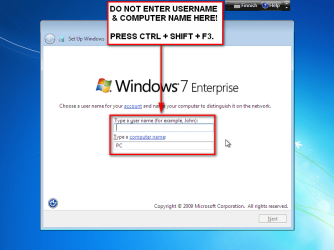
  2. When you reach step 11 in above mentioned installation tutorial, DO NOT ENTER USERNAME AND COMPUTER NAME! Instead press CTRL + SHIFT + F3:
    .
    Audit_1.png
    .
  3. This boots Windows 7 in so called Audit Mode using built-in administrator profile. There's no need to set up user accounts for now
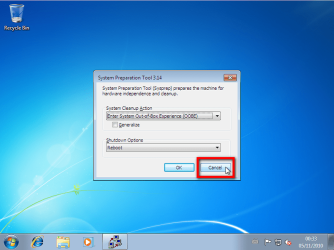
  4. Finally Windows 7 starts again in Audit Mode. Click Cancel to close System Preparation Tool for now:
    .
    Audit_3.png
    .
  5. Install all the drivers and software you want to. When installing software remember to use only valid, legal installation media
  6. If selling or giving away the PC equipped with Windows 7 Ultimate, install language packs needed if PC is going to be used in another language than that of your install media
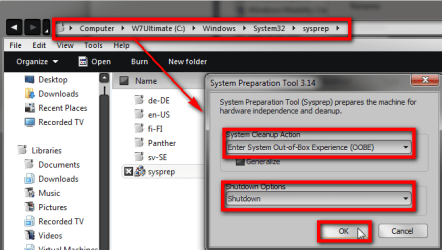
  7. When done, browse to and right click C:\Windows\System32\Sysprep\Sysprep.exe and choose Run as administrator to open System Preparation Tool (sysprep):
    .
    Audit_2.PNG
    .
  8. Select Out-of-Box Experience in System Cleanup Action
  9. Select Shutdown in Shutdown Options
  10. Click OK
Computer shuts down, and next time it is booted it is so called first boot (Out-of-Box Experience), stopping to ask initial user profile name and computer name. If language packs are installed (Ultimate or Enterprise), initial first boot also asks user in what language he / she wants Windows to be set up.

This way you can prepare the PC without creating any user accounts or naming the PC, letting the end user to do that.


Easy and quite fast (not counting DISKPART ;)).

Kari
 
Last edited:
Sorry to reply to an old thread but is there a similar process in Vista? I searched the Vista forum but couldn't find anything about this, and it's a brilliant way to retire and give away an old machine.

Regards.
You can follow the tutorial as it is also with Vista. For instance the Audit Mode works on Vista (and on Eight) exactly as on Seven, so this method is valid and works for Vista, Seven and Eight alike.

Kari
 

My Computer My Computer

At a glance

Windows 10 Pro x64 EN-GB1.6 GHz Intel Core i7-720QM Processor6 GBATI Mobility Radeon HD 5850 Graphics
Computer type
Laptop
Computer Manufacturer/Model Number
HP ENVY 17-1150eg
OS
Windows 10 Pro x64 EN-GB
CPU
1.6 GHz Intel Core i7-720QM Processor
Memory
6 GB
Graphics Card(s)
ATI Mobility Radeon HD 5850 Graphics
Sound Card
Beats sound system with integrated subwoofer
Monitor(s) Displays
17" laptop display, 22" LED and 32" Full HD TV through HDMI
Screen Resolution
1600*900 (1), 1920*1080 (2&3)
Hard Drives
Internal: 2 x 500 GB SATA Hard Disk Drive 7200 rpm
External: 2TB for backups, 3TB USB3 network drive for media
Cooling
As Envy runs a bit warm, I have it on a Cooler Master pad
Keyboard
Logitech diNovo Media Desktop Laser (bluetooth)
Mouse
Logitech Performance Mouse MX
Internet Speed
50/10 Mbps VDSL
Antivirus
Windows Defender 4.3.9431.0
Browser
Maxthon 3.5.2., IE11
Hi Kari

I know its quite some time since you posted this great tutorial. However, I hope you still might be able to help me with it.
I followed the steps on a Win7 Pro x64 Samsung Laptop. After I pressed the Ctrl+Shift+F3 the laptop rebooted as described but instead of continuing with step 15 of the Clean Install Tutorial the System Preparation Tool was displayed. After I pressed Cancel the desktop was displayed but the installation seemed not completed, there was no Ethernet installed for example.

So I must have missed something or the procedure has somehow changed in the meantime.

Thanks for your help.

Philippe
 

My Computer My Computer

At a glance

Windows 7 Pro x64
Computer type
PC/Desktop
OS
Windows 7 Pro x64
So I must have missed something or the procedure has somehow changed in the meantime.
Hi Philippe, welcome to the Seven Forums.

No, you have not missed something, I just had an unnecessary step in the instructions. My apologies for that. I have now removed the list item asking to continue from installation tutorial step 15 as totally unnecessary.

The Sysprep box in the middle of the display when you arrive to desktop means you have successfully booted to Audit Mode. As told in step 4 click Cancel to close the Sysprep dialog and continue from step 5 in this tutorial..

Please come back if you need any assistance.

Kari
 

My Computer My Computer

At a glance

Windows 10 Pro x64 EN-GB1.6 GHz Intel Core i7-720QM Processor6 GBATI Mobility Radeon HD 5850 Graphics
Computer type
Laptop
Computer Manufacturer/Model Number
HP ENVY 17-1150eg
OS
Windows 10 Pro x64 EN-GB
CPU
1.6 GHz Intel Core i7-720QM Processor
Memory
6 GB
Graphics Card(s)
ATI Mobility Radeon HD 5850 Graphics
Sound Card
Beats sound system with integrated subwoofer
Monitor(s) Displays
17" laptop display, 22" LED and 32" Full HD TV through HDMI
Screen Resolution
1600*900 (1), 1920*1080 (2&3)
Hard Drives
Internal: 2 x 500 GB SATA Hard Disk Drive 7200 rpm
External: 2TB for backups, 3TB USB3 network drive for media
Cooling
As Envy runs a bit warm, I have it on a Cooler Master pad
Keyboard
Logitech diNovo Media Desktop Laser (bluetooth)
Mouse
Logitech Performance Mouse MX
Internet Speed
50/10 Mbps VDSL
Antivirus
Windows Defender 4.3.9431.0
Browser
Maxthon 3.5.2., IE11
Thank you Kari

Its much appreciated!

Cheers,
Philippe
 

My Computer My Computer

At a glance

Windows 7 Pro x64
Computer type
PC/Desktop
OS
Windows 7 Pro x64
Hi Kari, thanks for great tutorial. Quick question, if I have already installed windows and given username and PC name can I still do this? I have heard that if I do it now it will delete the administrator and cause issues for the new user?

Cheers
 

My Computer My Computer

At a glance

Win 8 Ent 64 bit
Computer type
PC/Desktop
OS
Win 8 Ent 64 bit
Hi Cripple10, welcome to the Seven Forums.

The whole idea of this procedure is that the new user starts as if the PC was all new. It has no user accounts, nothing, but instead when booted first time it starts from this asking the new user to create the initial, first user account which will automatically be an administrator account:

2444d1231630498-clean-install-windows-7-a-step11.jpg


Kari
 

My Computer My Computer

At a glance

Windows 10 Pro x64 EN-GB1.6 GHz Intel Core i7-720QM Processor6 GBATI Mobility Radeon HD 5850 Graphics
Computer type
Laptop
Computer Manufacturer/Model Number
HP ENVY 17-1150eg
OS
Windows 10 Pro x64 EN-GB
CPU
1.6 GHz Intel Core i7-720QM Processor
Memory
6 GB
Graphics Card(s)
ATI Mobility Radeon HD 5850 Graphics
Sound Card
Beats sound system with integrated subwoofer
Monitor(s) Displays
17" laptop display, 22" LED and 32" Full HD TV through HDMI
Screen Resolution
1600*900 (1), 1920*1080 (2&3)
Hard Drives
Internal: 2 x 500 GB SATA Hard Disk Drive 7200 rpm
External: 2TB for backups, 3TB USB3 network drive for media
Cooling
As Envy runs a bit warm, I have it on a Cooler Master pad
Keyboard
Logitech diNovo Media Desktop Laser (bluetooth)
Mouse
Logitech Performance Mouse MX
Internet Speed
50/10 Mbps VDSL
Antivirus
Windows Defender 4.3.9431.0
Browser
Maxthon 3.5.2., IE11
Thanks man, understand that. If I however run the sysprep /audit /reboot and then choose the OOBE without the generalise option will it still work. Basically I have a PC that I have installed win 7 on. It has booted and I have installed all drivers etc. now I want to reset it back to the OOBE so I can sell it.

Thanks for your help! :)
 

My Computer My Computer

At a glance

Win 8 Ent 64 bit
Computer type
PC/Desktop
OS
Win 8 Ent 64 bit
The generalize phase is not only to remove drivers, it is also needed to remove all traces of product code and activation data. Doing it in your way works but is not an ideal solution.

Kari
 

My Computer My Computer

At a glance

Windows 10 Pro x64 EN-GB1.6 GHz Intel Core i7-720QM Processor6 GBATI Mobility Radeon HD 5850 Graphics
Computer type
Laptop
Computer Manufacturer/Model Number
HP ENVY 17-1150eg
OS
Windows 10 Pro x64 EN-GB
CPU
1.6 GHz Intel Core i7-720QM Processor
Memory
6 GB
Graphics Card(s)
ATI Mobility Radeon HD 5850 Graphics
Sound Card
Beats sound system with integrated subwoofer
Monitor(s) Displays
17" laptop display, 22" LED and 32" Full HD TV through HDMI
Screen Resolution
1600*900 (1), 1920*1080 (2&3)
Hard Drives
Internal: 2 x 500 GB SATA Hard Disk Drive 7200 rpm
External: 2TB for backups, 3TB USB3 network drive for media
Cooling
As Envy runs a bit warm, I have it on a Cooler Master pad
Keyboard
Logitech diNovo Media Desktop Laser (bluetooth)
Mouse
Logitech Performance Mouse MX
Internet Speed
50/10 Mbps VDSL
Antivirus
Windows Defender 4.3.9431.0
Browser
Maxthon 3.5.2., IE11
Cheers. I want to keep all the product activation data as I have built this to be used with the windows key I have loaded. I don't need to create an image as this is a one time reset for the new user.

Will my way still work and will the new user still get the OOBE etc...? Will the account they then create be an administrator on the PC or do I end up blowing that away when I do the sysprep?

Thanks again for your help and sorry I'm a noob! :(
 

My Computer My Computer

At a glance

Win 8 Ent 64 bit
Computer type
PC/Desktop
OS
Win 8 Ent 64 bit
Sysprep does not remove any user accounts. If you sysprep an existing Windows setup with existing users, they will still be there after the sysprep. Even in this case a new user must be created in OOBE phase and it will be admin user, this happens every time after the Sysprep (exception: if the new user is automatically created in an additional, optional answer file used with sysprep).

So let's say you have user accounts Shiva (admin user), Buddha and Allah, then you sysprep. Next boot will be an OOBE boot and requires creating a new admin user. If you now try to create a user Shiva, Buddha or Allah, you get an error message telling that the account already exists, so you need to create a new admin user. OK, you create a new admin user God. When Windows finally ends OOBE and boots to desktop, you have now two admin users (God and Shiva), and two standard users (Buddha and Allah).

Only way to give / sell the PC away without any user accounts is to boot to Audit Mode which automatically uses the built-in admin account, then remove all user accounts and finally sysprep to OOBE.

Kari
 

My Computer My Computer

At a glance

Windows 10 Pro x64 EN-GB1.6 GHz Intel Core i7-720QM Processor6 GBATI Mobility Radeon HD 5850 Graphics
Computer type
Laptop
Computer Manufacturer/Model Number
HP ENVY 17-1150eg
OS
Windows 10 Pro x64 EN-GB
CPU
1.6 GHz Intel Core i7-720QM Processor
Memory
6 GB
Graphics Card(s)
ATI Mobility Radeon HD 5850 Graphics
Sound Card
Beats sound system with integrated subwoofer
Monitor(s) Displays
17" laptop display, 22" LED and 32" Full HD TV through HDMI
Screen Resolution
1600*900 (1), 1920*1080 (2&3)
Hard Drives
Internal: 2 x 500 GB SATA Hard Disk Drive 7200 rpm
External: 2TB for backups, 3TB USB3 network drive for media
Cooling
As Envy runs a bit warm, I have it on a Cooler Master pad
Keyboard
Logitech diNovo Media Desktop Laser (bluetooth)
Mouse
Logitech Performance Mouse MX
Internet Speed
50/10 Mbps VDSL
Antivirus
Windows Defender 4.3.9431.0
Browser
Maxthon 3.5.2., IE11
Cool, thanks Kari. So my plan is to sysprep /audit /reboot , delete the user account I created then OOHE without generalize as this will be the PC the image stays on and I want all drivers kept. I should then be good with only the account that the user creates on the next boot? I'm basically trying to avoid reinstalling windows again.
 

My Computer My Computer

At a glance

Win 8 Ent 64 bit
Computer type
PC/Desktop
OS
Win 8 Ent 64 bit
Yes. When you have deleted all existing users in Audit Mode, check that the Users folder only has three first level subfolders, Administrator, Public and Default (hidden folder). I mean, if a user folder exists other than those three after you have deleted other users, manually delete the folders belonging to those deleted users.

Next, sysprep with /generalize, /oobe and /shutdown switches. When computer shuts down, you are done. Next time it will be booted it will go through the OOBE / Welcome phase and let the new owner create the initial user account, which as already mentioned will automatically be an admin account.

Kari
 

My Computer My Computer

At a glance

Windows 10 Pro x64 EN-GB1.6 GHz Intel Core i7-720QM Processor6 GBATI Mobility Radeon HD 5850 Graphics
Computer type
Laptop
Computer Manufacturer/Model Number
HP ENVY 17-1150eg
OS
Windows 10 Pro x64 EN-GB
CPU
1.6 GHz Intel Core i7-720QM Processor
Memory
6 GB
Graphics Card(s)
ATI Mobility Radeon HD 5850 Graphics
Sound Card
Beats sound system with integrated subwoofer
Monitor(s) Displays
17" laptop display, 22" LED and 32" Full HD TV through HDMI
Screen Resolution
1600*900 (1), 1920*1080 (2&3)
Hard Drives
Internal: 2 x 500 GB SATA Hard Disk Drive 7200 rpm
External: 2TB for backups, 3TB USB3 network drive for media
Cooling
As Envy runs a bit warm, I have it on a Cooler Master pad
Keyboard
Logitech diNovo Media Desktop Laser (bluetooth)
Mouse
Logitech Performance Mouse MX
Internet Speed
50/10 Mbps VDSL
Antivirus
Windows Defender 4.3.9431.0
Browser
Maxthon 3.5.2., IE11
Excellent, all done and tested.

Thanks so much for your help Kari. It's people like you that make forums so helpful.

Cheers
 

My Computer My Computer

At a glance

Win 8 Ent 64 bit
Computer type
PC/Desktop
OS
Win 8 Ent 64 bit
You are welcome :).
 

My Computer My Computer

At a glance

Windows 10 Pro x64 EN-GB1.6 GHz Intel Core i7-720QM Processor6 GBATI Mobility Radeon HD 5850 Graphics
Computer type
Laptop
Computer Manufacturer/Model Number
HP ENVY 17-1150eg
OS
Windows 10 Pro x64 EN-GB
CPU
1.6 GHz Intel Core i7-720QM Processor
Memory
6 GB
Graphics Card(s)
ATI Mobility Radeon HD 5850 Graphics
Sound Card
Beats sound system with integrated subwoofer
Monitor(s) Displays
17" laptop display, 22" LED and 32" Full HD TV through HDMI
Screen Resolution
1600*900 (1), 1920*1080 (2&3)
Hard Drives
Internal: 2 x 500 GB SATA Hard Disk Drive 7200 rpm
External: 2TB for backups, 3TB USB3 network drive for media
Cooling
As Envy runs a bit warm, I have it on a Cooler Master pad
Keyboard
Logitech diNovo Media Desktop Laser (bluetooth)
Mouse
Logitech Performance Mouse MX
Internet Speed
50/10 Mbps VDSL
Antivirus
Windows Defender 4.3.9431.0
Browser
Maxthon 3.5.2., IE11
Thanks Kari I often wondered how the pre built stuff was set up;)
 

My Computer My Computer

At a glance

Desk1 7 Home Prem / Desk2 10 Pro / Main lap A...Desk1 i5 3750K / Laptop i7 GTX 860M / Desk2 i...Desk1 8GB (1866) / Desk2 16GB (1333) / Laptop...Desk 1& 2NVidia GTX 650 & Laptops on board Intel
Computer type
PC/Desktop
Computer Manufacturer/Model Number
Own build (new) Desk1 / Asus ROG Win 7 / Desk2 1st build
OS
Desk1 7 Home Prem / Desk2 10 Pro / Main lap Asus ROG 10 Pro 2 laptop Toshiba 7 Pro Asus P2520 7 & 10
CPU
Desk1 i5 3750K / Laptop i7 GTX 860M / Desk2 i5 2500
Motherboard
Desk1 Asus P877-V / Desk2 Gigabyte H67 UD3H / Laptop ?
Memory
Desk1 8GB (1866) / Desk2 16GB (1333) / Laptop 8Gb DDR3
Graphics Card(s)
Desk 1& 2NVidia GTX 650 & Laptops on board Intel
Sound Card
Desk 1 & 2 -XONAR DG Realtek High Def audio Laptop
Monitor(s) Displays
Desk 1 Benq HD 2450 / Desk2 Philips 24" / Laptop 17.5"
Screen Resolution
1920x1080 D1 & D2 & Laptop 1
Hard Drives
Desk1 Samsung 120GB 830 SSD
Asus ROG 256GB 850 Pro SSD
Desk2 Samsung 840 256 SSD
Toshiba 120GB EVO
PSU
Desk 1 Corsair HX 1050/ Laptop ? / Desk 2 Corsair HX 650
Case
Desk 1 Cooler HAF XM ? Toshiba laptop / Desk2 Coolermaster
Cooling
Fans on all Desk1 -2 Desk2 - all Coolermasters 5 Laptop ?
Keyboard
Desk 1 MS Sidewinder X6 Desk 2 MS Sidewinder X 4
Mouse
Desk 1&2 - Gigabyte MS 900 gamer - laptop - Logitec wireless
Internet Speed
ADSL2+
Other Info
One other Desktop (tester) and spare Toshba laptop both with SSD's
Running Kaspersky 2016 ISS on all machines config'd identically
Logitec audio stereo systems on each machine (x3)
Canon MG5250MFC
Router/modem TP-Link running WPA2SK
You are welcome John :).

This is one way. It gives a "virgin" computer with absolutely no traces of its earlier life.
 

My Computer My Computer

At a glance

Windows 10 Pro x64 EN-GB1.6 GHz Intel Core i7-720QM Processor6 GBATI Mobility Radeon HD 5850 Graphics
Computer type
Laptop
Computer Manufacturer/Model Number
HP ENVY 17-1150eg
OS
Windows 10 Pro x64 EN-GB
CPU
1.6 GHz Intel Core i7-720QM Processor
Memory
6 GB
Graphics Card(s)
ATI Mobility Radeon HD 5850 Graphics
Sound Card
Beats sound system with integrated subwoofer
Monitor(s) Displays
17" laptop display, 22" LED and 32" Full HD TV through HDMI
Screen Resolution
1600*900 (1), 1920*1080 (2&3)
Hard Drives
Internal: 2 x 500 GB SATA Hard Disk Drive 7200 rpm
External: 2TB for backups, 3TB USB3 network drive for media
Cooling
As Envy runs a bit warm, I have it on a Cooler Master pad
Keyboard
Logitech diNovo Media Desktop Laser (bluetooth)
Mouse
Logitech Performance Mouse MX
Internet Speed
50/10 Mbps VDSL
Antivirus
Windows Defender 4.3.9431.0
Browser
Maxthon 3.5.2., IE11
Yes mate I just wanted to be sure any trace of 7 will be gone for the 10 install - when I can get my head around it.
 

My Computer My Computer

At a glance

Desk1 7 Home Prem / Desk2 10 Pro / Main lap A...Desk1 i5 3750K / Laptop i7 GTX 860M / Desk2 i...Desk1 8GB (1866) / Desk2 16GB (1333) / Laptop...Desk 1& 2NVidia GTX 650 & Laptops on board Intel
Computer type
PC/Desktop
Computer Manufacturer/Model Number
Own build (new) Desk1 / Asus ROG Win 7 / Desk2 1st build
OS
Desk1 7 Home Prem / Desk2 10 Pro / Main lap Asus ROG 10 Pro 2 laptop Toshiba 7 Pro Asus P2520 7 & 10
CPU
Desk1 i5 3750K / Laptop i7 GTX 860M / Desk2 i5 2500
Motherboard
Desk1 Asus P877-V / Desk2 Gigabyte H67 UD3H / Laptop ?
Memory
Desk1 8GB (1866) / Desk2 16GB (1333) / Laptop 8Gb DDR3
Graphics Card(s)
Desk 1& 2NVidia GTX 650 & Laptops on board Intel
Sound Card
Desk 1 & 2 -XONAR DG Realtek High Def audio Laptop
Monitor(s) Displays
Desk 1 Benq HD 2450 / Desk2 Philips 24" / Laptop 17.5"
Screen Resolution
1920x1080 D1 & D2 & Laptop 1
Hard Drives
Desk1 Samsung 120GB 830 SSD
Asus ROG 256GB 850 Pro SSD
Desk2 Samsung 840 256 SSD
Toshiba 120GB EVO
PSU
Desk 1 Corsair HX 1050/ Laptop ? / Desk 2 Corsair HX 650
Case
Desk 1 Cooler HAF XM ? Toshiba laptop / Desk2 Coolermaster
Cooling
Fans on all Desk1 -2 Desk2 - all Coolermasters 5 Laptop ?
Keyboard
Desk 1 MS Sidewinder X6 Desk 2 MS Sidewinder X 4
Mouse
Desk 1&2 - Gigabyte MS 900 gamer - laptop - Logitec wireless
Internet Speed
ADSL2+
Other Info
One other Desktop (tester) and spare Toshba laptop both with SSD's
Running Kaspersky 2016 ISS on all machines config'd identically
Logitec audio stereo systems on each machine (x3)
Canon MG5250MFC
Router/modem TP-Link running WPA2SK
Hi I know this is an older thread but quick question, can I use this method to install 7 then upgrade to 10 so that when I sell it the pc has win10 on?
 

My Computer My Computer

At a glance

windows 7 64 bit and dual boot PinguyosPC, intel i7 920 2.7ghz, laptop i7 720PC 6GB, laptop 2GB, me 2 seconds after 6 pintsPC Asus eah5870,laptop, ati hd 4580
Computer Manufacturer/Model Number
home built PC. Laptop studio1557
OS
windows 7 64 bit and dual boot Pinguyos
CPU
PC, intel i7 920 2.7ghz, laptop i7 720
Motherboard
PC, Asus P6t .laptop probably rubbish from dell
Memory
PC 6GB, laptop 2GB, me 2 seconds after 6 pints
Graphics Card(s)
PC Asus eah5870,laptop, ati hd 4580
Monitor(s) Displays
Sharp 42" HD TV using HDMI + HDMI to onkyo surround amp
Screen Resolution
1920x1080
Hard Drives
1x ssd OCZ 60GB, 2x250GB raid0, 2x1TB (storage),2TB
PSU
OCZ 700w
Case
antec 902
Cooling
antec khuler h20 920
Keyboard
logitek wave
Mouse
x8 sidewinder
Internet Speed
dog slow
Hi I know this is an older thread but quick question, can I use this method to install 7 then upgrade to 10 so that when I sell it the pc has win10 on?

You don't need to install Windows 7 first.

If you want to give or sell your old PC with Windows 10 and some preinstalled software, then use this method as told in the tutorial. Clean install Windows 10 as @z3r010 told above, then follow the steps told in this tutorial to prepare your PC to be given away or sold.

If you want to give or sell your PC as "new", just Windows 10 installed without any preinstalled software and user accounts, this method will be unnecessary. You can simply reset the PC after the 10 is installed. Reseting Windows 10 removes all user accounts and personal data, leaving Windows 10 as if it was a brand new installation without any user accounts. The next time the PC will be started it starts as if it was the first time ever it was booted.

Reset Windows 10: Reset Windows 10 - Windows 10 Forums

Kari
 

My Computer My Computer

At a glance

Windows 10 Pro x64 EN-GB1.6 GHz Intel Core i7-720QM Processor6 GBATI Mobility Radeon HD 5850 Graphics
Computer type
Laptop
Computer Manufacturer/Model Number
HP ENVY 17-1150eg
OS
Windows 10 Pro x64 EN-GB
CPU
1.6 GHz Intel Core i7-720QM Processor
Memory
6 GB
Graphics Card(s)
ATI Mobility Radeon HD 5850 Graphics
Sound Card
Beats sound system with integrated subwoofer
Monitor(s) Displays
17" laptop display, 22" LED and 32" Full HD TV through HDMI
Screen Resolution
1600*900 (1), 1920*1080 (2&3)
Hard Drives
Internal: 2 x 500 GB SATA Hard Disk Drive 7200 rpm
External: 2TB for backups, 3TB USB3 network drive for media
Cooling
As Envy runs a bit warm, I have it on a Cooler Master pad
Keyboard
Logitech diNovo Media Desktop Laser (bluetooth)
Mouse
Logitech Performance Mouse MX
Internet Speed
50/10 Mbps VDSL
Antivirus
Windows Defender 4.3.9431.0
Browser
Maxthon 3.5.2., IE11
Back
Top