Where is the Realtek HD Control Panel?

TDKMate

New member
Member
VIP
Local time
12:15 PM
Messages
335
My last build also had Realtek HD Audio and the Realtek software came with a fairly nice control panel. I could choose 2 or 4 speakers (I have Klipsch THX 4.1), set front and rear volume, EQ, and more.

This relatively new build (with a [FONT=&quot]MSI Z170A Gaming M7 motherboard) driv[FONT=&quot]ers [/FONT]installed MSI's Nahimic audio control panel. I just had to uninstall Nahimic as thru a different tech support, it was the cause of problems with a utility I have. I also installed Realtek's latest drivers.

Now the [/FONT]
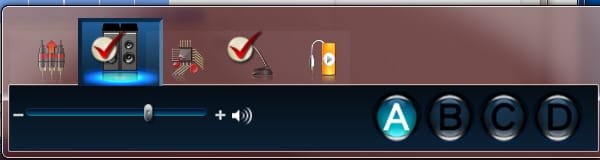
[FONT=&quot]utility works fine, but the fresh Realtek didn't install any sort of real control panel. See attachment for what I have. Realtek defaulted to Stereo speaks, so I'm now missing half my sound, and I can't find any way to change a[FONT=&quot][FONT=&quot]ny[/FONT] of [/FONT]their default settings.

And things are sounding [FONT=&quot]terrible without my rear speakers...[/FONT]

So how do I get the Realtek control panel back like it was on my last build? I went to their site but couldn't find anything but the same drivers I just installed.

Any ideas?
[FONT=&quot].

[/FONT] [/FONT]
 

Attachments

  • Realtek 'control panel' 5-19-16.jpg
    Realtek 'control panel' 5-19-16.jpg
    12.3 KB · Views: 44

My Computer My Computer

At a glance

Win 7 Pro 64 SP1i7 6700K SkyLake32 GBnVidia GTX 970
Computer type
PC/Desktop
Computer Manufacturer/Model Number
home built
OS
Win 7 Pro 64 SP1
CPU
i7 6700K SkyLake
Motherboard
MSI Gaming M7
Memory
32 GB
Graphics Card(s)
nVidia GTX 970
Sound Card
onboard
Monitor(s) Displays
DELL U2711
Screen Resolution
2560x1440
Hard Drives
1 SSD OS, 2 WD Black Caviar data harddrives
PSU
EVGA Super Nova 850W G2 'Gold'
Case
Thermaltake Soprano Snow Edition
Cooling
Cooler Master Hyper 212 evo
Keyboard
Logitech K350
Mouse
Mad Kats RATT
Antivirus
Avast
Browser
Firefox
I just built a Z170 PC with Realtek 1150 sound.

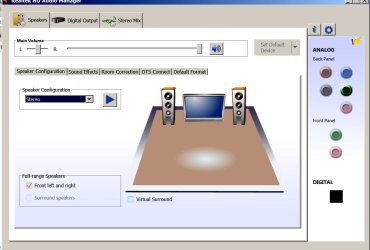
There's an icon for it in Control Panel and the pic below is what I see when I poke it.

I would go to the MSI site and get the Realtek driver for your MSI Z170A Gaming M7 board.

Accept no substitutes.

Go there rather than Realtek.

My driver (from Asrock, the board manufacturer) is called Realtek_Audio(v7614) and is 662 mb in size. Your driver at MSI would likely not match that exactly.
 

Attachments

  • Untitled-1.jpg
    Untitled-1.jpg
    96.7 KB · Views: 0

My Computer My Computer

At a glance

Windows 7 Home Premium SP1, 64-bitIntel Skylake i5-6600K, not overclocked8 GB HyperX DDR4-2666 (2 x 4 GB)none; graphics are integrated on CPU
Computer type
PC/Desktop
Computer Manufacturer/Model Number
Ignatz Special; 4 speed manual gearbox; factory air conditioning; one of one
OS
Windows 7 Home Premium SP1, 64-bit
CPU
Intel Skylake i5-6600K, not overclocked
Motherboard
AsRock Z170M Extreme 4, micro ATX
Memory
8 GB HyperX DDR4-2666 (2 x 4 GB)
Graphics Card(s)
none; graphics are integrated on CPU
Sound Card
onboard: Realtek ALC1150; external: USB Behringer UF0-202
Monitor(s) Displays
Dell S2340M 23 inch IPS
Screen Resolution
1600 x 900
Hard Drives
System: Crucial MX100 series SSD, 128 GB;
Data: Samsung Spinpoint 103SJ, 1 TB;
Backup: WD Caviar Green WD30EZRX-00D8PB0, 3 TB
PSU
Rosewill SilentNight 500 watt fanless, semi-modular
Case
Antec Solo II
Cooling
Noctua NH-U12S; Noctua F12 intake, Noctua S12A exhaust
Keyboard
Microsoft 200 6JH-00001 USB
Mouse
Dell or Microsoft optical wired; USB
Antivirus
Microsoft Security Essentials and Malwarebytes Premium
Browser
Pale Moon
Other Info
All fans PWM; speeds at idle: CPU circa 500 rpm; intake circa 600 rpm; exhaust circa 600 rpm; CPU temps 27 idle and 47 C load in a warm room (27 C/81 F) when running Intel Extreme Tuning Utility stress test.
I got an email notification that [FONT=&quot]Layback Bear posted a tip to simply hit the Start key and then type in "Audio" to bring up the Realtek Control Panel. That worked. Thanks [/FONT][FONT=&quot][FONT=&quot]Layback Bear. Following that, I tried the same trick using "Realtek" which also worked and narrowed down my choices some. However, I don't see the post here...?[/FONT] [/FONT]
 

My Computer My Computer

At a glance

Win 7 Pro 64 SP1i7 6700K SkyLake32 GBnVidia GTX 970
Computer type
PC/Desktop
Computer Manufacturer/Model Number
home built
OS
Win 7 Pro 64 SP1
CPU
i7 6700K SkyLake
Motherboard
MSI Gaming M7
Memory
32 GB
Graphics Card(s)
nVidia GTX 970
Sound Card
onboard
Monitor(s) Displays
DELL U2711
Screen Resolution
2560x1440
Hard Drives
1 SSD OS, 2 WD Black Caviar data harddrives
PSU
EVGA Super Nova 850W G2 'Gold'
Case
Thermaltake Soprano Snow Edition
Cooling
Cooler Master Hyper 212 evo
Keyboard
Logitech K350
Mouse
Mad Kats RATT
Antivirus
Avast
Browser
Firefox
I just built a Z170 PC with Realtek 1150 sound.

There's an icon for it in Control Panel and the pic below is what I see when I poke it.

I would go to the MSI site and get the Realtek driver for your MSI Z170A Gaming M7 board.

Accept no substitutes.

Go there rather than Realtek.

My driver (from Asrock, the board manufacturer) is called Realtek_Audio(v7614) and is 662 mb in size. Your driver at MSI would likely not match that exactly.
Thanks ignatzatsonic. I looked at the Control Panel and I also have an icon for it :) - I never thought of looking there.
So now I have all my speakers back and things sure sound a lot better :)

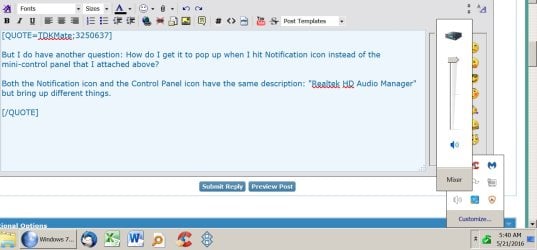
But I do have another question: How do I get it to pop up when I hit Notification icon instead of the mini-control panel that I attached above?

Both the Notification icon and the Control Panel icon have the same description: "Realtek HD Audio Manager" but bring up different things.


Oh, I downloaded MSI audio drivers (not installed) and they appear to be identical to the ones from Realtek: Same file size on disk (274,681 KB) and same file name under the ZIP wrapper (audio_6.0.1.7801). Since I've got the control panel back I don't want to take a chance of mucking things up by installing yet another driver set.
.
 

My Computer My Computer

At a glance

Win 7 Pro 64 SP1i7 6700K SkyLake32 GBnVidia GTX 970
Computer type
PC/Desktop
Computer Manufacturer/Model Number
home built
OS
Win 7 Pro 64 SP1
CPU
i7 6700K SkyLake
Motherboard
MSI Gaming M7
Memory
32 GB
Graphics Card(s)
nVidia GTX 970
Sound Card
onboard
Monitor(s) Displays
DELL U2711
Screen Resolution
2560x1440
Hard Drives
1 SSD OS, 2 WD Black Caviar data harddrives
PSU
EVGA Super Nova 850W G2 'Gold'
Case
Thermaltake Soprano Snow Edition
Cooling
Cooler Master Hyper 212 evo
Keyboard
Logitech K350
Mouse
Mad Kats RATT
Antivirus
Avast
Browser
Firefox
But I do have another question: How do I get it to pop up when I hit Notification icon instead of the mini-control panel that I attached above?

Both the Notification icon and the Control Panel icon have the same description: "Realtek HD Audio Manager" but bring up different things.

I don't know. If I want to use it, I open it from the Control Panel.

All I have in the notification area is a hidden speaker icon labeled "Realtek Digital Output". When I poke it, I get what is shown below. It's a simple volume control.
 

Attachments

  • Untitled-1.jpg
    Untitled-1.jpg
    118.3 KB · Views: 0

My Computer My Computer

At a glance

Windows 7 Home Premium SP1, 64-bitIntel Skylake i5-6600K, not overclocked8 GB HyperX DDR4-2666 (2 x 4 GB)none; graphics are integrated on CPU
Computer type
PC/Desktop
Computer Manufacturer/Model Number
Ignatz Special; 4 speed manual gearbox; factory air conditioning; one of one
OS
Windows 7 Home Premium SP1, 64-bit
CPU
Intel Skylake i5-6600K, not overclocked
Motherboard
AsRock Z170M Extreme 4, micro ATX
Memory
8 GB HyperX DDR4-2666 (2 x 4 GB)
Graphics Card(s)
none; graphics are integrated on CPU
Sound Card
onboard: Realtek ALC1150; external: USB Behringer UF0-202
Monitor(s) Displays
Dell S2340M 23 inch IPS
Screen Resolution
1600 x 900
Hard Drives
System: Crucial MX100 series SSD, 128 GB;
Data: Samsung Spinpoint 103SJ, 1 TB;
Backup: WD Caviar Green WD30EZRX-00D8PB0, 3 TB
PSU
Rosewill SilentNight 500 watt fanless, semi-modular
Case
Antec Solo II
Cooling
Noctua NH-U12S; Noctua F12 intake, Noctua S12A exhaust
Keyboard
Microsoft 200 6JH-00001 USB
Mouse
Dell or Microsoft optical wired; USB
Antivirus
Microsoft Security Essentials and Malwarebytes Premium
Browser
Pale Moon
Other Info
All fans PWM; speeds at idle: CPU circa 500 rpm; intake circa 600 rpm; exhaust circa 600 rpm; CPU temps 27 idle and 47 C load in a warm room (27 C/81 F) when running Intel Extreme Tuning Utility stress test.
Your welcome TDKMate!
 

My Computer My Computer

At a glance

Windows 10 Pro. 64/ version 1709 Windows 7 Pr...Intel i7-6800K @ 4.3Corsair Platinum 16 gig @2400EVGA GTX 1070 OC
Computer type
PC/Desktop
Computer Manufacturer/Model Number
Home made Desktop
OS
Windows 10 Pro. 64/ version 1709 Windows 7 Pro/64
CPU
Intel i7-6800K @ 4.3
Motherboard
ASUS X-99 Deluxe II
Memory
Corsair Platinum 16 gig @2400
Graphics Card(s)
EVGA GTX 1070 OC
Monitor(s) Displays
Asus 27" LED LCD/VE278Q
Screen Resolution
1920-1080 or 1280-720 HDMI
Hard Drives
INTEL SSD 730-240 Gb Sata 3.0/
PSU
EVGA Platium 1200W
Case
Phanteks Luxe Tempered Glass 8 fans/ one radiator
Cooling
XSPC/ Water Cooled CPU
Keyboard
Das 4 Professional
Mouse
Logitech M705/MX Anywhere 2-S
Internet Speed
100 mbits
Antivirus
Microsoft Security Essentials/ Malwarebytes Premium 3.0/ SAS
Browser
I.E. 11 default/Firefox/ ISP Time Warner Cable/Spectrum
Other Info
LG BluRay Burner/
Sound system-KLipsch-THX/
Icy Dock ssd Hot Swap bays.
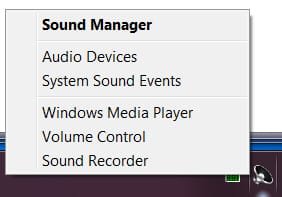
I have a lot of choices when I right click the Realtek speaker as shown below.

I don't know if I should start a new thread on this or not, but I tried out the 'Sound Recorder' but it records in such a low volume that it's basically useless.

I went into audio devices, clicked on the Recording tab, Stereo Mix is the default. I went into Stereo Mix's properties and set Levels to 100%.

Still, the recorded volume is so low you can barely hear it, even with the speakers cranked up...

Any ideas?
.
 

Attachments

  • Realtek Right Click, 5-22-16.jpg
    Realtek Right Click, 5-22-16.jpg
    8.9 KB · Views: 26

My Computer My Computer

At a glance

Win 7 Pro 64 SP1i7 6700K SkyLake32 GBnVidia GTX 970
Computer type
PC/Desktop
Computer Manufacturer/Model Number
home built
OS
Win 7 Pro 64 SP1
CPU
i7 6700K SkyLake
Motherboard
MSI Gaming M7
Memory
32 GB
Graphics Card(s)
nVidia GTX 970
Sound Card
onboard
Monitor(s) Displays
DELL U2711
Screen Resolution
2560x1440
Hard Drives
1 SSD OS, 2 WD Black Caviar data harddrives
PSU
EVGA Super Nova 850W G2 'Gold'
Case
Thermaltake Soprano Snow Edition
Cooling
Cooler Master Hyper 212 evo
Keyboard
Logitech K350
Mouse
Mad Kats RATT
Antivirus
Avast
Browser
Firefox
"I tried out the 'Sound Recorder' but it records in such a low volume............"

Is it actually being recorded at low levels or is it recording at normal levels, but you can't hear it because it's being played back at low levels?

Are all playback levels set high, at or near max?

If you use a standard recording app such as Audacity, do the record volume meters bounce up high into the acceptable range?
 

My Computer My Computer

At a glance

Windows 7 Home Premium SP1, 64-bitIntel Skylake i5-6600K, not overclocked8 GB HyperX DDR4-2666 (2 x 4 GB)none; graphics are integrated on CPU
Computer type
PC/Desktop
Computer Manufacturer/Model Number
Ignatz Special; 4 speed manual gearbox; factory air conditioning; one of one
OS
Windows 7 Home Premium SP1, 64-bit
CPU
Intel Skylake i5-6600K, not overclocked
Motherboard
AsRock Z170M Extreme 4, micro ATX
Memory
8 GB HyperX DDR4-2666 (2 x 4 GB)
Graphics Card(s)
none; graphics are integrated on CPU
Sound Card
onboard: Realtek ALC1150; external: USB Behringer UF0-202
Monitor(s) Displays
Dell S2340M 23 inch IPS
Screen Resolution
1600 x 900
Hard Drives
System: Crucial MX100 series SSD, 128 GB;
Data: Samsung Spinpoint 103SJ, 1 TB;
Backup: WD Caviar Green WD30EZRX-00D8PB0, 3 TB
PSU
Rosewill SilentNight 500 watt fanless, semi-modular
Case
Antec Solo II
Cooling
Noctua NH-U12S; Noctua F12 intake, Noctua S12A exhaust
Keyboard
Microsoft 200 6JH-00001 USB
Mouse
Dell or Microsoft optical wired; USB
Antivirus
Microsoft Security Essentials and Malwarebytes Premium
Browser
Pale Moon
Other Info
All fans PWM; speeds at idle: CPU circa 500 rpm; intake circa 600 rpm; exhaust circa 600 rpm; CPU temps 27 idle and 47 C load in a warm room (27 C/81 F) when running Intel Extreme Tuning Utility stress test.
"I tried out the 'Sound Recorder' but it records in such a low volume............"

Is it actually being recorded at low levels or is it recording at normal levels, but you can't hear it because it's being played back at low levels?
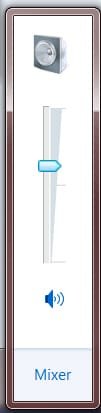
Yes, playback volume is up. See the Windows Volume control below. I have Klipsch THX 4.1's and normally when playing back with the volume set that high my BetterHalf would be complaining!

In fact, I just realized that since I uninstalled Nahimic, the playback volume is *a lot* less. At the level indicated below, I shouldn't even be able to hear the TV which is on low volume.

Are all playback levels set high, at or near max?
Yes, they are linked so they all go up and down together.

If you use a standard recording app such as Audacity, do the record volume meters bounce up high into the acceptable range?
Thanks for suggesting Audacity; I forgot I even have it as I haven't used it in years (but it is updated).

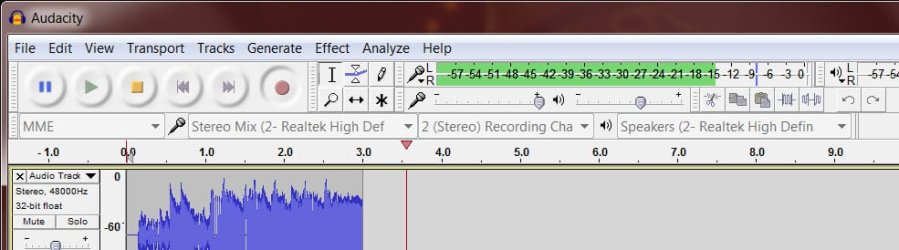
I fired it up and recorded a half minute or so. I barely know how to use Audacity but things seem OK. If you notice something, please let me know. I played back the clip and it's about the same volume as the source.

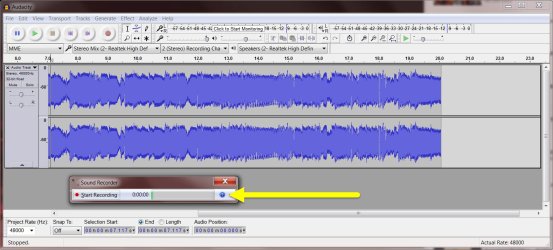
I then fired up Sound Recorder, recording the same source, and overlayed it over Audacity. You'll see below that it has only one green bar. I put in a yellow arrow pointing to it.

I then realized that the Audacity part of the screenshot didn't show the green bars. So instead of doing it all over again, I took a small screenshot of Audacity's green bars.

So besides figuring how to increase volume in Sound Recorder, I now have to figure out how to increase overall volume since, overall, it's a lot lower than when Nahimic was installed...

Any ideas?? I'm clueless...
.
 

Attachments

  • Windows Volume Level 5-22-16.jpg
    Windows Volume Level 5-22-16.jpg
    5.7 KB · Views: 24
  • Realtek Recording Volume 5-22-16.jpg
    Realtek Recording Volume 5-22-16.jpg
    140.9 KB · Views: 1
  • Realtek Audacity with Level Bars.jpg
    Realtek Audacity with Level Bars.jpg
    42.7 KB · Views: 0

My Computer My Computer

At a glance

Win 7 Pro 64 SP1i7 6700K SkyLake32 GBnVidia GTX 970
Computer type
PC/Desktop
Computer Manufacturer/Model Number
home built
OS
Win 7 Pro 64 SP1
CPU
i7 6700K SkyLake
Motherboard
MSI Gaming M7
Memory
32 GB
Graphics Card(s)
nVidia GTX 970
Sound Card
onboard
Monitor(s) Displays
DELL U2711
Screen Resolution
2560x1440
Hard Drives
1 SSD OS, 2 WD Black Caviar data harddrives
PSU
EVGA Super Nova 850W G2 'Gold'
Case
Thermaltake Soprano Snow Edition
Cooling
Cooler Master Hyper 212 evo
Keyboard
Logitech K350
Mouse
Mad Kats RATT
Antivirus
Avast
Browser
Firefox
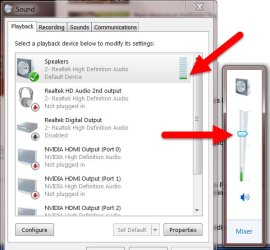
In playing with settings, trying to figure the overall main volume problem, I found a clue. But I don't know how to fix it. I opened up the Sound Playback tab and its green bars are very low, bouncing between one and two. I positioned it next to Windows volume control showing it's still cranked up. It really should be Loud!!

I'm thinking it has to be some kind of setting somewhere that I can find.

Hopefully this helps...
.
 

Attachments

  • Realtek Playback Volume Compare 5-22-16.jpg
    Realtek Playback Volume Compare 5-22-16.jpg
    48 KB · Views: 24

My Computer My Computer

At a glance

Win 7 Pro 64 SP1i7 6700K SkyLake32 GBnVidia GTX 970
Computer type
PC/Desktop
Computer Manufacturer/Model Number
home built
OS
Win 7 Pro 64 SP1
CPU
i7 6700K SkyLake
Motherboard
MSI Gaming M7
Memory
32 GB
Graphics Card(s)
nVidia GTX 970
Sound Card
onboard
Monitor(s) Displays
DELL U2711
Screen Resolution
2560x1440
Hard Drives
1 SSD OS, 2 WD Black Caviar data harddrives
PSU
EVGA Super Nova 850W G2 'Gold'
Case
Thermaltake Soprano Snow Edition
Cooling
Cooler Master Hyper 212 evo
Keyboard
Logitech K350
Mouse
Mad Kats RATT
Antivirus
Avast
Browser
Firefox
You have a relatively complex sound setup compared to mine, so I'm not sure I can be of further help.

I'm wondering why you have more choices when you poke the speaker icon in the notification area than I do. I have Realtek 1150 sound chip--the newest as far as I know. What is yours? I'm wondering if some of your other hardware or software has given you those additional choices?

My "Windows volume control" slider per your second red arrow is clear up at the top, not midway like yours.

My playback tab "Realtek High Definition Audio" meter bounces only to the 3rd or 4th bar on playback--less than half of it's height, although still higher than yours.

If you poke the word "mixer" on the Windows volume control, that opens up 4 more tabs on my PC, each tab with a slider. All are maxed out on my PC. Have you examined those 4 items?

Off the top of my head---regarding playback levels, you say "they are linked so they all go up and down together."

I'm wonder if that's the problem. One is preventing the others from maxing out. Can you unlink them and then set each one to max manually? Is this "linking" why your Windows volume control is not maxed out like mine?

Has this new system ever been "OK" on sound or has it been bad since you built it? If the former, do you have a System Restore point to a date when it was "OK"?

Windows sound is the most frustrating part of it in my experience. Lots of trial and error. Dozens of settings. Various drivers. Lots of cursing.

As a last resort, you might try earlier drivers. Or even an external USB sound card.

That's about all I can offer you other than sympathy.
 

My Computer My Computer

At a glance

Windows 7 Home Premium SP1, 64-bitIntel Skylake i5-6600K, not overclocked8 GB HyperX DDR4-2666 (2 x 4 GB)none; graphics are integrated on CPU
Computer type
PC/Desktop
Computer Manufacturer/Model Number
Ignatz Special; 4 speed manual gearbox; factory air conditioning; one of one
OS
Windows 7 Home Premium SP1, 64-bit
CPU
Intel Skylake i5-6600K, not overclocked
Motherboard
AsRock Z170M Extreme 4, micro ATX
Memory
8 GB HyperX DDR4-2666 (2 x 4 GB)
Graphics Card(s)
none; graphics are integrated on CPU
Sound Card
onboard: Realtek ALC1150; external: USB Behringer UF0-202
Monitor(s) Displays
Dell S2340M 23 inch IPS
Screen Resolution
1600 x 900
Hard Drives
System: Crucial MX100 series SSD, 128 GB;
Data: Samsung Spinpoint 103SJ, 1 TB;
Backup: WD Caviar Green WD30EZRX-00D8PB0, 3 TB
PSU
Rosewill SilentNight 500 watt fanless, semi-modular
Case
Antec Solo II
Cooling
Noctua NH-U12S; Noctua F12 intake, Noctua S12A exhaust
Keyboard
Microsoft 200 6JH-00001 USB
Mouse
Dell or Microsoft optical wired; USB
Antivirus
Microsoft Security Essentials and Malwarebytes Premium
Browser
Pale Moon
Other Info
All fans PWM; speeds at idle: CPU circa 500 rpm; intake circa 600 rpm; exhaust circa 600 rpm; CPU temps 27 idle and 47 C load in a warm room (27 C/81 F) when running Intel Extreme Tuning Utility stress test.
You have a relatively complex sound setup compared to mine, so I'm not sure I can be of further help.

I'm wondering why you have more choices when you poke the speaker icon in the notification area than I do. I have Realtek 1150 sound chip--the newest as far as I know. What is yours? I'm wondering if some of your other hardware or software has given you those additional choices?
I don’t know… I used Speccy, a systems property utility, and all it shows is “Realtek HD Audio.” So I looked in Windows’ Device Manager and all it says is the same thing.

My "Windows volume control" slider per your second red arrow is clear up at the top, not midway like yours.
Even at midway, with the Klipsch THX 4.1 speakers, it should be very loud as it was before uninstalling Nahimic, and like it was on prior builds. Normally I would only be able to play it that loud if I am the only person home. (if you are not familiar with these speakers, they are THX certified and can pump out a *true* 400Watts!)

My playback tab "Realtek High Definition Audio" meter bounces only to the 3rd or 4th bar on playback--less than half of it's height, although still higher than yours.
Yeah, I think that’s the root of the problem….

If you poke the word "mixer" on the Windows volume control, that opens up 4 more tabs on my PC, each tab with a slider. All are maxed out on my PC. Have you examined those 4 items?
I have only three: screenshot attached.

Off the top of my head---regarding playback levels, you say "they are linked so they all go up and down together."

I'm wonder if that's the problem. One is preventing the others from maxing out. Can you unlink them and then set each one to max manually? Is this "linking" why your Windows volume control is not maxed out like mine?
In the screenshot you’ll see a line thru all three devices. When I move the Windows volume control, all three go up or down in unison. So if one is maxed out, they all are. I have System Sounds turned off, but tried it both ways and it doesn’t make a difference. I have no idea on how to unlink them; I thought it was the Windows default.

Has this new system ever been "OK" on sound or has it been bad since you built it? If the former, do you have a System Restore point to a date when it was "OK"?
Way too late to restore anything! Things were good until I uninstalled Nahimic.

Windows sound is the most frustrating part of it in my experience. Lots of trial and error. Dozens of settings. Various drivers. Lots of cursing.

As a last resort, you might try earlier drivers. Or even an external USB sound card.

That's about all I can offer you other than sympathy.
I do appreciate your time and energy, thanks. I’ve toyed with the idea of a sound card, but in Googling around, all I hear is horror stories about Win 7 and sound cards. And it seems even a basic one is $100USD and they go up from there. And I don’t even want a USB sound device.
 

Attachments

  • Windows Mixer Window.jpg
    Windows Mixer Window.jpg
    22.3 KB · Views: 25

My Computer My Computer

At a glance

Win 7 Pro 64 SP1i7 6700K SkyLake32 GBnVidia GTX 970
Computer type
PC/Desktop
Computer Manufacturer/Model Number
home built
OS
Win 7 Pro 64 SP1
CPU
i7 6700K SkyLake
Motherboard
MSI Gaming M7
Memory
32 GB
Graphics Card(s)
nVidia GTX 970
Sound Card
onboard
Monitor(s) Displays
DELL U2711
Screen Resolution
2560x1440
Hard Drives
1 SSD OS, 2 WD Black Caviar data harddrives
PSU
EVGA Super Nova 850W G2 'Gold'
Case
Thermaltake Soprano Snow Edition
Cooling
Cooler Master Hyper 212 evo
Keyboard
Logitech K350
Mouse
Mad Kats RATT
Antivirus
Avast
Browser
Firefox
According to MSI website, you have Realtek 1150, just as I do.

https://us.msi.com/Motherboard/Z170A-GAMING-M7.html#hero-specification

I notice in your final pic, you have a red circle at the bottom of the System Sounds slider. I don't. I'd try to find out why.

All of my sliders are at 100 percent fully up. Yours are less than halfway up. Mine have that same horizontal line implying a link, just as yours do. HOWEVER, I can move each of them individually without affecting the others, from the mixer control at the speaker icon in the notification area, screen lower right. Can you?

Your issue appears to be related to Nahimic, whatever that is.

You can try removing/uninstalling/disabling each and every thing related to Realtek sound via Device Manager, then reboot and let Windows re-detect it. That may lead to a semi-sane situation with or without Nahimic.

Or going to MSI site and download the newest Realtek driver there and reinstalling it manually.

If you ever get it going OK, make an image of your installation with something like Macrium Reflect Free Edition so you can return easily to a known good state. System Restore works pretty well, but is not as complete as an image restore.

I paid $35 for a Behringer USB external sound card. About the size of your thumb. Works OK. I had to use it when I had a board that did NOT support "stereo mix" aka "record what you hear".

Good luck. That's about all I can do as sound can be expected to be highly frustrating.
 

My Computer My Computer

At a glance

Windows 7 Home Premium SP1, 64-bitIntel Skylake i5-6600K, not overclocked8 GB HyperX DDR4-2666 (2 x 4 GB)none; graphics are integrated on CPU
Computer type
PC/Desktop
Computer Manufacturer/Model Number
Ignatz Special; 4 speed manual gearbox; factory air conditioning; one of one
OS
Windows 7 Home Premium SP1, 64-bit
CPU
Intel Skylake i5-6600K, not overclocked
Motherboard
AsRock Z170M Extreme 4, micro ATX
Memory
8 GB HyperX DDR4-2666 (2 x 4 GB)
Graphics Card(s)
none; graphics are integrated on CPU
Sound Card
onboard: Realtek ALC1150; external: USB Behringer UF0-202
Monitor(s) Displays
Dell S2340M 23 inch IPS
Screen Resolution
1600 x 900
Hard Drives
System: Crucial MX100 series SSD, 128 GB;
Data: Samsung Spinpoint 103SJ, 1 TB;
Backup: WD Caviar Green WD30EZRX-00D8PB0, 3 TB
PSU
Rosewill SilentNight 500 watt fanless, semi-modular
Case
Antec Solo II
Cooling
Noctua NH-U12S; Noctua F12 intake, Noctua S12A exhaust
Keyboard
Microsoft 200 6JH-00001 USB
Mouse
Dell or Microsoft optical wired; USB
Antivirus
Microsoft Security Essentials and Malwarebytes Premium
Browser
Pale Moon
Other Info
All fans PWM; speeds at idle: CPU circa 500 rpm; intake circa 600 rpm; exhaust circa 600 rpm; CPU temps 27 idle and 47 C load in a warm room (27 C/81 F) when running Intel Extreme Tuning Utility stress test.
According to MSI website, you have Realtek 1150, just as I do.

https://us.msi.com/Motherboard/Z170A-GAMING-M7.html#hero-specification

I notice in your final pic, you have a red circle at the bottom of the System Sounds slider. I don't. I'd try to find out why.

All of my sliders are at 100 percent fully up. Yours are less than halfway up. Mine have that same horizontal line implying a link, just as yours do. HOWEVER, I can move each of them individually without affecting the others, from the mixer control at the speaker icon in the notification area, screen lower right. Can you?
The red circle indicates I have System Sounds turned off. I’ve tried it both ways with no difference.

I tried moving the sliders independently. If I move one up, they all go up. If I move one down (other than the speaker slider), then just that one can be moved down. If I move the Speaker slider, they’ll move in unison once they are level with each other.

Your issue appears to be related to Nahimic, whatever that is.
I fully agree. I’m in an MSI thread on how to uninstall it, which I did. One of the MSI forum tips was to check the registry and there are *a ton* of leftovers! I normally install programs thru Revo Uninstaller Pro for easy removal later, but Nahimic is one of those things that got installed with the motherboard’s driver disk. I’ve even contacted Nahimic on how to fully uninstall it but have not heard back. I’m thinking of reinstalling it thru Revo, then uninstalling it again and see what happens. CCleaner didn’t find anything…

Nahimic is a sound/audio control app. You can check it out here: (I’ve never heard of it before this.)
https://gaming.msi.com/features/nahimic

You can try removing/uninstalling/disabling each and every thing related to Realtek sound via Device Manager, then reboot and let Windows re-detect it. That may lead to a semi-sane situation with or without Nahimic.
That’s one option for sure. I’ll see if I hear back from Nahimic before I do anything, though (they may have an uninstall utility).

Or going to MSI site and download the newest Realtek driver there and reinstalling it manually.
Already done. :)

If you ever get it going OK, make an image of your installation with something like Macrium Reflect Free Edition so you can return easily to a known good state. System Restore works pretty well, but is not as complete as an image restore.
I have Macrium Reflect Pro and love it.

I paid $35 for a Behringer USB external sound card. About the size of your thumb. Works OK. I had to use it when I had a board that did NOT support "stereo mix" aka "record what you hear".
I’ll check it out. I did start a new thread on sound card options, but I’m going to try to get this mess fixed first.

Good luck. That's about all I can do as sound can be expected to be highly frustrating.
Yeah, it’s ridiculous how “un-simple” this is! LOL
 

My Computer My Computer

At a glance

Win 7 Pro 64 SP1i7 6700K SkyLake32 GBnVidia GTX 970
Computer type
PC/Desktop
Computer Manufacturer/Model Number
home built
OS
Win 7 Pro 64 SP1
CPU
i7 6700K SkyLake
Motherboard
MSI Gaming M7
Memory
32 GB
Graphics Card(s)
nVidia GTX 970
Sound Card
onboard
Monitor(s) Displays
DELL U2711
Screen Resolution
2560x1440
Hard Drives
1 SSD OS, 2 WD Black Caviar data harddrives
PSU
EVGA Super Nova 850W G2 'Gold'
Case
Thermaltake Soprano Snow Edition
Cooling
Cooler Master Hyper 212 evo
Keyboard
Logitech K350
Mouse
Mad Kats RATT
Antivirus
Avast
Browser
Firefox
update: I got brave and just used Revo Uninstaller Pro's feature to uninstall already uninstalled programs. It found a handful of Registry Remnants, which I deleted. No change after rebooting.
 

My Computer My Computer

At a glance

Win 7 Pro 64 SP1i7 6700K SkyLake32 GBnVidia GTX 970
Computer type
PC/Desktop
Computer Manufacturer/Model Number
home built
OS
Win 7 Pro 64 SP1
CPU
i7 6700K SkyLake
Motherboard
MSI Gaming M7
Memory
32 GB
Graphics Card(s)
nVidia GTX 970
Sound Card
onboard
Monitor(s) Displays
DELL U2711
Screen Resolution
2560x1440
Hard Drives
1 SSD OS, 2 WD Black Caviar data harddrives
PSU
EVGA Super Nova 850W G2 'Gold'
Case
Thermaltake Soprano Snow Edition
Cooling
Cooler Master Hyper 212 evo
Keyboard
Logitech K350
Mouse
Mad Kats RATT
Antivirus
Avast
Browser
Firefox
OK, over in my Sound Card thread, fireberd suggested uninstalling/reinstalling Realtek. That has fixed my volume problem. Here's the steps I followed per recommendation:

* Uninstall Realtek with Revo - no signs of Nahimic.
* Reboot and let Windows do it's thing.
* Volume Greatly improved!
(Rebooted a second time just for giggles. )
* Installed Realtek drivers (latest as of a couple days ago)
* Reboot. Volume still a lot better, but not quite as high as Windows only drivers.
 

My Computer My Computer

At a glance

Win 7 Pro 64 SP1i7 6700K SkyLake32 GBnVidia GTX 970
Computer type
PC/Desktop
Computer Manufacturer/Model Number
home built
OS
Win 7 Pro 64 SP1
CPU
i7 6700K SkyLake
Motherboard
MSI Gaming M7
Memory
32 GB
Graphics Card(s)
nVidia GTX 970
Sound Card
onboard
Monitor(s) Displays
DELL U2711
Screen Resolution
2560x1440
Hard Drives
1 SSD OS, 2 WD Black Caviar data harddrives
PSU
EVGA Super Nova 850W G2 'Gold'
Case
Thermaltake Soprano Snow Edition
Cooling
Cooler Master Hyper 212 evo
Keyboard
Logitech K350
Mouse
Mad Kats RATT
Antivirus
Avast
Browser
Firefox
OK, over in my Sound Card thread, fireberd suggested uninstalling/reinstalling Realtek. That has fixed my volume problem. Here's the steps I followed per recommendation:

* Uninstall Realtek with Revo - no signs of Nahimic.
* Reboot and let Windows do it's thing.
* Volume Greatly improved!
(Rebooted a second time just for giggles. )
* Installed Realtek drivers (latest as of a couple days ago)
* Reboot. Volume still a lot better, but not quite as high as Windows only drivers.

If you are using a desktop PC, the type of speakers connected also makes a difference (connect a pair of either Altec Lansing, BOSE, or JBL powered speakers and use the hardware volume control on the speakers themselves for better & louder sound).

Nahimic audio enhancement is only available to certain MSI (Microstar International) laptops & MSI boards (and using recent Realtek audio drivers).
 

My Computer My Computer

At a glance

Windows 7 SP1 Home Premium 64bit [x64]Intel(R) Core(TM) i5-2310 CPU @ 2.90GHz6 GBIntel HD Graphics 2000
Computer type
PC/Desktop
Computer Manufacturer/Model Number
Dell Inspiron 620
OS
Windows 7 SP1 Home Premium 64bit [x64]
CPU
Intel(R) Core(TM) i5-2310 CPU @ 2.90GHz
Memory
6 GB
Graphics Card(s)
Intel HD Graphics 2000
Sound Card
Conexant CX20641 HD Audio
Hard Drives
Western Digital 1TB (1024GB) WD10EALX-759BA1
Internet Speed
Spectrum Cable Internet up to 100Mbps
I'm just now getting back to this; sorry for the delay. I spent hours this morning alone trying to get Nahimic off my system. I went to download the drivers from Realtek and got confused. (I also posted this in my Sound Card thread.)

My new confusion is which Realtek driver do I install? (Yes, I thought it would be a no-brainer, too)

There's a Win 7 64 version, and a 32/64 bit combo version. Do I need the 32 bit drivers on a 64 bit system?

Also, there's both .exe and .zip versions. The scary part here is that in looking in the .zip version, there are Nahimic components in it!!!!!!!

So I have to assume they are in the .exe version, too.

After all the trouble I've had in trying to get rid of Nahimic, I sure would hate to have the problem pop up again because it's embedded in the Realtek drivers themselves!
 

My Computer My Computer

At a glance

Win 7 Pro 64 SP1i7 6700K SkyLake32 GBnVidia GTX 970
Computer type
PC/Desktop
Computer Manufacturer/Model Number
home built
OS
Win 7 Pro 64 SP1
CPU
i7 6700K SkyLake
Motherboard
MSI Gaming M7
Memory
32 GB
Graphics Card(s)
nVidia GTX 970
Sound Card
onboard
Monitor(s) Displays
DELL U2711
Screen Resolution
2560x1440
Hard Drives
1 SSD OS, 2 WD Black Caviar data harddrives
PSU
EVGA Super Nova 850W G2 'Gold'
Case
Thermaltake Soprano Snow Edition
Cooling
Cooler Master Hyper 212 evo
Keyboard
Logitech K350
Mouse
Mad Kats RATT
Antivirus
Avast
Browser
Firefox
Well... I'm giving up trying to get the Effects tab in the Realtek control panel to work. Yet again I've got many more hours in backing up, un/re-installing different flavors of Realtek driver, along with the new version of Nahimic, and so on.

Things are working and I've never really used the Effects tab anyway. I was having a Reverb problem with Stereo Mix, but I did figure out a fix, though. The trick is that when Nahimic is uninstalled, whatever settings were in effect at that time, stay as set.

So I reinstalled it, set Reverb to zero, then to off. I also zeroed out things like Voice enhancement, which made watching YouTube videos a nightmare! (All sounds in the typical vocal range were boosted so the voice was blaring while the background music seemed muted somewhat. Terrible listening!)
 

My Computer My Computer

At a glance

Win 7 Pro 64 SP1i7 6700K SkyLake32 GBnVidia GTX 970
Computer type
PC/Desktop
Computer Manufacturer/Model Number
home built
OS
Win 7 Pro 64 SP1
CPU
i7 6700K SkyLake
Motherboard
MSI Gaming M7
Memory
32 GB
Graphics Card(s)
nVidia GTX 970
Sound Card
onboard
Monitor(s) Displays
DELL U2711
Screen Resolution
2560x1440
Hard Drives
1 SSD OS, 2 WD Black Caviar data harddrives
PSU
EVGA Super Nova 850W G2 'Gold'
Case
Thermaltake Soprano Snow Edition
Cooling
Cooler Master Hyper 212 evo
Keyboard
Logitech K350
Mouse
Mad Kats RATT
Antivirus
Avast
Browser
Firefox
Back
Top