Stuck at black screen after "Windows is loading files"

Majd900

New member
Local time
9:29 PM
Messages
13
Hello Sevenforums

Notebook: HP ProBook 4730s

OS: Windows 7 (x64 bit)

Did not buy from hp, bought from a guy.

Yesterday, my explorer got stuck so i had to restart the laptop by pressing the power button, i turned it on, and then, Startup repair appeared, i left it to complete and then i went to sleep.

The next day i woke up, i opened my laptop, and then "Windows is loading files" appeared and afterwards a black screen appears and it stays there forever.

I read many solutions but none of them seemed to work

Such as:

-Removing the battery and the AC adapter and then press power button for 40 seconds.

-Entering safe mode and doing a full recovery (I cannot access safe mode using F8)

I can only access the ESC which is the bios and these stuff.

If anyone can help, i would be grateful because ill probably pay $200 and up.

Im extremely sure that this problem happened because of AVG free antivirus that i installed, i installed the antivirus about 1 week ago, and i never restarted the pc until then, only putting it into sleep mode. But this time it got restarted with some strange things happening when it was restarting, and it mentioned some of the AVG files deleting stuff
I dont know im really in need of help!!
 
Last edited:

My Computer My Computer

Computer type
Laptop
Computer Manufacturer/Model Number
HP
OS
Windows 7 x64
Antivirus
AVG Free 2015
Browser
Google chrome
Hello and welcome Majd have a read throughtis and see if there are any thngs you can use . http://www.sevenforums.com/tutorials/219533-troubleshooting-windows-7-failure-boot.html

If you can get into safe mode at all get rid of the AVG - it is crap.

Did this bloke give you any recovery media ?? and usually factory installed machines have factory restore partitions so can you let us know exactly what model this machine is please - I know you have quoted a number but have good look underneath and look for yourself before we go any further .
 

My Computer My Computer

Computer type
PC/Desktop
Computer Manufacturer/Model Number
Own build (new) Desk1 / Asus ROG Win 7 / Desk2 1st build
OS
Desk1 7 Home Prem / Desk2 10 Pro / Main lap Asus ROG 10 Pro 2 laptop Toshiba 7 Pro Asus P2520 7 & 10
CPU
Desk1 i5 3750K / Laptop i7 GTX 860M / Desk2 i5 2500
Motherboard
Desk1 Asus P877-V / Desk2 Gigabyte H67 UD3H / Laptop ?
Memory
Desk1 8GB (1866) / Desk2 16GB (1333) / Laptop 8Gb DDR3
Graphics Card(s)
Desk 1& 2NVidia GTX 650 & Laptops on board Intel
Sound Card
Desk 1 & 2 -XONAR DG Realtek High Def audio Laptop
Monitor(s) Displays
Desk 1 Benq HD 2450 / Desk2 Philips 24" / Laptop 17.5"
Screen Resolution
1920x1080 D1 & D2 & Laptop 1
Hard Drives
Desk1 Samsung 120GB 830 SSD
Asus ROG 256GB 850 Pro SSD
Desk2 Samsung 840 256 SSD
Toshiba 120GB EVO
PSU
Desk 1 Corsair HX 1050/ Laptop ? / Desk 2 Corsair HX 650
Case
Desk 1 Cooler HAF XM ? Toshiba laptop / Desk2 Coolermaster
Cooling
Fans on all Desk1 -2 Desk2 - all Coolermasters 5 Laptop ?
Keyboard
Desk 1 MS Sidewinder X6 Desk 2 MS Sidewinder X 4
Mouse
Desk 1&2 - Gigabyte MS 900 gamer - laptop - Logitec wireless
Internet Speed
ADSL2+
Other Info
One other Desktop (tester) and spare Toshba laptop both with SSD's
Running Kaspersky 2016 ISS on all machines config'd identically
Logitec audio stereo systems on each machine (x3)
Canon MG5250MFC
Router/modem TP-Link running WPA2SK
UPDATE:
I just found out that i have the recovery disk, so when i put it in, the menu dosen't show up (System Recovery and Startup repair, etc...) But when i put the disk in, i can now access Advanced Boot Options including the safe mode and all the other things.
So now that i can access the safe mode, is there any way that i can have any access to my laptop?
And i just removed the HDD and put it back again, no effect.
So i think that my HDD is probably corrupt and HDD tests all failed. So yeah :/
But i don't really want to buy a new hard drive because it will probably cost alot.
Im still not sure what the problem is; but it's probably the HDD as im predicting.
I can access safe mode, but i have to put in the repair disc so i can access the advanced boot options.
Althought when i go ahead and press on the safe mode option; it just shows me a black screen and that's it.
 

My Computer My Computer

Computer type
Laptop
Computer Manufacturer/Model Number
HP
OS
Windows 7 x64
Antivirus
AVG Free 2015
Browser
Google chrome
Hello and welcome Majd have a read throughtis and see if there are any thngs you can use . http://www.sevenforums.com/tutorials/219533-troubleshooting-windows-7-failure-boot.html

If you can get into safe mode at all get rid of the AVG - it is crap.

Did this bloke give you any recovery media ?? and usually factory installed machines have factory restore partitions so can you let us know exactly what model this machine is please - I know you have quoted a number but have good look underneath and look for yourself before we go any further .

UPDATE:
I just found out that i have the recovery disk, so when i put it in, the menu dosen't show up (System Recovery and Startup repair, etc...) But when i put the disk in, i can now access Advanced Boot Options including the safe mode and all the other things.
So now that i can access the safe mode, is there any way that i can have any access to my laptop?
And i just removed the HDD and put it back again, no effect.
So i think that my HDD is probably corrupt and HDD tests all failed. So yeah :/
But i don't really want to buy a new hard drive because it will probably cost alot.
Im still not sure what the problem is; but it's probably the HDD as im predicting.
I can access safe mode, but i have to put in the repair disc so i can access the advanced boot options.
Althought when i go ahead and press on the safe mode option; it just shows me a black screen and that's it.
 

My Computer My Computer

Computer type
Laptop
Computer Manufacturer/Model Number
HP
OS
Windows 7 x64
Antivirus
AVG Free 2015
Browser
Google chrome
Okmate at least you have safe mode which means the basic operating system files are being loaded. Now while in safe mode run these
http://www.sevenforums.com/tutorials/1538-sfc-scannow-command-system-file-checker.html
http://www.sevenforums.com/tutorials/433-disk-check.html < if necessary include the /f and /r in the command line as per Option2

The first SFC is best run for three runs at least that is what some of us do to make sure nothing is missed the second the CHKDSK run it with the / f swich first.

When those scans are finished it will let you know if there are problems but the reports do not stay on the screen long just long enough for it to say for example there were corrupt files found and fixed or not but it then gives us something to work on

Restart the computer and see if anything has changed. Now hard drives especially the spinner are not expensive really but the problem is the machine came with Windows pre installed and the repair disk will not clean install Windows, you would need to buy an OEM copy of indows to do that or thee is another way to do that depending if you know the activation code on the sticker on the bottom of the machine.
The other option is like I said that that drive came with a preinstalled system then the factory will have made a partition on that drive that will clean install Windows back to what it was like new and so see if you can do what I have put below.

If you can do this too
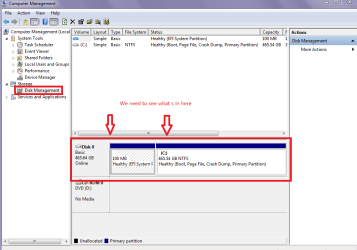
Start > Computer > right click it > click Manage - it will give a small window and in that window there will be under Storage > Disk Management - click it and it will give you a pic of the disks and devices and if you can send back a pic of that screen. I have attached a pic of mine so you know what you are looking for.
 

Attachments

  • COMP.PNG
    COMP.PNG
    23.5 KB · Views: 0

My Computer My Computer

Computer type
PC/Desktop
Computer Manufacturer/Model Number
Own build (new) Desk1 / Asus ROG Win 7 / Desk2 1st build
OS
Desk1 7 Home Prem / Desk2 10 Pro / Main lap Asus ROG 10 Pro 2 laptop Toshiba 7 Pro Asus P2520 7 & 10
CPU
Desk1 i5 3750K / Laptop i7 GTX 860M / Desk2 i5 2500
Motherboard
Desk1 Asus P877-V / Desk2 Gigabyte H67 UD3H / Laptop ?
Memory
Desk1 8GB (1866) / Desk2 16GB (1333) / Laptop 8Gb DDR3
Graphics Card(s)
Desk 1& 2NVidia GTX 650 & Laptops on board Intel
Sound Card
Desk 1 & 2 -XONAR DG Realtek High Def audio Laptop
Monitor(s) Displays
Desk 1 Benq HD 2450 / Desk2 Philips 24" / Laptop 17.5"
Screen Resolution
1920x1080 D1 & D2 & Laptop 1
Hard Drives
Desk1 Samsung 120GB 830 SSD
Asus ROG 256GB 850 Pro SSD
Desk2 Samsung 840 256 SSD
Toshiba 120GB EVO
PSU
Desk 1 Corsair HX 1050/ Laptop ? / Desk 2 Corsair HX 650
Case
Desk 1 Cooler HAF XM ? Toshiba laptop / Desk2 Coolermaster
Cooling
Fans on all Desk1 -2 Desk2 - all Coolermasters 5 Laptop ?
Keyboard
Desk 1 MS Sidewinder X6 Desk 2 MS Sidewinder X 4
Mouse
Desk 1&2 - Gigabyte MS 900 gamer - laptop - Logitec wireless
Internet Speed
ADSL2+
Other Info
One other Desktop (tester) and spare Toshba laptop both with SSD's
Running Kaspersky 2016 ISS on all machines config'd identically
Logitec audio stereo systems on each machine (x3)
Canon MG5250MFC
Router/modem TP-Link running WPA2SK
Okmate at least you have safe mode which means the basic operating system files are being loaded. Now while in safe mode run these
http://www.sevenforums.com/tutorials/1538-sfc-scannow-command-system-file-checker.html
http://www.sevenforums.com/tutorials/433-disk-check.html < if necessary include the /f and /r in the command line as per Option2

The first SFC is best run for three runs at least that is what some of us do to make sure nothing is missed the second the CHKDSK run it with the / f swich first.

When those scans are finished it will let you know if there are problems but the reports do not stay on the screen long just long enough for it to say for example there were corrupt files found and fixed or not but it then gives us something to work on

Restart the computer and see if anything has changed. Now hard drives especially the spinner are not expensive really but the problem is the machine came with Windows pre installed and the repair disk will not clean install Windows, you would need to buy an OEM copy of indows to do that or thee is another way to do that depending if you know the activation code on the sticker on the bottom of the machine.
The other option is like I said that that drive came with a preinstalled system then the factory will have made a partition on that drive that will clean install Windows back to what it was like new and so see if you can do what I have put below.

If you can do this too
Start > Computer > right click it > click Manage - it will give a small window and in that window there will be under Storage > Disk Management - click it and it will give you a pic of the disks and devices and if you can send back a pic of that screen. I have attached a pic of mine so you know what you are looking for.

No haha; i said i can access the safe mode when the repair disc is in; i dont know its really weird, when "Press any key to boot from CD" i press F8 and then it directs me to advanced boot options, i press on safe mode but then, a black screen appears.
It's literally a black screen i waited for about an hour and its stilll a black screen.
So if theres any solution why is this happening with the safe mode please lmk
Because i really need to access the safe mode to make a progress.
Thanks.
 

My Computer My Computer

Computer type
Laptop
Computer Manufacturer/Model Number
HP
OS
Windows 7 x64
Antivirus
AVG Free 2015
Browser
Google chrome
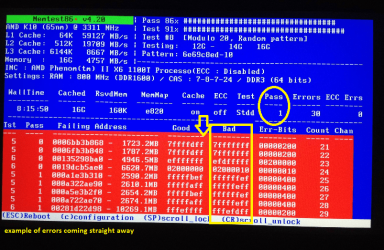
Ok well as a start I would be running this http://www.sevenforums.com/tutorials/105647-ram-test-memtest86.html as it seem as if it wants to boot but cannot load the RAM.

But I could be wrong but at least this will eliminate that cause - just remember to run for at least 8 passes any less and you may as well not bother and it is the only test we recommend here. If the errors come up straight away then you can stop the test. However if it still runs in a black screen when you boot from that memtest disk we shall have to look elsewhere.
 

Attachments

  • MEM.PNG
    MEM.PNG
    227.6 KB · Views: 1

My Computer My Computer

Computer type
PC/Desktop
Computer Manufacturer/Model Number
Own build (new) Desk1 / Asus ROG Win 7 / Desk2 1st build
OS
Desk1 7 Home Prem / Desk2 10 Pro / Main lap Asus ROG 10 Pro 2 laptop Toshiba 7 Pro Asus P2520 7 & 10
CPU
Desk1 i5 3750K / Laptop i7 GTX 860M / Desk2 i5 2500
Motherboard
Desk1 Asus P877-V / Desk2 Gigabyte H67 UD3H / Laptop ?
Memory
Desk1 8GB (1866) / Desk2 16GB (1333) / Laptop 8Gb DDR3
Graphics Card(s)
Desk 1& 2NVidia GTX 650 & Laptops on board Intel
Sound Card
Desk 1 & 2 -XONAR DG Realtek High Def audio Laptop
Monitor(s) Displays
Desk 1 Benq HD 2450 / Desk2 Philips 24" / Laptop 17.5"
Screen Resolution
1920x1080 D1 & D2 & Laptop 1
Hard Drives
Desk1 Samsung 120GB 830 SSD
Asus ROG 256GB 850 Pro SSD
Desk2 Samsung 840 256 SSD
Toshiba 120GB EVO
PSU
Desk 1 Corsair HX 1050/ Laptop ? / Desk 2 Corsair HX 650
Case
Desk 1 Cooler HAF XM ? Toshiba laptop / Desk2 Coolermaster
Cooling
Fans on all Desk1 -2 Desk2 - all Coolermasters 5 Laptop ?
Keyboard
Desk 1 MS Sidewinder X6 Desk 2 MS Sidewinder X 4
Mouse
Desk 1&2 - Gigabyte MS 900 gamer - laptop - Logitec wireless
Internet Speed
ADSL2+
Other Info
One other Desktop (tester) and spare Toshba laptop both with SSD's
Running Kaspersky 2016 ISS on all machines config'd identically
Logitec audio stereo systems on each machine (x3)
Canon MG5250MFC
Router/modem TP-Link running WPA2SK
Ok well as a start I would be running this http://www.sevenforums.com/tutorials/105647-ram-test-memtest86.html as it seem as if it wants to boot but cannot load the RAM.

But I could be wrong but at least this will eliminate that cause - just remember to run for at least 8 passes any less and you may as well not bother and it is the only test we recommend here. If the errors come up straight away then you can stop the test. However if it still runs in a black screen when you boot from that memtest disk we shall have to look elsewhere.
I have Hirens boot CD it includes the mem test and it got the mini xp feature so idk if that will help
But i didnt get why you want me to run the memtest althought i pretty think it's an HDD Issue
I still dont know the problem specifically, but maybe :/
Reply as fast as possible because i really need this laptop as im like a computer addict haha
 

My Computer My Computer

Computer type
Laptop
Computer Manufacturer/Model Number
HP
OS
Windows 7 x64
Antivirus
AVG Free 2015
Browser
Google chrome
You came here for help. Someone tells you what to do and you don't do it and say that it is a HDD issue. == If you want help, follow the instructions, if not well...............
 

My Computer My Computer

Computer type
PC/Desktop
Computer Manufacturer/Model Number
Custom Build
OS
Windows 7 Home Premium 32-Bit - Build 7600 SP1
CPU
Intel Core i3-2120 3.30Ghz
Motherboard
Asus P8Z68-V LX Intel Z68 Socket H2 ATX
Memory
Kingston 4 GB DDR3 1333 mhz
Graphics Card(s)
AMD Radeon HD6670
Sound Card
Sound Blaster Audigy SE 24-Bit
Monitor(s) Displays
Asus VE228
Screen Resolution
1440 X 900
Hard Drives
OCZ Vertex 3 120 GB Sata 3 SSD ==
Kingston SH103/S3 120 G Hyper X 120 GB SSD ==
Western Digital 500 GB Caviar Green 7200 RPM ==
PSU
Corsair CX600M == 600 Watt
Case
NZXT Apollo - Silver with Clear Side Panel
Cooling
Three 120 mm Fans
Keyboard
Microsoft Natural 4000
Mouse
Microsoft Custom Optical 3000
Internet Speed
AT&T Fiber Optic Wireless Network
Antivirus
Microsoft Security Essentials
Browser
Chrome
Other Info
120 mm Blue LED Fan -- Three Blue LED Lazer Light Sticks
You came here for help. Someone tells you what to do and you don't do it and say that it is a HDD issue. == If you want help, follow the instructions, if not well...............

I did, i try every thing that people suggests me :)
 

My Computer My Computer

Computer type
Laptop
Computer Manufacturer/Model Number
HP
OS
Windows 7 x64
Antivirus
AVG Free 2015
Browser
Google chrome
Ok mate the memtest it is the only one we will recommend as per my earlier post.
Now the RAM is important because in a nutshell the operating system is loaded into it at boot up and if nothing is being loaded then the system will not run because it has no basic info up and going to run programs from or from within itself ie sfc.

The hard drive if you cannot get the system up and running then you have either have got to get it going by looking at other components (and as mad as it may sound even the PSU is a major source of problems withing the system but more of that after the memtest has been done) or you have to hook the drive up to another machine and run tests on it via the other machines system.
 

My Computer My Computer

Computer type
PC/Desktop
Computer Manufacturer/Model Number
Own build (new) Desk1 / Asus ROG Win 7 / Desk2 1st build
OS
Desk1 7 Home Prem / Desk2 10 Pro / Main lap Asus ROG 10 Pro 2 laptop Toshiba 7 Pro Asus P2520 7 & 10
CPU
Desk1 i5 3750K / Laptop i7 GTX 860M / Desk2 i5 2500
Motherboard
Desk1 Asus P877-V / Desk2 Gigabyte H67 UD3H / Laptop ?
Memory
Desk1 8GB (1866) / Desk2 16GB (1333) / Laptop 8Gb DDR3
Graphics Card(s)
Desk 1& 2NVidia GTX 650 & Laptops on board Intel
Sound Card
Desk 1 & 2 -XONAR DG Realtek High Def audio Laptop
Monitor(s) Displays
Desk 1 Benq HD 2450 / Desk2 Philips 24" / Laptop 17.5"
Screen Resolution
1920x1080 D1 & D2 & Laptop 1
Hard Drives
Desk1 Samsung 120GB 830 SSD
Asus ROG 256GB 850 Pro SSD
Desk2 Samsung 840 256 SSD
Toshiba 120GB EVO
PSU
Desk 1 Corsair HX 1050/ Laptop ? / Desk 2 Corsair HX 650
Case
Desk 1 Cooler HAF XM ? Toshiba laptop / Desk2 Coolermaster
Cooling
Fans on all Desk1 -2 Desk2 - all Coolermasters 5 Laptop ?
Keyboard
Desk 1 MS Sidewinder X6 Desk 2 MS Sidewinder X 4
Mouse
Desk 1&2 - Gigabyte MS 900 gamer - laptop - Logitec wireless
Internet Speed
ADSL2+
Other Info
One other Desktop (tester) and spare Toshba laptop both with SSD's
Running Kaspersky 2016 ISS on all machines config'd identically
Logitec audio stereo systems on each machine (x3)
Canon MG5250MFC
Router/modem TP-Link running WPA2SK
Ok well as a start I would be running this http://www.sevenforums.com/tutorials/105647-ram-test-memtest86.html as it seem as if it wants to boot but cannot load the RAM.

But I could be wrong but at least this will eliminate that cause - just remember to run for at least 8 passes any less and you may as well not bother and it is the only test we recommend here. If the errors come up straight away then you can stop the test. However if it still runs in a black screen when you boot from that memtest disk we shall have to look elsewhere.
I ran the memtest but there was 0 errors; 2 passes :)
So whats the deal now?
 

My Computer My Computer

Computer type
Laptop
Computer Manufacturer/Model Number
HP
OS
Windows 7 x64
Antivirus
AVG Free 2015
Browser
Google chrome
Ok mate the memtest it is the only one we will recommend as per my earlier post.
Now the RAM is important because in a nutshell the operating system is loaded into it at boot up and if nothing is being loaded then the system will not run because it has no basic info up and going to run programs from or from within itself ie sfc.

The hard drive if you cannot get the system up and running then you have either have got to get it going by looking at other components (and as mad as it may sound even the PSU is a major source of problems withing the system but more of that after the memtest has been done) or you have to hook the drive up to another machine and run tests on it via the other machines system.

I did that
No errors has been found thankfully.
So what's the deal now?
Any other suggestions broo :D
 

My Computer My Computer

Computer type
Laptop
Computer Manufacturer/Model Number
HP
OS
Windows 7 x64
Antivirus
AVG Free 2015
Browser
Google chrome
Mine crashed sometime ago and after panicking I remembered safe mode too, when in safe mode I managed to use a 'restore point' from not too long ago and that fixed mine. Also I remember in safe mode/recovery somewhere there is an option to 'restart in 30 seconds' or so, cant remember much about it now but it gave a helpful option too, rather than picking an option, let it restart in 30sec and there is another option.
I got rid of Avira too, havent needed it since.
 

My Computer My Computer

Computer type
Laptop
Computer Manufacturer/Model Number
toshiba model A660 PSAW3A-15JO6T
OS
7 homepremium, 64 bit
CPU
[email protected]
Motherboard
Intel Core I 5 CPU M480
Memory
4 gig 3.80 usable
Hard Drives
One
Antivirus
avira
Browser
Google, firefox
Other Info
Recent change to from Win 7 HP 32 bit, to Win 10, and back to Win 7 HP, 64 bit.
Mine crashed sometime ago and after panicking I remembered safe mode too, when in safe mode I managed to use a 'restore point' from not too long ago and that fixed mine. Also I remember in safe mode/recovery somewhere there is an option to 'restart in 30 seconds' or so, cant remember much about it now but it gave a helpful option too, rather than picking an option, let it restart in 30sec and there is another option.
I got rid of Avira too, havent needed it since.
Well yeah im a big fan of using system restore point too but sadly, when i had access to safe mode, restore point didnt have any previous backups
Then after like 1 day, i couldnt access the safe mode so im pretty much going to need to put it in some laptop repair shop sadly
Like seriously i never installed an antivirus that did these type of things
AVG truly sucks, never expected that, but oh dear.
Oh and btw i had also Advanced System Care 8 which was excellent, but since i got that AvG into my laptop, it gott pretty much :/ .....
 

My Computer My Computer

Computer type
Laptop
Computer Manufacturer/Model Number
HP
OS
Windows 7 x64
Antivirus
AVG Free 2015
Browser
Google chrome
Are the F keys working?
 

My Computer My Computer

Computer type
Laptop
Computer Manufacturer/Model Number
toshiba model A660 PSAW3A-15JO6T
OS
7 homepremium, 64 bit
CPU
[email protected]
Motherboard
Intel Core I 5 CPU M480
Memory
4 gig 3.80 usable
Hard Drives
One
Antivirus
avira
Browser
Google, firefox
Other Info
Recent change to from Win 7 HP 32 bit, to Win 10, and back to Win 7 HP, 64 bit.
I did that
No errors has been found thankfully.
So what's the deal now?
Any other suggestions broo

Now Majd I think I did specify that the memtest has to be run for at least 8 passes - two passes is just not enough because errors can occur during the subsequent passes after the first one or two. The test without getting too technical runs using different input and outputs and frequencies etc and while the two that you ran came back negative errors it may have just been that those two test passes/runs did not use the combinations that the software uses hence it may well have missed a pass that would have come up as an error. See the first few lines of this https://en.wikipedia.org/wiki/Memtest86

For an analogy take a car and rive it round a certain test circuit that has all the features that any road could throw at it and do that in first gear then second gear then third etc etc - doing that like that might not come up with any faults until you use a certain gear or pattern of gear changes driving that circuit.

I know it is tedious and time consuming but sometimes we have to eliminate problems using things like the memtest.
 

My Computer My Computer

Computer type
PC/Desktop
Computer Manufacturer/Model Number
Own build (new) Desk1 / Asus ROG Win 7 / Desk2 1st build
OS
Desk1 7 Home Prem / Desk2 10 Pro / Main lap Asus ROG 10 Pro 2 laptop Toshiba 7 Pro Asus P2520 7 & 10
CPU
Desk1 i5 3750K / Laptop i7 GTX 860M / Desk2 i5 2500
Motherboard
Desk1 Asus P877-V / Desk2 Gigabyte H67 UD3H / Laptop ?
Memory
Desk1 8GB (1866) / Desk2 16GB (1333) / Laptop 8Gb DDR3
Graphics Card(s)
Desk 1& 2NVidia GTX 650 & Laptops on board Intel
Sound Card
Desk 1 & 2 -XONAR DG Realtek High Def audio Laptop
Monitor(s) Displays
Desk 1 Benq HD 2450 / Desk2 Philips 24" / Laptop 17.5"
Screen Resolution
1920x1080 D1 & D2 & Laptop 1
Hard Drives
Desk1 Samsung 120GB 830 SSD
Asus ROG 256GB 850 Pro SSD
Desk2 Samsung 840 256 SSD
Toshiba 120GB EVO
PSU
Desk 1 Corsair HX 1050/ Laptop ? / Desk 2 Corsair HX 650
Case
Desk 1 Cooler HAF XM ? Toshiba laptop / Desk2 Coolermaster
Cooling
Fans on all Desk1 -2 Desk2 - all Coolermasters 5 Laptop ?
Keyboard
Desk 1 MS Sidewinder X6 Desk 2 MS Sidewinder X 4
Mouse
Desk 1&2 - Gigabyte MS 900 gamer - laptop - Logitec wireless
Internet Speed
ADSL2+
Other Info
One other Desktop (tester) and spare Toshba laptop both with SSD's
Running Kaspersky 2016 ISS on all machines config'd identically
Logitec audio stereo systems on each machine (x3)
Canon MG5250MFC
Router/modem TP-Link running WPA2SK
I did that
No errors has been found thankfully.
So what's the deal now?
Any other suggestions broo

Now Majd I think I did specify that the memtest has to be run for at least 8 passes - two passes is just not enough because errors can occur during the subsequent passes after the first one or two. The test without getting too technical runs using different input and outputs and frequencies etc and while the two that you ran came back negative errors it may have just been that those two test passes/runs did not use the combinations that the software uses hence it may well have missed a pass that would have come up as an error. See the first few lines of this https://en.wikipedia.org/wiki/Memtest86

For an analogy take a car and rive it round a certain test circuit that has all the features that any road could throw at it and do that in first gear then second gear then third etc etc - doing that like that might not come up with any faults until you use a certain gear or pattern of gear changes driving that circuit.

I know it is tedious and time consuming but sometimes we have to eliminate problems using things like the memtest.

I see, because 2 passes took like 5 hours, but anywayd ill do that, i wonder tho, what is memtest exactly?
 

My Computer My Computer

Computer type
Laptop
Computer Manufacturer/Model Number
HP
OS
Windows 7 x64
Antivirus
AVG Free 2015
Browser
Google chrome
Are the F keys working?

Yeah they are fully functional
I can access bios menu and device configurations
But cant access safe mode
When i first got this problem, i was able to access everything, and even the Starting Windows would appear
But i dont know what happened now.
 

My Computer My Computer

Computer type
Laptop
Computer Manufacturer/Model Number
HP
OS
Windows 7 x64
Antivirus
AVG Free 2015
Browser
Google chrome
When mine cacked itself I was panicky, that stopped me from working out what to do. I slept on it and 'viola' managed to fix it. Does anything you have access to on the computer let you fix the F keys? Bios?
 

My Computer My Computer

Computer type
Laptop
Computer Manufacturer/Model Number
toshiba model A660 PSAW3A-15JO6T
OS
7 homepremium, 64 bit
CPU
[email protected]
Motherboard
Intel Core I 5 CPU M480
Memory
4 gig 3.80 usable
Hard Drives
One
Antivirus
avira
Browser
Google, firefox
Other Info
Recent change to from Win 7 HP 32 bit, to Win 10, and back to Win 7 HP, 64 bit.
Back
Top