External Hard Disk not detected, visible in Disk Manager

sakshi2712

New member
Local time
3:58 PM
Messages
10
Location
Delhi
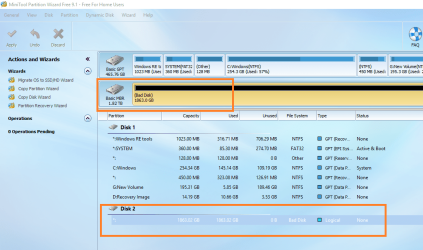
Hi, My Seagate 2TB external hard disk is not getting detected by my PC, doesn't show in 'Safely remove hardware' option.

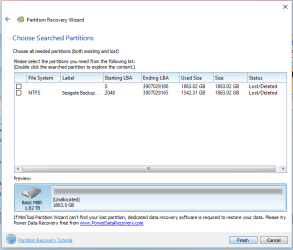
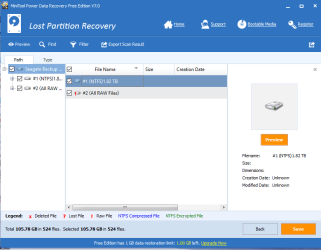
However, based on one old thread, I installed Partition Recovery Wizard and this is how the scan looks. Please help.
 

Attachments

  • screenshot.png
    screenshot.png
    155.2 KB · Views: 4
  • partition wizard.PNG
    partition wizard.PNG
    16.6 KB · Views: 58

My Computer My Computer

At a glance

Windows 10 Home Single Language
Computer type
Laptop
Computer Manufacturer/Model Number
HP
OS
Windows 10 Home Single Language
Disk Management screenshot

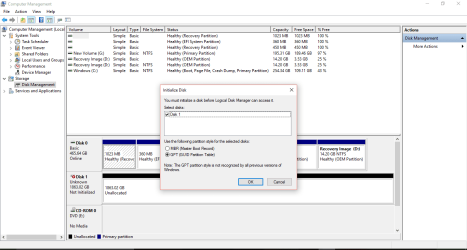
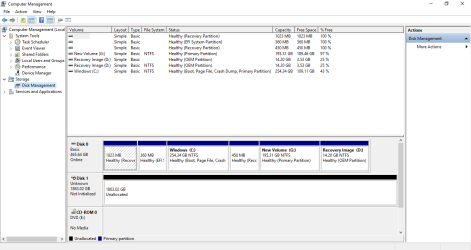
Please find the screenshot of disk management
 

Attachments

  • disk management.PNG
    disk management.PNG
    30.9 KB · Views: 2
  • without pop-up.PNG
    without pop-up.PNG
    24.5 KB · Views: 2

My Computer My Computer

At a glance

Windows 10 Home Single Language
Computer type
Laptop
Computer Manufacturer/Model Number
HP
OS
Windows 10 Home Single Language
You haven't given me the details of your drive. Please give the model Number and also let me know whether it is a Desktop external with a power brick or a portable external.

Your first PW screenshot in post #1 showing the 2TB HDD as Bad Disk is a little disturbing. I still hope that the data can be recovered given the Quick Scan did find the partition starting at LBA 2048

Now tell me when this happened? Did you at anytime get a prior warning that the HDD is failing and that you have to backup your data on it?

I am too hungry to continue this post. Shut down your PC, unplug your external and keep it under rest. You can use your PC with the external unplugged. I shall be back after dinner.

( Are you in India or USA?)

.
 

My Computer My Computer

At a glance

Windows 7 Home Premium 32 bit
OS
Windows 7 Home Premium 32 bit
I am in India.

Please have ur dinner peacefully.

The drive specifications show this information:

Backup Plus Portable Drive 2TB Red
STDR2000303

around 8-9 months back, the issue started with no folders visible on opening the drive but if I used to search by any file name, it used to display all the sub-folders. Thats when I contacted seagate support, but they were not of much help.

Also, I didn't require the drive for some time after that issue. Now when I checked it last month, it has been giving me this error since.

In the PW quick scan, when I double-clicked this second partition, it displayed all my files in there.

I hope its fixable.

I do not understand what do you mean by 'Desktop external with a power brick or a portable external.'.....If I say I do not need to plug in any external power input to the drive, does that answer your question?
 

My Computer My Computer

At a glance

Windows 10 Home Single Language
Computer type
Laptop
Computer Manufacturer/Model Number
HP
OS
Windows 10 Home Single Language

My Computer My Computer

At a glance

Windows 10 Pro. 64/ version 1709 Windows 7 Pr...Intel i7-6800K @ 4.3Corsair Platinum 16 gig @2400EVGA GTX 1070 OC
Computer type
PC/Desktop
Computer Manufacturer/Model Number
Home made Desktop
OS
Windows 10 Pro. 64/ version 1709 Windows 7 Pro/64
CPU
Intel i7-6800K @ 4.3
Motherboard
ASUS X-99 Deluxe II
Memory
Corsair Platinum 16 gig @2400
Graphics Card(s)
EVGA GTX 1070 OC
Monitor(s) Displays
Asus 27" LED LCD/VE278Q
Screen Resolution
1920-1080 or 1280-720 HDMI
Hard Drives
INTEL SSD 730-240 Gb Sata 3.0/
PSU
EVGA Platium 1200W
Case
Phanteks Luxe Tempered Glass 8 fans/ one radiator
Cooling
XSPC/ Water Cooled CPU
Keyboard
Das 4 Professional
Mouse
Logitech M705/MX Anywhere 2-S
Internet Speed
100 mbits
Antivirus
Microsoft Security Essentials/ Malwarebytes Premium 3.0/ SAS
Browser
I.E. 11 default/Firefox/ ISP Time Warner Cable/Spectrum
Other Info
LG BluRay Burner/
Sound system-KLipsch-THX/
Icy Dock ssd Hot Swap bays.
Yes..that is exactly the drive I have. I am from India
 

My Computer My Computer

At a glance

Windows 10 Home Single Language
Computer type
Laptop
Computer Manufacturer/Model Number
HP
OS
Windows 10 Home Single Language
From your ID I thought so - that you must be in India. Change the time zone in UserCP to show local time in your posts.

OK. double clicking on the the right partition should show the files. It is a good sign.I guessed it will. And you have confirmed it.

But something has happened to Sector 0. Is it a glitch or has it gone/going bad? That is what has to be determined. The data Recovery process or restoring the drive will depend upon it.

So here we go. Take your time to do it. No need to be in a hurry. I will also be retiring for the day after this post. Was a hectic day for me.

Read my post here about bootice. http://www.sevenforums.com/hardware-devices/310295-lost-partitions.html#post2584426

Using bootice you will be seeing sector 0 and Sector 2048. Post a screenshot of these two sectors and also save them. So read it only upto the point how to save. Rest not necessary at the moment.

Now create a folder named bootice on your C drive. If your system is 64bit, download BOOTICEx64 v1.1.332 from the author's website 【BOOTICE v1.3.3.2: 功能强大的启动维护工具】-子逸轩 It will be a .rar file. Extract it to the Bootice folder you created. It will be a single BOOTICEx64.exe

With your faulty external drive connected, straightaway run bootice , select the Seagate drive see Sector 0 and take a screenshot. Also save it by name Sector0. By default it will be saved to the Bootice folder from which you run it. Check the file has been saved. Then go to sector 2048, take a screenshot and also save it as sector2048. After that close bootice. If you cannot safely remove the Seagate external, shut down your PC and unplug it.

Post the two screenshots. I shall see it tomorrow morning. As I already said do not do anything in a hurry. Take your own time to do it. I shall be peeping into Seven Forums every once in a while and I will catch it when it is available.

Do not keep the external drive connected all the time. Connect it only when necessary during this process.

 

My Computer My Computer

At a glance

Windows 7 Home Premium 32 bit
OS
Windows 7 Home Premium 32 bit
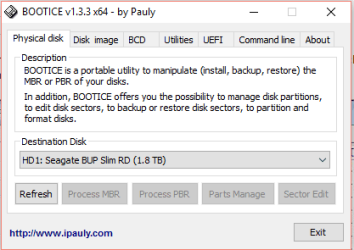
In Bootice, The 'Sector Edit' option is greyed out.

I am going to try again by re-plugging the drive.

Edit:::One more thing!!!!...the 'Safely Remove Hardware' just displayed my drive to be removed safely. ^_^

Is it a good sign??
 

Attachments

  • Capture.PNG
    Capture.PNG
    7.3 KB · Views: 41
Last edited:

My Computer My Computer

At a glance

Windows 10 Home Single Language
Computer type
Laptop
Computer Manufacturer/Model Number
HP
OS
Windows 10 Home Single Language
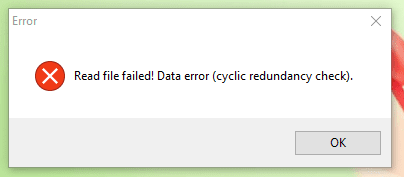
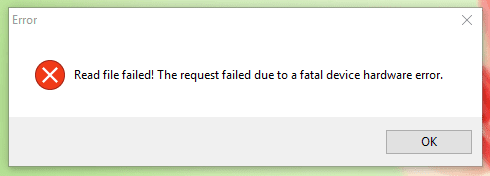
On reconnecting the drive and running the Bootice exe file,
Following errors/screens appeared in the same order as listed.
 

Attachments

  • Capture.PNG
    Capture.PNG
    7.3 KB · Views: 41
  • error 2.PNG
    error 2.PNG
    4.4 KB · Views: 41
  • error 1.PNG
    error 1.PNG
    4.4 KB · Views: 41

My Computer My Computer

At a glance

Windows 10 Home Single Language
Computer type
Laptop
Computer Manufacturer/Model Number
HP
OS
Windows 10 Home Single Language
What that means is that the all important Sector 0 in your drive had gone bad. That makes the drive unreadable and the prognosis is not good.

Go back to Partition Wizard. Do a Quick Scan. Put a tick mark against the partition that shows starting LBA 2048. ( This is the same partition which you double clicked that showed all your files) The preview map at the bottom should show your drive as it was before. Does it? Click on Finish and then on the PW Main screen Apply. In actual practice this will rewrite the partition table to sector 0 and make the drive visible. Let us see whether it does in this case. If it does not and gives an error message post a screenshot. This will confirm whether your sector 0 has indeed gone bad.
 

My Computer My Computer

At a glance

Windows 7 Home Premium 32 bit
OS
Windows 7 Home Premium 32 bit
Yes, you can mark the partition to scan from the LBA 2048. And jumanji is quite professional in this case. Follow the detailed instructions will be useful for you. Maybe, the steps will also be adopted by me. Haha.
 

My Computer My Computer

At a glance

Windows 7 Ultimate x64
Computer type
PC/Desktop
OS
Windows 7 Ultimate x64
Hi,

Sorry I had lost this thread and my HD issue is not yet resolved.

I have started to follow all the steps from starting. Do I need a new thread for this now? [I am now on another system with different specs, this has been updated in my profile]

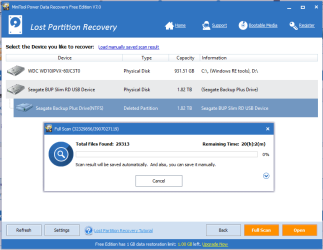
Here is the screenshot of partition recovery wizard currently running a scan.
 

Attachments

  • Capture.PNG
    Capture.PNG
    20.9 KB · Views: 1

My Computer My Computer

At a glance

Windows 10 Home Single Language
Computer type
Laptop
Computer Manufacturer/Model Number
HP
OS
Windows 10 Home Single Language
Scan results

Hi,
My scan completed and here are the results.
 

Attachments

  • Capture.PNG
    Capture.PNG
    18.9 KB · Views: 1

My Computer My Computer

At a glance

Windows 10 Home Single Language
Computer type
Laptop
Computer Manufacturer/Model Number
HP
OS
Windows 10 Home Single Language
Hi, My Seagate 2TB external hard disk is not getting detected by my PC, doesn't show in 'Safely remove hardware' option.

However, based on one old thread, I installed Partition Recovery Wizard and this is how the scan looks. Please help.

Why wasnt is safe for Sakshi to click Finish here? I thought it means that it is completed? Im having a bad disk situation too and want to know how do I fix it and whether Minitool can eventually recover it?
 

My Computer My Computer

At a glance

Wins 8.1
Computer type
Laptop
OS
Wins 8.1
sakshi2712,

On 29 Jul 2016, in my post#10, I asked you to run Partition Recovery Wizard in MiniTool Partition Wizard Free and post the results. You went missing thereafter and returned only on 24 Jun 2017 eleven months later.

And did you do what was told in my post #10? No, You ran Minitool Power Data Recovery and posted a screenshot. Irrelevant to me, the way I was proceeding.

Result: You did not get any response from me. Unfortunately nobody else also responded.
 

My Computer My Computer

At a glance

Windows 7 Home Premium 32 bit
OS
Windows 7 Home Premium 32 bit
Back
Top