Solved How do I get Spell-Checker to learn words?

My apologies to everyone but I must resurrect this Thread.

Callender is a superb Teacher who, unfortunately, doesn't reside in Barrie, Ontario, Canada, to assist me in resolving the problem I've encountered in successfully installing tinySpell, as seen in the image below:
 

Attachments

  • 2016.08.10 tinySpell Installation Problem.png
    2016.08.10 tinySpell Installation Problem.png
    13.7 KB · Views: 31

My Computer My Computer

At a glance

Windows 7 Professional3.40 gigahertz Intel Core i3-21304.0 Gigabytes RAM
Computer type
PC/Desktop
Computer Manufacturer/Model Number
ThinkCentre
OS
Windows 7 Professional
CPU
3.40 gigahertz Intel Core i3-2130
Motherboard
LENOVO MAHOBAY
Memory
4.0 Gigabytes RAM
Hard Drives
277 Gigabyte Hard Disk Drive.
Unused Bays for 5 (five) Additional Hard Disk Drives.
Keyboard
DELL - Model: SK-8135 (Used)
Mouse
Logitech B100 (Optical)
Internet Speed
100 Mbps
Antivirus
Avast! , Malwarebytes Premium , SuperAntiSpyware
Browser
Google Chrome
Sounds like a UAC (User Account Control) problem. Do you have UAC switched on and if so what level is set?

http://www.sevenforums.com/tutorials/299-user-account-control-uac-change-notification-settings.html

Default settings are like this:

73944d1379281337t-user-account-control-uac-change-notification-settings-uac_level-2_default.jpg

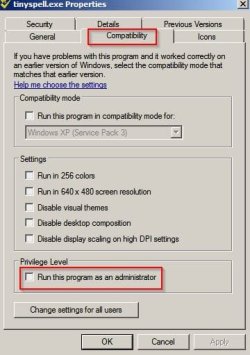
Also if you right click tinyspell.exe is "Run this program as administrator" unchecked?

C:\Program Files (x86)\tinySpell\tinyspell.exe

tinyspell.exe Properties.jpg
 

My Computer My Computer

At a glance

Microsoft Windows 7 Home Premium 64-bit 7601 ...AMD C-60 APU with Radeon(tm) HD Graphics4.00 GBAMD Radeon HD 6290 Graphics
Computer type
Laptop
Computer Manufacturer/Model Number
ASUS
OS
Microsoft Windows 7 Home Premium 64-bit 7601 Multiprocessor Free Service Pack 1
CPU
AMD C-60 APU with Radeon(tm) HD Graphics
Motherboard
ASUSTeK COMPUTER INC. X501U
Memory
4.00 GB
Graphics Card(s)
AMD Radeon HD 6290 Graphics
Sound Card
(1) AMD High Definition Audio Device (2) Realtek High Defi
Screen Resolution
1366 x 768 x 32 bits (4294967296 colors) @ 60 Hz
Hard Drives
Hitachi HTS545050A7E380 SATA Disk Device
Antivirus
Comodo CIS & FW, SecureAplus App Whitelisting, Threatfire
Browser
Cyberfox 64bit, Opera 64bit, Airfox
Other Info
Spy-The-Spy, HitmanPro.Alert, Norton Connect Safe, MJRegWatcher, BitDefender TrafficLight, Voodoo Shield, Zemana AntiMalware
Also try this:

Start> Run then type netplwiz

Press Enter

You should see a screen showing user accounts. Which account are you using to log in? Admin account?
 

My Computer My Computer

At a glance

Microsoft Windows 7 Home Premium 64-bit 7601 ...AMD C-60 APU with Radeon(tm) HD Graphics4.00 GBAMD Radeon HD 6290 Graphics
Computer type
Laptop
Computer Manufacturer/Model Number
ASUS
OS
Microsoft Windows 7 Home Premium 64-bit 7601 Multiprocessor Free Service Pack 1
CPU
AMD C-60 APU with Radeon(tm) HD Graphics
Motherboard
ASUSTeK COMPUTER INC. X501U
Memory
4.00 GB
Graphics Card(s)
AMD Radeon HD 6290 Graphics
Sound Card
(1) AMD High Definition Audio Device (2) Realtek High Defi
Screen Resolution
1366 x 768 x 32 bits (4294967296 colors) @ 60 Hz
Hard Drives
Hitachi HTS545050A7E380 SATA Disk Device
Antivirus
Comodo CIS & FW, SecureAplus App Whitelisting, Threatfire
Browser
Cyberfox 64bit, Opera 64bit, Airfox
Other Info
Spy-The-Spy, HitmanPro.Alert, Norton Connect Safe, MJRegWatcher, BitDefender TrafficLight, Voodoo Shield, Zemana AntiMalware
Pursuant to your 1st Post, Callender, the Default Setting is as you have shown. Further, under "Properties" the "Run as Administrator" Box is Unchecked.

Pursuant to your 2nd Post's Query, "Which account are you using to log in?", as I am the Only User of this Computer, I am (by default) the Administrator.
 

My Computer My Computer

At a glance

Windows 7 Professional3.40 gigahertz Intel Core i3-21304.0 Gigabytes RAM
Computer type
PC/Desktop
Computer Manufacturer/Model Number
ThinkCentre
OS
Windows 7 Professional
CPU
3.40 gigahertz Intel Core i3-2130
Motherboard
LENOVO MAHOBAY
Memory
4.0 Gigabytes RAM
Hard Drives
277 Gigabyte Hard Disk Drive.
Unused Bays for 5 (five) Additional Hard Disk Drives.
Keyboard
DELL - Model: SK-8135 (Used)
Mouse
Logitech B100 (Optical)
Internet Speed
100 Mbps
Antivirus
Avast! , Malwarebytes Premium , SuperAntiSpyware
Browser
Google Chrome
Okay try changing the settings shown in the screenshot in Post #22.

Tick "Run this program as administrator" and also "Change settings for all users" then click "OK"

See if that works. It night require a reboot.

Also you can try launching TinySpell from an Elevated Shortcut to avoid UAC prompts.

http://www.sevenforums.com/tutorials/11949-elevated-program-shortcut-without-uac-prompt-create.html

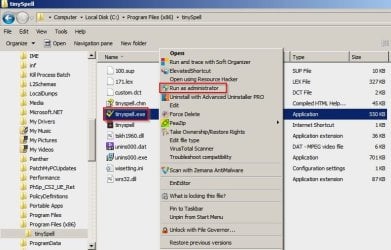
What happens if you navigate to C:\Program Files (x86)\tinySpell then right click tinyspell.exe and choose "Run as administrator" ?

Does it work?

tinySpell.jpg
 

My Computer My Computer

At a glance

Microsoft Windows 7 Home Premium 64-bit 7601 ...AMD C-60 APU with Radeon(tm) HD Graphics4.00 GBAMD Radeon HD 6290 Graphics
Computer type
Laptop
Computer Manufacturer/Model Number
ASUS
OS
Microsoft Windows 7 Home Premium 64-bit 7601 Multiprocessor Free Service Pack 1
CPU
AMD C-60 APU with Radeon(tm) HD Graphics
Motherboard
ASUSTeK COMPUTER INC. X501U
Memory
4.00 GB
Graphics Card(s)
AMD Radeon HD 6290 Graphics
Sound Card
(1) AMD High Definition Audio Device (2) Realtek High Defi
Screen Resolution
1366 x 768 x 32 bits (4294967296 colors) @ 60 Hz
Hard Drives
Hitachi HTS545050A7E380 SATA Disk Device
Antivirus
Comodo CIS & FW, SecureAplus App Whitelisting, Threatfire
Browser
Cyberfox 64bit, Opera 64bit, Airfox
Other Info
Spy-The-Spy, HitmanPro.Alert, Norton Connect Safe, MJRegWatcher, BitDefender TrafficLight, Voodoo Shield, Zemana AntiMalware
Your first suggestion appears to have worked. tinySpell.exe appears to have installed itself without a single hitch.

A question, however, is in order:
Though I've already uninstalled ASpell.exe (the plugin Spell Checker for Notepad++) was that a good idea?

ADDENDUM
- Pursuant to absolutely nothing, in your opinion would "SevenForums.com" appreciate a Desktop Icon of their own?
- Does "Bulletin Board Code", that's been capitalized, work in here?
 

My Computer My Computer

At a glance

Windows 7 Professional3.40 gigahertz Intel Core i3-21304.0 Gigabytes RAM
Computer type
PC/Desktop
Computer Manufacturer/Model Number
ThinkCentre
OS
Windows 7 Professional
CPU
3.40 gigahertz Intel Core i3-2130
Motherboard
LENOVO MAHOBAY
Memory
4.0 Gigabytes RAM
Hard Drives
277 Gigabyte Hard Disk Drive.
Unused Bays for 5 (five) Additional Hard Disk Drives.
Keyboard
DELL - Model: SK-8135 (Used)
Mouse
Logitech B100 (Optical)
Internet Speed
100 Mbps
Antivirus
Avast! , Malwarebytes Premium , SuperAntiSpyware
Browser
Google Chrome
Your first suggestion appears to have worked. tinySpell.exe appears to have installed itself without a single hitch.

Great! :)

A question, however, is in order:
Though I've already uninstalled ASpell.exe (the plugin Spell Checker for Notepad++) was that a good idea?

That's totally up to you. If TinySpell works in the way that you need it to then you probably don't need Aspell.

- Pursuant to absolutely nothing, in your opinion would "SevenForums.com" appreciate a Desktop Icon of their own?

I'm not sure what you mean. If you mean add a shortcut to SevenForums on your desktop then it's your call.
Personally I added one in the desktop right click context menu.

Add SevenForums shortcut to context menu

- Does "Bulletin Board Code", that's been capitalized, work in here?


As far as I know - it does. There's a list here:

 
Last edited:

My Computer My Computer

At a glance

Microsoft Windows 7 Home Premium 64-bit 7601 ...AMD C-60 APU with Radeon(tm) HD Graphics4.00 GBAMD Radeon HD 6290 Graphics
Computer type
Laptop
Computer Manufacturer/Model Number
ASUS
OS
Microsoft Windows 7 Home Premium 64-bit 7601 Multiprocessor Free Service Pack 1
CPU
AMD C-60 APU with Radeon(tm) HD Graphics
Motherboard
ASUSTeK COMPUTER INC. X501U
Memory
4.00 GB
Graphics Card(s)
AMD Radeon HD 6290 Graphics
Sound Card
(1) AMD High Definition Audio Device (2) Realtek High Defi
Screen Resolution
1366 x 768 x 32 bits (4294967296 colors) @ 60 Hz
Hard Drives
Hitachi HTS545050A7E380 SATA Disk Device
Antivirus
Comodo CIS & FW, SecureAplus App Whitelisting, Threatfire
Browser
Cyberfox 64bit, Opera 64bit, Airfox
Other Info
Spy-The-Spy, HitmanPro.Alert, Norton Connect Safe, MJRegWatcher, BitDefender TrafficLight, Voodoo Shield, Zemana AntiMalware
Pursuant to "BBC": I'd wondered as I had earlier tried Superscript [sup] and [/sup] which isn't on the List. It should go without saying that Subscript [sub] and [/sub] isn't either. So much for So much for Chemical Formulas and Radioactive Isotopes.

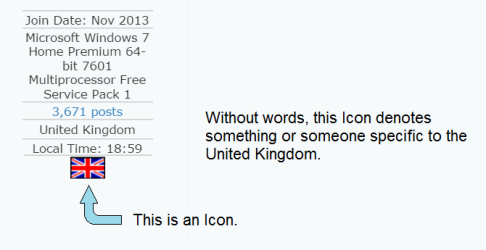
Pursuant to "What's an Icon?", I believe that the attached image answers the question.
 

Attachments

  • Icon - Visual Identification.png
    Icon - Visual Identification.png
    8.7 KB · Views: 15

My Computer My Computer

At a glance

Windows 7 Professional3.40 gigahertz Intel Core i3-21304.0 Gigabytes RAM
Computer type
PC/Desktop
Computer Manufacturer/Model Number
ThinkCentre
OS
Windows 7 Professional
CPU
3.40 gigahertz Intel Core i3-2130
Motherboard
LENOVO MAHOBAY
Memory
4.0 Gigabytes RAM
Hard Drives
277 Gigabyte Hard Disk Drive.
Unused Bays for 5 (five) Additional Hard Disk Drives.
Keyboard
DELL - Model: SK-8135 (Used)
Mouse
Logitech B100 (Optical)
Internet Speed
100 Mbps
Antivirus
Avast! , Malwarebytes Premium , SuperAntiSpyware
Browser
Google Chrome
Pursuant to this thread, we're not done yet.

In my previous Post I tried to use the word "formulae" and tinySpell told me that the word was incorrect.

"Plural formulas or formulae (fôr'myə-lē') A set of symbols showing the composition of a chemical compound. A formula lists the elements contained within it and indicates the number of atoms of each element with a subscript numeral if the number is more than 1."

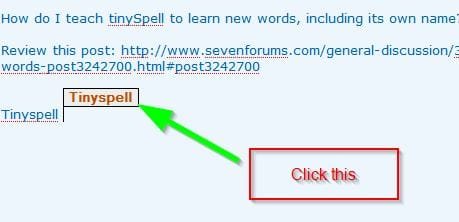
How do I teach tinySpell to learn new words, including its own name?
 

My Computer My Computer

At a glance

Windows 7 Professional3.40 gigahertz Intel Core i3-21304.0 Gigabytes RAM
Computer type
PC/Desktop
Computer Manufacturer/Model Number
ThinkCentre
OS
Windows 7 Professional
CPU
3.40 gigahertz Intel Core i3-2130
Motherboard
LENOVO MAHOBAY
Memory
4.0 Gigabytes RAM
Hard Drives
277 Gigabyte Hard Disk Drive.
Unused Bays for 5 (five) Additional Hard Disk Drives.
Keyboard
DELL - Model: SK-8135 (Used)
Mouse
Logitech B100 (Optical)
Internet Speed
100 Mbps
Antivirus
Avast! , Malwarebytes Premium , SuperAntiSpyware
Browser
Google Chrome

My Computer My Computer

At a glance

Microsoft Windows 7 Home Premium 64-bit 7601 ...AMD C-60 APU with Radeon(tm) HD Graphics4.00 GBAMD Radeon HD 6290 Graphics
Computer type
Laptop
Computer Manufacturer/Model Number
ASUS
OS
Microsoft Windows 7 Home Premium 64-bit 7601 Multiprocessor Free Service Pack 1
CPU
AMD C-60 APU with Radeon(tm) HD Graphics
Motherboard
ASUSTeK COMPUTER INC. X501U
Memory
4.00 GB
Graphics Card(s)
AMD Radeon HD 6290 Graphics
Sound Card
(1) AMD High Definition Audio Device (2) Realtek High Defi
Screen Resolution
1366 x 768 x 32 bits (4294967296 colors) @ 60 Hz
Hard Drives
Hitachi HTS545050A7E380 SATA Disk Device
Antivirus
Comodo CIS & FW, SecureAplus App Whitelisting, Threatfire
Browser
Cyberfox 64bit, Opera 64bit, Airfox
Other Info
Spy-The-Spy, HitmanPro.Alert, Norton Connect Safe, MJRegWatcher, BitDefender TrafficLight, Voodoo Shield, Zemana AntiMalware
Courtesy of: Your patience with me and Google Chrome, I've managed to teach this computer that its Default Language is "English (Canada)" but no TinySpell Box opened for "TinySpell".

What am I doing incorrectly?

Also, how do I increase the Font Size in the Reply Window?

Also, why does Chrome believe that Reply Windows need to be 2 miles wide?

Also, courtesy of Belarc Advisor (again, no Box opened) I can now give you 100% of the Specifications for this Computer which may be unique. The Computer Repair Shop that created this Online Computer ($500 CDN) also created a Stand-Alone SATA-IDE Transitional Computer ($0) which, when I finally get 'round to hooking it up, will be a Dual Boot Computer: Xandros 3.0.1 (Linux Master) and Windows XP Professional + SP3 in 64-Bit (Slave) which I need to run AutoCAD 2007.

Callender, I have a Life-Philosophy that I stole from Andy Griffith, "Ain't nuthin', wurth anithin', what's easy."
 

My Computer My Computer

At a glance

Windows 7 Professional3.40 gigahertz Intel Core i3-21304.0 Gigabytes RAM
Computer type
PC/Desktop
Computer Manufacturer/Model Number
ThinkCentre
OS
Windows 7 Professional
CPU
3.40 gigahertz Intel Core i3-2130
Motherboard
LENOVO MAHOBAY
Memory
4.0 Gigabytes RAM
Hard Drives
277 Gigabyte Hard Disk Drive.
Unused Bays for 5 (five) Additional Hard Disk Drives.
Keyboard
DELL - Model: SK-8135 (Used)
Mouse
Logitech B100 (Optical)
Internet Speed
100 Mbps
Antivirus
Avast! , Malwarebytes Premium , SuperAntiSpyware
Browser
Google Chrome
Courtesy of: Your patience with me and Google Chrome, I've managed to teach this computer that its Default Language is "English (Canada)" but no TinySpell Box opened for "TinySpell".

What am I doing incorrectly?

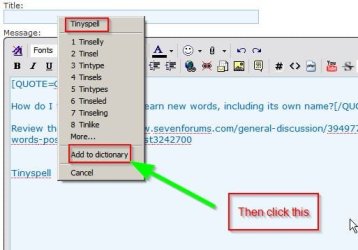
I'm not sure. Tinyspell needs to be actually running. It should work when typing in chrome by default. Personally I avoid Chrome and do not have it installed. However I do have a close alternative Chromium based browser and the TinySpell box appears at the top of the screen. In other applications I use the box always opens next to the words being typed.


Tinyspell vs Chrome.jpg

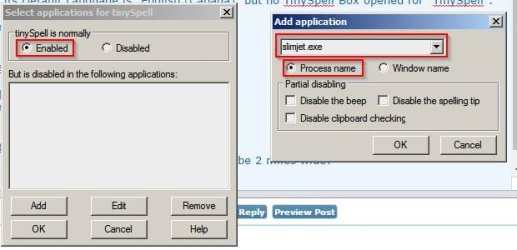
If Tinyspell is not working in Chrome try right clicking the TinySpell icon in the system tray (bottom right of screen) and then click "Applications"

Check that Chrome is not listed under disabled applications and add chrome.exe process by name in "Add Application"

Tinyspell vs Chrome 2.jpg

Also, how do I increase the Font Size in the Reply Window?

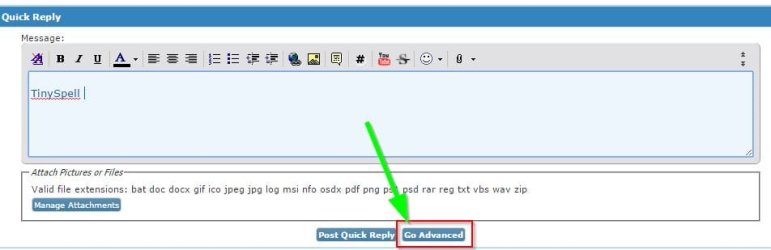
Write a reply and click the "Advanced" button.

Reply font size.jpg

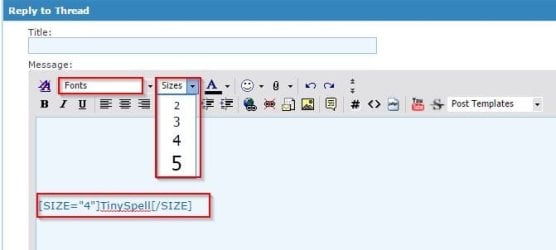
Then you can highlight text and choose size. Or you can just use tags.

Like this:

PHP:
[Size="10"]Bigger[/Size]

Resulting in this:

Bigger

Reply font size 2.jpg

Also, why does Chrome believe that Reply Windows need to be 2 miles wide?

I have no idea on that. Maybe tab settings or something. Can anyone who uses Chrome help out here? Thanks.
 
Last edited:

My Computer My Computer

At a glance

Microsoft Windows 7 Home Premium 64-bit 7601 ...AMD C-60 APU with Radeon(tm) HD Graphics4.00 GBAMD Radeon HD 6290 Graphics
Computer type
Laptop
Computer Manufacturer/Model Number
ASUS
OS
Microsoft Windows 7 Home Premium 64-bit 7601 Multiprocessor Free Service Pack 1
CPU
AMD C-60 APU with Radeon(tm) HD Graphics
Motherboard
ASUSTeK COMPUTER INC. X501U
Memory
4.00 GB
Graphics Card(s)
AMD Radeon HD 6290 Graphics
Sound Card
(1) AMD High Definition Audio Device (2) Realtek High Defi
Screen Resolution
1366 x 768 x 32 bits (4294967296 colors) @ 60 Hz
Hard Drives
Hitachi HTS545050A7E380 SATA Disk Device
Antivirus
Comodo CIS & FW, SecureAplus App Whitelisting, Threatfire
Browser
Cyberfox 64bit, Opera 64bit, Airfox
Other Info
Spy-The-Spy, HitmanPro.Alert, Norton Connect Safe, MJRegWatcher, BitDefender TrafficLight, Voodoo Shield, Zemana AntiMalware
Don't give up yet, Callender. The "Reply Window" that I have, doesn't have all the Bells and Whistles that yours does.

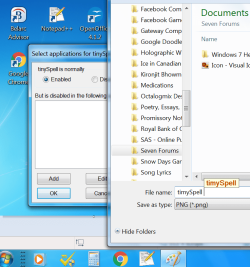
That being said there's still *some* progress. Have a look at the attached multi-screenshot edited image.
 

Attachments

  • 2016.08.27 - timySpell Enabled.png
    2016.08.27 - timySpell Enabled.png
    76.2 KB · Views: 0

My Computer My Computer

At a glance

Windows 7 Professional3.40 gigahertz Intel Core i3-21304.0 Gigabytes RAM
Computer type
PC/Desktop
Computer Manufacturer/Model Number
ThinkCentre
OS
Windows 7 Professional
CPU
3.40 gigahertz Intel Core i3-2130
Motherboard
LENOVO MAHOBAY
Memory
4.0 Gigabytes RAM
Hard Drives
277 Gigabyte Hard Disk Drive.
Unused Bays for 5 (five) Additional Hard Disk Drives.
Keyboard
DELL - Model: SK-8135 (Used)
Mouse
Logitech B100 (Optical)
Internet Speed
100 Mbps
Antivirus
Avast! , Malwarebytes Premium , SuperAntiSpyware
Browser
Google Chrome
Don't give up yet, Callender. The "Reply Window" that I have, doesn't have all the Bells and Whistles that yours does.

Well I suspect that maybe something to do with Chrome configuration or some type of content/ script blocking Chrome addon. Unfortunately I don't use Chrome.

Try using the "Quick Reply" box then "Go Advanced"
 

My Computer My Computer

At a glance

Microsoft Windows 7 Home Premium 64-bit 7601 ...AMD C-60 APU with Radeon(tm) HD Graphics4.00 GBAMD Radeon HD 6290 Graphics
Computer type
Laptop
Computer Manufacturer/Model Number
ASUS
OS
Microsoft Windows 7 Home Premium 64-bit 7601 Multiprocessor Free Service Pack 1
CPU
AMD C-60 APU with Radeon(tm) HD Graphics
Motherboard
ASUSTeK COMPUTER INC. X501U
Memory
4.00 GB
Graphics Card(s)
AMD Radeon HD 6290 Graphics
Sound Card
(1) AMD High Definition Audio Device (2) Realtek High Defi
Screen Resolution
1366 x 768 x 32 bits (4294967296 colors) @ 60 Hz
Hard Drives
Hitachi HTS545050A7E380 SATA Disk Device
Antivirus
Comodo CIS & FW, SecureAplus App Whitelisting, Threatfire
Browser
Cyberfox 64bit, Opera 64bit, Airfox
Other Info
Spy-The-Spy, HitmanPro.Alert, Norton Connect Safe, MJRegWatcher, BitDefender TrafficLight, Voodoo Shield, Zemana AntiMalware
I've met with some progress but not a lot, tinySpell is slowly but surely learning new words but it's still a long ways from becoming this Author's "Best Friend".

Pursuant to the above, I think that tinySpell might learn faster if I installed Grammarly: an add-on program for Chrome that not only checks Spelling, it also checks Sentence Composition. Have you read or seen any feedback on this program?

(By the way, clicking "Go Advanced" was an excellent idea and I thank you for it, my Friend.)
 

My Computer My Computer

At a glance

Windows 7 Professional3.40 gigahertz Intel Core i3-21304.0 Gigabytes RAM
Computer type
PC/Desktop
Computer Manufacturer/Model Number
ThinkCentre
OS
Windows 7 Professional
CPU
3.40 gigahertz Intel Core i3-2130
Motherboard
LENOVO MAHOBAY
Memory
4.0 Gigabytes RAM
Hard Drives
277 Gigabyte Hard Disk Drive.
Unused Bays for 5 (five) Additional Hard Disk Drives.
Keyboard
DELL - Model: SK-8135 (Used)
Mouse
Logitech B100 (Optical)
Internet Speed
100 Mbps
Antivirus
Avast! , Malwarebytes Premium , SuperAntiSpyware
Browser
Google Chrome
Sorry but I'm one of those users who avoid Chrome. I do have SRWare Iron portable and SlimJet portable browsers that are based on Chrome but with no extensions installed. I have not used Grammarly.

Since Chrome seems to be a particular problem why not add it to excluded processes list in Tinyspell?

Right click Tinyspell icon in system tray and then "Applications" and add chrome.exe to disabled applications list. If Grammarly works in Chrome - go for it!

For other apps/ browsers/ text editors Tinyspell should work okay.
 

My Computer My Computer

At a glance

Microsoft Windows 7 Home Premium 64-bit 7601 ...AMD C-60 APU with Radeon(tm) HD Graphics4.00 GBAMD Radeon HD 6290 Graphics
Computer type
Laptop
Computer Manufacturer/Model Number
ASUS
OS
Microsoft Windows 7 Home Premium 64-bit 7601 Multiprocessor Free Service Pack 1
CPU
AMD C-60 APU with Radeon(tm) HD Graphics
Motherboard
ASUSTeK COMPUTER INC. X501U
Memory
4.00 GB
Graphics Card(s)
AMD Radeon HD 6290 Graphics
Sound Card
(1) AMD High Definition Audio Device (2) Realtek High Defi
Screen Resolution
1366 x 768 x 32 bits (4294967296 colors) @ 60 Hz
Hard Drives
Hitachi HTS545050A7E380 SATA Disk Device
Antivirus
Comodo CIS & FW, SecureAplus App Whitelisting, Threatfire
Browser
Cyberfox 64bit, Opera 64bit, Airfox
Other Info
Spy-The-Spy, HitmanPro.Alert, Norton Connect Safe, MJRegWatcher, BitDefender TrafficLight, Voodoo Shield, Zemana AntiMalware
Point 1:
While [Size = 10]Bigger[/Size] does result in the reply being considerably larger, it doesn't do anything about increasing the Font Size from the POV (point of view) of the Writer.

Point 2:
Since Chrome seems to be a particular problem why not add it to excluded processes list in Tinyspell?
This Point is partly my fault and partly yours.

In my previously posted screenshot you'll see "Select applications for tinySpell" underneath which you'll see "tinySpell is normally Enabled" which reveals a Blank Page. This is due to the fact that tinySpell is normally enabled for Everything!

The part that's your fault is that you continue to misspell tinySpell's name. tinySpell is spelt with a Lower-Case "t", not a Capital, and tinySpell objects to the misspelling of its name.

End Point
Insofar as the original topic is concerned, it's solved. However, I have a closing question.

How many Posts must I post before my On-File Avatar shows?
 

My Computer My Computer

At a glance

Windows 7 Professional3.40 gigahertz Intel Core i3-21304.0 Gigabytes RAM
Computer type
PC/Desktop
Computer Manufacturer/Model Number
ThinkCentre
OS
Windows 7 Professional
CPU
3.40 gigahertz Intel Core i3-2130
Motherboard
LENOVO MAHOBAY
Memory
4.0 Gigabytes RAM
Hard Drives
277 Gigabyte Hard Disk Drive.
Unused Bays for 5 (five) Additional Hard Disk Drives.
Keyboard
DELL - Model: SK-8135 (Used)
Mouse
Logitech B100 (Optical)
Internet Speed
100 Mbps
Antivirus
Avast! , Malwarebytes Premium , SuperAntiSpyware
Browser
Google Chrome
Okay I stand corrected on how to spell tinySpell. :)

As for Avatars not showing up - as far as i know they should be visible without needing a certain number of posts.

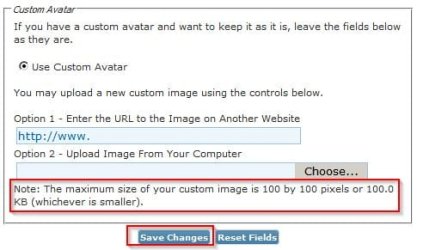
Profile picture is for profile only. What you want is to upload an avatar (100 x 100) in your User control panel. Maybe the avatar you wish to use is over the size limit?

Edit Avatar.jpg
 

My Computer My Computer

At a glance

Microsoft Windows 7 Home Premium 64-bit 7601 ...AMD C-60 APU with Radeon(tm) HD Graphics4.00 GBAMD Radeon HD 6290 Graphics
Computer type
Laptop
Computer Manufacturer/Model Number
ASUS
OS
Microsoft Windows 7 Home Premium 64-bit 7601 Multiprocessor Free Service Pack 1
CPU
AMD C-60 APU with Radeon(tm) HD Graphics
Motherboard
ASUSTeK COMPUTER INC. X501U
Memory
4.00 GB
Graphics Card(s)
AMD Radeon HD 6290 Graphics
Sound Card
(1) AMD High Definition Audio Device (2) Realtek High Defi
Screen Resolution
1366 x 768 x 32 bits (4294967296 colors) @ 60 Hz
Hard Drives
Hitachi HTS545050A7E380 SATA Disk Device
Antivirus
Comodo CIS & FW, SecureAplus App Whitelisting, Threatfire
Browser
Cyberfox 64bit, Opera 64bit, Airfox
Other Info
Spy-The-Spy, HitmanPro.Alert, Norton Connect Safe, MJRegWatcher, BitDefender TrafficLight, Voodoo Shield, Zemana AntiMalware
We've covered a lot of ground with this thread, not all of it germane to this subject's Title but useful nevertheless to anyone who's new to Seven Forums.

My "Closing Question" is particularly useful as when a New User wishes to add their own Avatar, they're met with an incongruity or, if they don't like big words, something that doesn't make sense.

"UserCP" meant nothing to me until, in desperation (because nothing else had proven useful) I clicked the link and discovered that it meant "User Control Panel". After fumbling my way around I eventually found "Custom Avatar" and ran head-on into the incongruity, "The maximum size of your custom image is 100 by 100 pixels".

When Personal Computers were first introduced the Screen Resolution for a 1024 by 768 pixel Monitor was 85 pixels per inch. The Flat Screen Monitors of today, however, have a Screen Resolution of 2400 pixels per inch and Hand-Held Mobile Devices exceed that. Presuming that the New User is using a Flat Screen Monitor that means that a 100 by 100 pixel custom image measures approximately 1 millimetre by 1 millimetre. Nobody would ever see it!

After picking up my almost-seven-decades-old jaw, up off the floor, I read the remainder of the sentence, "or 100.0 KB (whichever is smaller)." Considering the Screen Resolutions of today, somebody really ought to work on the wording of that sentence.

As you can no doubt see, my Custom Avatar is in place. It measures 37.7 KB or 299 by 299 pixels but only due to the fact that it's a "Joint Projects Group" Image.

Because Units are irrelevant, the sentence should be reworded to read as, "The maximum size of your custom image is 100 by 100 pixels or 100.0 KB (whichever number is smaller)."

Subject Solved​

Callender, what say you and I collaborate on a thread entitled, "An Alphabetical List of Computer Abbreviations"?
 

My Computer My Computer

At a glance

Windows 7 Professional3.40 gigahertz Intel Core i3-21304.0 Gigabytes RAM
Computer type
PC/Desktop
Computer Manufacturer/Model Number
ThinkCentre
OS
Windows 7 Professional
CPU
3.40 gigahertz Intel Core i3-2130
Motherboard
LENOVO MAHOBAY
Memory
4.0 Gigabytes RAM
Hard Drives
277 Gigabyte Hard Disk Drive.
Unused Bays for 5 (five) Additional Hard Disk Drives.
Keyboard
DELL - Model: SK-8135 (Used)
Mouse
Logitech B100 (Optical)
Internet Speed
100 Mbps
Antivirus
Avast! , Malwarebytes Premium , SuperAntiSpyware
Browser
Google Chrome
Nice Avatar! Not sure that I'd be much help with "An Alphabetical List of Computer Abbreviations" :o
 

My Computer My Computer

At a glance

Microsoft Windows 7 Home Premium 64-bit 7601 ...AMD C-60 APU with Radeon(tm) HD Graphics4.00 GBAMD Radeon HD 6290 Graphics
Computer type
Laptop
Computer Manufacturer/Model Number
ASUS
OS
Microsoft Windows 7 Home Premium 64-bit 7601 Multiprocessor Free Service Pack 1
CPU
AMD C-60 APU with Radeon(tm) HD Graphics
Motherboard
ASUSTeK COMPUTER INC. X501U
Memory
4.00 GB
Graphics Card(s)
AMD Radeon HD 6290 Graphics
Sound Card
(1) AMD High Definition Audio Device (2) Realtek High Defi
Screen Resolution
1366 x 768 x 32 bits (4294967296 colors) @ 60 Hz
Hard Drives
Hitachi HTS545050A7E380 SATA Disk Device
Antivirus
Comodo CIS & FW, SecureAplus App Whitelisting, Threatfire
Browser
Cyberfox 64bit, Opera 64bit, Airfox
Other Info
Spy-The-Spy, HitmanPro.Alert, Norton Connect Safe, MJRegWatcher, BitDefender TrafficLight, Voodoo Shield, Zemana AntiMalware
Back
Top