Solved How do I get Spell-Checker to learn words?

CdnGhost

New member
Local time
6:44 AM
Messages
19
I enjoy using "Notepad++" and have successfully downloaded/installed "Spell-Checker" but unless the the word which I've used isn't in Spell-Checker's Dictionary, it adamantly refuses to Learn the word that I've used.

How do I activate "Learn"?
 

My Computer My Computer

Computer type
PC/Desktop
Computer Manufacturer/Model Number
ThinkCentre
OS
Windows 7 Professional
CPU
3.40 gigahertz Intel Core i3-2130
Motherboard
LENOVO MAHOBAY
Memory
4.0 Gigabytes RAM
Hard Drives
277 Gigabyte Hard Disk Drive.
Unused Bays for 5 (five) Additional Hard Disk Drives.
Keyboard
DELL - Model: SK-8135 (Used)
Mouse
Logitech B100 (Optical)
Internet Speed
100 Mbps
Antivirus
Avast! , Malwarebytes Premium , SuperAntiSpyware
Browser
Google Chrome
Hi and welcome to SevenForums,
Not sure but most have a add to dictionary if you right click the tagged word ?
 

My Computer My Computer

Computer type
PC/Desktop
Computer Manufacturer/Model Number
Custom assembled by me :}
OS
Win-7-Pro64bit 7-H-Prem-64bit
CPU
i7-5930K 2nd i9-9940x both water blocked VRM's too
Motherboard
ASUS SABERTOOTH X99 2nd ASUS x299 Apex
Memory
Trident-z 3200C14 2nd Trident-z 3600C16
Graphics Card(s)
EVGA 1080ti ftw3 2nd Titan Xp both water blocked
Sound Card
Built-in Realtek
Monitor(s) Displays
1-AOC G2460PG 24"G-Sync 144Hz/ 2nd 1-ASUS VG248QE 24" 144Hz
Screen Resolution
1920 x 1080 144Hz
Hard Drives
2-Samsung M.2 Evo & Evo Plus
2-Samsung 850 EVO 500GB SSD's/ 3-2.5 W.D. Black 1tb-&3-1tb/3-3.5 WD Black 1tb hdd's
PSU
EVGA SuperNOVA 1000-P2 2nd 1200-P2
Case
2-Corsair Obsidian Series 450D Black ATX Mid Tower
Cooling
Custom water loops
Keyboard
Logitech G710+/ 2nd Logitech G910
Mouse
2-RedDragon M901 Perdition 16400 dpi Gaming mouse = wired
Internet Speed
Comcast Ping 19ms 89.31mbps download speed 6.12mbps upload
Antivirus
Malwarebytes Pro/ Superantispyware Pro
Browser
FireFox & Pale moon
Other Info
2nd ASUS X299 Apex/Intel i9-9940x with Custom water loop/7H-Prem-x64/Corsair 450D case/Ram Trident-z 3600C16 4x8gb / Samsung970Evo plus 500gb SSD/Dual ssd EZ swap evo/PSU EVGA SuperNova 1200w-P2 80+Platinum/GPU Titan Xp /8-ML-140 on push-pull on 2-280GTX rads
Not sure but most have a add to dictionary if you right click the tagged word ?

Regrettably, ThrashZone, I am not permitted that option.

These are the Options I am Given
"Replace" (Replace with a word that already exists in Spell-Checker's limited Dictionary.)
"Learn" (This Option doesn't work.)
"Ignore" (This Option is Self-Evident.)

As difficult as it is to believe, Spell-Checker has never encountered the proper name, "Facebook".
 

My Computer My Computer

Computer type
PC/Desktop
Computer Manufacturer/Model Number
ThinkCentre
OS
Windows 7 Professional
CPU
3.40 gigahertz Intel Core i3-2130
Motherboard
LENOVO MAHOBAY
Memory
4.0 Gigabytes RAM
Hard Drives
277 Gigabyte Hard Disk Drive.
Unused Bays for 5 (five) Additional Hard Disk Drives.
Keyboard
DELL - Model: SK-8135 (Used)
Mouse
Logitech B100 (Optical)
Internet Speed
100 Mbps
Antivirus
Avast! , Malwarebytes Premium , SuperAntiSpyware
Browser
Google Chrome
Hi,
I'm sort of unsure which spell checker you're using ?
Is it a add-on for notepad++ ?
 

My Computer My Computer

Computer type
PC/Desktop
Computer Manufacturer/Model Number
Custom assembled by me :}
OS
Win-7-Pro64bit 7-H-Prem-64bit
CPU
i7-5930K 2nd i9-9940x both water blocked VRM's too
Motherboard
ASUS SABERTOOTH X99 2nd ASUS x299 Apex
Memory
Trident-z 3200C14 2nd Trident-z 3600C16
Graphics Card(s)
EVGA 1080ti ftw3 2nd Titan Xp both water blocked
Sound Card
Built-in Realtek
Monitor(s) Displays
1-AOC G2460PG 24"G-Sync 144Hz/ 2nd 1-ASUS VG248QE 24" 144Hz
Screen Resolution
1920 x 1080 144Hz
Hard Drives
2-Samsung M.2 Evo & Evo Plus
2-Samsung 850 EVO 500GB SSD's/ 3-2.5 W.D. Black 1tb-&3-1tb/3-3.5 WD Black 1tb hdd's
PSU
EVGA SuperNOVA 1000-P2 2nd 1200-P2
Case
2-Corsair Obsidian Series 450D Black ATX Mid Tower
Cooling
Custom water loops
Keyboard
Logitech G710+/ 2nd Logitech G910
Mouse
2-RedDragon M901 Perdition 16400 dpi Gaming mouse = wired
Internet Speed
Comcast Ping 19ms 89.31mbps download speed 6.12mbps upload
Antivirus
Malwarebytes Pro/ Superantispyware Pro
Browser
FireFox & Pale moon
Other Info
2nd ASUS X299 Apex/Intel i9-9940x with Custom water loop/7H-Prem-x64/Corsair 450D case/Ram Trident-z 3600C16 4x8gb / Samsung970Evo plus 500gb SSD/Dual ssd EZ swap evo/PSU EVGA SuperNova 1200w-P2 80+Platinum/GPU Titan Xp /8-ML-140 on push-pull on 2-280GTX rads
Hi,
I'm sort of unsure which spell checker you're using ?
Is it a add-on for notepad++ ?

Yes, TrashZone, it's an add-on for Notepad++ which is a program called, "ASpell"

Would an Edited Screenshot help you to understand what I'm up against?
 

My Computer My Computer

Computer type
PC/Desktop
Computer Manufacturer/Model Number
ThinkCentre
OS
Windows 7 Professional
CPU
3.40 gigahertz Intel Core i3-2130
Motherboard
LENOVO MAHOBAY
Memory
4.0 Gigabytes RAM
Hard Drives
277 Gigabyte Hard Disk Drive.
Unused Bays for 5 (five) Additional Hard Disk Drives.
Keyboard
DELL - Model: SK-8135 (Used)
Mouse
Logitech B100 (Optical)
Internet Speed
100 Mbps
Antivirus
Avast! , Malwarebytes Premium , SuperAntiSpyware
Browser
Google Chrome

My Computers My Computers

System One System Two

Suggest:

Use TinySpell instead:

Download tinySpell - MajorGeeks

It doesn't just work in Notepad but also your browser and lots of other apps. It's checking my spelling as I type this reply.

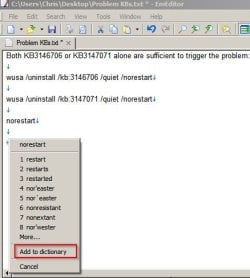
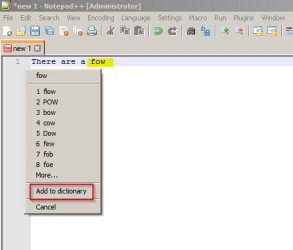
Examlpe:

Tinyspell 1.jpg

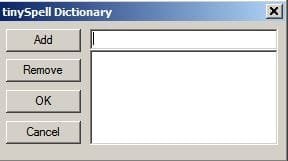
You can add any unrecognized word to the dictionary:

TinySpell Dictionary.jpg

Tinyspell.jpg

Optionally set it to run on demand only:

Disable stratup entry.jpg
 

My Computer My Computer

Computer type
Laptop
Computer Manufacturer/Model Number
ASUS
OS
Microsoft Windows 7 Home Premium 64-bit 7601 Multiprocessor Free Service Pack 1
CPU
AMD C-60 APU with Radeon(tm) HD Graphics
Motherboard
ASUSTeK COMPUTER INC. X501U
Memory
4.00 GB
Graphics Card(s)
AMD Radeon HD 6290 Graphics
Sound Card
(1) AMD High Definition Audio Device (2) Realtek High Defi
Screen Resolution
1366 x 768 x 32 bits (4294967296 colors) @ 60 Hz
Hard Drives
Hitachi HTS545050A7E380 SATA Disk Device
Antivirus
Comodo CIS & FW, SecureAplus App Whitelisting, Threatfire
Browser
Cyberfox 64bit, Opera 64bit, Airfox
Other Info
Spy-The-Spy, HitmanPro.Alert, Norton Connect Safe, MJRegWatcher, BitDefender TrafficLight, Voodoo Shield, Zemana AntiMalware
Let me see if I understand you correctly, Callender.

Are you suggesting that I should trash "Notepad++" in favour of "Notepad"?

I have a Disability which I have not mentioned. Recently, due to Iritis, I have become totally blind in my (Previously Dominant) Right Eye and am relearning how to Read and Write with my Left (Recessive) Eye.

Though it may sound trivial to you, for many years I have been writing my Autobiography in the form of "Autobiographical Incidents" which span my 67 years of life due to having inherited an Eidetic Image Memory from my late Mother.

Unlike "Notepad", "Notepad++" has the ability to Magnify Text. Without that "Magnification Ability" my Writing Career is over.

My question is this:

Will your "Spell Checker/Learner Program" also work on "Notepad++" as it does on "Notepad"?

ADDENDUM

While I have other Disabilities, overcoming my Inability to Read and Write is paramount.
 

My Computer My Computer

Computer type
PC/Desktop
Computer Manufacturer/Model Number
ThinkCentre
OS
Windows 7 Professional
CPU
3.40 gigahertz Intel Core i3-2130
Motherboard
LENOVO MAHOBAY
Memory
4.0 Gigabytes RAM
Hard Drives
277 Gigabyte Hard Disk Drive.
Unused Bays for 5 (five) Additional Hard Disk Drives.
Keyboard
DELL - Model: SK-8135 (Used)
Mouse
Logitech B100 (Optical)
Internet Speed
100 Mbps
Antivirus
Avast! , Malwarebytes Premium , SuperAntiSpyware
Browser
Google Chrome
I'm suggesting that you try TinySpell. It doesn't just work with Notepad alone but pretty much any application in Windows where you can type. That includes Notepad++


Notepad++ Screenshot:

Notepad++.jpg

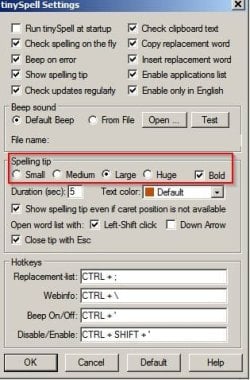
If you check Tinyspell settings you can specify larger test for the prompts.

Tinyspell 2.jpg
 

My Computer My Computer

Computer type
Laptop
Computer Manufacturer/Model Number
ASUS
OS
Microsoft Windows 7 Home Premium 64-bit 7601 Multiprocessor Free Service Pack 1
CPU
AMD C-60 APU with Radeon(tm) HD Graphics
Motherboard
ASUSTeK COMPUTER INC. X501U
Memory
4.00 GB
Graphics Card(s)
AMD Radeon HD 6290 Graphics
Sound Card
(1) AMD High Definition Audio Device (2) Realtek High Defi
Screen Resolution
1366 x 768 x 32 bits (4294967296 colors) @ 60 Hz
Hard Drives
Hitachi HTS545050A7E380 SATA Disk Device
Antivirus
Comodo CIS & FW, SecureAplus App Whitelisting, Threatfire
Browser
Cyberfox 64bit, Opera 64bit, Airfox
Other Info
Spy-The-Spy, HitmanPro.Alert, Norton Connect Safe, MJRegWatcher, BitDefender TrafficLight, Voodoo Shield, Zemana AntiMalware
You will get better spell checking options as well as other features from a full blown word processor such as Word or (if you want free) OpenOffice. Notepad++ is designed really for coders to get the programming keywords and syntax. In my opinion it isn't really good as a word processor for writing a document. It looks like callender make a mistake but you can make out notepad++ in at least one of his screenshots.
 
Last edited:

My Computers My Computers

System One System Two

You will get better spell checking options as well as other features from a full blown word processor such as Word or (if you want free) OpenOffice. Notepad++ is designed really for coders to get the programming keywords and syntax. In my opinion it isn't really good as a word processor for writing a document. It looks like callender make a mistake but you can make out notepad++ in at least one of his screenshots.

For whatever it's worth, townsbg, I already have both "Open Office" and "Word (version unknown)"; however for the purposes of writing Poetry and Short Stories I much prefer Notepad++.

Prior to becoming blind, two years ago, I had used "Text Editor" (the Linux Version of Notepad) and "Word 2000" for all of my Published and Unpublished Works. But, as I am now blind, I must make allowances to my new state.

For that reason I have decided to take Callender's advice and try TinySpell for a number of reasons...not the least of which being that TinySpell accepts the UK Version of English which is the only accepted Version of English in Canada.

I mean no disrespect, townsbg, but your argument "You will get better spell checking options" while valid, as you'll notice in your quoted text, no Spell Checker will catch Incorrect Word Usage.

Addendum

Though I've been writing for over fifty years, due to being born an Extreme Dyslectic I was unable to teach myself how to read for over twelve years.

Unfortunately, though my younger Sister is a Teacher of the Learning Disabled, the method which I used is unteachable. It requires the presence of an Eidetic Image Memory.
 

My Computer My Computer

Computer type
PC/Desktop
Computer Manufacturer/Model Number
ThinkCentre
OS
Windows 7 Professional
CPU
3.40 gigahertz Intel Core i3-2130
Motherboard
LENOVO MAHOBAY
Memory
4.0 Gigabytes RAM
Hard Drives
277 Gigabyte Hard Disk Drive.
Unused Bays for 5 (five) Additional Hard Disk Drives.
Keyboard
DELL - Model: SK-8135 (Used)
Mouse
Logitech B100 (Optical)
Internet Speed
100 Mbps
Antivirus
Avast! , Malwarebytes Premium , SuperAntiSpyware
Browser
Google Chrome
Callender would you do me a favour?

Instead of telling me to try TinySpell, could you give a Direct Link to the version of TinySpell which will work with Windows 7 Professional?

I tried one of the three links available at Major Geeks and, after installation, was told that it doesn't work with Notepad++ because Notepad++ is a DOS Program. In addition there wasn't a Set-Up-Routine such as you showed in your Post.

I'm still willing to give it a try but I'm going to need a "Walk-Through Process" of which link and how to set it up.
 

My Computer My Computer

Computer type
PC/Desktop
Computer Manufacturer/Model Number
ThinkCentre
OS
Windows 7 Professional
CPU
3.40 gigahertz Intel Core i3-2130
Motherboard
LENOVO MAHOBAY
Memory
4.0 Gigabytes RAM
Hard Drives
277 Gigabyte Hard Disk Drive.
Unused Bays for 5 (five) Additional Hard Disk Drives.
Keyboard
DELL - Model: SK-8135 (Used)
Mouse
Logitech B100 (Optical)
Internet Speed
100 Mbps
Antivirus
Avast! , Malwarebytes Premium , SuperAntiSpyware
Browser
Google Chrome
Try this link:

Code:
http://www.tinyspell.numerit.com/tisp1961.exe

I'm currently uninstalling TinySpell so that I can clean install it.
 
Last edited:

My Computer My Computer

Computer type
Laptop
Computer Manufacturer/Model Number
ASUS
OS
Microsoft Windows 7 Home Premium 64-bit 7601 Multiprocessor Free Service Pack 1
CPU
AMD C-60 APU with Radeon(tm) HD Graphics
Motherboard
ASUSTeK COMPUTER INC. X501U
Memory
4.00 GB
Graphics Card(s)
AMD Radeon HD 6290 Graphics
Sound Card
(1) AMD High Definition Audio Device (2) Realtek High Defi
Screen Resolution
1366 x 768 x 32 bits (4294967296 colors) @ 60 Hz
Hard Drives
Hitachi HTS545050A7E380 SATA Disk Device
Antivirus
Comodo CIS & FW, SecureAplus App Whitelisting, Threatfire
Browser
Cyberfox 64bit, Opera 64bit, Airfox
Other Info
Spy-The-Spy, HitmanPro.Alert, Norton Connect Safe, MJRegWatcher, BitDefender TrafficLight, Voodoo Shield, Zemana AntiMalware
Okay here's what happens when I install Notepad++ version 6.9.1 and Tinyspell version 1961

Installers downloaded and ready to run:
Installed Notepad++ then afterwards ran tisp1961.exe which is the TinySpell installer.

Tiny Spell and NP++ installers.jpg

Run the TinySpell installer tisp1961.exe - click next.
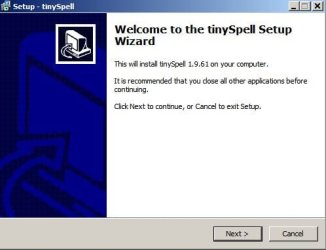
Setup - TinySpell 1.jpg

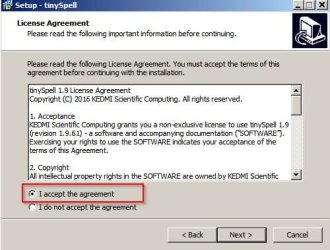
Accept license agreement.

Setup - TinySpell 2.jpg

Choose install location - leave it as it is.
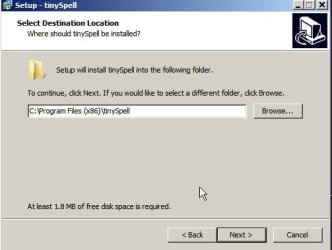
Setup - TinySpell 3.jpg

It will create a start menu folder but this can be removed later.
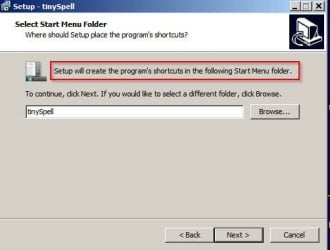
Setup - TinySpell 4.jpg

It's up to you if you want a desktop icon.
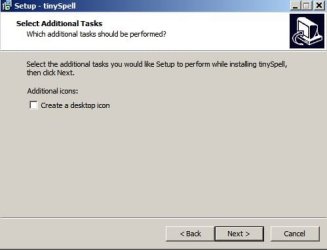
Setup - TinySpell 5.jpg

Click Finish to complete the install and launch TinySpell.
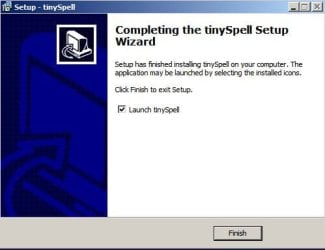
Setup - TinySpell 6.jpg

Right click the TinySpell icon in your system tray.

Tiny Spell System Tray Icon.jpg

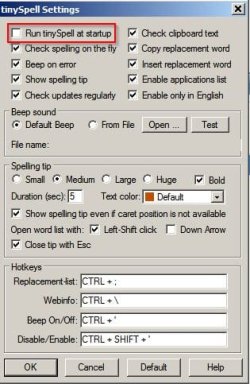
Choose "Settings" and the following window opens.
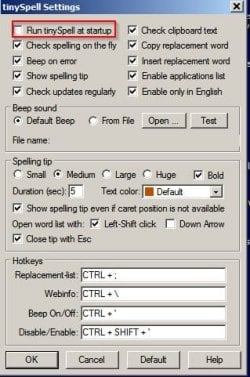
Tiny Spell Settings.jpg

Suggest: Uncheck "Run TinySpell at Startup" - you can then launch it when needed.

Leave the other settings as they are but consider increasing the size and duration of "Spelling Tip"

If you close that window and launch Notepad++ and type a word but spell it incorrectly - once you have added a space or other punctuation after the word you should see a prompt appear.

It the prompt does not appear right click the TinySpell system tray icon and view the applications list to make sure that Notepad++ is included.

Tiny Spell Settings 2.jpg

TinySpell Usage:

If you spell a word incorrectly you get a prompt like this (where green arrow is pointing)
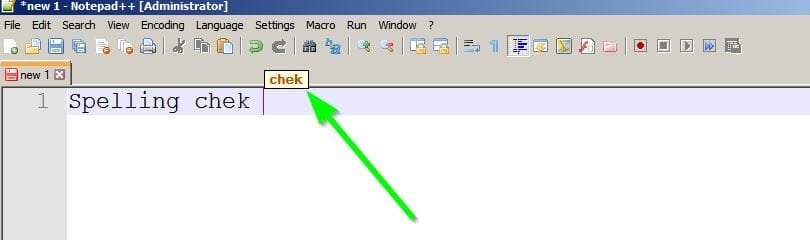
Tiny Spell Usage.jpg

Click the prompt and choose from the list of options.
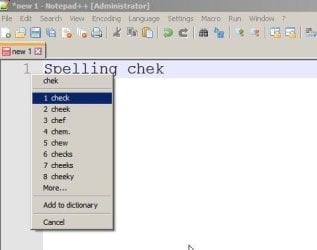
Tiny Spell Usage 2.jpg

If the prompt vanishes before you can click - adjust delay here:
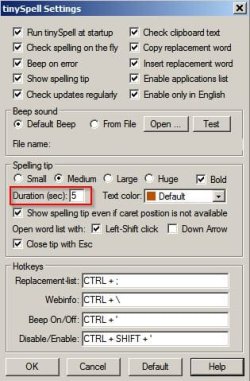
TinySpell Prompt Duration.jpg

If you still get the same error messages after installation I'd suggest uninstalling Notepad++ and TinySpell then rebooting before re-installing the current version of both programs. Notepad++ should be installed before TinySpell.

 

My Computer My Computer

Computer type
Laptop
Computer Manufacturer/Model Number
ASUS
OS
Microsoft Windows 7 Home Premium 64-bit 7601 Multiprocessor Free Service Pack 1
CPU
AMD C-60 APU with Radeon(tm) HD Graphics
Motherboard
ASUSTeK COMPUTER INC. X501U
Memory
4.00 GB
Graphics Card(s)
AMD Radeon HD 6290 Graphics
Sound Card
(1) AMD High Definition Audio Device (2) Realtek High Defi
Screen Resolution
1366 x 768 x 32 bits (4294967296 colors) @ 60 Hz
Hard Drives
Hitachi HTS545050A7E380 SATA Disk Device
Antivirus
Comodo CIS & FW, SecureAplus App Whitelisting, Threatfire
Browser
Cyberfox 64bit, Opera 64bit, Airfox
Other Info
Spy-The-Spy, HitmanPro.Alert, Norton Connect Safe, MJRegWatcher, BitDefender TrafficLight, Voodoo Shield, Zemana AntiMalware
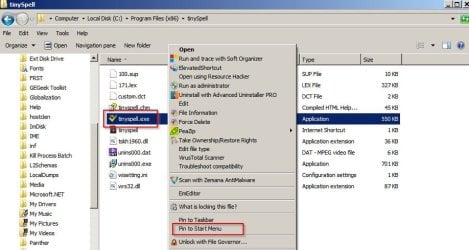
Additionally you might want to pint TinySpell to your start menu:

Navigate to C:\Program Files (x86)\tinySpell

Right click tinyspell.exe and choose "Pin To Start Menu" - then it can be launched from there when needed.

Pin TinySpell.jpg

To exit TinySpell - right click the system tray icon and choose "Exit TinySpell"
 

My Computer My Computer

Computer type
Laptop
Computer Manufacturer/Model Number
ASUS
OS
Microsoft Windows 7 Home Premium 64-bit 7601 Multiprocessor Free Service Pack 1
CPU
AMD C-60 APU with Radeon(tm) HD Graphics
Motherboard
ASUSTeK COMPUTER INC. X501U
Memory
4.00 GB
Graphics Card(s)
AMD Radeon HD 6290 Graphics
Sound Card
(1) AMD High Definition Audio Device (2) Realtek High Defi
Screen Resolution
1366 x 768 x 32 bits (4294967296 colors) @ 60 Hz
Hard Drives
Hitachi HTS545050A7E380 SATA Disk Device
Antivirus
Comodo CIS & FW, SecureAplus App Whitelisting, Threatfire
Browser
Cyberfox 64bit, Opera 64bit, Airfox
Other Info
Spy-The-Spy, HitmanPro.Alert, Norton Connect Safe, MJRegWatcher, BitDefender TrafficLight, Voodoo Shield, Zemana AntiMalware
If you've never considered taking up Teaching as a profession, you ought to as you're a "Natural Pedagogue".

I've never seen a "How-To Manual" that was so complete...and almost letter-perfect. I only found one Boo-Boo.

Behold:

Additionally you might want to pint TinySpell to your start menu:

What I'm going to do about the lack of: a System Tray and Start Menu, I don't know yet but I imagine I'll figure out something.

Do you have any idea how long 5 seconds is? Ask someone who's dying (been there, done that twice). Failing that, ask the National Aeronautics and Space Administration ("NASA") what can go wrong during the last 2 seconds preparatory to a launch: the Book weighs slightly over 5 kilograms. Drop that puppy on your foot and you can give up walking for a while.
 
Last edited:

My Computer My Computer

Computer type
PC/Desktop
Computer Manufacturer/Model Number
ThinkCentre
OS
Windows 7 Professional
CPU
3.40 gigahertz Intel Core i3-2130
Motherboard
LENOVO MAHOBAY
Memory
4.0 Gigabytes RAM
Hard Drives
277 Gigabyte Hard Disk Drive.
Unused Bays for 5 (five) Additional Hard Disk Drives.
Keyboard
DELL - Model: SK-8135 (Used)
Mouse
Logitech B100 (Optical)
Internet Speed
100 Mbps
Antivirus
Avast! , Malwarebytes Premium , SuperAntiSpyware
Browser
Google Chrome
Try this link:

Code:
http://www.tinyspell.numerit.com/tisp1961.exe

I'm currently uninstalling TinySpell so that I can clean install it.

Boo-Boo #2

The link is:

tinyspell.numerit.com

And the version is:

tinySpell+ 1.9.61 Isn't free to ''First-Time Users''.png

It makes a slight difference, especially when you're surviving on a Government Pension. I went with the Freebie.
 

My Computer My Computer

Computer type
PC/Desktop
Computer Manufacturer/Model Number
ThinkCentre
OS
Windows 7 Professional
CPU
3.40 gigahertz Intel Core i3-2130
Motherboard
LENOVO MAHOBAY
Memory
4.0 Gigabytes RAM
Hard Drives
277 Gigabyte Hard Disk Drive.
Unused Bays for 5 (five) Additional Hard Disk Drives.
Keyboard
DELL - Model: SK-8135 (Used)
Mouse
Logitech B100 (Optical)
Internet Speed
100 Mbps
Antivirus
Avast! , Malwarebytes Premium , SuperAntiSpyware
Browser
Google Chrome
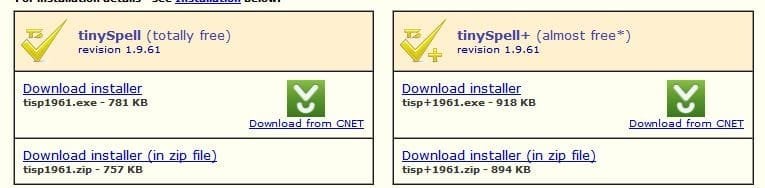
Thanks for your kind words. Actually there are two versions of TinySpell.

There's TinySpell (free) and also TinySpell+ (paid)

tinySpell_ versions.jpg

The TinySpell+ version is the paid version.

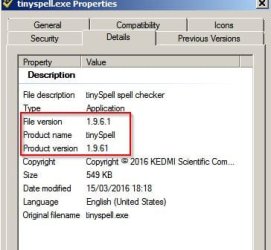
TinySpell 1.9.6.1 is free and works for me.

tinyspell.exe Properties.jpg

However earlier versions should also work fine. I haven't tested those!

:)
 

My Computer My Computer

Computer type
Laptop
Computer Manufacturer/Model Number
ASUS
OS
Microsoft Windows 7 Home Premium 64-bit 7601 Multiprocessor Free Service Pack 1
CPU
AMD C-60 APU with Radeon(tm) HD Graphics
Motherboard
ASUSTeK COMPUTER INC. X501U
Memory
4.00 GB
Graphics Card(s)
AMD Radeon HD 6290 Graphics
Sound Card
(1) AMD High Definition Audio Device (2) Realtek High Defi
Screen Resolution
1366 x 768 x 32 bits (4294967296 colors) @ 60 Hz
Hard Drives
Hitachi HTS545050A7E380 SATA Disk Device
Antivirus
Comodo CIS & FW, SecureAplus App Whitelisting, Threatfire
Browser
Cyberfox 64bit, Opera 64bit, Airfox
Other Info
Spy-The-Spy, HitmanPro.Alert, Norton Connect Safe, MJRegWatcher, BitDefender TrafficLight, Voodoo Shield, Zemana AntiMalware
Try this link:

Code:
http://www.tinyspell.numerit.com/tisp1961.exe

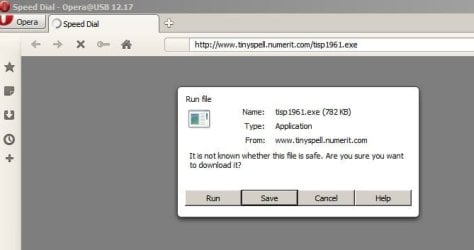
The above is the direct download link for the free version:

Tiny Spell Download.jpg
 

My Computer My Computer

Computer type
Laptop
Computer Manufacturer/Model Number
ASUS
OS
Microsoft Windows 7 Home Premium 64-bit 7601 Multiprocessor Free Service Pack 1
CPU
AMD C-60 APU with Radeon(tm) HD Graphics
Motherboard
ASUSTeK COMPUTER INC. X501U
Memory
4.00 GB
Graphics Card(s)
AMD Radeon HD 6290 Graphics
Sound Card
(1) AMD High Definition Audio Device (2) Realtek High Defi
Screen Resolution
1366 x 768 x 32 bits (4294967296 colors) @ 60 Hz
Hard Drives
Hitachi HTS545050A7E380 SATA Disk Device
Antivirus
Comodo CIS & FW, SecureAplus App Whitelisting, Threatfire
Browser
Cyberfox 64bit, Opera 64bit, Airfox
Other Info
Spy-The-Spy, HitmanPro.Alert, Norton Connect Safe, MJRegWatcher, BitDefender TrafficLight, Voodoo Shield, Zemana AntiMalware
What I'm going to do about the lack of: a System Tray and Start Menu, I don't know yet but I imagine I'll figure out something.

When I talk about "System Tray" - another term that could be used is "Notification Area"

To see icons (including the TinySpell icon when it's running) have a look at this tutorial:

Windows 7: Notification Area Icons - Hide or Show System Icons and Notifications

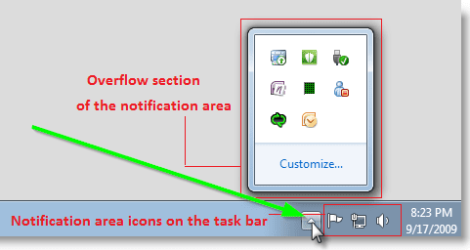
It is possible to set all icons to show in "System Tray" or "Notification Area" but alternatively you can just click on the "up arrow" (where the green arrow is points to) as shown in this image from the above tutorial.

Notfication_Area_Icons.png

In the little window that opens you should see the TinySpell icon when the TinySpell program is running. Right click that icon for options.

RE: Start Menu

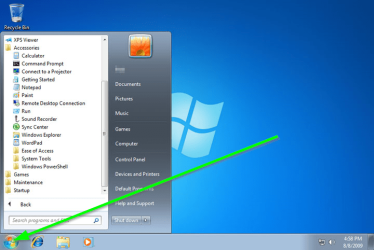
That is the menu that opens up when you click the "Start Orb" shown at the bottom left of your screen.

win7_start menu.png

How to Pin or Unpin a Program to the Windows 7 Start Menu
 

My Computer My Computer

Computer type
Laptop
Computer Manufacturer/Model Number
ASUS
OS
Microsoft Windows 7 Home Premium 64-bit 7601 Multiprocessor Free Service Pack 1
CPU
AMD C-60 APU with Radeon(tm) HD Graphics
Motherboard
ASUSTeK COMPUTER INC. X501U
Memory
4.00 GB
Graphics Card(s)
AMD Radeon HD 6290 Graphics
Sound Card
(1) AMD High Definition Audio Device (2) Realtek High Defi
Screen Resolution
1366 x 768 x 32 bits (4294967296 colors) @ 60 Hz
Hard Drives
Hitachi HTS545050A7E380 SATA Disk Device
Antivirus
Comodo CIS & FW, SecureAplus App Whitelisting, Threatfire
Browser
Cyberfox 64bit, Opera 64bit, Airfox
Other Info
Spy-The-Spy, HitmanPro.Alert, Norton Connect Safe, MJRegWatcher, BitDefender TrafficLight, Voodoo Shield, Zemana AntiMalware
Back
Top