SSD Questions on New Computer

Any laptop can be customized to it owner.
Maybe you could ask your repairman on this.

Yes, do bring 'new' laptop to the repairman and let him decide for you what is the next best to do.

Fyi, eBay do not sell "Brand New" laptop and eBay user sell 'used' laptop are not also NEW Laptop.
I did bought from eBay and collect from him and re-customize by my repairman, and it works well, until now. Repaired and still work well.

Learn a bit from the repairman on how to open the back case, 2 screws only, and you can sway RAM and HDD slot for HDD or SSD.
This is a basic rule to understand as Laptop use only 2.5" HDD or SSD, using SATA connector.

Other issue on Laptops and Windows and many others, repairman can explained to you if he want to.

Some repairman do have their Corporate version on Windows OS such as 7. 8.1, 10; Pro, Ultimate, etc.
They can repair damaged laptop with motherboard problem and install Windows 7 Pro and sell. This is their main business.
They may keep some info from you, as it is their main business to stay alive in laptop business.
 

My Computer My Computer

Computer type
Laptop
Computer Manufacturer/Model Number
Toshiba L630 and L735
OS
Windows 7 x64
Hard Drives
240 GB SSD
Hi there. When you say opoen the back case 2 screws only, are you talking about a normal laptop or the dell xps 15? Because my asus laptop has 2 screws but my sager laptop... theres close to 20 screws if you want to open it up. Thus 2 screws its pretty simple.


Well the seller of the laptop has perfect review. He does sell some items refurbished and some new. But these are Dell outlet new which is a bit different but still unopened. There are rarely anyone that i buy from ebay that has 0 negative feedback over this much reviews.


Yes i will bring laptop there and see what they suggest. But do you suggest i do what im planning to do with the enclosure? I bought it specifically for that? thus i want to test it on my desktop to see what files i can transfer to my desktop before i get my new laptop. And i figure most ppl need an enclosure anyway since if ssd fails, thats how they do transfer and its sort of like an external back up?
 

My Computer My Computer

Computer type
Laptop
OS
Windows 10 Pro
Hi
I never see a sager laptop, so i cannot say.
Then the asus is the common laptop with 2 screws.
On one side is the RAM slots.
On the other lower is the HDD slot for either HDD or SSD. Laptop have only allow 1 HDD slot.

eBay is basically up to the seller and buyer.
I loved this laptop which was bought from eBay, Singapore; where we meet and exchange laptop & money.
Up to now, i did not know who he is, his rating or not. The laptop is in 'excellent' working conditions, no problem.


You don't have to worry for anything when you are bring the laptop to the repairman.
He can manage to provide everything for you, as he is much better person.

One final point, You made your decision, as final.
 

My Computer My Computer

Computer type
Laptop
Computer Manufacturer/Model Number
Toshiba L630 and L735
OS
Windows 7 x64
Hard Drives
240 GB SSD
It would take a few minutes to transfer 12 GB. It shouldn't take over an hour or two for 140 GB even if the drives are slow.

Turn the whole project over to a competent shop before you dig yourself a deeper hole.
 

My Computer My Computer

Computer type
PC/Desktop
Computer Manufacturer/Model Number
Ignatz Special; 4 speed manual gearbox; factory air conditioning; one of one
OS
Windows 7 Home Premium SP1, 64-bit
CPU
Intel Skylake i5-6600K, not overclocked
Motherboard
AsRock Z170M Extreme 4, micro ATX
Memory
8 GB HyperX DDR4-2666 (2 x 4 GB)
Graphics Card(s)
none; graphics are integrated on CPU
Sound Card
onboard: Realtek ALC1150; external: USB Behringer UF0-202
Monitor(s) Displays
Dell S2340M 23 inch IPS
Screen Resolution
1600 x 900
Hard Drives
System: Crucial MX100 series SSD, 128 GB;
Data: Samsung Spinpoint 103SJ, 1 TB;
Backup: WD Caviar Green WD30EZRX-00D8PB0, 3 TB
PSU
Rosewill SilentNight 500 watt fanless, semi-modular
Case
Antec Solo II
Cooling
Noctua NH-U12S; Noctua F12 intake, Noctua S12A exhaust
Keyboard
Microsoft 200 6JH-00001 USB
Mouse
Dell or Microsoft optical wired; USB
Antivirus
Microsoft Security Essentials and Malwarebytes Premium
Browser
Pale Moon
Other Info
All fans PWM; speeds at idle: CPU circa 500 rpm; intake circa 600 rpm; exhaust circa 600 rpm; CPU temps 27 idle and 47 C load in a warm room (27 C/81 F) when running Intel Extreme Tuning Utility stress test.
Hey guys i have an issue here. So i received the enclosure


https://www.amazon.com/Tool-free-In...00JQTO8TU/ref=cm_cr_arp_d_product_top?ie=UTF8


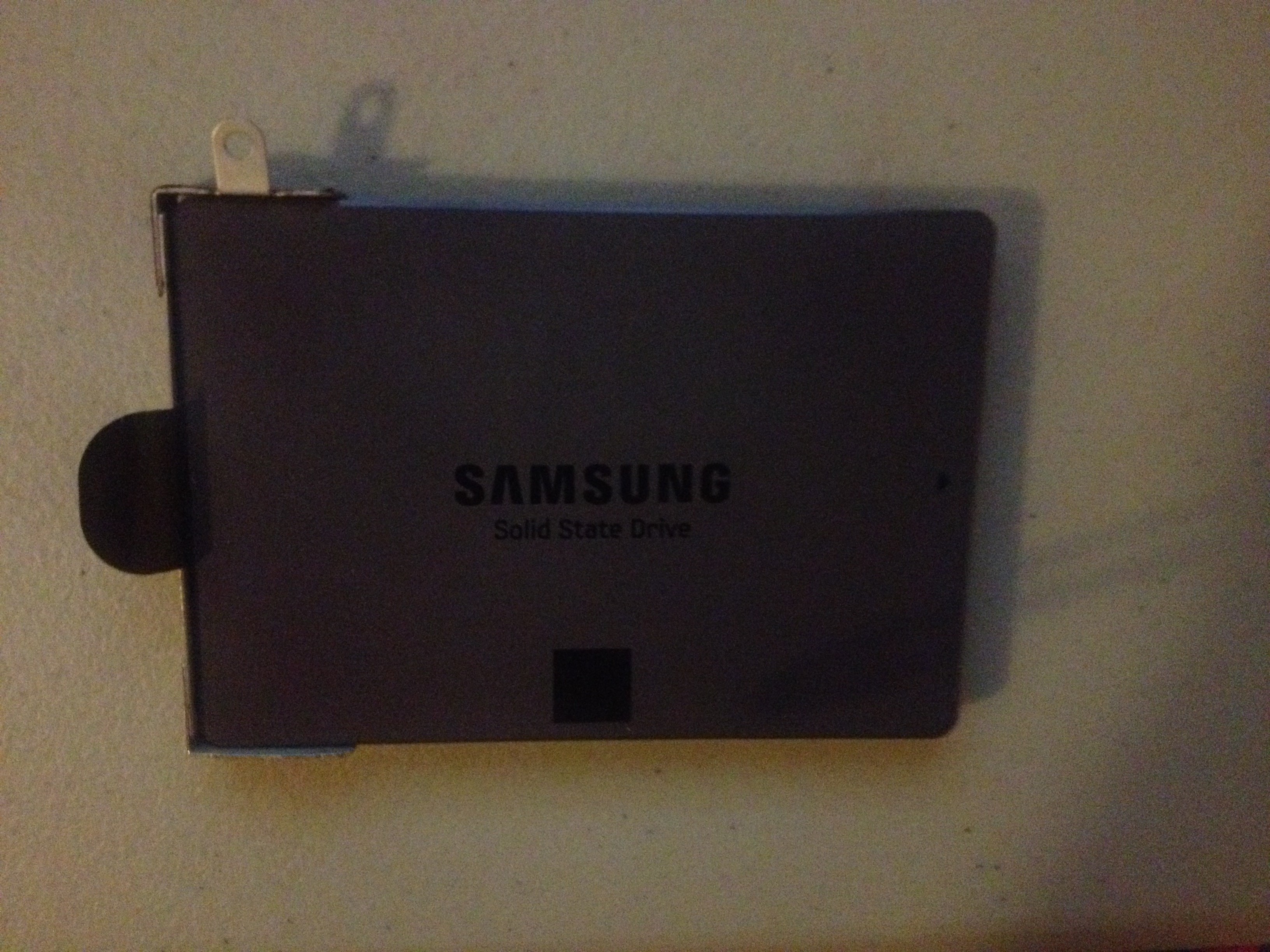
However, i noticed something that i had not noticed. My samsung ssds... the one that is the sager one that i want to put on the new computer, Its attached to this metal thing like a piece of metal. On the top left of it, theres like a little screw etc thats stuck to it. I cannot put my samsung evo pro into the enclosure. The other samsung ssd pro i can since its just the ssd.


Can someone tell me why my ssd looks like this? Its attached to something that I cannot pull it out of. Basically you can slip the part of the ssd into the slot but it cannot go in because theres a piece of metal thing attached to it. Does anyone know what im talking about? I can take a picture of it if you guys like. But i cannot put it into the enclosure because of this thing. Theres also like a piece of small sticker attached to it. Does anyone know what this is? I cant even test my enclosure/sdd because of this. On the back however, there are 2 screws stuck to it so that means i can unscrew it and then put it in the enclosure. But i want to know 100 percent what is this thing first before i do anything. I know for sure no ssd has anything attached to it like this so im wondering why theres a piece of metal attached to it.
 

My Computer My Computer

Computer type
Laptop
OS
Windows 10 Pro
Ya, we`d need a picture. It`s probably just some type of adapter.

But if you can just unscrew it, then do that, it won`t hurt it, be careful and use the right size screwdriver, don`t strip them.
 

My Computer My Computer

Computer type
PC/Desktop
Computer Manufacturer/Model Number
Skylake Special #666
OS
Windows 10 Pro x64
CPU
Intel Core i7 6700K
Motherboard
Asus Sabertooth Z170 Mark 1
Memory
GSkill TridentZ RGB 16GB 3600 16-16-16-36
Graphics Card(s)
EVGA GTX 980 Ti SC x2
Sound Card
Realtek High Definition
Monitor(s) Displays
AOC G2460PG
Screen Resolution
1920 x 1080 144Hz
Hard Drives
Samsung 860 Pro 256GB, Seagate Barracuda 4TB x2
PSU
EVGA 1000 P2, EVGA White Custom Braided Cables
Case
Corsair Vengeance C70 Gunmetal Black
Cooling
Corsair H100i v2, Corsair ML120 x2, Thermal Grizzly Kryonaut
Keyboard
Logitech G910 Orion Spectrum
Mouse
Logitech G700s
Internet Speed
Verizon Fios Quantum Gateway 75/75
Antivirus
Windows Defender, Malwarebytes Free 3.8.3
Browser
Chrome
Other Info
Corsair SP120 x4, LG Blu-ray Drive, Durabrand HT-395 100 Watt Dolby Digital Amp, Corsair H2100 Wireless 7.1 Headset


I googled adapter and well its not a full adapter as it covers a very small portion of it... Its from the left side. So i just unscrew it right? Also why is this even stuck to it?
 

My Computer My Computer

Computer type
Laptop
OS
Windows 10 Pro
Well it looks like it has a spot for a screw at the top to hold it in place on your latop. Did you remove a screw from there ?

I mean there has to be a reason it`s on there. :)

Yes just remove those 2 screws, carefully.
 

My Computer My Computer

Computer type
PC/Desktop
Computer Manufacturer/Model Number
Skylake Special #666
OS
Windows 10 Pro x64
CPU
Intel Core i7 6700K
Motherboard
Asus Sabertooth Z170 Mark 1
Memory
GSkill TridentZ RGB 16GB 3600 16-16-16-36
Graphics Card(s)
EVGA GTX 980 Ti SC x2
Sound Card
Realtek High Definition
Monitor(s) Displays
AOC G2460PG
Screen Resolution
1920 x 1080 144Hz
Hard Drives
Samsung 860 Pro 256GB, Seagate Barracuda 4TB x2
PSU
EVGA 1000 P2, EVGA White Custom Braided Cables
Case
Corsair Vengeance C70 Gunmetal Black
Cooling
Corsair H100i v2, Corsair ML120 x2, Thermal Grizzly Kryonaut
Keyboard
Logitech G910 Orion Spectrum
Mouse
Logitech G700s
Internet Speed
Verizon Fios Quantum Gateway 75/75
Antivirus
Windows Defender, Malwarebytes Free 3.8.3
Browser
Chrome
Other Info
Corsair SP120 x4, LG Blu-ray Drive, Durabrand HT-395 100 Watt Dolby Digital Amp, Corsair H2100 Wireless 7.1 Headset
And one other question. Once i plug this into my desktop to copy certain files, I will bring my new laptop once i get it and this SSD. Now the thing is i will have to have him replace this SSD with the 5400 rpm hard drive. Now i know he will power up windows to see if it works. But when he does this, do i have him do the setup of windows 10? Is that even called a setup? As you guys know, if you buy a new laptop and start it up, the process is very simple. But in my situation, I probably should have him do this for me since it would ask what partition i want to delete? Or it wouldn't? I know repair shops charge when installing an OS so this is what that is right? Of course i could do this easily except i dont know how to put the ssd in... well i could try but dont want to make a mistake jamming it... but even if i do and start up the laptop, is the process very simple? I had many times previously did a fresh install of windows of my old laptops many years ago and never did it right. Thus i think i kept deleting the wrong partition so when computer started up, you still see a lot of files in the computer drive that wasn't deleted.
 

My Computer My Computer

Computer type
Laptop
OS
Windows 10 Pro
Installing Windows is easy, you can do it yourself but if you`re not sure then have someone do it.

What is this mention of Windows 10 ? That`s blasphemy here :rolleyes:

But seriously, what OS are you gonna install ?

Perhaps we can pick this up again tomorrow, it`s very late :sleep:
 

My Computer My Computer

Computer type
PC/Desktop
Computer Manufacturer/Model Number
Skylake Special #666
OS
Windows 10 Pro x64
CPU
Intel Core i7 6700K
Motherboard
Asus Sabertooth Z170 Mark 1
Memory
GSkill TridentZ RGB 16GB 3600 16-16-16-36
Graphics Card(s)
EVGA GTX 980 Ti SC x2
Sound Card
Realtek High Definition
Monitor(s) Displays
AOC G2460PG
Screen Resolution
1920 x 1080 144Hz
Hard Drives
Samsung 860 Pro 256GB, Seagate Barracuda 4TB x2
PSU
EVGA 1000 P2, EVGA White Custom Braided Cables
Case
Corsair Vengeance C70 Gunmetal Black
Cooling
Corsair H100i v2, Corsair ML120 x2, Thermal Grizzly Kryonaut
Keyboard
Logitech G910 Orion Spectrum
Mouse
Logitech G700s
Internet Speed
Verizon Fios Quantum Gateway 75/75
Antivirus
Windows Defender, Malwarebytes Free 3.8.3
Browser
Chrome
Other Info
Corsair SP120 x4, LG Blu-ray Drive, Durabrand HT-395 100 Watt Dolby Digital Amp, Corsair H2100 Wireless 7.1 Headset
I would personally recommend doing a fresh install of the OS instead of upgrading one, regardless which one you'd pick.
Installing a Windows OS should be quite easy and pretty straightforward as long as you have the installation disk and your key. :)

Feel free to ask for a step-by-step guidance here on the forum. :)

Captain_WD.
 

My Computer My Computer

Computer type
PC/Desktop
Computer Manufacturer/Model Number
Dell
OS
Windows 7 Professional x64
Hey guys. I got the new laptop. But i have not unscrewed the thing from my samsung ssd yet so will do so soon. Then i will plug it into the enclosure and connect it into my desktop to see what files i want to move.


So just want to make sure. Copy everything that i need to into my desktop computer. Then connect it to my external hard drive. Then after i go to the repair shop with my new computer which i never turned on, have the guy switch my hard drive in that new computer with this new one. Then he still needs to power it up to see if it works. After that, do i have to have him do the installation? That part is easy if it was new computer and i dont have to change hard drive but the one part that im not sure is when i do the installation, there will be a part where it ask which partition to delete etc right since this is an old ssd? I know i get this message everytime back then when i tried to wipe out everything on my old computer and start new... i always never deleted the right partition.


Thus if its brand new computer and i use the hard drive that comes along with it, i wont get this message?


Well this new laptop is windows 10. My sager ssd is windows 7. So am i doing a fresh install or an upgrade? Since its new computer, this is a fresh install right? Of its with an older ssd. You mean i have the option to choose windows 7 or 10? I think i will just go with 10 as that makes it easier? I had no idea not much people use windows 7 anymore.


Sorry for asking all these questions and repeating few of it. Im just worried im going to make a mistake at some point. So after he swaps the hard drive, would it be possible for him to turn on my laptop to see if it works but then shut it down and not finish it? Then i go back home and i do it myself? Or is this bad since theres no way to really shut a computer off after you turn it on. The thing however is didn't someone mentione if i swap hard drives, they have to make sure i have the right drives etc and you have to also do something like this? I believe someone mentioned this? Because if so, then i obviously have him do everything. Im not sure how much it cost to have some just replace the ssd with the hard drive, but i know when they install windows, thats probably another $60? But is this considered installing windows or not? Because windows is already there right? So what is it called if its not installing?


Thanks guys im going to do the copying part now while i get a response from you guys before i know 100 percent every step before i head to the repair shop.
 

My Computer My Computer

Computer type
Laptop
OS
Windows 10 Pro
The dell xps 15 has 10 screws. That looks like i have to remove the whole thing?


Also one other important question. I put the sager ssd into the enclosure. Connected it to my desktop. It shows up as windows K drive. It shows 232 gb capacity and about 150gb used up so 82gb free if i highlight all these folders and right click properties.


So could i just highlight all these folders, then copy it to my 1tb external hard drive? Currently i have the ssd and enclosure and my external hard drive all connected to my desktop. That way once i do this, its 100 percent safe to bring the ssd and my new laptop to repair shop for them to replace the ssd since every single file in my hard drive is transferred to my external? Or is it way excessive to transfer everything? I want to make sure i have everything in my ssd into my external hard drive. Then once they do everything, any file i want to transfer to new laptop, i then transfer it by copy and pasting?


I will head to the repair shop soon so i want to make sure of this... but also the previous question before this as with the ssd hard drive swap and windows install at repair shop.


Thanks guys.
 
Last edited:

My Computer My Computer

Computer type
Laptop
OS
Windows 10 Pro
im doing the transfer and it looks like it will take over an hour to do this.


I thought about something else. After i transfer everything into the external hard drive, couldn't i just delete every single thing on the ssd drive? Thus if i do this, then i bring it to the repair shop, then everything in my hard drive is already deleted so when they swap my ssd with the other hard drive, then installing is a breeze since no partition will need to be deleted? Or that may be a problem? Thus this way, they swap hard drives then i can just do the setup on windows myself? Or again the issue arises where if the guy turns on the computer just to make sure the ssd works, well computer will be asking to set it up and there isn't a button to turn if off safely where i can just do everything myself in my apartment?


Can someone let me know this? I most likely will be heading to repair shop later on once all my files from my ssd hard drive is transferred to my external. But i want to know if i should delete everything in my hard drive or am i suppose to keep certain programs because of drivers? Or just delete my documents, pictures and personal things and maybe some programs that i downloaded but everything else just leave it there? And would him installing the new ssd driver into it require me to download drivers and stuff like that? If not, it seem very simple for me to do it but of course the issue of hey when he turns it on, it will ask me to setup windows right?


Thanks guys and sorry for all these questions.
 

My Computer My Computer

Computer type
Laptop
OS
Windows 10 Pro
see comments

Hey guys. I got the new laptop. But i have not unscrewed the thing from my samsung ssd yet so will do so soon. Then i will plug it into the enclosure and connect it into my desktop to see what files i want to move.


So just want to make sure. Copy everything that i need to into my desktop computer. Then connect it to my external hard drive. Then after i go to the repair shop with my new computer which i never turned on, have the guy switch my hard drive in that new computer with this new one. Then he still needs to power it up to see if it works.

Why wouldn't YOU power it up to see if it works?


After that, do i have to have him do the installation?


No, but considering your anxiety level and experience level, you may as well.


That part is easy if it was new computer and i dont have to change hard drive but the one part that im not sure is when i do the installation, there will be a part where it ask which partition to delete etc right since this is an old ssd?


For a clean installation, you would delete all partitions. All. Repeat ALL. And you have to have some Windows 10 installation media (disc or USB flash drive), which I'm guessing you do NOT have.


But of course you don't have to do a clean install. Since you DON'T have installation media and are inexperienced, I'd probably have the shop clone or image the existing Windows 10 install to the Samsung SSD. That way, the install would be exactly as if you had ordered the new Dell laptop with the Samsung SSD rather than the hybrid drive. You also would avoid any possible shenanigans with licensing. Are you confident this repair shop is an honest outfit?


Thus if its brand new computer and i use the hard drive that comes along with it, i wont get this message?

A message about deleting partitions on a brand new computer? No. It should just start up and run. You should find out if it won't. Why rely on the shop to find that out?


Well this new laptop is windows 10. My sager ssd is windows 7. So am i doing a fresh install or an upgrade?

You are doing a clean install to an SSD or a clone or image from the hybrid drive in the new laptop to the SSD. You have to decide which. You are not doing an upgrade.


You mean i have the option to choose windows 7 or 10?

No, only Windows 10. The new laptop does not have a Windows 7 license. If you want to put 7 on it, you have to buy 7 separately.

I had no idea not much people use windows 7 anymore.


Twice as many people use Windows 7 as Windows 10, but you don't have a choice unless you lay out more money or already own a retail Windows 7 license (unlikely).


Sorry for asking all these questions and repeating few of it. Im just worried im going to make a mistake at some point.

You should be worried. That's why you should have a competent shop do it. You walk in with the new laptop in one hand and the SSD in the other. You tell them what you want them to do. You come back the next day and walk out with the new laptop in one hand and the old hybrid drive in the other. The new laptop now has the SSD inside it, with Windows 10 on that SSD, just as if you had ordered it from Dell that way.


So after he swaps the hard drive, would it be possible for him to turn on my laptop to see if it works but then shut it down and not finish it?

He could see if the SSD is visible and apparently working OK without installing Windows 10 onto it, but it's your job to determine if the the thing "works" at home by yourself before going to the shop. Maybe the motherboard is bad. Maybe the screen has a bunch of bad pixels. Maybe the keyboard is flaky, etc.


Then i go back home and i do it myself?

Yes, you could do that, but you may be in over your head, judging by this thread. You apparently don't have installation media. What are you going to do about that? You apparently have never before installed Windows. You seem to have no experience with a cloning or imaging application. The path of least resistance is to have the shop do it all since I guess you have already decided they are going to do the drive swap.

Your primary concern would be to pick the right shop and be able to tell them what you need done. Do you tell them "clean install to SSD" or do you tell them "transfer existing install to SSD"?


Or is this bad since theres no way to really shut a computer off after you turn it on


Hmmmm........................


The thing however is didn't someone mentione if i swap hard drives, they have to make sure i have the right drives etc and you have to also do something like this?

Something like what?

I believe someone mentioned this? Because if so, then i obviously have him do everything. Im not sure how much it cost to have some just replace the ssd with the hard drive, but i know when they install windows, thats probably another $60? But is this considered installing windows or not? Because windows is already there right? So what is it called if its not installing?

You'd have to ask the shop about their rates, but of course you need to know what you want. Maybe you don't.

 
Last edited:

My Computer My Computer

Computer type
PC/Desktop
Computer Manufacturer/Model Number
Ignatz Special; 4 speed manual gearbox; factory air conditioning; one of one
OS
Windows 7 Home Premium SP1, 64-bit
CPU
Intel Skylake i5-6600K, not overclocked
Motherboard
AsRock Z170M Extreme 4, micro ATX
Memory
8 GB HyperX DDR4-2666 (2 x 4 GB)
Graphics Card(s)
none; graphics are integrated on CPU
Sound Card
onboard: Realtek ALC1150; external: USB Behringer UF0-202
Monitor(s) Displays
Dell S2340M 23 inch IPS
Screen Resolution
1600 x 900
Hard Drives
System: Crucial MX100 series SSD, 128 GB;
Data: Samsung Spinpoint 103SJ, 1 TB;
Backup: WD Caviar Green WD30EZRX-00D8PB0, 3 TB
PSU
Rosewill SilentNight 500 watt fanless, semi-modular
Case
Antec Solo II
Cooling
Noctua NH-U12S; Noctua F12 intake, Noctua S12A exhaust
Keyboard
Microsoft 200 6JH-00001 USB
Mouse
Dell or Microsoft optical wired; USB
Antivirus
Microsoft Security Essentials and Malwarebytes Premium
Browser
Pale Moon
Other Info
All fans PWM; speeds at idle: CPU circa 500 rpm; intake circa 600 rpm; exhaust circa 600 rpm; CPU temps 27 idle and 47 C load in a warm room (27 C/81 F) when running Intel Extreme Tuning Utility stress test.
see comments

Also one other important question. I put the sager ssd into the enclosure. Connected it to my desktop. It shows up as windows K drive. It shows 232 gb capacity and about 150gb used up so 82gb free if i highlight all these folders and right click properties.


So could i just highlight all these folders, then copy it to my 1tb external hard drive?

That's right. You should be able to copy stuff around with the mouse or keyboard. If you can't, something is wrong.


Currently i have the ssd and enclosure and my external hard drive all connected to my desktop. That way once i do this, its 100 percent safe to bring the ssd and my new laptop to repair shop for them to replace the ssd since every single file in my hard drive is transferred to my external?

It's up to you to know whether you have in fact copied ALL files you care about to the external. You have to know where all of your "original" files are. If you forgot about those pictures of Grandma that you had stored in this folder, then they would be lost. And there's a remote chance of drive failure, copying errors, etc. You could make a second set of copies of the most important stuff to a USB flash drive if that would ease your anxiety.


Or is it way excessive to transfer everything? I want to make sure i have everything in my ssd into my external hard drive.

"Everything"?. Hmmm..........including any operating system that might be on it? Including any installed programs that might be on it? Or just personal files?

If you don't care about something, don't copy it. If you do care about it, copy it.

If you are unsure about whether you care about something, copy it.

There's no point in copying anything related to Windows 7 or installed programs that are now on the SSD to the external. You are saying bye-bye to Windows 7.

Concentrate on YOUR PERSONAL FILES--pictures, saved email messages, browser bookmarks, mp3s, videos, the book you wrote, your plans for world domination, etc.


Then once they do everything, any file i want to transfer to new laptop, i then transfer it by copy and pasting?

Yep.
 
Last edited:

My Computer My Computer

Computer type
PC/Desktop
Computer Manufacturer/Model Number
Ignatz Special; 4 speed manual gearbox; factory air conditioning; one of one
OS
Windows 7 Home Premium SP1, 64-bit
CPU
Intel Skylake i5-6600K, not overclocked
Motherboard
AsRock Z170M Extreme 4, micro ATX
Memory
8 GB HyperX DDR4-2666 (2 x 4 GB)
Graphics Card(s)
none; graphics are integrated on CPU
Sound Card
onboard: Realtek ALC1150; external: USB Behringer UF0-202
Monitor(s) Displays
Dell S2340M 23 inch IPS
Screen Resolution
1600 x 900
Hard Drives
System: Crucial MX100 series SSD, 128 GB;
Data: Samsung Spinpoint 103SJ, 1 TB;
Backup: WD Caviar Green WD30EZRX-00D8PB0, 3 TB
PSU
Rosewill SilentNight 500 watt fanless, semi-modular
Case
Antec Solo II
Cooling
Noctua NH-U12S; Noctua F12 intake, Noctua S12A exhaust
Keyboard
Microsoft 200 6JH-00001 USB
Mouse
Dell or Microsoft optical wired; USB
Antivirus
Microsoft Security Essentials and Malwarebytes Premium
Browser
Pale Moon
Other Info
All fans PWM; speeds at idle: CPU circa 500 rpm; intake circa 600 rpm; exhaust circa 600 rpm; CPU temps 27 idle and 47 C load in a warm room (27 C/81 F) when running Intel Extreme Tuning Utility stress test.
see comments

im doing the transfer and it looks like it will take over an hour to do this.


I thought about something else. After i transfer everything into the external hard drive, couldn't i just delete every single thing on the ssd drive? Thus if i do this, then i bring it to the repair shop, then everything in my hard drive is already deleted so when they swap my ssd with the other hard drive, then installing is a breeze since no partition will need to be deleted?

Deleting all files does NOT delete partitions. Deleting a partition takes about 1 second flat. If you want the shop to do a clean install, they will delete all partitions, regardless of whether or not you have previously deleted all files.


Or that may be a problem? Thus this way, they swap hard drives then i can just do the setup on windows myself? Or again the issue arises where if the guy turns on the computer just to make sure the ssd works, well computer will be asking to set it up and there isn't a button to turn if off safely where i can just do everything myself in my apartment?


Can someone let me know this? I most likely will be heading to repair shop later on once all my files from my ssd hard drive is transferred to my external. But i want to know if i should delete everything in my hard drive or am i suppose to keep certain programs because of drivers? Or just delete my documents, pictures and personal things and maybe some programs that i downloaded but everything else just leave it there? And would him installing the new ssd driver into it require me to download drivers and stuff like that? If not, it seem very simple for me to do it but of course the issue of hey when he turns it on, it will ask me to setup windows right?

All of the above just indicates that you are worried and confused and shouldn't do any of this yourself.

You have posted thousands of words but still apparently have not decided what you want the shop to do.

1: clean install of Windows 10 to the SSD

or

2: transfer of existing Windows 10 install to the SSD.

I've mentioned it a half dozen times to no avail.

You need to decide on the answer to that, then copy "everything" to the external, then find a competent shop, then be able to tell them what you want, without confusion. That's 4 tasks. See if you can compartmentalize them in your mind and start with the first task.
 

My Computer My Computer

Computer type
PC/Desktop
Computer Manufacturer/Model Number
Ignatz Special; 4 speed manual gearbox; factory air conditioning; one of one
OS
Windows 7 Home Premium SP1, 64-bit
CPU
Intel Skylake i5-6600K, not overclocked
Motherboard
AsRock Z170M Extreme 4, micro ATX
Memory
8 GB HyperX DDR4-2666 (2 x 4 GB)
Graphics Card(s)
none; graphics are integrated on CPU
Sound Card
onboard: Realtek ALC1150; external: USB Behringer UF0-202
Monitor(s) Displays
Dell S2340M 23 inch IPS
Screen Resolution
1600 x 900
Hard Drives
System: Crucial MX100 series SSD, 128 GB;
Data: Samsung Spinpoint 103SJ, 1 TB;
Backup: WD Caviar Green WD30EZRX-00D8PB0, 3 TB
PSU
Rosewill SilentNight 500 watt fanless, semi-modular
Case
Antec Solo II
Cooling
Noctua NH-U12S; Noctua F12 intake, Noctua S12A exhaust
Keyboard
Microsoft 200 6JH-00001 USB
Mouse
Dell or Microsoft optical wired; USB
Antivirus
Microsoft Security Essentials and Malwarebytes Premium
Browser
Pale Moon
Other Info
All fans PWM; speeds at idle: CPU circa 500 rpm; intake circa 600 rpm; exhaust circa 600 rpm; CPU temps 27 idle and 47 C load in a warm room (27 C/81 F) when running Intel Extreme Tuning Utility stress test.
Hey guys. So i had just copied the ssd in the enclosure to my external hard drive. Its 232gb total and about 150gb used so 82gb free. It was taking about 2 hours... but then as it was say 80 percent finished, that message was no longer there. I then checked my external hard drive and it only copied about 54gb to it. I know this because my external had about 919gb free out of 931gb.


I then went into the external hard drive and noticed not all folders were copied. I then just copy and pasted each folder that was not in the external hard drive. I did this with all and all that is used up was 54gb total. Does anyone know why? However, i took a look and the files that i wanted to transfer to my external are there. But i have no idea what the other 96gb is?


About the why don't i just power up my new laptop first... well when you get a new laptop, you plug in power then power it up. But when you do this, im pretty certain it ask you to install windows. Isn't that not what i want to do? I want to have the ssd replaced first then start it up right? Because let say i do start it up, i certainly am not doing the installation right? But is there a way to properly shut it down? Because everytime i ever got a new computer, i made sure i set it up correctly by following all instructions. So you want me to turn on laptop and it works... how do you want me to shut it down properly? Or do you want me to just do the installation myself with the hard drive as it is. Then go there and ask them, okay i need to replace the hard drive to ssd?
 

My Computer My Computer

Computer type
Laptop
OS
Windows 10 Pro
Yes, you could do that, but you may be in over your head, judging by this thread. You apparently don't have installation media. What are you going to do about that? You apparently have never before installed Windows. You seem to have no experience with a cloning or imaging application. The path of least resistance is to have the shop do it all since I guess you have already decided they are going to do the drive swap.

Your primary concern would be to pick the right shop and be able to tell them what you need done. Do you tell them "clean install to SSD" or do you tell them "transfer existing install to SSD"?


I already know which place im going as the guy i go to is very knowledgeable. Well from what im describing i want the clean install right? Basically i want to have my ssd replaced with the hard drive already in the laptop when i use this computer. Then any files that i want to put into this laptop, i do this later on since my files are in my external hard drive. That obviously i do myself. I want to use windows 10.


And as to the i never installed windows before... does getting a new computer few times and well powering it up and then following instructions like putting your name, password if you want etc counts or does that not count? I assume no based on what you are describing? However, i have many times with an older computer formatted my computer and installed windows again. I did this with either a windows cd or a windows file in a usb. However, each time i did this, after i did the format of my computer, assuming i have 232gb available on that hard drive to make it simple. It would always show about 160gb or so used up because i deleted the wrong partition etc each time. So that would count as installing windows but i did it wrong correct? There was always 3 partitions and each time i did this back then with old computers, i would follow instructions but it never did it correctly.
 

My Computer My Computer

Computer type
Laptop
OS
Windows 10 Pro
Okay so we all agree im going to bring the ssd and laptop to him and have him do everything. However, do you suggest i just delete my documents, files, pictures and other things on the ssd besides programs? I already have those backed up on my external.


And the other thing is the powering up. That is what confuses me the most. Unless you want me to power up the laptop, start it up and then setup windows on the 5400rpm, how do i shut down the computer properly then since thats what shows up on the computer screen first when you are setting up the computer?


Yes i have quite a bit of anxiety on this and thus i will have repair shop do all this.
 

My Computer My Computer

Computer type
Laptop
OS
Windows 10 Pro
Back
Top