Solved How to install Windows 7 on Skylake Dell XPS 8910

Uploading something for you. Might take a little while.
 

My Computers My Computers

  • At a glance

    7 X64i5 84002x8gb 3200mhz
    Computer type
    PC/Desktop
    OS
    7 X64
    CPU
    i5 8400
    Motherboard
    gigabyte b365m ds3h
    Memory
    2x8gb 3200mhz
    Hard Drives
    various
    PSU
    pure power 11 400w cm
    Case
    Coolermaster
    Cooling
    cryorig m9i
  • At a glance

    7x64g54008gb ddr4 2400
    Computer type
    PC/Desktop
    OS
    7x64
    CPU
    g5400
    Motherboard
    ga b365m ds3h
    Memory
    8gb ddr4 2400
    PSU
    xfx pro 450w
Thank you very much, look forward to using it and hope it helps.

Such a complicated idea I read so many posts and comments on videos and other forums where users just say they give up, that is sad to me because then they are not happy when using their device. I dunno maybe for me its also part that I feel like M$ had a very good OS with Win 7 and would use Win 10 if it wasnt like a mobile device with all the apps, but I guess that is future of computing, but at least maybe this time I can use Win 7 for one long last good run I hope.
 

My Computer My Computer

At a glance

Windows 7 Ultimate x64
Computer type
PC/Desktop
OS
Windows 7 Ultimate x64
17514x64
 
Last edited:

My Computers My Computers

  • At a glance

    7 X64i5 84002x8gb 3200mhz
    Computer type
    PC/Desktop
    OS
    7 X64
    CPU
    i5 8400
    Motherboard
    gigabyte b365m ds3h
    Memory
    2x8gb 3200mhz
    Hard Drives
    various
    PSU
    pure power 11 400w cm
    Case
    Coolermaster
    Cooling
    cryorig m9i
  • At a glance

    7x64g54008gb ddr4 2400
    Computer type
    PC/Desktop
    OS
    7x64
    CPU
    g5400
    Motherboard
    ga b365m ds3h
    Memory
    8gb ddr4 2400
    PSU
    xfx pro 450w
Thank you SIW2 for taking time to upload that file, now have it here downloaded, it is very appreciated. Mounted the file on diskparted USB and then used that to use the cd rom to install windows 7 on an HDD, was that the right way?

Removed SSD with Win 10 from computer.
Using the USB a desktop environment appeared.
From there placed OEM Win 7 disk in drive and began install on to a 2tb hdd at each restart manually choosing to boot to the HDD which worked.
Windows 7 ult seems installed on HDD.
I am at the screen for Win 7 where it says to input a computer name but the cursor wont move and no keyboard response.

Seems I am stuck at this screen with the problem from before where keyboard and mouse dont do anything.
 
Last edited:

My Computer My Computer

At a glance

Windows 7 Ultimate x64
Computer type
PC/Desktop
OS
Windows 7 Ultimate x64
You will have to install usb3 drivers into your installed windows.

You can use dism++ to do that. It is in the program files folder of the 17514 iso.

The drivers are here: View attachment Drivers.zip
 

My Computers My Computers

  • At a glance

    7 X64i5 84002x8gb 3200mhz
    Computer type
    PC/Desktop
    OS
    7 X64
    CPU
    i5 8400
    Motherboard
    gigabyte b365m ds3h
    Memory
    2x8gb 3200mhz
    Hard Drives
    various
    PSU
    pure power 11 400w cm
    Case
    Coolermaster
    Cooling
    cryorig m9i
  • At a glance

    7x64g54008gb ddr4 2400
    Computer type
    PC/Desktop
    OS
    7x64
    CPU
    g5400
    Motherboard
    ga b365m ds3h
    Memory
    8gb ddr4 2400
    PSU
    xfx pro 450w
Thanks for the reply and drivers, it seems they dont work as I am still stuck with no cursor or mouse control on the windows 7 name the computer screen on the HDD. Here is what I did.:

Load USB, open dism
Clicked box on right which was local drive D and opened session.
Went to driver management and added the folder of drivers from the zip.
It looked liked it added the drivers as it shows USB controllers in the driver management window for the open session on local disk d.
Closed dism didnt see a way to save it? Did I miss a step?

Maybe I need a driver from here? Tried running the "ASMedia USB 3.1 eXtensible Host Controller Driver" exe from there but it said memory violation at 0x0000000 so I was unable to install it from the USB.
Product Support | Dell US
 

My Computer My Computer

At a glance

Windows 7 Ultimate x64
Computer type
PC/Desktop
OS
Windows 7 Ultimate x64
Sounds like you did the right thing.

Here are more drivers, must be one of these as they are from the 17514 iso, which works fine.

View attachment NEWDRVSx64.zip
 

My Computers My Computers

  • At a glance

    7 X64i5 84002x8gb 3200mhz
    Computer type
    PC/Desktop
    OS
    7 X64
    CPU
    i5 8400
    Motherboard
    gigabyte b365m ds3h
    Memory
    2x8gb 3200mhz
    Hard Drives
    various
    PSU
    pure power 11 400w cm
    Case
    Coolermaster
    Cooling
    cryorig m9i
  • At a glance

    7x64g54008gb ddr4 2400
    Computer type
    PC/Desktop
    OS
    7x64
    CPU
    g5400
    Motherboard
    ga b365m ds3h
    Memory
    8gb ddr4 2400
    PSU
    xfx pro 450w
Thanks for helping with this, I know its real annoying but I appreciate your helping me digging out those drivers. Seems I am still stuck at this Computer name part for Win 7 ultimate where the mouse and keyboard are not responding to pass this screen. Mega was very helpful being able to find there is a Z170 mobo in the computer, does that help at all? Would these drivers be recognized at that screen where it is asking me to name the computer? Tried to boot to safe mode but an error message popped up saying it will not load until setup is complete.

Here is a picture I took of dism showing the USB drivers installed, is this done right?

IMG_0899.jpg
 

My Computer My Computer

At a glance

Windows 7 Ultimate x64
Computer type
PC/Desktop
OS
Windows 7 Ultimate x64
Boot up the 17514 usb stick , then check in device manager to see which drivers are loaded.
 

My Computers My Computers

  • At a glance

    7 X64i5 84002x8gb 3200mhz
    Computer type
    PC/Desktop
    OS
    7 X64
    CPU
    i5 8400
    Motherboard
    gigabyte b365m ds3h
    Memory
    2x8gb 3200mhz
    Hard Drives
    various
    PSU
    pure power 11 400w cm
    Case
    Coolermaster
    Cooling
    cryorig m9i
  • At a glance

    7x64g54008gb ddr4 2400
    Computer type
    PC/Desktop
    OS
    7x64
    CPU
    g5400
    Motherboard
    ga b365m ds3h
    Memory
    8gb ddr4 2400
    PSU
    xfx pro 450w
Need to go now. Can continue tomorrow, probabaly.
 

My Computers My Computers

  • At a glance

    7 X64i5 84002x8gb 3200mhz
    Computer type
    PC/Desktop
    OS
    7 X64
    CPU
    i5 8400
    Motherboard
    gigabyte b365m ds3h
    Memory
    2x8gb 3200mhz
    Hard Drives
    various
    PSU
    pure power 11 400w cm
    Case
    Coolermaster
    Cooling
    cryorig m9i
  • At a glance

    7x64g54008gb ddr4 2400
    Computer type
    PC/Desktop
    OS
    7x64
    CPU
    g5400
    Motherboard
    ga b365m ds3h
    Memory
    8gb ddr4 2400
    PSU
    xfx pro 450w
Just found this article listing that Dell makes Windows 7 images with USB 3.0 and NVME drivers. Windows 7 recovery image download available with USB 3.1 and NVMe driver support | Dell US

Problem is my desktop an XPS 8910 is not listed. The computer came with Windows 10 Pro, meaning that through dell it has downgrade rights to windows 7 (Reg Win 10 users on the 8910 do not have this right.). Tried checking my drivers page and clicked change OS, there is a listing for Windows 8.1 64 bits. Problem is there is no Operating system category present with recovery media for either Windows 10 or Windows 8, ugh.

Would this work?
Looked over the list of computers and found a service tag for a Vostro 3900, oddly this computer has all the factory recovery images posted in the operating system category. Am now downloading what appears to be Win 7 Pro SP1 iso.
Questions:
From the link posted at the start of this post, would it be correct to assume that this Win 7 image has the USB 3.0 drivers on it and NVME for 6th generation skylake processors which I guess I have since its a 6700k?
Is Win 7 pro upgradeable to Win7 ultimate OEM disk from dell I have should this work?
Does anyone have a link to a similar dell article with Win7 ultimate instead?

***Does this mean Dell just has these Win 7 images sitting around somewhere prepatched with USB 3.1 and NVME I could just use or any dell user?


Possibly useful info from the dell driver page for XPS 8910
"ASMedia USB 3.1 eXtensible Host Controller Driver" it says "Version 1.16.33.1, A01"

 
Last edited:

My Computer My Computer

At a glance

Windows 7 Ultimate x64
Computer type
PC/Desktop
OS
Windows 7 Ultimate x64
Boot up the 17514 usb stick , then check in device manager to see which drivers are loaded.

**Also could you look at my previous post if you have any thoughts on it?


First image shows what USB drivers appear to be installed I am unsure if that means on the stick or in Win7
IMG_0904.jpg


Second Image indicates there is still some unknown USB controller listed
IMG_0906.jpg
 

My Computer My Computer

At a glance

Windows 7 Ultimate x64
Computer type
PC/Desktop
OS
Windows 7 Ultimate x64
1. "Second Image indicates there is still some unknown USB controller listed".

Run pnputil all. It is under the start menu\program files. It will take a minute. Then check which drvers are loaded.


2. Yes, Dell have recovery media with updates and drivers included. Not sure if all their skylake pc's use the same recovery media.

However, those updates and drivers are only in the one Edition ( e.g. Pro). The ultimate image on the media doesn't have those included.

It is possible to use dism7 ( on the 17514 desktop) to change the Pro Edition to Ultimate, but you would also need to use the winre.wim and boot.wim from the Dell media.
 
Last edited:

My Computers My Computers

  • At a glance

    7 X64i5 84002x8gb 3200mhz
    Computer type
    PC/Desktop
    OS
    7 X64
    CPU
    i5 8400
    Motherboard
    gigabyte b365m ds3h
    Memory
    2x8gb 3200mhz
    Hard Drives
    various
    PSU
    pure power 11 400w cm
    Case
    Coolermaster
    Cooling
    cryorig m9i
  • At a glance

    7x64g54008gb ddr4 2400
    Computer type
    PC/Desktop
    OS
    7x64
    CPU
    g5400
    Motherboard
    ga b365m ds3h
    Memory
    8gb ddr4 2400
    PSU
    xfx pro 450w
The other way is to add the required updates and drivers to an Ultimate image, before installing. ( Boot.wim and install.wim also need to have the updates and drivers and are the same for all editions. )

It seems they have used the newer image based setup media.
 
Last edited:

My Computers My Computers

  • At a glance

    7 X64i5 84002x8gb 3200mhz
    Computer type
    PC/Desktop
    OS
    7 X64
    CPU
    i5 8400
    Motherboard
    gigabyte b365m ds3h
    Memory
    2x8gb 3200mhz
    Hard Drives
    various
    PSU
    pure power 11 400w cm
    Case
    Coolermaster
    Cooling
    cryorig m9i
  • At a glance

    7x64g54008gb ddr4 2400
    Computer type
    PC/Desktop
    OS
    7x64
    CPU
    g5400
    Motherboard
    ga b365m ds3h
    Memory
    8gb ddr4 2400
    PSU
    xfx pro 450w
*Ran pnputil watching a greenbox install *.inf files some fail some succeed.
*Prior to rebooting the exclamation points were less but there was still one that said USB controller on one item after running pnputil.
*Upon boot to HDD the keyboard and mouse did not respond on the computer name screen of setup for win7.
*Booting back to USB noticed many of the exclamation marks returned, same USB controller has exclamation mark it seems.

These inf files are driver files, though I cant run the dell exe from the USB 17514 maybe the driver inf files are in that exe that could be loaded from dism if could get their folders?

First image shows USB drivers installed
IMG_0912.jpg


Second image shows a single instance of an exclamation mark on a USB controller
IMG_0906.jpg
 

My Computer My Computer

At a glance

Windows 7 Ultimate x64
Computer type
PC/Desktop
OS
Windows 7 Ultimate x64
These newer Win7 images dell is using may have the updates wrapped into the wim files for installation maybe? Would need to test that which I can do later. You mentioned being able to upgrade pro to ultimate, Ultimate is the only OS ever purchased from Dell which is included as far as I know from downgrade rights for dell win 10 pro users. once pro is installed would ultimate from an OEM dell disc just be an upgrade so it wouldnt remove the drivers from pro right?

*Dell Win7 images indicate they are made for use with 6th generation skylake processors.
*Would an I7-6700k be a sixth generation skylake processor?
According to intel the I7-6700k processor in the dell XPS 8910 is sixth generation: 6th Generation Intel(R) Core™ i7-6700K and i5-6600K Processors

**EDIT: Attempting Dell Win7 image modified with 3.0 for installation from USB without use of 17514 to determine functionality of mouse and keyboard during installation. All previous steps are repeatable to arrive at last working point in discussion.
 
Last edited:

My Computer My Computer

At a glance

Windows 7 Ultimate x64
Computer type
PC/Desktop
OS
Windows 7 Ultimate x64
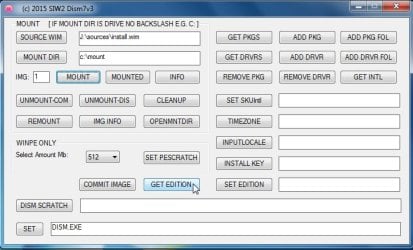
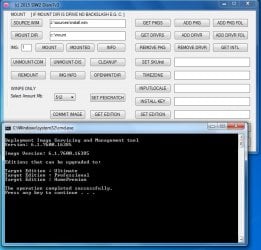
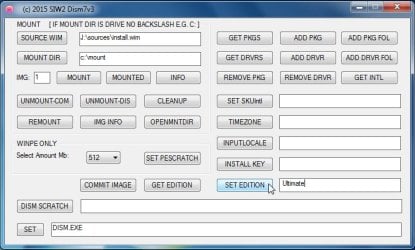
See how you get on with that.
FYI win7 images can be changed to a higher edition.

getedn1.jpg

getedn2.jpg

getedn.jpg
 

My Computers My Computers

  • At a glance

    7 X64i5 84002x8gb 3200mhz
    Computer type
    PC/Desktop
    OS
    7 X64
    CPU
    i5 8400
    Motherboard
    gigabyte b365m ds3h
    Memory
    2x8gb 3200mhz
    Hard Drives
    various
    PSU
    pure power 11 400w cm
    Case
    Coolermaster
    Cooling
    cryorig m9i
  • At a glance

    7x64g54008gb ddr4 2400
    Computer type
    PC/Desktop
    OS
    7x64
    CPU
    g5400
    Motherboard
    ga b365m ds3h
    Memory
    8gb ddr4 2400
    PSU
    xfx pro 450w
See how you get on with that.
FYI win7 images can be changed to a higher edition.

Have program open now to change edition but do not see the same layout as shown in pictures above, the options "commit image" and "get edition" are not listed even when following the steps of selecting the .wim from the usb and creating a mount folder to mount. What steps would be needed to make those options appear? Is the version upped that I am using maybe missing those? the CMD screens are not black and white their green or yellowish.

*In Dism7v3 when clicking info it lists Windows 7 Ultimate as index 4

*In Dism x 64 using the tool imagex I can confirm seeing win 7 ultimate present just not sure how to set it as the image on that usb.
 

My Computer My Computer

At a glance

Windows 7 Ultimate x64
Computer type
PC/Desktop
OS
Windows 7 Ultimate x64
View attachment Dism7v3-x86-x64.zip

Browse to the wim.

Select a folder.

Type the number of the image you want to mount. IMG: ( Whichever is Professional - probably image 3).

Click MOUNT. ( Takes a minute to mount )

Type Ultimate, then click SET EDITION. A command window will show you the progress (may take 30 secs or so. )

Then click UNMOUNT-COM. ( Note, the name field doesn't change until you install, as the changes are pending).
 

My Computers My Computers

  • At a glance

    7 X64i5 84002x8gb 3200mhz
    Computer type
    PC/Desktop
    OS
    7 X64
    CPU
    i5 8400
    Motherboard
    gigabyte b365m ds3h
    Memory
    2x8gb 3200mhz
    Hard Drives
    various
    PSU
    pure power 11 400w cm
    Case
    Coolermaster
    Cooling
    cryorig m9i
  • At a glance

    7x64g54008gb ddr4 2400
    Computer type
    PC/Desktop
    OS
    7x64
    CPU
    g5400
    Motherboard
    ga b365m ds3h
    Memory
    8gb ddr4 2400
    PSU
    xfx pro 450w
If you are going to use Dell skylake recovery media, suggest you rename sources\ei.cfg to ei.cfg.bak.

It should then give the option which image to install. It will be the third one down - probably still called Pro. (changes are pending ) After install is complete it will be Ultimate.

The product key and xml file in the Dell skylake media will be for Pro, so you will need an Ultimate key to activate later.
 

My Computers My Computers

  • At a glance

    7 X64i5 84002x8gb 3200mhz
    Computer type
    PC/Desktop
    OS
    7 X64
    CPU
    i5 8400
    Motherboard
    gigabyte b365m ds3h
    Memory
    2x8gb 3200mhz
    Hard Drives
    various
    PSU
    pure power 11 400w cm
    Case
    Coolermaster
    Cooling
    cryorig m9i
  • At a glance

    7x64g54008gb ddr4 2400
    Computer type
    PC/Desktop
    OS
    7x64
    CPU
    g5400
    Motherboard
    ga b365m ds3h
    Memory
    8gb ddr4 2400
    PSU
    xfx pro 450w
Back
Top