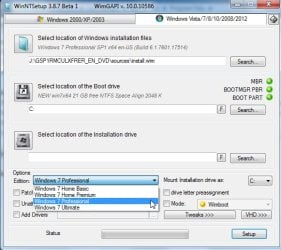
Note: When installed a Dell OEM Windows 7 pro as a test to an HDD on the machine it did not auto activate. Are they supposed to auto activate? Or is there some "official" way I missed of downgrading it? Read somewhere about the keys being in the UEFI, not sure what that means though.
Best Option:
You will need a key that activates online. Dell may provide one if you hassle them - you are entoled to downgrade, so there must be a way to get that key - it will be for Pro.
Note:
If you really want Ult, you will need an Ult key. You can use one from another machine in this scenario, tho you may need to call MS if it doesn't activate by itself. Do you have an Ult key on another machine?
Have a bunch of machines currently used and unused from Dell to Alienware in storage all windows 7 ultimate, their not out of date yet entirely. This is the first and only machine I have with Windows 10. Just happen to upgrade machines pretty quick hence the immediate purchase of a dell XPS 8910 fresh off the product line. Or I just buy a key, keys are available to buy which makes that a non issue. This skylake issue is the one thing preventing me from purchasing a new alienware since they would face the same issue

The issue is getting it installed period to test if it works satisfactorily with the components of the 8910. Contacting dell tech about the issue may prove fruitless since I am unsure if any skylake machine made by dell had Windows 7 ultimate. It seems Dell tech at least online have no solution I can find in any knowledgebase article regarding Ultimate but there are articles about win7pro on skylake and a Dell win7 Pro iso created using all the correct drivers for my system which is good. So far I have not had much luck finding the same thing from Dell with Win7 Ultimate, it may be out there but I havent found it yet due to maybe using the wrong search terms? I think there are still some options worth testing here or trying to get Windows 7 ultimate to work? Would like to explore those options until exhausted, it may be a waste of time to some, but for me I see it as more of a challenge like a puzzle to figure out.
Keep in mind, buying a key is easy, it does not make anything magically work, I really wish it was that easy because I would have done that first. A key does not make the USB 3.1 magically get recognized or force intel to see the NVME drive or the USB 2.0 ports, its just a key, it is not a working iso, and microsoft as far as I can tell has no working iso for windows ultimate with usb 3.1 and NVME drivers to allow it to be installed, maybe there is one but I have not found an official or unofficial link as of yet sadly. Maybe this is due to the move at Microsoft towards providing better existing support for Windows 10 users which would make sense to cut back on support for past OS's like Windows 7? (The whole USB issue with 2.0 ports not being seen seems to be a skylake only issue due to the type of host controller I think or something like that, not an expert there. If it did work though then the win 7 pro disk would work as you suggested but sadly doesnt
only the win 7 pro iso from dell with the special drivers works.)
*Ideally would like to install windows 7 ultimate, the problem is during the install process it stops saying the machine has the wrong product key without giving me an option to enter a product key so again a key wouldnt help here. The Pro iso does install so far so maybe there is a way to work with that or access the windows windows 7 OS currently on the computer? Would getting to the windows 7 os the computer came installed with be possible? Pictures above show something is there just not sure how to access it.


 If possible thank you would save so much time here when troubleshooting this since takes a long time to load that dism x64 on to 17514.