28 GB Windows folder. How to reduce bloat?

ProfPepper

New member
Local time
7:27 AM
Messages
23
Hi,

I have a 60 GB SSD and would like to free up storage. My C drive I've lost around 6 GB this year alone, mostly in the windows folder, however I do not think that I have installed 6 GB worth of windows updates.

I've used Disk Cleanup, use CCleaner, and my DriverStore is only 1.9 GB.

Below is a breakdown of most of my windows folder so you can see the size of each folder.

dfhdfhg.jpg


As you can see, the Winsxs is quite large but I'm not sure if there is an adequate method to reduce size.

Thanks for any help, I'll be happy to answer any questions to clarify.
 

My Computer My Computer

Computer type
PC/Desktop
OS
Windows 7 Home Premium 64-bit
CPU
Intel i5-3570K
Motherboard
ASUS P8Z77-V-LX
Memory
8GB
Graphics Card(s)
GTX 670
Hard Drives
3TB WD Green
1TB WD Blue
60GB Intel 330 SSD
Antivirus
Avast
Browser
Firefox
Don't try to shrink Windows folder or you may have an unstable system.

Under windows, the only two folders that you can clean is the C:\ Temp and C:\Windows\SoftwareDistribution\Download

See post nº5
Wondering why my C:\Windows folder is so large
 

My Computers My Computers

System One System Two

  • Computer type
    PC/Desktop
    Computer Manufacturer/Model Number
    custom build
    OS
    Windows 7 HP 64
    CPU
    i5 6600K - 800MHz to 4200MHz
    Motherboard
    GA-Z170-HD3P
    Memory
    4+4G GSkill DDR4 3000
    Graphics Card(s)
    IG - Intel 530
    Monitor(s) Displays
    Samsung 226BW
    Screen Resolution
    1680x1050
    Hard Drives
    (1) -1 SM951 – 128GB M.2 AHCI PCIe SSD drive for Windows 7 and Lubuntu
    (2) -1 WD SATA 3 - 1T for Data
    (3) -1 WD SATA 3 - 1T for backup
    PSU
    Thermaltake 450W TR2 gold
    Keyboard
    Old and good Chicony mechanical keyboard
    Mouse
    Logitech mX performance - 9 buttons (had to disable some)
    Internet Speed
    500Mb/s
    Browser
    Firefox 64
    Other Info
    TinyWall firewall
  • Computer type
    Laptop
    System Manufacturer/Model Number
    Asus Q550LF
    OS
    Windows 7 Pro
    CPU
    i7-4500U 800MHz to 3.0GHz
    Motherboard
    Asus Q550LF
    Memory
    (4+4)G DDR3 1600
    Graphics Card(s)
    IG intel 4400 + NVIDIA GeForce GT 745M
    Sound Card
    Realtek
    Monitor(s) Displays
    LG Display LP156WF4-SPH1
    Screen Resolution
    1920 x 1080
    Hard Drives
    BX500 120G SSD for Windows and programs +
    1T HDD for data
    Internet Speed
    500 Mb/s
    Browser
    Firefox
    Other Info
    TinyWall firewall
I was hoping that wouldn't be the case :/

Why does the Windows folder get so consistently large anyway?
 

My Computer My Computer

Computer type
PC/Desktop
OS
Windows 7 Home Premium 64-bit
CPU
Intel i5-3570K
Motherboard
ASUS P8Z77-V-LX
Memory
8GB
Graphics Card(s)
GTX 670
Hard Drives
3TB WD Green
1TB WD Blue
60GB Intel 330 SSD
Antivirus
Avast
Browser
Firefox
It's the Winsxs folder, mine is about 9gb. Look through that folder, for things that ought not to be in it, I'm not clear on what that folder is for, recovery, ? There is a Backup folder in there, check that.

Check these:

How to Save Space By Cleaning Windows' WinSxS Folder

Clean Up the WinSxS Folder

This has a link to a specific cleanup tool:

winsxs folder 12Gb in size, how can I reduce?! - [Solved] - Windows 7

And again, run Disk Cleanup:

How to Reduce the Size of Your WinSXS Folder on Windows 7 or 8
 

My Computer My Computer

Computer type
PC/Desktop
Computer Manufacturer/Model Number
Lenovo Thinkcenter M92p
OS
Windows 10/Windows 7 (My Idea- Virtual PC)
CPU
Intel(R) Core(TM) i5-3470 CPU @ 3.20GHz
Motherboard
Lenovo MahoBay
Memory
16 GB
Graphics Card(s)
nVidia GeForce GTX 750 Ti (2GB)
Sound Card
nVidia HD Audio
Monitor(s) Displays
RCA 4KTV 50"
Screen Resolution
3840p x 2160p
Hard Drives
Onboard:
Seagate ST500DM009-2F110A 500GB
WDC WD4000FYYZ-01UL1B1 (WD-WCC131910831) [3726 GB]

USB 3.0
My Book 1140 (WCAZAD122454) [1862 GB]
Apple MDT MD10EAVS-00D7B0 (0000AB123473) [931 GB]

External:
WD Blue Innostar/Matsunichi (465 GB)
WD
PSU
Stock Thinkcenter M92p
Case
Stock Thinkcenter M92p
Cooling
Active
Keyboard
BYTEC BY-GA-KT-100-AC
Mouse
BYTEC
Internet Speed
1 GHz Down, 40 Mbps Up
Antivirus
Windows Defender
Browser
EDGE
Other Info
Old Other Info:
I finally have an Intel machine that has more than 8GB of Ram.
My ASUS M2N-SE AMD Windows 7 machine is back to Windows 7. Replaced the AMD 4400+ CPU and maxed out the RAM (4GB).
My Core Duo machine is only 2GB of Ram and it is locked to Windows XP in order to run Pro Tools 6.4, which I have been using since 2004.
I have one other Dell OptiPlex 980 tower, Identical to this one,
... Under windows, the only two folders that you can clean is the C:\ Temp and C:\Windows\SoftwareDistribution\Download ...
I noticed I have a folder labeled 'SoftwareDistribution.bak'. Is it ok to delete this one?
 

My Computer My Computer

Computer type
PC/Desktop
Computer Manufacturer/Model Number
HP (HP-P6212F)
OS
Microsoft Windows 7 Home Premium 64-bit 7601 Multiprocessor Free Service Pack 1
CPU
Pentium(R) Dual-Core CPU E5300 @ 2.60GHz
Motherboard
PEGATRON CORPORATION Benicia
Memory
6.00 GB
Graphics Card(s)
Intel(R) G33/G31 Express Chipset Family
Sound Card
Realtek High Definition Audio
Monitor(s) Displays
24'' HP WS LCD
Screen Resolution
1920 x 1080 x 32 bits (4294967296 colors) @ 60 Hz
Hard Drives
(1) ATA Hitachi HDT72106 SCSI Disk Device (2) Generic- Compact Flash USB Device (3) Generic- MS/MS-Pro USB Device (4) Generic- SD/MMC USB Device (5) Generic- SM/xD-Picture USB Device (6) Verbatim STORE N GO USB Device
Keyboard
Logitech G510s
Mouse
Logitech Trackball M570
Antivirus
Microsoft Security Essentials / Malwarebytes
Browser
IE / Firefox / Chrome
I just ran the Disk Cleaner utility, and it killed 2gb off my Winsxs folder. Try it and see what happens.

I suppose any *.Bak files/Folders can be deleted
 

My Computer My Computer

Computer type
PC/Desktop
Computer Manufacturer/Model Number
Lenovo Thinkcenter M92p
OS
Windows 10/Windows 7 (My Idea- Virtual PC)
CPU
Intel(R) Core(TM) i5-3470 CPU @ 3.20GHz
Motherboard
Lenovo MahoBay
Memory
16 GB
Graphics Card(s)
nVidia GeForce GTX 750 Ti (2GB)
Sound Card
nVidia HD Audio
Monitor(s) Displays
RCA 4KTV 50"
Screen Resolution
3840p x 2160p
Hard Drives
Onboard:
Seagate ST500DM009-2F110A 500GB
WDC WD4000FYYZ-01UL1B1 (WD-WCC131910831) [3726 GB]

USB 3.0
My Book 1140 (WCAZAD122454) [1862 GB]
Apple MDT MD10EAVS-00D7B0 (0000AB123473) [931 GB]

External:
WD Blue Innostar/Matsunichi (465 GB)
WD
PSU
Stock Thinkcenter M92p
Case
Stock Thinkcenter M92p
Cooling
Active
Keyboard
BYTEC BY-GA-KT-100-AC
Mouse
BYTEC
Internet Speed
1 GHz Down, 40 Mbps Up
Antivirus
Windows Defender
Browser
EDGE
Other Info
Old Other Info:
I finally have an Intel machine that has more than 8GB of Ram.
My ASUS M2N-SE AMD Windows 7 machine is back to Windows 7. Replaced the AMD 4400+ CPU and maxed out the RAM (4GB).
My Core Duo machine is only 2GB of Ram and it is locked to Windows XP in order to run Pro Tools 6.4, which I have been using since 2004.
I have one other Dell OptiPlex 980 tower, Identical to this one,

My Computer My Computer

Computer type
PC/Desktop
Computer Manufacturer/Model Number
HP (HP-P6212F)
OS
Microsoft Windows 7 Home Premium 64-bit 7601 Multiprocessor Free Service Pack 1
CPU
Pentium(R) Dual-Core CPU E5300 @ 2.60GHz
Motherboard
PEGATRON CORPORATION Benicia
Memory
6.00 GB
Graphics Card(s)
Intel(R) G33/G31 Express Chipset Family
Sound Card
Realtek High Definition Audio
Monitor(s) Displays
24'' HP WS LCD
Screen Resolution
1920 x 1080 x 32 bits (4294967296 colors) @ 60 Hz
Hard Drives
(1) ATA Hitachi HDT72106 SCSI Disk Device (2) Generic- Compact Flash USB Device (3) Generic- MS/MS-Pro USB Device (4) Generic- SD/MMC USB Device (5) Generic- SM/xD-Picture USB Device (6) Verbatim STORE N GO USB Device
Keyboard
Logitech G510s
Mouse
Logitech Trackball M570
Antivirus
Microsoft Security Essentials / Malwarebytes
Browser
IE / Firefox / Chrome
3 things you can do to gain space.

1) Reduce the size of the pagefile, if you`ve never touched it, it`ll be 8 GB, you don`t need a 8GB page file.

2) Disable Hibernation

3) Disable System Restore or lower the amount windows use for system restore.

I don`t recommend #3 unless you create Disk Images.
 

My Computer My Computer

Computer type
PC/Desktop
Computer Manufacturer/Model Number
Skylake Special #666
OS
Windows 10 Pro x64
CPU
Intel Core i7 6700K
Motherboard
Asus Sabertooth Z170 Mark 1
Memory
GSkill TridentZ RGB 16GB 3600 16-16-16-36
Graphics Card(s)
EVGA GTX 980 Ti SC x2
Sound Card
Realtek High Definition
Monitor(s) Displays
AOC G2460PG
Screen Resolution
1920 x 1080 144Hz
Hard Drives
Samsung 860 Pro 256GB, Seagate Barracuda 4TB x2
PSU
EVGA 1000 P2, EVGA White Custom Braided Cables
Case
Corsair Vengeance C70 Gunmetal Black
Cooling
Corsair H100i v2, Corsair ML120 x2, Thermal Grizzly Kryonaut
Keyboard
Logitech G910 Orion Spectrum
Mouse
Logitech G700s
Internet Speed
Verizon Fios Quantum Gateway 75/75
Antivirus
Windows Defender, Malwarebytes Free 3.8.3
Browser
Chrome
Other Info
Corsair SP120 x4, LG Blu-ray Drive, Durabrand HT-395 100 Watt Dolby Digital Amp, Corsair H2100 Wireless 7.1 Headset
Winsxs cannot be cleared by much without seriously damaging the system. See my thread on the subject for something that you can do. Winsxs Folder
 

My Computers My Computers

System One System Two

So it's best to leave it alone? I'm just trying to prevent my SSD from getting too low on free space where it starts hindering the performance. I currently fluctuate between about 13-15 GB of free space, but if the winsxs folder keeps growing the way it is, it could easily get to about 10 GB and lower.
 

My Computer My Computer

Computer type
PC/Desktop
OS
Windows 7 Home Premium 64-bit
CPU
Intel i5-3570K
Motherboard
ASUS P8Z77-V-LX
Memory
8GB
Graphics Card(s)
GTX 670
Hard Drives
3TB WD Green
1TB WD Blue
60GB Intel 330 SSD
Antivirus
Avast
Browser
Firefox

My Computer My Computer

Computer type
PC/Desktop
Computer Manufacturer/Model Number
Home made Desktop
OS
Windows 10 Pro. 64/ version 1709 Windows 7 Pro/64
CPU
Intel i7-6800K @ 4.3
Motherboard
ASUS X-99 Deluxe II
Memory
Corsair Platinum 16 gig @2400
Graphics Card(s)
EVGA GTX 1070 OC
Monitor(s) Displays
Asus 27" LED LCD/VE278Q
Screen Resolution
1920-1080 or 1280-720 HDMI
Hard Drives
INTEL SSD 730-240 Gb Sata 3.0/
PSU
EVGA Platium 1200W
Case
Phanteks Luxe Tempered Glass 8 fans/ one radiator
Cooling
XSPC/ Water Cooled CPU
Keyboard
Das 4 Professional
Mouse
Logitech M705/MX Anywhere 2-S
Internet Speed
100 mbits
Antivirus
Microsoft Security Essentials/ Malwarebytes Premium 3.0/ SAS
Browser
I.E. 11 default/Firefox/ ISP Time Warner Cable/Spectrum
Other Info
LG BluRay Burner/
Sound system-KLipsch-THX/
Icy Dock ssd Hot Swap bays.
So it's best to leave it alone? I'm just trying to prevent my SSD from getting too low on free space where it starts hindering the performance. I currently fluctuate between about 13-15 GB of free space, but if the winsxs folder keeps growing the way it is, it could easily get to about 10 GB and lower.

After running official MS method of cleaning WINSXS and using tools like PatchCleaner my WINSXS folder is currently 13.8 GB and you can't seriously expect to get it to a much smaller size after running those tools.

You can disable hibernation to save a fairly large chunk of drive space. You can also periodically clean logs if you don't need them because your system is running okay.

Event Viewer One Click Clear or read the thread - Event Viewer One Click Clear

Also you could run an ADS scanner to remove only safe ADS.

How do I delete zone identifier files?

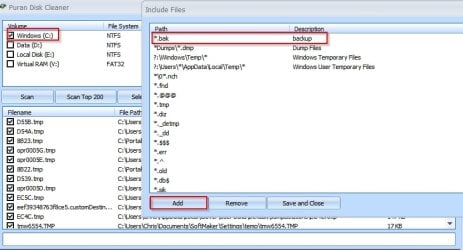
You can use this to find and remove .bak files. Just add them to the include list.


Puran Disk Cleaner.jpg

Run a scan and inspect results. Uncheck anything that you don't want to delete.
 

My Computer My Computer

Computer type
Laptop
Computer Manufacturer/Model Number
ASUS
OS
Microsoft Windows 7 Home Premium 64-bit 7601 Multiprocessor Free Service Pack 1
CPU
AMD C-60 APU with Radeon(tm) HD Graphics
Motherboard
ASUSTeK COMPUTER INC. X501U
Memory
4.00 GB
Graphics Card(s)
AMD Radeon HD 6290 Graphics
Sound Card
(1) AMD High Definition Audio Device (2) Realtek High Defi
Screen Resolution
1366 x 768 x 32 bits (4294967296 colors) @ 60 Hz
Hard Drives
Hitachi HTS545050A7E380 SATA Disk Device
Antivirus
Comodo CIS & FW, SecureAplus App Whitelisting, Threatfire
Browser
Cyberfox 64bit, Opera 64bit, Airfox
Other Info
Spy-The-Spy, HitmanPro.Alert, Norton Connect Safe, MJRegWatcher, BitDefender TrafficLight, Voodoo Shield, Zemana AntiMalware
Well you can only clean it through the Disk Cleanup utility, located in Accessories/System Tools on your start menu- Don't ever try to randomly delete files yourself, but the tool should remove a bunch of your bloat. When you run that tool, you want to choose the very bottom checkbox, that's the one that removes the stuff in "winsxs". It says "Temporary Files", but you should also check "downloaded program files" You can check the other selections at your leisure, but I generally run all of them.

As far as the "bak" folder, I think it's safe to delete that, in your case it was probably created when you ran the Windows Update repair Diagcab at one point. That's the folder where your downloaded windows updates are saved, if the diagcab repaired Windows Update, then it should be safe to delete that backup of the original corrupted folder.

You can also try CCleaner free version, it will delete all kinds of backups. Just download that and run it, I would not be surprised if it finds and deletes up to 10gb of bloat. Be prepared to wait a long time while it populates the files, but don't close the app, let it run, then delete the files it finds. There are two buttons, "analyze" and "clean", run analyze first, then clean.

On systems where I have never run that tool, I've found all the way up to 10gb of temp files. But try the built in Disk Cleaner tool first.
 

My Computer My Computer

Computer type
PC/Desktop
Computer Manufacturer/Model Number
Lenovo Thinkcenter M92p
OS
Windows 10/Windows 7 (My Idea- Virtual PC)
CPU
Intel(R) Core(TM) i5-3470 CPU @ 3.20GHz
Motherboard
Lenovo MahoBay
Memory
16 GB
Graphics Card(s)
nVidia GeForce GTX 750 Ti (2GB)
Sound Card
nVidia HD Audio
Monitor(s) Displays
RCA 4KTV 50"
Screen Resolution
3840p x 2160p
Hard Drives
Onboard:
Seagate ST500DM009-2F110A 500GB
WDC WD4000FYYZ-01UL1B1 (WD-WCC131910831) [3726 GB]

USB 3.0
My Book 1140 (WCAZAD122454) [1862 GB]
Apple MDT MD10EAVS-00D7B0 (0000AB123473) [931 GB]

External:
WD Blue Innostar/Matsunichi (465 GB)
WD
PSU
Stock Thinkcenter M92p
Case
Stock Thinkcenter M92p
Cooling
Active
Keyboard
BYTEC BY-GA-KT-100-AC
Mouse
BYTEC
Internet Speed
1 GHz Down, 40 Mbps Up
Antivirus
Windows Defender
Browser
EDGE
Other Info
Old Other Info:
I finally have an Intel machine that has more than 8GB of Ram.
My ASUS M2N-SE AMD Windows 7 machine is back to Windows 7. Replaced the AMD 4400+ CPU and maxed out the RAM (4GB).
My Core Duo machine is only 2GB of Ram and it is locked to Windows XP in order to run Pro Tools 6.4, which I have been using since 2004.
I have one other Dell OptiPlex 980 tower, Identical to this one,
Back
Top