Windows 7 Update disables system restore + new folder entry

Microbell

New member
Member
VIP
Local time
11:47 AM
Messages
60
Gents,

I searched the forum for this but could find nothing about updates that disabled system restore and creates that folder.

Problem:

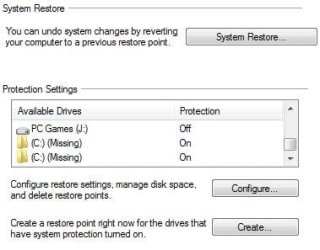
In July I reinstalled Windows 7 and installed the updates. At the time I posted a question that wasn't really answered and it's reared it's ugly head again so I would like to solve this issue. When I installed the updates in July windows update DISABLE system restore and created a folder called (C: ) (Missing) and the protection was ON for that folder while it turned protection for Local Disk (C: ) (System) OFF. At the time I thought it was just a fluke with the new SSD I installed so I simply turned Local Disk (C: ) (System) protection back ON and Disabled Updates.

Since it's been about 4 months I decided to turn automatic updates back ON and get it back to current in the updates I missed. I didn't have time at that moment to let it search for updates so I ended the process and was going to download/install them later. As an afterthought though I checked system protection again and found that yet again Windows update (simply searching for updates for about 20 seconds.....downloaded/installed nothing) DISABLED system protection, wiped out my restore points and created another folder (C: ) (Missing) so now I have two of those.

Does anyone have an Idea/Info on why Windows 7 Update (just searching for updates) is turning OFF my system protection for (C: ) (System) and creating that new (C: ) (Missing) folder?

**Note** The (C: ) (Missing) folder that's being created is using zero bytes in disk space usage and sets itself that way and protection is always ON.


Update: I did find a way to remove the 2 C: Missing Folders but still need to find out why Windows update is turning off system restore.
 

Attachments
  • sysprtect.JPG
    sysprtect.JPG
    29.7 KB · Views: 81
Last edited:

My Computer

Computer type
PC/Desktop
Computer Manufacturer/Model Number
Custom Build
OS
Windows 7 Pro 64bit SP1+Updates
CPU
Intel I3 6100
Motherboard
MSI Z170a Gaming 3 Bios ver a.4
Memory
G.Skill Ripjaws V Series 16GB (2 x 8GB) DDR4 2133mhz
Graphics Card(s)
MSI GTX 960 GAMING 100ME 2GB
Sound Card
X-Fi xtremegamer fatal1ty pro series
Monitor(s) Displays
LG 32MP58HQ-P 32"
Screen Resolution
1920X1080
Hard Drives
Samsung 850EVO SSD 250GB
4 WD HD
PSU
EVGA SuperNova 650 G2 650w
Case
Thermaltake Armor II Tower
Cooling
6 Fan air cooled modded case
Keyboard
Logitech G15
Mouse
Logitech G5
Internet Speed
Cable 120MB/3MB
Antivirus
Avast Ver 12.1.2272
Browser
Chrome
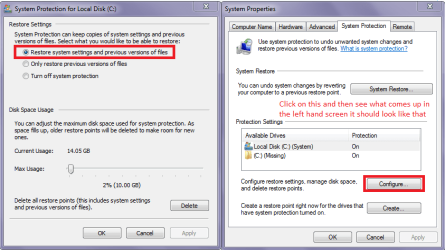
Hello Microbell now have you checked as in my pic??
 

Attachments

  • RESTORE.PNG
    RESTORE.PNG
    84.5 KB · Views: 1

My Computer

Computer type
PC/Desktop
Computer Manufacturer/Model Number
Own build (new) Desk1 / Asus ROG Win 7 / Desk2 1st build
OS
Desk1 7 Home Prem / Desk2 10 Pro / Main lap Asus ROG 10 Pro 2 laptop Toshiba 7 Pro Asus P2520 7 & 10
CPU
Desk1 i5 3750K / Laptop i7 GTX 860M / Desk2 i5 2500
Motherboard
Desk1 Asus P877-V / Desk2 Gigabyte H67 UD3H / Laptop ?
Memory
Desk1 8GB (1866) / Desk2 16GB (1333) / Laptop 8Gb DDR3
Graphics Card(s)
Desk 1& 2NVidia GTX 650 & Laptops on board Intel
Sound Card
Desk 1 & 2 -XONAR DG Realtek High Def audio Laptop
Monitor(s) Displays
Desk 1 Benq HD 2450 / Desk2 Philips 24" / Laptop 17.5"
Screen Resolution
1920x1080 D1 & D2 & Laptop 1
Hard Drives
Desk1 Samsung 120GB 830 SSD
Asus ROG 256GB 850 Pro SSD
Desk2 Samsung 840 256 SSD
Toshiba 120GB EVO
PSU
Desk 1 Corsair HX 1050/ Laptop ? / Desk 2 Corsair HX 650
Case
Desk 1 Cooler HAF XM ? Toshiba laptop / Desk2 Coolermaster
Cooling
Fans on all Desk1 -2 Desk2 - all Coolermasters 5 Laptop ?
Keyboard
Desk 1 MS Sidewinder X6 Desk 2 MS Sidewinder X 4
Mouse
Desk 1&2 - Gigabyte MS 900 gamer - laptop - Logitec wireless
Internet Speed
ADSL2+
Other Info
One other Desktop (tester) and spare Toshba laptop both with SSD's
Running Kaspersky 2016 ISS on all machines config'd identically
Logitec audio stereo systems on each machine (x3)
Canon MG5250MFC
Router/modem TP-Link running WPA2SK
Hello Microbell now have you checked as in my pic??

Yup.

When I set it manually it stays that way.

If I attempt to run Windows update it will disable that setting, wipe my restore points and turns system protection for C: off.

I just downloaded the "System Update Readiness Tool" and will run that in the next few days to try and locate what the heck is going on with these update issues.
 

My Computer

Computer type
PC/Desktop
Computer Manufacturer/Model Number
Custom Build
OS
Windows 7 Pro 64bit SP1+Updates
CPU
Intel I3 6100
Motherboard
MSI Z170a Gaming 3 Bios ver a.4
Memory
G.Skill Ripjaws V Series 16GB (2 x 8GB) DDR4 2133mhz
Graphics Card(s)
MSI GTX 960 GAMING 100ME 2GB
Sound Card
X-Fi xtremegamer fatal1ty pro series
Monitor(s) Displays
LG 32MP58HQ-P 32"
Screen Resolution
1920X1080
Hard Drives
Samsung 850EVO SSD 250GB
4 WD HD
PSU
EVGA SuperNova 650 G2 650w
Case
Thermaltake Armor II Tower
Cooling
6 Fan air cooled modded case
Keyboard
Logitech G15
Mouse
Logitech G5
Internet Speed
Cable 120MB/3MB
Antivirus
Avast Ver 12.1.2272
Browser
Chrome
Hi Microbell,
That screenshot sent me flying off in another direction
As C's are showing as MISSING - then system protection is trying to restore from an incorrectly configued system partition/volume path.
(possible due to your mount point changes)
Part of windows update is to create a restore point, before making changes if it cannot perform this the updates fail.
(C will allways be created on a failure like this as its the system default. why 2 = 2 attempts.)

Roy

NB lookin at ICIT2LOL screenshot same applies:)
 
Last edited:

My Computer

Computer type
PC/Desktop
Computer Manufacturer/Model Number
medionl/Aspire 6930G/acer x55a
OS
W7 home premium 32bit/W7HP 64bit/w10 tp insider ring
CPU
E5300 dual core
Motherboard
medion MS7366
Memory
3gb
Graphics Card(s)
Nvidia Geforce 7100 Nforce 630i
Monitor(s) Displays
avixc
Internet Speed
n (isp resticted to 72)
Antivirus
mse/pands
Browser
palemoon
Other Info
Belkin Fd7050 n USB using Railink RT2870 drivers, more upto date

My Computer

Computer type
PC/Desktop
Computer Manufacturer/Model Number
Own build (new) Desk1 / Asus ROG Win 7 / Desk2 1st build
OS
Desk1 7 Home Prem / Desk2 10 Pro / Main lap Asus ROG 10 Pro 2 laptop Toshiba 7 Pro Asus P2520 7 & 10
CPU
Desk1 i5 3750K / Laptop i7 GTX 860M / Desk2 i5 2500
Motherboard
Desk1 Asus P877-V / Desk2 Gigabyte H67 UD3H / Laptop ?
Memory
Desk1 8GB (1866) / Desk2 16GB (1333) / Laptop 8Gb DDR3
Graphics Card(s)
Desk 1& 2NVidia GTX 650 & Laptops on board Intel
Sound Card
Desk 1 & 2 -XONAR DG Realtek High Def audio Laptop
Monitor(s) Displays
Desk 1 Benq HD 2450 / Desk2 Philips 24" / Laptop 17.5"
Screen Resolution
1920x1080 D1 & D2 & Laptop 1
Hard Drives
Desk1 Samsung 120GB 830 SSD
Asus ROG 256GB 850 Pro SSD
Desk2 Samsung 840 256 SSD
Toshiba 120GB EVO
PSU
Desk 1 Corsair HX 1050/ Laptop ? / Desk 2 Corsair HX 650
Case
Desk 1 Cooler HAF XM ? Toshiba laptop / Desk2 Coolermaster
Cooling
Fans on all Desk1 -2 Desk2 - all Coolermasters 5 Laptop ?
Keyboard
Desk 1 MS Sidewinder X6 Desk 2 MS Sidewinder X 4
Mouse
Desk 1&2 - Gigabyte MS 900 gamer - laptop - Logitec wireless
Internet Speed
ADSL2+
Other Info
One other Desktop (tester) and spare Toshba laptop both with SSD's
Running Kaspersky 2016 ISS on all machines config'd identically
Logitec audio stereo systems on each machine (x3)
Canon MG5250MFC
Router/modem TP-Link running WPA2SK

My Computer

Computer type
PC/Desktop
Computer Manufacturer/Model Number
Own build (new) Desk1 / Asus ROG Win 7 / Desk2 1st build
OS
Desk1 7 Home Prem / Desk2 10 Pro / Main lap Asus ROG 10 Pro 2 laptop Toshiba 7 Pro Asus P2520 7 & 10
CPU
Desk1 i5 3750K / Laptop i7 GTX 860M / Desk2 i5 2500
Motherboard
Desk1 Asus P877-V / Desk2 Gigabyte H67 UD3H / Laptop ?
Memory
Desk1 8GB (1866) / Desk2 16GB (1333) / Laptop 8Gb DDR3
Graphics Card(s)
Desk 1& 2NVidia GTX 650 & Laptops on board Intel
Sound Card
Desk 1 & 2 -XONAR DG Realtek High Def audio Laptop
Monitor(s) Displays
Desk 1 Benq HD 2450 / Desk2 Philips 24" / Laptop 17.5"
Screen Resolution
1920x1080 D1 & D2 & Laptop 1
Hard Drives
Desk1 Samsung 120GB 830 SSD
Asus ROG 256GB 850 Pro SSD
Desk2 Samsung 840 256 SSD
Toshiba 120GB EVO
PSU
Desk 1 Corsair HX 1050/ Laptop ? / Desk 2 Corsair HX 650
Case
Desk 1 Cooler HAF XM ? Toshiba laptop / Desk2 Coolermaster
Cooling
Fans on all Desk1 -2 Desk2 - all Coolermasters 5 Laptop ?
Keyboard
Desk 1 MS Sidewinder X6 Desk 2 MS Sidewinder X 4
Mouse
Desk 1&2 - Gigabyte MS 900 gamer - laptop - Logitec wireless
Internet Speed
ADSL2+
Other Info
One other Desktop (tester) and spare Toshba laptop both with SSD's
Running Kaspersky 2016 ISS on all machines config'd identically
Logitec audio stereo systems on each machine (x3)
Canon MG5250MFC
Router/modem TP-Link running WPA2SK
Hi Microbell,
That screenshot sent me flying off in another direction
As C's are showing as MISSING - then system protection is trying to restore from an incorrectly configued system partition/volume path.
(possible due to your mount point changes)
Part of windows update is to create a restore point, before making changes if it cannot perform this the updates fail.
(C will allways be created on a failure like this as its the system default. why 2 = 2 attempts.)

Roy

NB lookin at ICIT2LOL screenshot same applies:)

Thanks for the reply Torchwood.

Well let me add some more info to this concerning "mount points" and partitions. My system has 4 HD's and 1 SSD and Windows is the only thing on the SSD so the system partition/volume path is correct according to disk management, registry entries and the Windows Update log. I also work with a "Drivecrypt" hidden container on another HD and did clean some mount point entries in the registry out but left C: alone and this issue appeared way before I had any other software on the hard drive.

That said you have to take into account that this issue appeared for the first time on a "clean" install of Windows 7 Pro on the SSD with just the SSD connected (NO other drives and Only Windows 7 Installed) and when I first ran Windows update to install them it created that file. Correct me if I'm wrong but my understanding of Windows update creating a restore point happens right before you "Install" the updates not while simply searching for and downloading them. (according to Microsoft anyway)

You would have a point if I was attempting to restore Windows.....but It's simply searching for updates that causes this and I can't fathom why as Windows 7 system restore should not even be involved until the attempt to install the update is initialized.

**Note** The second " C: File Missing was created this month when I attempted to search for updates as I run with Automatic Updates disable because of the hassle's that have been happening over the last year or so with Windows 7 updates and it's been about 4 months since the Install and first updates where added.
 

My Computer

Computer type
PC/Desktop
Computer Manufacturer/Model Number
Custom Build
OS
Windows 7 Pro 64bit SP1+Updates
CPU
Intel I3 6100
Motherboard
MSI Z170a Gaming 3 Bios ver a.4
Memory
G.Skill Ripjaws V Series 16GB (2 x 8GB) DDR4 2133mhz
Graphics Card(s)
MSI GTX 960 GAMING 100ME 2GB
Sound Card
X-Fi xtremegamer fatal1ty pro series
Monitor(s) Displays
LG 32MP58HQ-P 32"
Screen Resolution
1920X1080
Hard Drives
Samsung 850EVO SSD 250GB
4 WD HD
PSU
EVGA SuperNova 650 G2 650w
Case
Thermaltake Armor II Tower
Cooling
6 Fan air cooled modded case
Keyboard
Logitech G15
Mouse
Logitech G5
Internet Speed
Cable 120MB/3MB
Antivirus
Avast Ver 12.1.2272
Browser
Chrome
How much free space does Windows 7 partition "C" have?
 

My Computer

Computer type
PC/Desktop
Computer Manufacturer/Model Number
Home made Desktop
OS
Windows 10 Pro. 64/ version 1709 Windows 7 Pro/64
CPU
Intel i7-6800K @ 4.3
Motherboard
ASUS X-99 Deluxe II
Memory
Corsair Platinum 16 gig @2400
Graphics Card(s)
EVGA GTX 1070 OC
Monitor(s) Displays
Asus 27" LED LCD/VE278Q
Screen Resolution
1920-1080 or 1280-720 HDMI
Hard Drives
INTEL SSD 730-240 Gb Sata 3.0/
PSU
EVGA Platium 1200W
Case
Phanteks Luxe Tempered Glass 8 fans/ one radiator
Cooling
XSPC/ Water Cooled CPU
Keyboard
Das 4 Professional
Mouse
Logitech M705/MX Anywhere 2-S
Internet Speed
100 mbits
Antivirus
Microsoft Security Essentials/ Malwarebytes Premium 3.0/ SAS
Browser
I.E. 11 default/Firefox/ ISP Time Warner Cable/Spectrum
Other Info
LG BluRay Burner/
Sound system-KLipsch-THX/
Icy Dock ssd Hot Swap bays.
So have you tried just leaving the oS drive hooked up and try thr restore point because it seems to me that the other drives are your problem.
 

My Computer

Computer type
PC/Desktop
Computer Manufacturer/Model Number
Own build (new) Desk1 / Asus ROG Win 7 / Desk2 1st build
OS
Desk1 7 Home Prem / Desk2 10 Pro / Main lap Asus ROG 10 Pro 2 laptop Toshiba 7 Pro Asus P2520 7 & 10
CPU
Desk1 i5 3750K / Laptop i7 GTX 860M / Desk2 i5 2500
Motherboard
Desk1 Asus P877-V / Desk2 Gigabyte H67 UD3H / Laptop ?
Memory
Desk1 8GB (1866) / Desk2 16GB (1333) / Laptop 8Gb DDR3
Graphics Card(s)
Desk 1& 2NVidia GTX 650 & Laptops on board Intel
Sound Card
Desk 1 & 2 -XONAR DG Realtek High Def audio Laptop
Monitor(s) Displays
Desk 1 Benq HD 2450 / Desk2 Philips 24" / Laptop 17.5"
Screen Resolution
1920x1080 D1 & D2 & Laptop 1
Hard Drives
Desk1 Samsung 120GB 830 SSD
Asus ROG 256GB 850 Pro SSD
Desk2 Samsung 840 256 SSD
Toshiba 120GB EVO
PSU
Desk 1 Corsair HX 1050/ Laptop ? / Desk 2 Corsair HX 650
Case
Desk 1 Cooler HAF XM ? Toshiba laptop / Desk2 Coolermaster
Cooling
Fans on all Desk1 -2 Desk2 - all Coolermasters 5 Laptop ?
Keyboard
Desk 1 MS Sidewinder X6 Desk 2 MS Sidewinder X 4
Mouse
Desk 1&2 - Gigabyte MS 900 gamer - laptop - Logitec wireless
Internet Speed
ADSL2+
Other Info
One other Desktop (tester) and spare Toshba laptop both with SSD's
Running Kaspersky 2016 ISS on all machines config'd identically
Logitec audio stereo systems on each machine (x3)
Canon MG5250MFC
Router/modem TP-Link running WPA2SK

My Computer

Computer type
PC/Desktop
Computer Manufacturer/Model Number
medionl/Aspire 6930G/acer x55a
OS
W7 home premium 32bit/W7HP 64bit/w10 tp insider ring
CPU
E5300 dual core
Motherboard
medion MS7366
Memory
3gb
Graphics Card(s)
Nvidia Geforce 7100 Nforce 630i
Monitor(s) Displays
avixc
Internet Speed
n (isp resticted to 72)
Antivirus
mse/pands
Browser
palemoon
Other Info
Belkin Fd7050 n USB using Railink RT2870 drivers, more upto date

My Computer

Computer type
PC/Desktop
Computer Manufacturer/Model Number
Custom Build
OS
Windows 7 Pro 64bit SP1+Updates
CPU
Intel I3 6100
Motherboard
MSI Z170a Gaming 3 Bios ver a.4
Memory
G.Skill Ripjaws V Series 16GB (2 x 8GB) DDR4 2133mhz
Graphics Card(s)
MSI GTX 960 GAMING 100ME 2GB
Sound Card
X-Fi xtremegamer fatal1ty pro series
Monitor(s) Displays
LG 32MP58HQ-P 32"
Screen Resolution
1920X1080
Hard Drives
Samsung 850EVO SSD 250GB
4 WD HD
PSU
EVGA SuperNova 650 G2 650w
Case
Thermaltake Armor II Tower
Cooling
6 Fan air cooled modded case
Keyboard
Logitech G15
Mouse
Logitech G5
Internet Speed
Cable 120MB/3MB
Antivirus
Avast Ver 12.1.2272
Browser
Chrome
So have you tried just leaving the oS drive hooked up and try thr restore point because it seems to me that the other drives are your problem.

If you noticed in my last post this happened when no other drives were attached and right after a fresh install of Windows 7 Pro.

How much free space does Windows 7 partition "C" have?

189GB Free of a 250GB SSD. Windows is the only thing on it.

Hi Microbell,

would you mind posting your CBS log.

do you have any of these events, on your system.
Event ID 25:
Event ID 22:
Event ID 8193
if so have a read of this
https://www.google.co.uk/url?sa=t&r...506576&usg=AFQjCNGudyaaX0e4IzWu_iY_Yw1mWjOZ3w

and have you incorporated the 100mb partition into J drive?

Roy

I was able to locate 2 set's of errors in event viewer dealing with VSS.
Event ID 8193
Event ID 12293

Both set's of errors only occurred when I first ran though Windows update after the initial install of Windows 7 and again when I tried to update this month. The error does not appear though out event viewer.

I did read through the link you posted but I have 13.9GB set aside for system restore which should be more then enough space ( they were saying setting it to 1GB in the article), pagefile and hiberfil are disabled on a SSD, no 3rd party disk applications running and system restore points are fine when rebooting. They only get deleted if I try to run Windows update which makes me think this is a Windows update related issue.

As for the CBS log if you need a recent one I will have to run SFC as my system is set up to clean out log files and such on shutdown. Let me know and I'll do that but I do have 4 logs in RAR files from the first install but some of those are pretty big.

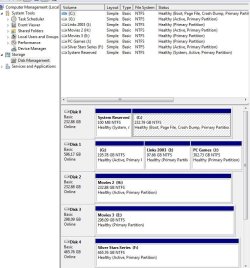
"and have you incorporated the 100mb partition into J drive?"

Not sure what you mean by that. J: drive is my game drive location which rests on a partition of a 3 partition disk (G:) The 100MB system reserve partition should be residing on C: disk which is the SSD.

Drive Setup:

**Note**
Drive G: was my C: drive with windows on it before adding the SSD.
 

Attachments

  • drivesetup.JPG
    drivesetup.JPG
    124.6 KB · Views: 1

My Computer

Computer type
PC/Desktop
Computer Manufacturer/Model Number
Custom Build
OS
Windows 7 Pro 64bit SP1+Updates
CPU
Intel I3 6100
Motherboard
MSI Z170a Gaming 3 Bios ver a.4
Memory
G.Skill Ripjaws V Series 16GB (2 x 8GB) DDR4 2133mhz
Graphics Card(s)
MSI GTX 960 GAMING 100ME 2GB
Sound Card
X-Fi xtremegamer fatal1ty pro series
Monitor(s) Displays
LG 32MP58HQ-P 32"
Screen Resolution
1920X1080
Hard Drives
Samsung 850EVO SSD 250GB
4 WD HD
PSU
EVGA SuperNova 650 G2 650w
Case
Thermaltake Armor II Tower
Cooling
6 Fan air cooled modded case
Keyboard
Logitech G15
Mouse
Logitech G5
Internet Speed
Cable 120MB/3MB
Antivirus
Avast Ver 12.1.2272
Browser
Chrome
Hi Microbell,
As for the 100MB reserved, I mentioned the J drive as that showed as the "primary" restore drive in your screenshot.

The CBS log is updated when you run Windows updates, no need for SFC, might show where its falling over.....
(would prefer Zip not rar, its on your system by default)

What prog are you using to clear your logs

Roy
 

My Computer

Computer type
PC/Desktop
Computer Manufacturer/Model Number
medionl/Aspire 6930G/acer x55a
OS
W7 home premium 32bit/W7HP 64bit/w10 tp insider ring
CPU
E5300 dual core
Motherboard
medion MS7366
Memory
3gb
Graphics Card(s)
Nvidia Geforce 7100 Nforce 630i
Monitor(s) Displays
avixc
Internet Speed
n (isp resticted to 72)
Antivirus
mse/pands
Browser
palemoon
Other Info
Belkin Fd7050 n USB using Railink RT2870 drivers, more upto date
Hi Microbell,
As for the 100MB reserved, I mentioned the J drive as that showed as the "primary" restore drive in your screenshot.

The CBS log is updated when you run Windows updates, no need for SFC, might show where its falling over.....
(would prefer Zip not rar, its on your system by default)

What prog are you using to clear your logs

Roy

Roy,

I use CCleaner (secure delete) to clean out logs and files and shell bag analyzer to clean out MRU shells and mount points. That said I did run SFC to check for corruption violations and it found none. Today I finally got Windows update to install updates using the method posted here... Windows Update will not update and I've tried multiple fixes

I had about 40 updates and broke it down into 2 stages so I could check to make sure it was creating and not deleting my restore points and everything looks fine as far as I can tell. All updates installed successfully and system restore did NOT get disable this time so I turned Windows Update back to Automatic.

The new CBS log is attached in zip format as requested. Let me know if you see any issues (As I did see some FAILED entries) for some packages that may pertain to a few FAILED updates that I had previously installed. I do have 7 that show as FAILED in the list.

Also do I really need to use option 3 on that "Windows Update Reset" page since everything seamed to install correctly after I installed KB3172605 manually?
 

My Computer

Computer type
PC/Desktop
Computer Manufacturer/Model Number
Custom Build
OS
Windows 7 Pro 64bit SP1+Updates
CPU
Intel I3 6100
Motherboard
MSI Z170a Gaming 3 Bios ver a.4
Memory
G.Skill Ripjaws V Series 16GB (2 x 8GB) DDR4 2133mhz
Graphics Card(s)
MSI GTX 960 GAMING 100ME 2GB
Sound Card
X-Fi xtremegamer fatal1ty pro series
Monitor(s) Displays
LG 32MP58HQ-P 32"
Screen Resolution
1920X1080
Hard Drives
Samsung 850EVO SSD 250GB
4 WD HD
PSU
EVGA SuperNova 650 G2 650w
Case
Thermaltake Armor II Tower
Cooling
6 Fan air cooled modded case
Keyboard
Logitech G15
Mouse
Logitech G5
Internet Speed
Cable 120MB/3MB
Antivirus
Avast Ver 12.1.2272
Browser
Chrome
Hi Microbell,
Yep update hanging has been around for a while now.
The "fix" you applied was not issued by MS, but found and issued by users!!!
Thier advice(MS) was a clean install:rolleyes: :mad:

If you are now getting updates then part 3 is not required.

I suspect that the Hanging caused the restore point failure as there is an upper time limit on system processes.
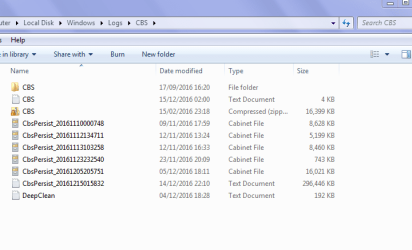
I cannot see that in your CBS log as it only covers 1 day, using Ccleaner has cleared previous entries,
where it would have been shown, see my screenshot for a standard user view,
(if you had run SURT that would have shown as the last entry).

Things are looking much better, but to find the root cause of the CBS failed, BUT INFO errors
can you please run these tools

http://www.sysnative.com/niemiro/apps/SFCFix.exe

and then SURT
Access Denied
(ITS FOR THE KB FORUM GLITCH)

copy paste the output

Roy
 

Attachments

  • neal1.PNG
    neal1.PNG
    40.9 KB · Views: 5

My Computer

Computer type
PC/Desktop
Computer Manufacturer/Model Number
medionl/Aspire 6930G/acer x55a
OS
W7 home premium 32bit/W7HP 64bit/w10 tp insider ring
CPU
E5300 dual core
Motherboard
medion MS7366
Memory
3gb
Graphics Card(s)
Nvidia Geforce 7100 Nforce 630i
Monitor(s) Displays
avixc
Internet Speed
n (isp resticted to 72)
Antivirus
mse/pands
Browser
palemoon
Other Info
Belkin Fd7050 n USB using Railink RT2870 drivers, more upto date
Roy,

First off.... Thank you for all the help on this. I'm pretty computer savvy but this one had me clueless to the cause but as you know Windows 7 update has become somewhat of a mess now days. Here is the output for the logs.

Code:
SFCFix version 3.0.0.0 by niemiro.
Start time: 2016-12-15 19:26:42.618
Microsoft Windows 7 Service Pack 1 - amd64
Not using a script file.

AutoAnalysis::
SUMMARY: No corruptions were detected.
AutoAnalysis:: directive completed successfully.

Successfully processed all directives.
SFCFix version 3.0.0.0 by niemiro has completed.
Currently storing 0 datablocks.
Finish time: 2016-12-15 19:30:07.232
----------------------EOF-----------------------


Code:
=================================
Checking System Update Readiness.
Binary Version 6.1.7601.22471
Package Version 26.0
2016-12-15 19:57

Checking Windows Servicing Packages

Checking Package Manifests and Catalogs

Checking Package Watchlist

Checking Component Watchlist

Checking Packages

Checking Component Store
(f)	CSI F Mark Missing	0x00000002	f!msvcr110.dll	x86_avast.vc110.crt_2036b14a11e83e4a_11.0.60610.1_none_1d37a43bbfe1dc9c	
(fix)	CSI F Mark Missing	CSI Registry Item Repaired	Wrote x86_avast.vc110.crt_2036b14a11e83e4a_11.0.60610.1_none_1d37a43bbfe1dc9c\f!msvcr110.dll: msvcr110.dll
(f)	CSI F Mark Missing	0x00000002	f!msvcp110.dll	x86_avast.vc110.crt_2036b14a11e83e4a_11.0.60610.1_none_1d37a43bbfe1dc9c	
(fix)	CSI F Mark Missing	CSI Registry Item Repaired	Wrote x86_avast.vc110.crt_2036b14a11e83e4a_11.0.60610.1_none_1d37a43bbfe1dc9c\f!msvcp110.dll: msvcp110.dll
(f)	CSI F Mark Missing	0x00000002	f!atl110.dll	x86_avast.vc110.crt_2036b14a11e83e4a_11.0.60610.1_none_1d37a43bbfe1dc9c	
(fix)	CSI F Mark Missing	CSI Registry Item Repaired	Wrote x86_avast.vc110.crt_2036b14a11e83e4a_11.0.60610.1_none_1d37a43bbfe1dc9c\f!atl110.dll: atl110.dll
(f)	CSI F Mark Missing	0x00000002	f!mfc110u.dll	x86_avast.vc110.crt_2036b14a11e83e4a_11.0.60610.1_none_1d37a43bbfe1dc9c	
(fix)	CSI F Mark Missing	CSI Registry Item Repaired	Wrote x86_avast.vc110.crt_2036b14a11e83e4a_11.0.60610.1_none_1d37a43bbfe1dc9c\f!mfc110u.dll: mfc110u.dll
(f)	CSI C Mark Deployment Missing	0x00000000	c!avast.vc110.crt_2036b14a11e83e4a_11.0.60610.1_0b20a8ff883c3a4a	x86_avast.vc110.crt_2036b14a11e83e4a_11.0.60610.1_none_1d37a43bbfe1dc9c	
(f)	CSI F Mark Missing	0x00000002	f!msvcr110.dll	amd64_avast.vc110.crt_2036b14a11e83e4a_11.0.60610.1_none_d58a6d64ab65b396	
(fix)	CSI F Mark Missing	CSI Registry Item Repaired	Wrote amd64_avast.vc110.crt_2036b14a11e83e4a_11.0.60610.1_none_d58a6d64ab65b396\f!msvcr110.dll: msvcr110.dll
(f)	CSI F Mark Missing	0x00000002	f!msvcp110.dll	amd64_avast.vc110.crt_2036b14a11e83e4a_11.0.60610.1_none_d58a6d64ab65b396	
(fix)	CSI F Mark Missing	CSI Registry Item Repaired	Wrote amd64_avast.vc110.crt_2036b14a11e83e4a_11.0.60610.1_none_d58a6d64ab65b396\f!msvcp110.dll: msvcp110.dll
(f)	CSI F Mark Missing	0x00000002	f!atl110.dll	amd64_avast.vc110.crt_2036b14a11e83e4a_11.0.60610.1_none_d58a6d64ab65b396	
(fix)	CSI F Mark Missing	CSI Registry Item Repaired	Wrote amd64_avast.vc110.crt_2036b14a11e83e4a_11.0.60610.1_none_d58a6d64ab65b396\f!atl110.dll: atl110.dll
(f)	CSI F Mark Missing	0x00000002	f!mfc110u.dll	amd64_avast.vc110.crt_2036b14a11e83e4a_11.0.60610.1_none_d58a6d64ab65b396	
(fix)	CSI F Mark Missing	CSI Registry Item Repaired	Wrote amd64_avast.vc110.crt_2036b14a11e83e4a_11.0.60610.1_none_d58a6d64ab65b396\f!mfc110u.dll: mfc110u.dll
(f)	CSI C Mark Deployment Missing	0x00000000	c!avast.vc110.crt_2036b14a11e83e4a_11.0.60610.1_c373722873c01144	amd64_avast.vc110.crt_2036b14a11e83e4a_11.0.60610.1_none_d58a6d64ab65b396	

Summary:
Seconds executed: 132
 Found 10 errors

**Note**

While reviewing this issue here and on other forums I did see that Avast was causing these entries in the CheckSUR logs. Other then that the logs look clean to me and Windows 7 is finding updates on the auto setting (so far). :D

Question:

If that screenshot you posted was from your PC I see a DeepClean log. Is that a cleaning tool and if so can you shoot me a link to check out? I do like tools......hahahaha
 

My Computer

Computer type
PC/Desktop
Computer Manufacturer/Model Number
Custom Build
OS
Windows 7 Pro 64bit SP1+Updates
CPU
Intel I3 6100
Motherboard
MSI Z170a Gaming 3 Bios ver a.4
Memory
G.Skill Ripjaws V Series 16GB (2 x 8GB) DDR4 2133mhz
Graphics Card(s)
MSI GTX 960 GAMING 100ME 2GB
Sound Card
X-Fi xtremegamer fatal1ty pro series
Monitor(s) Displays
LG 32MP58HQ-P 32"
Screen Resolution
1920X1080
Hard Drives
Samsung 850EVO SSD 250GB
4 WD HD
PSU
EVGA SuperNova 650 G2 650w
Case
Thermaltake Armor II Tower
Cooling
6 Fan air cooled modded case
Keyboard
Logitech G15
Mouse
Logitech G5
Internet Speed
Cable 120MB/3MB
Antivirus
Avast Ver 12.1.2272
Browser
Chrome
Hi Microbell,
Looks sweet to me all errors found were fixed.

The deep clean folder is from the inbuilt MS disk cleanup tool:)


Happy surfing


Roy
 

My Computer

Computer type
PC/Desktop
Computer Manufacturer/Model Number
medionl/Aspire 6930G/acer x55a
OS
W7 home premium 32bit/W7HP 64bit/w10 tp insider ring
CPU
E5300 dual core
Motherboard
medion MS7366
Memory
3gb
Graphics Card(s)
Nvidia Geforce 7100 Nforce 630i
Monitor(s) Displays
avixc
Internet Speed
n (isp resticted to 72)
Antivirus
mse/pands
Browser
palemoon
Other Info
Belkin Fd7050 n USB using Railink RT2870 drivers, more upto date
Alright then. Thanks a bunch for your help Roy!

Have a great holiday!!
 

Attachments

  • christmas-tree-animated-gif-19.gif
    christmas-tree-animated-gif-19.gif
    63.9 KB · Views: 45

My Computer

Computer type
PC/Desktop
Computer Manufacturer/Model Number
Custom Build
OS
Windows 7 Pro 64bit SP1+Updates
CPU
Intel I3 6100
Motherboard
MSI Z170a Gaming 3 Bios ver a.4
Memory
G.Skill Ripjaws V Series 16GB (2 x 8GB) DDR4 2133mhz
Graphics Card(s)
MSI GTX 960 GAMING 100ME 2GB
Sound Card
X-Fi xtremegamer fatal1ty pro series
Monitor(s) Displays
LG 32MP58HQ-P 32"
Screen Resolution
1920X1080
Hard Drives
Samsung 850EVO SSD 250GB
4 WD HD
PSU
EVGA SuperNova 650 G2 650w
Case
Thermaltake Armor II Tower
Cooling
6 Fan air cooled modded case
Keyboard
Logitech G15
Mouse
Logitech G5
Internet Speed
Cable 120MB/3MB
Antivirus
Avast Ver 12.1.2272
Browser
Chrome
Greetings all,

Well I marked this solved a few weeks ago but it seams the issue has reappeared. I got all the updates and every thing ran fine until last week. I was checking my logs in "Event Viewer" and again saw the same errors for system restore appeared again and after checking system restore I yet again have windows disabling system restore and creating that C: (Folder Missing) folder.

Here is the detail of the errors:

Code:
- <Event xmlns="http://schemas.microsoft.com/win/2004/08/events/event">
- <System>
  <Provider Name="System Restore" /> 
  <EventID Qualifiers="0">8193</EventID> 
  <Level>2</Level> 
  <Task>0</Task> 
  <Keywords>0x80000000000000</Keywords> 
  <TimeCreated SystemTime="2017-01-05T21:52:08.000000000Z" /> 
  <EventRecordID>14034</EventRecordID> 
  <Channel>Application</Channel> 
  <Computer>Microbell-PC</Computer> 
  <Security /> 
  </System>
- <EventData>
  <Data>C:\Windows\system32\svchost.exe -k netsvcs</Data> 
  <Data>Windows Update</Data> 
  <Data>0x80070422</Data> 
  <Binary>220407809D010000870100009501000022CE28677C6DDA79E28C1C000000000000000000</Binary> 
  </EventData>
  </Event>


- <Event xmlns="http://schemas.microsoft.com/win/2004/08/events/event">
- <System>
  <Provider Name="SPP" /> 
  <EventID Qualifiers="0">16388</EventID> 
  <Level>2</Level> 
  <Task>0</Task> 
  <Keywords>0x80000000000000</Keywords> 
  <TimeCreated SystemTime="2017-01-08T04:45:09.000000000Z" /> 
  <EventRecordID>14155</EventRecordID> 
  <Channel>Application</Channel> 
  <Computer>Microbell-PC</Computer> 
  <Security /> 
  </System>
- <EventData>
  <Data>\\?\Volume{c80f7f49-d375-11e6-8248-806e6f6e6963}\</Data> 
  <Data>\\?\GLOBALROOT\Device\HarddiskVolumeShadowCopy3\</Data> 
  <Data>The specified object was not found. (0x80042308)</Data> 
  <Binary>01000000502600003E2600000000000042BEB7C56AAFC921DB93674A0E00000000000000</Binary> 
  </EventData>
  </Event>

SFCFix Tool:

Code:
SFCFix version 3.0.0.0 by niemiro.
Start time: 2017-01-10 15:54:14.018
Microsoft Windows 7 Service Pack 1 - amd64
Not using a script file.

AutoAnalysis::
SUMMARY: No corruptions were detected.
AutoAnalysis:: directive completed successfully.

Successfully processed all directives.
SFCFix version 3.0.0.0 by niemiro has completed.
Currently storing 0 datablocks.
Finish time: 2017-01-10 15:57:00.984
----------------------EOF-----------------------

I allocated more space (18.6GB or 8% of the SSD) which gave me about 7-10 restore points which should be quite enough space but it keeps getting nuked once filled. The problem seams to me like once the restore points reach the limit you set (18.6GB in my case) Windows is not deleting the oldest restore point first when it attempts to create a new one but instead DISABLES system restore altogether and wipes them all out and creates that folder.

After looking at the error in event viewer and comparing it with Windows Update logs it seams to happen when Windows tries to create a restore point right before an update (KB2565063 this time on 1-5-2016) but updates installed from the previous days (since 12-15-2016) went find with no restore point issues.


Any thoughts on a way to prevent this or fix the issue other then deleting restore points manually to make sure it never tops out?

**Note**

All updates installed fine and SFC found no violations so I can't find anything that may be corrupting this system restore process.

System settings using vssadmin commands:
 

Attachments

  • storage.JPG
    storage.JPG
    25.1 KB · Views: 36
Last edited:

My Computer

Computer type
PC/Desktop
Computer Manufacturer/Model Number
Custom Build
OS
Windows 7 Pro 64bit SP1+Updates
CPU
Intel I3 6100
Motherboard
MSI Z170a Gaming 3 Bios ver a.4
Memory
G.Skill Ripjaws V Series 16GB (2 x 8GB) DDR4 2133mhz
Graphics Card(s)
MSI GTX 960 GAMING 100ME 2GB
Sound Card
X-Fi xtremegamer fatal1ty pro series
Monitor(s) Displays
LG 32MP58HQ-P 32"
Screen Resolution
1920X1080
Hard Drives
Samsung 850EVO SSD 250GB
4 WD HD
PSU
EVGA SuperNova 650 G2 650w
Case
Thermaltake Armor II Tower
Cooling
6 Fan air cooled modded case
Keyboard
Logitech G15
Mouse
Logitech G5
Internet Speed
Cable 120MB/3MB
Antivirus
Avast Ver 12.1.2272
Browser
Chrome
Hi Again Microbell,
sorry its reared its head again:mad:
there was a different error code showing in that log 0x80070422

Please check that the following services are enabled with these settings:

- "Remote Procedure Call" (RPCSS), Automatic.

- "COM+ Event System" (EventSystem), Manual.

- "System Event Notification Service" (SENS), Automatic.

- "Volume Shadow Copy" (VSS), Manual.

- "Microsoft Software Shadow Copy Provider" (SWPRV) , manual.

- "Block Level Backup Engine Service", manual


I also see that 8193 error did you increase the VSS storage capacity, as shown in the link referenced previously.


(manually updating does not follow the same rules so restore points will not be affected)


Roy
 

My Computer

Computer type
PC/Desktop
Computer Manufacturer/Model Number
medionl/Aspire 6930G/acer x55a
OS
W7 home premium 32bit/W7HP 64bit/w10 tp insider ring
CPU
E5300 dual core
Motherboard
medion MS7366
Memory
3gb
Graphics Card(s)
Nvidia Geforce 7100 Nforce 630i
Monitor(s) Displays
avixc
Internet Speed
n (isp resticted to 72)
Antivirus
mse/pands
Browser
palemoon
Other Info
Belkin Fd7050 n USB using Railink RT2870 drivers, more upto date
Back
Top