windows explorer has stopped working

Hi Callender,

Because it's essential to have a good working copy of this file, I'd rather be safe than sorry.

Now I don't know if I can do the operation again (reformatting this stick, making it bootable again and burn the ISO on it again - people on the internet seem to not agree on this issue). I don't have any sticks left, they're all in use by my back-up, but I have disks.

I've been searching how to make a disk bootable and read about the Windows Disc Image Burner that is available in Windows 7. I apparently just need to right click the ISO, go to "Open With" and then select "Windows Disc Image Burner". Would that be a good idea ?

Sorry to be such a pain in the b.. needing help with each and every step.

Judith
 

My Computer

Computer type
Laptop
Computer Manufacturer/Model Number
Toshiba
OS
Windows 7 Home Premium x64
CPU
Processor Intel(R) Core(TM) i3 CPU M 330 @ 2.13GHz
Motherboard
Satellite L550
Memory
8GB
Graphics Card(s)
ATI Mobility Radeon HD 5165
Hard Drives
C, D
Antivirus
Microsoft Essentials
Browser
Firefow
Okay there's no problem with reformatting the USB and starting again. Just eject after the reformat and reinsert. You did download Unetbootin v494 for Windows? You might want to check.

Anyway regarding making the USB bootable - Unetbootin does that for you with no additional steps required. You just select the ISO you want to burn and browse to the USB drive that you want to create the Windows 7 USB installer on. That's about it really. After the USB has been created you'd need to eject it via safely remove hardware then insert it again and power off your computer. Wait a couple of minutes then swith your computer back on leaving the USB inserted. If it doesn't boot from the USB then switch off the machine and figure out how to boot into BIOS options to make changes needed o boot from USB. On my machine I have the option to override boot options and choose a device for one time use next boot.
 

My Computer

Computer type
Laptop
Computer Manufacturer/Model Number
ASUS
OS
Microsoft Windows 7 Home Premium 64-bit 7601 Multiprocessor Free Service Pack 1
CPU
AMD C-60 APU with Radeon(tm) HD Graphics
Motherboard
ASUSTeK COMPUTER INC. X501U
Memory
4.00 GB
Graphics Card(s)
AMD Radeon HD 6290 Graphics
Sound Card
(1) AMD High Definition Audio Device (2) Realtek High Defi
Screen Resolution
1366 x 768 x 32 bits (4294967296 colors) @ 60 Hz
Hard Drives
Hitachi HTS545050A7E380 SATA Disk Device
Antivirus
Comodo CIS & FW, SecureAplus App Whitelisting, Threatfire
Browser
Cyberfox 64bit, Opera 64bit, Airfox
Other Info
Spy-The-Spy, HitmanPro.Alert, Norton Connect Safe, MJRegWatcher, BitDefender TrafficLight, Voodoo Shield, Zemana AntiMalware
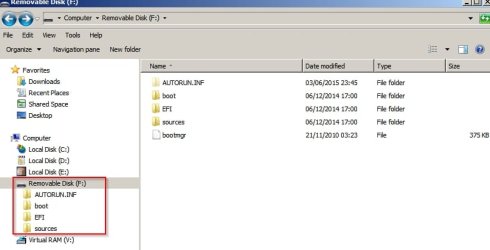
If you want to check contents of the USB before using it - it should look like this:

Removable Disk (F_).jpg
 

My Computer

Computer type
Laptop
Computer Manufacturer/Model Number
ASUS
OS
Microsoft Windows 7 Home Premium 64-bit 7601 Multiprocessor Free Service Pack 1
CPU
AMD C-60 APU with Radeon(tm) HD Graphics
Motherboard
ASUSTeK COMPUTER INC. X501U
Memory
4.00 GB
Graphics Card(s)
AMD Radeon HD 6290 Graphics
Sound Card
(1) AMD High Definition Audio Device (2) Realtek High Defi
Screen Resolution
1366 x 768 x 32 bits (4294967296 colors) @ 60 Hz
Hard Drives
Hitachi HTS545050A7E380 SATA Disk Device
Antivirus
Comodo CIS & FW, SecureAplus App Whitelisting, Threatfire
Browser
Cyberfox 64bit, Opera 64bit, Airfox
Other Info
Spy-The-Spy, HitmanPro.Alert, Norton Connect Safe, MJRegWatcher, BitDefender TrafficLight, Voodoo Shield, Zemana AntiMalware
I reckon you should also have a copy (clone) of your windows partition handy on an external drive just in case you need to reinstall some currently installed drivers that might prove hard to find.
 

My Computer

Computer type
Laptop
Computer Manufacturer/Model Number
ASUS
OS
Microsoft Windows 7 Home Premium 64-bit 7601 Multiprocessor Free Service Pack 1
CPU
AMD C-60 APU with Radeon(tm) HD Graphics
Motherboard
ASUSTeK COMPUTER INC. X501U
Memory
4.00 GB
Graphics Card(s)
AMD Radeon HD 6290 Graphics
Sound Card
(1) AMD High Definition Audio Device (2) Realtek High Defi
Screen Resolution
1366 x 768 x 32 bits (4294967296 colors) @ 60 Hz
Hard Drives
Hitachi HTS545050A7E380 SATA Disk Device
Antivirus
Comodo CIS & FW, SecureAplus App Whitelisting, Threatfire
Browser
Cyberfox 64bit, Opera 64bit, Airfox
Other Info
Spy-The-Spy, HitmanPro.Alert, Norton Connect Safe, MJRegWatcher, BitDefender TrafficLight, Voodoo Shield, Zemana AntiMalware
I suppose that you might possibly need to keep an eye on or disable any security software that could block any process needed to create the bootable.
 

My Computer

Computer type
Laptop
Computer Manufacturer/Model Number
ASUS
OS
Microsoft Windows 7 Home Premium 64-bit 7601 Multiprocessor Free Service Pack 1
CPU
AMD C-60 APU with Radeon(tm) HD Graphics
Motherboard
ASUSTeK COMPUTER INC. X501U
Memory
4.00 GB
Graphics Card(s)
AMD Radeon HD 6290 Graphics
Sound Card
(1) AMD High Definition Audio Device (2) Realtek High Defi
Screen Resolution
1366 x 768 x 32 bits (4294967296 colors) @ 60 Hz
Hard Drives
Hitachi HTS545050A7E380 SATA Disk Device
Antivirus
Comodo CIS & FW, SecureAplus App Whitelisting, Threatfire
Browser
Cyberfox 64bit, Opera 64bit, Airfox
Other Info
Spy-The-Spy, HitmanPro.Alert, Norton Connect Safe, MJRegWatcher, BitDefender TrafficLight, Voodoo Shield, Zemana AntiMalware
Hi Callender,

Thank you for all your advice and sorry to not have gotten back to you earlier. I was checking things, and not really progressing.

I did install unetbootin-windows-494.exe. Executing the file a second time gave no error messages, so I don't know why I got that the first time on exiting (after I'd put the ISO on the stick).

The data on the stick looks more or less the same as your attachement. Boot, efi, sources, support and upgrade are all in folders. There are a couple of other files beneath these folders among which autorun.inf (which on your image is a folder).

I know how to make a stick bootable now in command prompt, thanks to Torchwood. But before I wanted to go through the process again of clearing this stick, making it bootable again and putting the ISO on it, I wanted to check into this safely ejection you are talking about. Never seen it, never used it, and the icon didn't show on the taskbar. Got that fixed, although it doesn't seem to work for a cd-rom (not sure if it should...).

I also checked into changing the boot order. Found that I need to use F12 on my Toshiba. When I do that (not having any stick or disk inserted) it gives me a menu with 4 options:
- P1 Toshiba (so I guess that's what's happening normally, i.e. c:\)
- Floppy (??? this laptop doesn't have a tray to insert floppies! That's prehistoric!)
- Realtek Boot Agent
- P4-TSSTcorp CDDVDW TS-L633C (the option to boot from CD/DVD?)

I have 2 USB ports, so where's the option to boot from USB? If I cannot boot from a stick then redoing the operation of putting the ISO on the stick again is pointless. I would need this ISO to be on a disk. So I repeat my question can I do that with the Windows 7 "Windows Disc Image Burner" > right click the ISO, go to "Open With" and then select "Windows Disc Image Burner".

I do not know what a partition of windows is and I do not have an external drive. I do have a d: drive. I copied the drivers in system32 to a stick.

Judith
 

My Computer

Computer type
Laptop
Computer Manufacturer/Model Number
Toshiba
OS
Windows 7 Home Premium x64
CPU
Processor Intel(R) Core(TM) i3 CPU M 330 @ 2.13GHz
Motherboard
Satellite L550
Memory
8GB
Graphics Card(s)
ATI Mobility Radeon HD 5165
Hard Drives
C, D
Antivirus
Microsoft Essentials
Browser
Firefow

My Computer

Computer type
Laptop
Computer Manufacturer/Model Number
ASUS
OS
Microsoft Windows 7 Home Premium 64-bit 7601 Multiprocessor Free Service Pack 1
CPU
AMD C-60 APU with Radeon(tm) HD Graphics
Motherboard
ASUSTeK COMPUTER INC. X501U
Memory
4.00 GB
Graphics Card(s)
AMD Radeon HD 6290 Graphics
Sound Card
(1) AMD High Definition Audio Device (2) Realtek High Defi
Screen Resolution
1366 x 768 x 32 bits (4294967296 colors) @ 60 Hz
Hard Drives
Hitachi HTS545050A7E380 SATA Disk Device
Antivirus
Comodo CIS & FW, SecureAplus App Whitelisting, Threatfire
Browser
Cyberfox 64bit, Opera 64bit, Airfox
Other Info
Spy-The-Spy, HitmanPro.Alert, Norton Connect Safe, MJRegWatcher, BitDefender TrafficLight, Voodoo Shield, Zemana AntiMalware
Hi Callender,

The USB Legacy emulation was enabled, but I just read on the internet that sometimes it doesn't work until you actually plug the stick in. So I tried and got a 5th option : USB :D!

So now I'll put the ISO on the flash drive again, hopefully exactly as it should.
Empty, make it bootable, de-activate any security software and burn with unetbootin-windows-494 and eject with safe eject (as I do not want to try to reinstall Windows just yet - maybe this evening after dinner or tomorrow when my mind is "fresh").

I have 2 other questions. I have a d drive with 232GB (190GB available).

If I reinstall Windows it will erase c:\. Will it leave d:\ alone? I am asking because I was thinking of copying personal files to d:\ in order to have a double back-up (in case any of my USB sticks, where all my stuff is backed up now, appears to be corrupt - you never know...).

The other question is this hidden partition that is on my d:\. I've written about it before in this thread. If I reinstall Windows will it still be there? And actually, why not use that. What's wrong with factory settings?

This is what the user guide says, I understand from it that it does reinstall Windows from there (so it's not a repair function):


***

Restoring the pre-installed software form the Recovery hard disk drive
A portion of the total hard disk drive space is configured as a hidden recovery partition. This partition stores files which can be used to restore pre-installed software in the event of a problem.

If you subsequently set up your hard disk drive again, do not change, delete or add partitions in a manner other than specified in the manual, otherwise you may find that space for the required software is not available.

In addition, if you use a third-party partitioning program to reconfigure the partitions on your hard disk drive, you may find that it becomes impossible to setup your computer (actually this phrase scares me, what happens if I reinstall Windows on c:\ from USB? I've come accross people saying that on their Toshiba, their reinstallation stopped).

You can not use System Recovery Options if restoring the pre-installed software without System Recovery Options.

When you reinstall the Windows operating system, the hard disk will be reformatted and all data will be lost.

1. Turn off your computer.
2. While holding down 0 (zero) key on the keyboard, turn on your computer.
A menu will be displayed from which you should follow the on-screen instructions.

Please set you BIOS to default before you recover your computer to the factory state!

****

Thank you for the help (and patience!),

Judith
 

My Computer

Computer type
Laptop
Computer Manufacturer/Model Number
Toshiba
OS
Windows 7 Home Premium x64
CPU
Processor Intel(R) Core(TM) i3 CPU M 330 @ 2.13GHz
Motherboard
Satellite L550
Memory
8GB
Graphics Card(s)
ATI Mobility Radeon HD 5165
Hard Drives
C, D
Antivirus
Microsoft Essentials
Browser
Firefow
When you install Windows, it will only affect C: drive, nothing else.
 

My Computer

Computer type
PC/Desktop
Computer Manufacturer/Model Number
Custom Build
OS
Windows 7 Home Premium 32-Bit - Build 7600 SP1
CPU
Intel Core i3-2120 3.30Ghz
Motherboard
Asus P8Z68-V LX Intel Z68 Socket H2 ATX
Memory
Kingston 4 GB DDR3 1333 mhz
Graphics Card(s)
AMD Radeon HD6670
Sound Card
Sound Blaster Audigy SE 24-Bit
Monitor(s) Displays
Asus VE228
Screen Resolution
1440 X 900
Hard Drives
OCZ Vertex 3 120 GB Sata 3 SSD ==
Kingston SH103/S3 120 G Hyper X 120 GB SSD ==
Western Digital 500 GB Caviar Green 7200 RPM ==
PSU
Corsair CX600M == 600 Watt
Case
NZXT Apollo - Silver with Clear Side Panel
Cooling
Three 120 mm Fans
Keyboard
Microsoft Natural 4000
Mouse
Microsoft Custom Optical 3000
Internet Speed
AT&T Fiber Optic Wireless Network
Antivirus
Microsoft Security Essentials
Browser
Chrome
Other Info
120 mm Blue LED Fan -- Three Blue LED Lazer Light Sticks
When you install Windows, it will only affect C: drive, nothing else.
...as long as no other internal HD exists and/or no other external HD is plugged in, according to scuttlebutt.
 

My Computer

Computer type
PC/Desktop
Computer Manufacturer/Model Number
Antec desktop; Acer Aspire laptops
OS
Windows 7 Professional 64-bit
CPU
Desktop i5; Acers i5 & i7
Memory
desktop 16GB; 1 Acer 8GB & 1 Acer 16GB
Hard Drives
1TB split into 2 equal partitions [OS and data] usable by RJS
Internet Speed
AT&T DSL
Browser
FF, GChrome, msIE
Other Info
Windows 7 Firewall, Emsisoft AM/AV, MSE [scan-only], SpywareBlaster, Ruiware/BillP combine
I posted in this thread just to help out with creating a Windows 7 USB installer. I'm not expert on reinstalling as I've always preferred to wipe the drive and create a new partiton to install windows onto when clean installing.

You might want to look at the tutorial here:

Custom Install Windows 7

In theory you can choose the partition to install windows onto.

However I'd assume that the installer detects your existing installation and overwrites it keeping other partitons intact but that's a huge assumption beacause I don't really know if it is the case.

RE: Recovery Partition. That just reinstalls windows and makes your computer like it was when you first purchased it along with any programs and drivers that were pre-installed.
 

My Computer

Computer type
Laptop
Computer Manufacturer/Model Number
ASUS
OS
Microsoft Windows 7 Home Premium 64-bit 7601 Multiprocessor Free Service Pack 1
CPU
AMD C-60 APU with Radeon(tm) HD Graphics
Motherboard
ASUSTeK COMPUTER INC. X501U
Memory
4.00 GB
Graphics Card(s)
AMD Radeon HD 6290 Graphics
Sound Card
(1) AMD High Definition Audio Device (2) Realtek High Defi
Screen Resolution
1366 x 768 x 32 bits (4294967296 colors) @ 60 Hz
Hard Drives
Hitachi HTS545050A7E380 SATA Disk Device
Antivirus
Comodo CIS & FW, SecureAplus App Whitelisting, Threatfire
Browser
Cyberfox 64bit, Opera 64bit, Airfox
Other Info
Spy-The-Spy, HitmanPro.Alert, Norton Connect Safe, MJRegWatcher, BitDefender TrafficLight, Voodoo Shield, Zemana AntiMalware
I've always preferred to wipe the drive and create a new partiton to install windows onto when clean installing.

Yes well just for the record I always clean the drive with the DISKPART or the wipe function in Partition Wizard it does take time to do but it certainly does avid any remnants of previous installs one the drive. But I am a bit pedantic with this sort of stuff. I don't necessarily create a dedicated partition - just making the whole drive accessible for the OS and let Windows do it's own thing.
 

My Computer

Computer type
PC/Desktop
Computer Manufacturer/Model Number
Own build (new) Desk1 / Asus ROG Win 7 / Desk2 1st build
OS
Desk1 7 Home Prem / Desk2 10 Pro / Main lap Asus ROG 10 Pro 2 laptop Toshiba 7 Pro Asus P2520 7 & 10
CPU
Desk1 i5 3750K / Laptop i7 GTX 860M / Desk2 i5 2500
Motherboard
Desk1 Asus P877-V / Desk2 Gigabyte H67 UD3H / Laptop ?
Memory
Desk1 8GB (1866) / Desk2 16GB (1333) / Laptop 8Gb DDR3
Graphics Card(s)
Desk 1& 2NVidia GTX 650 & Laptops on board Intel
Sound Card
Desk 1 & 2 -XONAR DG Realtek High Def audio Laptop
Monitor(s) Displays
Desk 1 Benq HD 2450 / Desk2 Philips 24" / Laptop 17.5"
Screen Resolution
1920x1080 D1 & D2 & Laptop 1
Hard Drives
Desk1 Samsung 120GB 830 SSD
Asus ROG 256GB 850 Pro SSD
Desk2 Samsung 840 256 SSD
Toshiba 120GB EVO
PSU
Desk 1 Corsair HX 1050/ Laptop ? / Desk 2 Corsair HX 650
Case
Desk 1 Cooler HAF XM ? Toshiba laptop / Desk2 Coolermaster
Cooling
Fans on all Desk1 -2 Desk2 - all Coolermasters 5 Laptop ?
Keyboard
Desk 1 MS Sidewinder X6 Desk 2 MS Sidewinder X 4
Mouse
Desk 1&2 - Gigabyte MS 900 gamer - laptop - Logitec wireless
Internet Speed
ADSL2+
Other Info
One other Desktop (tester) and spare Toshba laptop both with SSD's
Running Kaspersky 2016 ISS on all machines config'd identically
Logitec audio stereo systems on each machine (x3)
Canon MG5250MFC
Router/modem TP-Link running WPA2SK
Thank you all for reacting. I haven't gotten back to you as I was checking problems that may not be related to Windows and may still be there after a reinstall. So I want to get rid of those first.

I will most likely opt for a clean install instead of back to factory settings (although that phrase in the manual about not being able the set up my computer if I use a 3rd party partitioning program still bothers me - I am not quite sure how to interpret it).

Roland, I don't understand your comment. I have a c (named Windows) and d drive (named Data). So I suppose I have 2 HDD, but the manual speaks about "a portion of the total hard disk drive space is configured as a hidden recovery partition"? So Toshiba treats c and d as 1 HDD. What makes a drive a HD? I'm confused.

Judith
 
Last edited:

My Computer

Computer type
Laptop
Computer Manufacturer/Model Number
Toshiba
OS
Windows 7 Home Premium x64
CPU
Processor Intel(R) Core(TM) i3 CPU M 330 @ 2.13GHz
Motherboard
Satellite L550
Memory
8GB
Graphics Card(s)
ATI Mobility Radeon HD 5165
Hard Drives
C, D
Antivirus
Microsoft Essentials
Browser
Firefow
Thank you all for reacting. I haven't gotten back to you as I was checking problems that may not be related to Windows and may still be there after a reinstall. So I want to get rid of those first.

I will most likely opt for a clean install instead of back to factory settings (although that phrase in the manual about not being able the set up my computer if I use a 3rd party partitioning program still bothers me - I am not quite sure how to interpret it).

Roland, I don't understand your comment. I have a c (named Windows) and d drive (named Data). So I suppose I have 2 HDD, but the manual speaks about "a portion of the total hard disk drive space is configured as a hidden recovery partition"? So Toshiba treats c and d as 1 HDD. What makes a drive a HD? I'm confused.

Judith

A Hard Drive Disk (HDD) is the physical piece that goes in your computer. It can be divided into partitions (parts) so that Drive C and D are on one HDD.
 

My Computer

Computer type
PC/Desktop
Computer Manufacturer/Model Number
Custom Build
OS
Windows 7 Home Premium 32-Bit - Build 7600 SP1
CPU
Intel Core i3-2120 3.30Ghz
Motherboard
Asus P8Z68-V LX Intel Z68 Socket H2 ATX
Memory
Kingston 4 GB DDR3 1333 mhz
Graphics Card(s)
AMD Radeon HD6670
Sound Card
Sound Blaster Audigy SE 24-Bit
Monitor(s) Displays
Asus VE228
Screen Resolution
1440 X 900
Hard Drives
OCZ Vertex 3 120 GB Sata 3 SSD ==
Kingston SH103/S3 120 G Hyper X 120 GB SSD ==
Western Digital 500 GB Caviar Green 7200 RPM ==
PSU
Corsair CX600M == 600 Watt
Case
NZXT Apollo - Silver with Clear Side Panel
Cooling
Three 120 mm Fans
Keyboard
Microsoft Natural 4000
Mouse
Microsoft Custom Optical 3000
Internet Speed
AT&T Fiber Optic Wireless Network
Antivirus
Microsoft Security Essentials
Browser
Chrome
Other Info
120 mm Blue LED Fan -- Three Blue LED Lazer Light Sticks
So Toshiba treats c and d as 1 HDD. What makes a drive a HD? I'm confused.

Hmm that looks like it is made for confusion Judith and I think especially as Toshiba when it installs the Windows OS does at the same time include an awful lot of their own bloatware which would be included in that recovery partition. After having a few Toshibas I do like I think I mentioned before and that is to clean install Windows onto a new drive and an SSD at that. That way yo avoid all the crap they put on although there are some of the rubbish installs via Windows updates - I just ignore that stuff.
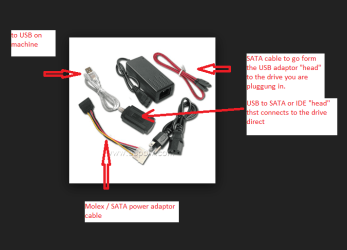
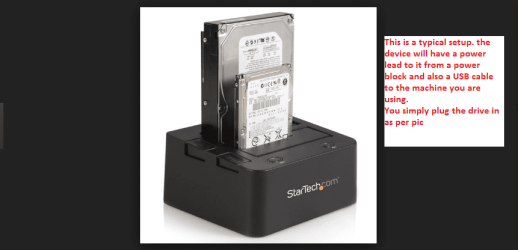
Now the clean install only needs the ISO download and the activation code that is on the sticker on that particular machine. The only thing is that you will have to do the updates and reinstall your programs - the data can just be transferred via a stick for example or by using a SATA to USB adaptor to hook the old drive up to the machine or a USB dock. There are other ways of getting the important data back if you preferred.

Now the updates I read here Four steps to reduce the pain of Windows 7 installations using cumulative updates - Tech Pro Research the other day there are packages that minimise the amount of time it takes to do the updates. I have not tried this method yet so cannot comment on how good this way is but the authour is a well known IT person.

The ISO was linked earlier on but having raved on about all that it is your choice it is just my own personal preference to do it like this.;)
 

My Computer

Computer type
PC/Desktop
Computer Manufacturer/Model Number
Own build (new) Desk1 / Asus ROG Win 7 / Desk2 1st build
OS
Desk1 7 Home Prem / Desk2 10 Pro / Main lap Asus ROG 10 Pro 2 laptop Toshiba 7 Pro Asus P2520 7 & 10
CPU
Desk1 i5 3750K / Laptop i7 GTX 860M / Desk2 i5 2500
Motherboard
Desk1 Asus P877-V / Desk2 Gigabyte H67 UD3H / Laptop ?
Memory
Desk1 8GB (1866) / Desk2 16GB (1333) / Laptop 8Gb DDR3
Graphics Card(s)
Desk 1& 2NVidia GTX 650 & Laptops on board Intel
Sound Card
Desk 1 & 2 -XONAR DG Realtek High Def audio Laptop
Monitor(s) Displays
Desk 1 Benq HD 2450 / Desk2 Philips 24" / Laptop 17.5"
Screen Resolution
1920x1080 D1 & D2 & Laptop 1
Hard Drives
Desk1 Samsung 120GB 830 SSD
Asus ROG 256GB 850 Pro SSD
Desk2 Samsung 840 256 SSD
Toshiba 120GB EVO
PSU
Desk 1 Corsair HX 1050/ Laptop ? / Desk 2 Corsair HX 650
Case
Desk 1 Cooler HAF XM ? Toshiba laptop / Desk2 Coolermaster
Cooling
Fans on all Desk1 -2 Desk2 - all Coolermasters 5 Laptop ?
Keyboard
Desk 1 MS Sidewinder X6 Desk 2 MS Sidewinder X 4
Mouse
Desk 1&2 - Gigabyte MS 900 gamer - laptop - Logitec wireless
Internet Speed
ADSL2+
Other Info
One other Desktop (tester) and spare Toshba laptop both with SSD's
Running Kaspersky 2016 ISS on all machines config'd identically
Logitec audio stereo systems on each machine (x3)
Canon MG5250MFC
Router/modem TP-Link running WPA2SK
Hi Bigmck and Icit2lol,

Indeed I am confused. I feel I don't understand the basic definitions. Hard disk drive, hard drive, drive, partitions etc. It seems to me they are used arbitrarily, in each other's place. In any case the naming is not not very distinctive to start with, it leads to confusion.

I didn't have much time today but I want to try to understand why my manual says "If you use a third-party partitioning program to configure the partitions on your hard disk drive (which I would if I would do a clean reinstall), you may find that it becomes impossible to setup your computer. I want to be sure I can do this clean reinstall and setup my computer. If I'm not totally sure I can do that, I'll go by the Toshiba recovery install, despite all the bloatware that comes with it. I'm not sure if there is much of that. And I could always uninstall items if I don't want them.

I had a look at my disk management:
Disk 0 465.76 GB
- 400MB (Active, Recovery Partition)
c: Windows 232.88GB (Boot, Crash Dump, Primary Partition)
d: Data 232.49GB (Primary Partition)
CD-ROM 0 e: DVD

So, 1 hard disk drive, divided in 3 partitions, a portion with no letter assigned (400MB), a c drive and a d drive, and extra (external to HDD) storage on drive e: for CD/DVD (and 2 USB ports for sticks or other devices).

So what in this configuration is my hard drive?

And why would I not be able to setup my computer again if I configure the whole HDD? If all that is on this HDD is erased and overwritten (i.e. 465.76GB clean without any partitioning or allocation and then repartitioned), it seems logical to me I would be able to setup my computer, as all that Toshiba ever did on this pc would be gone (including all personal data on c and d). Or is this supposition wrong and my understanding of how a clean install would work not correct?

I went through the sevenforums tutorial of a clean install was wondering if you can just keep the existing partitioning. It says "Select a hard drive or partition that you want to do a clean install of Windows 7 on, do what Drive options (advanced) you want if any and click next". And then it explains you can get rid of existing partitions to get only partition, and how to shrink existing partitions. How would I have to operate to have (or keep) a c: and d: of about 230GB, plus the 100MB System Reserved (for Boot Manager Code and etc.)?

Icit2lol, I do not know what ASAT is, I intend to just use my sticks to put my data back on my laptop. May take a while, but that's not a big issue. Your link will be useful if I will do a clean install. Thanks.

I'm probably boring you experts with my beginner's questions... and I am grateful for your interest and time. This is one learning experience for me. I've been doing a lot of reading on the internet as well, discovering things. When I finally (sic!) will have installed (or recovered) Windows, and it works, I will have passed the beginner's exam, in my eyes anyway...

Judith
 

My Computer

Computer type
Laptop
Computer Manufacturer/Model Number
Toshiba
OS
Windows 7 Home Premium x64
CPU
Processor Intel(R) Core(TM) i3 CPU M 330 @ 2.13GHz
Motherboard
Satellite L550
Memory
8GB
Graphics Card(s)
ATI Mobility Radeon HD 5165
Hard Drives
C, D
Antivirus
Microsoft Essentials
Browser
Firefow
Icit2lol, I do not know what ASAT is, I intend to just use my sticks to put my data back on my laptop. May take a while, but that's not a big issue. Your link will be useful if I will do a clean install. Thanks.
Now do you mean what I posted about the SATA to USB adaptor? because that is jut a way you can hook up say your OS drive to another machine and then do what you want to do and that could be anything from running a test on it to cleaning it to retrieving data. see pic it is of a very basic one but you may get the idea of how this works. I also like a dock and that is a block design that you plug the drive into and then just run the USB connector to the machine you are using.

Now of course go with what you are comfortable with and don't think you are boring us it is all part of the forum:)
John
 

Attachments

  • USBSATA.PNG
    USBSATA.PNG
    26.6 KB · Views: 5
  • DOCK.PNG
    DOCK.PNG
    110.2 KB · Views: 0

My Computer

Computer type
PC/Desktop
Computer Manufacturer/Model Number
Own build (new) Desk1 / Asus ROG Win 7 / Desk2 1st build
OS
Desk1 7 Home Prem / Desk2 10 Pro / Main lap Asus ROG 10 Pro 2 laptop Toshiba 7 Pro Asus P2520 7 & 10
CPU
Desk1 i5 3750K / Laptop i7 GTX 860M / Desk2 i5 2500
Motherboard
Desk1 Asus P877-V / Desk2 Gigabyte H67 UD3H / Laptop ?
Memory
Desk1 8GB (1866) / Desk2 16GB (1333) / Laptop 8Gb DDR3
Graphics Card(s)
Desk 1& 2NVidia GTX 650 & Laptops on board Intel
Sound Card
Desk 1 & 2 -XONAR DG Realtek High Def audio Laptop
Monitor(s) Displays
Desk 1 Benq HD 2450 / Desk2 Philips 24" / Laptop 17.5"
Screen Resolution
1920x1080 D1 & D2 & Laptop 1
Hard Drives
Desk1 Samsung 120GB 830 SSD
Asus ROG 256GB 850 Pro SSD
Desk2 Samsung 840 256 SSD
Toshiba 120GB EVO
PSU
Desk 1 Corsair HX 1050/ Laptop ? / Desk 2 Corsair HX 650
Case
Desk 1 Cooler HAF XM ? Toshiba laptop / Desk2 Coolermaster
Cooling
Fans on all Desk1 -2 Desk2 - all Coolermasters 5 Laptop ?
Keyboard
Desk 1 MS Sidewinder X6 Desk 2 MS Sidewinder X 4
Mouse
Desk 1&2 - Gigabyte MS 900 gamer - laptop - Logitec wireless
Internet Speed
ADSL2+
Other Info
One other Desktop (tester) and spare Toshba laptop both with SSD's
Running Kaspersky 2016 ISS on all machines config'd identically
Logitec audio stereo systems on each machine (x3)
Canon MG5250MFC
Router/modem TP-Link running WPA2SK
If you are doing a Clean Install, you don't really need to worry about making Partitions as you will just put Windows on the C: where it is now. You will still have a C: and a D: as they are now. If you have your Product Key (sticker on your PC with 25-characters) and a ISO of Windows 7, that is all you need for your Clean Install. If you have another way to contact us, we can assist if you get to a point where you are stuck doing it. Installing Windows is pretty easy. Once you start it, it just goes and will restart the computer a couple times. You don't have to do a whole lot. == When you got your present Internet Connection, did you have any disk to install anything? If you did, you might need that to get the Internet going. It is not always a problem though. If you have another way to get in contact with Seven Forums, then we can guide you along with the Clean Install.
 

My Computer

Computer type
PC/Desktop
Computer Manufacturer/Model Number
Custom Build
OS
Windows 7 Home Premium 32-Bit - Build 7600 SP1
CPU
Intel Core i3-2120 3.30Ghz
Motherboard
Asus P8Z68-V LX Intel Z68 Socket H2 ATX
Memory
Kingston 4 GB DDR3 1333 mhz
Graphics Card(s)
AMD Radeon HD6670
Sound Card
Sound Blaster Audigy SE 24-Bit
Monitor(s) Displays
Asus VE228
Screen Resolution
1440 X 900
Hard Drives
OCZ Vertex 3 120 GB Sata 3 SSD ==
Kingston SH103/S3 120 G Hyper X 120 GB SSD ==
Western Digital 500 GB Caviar Green 7200 RPM ==
PSU
Corsair CX600M == 600 Watt
Case
NZXT Apollo - Silver with Clear Side Panel
Cooling
Three 120 mm Fans
Keyboard
Microsoft Natural 4000
Mouse
Microsoft Custom Optical 3000
Internet Speed
AT&T Fiber Optic Wireless Network
Antivirus
Microsoft Security Essentials
Browser
Chrome
Other Info
120 mm Blue LED Fan -- Three Blue LED Lazer Light Sticks
I agree with Bigmck and also links for an ISO (genuine Microsoft ones) are available in case you do not have any installation media, and you only need the activation code off the sticker on your computer.

Now what I always do is download some of the drivers for a machine especially the LAN (Ethernet connection) and WLAN (wifi connection) as I find very often Windows will not install those with the installation. They are vital for any hook up to the net obviously and the method I use is to copy them to a USB stick and install them to the computer via it. The rest if any need updating can then be done from the net, along with a security suite - I alwasy make that a priority before much else;)
 

My Computer

Computer type
PC/Desktop
Computer Manufacturer/Model Number
Own build (new) Desk1 / Asus ROG Win 7 / Desk2 1st build
OS
Desk1 7 Home Prem / Desk2 10 Pro / Main lap Asus ROG 10 Pro 2 laptop Toshiba 7 Pro Asus P2520 7 & 10
CPU
Desk1 i5 3750K / Laptop i7 GTX 860M / Desk2 i5 2500
Motherboard
Desk1 Asus P877-V / Desk2 Gigabyte H67 UD3H / Laptop ?
Memory
Desk1 8GB (1866) / Desk2 16GB (1333) / Laptop 8Gb DDR3
Graphics Card(s)
Desk 1& 2NVidia GTX 650 & Laptops on board Intel
Sound Card
Desk 1 & 2 -XONAR DG Realtek High Def audio Laptop
Monitor(s) Displays
Desk 1 Benq HD 2450 / Desk2 Philips 24" / Laptop 17.5"
Screen Resolution
1920x1080 D1 & D2 & Laptop 1
Hard Drives
Desk1 Samsung 120GB 830 SSD
Asus ROG 256GB 850 Pro SSD
Desk2 Samsung 840 256 SSD
Toshiba 120GB EVO
PSU
Desk 1 Corsair HX 1050/ Laptop ? / Desk 2 Corsair HX 650
Case
Desk 1 Cooler HAF XM ? Toshiba laptop / Desk2 Coolermaster
Cooling
Fans on all Desk1 -2 Desk2 - all Coolermasters 5 Laptop ?
Keyboard
Desk 1 MS Sidewinder X6 Desk 2 MS Sidewinder X 4
Mouse
Desk 1&2 - Gigabyte MS 900 gamer - laptop - Logitec wireless
Internet Speed
ADSL2+
Other Info
One other Desktop (tester) and spare Toshba laptop both with SSD's
Running Kaspersky 2016 ISS on all machines config'd identically
Logitec audio stereo systems on each machine (x3)
Canon MG5250MFC
Router/modem TP-Link running WPA2SK
Hi Icit2lol and Bigmck,

As I still do not know why using a 3rd party partitioning program wouldn't work (and no one reacted on this question to give any clues), I decided to better be safe (with bloatware) than sorry (with nothing) and I am going to try the Toshiba recovery partition that is on my d drive. If I understand it well, I have the option to recover only c: (without touching d: or to erase the whole HDD and reinstall, which is the recommended method and which is what I am planning on doing.

I have a disk with a Toshiba recovery too (the files are all from 2009 or before, so I guess it is back to factory settings as well and will not install my already messed up user profile when I made the recovery disk back in April 2015). I still have Torchwood's iso on a flash drive (and printed all the tutorials for a clean install), in case the Toshiba recovery methods doesn't work.

I don't have a 2nd machine; ASAT, adaptors, a dock and all of that fancy stuff. It is just my home machine and I am a simple user, not a passionate with all kinds of multi-purpose equipment.

Getting back internet is my first priority after install and it also was the 1st thing I checked, how to reinstall it. It isn't a disk. I have a box here that is connected to the phone line and this box provides the internet connection (so you configure the box, but I don't have to redo that). My phone, mobile phone and pc connections - LAN and wifi - work through this box (and in more urban regions tv also works on it > everything goes through the phone line). So what I need to do is connect my pc to this box again. I believe a simple key and password do the trick, just as like you would hook your mobile phone on to a wifi hot spot. I have a manual that explains it, should I need it.

Well, here I go... if you don't hear back from me, it means I'm in deep trouble :shock:.

Judith
 

My Computer

Computer type
Laptop
Computer Manufacturer/Model Number
Toshiba
OS
Windows 7 Home Premium x64
CPU
Processor Intel(R) Core(TM) i3 CPU M 330 @ 2.13GHz
Motherboard
Satellite L550
Memory
8GB
Graphics Card(s)
ATI Mobility Radeon HD 5165
Hard Drives
C, D
Antivirus
Microsoft Essentials
Browser
Firefow
Back
Top