Mysterious Win 7 Pro 64 Slowdown - Maybe Underclocking Itself?

TDKMate

New member
Member
VIP
Local time
7:24 AM
Messages
335
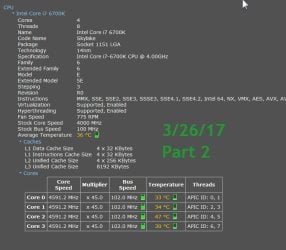
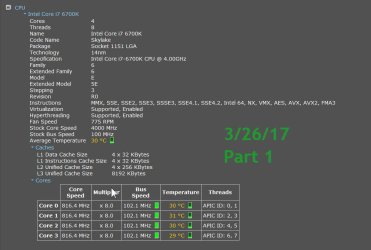
All of a sudden my system seems to be running slow. I did what I could think of (see below) but the problem seems to be, per Piriform Speccy, that my CPU appears to be randomly and fairly steadily underclocking.

The CPU should be running right around 4590MHz, but is staying right around 816MHz per Speccy.

Some of the things I did:

Reboot. Was slow to display all the little icons in the notification area.

Start and constantly monitor Task Manager, mainly in the Processes tab, sorted by CPU usage.

Ran AV scan: Scanned OK. I stepped away so I don’t know how long this took.

Ran CCleaner: Ran very slow but didn’t find anything abnormal: no usual startups, registry hooks, etc. It took several seconds to go from one tool/tab to another instead of instantaneously.

Ran Malwarebytes scan: Scanned OK. But it took over 18 minutes when it usually takes 6-7 minutes. I fired up Speccy during this scan and had it visible. CPU stayed around 816MHz. MBAM using 13% CPU.

Ran Malicious Removal tool: Scanned OK. Was creeping along slowly with CPU at 816MHz using 45-51% CPU. About 2/3 of the way thru the scan, the CPU jumped to 4590MHz and MRT took off and finished quickly.

Checked Power Options and nothing seemed to change, and I haven’t changed anything.

I don’t run Speccy all that much, but I have never noticed the CPU dropping below 45xxMHz. It shows the CPU running at ~816MHz for about 45 minutes now with a reported average temp of 28-30°C.

Even my browser (Firefox) is just crawling along as is everything else.

Any ideas on why all of a sudden I seem to be underclocking? (I don’t know OCing and haven’t touched my BIOS in at least a year.)

Is there some Windows power saving setting, or the like, that I’m missing. A BIOS setting that somehow changed itself?

I’m clueless…

screenshot 1: CPU at 816MHz
screenshot 2: CPU at normal full speed
.
 

Attachments
  • CPU at 816MHz.jpg
    CPU at 816MHz.jpg
    60 KB · Views: 1
  • CPU at 4591GHz.jpg
    CPU at 4591GHz.jpg
    59.2 KB · Views: 2
Last edited:

My Computer My Computer

Computer type
PC/Desktop
Computer Manufacturer/Model Number
home built
OS
Win 7 Pro 64 SP1
CPU
i7 6700K SkyLake
Motherboard
MSI Gaming M7
Memory
32 GB
Graphics Card(s)
nVidia GTX 970
Sound Card
onboard
Monitor(s) Displays
DELL U2711
Screen Resolution
2560x1440
Hard Drives
1 SSD OS, 2 WD Black Caviar data harddrives
PSU
EVGA Super Nova 850W G2 'Gold'
Case
Thermaltake Soprano Snow Edition
Cooling
Cooler Master Hyper 212 evo
Keyboard
Logitech K350
Mouse
Mad Kats RATT
Antivirus
Avast
Browser
Firefox
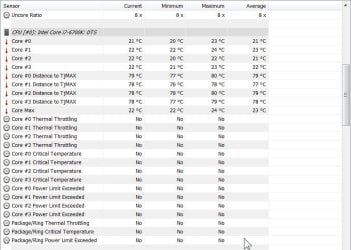
I doubt the cpu speed is causing your slowdown problem unless you are underclocking due to overheating. To see if you are, download and run hwinfo64 and watch your "distance to TjMaxx" lines and see if they turn red because your cpu temp is getting elevated.

otherwise, underclocking is just a power saving feature that turns off in a few microseconds, so you should not notice it. But to turn off underclocking altogether do these two things:

press del at startup to open your bios, then disable cpu features eist, intel c-state, and c1e support. Your manual will show you exactly where they are in bios

within windows do start > run > control powercfg.cpl,,1 > processor power management > min processor state > 100%

Then undo all of the above if the problem persists, which I'm assuming it will.

Does the problem also occur in windows safe mode? If so, please re-fill out your specs with much more detail. From your description it sounds like a bad or very full hard drive, but more info is needed.
 

My Computer My Computer

Computer type
PC/Desktop
Computer Manufacturer/Model Number
diy
OS
Win7 pro x64
CPU
stock i7 7700k
Motherboard
Gigabyte Z270N-WIFI mini-ITX
Memory
Corsair Vengeance LPX 16GB (2x8GB) DDR4 @ 3200MHz
Graphics Card(s)
integrated Intel HD 630
Sound Card
onboard Realtek ALC1220
Monitor(s) Displays
two vertically mounted samsung 55" 4k un55mu8000
Screen Resolution
1920x1280
Hard Drives
256GB Samsung EVO 960 M.2 pci-e NVMe SSD
PSU
SilverStone Nightjar ST45NF 450Watt Fanless
Case
No case. Motherboard is mounted directly onto power supply
Cooling
Evercool low profile 815EP with Panaflow 12L fan at 7v
Keyboard
Ortek MCK-86 mini
Mouse
Belkin 5-button USB
Internet Speed
spectrum 400mbps
Thanks for the tips, johnhoh. Yeah, I also doubt it’s running hot. One sign is the case and PSU fans are slow spinning and the air coming out is barely lukewarm.

The motherboard temp is higher than the CPU (at 37-39°C), but it’s been that way on every build I’ve done.

For an update: the system ran at 816MHz the rest of the evening (for hours) last night. And that was no matter what I did, meaning at idle or running programs. I usually turn off the system at night but I put it to sleep instead.

This morning I woke it up and it ran at 4590MHz for about 1/2 hour, both at idle and working. Then it dropped back down to 816MHz and stayed there for a couple hours regardless of usage. I had to go out so I put it back to sleep.

When I came back and woke it up this time, about 4 hours ago, it was and still is running normally at 4590MHz all this time.

When it running at 816MHz it is quite obvious as even simple Web sites are jittery when you scroll down/up, and everything else runs slow, too.

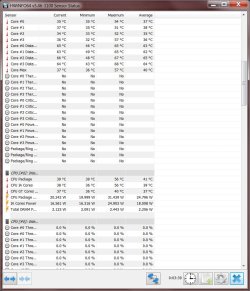
“To see if you are, download and run hwinfo64 and watch your "distance to TjMaxx" lines and see if they turn red because your cpu temp is getting elevated.”
Things seem fine, screenshot below, but I have to admit most of the info it supplies is far beyond my smarts here.

“… otherwise, underclocking is just a power saving feature that turns off in a few microseconds, so you should not notice it. …”
I do get that, but it’s has always run ‘full bore’ at 45xxMHz since I put it together, even at idle for extend periods. So that’s why I’m baffled on why it’s all of a sudden throttling down. (I don’t know squat about OCing and to get this thing to run at 45xxMHz took a lot of help from the MSI forums.)

“Does the problem also occur in windows safe mode?”
Haven’t tried that.

“From your description it sounds like a bad or very full hard drive, but more info is needed.”
My OS SSD and both data hard drives (two partitions each on all three) give good SMART reports. All have lots of free space.
.
 

Attachments

  • HW info 64 -2017-03-27_14-03-47.jpg
    HW info 64 -2017-03-27_14-03-47.jpg
    114.5 KB · Views: 1

My Computer My Computer

Computer type
PC/Desktop
Computer Manufacturer/Model Number
home built
OS
Win 7 Pro 64 SP1
CPU
i7 6700K SkyLake
Motherboard
MSI Gaming M7
Memory
32 GB
Graphics Card(s)
nVidia GTX 970
Sound Card
onboard
Monitor(s) Displays
DELL U2711
Screen Resolution
2560x1440
Hard Drives
1 SSD OS, 2 WD Black Caviar data harddrives
PSU
EVGA Super Nova 850W G2 'Gold'
Case
Thermaltake Soprano Snow Edition
Cooling
Cooler Master Hyper 212 evo
Keyboard
Logitech K350
Mouse
Mad Kats RATT
Antivirus
Avast
Browser
Firefox
did you try the below yet?

press del at startup to open your bios, then disable cpu features eist, intel c-state, and c1e support. Your manual will show you exactly where they are in bios

within windows do start > run > control powercfg.cpl,,1 > processor power management > min processor state > 100%
 

My Computer My Computer

Computer type
PC/Desktop
Computer Manufacturer/Model Number
diy
OS
Win7 pro x64
CPU
stock i7 7700k
Motherboard
Gigabyte Z270N-WIFI mini-ITX
Memory
Corsair Vengeance LPX 16GB (2x8GB) DDR4 @ 3200MHz
Graphics Card(s)
integrated Intel HD 630
Sound Card
onboard Realtek ALC1220
Monitor(s) Displays
two vertically mounted samsung 55" 4k un55mu8000
Screen Resolution
1920x1280
Hard Drives
256GB Samsung EVO 960 M.2 pci-e NVMe SSD
PSU
SilverStone Nightjar ST45NF 450Watt Fanless
Case
No case. Motherboard is mounted directly onto power supply
Cooling
Evercool low profile 815EP with Panaflow 12L fan at 7v
Keyboard
Ortek MCK-86 mini
Mouse
Belkin 5-button USB
Internet Speed
spectrum 400mbps
Base clock is applied not only to the CPU but to everything (Memory, chipset etc). Some of this components my be failing.
Try to set you base clock (102MHz) back to default (100MHz).
 

My Computers My Computers

System One System Two

  • Computer type
    PC/Desktop
    Computer Manufacturer/Model Number
    custom build
    OS
    Windows 7 HP 64
    CPU
    i5 6600K - 800MHz to 4200MHz
    Motherboard
    GA-Z170-HD3P
    Memory
    4+4G GSkill DDR4 3000
    Graphics Card(s)
    IG - Intel 530
    Monitor(s) Displays
    Samsung 226BW
    Screen Resolution
    1680x1050
    Hard Drives
    (1) -1 SM951 – 128GB M.2 AHCI PCIe SSD drive for Windows 7 and Lubuntu
    (2) -1 WD SATA 3 - 1T for Data
    (3) -1 WD SATA 3 - 1T for backup
    PSU
    Thermaltake 450W TR2 gold
    Keyboard
    Old and good Chicony mechanical keyboard
    Mouse
    Logitech mX performance - 9 buttons (had to disable some)
    Internet Speed
    500Mb/s
    Browser
    Firefox 64
    Other Info
    TinyWall firewall
  • Computer type
    Laptop
    System Manufacturer/Model Number
    Asus Q550LF
    OS
    Windows 7 Pro
    CPU
    i7-4500U 800MHz to 3.0GHz
    Motherboard
    Asus Q550LF
    Memory
    (4+4)G DDR3 1600
    Graphics Card(s)
    IG intel 4400 + NVIDIA GeForce GT 745M
    Sound Card
    Realtek
    Monitor(s) Displays
    LG Display LP156WF4-SPH1
    Screen Resolution
    1920 x 1080
    Hard Drives
    BX500 120G SSD for Windows and programs +
    1T HDD for data
    Internet Speed
    500 Mb/s
    Browser
    Firefox
    Other Info
    TinyWall firewall
Update. Two days ago I got to spend some time on the computer. It worked fine. I had about 7 hours in the morning without a glitch. And all afternoon and evening things were good, too. I had only one ‘stutter’ for about 20 minutes in the evening, but other than that, it ran full speed.

I was pretty busy with errands, chores, and the like yesterday, but again it ran without a hitch.

This morning is a different case, though. It fired up at 816MHz and has stayed there for the 2 hours or so it’s been on.

did you try the below yet? …”
No, not yet as it has been working fine and I want to give it a day or two to see how things go. More clues below.

Base clock is applied not only to the CPU but to everything (Memory, chipset etc). Some of this components my be failing. Try to set you base clock (102MHz) back to default (100MHz).
I really don’t know anything about OCing so messing with those setting is not only very iffy for me, but scary, too. More clues below.

~~~~~~~~~~~~~~~~~~~~~~~~~~

This thing is running painfully slow. I figured I’d go into BIOS and see if I could find the ‘base clock.’ I did but don’t know how to change only that as it's greyed out and won't change.

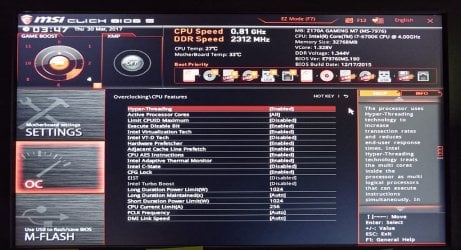
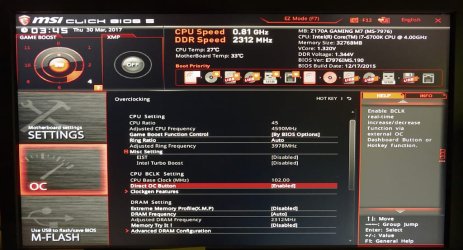
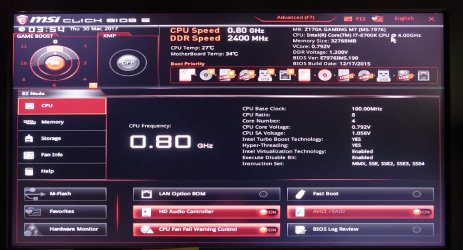
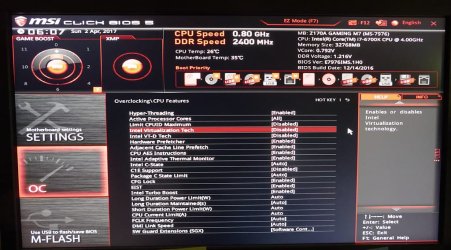
What I notice right off is even in BIOS it is running at 0.8GHz. See first screenshot below. Also note the “Game Boost” block in the upper left corner. This is the only thing I’ve set in regards to OCing. It is set at ‘4’.

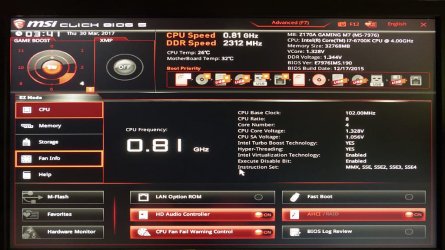
So I changed the ‘4’ setting back down to ‘0,’ rebooted, but no change. See second screen shot.

The other two screen shots are to (hopefully) provide more details of various setting when the Game Boost was set to ‘4.’

The Game Boost ‘dial’ in the BIOS is software driven. There is a physical knob on the motherboard with the same settings. I don’t remember if I set that when I built this box or used the BIOS to ‘OC.’

Any ideas on what to test or do?

I’m still clueless…
.
 

Attachments

  • Computer BIOS settings-Mar30-17=FZ1K-_1020502-EditLowRes.jpg
    Computer BIOS settings-Mar30-17=FZ1K-_1020502-EditLowRes.jpg
    105.4 KB · Views: 1
  • Computer BIOS settings-Mar30-17=FZ1K-_1020501-EditLowRes.jpg
    Computer BIOS settings-Mar30-17=FZ1K-_1020501-EditLowRes.jpg
    87.9 KB · Views: 2
  • Computer BIOS settings-Mar30-17=FZ1K-_1020503-EditLowRes.jpg
    Computer BIOS settings-Mar30-17=FZ1K-_1020503-EditLowRes.jpg
    88.4 KB · Views: 1
  • Computer BIOS settings-Mar30-17=FZ1K-_1020500-EditLowRes.jpg
    Computer BIOS settings-Mar30-17=FZ1K-_1020500-EditLowRes.jpg
    90.3 KB · Views: 1

My Computer My Computer

Computer type
PC/Desktop
Computer Manufacturer/Model Number
home built
OS
Win 7 Pro 64 SP1
CPU
i7 6700K SkyLake
Motherboard
MSI Gaming M7
Memory
32 GB
Graphics Card(s)
nVidia GTX 970
Sound Card
onboard
Monitor(s) Displays
DELL U2711
Screen Resolution
2560x1440
Hard Drives
1 SSD OS, 2 WD Black Caviar data harddrives
PSU
EVGA Super Nova 850W G2 'Gold'
Case
Thermaltake Soprano Snow Edition
Cooling
Cooler Master Hyper 212 evo
Keyboard
Logitech K350
Mouse
Mad Kats RATT
Antivirus
Avast
Browser
Firefox
i'd do a simple bios cmos reset. should be in your manual
 

My Computer My Computer

Computer type
PC/Desktop
Computer Manufacturer/Model Number
diy
OS
Win7 pro x64
CPU
stock i7 7700k
Motherboard
Gigabyte Z270N-WIFI mini-ITX
Memory
Corsair Vengeance LPX 16GB (2x8GB) DDR4 @ 3200MHz
Graphics Card(s)
integrated Intel HD 630
Sound Card
onboard Realtek ALC1220
Monitor(s) Displays
two vertically mounted samsung 55" 4k un55mu8000
Screen Resolution
1920x1280
Hard Drives
256GB Samsung EVO 960 M.2 pci-e NVMe SSD
PSU
SilverStone Nightjar ST45NF 450Watt Fanless
Case
No case. Motherboard is mounted directly onto power supply
Cooling
Evercool low profile 815EP with Panaflow 12L fan at 7v
Keyboard
Ortek MCK-86 mini
Mouse
Belkin 5-button USB
Internet Speed
spectrum 400mbps
I'm wondering if the computer's back-ground-running security and monitoring programs' scanning and logging are a little too assertively set.
 

My Computer My Computer

Computer type
PC/Desktop
Computer Manufacturer/Model Number
Antec desktop; Acer Aspire laptops
OS
Windows 7 Professional 64-bit
CPU
Desktop i5; Acers i5 & i7
Memory
desktop 16GB; 1 Acer 8GB & 1 Acer 16GB
Hard Drives
1TB split into 2 equal partitions [OS and data] usable by RJS
Internet Speed
AT&T DSL
Browser
FF, GChrome, msIE
Other Info
Windows 7 Firewall, Emsisoft AM/AV, MSE [scan-only], SpywareBlaster, Ruiware/BillP combine
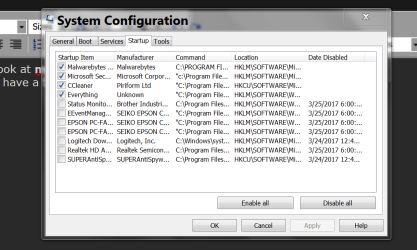
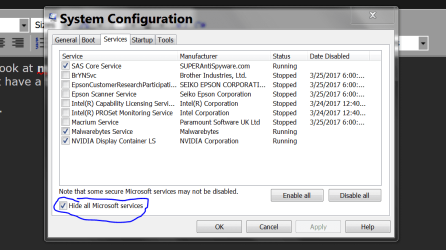
Let us take a look at msconfig/Startup and Non Microsoft Services.
You just might have a bunch of things running in the background that are not needed.

Looks like this.


Msconfig Startup.PNG

Msconfig Non Microsoft Services.PNG


Jack
 

My Computer My Computer

Computer type
PC/Desktop
Computer Manufacturer/Model Number
Home made Desktop
OS
Windows 10 Pro. 64/ version 1709 Windows 7 Pro/64
CPU
Intel i7-6800K @ 4.3
Motherboard
ASUS X-99 Deluxe II
Memory
Corsair Platinum 16 gig @2400
Graphics Card(s)
EVGA GTX 1070 OC
Monitor(s) Displays
Asus 27" LED LCD/VE278Q
Screen Resolution
1920-1080 or 1280-720 HDMI
Hard Drives
INTEL SSD 730-240 Gb Sata 3.0/
PSU
EVGA Platium 1200W
Case
Phanteks Luxe Tempered Glass 8 fans/ one radiator
Cooling
XSPC/ Water Cooled CPU
Keyboard
Das 4 Professional
Mouse
Logitech M705/MX Anywhere 2-S
Internet Speed
100 mbits
Antivirus
Microsoft Security Essentials/ Malwarebytes Premium 3.0/ SAS
Browser
I.E. 11 default/Firefox/ ISP Time Warner Cable/Spectrum
Other Info
LG BluRay Burner/
Sound system-KLipsch-THX/
Icy Dock ssd Hot Swap bays.
i notice that in bios, the cpu is 27c and 800mhz. This is not a windows issue
 

My Computer My Computer

Computer type
PC/Desktop
Computer Manufacturer/Model Number
diy
OS
Win7 pro x64
CPU
stock i7 7700k
Motherboard
Gigabyte Z270N-WIFI mini-ITX
Memory
Corsair Vengeance LPX 16GB (2x8GB) DDR4 @ 3200MHz
Graphics Card(s)
integrated Intel HD 630
Sound Card
onboard Realtek ALC1220
Monitor(s) Displays
two vertically mounted samsung 55" 4k un55mu8000
Screen Resolution
1920x1280
Hard Drives
256GB Samsung EVO 960 M.2 pci-e NVMe SSD
PSU
SilverStone Nightjar ST45NF 450Watt Fanless
Case
No case. Motherboard is mounted directly onto power supply
Cooling
Evercool low profile 815EP with Panaflow 12L fan at 7v
Keyboard
Ortek MCK-86 mini
Mouse
Belkin 5-button USB
Internet Speed
spectrum 400mbps
There are many wrong settings. (Memory XMP, turbo boost off, CPU ratio etc).
You must read the MB manual.
Overclock can damage your MB and CPU. It's for experts, and you're not.
I would do what Jonh has suggested. Reset Bios and start the default.
After resetting, try fist without overclock.
Enable:
- CSM
- Memory XMP
- Turbo boost

Disable:
-Secure boot
-Fast boot
-Intel Virtualization

There are many other BIOS settings, you have to look one by one.
 
Last edited:

My Computers My Computers

System One System Two

  • Computer type
    PC/Desktop
    Computer Manufacturer/Model Number
    custom build
    OS
    Windows 7 HP 64
    CPU
    i5 6600K - 800MHz to 4200MHz
    Motherboard
    GA-Z170-HD3P
    Memory
    4+4G GSkill DDR4 3000
    Graphics Card(s)
    IG - Intel 530
    Monitor(s) Displays
    Samsung 226BW
    Screen Resolution
    1680x1050
    Hard Drives
    (1) -1 SM951 – 128GB M.2 AHCI PCIe SSD drive for Windows 7 and Lubuntu
    (2) -1 WD SATA 3 - 1T for Data
    (3) -1 WD SATA 3 - 1T for backup
    PSU
    Thermaltake 450W TR2 gold
    Keyboard
    Old and good Chicony mechanical keyboard
    Mouse
    Logitech mX performance - 9 buttons (had to disable some)
    Internet Speed
    500Mb/s
    Browser
    Firefox 64
    Other Info
    TinyWall firewall
  • Computer type
    Laptop
    System Manufacturer/Model Number
    Asus Q550LF
    OS
    Windows 7 Pro
    CPU
    i7-4500U 800MHz to 3.0GHz
    Motherboard
    Asus Q550LF
    Memory
    (4+4)G DDR3 1600
    Graphics Card(s)
    IG intel 4400 + NVIDIA GeForce GT 745M
    Sound Card
    Realtek
    Monitor(s) Displays
    LG Display LP156WF4-SPH1
    Screen Resolution
    1920 x 1080
    Hard Drives
    BX500 120G SSD for Windows and programs +
    1T HDD for data
    Internet Speed
    500 Mb/s
    Browser
    Firefox
    Other Info
    TinyWall firewall
I'm wondering if the computer's back-ground-running security and monitoring programs' scanning and logging are a little too assertively set.

Let us take a look at msconfig/Startup and Non Microsoft Services.
You just might have a bunch of things running in the background that are not needed.
...

Jack
Hi Jack and RolandJS. Thanks for the tips. There's nothing unusual running, and I keep the system at least fairly groomed. There may be a couple of debatable item running (like nVidia's telemetry container) but it's mostly items needed to run the programs and software I use (like Adobe's junk for Photoshop and Lightroom, Steam [on demand only], SnagIt, printer and capture card items...).
 

My Computer My Computer

Computer type
PC/Desktop
Computer Manufacturer/Model Number
home built
OS
Win 7 Pro 64 SP1
CPU
i7 6700K SkyLake
Motherboard
MSI Gaming M7
Memory
32 GB
Graphics Card(s)
nVidia GTX 970
Sound Card
onboard
Monitor(s) Displays
DELL U2711
Screen Resolution
2560x1440
Hard Drives
1 SSD OS, 2 WD Black Caviar data harddrives
PSU
EVGA Super Nova 850W G2 'Gold'
Case
Thermaltake Soprano Snow Edition
Cooling
Cooler Master Hyper 212 evo
Keyboard
Logitech K350
Mouse
Mad Kats RATT
Antivirus
Avast
Browser
Firefox
i'd do a simple bios cmos reset. should be in your manual

There are many wrong settings. (Memory XMP, turbo boost off, CPU ratio etc).
You must read the MB manual.
Overclock can damage your MB and CPU. It's for experts, and you're not.
I would do what Jonh has suggested. Reset Bios and start the default.
After resetting, try fist without overclock.
Enable:
- CSM
- Memory XMP
- Turbo boost

Disable:
-Secure boot
-Fast boot
-Intel Virtualization

There are many other BIOS settings, you have to look one by one.
Hi johnhoh and Megahertz07. As suggested, I downloaded the manual and resetting the BIOS turned to be as easy as hitting the F6 key.

Sadly, no difference except it's now running at 0.8GHz instead of 0.81GHz. I image that's because the OC was removed. Also, before and after resetting the BIOS, it's been running consistently slow.

As recommended, I Disabled:
-Secure boot (don't remember prior setting)
-Fast boot (was already disabled)
-Intel Virtualization (was already disabled)

On Enabling:
- CSM (I was pretty tired when I did the reset and didn't notice this one. I'll look again)
- Memory XMP (Didn't try yet this time, but did many times prior: it has never stayed to being ON)
- Turbo boost (On)

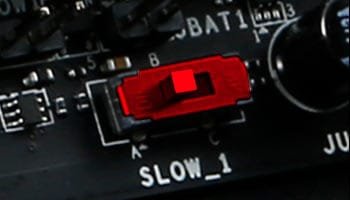
My motherboard is a Z170A GAMING M7. When looking at the PDF manual I noticed a ‘Slow’ switch located on it. Curious, I Googled it to learn a little more on it (the manual indicates it’s to manually run a slow boot) and found there’s other’s out there with a Skylake and an M7 that run at only 0.8GHz.

But like all things Google, the cure has a wide range of possibilities, with one being a defective ‘Slow’ switch. Do you think ‘slow boot’ could be sticking somehow, causing it to run slow all the time?

One suggested cure is an overheating VC chip (Voltage Control??) that doesn’t show up in CPU temps. Can this be a cause? -- For giggles and general maintenance, I’m hoping to have time this weekend to get the box out to the storage shed, where I have a small air compressor, and blow it out. I haven’t opened it since I built it over a year ago and I have three long haired dogs, so I’m sure it needs blown out anyway.

I was pretty tired when I reset the BIOS last night, so I’ll go thru the BIOS again and look for CSM and try turning XMP on again and see what happens.

In the mean time, any other ideas?
.
 

My Computer My Computer

Computer type
PC/Desktop
Computer Manufacturer/Model Number
home built
OS
Win 7 Pro 64 SP1
CPU
i7 6700K SkyLake
Motherboard
MSI Gaming M7
Memory
32 GB
Graphics Card(s)
nVidia GTX 970
Sound Card
onboard
Monitor(s) Displays
DELL U2711
Screen Resolution
2560x1440
Hard Drives
1 SSD OS, 2 WD Black Caviar data harddrives
PSU
EVGA Super Nova 850W G2 'Gold'
Case
Thermaltake Soprano Snow Edition
Cooling
Cooler Master Hyper 212 evo
Keyboard
Logitech K350
Mouse
Mad Kats RATT
Antivirus
Avast
Browser
Firefox
Because you are at 0.8ghz in bios, this is certainly not a windows problem. Just saying.

Your machine appears to intermittently be in MSI Slow Mode.

I recommend you not do a compressor-driven air-cleaning of your computer because a compressor may be too powerful. A can of Dust-Off is okay, but cleaning the machine out is pretty unlikely to make a difference to your problem.

First thing I'd do is re-flash your bios to version 1.H. I think this is your link. Double check so you are sure though..

Support For Z170A GAMING M7 | Motherboard - The world leader in motherboard design | MSI USA

your manual will tell you how to update bios either by using M-Flash from within bios with the new version bios file on FAT32-formatted USB drive, or by using MSI Live Update. I would try Live Update first since its easier, but if it says you are already on the most current bios then you will have no choice but to use M-Flash because just because Live Update says your version is current, that does not mean its not corrupted, so you still need to update it even if its just a re-install using the same version. Your board also has a feature called Flashback which is yet a third method to update your bios that you can do even without a cpu or ram installed. I would avoid that method for now.

Reboot with the new bios in place and hope your problem is fixed. If not, download and run HWINFO64.

HWiNFO - Download

Check the line items called Core #0-#3 Clock in the first cpu section, and Core #0-#3 (temps) and Core #0-#3 Thermal Throttling in the second section. Check current/min/max for each. If I understand the MSI Slow Mode correctly, you will report Thermal Throttling = yes when slow mode is activated, despite having low (like 27C-31C) temps.

A few others online have had to RMA their MSI Gaming board due to a faulty Slow Mode switch. I would play with the switch, booting first with it all the way to the left, then rebooting with it all the way to the right, then if that does not work, rebooting with it exactly in the middle. Run hwinfo after booting each time to see what you get.

I wonder if you disable the bios cpu thermal features that I posted about previously would cause slow mode to be disabled. Try that if you have not already.

Just as an aside, I run a z270 board with a 7700k. no gaming. 99% of my day the cpu sits at 800mhz due to intel's excellent thermal management. So even once your system is fixed, don't be surprised if hwinfo shows you at 800mhz. The key is to look at the "max" column. It should say 4200 to 4500 mhz for each core.

If all of the above fails I would definitely put in a call to MSI, as you may just have a board with a bad slow mode switch.
 

Attachments

  • oc-essentials-slow-mode.jpg
    oc-essentials-slow-mode.jpg
    10.2 KB · Views: 34
Last edited:

My Computer My Computer

Computer type
PC/Desktop
Computer Manufacturer/Model Number
diy
OS
Win7 pro x64
CPU
stock i7 7700k
Motherboard
Gigabyte Z270N-WIFI mini-ITX
Memory
Corsair Vengeance LPX 16GB (2x8GB) DDR4 @ 3200MHz
Graphics Card(s)
integrated Intel HD 630
Sound Card
onboard Realtek ALC1220
Monitor(s) Displays
two vertically mounted samsung 55" 4k un55mu8000
Screen Resolution
1920x1280
Hard Drives
256GB Samsung EVO 960 M.2 pci-e NVMe SSD
PSU
SilverStone Nightjar ST45NF 450Watt Fanless
Case
No case. Motherboard is mounted directly onto power supply
Cooling
Evercool low profile 815EP with Panaflow 12L fan at 7v
Keyboard
Ortek MCK-86 mini
Mouse
Belkin 5-button USB
Internet Speed
spectrum 400mbps
Does your MB has the latest BIOS?
You have to set BIOS properly before you begin with overclock, so set it off.
With a base clock at 100MHz your cores should have a multiplier of 40 and on turbo bust 42.
Your MB has a setting to allow lower multiplier when the CPU is at idle, so it's normal to have a multiplier of 8 (800MHz).
You didn't gave us the memory specks. But XMP puts memory at its factory default overclock, so it's important.
Did you install win 7 as UEFI or Legacy?/
 

My Computers My Computers

System One System Two

  • Computer type
    PC/Desktop
    Computer Manufacturer/Model Number
    custom build
    OS
    Windows 7 HP 64
    CPU
    i5 6600K - 800MHz to 4200MHz
    Motherboard
    GA-Z170-HD3P
    Memory
    4+4G GSkill DDR4 3000
    Graphics Card(s)
    IG - Intel 530
    Monitor(s) Displays
    Samsung 226BW
    Screen Resolution
    1680x1050
    Hard Drives
    (1) -1 SM951 – 128GB M.2 AHCI PCIe SSD drive for Windows 7 and Lubuntu
    (2) -1 WD SATA 3 - 1T for Data
    (3) -1 WD SATA 3 - 1T for backup
    PSU
    Thermaltake 450W TR2 gold
    Keyboard
    Old and good Chicony mechanical keyboard
    Mouse
    Logitech mX performance - 9 buttons (had to disable some)
    Internet Speed
    500Mb/s
    Browser
    Firefox 64
    Other Info
    TinyWall firewall
  • Computer type
    Laptop
    System Manufacturer/Model Number
    Asus Q550LF
    OS
    Windows 7 Pro
    CPU
    i7-4500U 800MHz to 3.0GHz
    Motherboard
    Asus Q550LF
    Memory
    (4+4)G DDR3 1600
    Graphics Card(s)
    IG intel 4400 + NVIDIA GeForce GT 745M
    Sound Card
    Realtek
    Monitor(s) Displays
    LG Display LP156WF4-SPH1
    Screen Resolution
    1920 x 1080
    Hard Drives
    BX500 120G SSD for Windows and programs +
    1T HDD for data
    Internet Speed
    500 Mb/s
    Browser
    Firefox
    Other Info
    TinyWall firewall
Does your MB has the latest BIOS?
You have to set BIOS properly before you begin with overclock, so set it off.
With a base clock at 100MHz your cores should have a multiplier of 40 and on turbo bust 42.
Your MB has a setting to allow lower multiplier when the CPU is at idle, so it's normal to have a multiplier of 8 (800MHz).
Hi Megahertz07. Yes, just updated to the latest BIOS last night before shutting down for the night.

Where would I find the ‘lower multiplier when the CPU is at idle’ setting at? I looked but didn’t find it. I haven’t looked at the OC setting yet…

You didn't gave us the memory specks. But XMP puts memory at its factory default overclock, so it's important.
Did you install win 7 as UEFI or Legacy?/
Yes, I installed as UEFI.

XMP never stuck (stayed on) before when I put this box together. I tried it again with OC off (fresh BIOS) and so far it’s staying on. Maybe OCing turns it off??

I did not ever mess with memory settings; I let the motherboard do it all. All I’ve ever done is jack up the Game Boost dial.

I’ll be more than happy to supply screenshots of any specs you’d like.
 

My Computer My Computer

Computer type
PC/Desktop
Computer Manufacturer/Model Number
home built
OS
Win 7 Pro 64 SP1
CPU
i7 6700K SkyLake
Motherboard
MSI Gaming M7
Memory
32 GB
Graphics Card(s)
nVidia GTX 970
Sound Card
onboard
Monitor(s) Displays
DELL U2711
Screen Resolution
2560x1440
Hard Drives
1 SSD OS, 2 WD Black Caviar data harddrives
PSU
EVGA Super Nova 850W G2 'Gold'
Case
Thermaltake Soprano Snow Edition
Cooling
Cooler Master Hyper 212 evo
Keyboard
Logitech K350
Mouse
Mad Kats RATT
Antivirus
Avast
Browser
Firefox
Because you are at 0.8ghz in bios, this is certainly not a windows problem. Just saying.

Your machine appears to intermittently be in MSI Slow Mode.

I recommend you not do a compressor-driven air-cleaning of your computer because a compressor may be too powerful. A can of Dust-Off is okay, but cleaning the machine out is pretty unlikely to make a difference to your problem.

First thing I'd do is re-flash your bios to version 1.H. I think this is your link. Double check so you are sure though..

Support For Z170A GAMING M7 | Motherboard - The world leader in motherboard design | MSI USA
Hi johnhoh. Yes, it’s been very erratic, but for the last two days it’s been running at only 800 MHz. This morning was ‘office work’ day so I had to suffer with the slowness. Even typing a simple email was so slow that characters would sometimes take a few seconds to appear for example.

I flashed the BIOS to 1H as suggested and, while scary, it was successful. I used the M-Flash method.

Thanks for the compressed air warning.

Reboot with the new bios in place and hope your problem is fixed. If not, download and run HWINFO64.

HWiNFO - Download

Check the line items called Core #0-#3 Clock in the first cpu section, and Core #0-#3 (temps) and Core #0-#3 Thermal Throttling in the second section. Check current/min/max for each. If I understand the MSI Slow Mode correctly, you will report Thermal Throttling = yes when slow mode is activated, despite having low (like 27C-31C) temps.
Sadly, no change. I took screenshots of the sections you mention above. I’ve had Speccy and HWiNFo running all day and they both have been showing 800 MHz .

A few others online have had to RMA their MSI Gaming board due to a faulty Slow Mode switch. I would play with the switch, booting first with it all the way to the left, then rebooting with it all the way to the right, then if that does not work, rebooting with it exactly in the middle. Run hwinfo after booting each time to see what you get.

I wonder if you disable the bios cpu thermal features that I posted about previously would cause slow mode to be disabled. Try that if you have not already.
On BIOS settings, I still haven’t found ‘CSM.’ ‘Virtualization’ is now on and I can’t find where to turn it off. I spent probably about 20 real minutes going thru all the menus a couple of times. I didn’t go thru the OC menu however.

I also didn’t find any CPU thermal features to play with, either. I’ll look again…(this time including the OC section.) Nor could I figure out how to change fan speed operations (but then, I’ve never had a running hot problem, even in summer with no A/C.)

Today’s ‘errands’ and the like took a lot longer than expected so I didn’t get a chance to open the case and play with the switch and look for dust bunnies. I should have time tomorrow.

Just as an aside, I run a z270 board with a 7700k. no gaming. 99% of my day the cpu sits at 800mhz due to intel's excellent thermal management. So even once your system is fixed, don't be surprised if hwinfo shows you at 800mhz. The key is to look at the "max" column. It should say 4200 to 4500 mhz for each core.

If all of the above fails I would definitely put in a call to MSI, as you may just have a board with a bad slow mode switch.
I have no idea how long the warranty is on this motherboard. Like others, I was buying parts for months before I had them all to build with. So even though I put this together early ’16, I bought the motherboard in late ’15. So I doubt I could RMA it if I need to.

I do get the power down feature at idea. My wife’s computer drops to 1.3 GHz at idle (factory Dell) on a 3.3 GHz CPU. It’s just mine has always run at 4.5x GHz all the time. Maybe that’s part of the problem..?
.
 

Attachments

  • HW info 64 - 2017-04-01_4-21-24.jpg
    HW info 64 - 2017-04-01_4-21-24.jpg
    25 KB · Views: 0
  • HW info 64 - 2017-04-01_4-23-51.jpg
    HW info 64 - 2017-04-01_4-23-51.jpg
    70.5 KB · Views: 0

My Computer My Computer

Computer type
PC/Desktop
Computer Manufacturer/Model Number
home built
OS
Win 7 Pro 64 SP1
CPU
i7 6700K SkyLake
Motherboard
MSI Gaming M7
Memory
32 GB
Graphics Card(s)
nVidia GTX 970
Sound Card
onboard
Monitor(s) Displays
DELL U2711
Screen Resolution
2560x1440
Hard Drives
1 SSD OS, 2 WD Black Caviar data harddrives
PSU
EVGA Super Nova 850W G2 'Gold'
Case
Thermaltake Soprano Snow Edition
Cooling
Cooler Master Hyper 212 evo
Keyboard
Logitech K350
Mouse
Mad Kats RATT
Antivirus
Avast
Browser
Firefox
I'm staying with my faulty slow mode switch theory. Have you played with the physical switch yet? (mentioned that in earlier post)

That switch, and thermal management downclocking, are the only things within your system that can override bios settings when you are booted into the bios menu system. By that I mean if your cpu is at 800mhz within bios right after a bios flash (which loads the default setting of 4200mhz), then something is overriding the defaults, and the two options are thermal management and the slow mode switch. And since your temps are so low, it has to be the switch. If/when you get that switch placed such that your system is back to normal, take care to never move it.
 

My Computer My Computer

Computer type
PC/Desktop
Computer Manufacturer/Model Number
diy
OS
Win7 pro x64
CPU
stock i7 7700k
Motherboard
Gigabyte Z270N-WIFI mini-ITX
Memory
Corsair Vengeance LPX 16GB (2x8GB) DDR4 @ 3200MHz
Graphics Card(s)
integrated Intel HD 630
Sound Card
onboard Realtek ALC1220
Monitor(s) Displays
two vertically mounted samsung 55" 4k un55mu8000
Screen Resolution
1920x1280
Hard Drives
256GB Samsung EVO 960 M.2 pci-e NVMe SSD
PSU
SilverStone Nightjar ST45NF 450Watt Fanless
Case
No case. Motherboard is mounted directly onto power supply
Cooling
Evercool low profile 815EP with Panaflow 12L fan at 7v
Keyboard
Ortek MCK-86 mini
Mouse
Belkin 5-button USB
Internet Speed
spectrum 400mbps
I'm staying with my faulty slow mode switch theory. Have you played with the physical switch yet? (mentioned that in earlier post)

That switch, and thermal management downclocking, are the only things within your system that can override bios settings when you are booted into the bios menu system. By that I mean if your cpu is at 800mhz within bios right after a bios flash (which loads the default setting of 4200mhz), then something is overriding the defaults, and the two options are thermal management and the slow mode switch. And since your temps are so low, it has to be the switch. If/when you get that switch placed such that your system is back to normal, take care to never move it.
I’m with you on the Switch theory. Remember ‘pots’? As in potentiometers? I remember you’d have to occasionally flick the volume control to get the sound to come on, or twist it back-n-forth rapidly to get the crackling noise out.

Well, I’m getting that feeling here. On first boot this morning, about 2 hours ago, I went right into BIOS and, poof, it was running at 4 GHz. I didn’t need to fire up Speccy or the like as I could tell it was running fast by how quick the notification area icons popped up.

It ran fine until just moments ago when I reboot into BIOS to take a screenshot of the settings; it restarted at 0.8 GHz. And I got that ‘flick the knob’ feeling, LOL.

Any who, I found a lot of the BIOS settings I couldn’t find before in the OC settings area. Screenshot of them below.

No, I was unable to open the case yesterday as all the other things I had to do yesterday took longer than planned. It is on the top of the priority list today, however, right after I do a few things first...

In the meantime, any suggested settings I should change in the BIOS?
.
 

Attachments

  • Computer BIOS settings-Apr2-17=FZ1K-_1020519-EditLowRes.jpg
    Computer BIOS settings-Apr2-17=FZ1K-_1020519-EditLowRes.jpg
    100 KB · Views: 1

My Computer My Computer

Computer type
PC/Desktop
Computer Manufacturer/Model Number
home built
OS
Win 7 Pro 64 SP1
CPU
i7 6700K SkyLake
Motherboard
MSI Gaming M7
Memory
32 GB
Graphics Card(s)
nVidia GTX 970
Sound Card
onboard
Monitor(s) Displays
DELL U2711
Screen Resolution
2560x1440
Hard Drives
1 SSD OS, 2 WD Black Caviar data harddrives
PSU
EVGA Super Nova 850W G2 'Gold'
Case
Thermaltake Soprano Snow Edition
Cooling
Cooler Master Hyper 212 evo
Keyboard
Logitech K350
Mouse
Mad Kats RATT
Antivirus
Avast
Browser
Firefox
To see the full Bios Options you must disable EZ Mode (F7) to enter advanced.

The function to change core ratio dynamically is CPU Ratio mode = Dynamic (page 64 of your manual). I would leave it at Dynamic mode. Fixed mode wont let it use low multiplier at idle and will generate a lot of heat unnecessary.

On page 63:
▶ CPU Ratio [Auto]
Sets the CPU ratio that is used to determine CPU clock speed. This item can only be changed if the processor supports this function. (should be at 40)
▶ 1/2/3/4-Core Ratio Limit [Auto]
Allows you to set the CPU ratios for different number of active cores. These items only appear when a CPU that support this function is installed. (should be at 42, 41, 40, 40)
 

My Computers My Computers

System One System Two

  • Computer type
    PC/Desktop
    Computer Manufacturer/Model Number
    custom build
    OS
    Windows 7 HP 64
    CPU
    i5 6600K - 800MHz to 4200MHz
    Motherboard
    GA-Z170-HD3P
    Memory
    4+4G GSkill DDR4 3000
    Graphics Card(s)
    IG - Intel 530
    Monitor(s) Displays
    Samsung 226BW
    Screen Resolution
    1680x1050
    Hard Drives
    (1) -1 SM951 – 128GB M.2 AHCI PCIe SSD drive for Windows 7 and Lubuntu
    (2) -1 WD SATA 3 - 1T for Data
    (3) -1 WD SATA 3 - 1T for backup
    PSU
    Thermaltake 450W TR2 gold
    Keyboard
    Old and good Chicony mechanical keyboard
    Mouse
    Logitech mX performance - 9 buttons (had to disable some)
    Internet Speed
    500Mb/s
    Browser
    Firefox 64
    Other Info
    TinyWall firewall
  • Computer type
    Laptop
    System Manufacturer/Model Number
    Asus Q550LF
    OS
    Windows 7 Pro
    CPU
    i7-4500U 800MHz to 3.0GHz
    Motherboard
    Asus Q550LF
    Memory
    (4+4)G DDR3 1600
    Graphics Card(s)
    IG intel 4400 + NVIDIA GeForce GT 745M
    Sound Card
    Realtek
    Monitor(s) Displays
    LG Display LP156WF4-SPH1
    Screen Resolution
    1920 x 1080
    Hard Drives
    BX500 120G SSD for Windows and programs +
    1T HDD for data
    Internet Speed
    500 Mb/s
    Browser
    Firefox
    Other Info
    TinyWall firewall
Back
Top