Library feature....I hate it...how to disable?

Status
Not open for further replies.

cavalier

New member
Local time
6:23 AM
Messages
5
Every time I save a document, video, etc. it automatically places it in the Library.

Does MS think I'm so dumb I need this stuff saved in two different locations? Not to mention the space it eats/wastes.

I can I disable this feature?
 

My Computer My Computer

OS
Windows 7
It really doesn't store it in two places. The library just catalogs, in one place, files stored in, for example Documents and Public Documents. Or you can create you own
library entrys.
 

My Computer My Computer

Computer type
PC/Desktop
Computer Manufacturer/Model Number
Custom Built
OS
Windows 10 Pro x64, Windows 8.1 Pro x64, Windows 7 Ultimate x64 SP1,
CPU
INTEL i9-7920X LGA 2066
Motherboard
Gigabyte X299-WU8 F3
Memory
64 GB (4 X 16 GB) G-Skill V Series DDR4 3200 Quad Channel
Graphics Card(s)
EVGA GTX 1060 SC 3 GB
Sound Card
Realtek Onboard ALC1220
Monitor(s) Displays
2 x Samsung S27E310
Screen Resolution
1920x1080
Hard Drives
Samsung 2 x 970 EVO Plus 500 GB NVMe
1 x 6TB WD 6003FZBX SATA
1 x 6TB WD 60EFRX SATA
12 x 3TB WD 30EFRX SATA
PSU
Seasonic X-1050
Case
Thermaltake Armor+
Cooling
Corsair H80i V2 Liquid AOI Cooler
Keyboard
Logitech G510s
Mouse
Logitech MX Master 2S
Internet Speed
200 Mb/s
Antivirus
ESET NOD32 13.1
Browser
EDGE (Dev, Canary, Beta), Chrome
Other Info
ASUS RT-AC68U router
Malwarebytes 4.0.4
Go into a library, at the top it will say "2 locations", or 3 or 4 or whatever. Click that. One will say "Default save location". That's the folder it saves to. It only saves once.

It displays from multiple folders but only saves once.
 

My Computer My Computer

OS
Windows 7
CPU
1.8GHz Core 2 Duo
Memory
2x1GB 667MHz
Graphics Card(s)
8800GTS 640MB
Sound Card
Chaintech AV710
Monitor(s) Displays
22" and 21.5"
Screen Resolution
1680x1050 + 1920x1080
Hard Drives
1,162 GB total
Internet Speed
150 KB down, 25 KB up
Thanks for the clarrification on this.

So, is there any way to disable it (videos, pics, etc) from displaying in the Library if I should want to?
 

My Computer My Computer

OS
Windows 7
Last edited by a moderator:

My Computer My Computer

OS
Windows 7
CPU
1.8GHz Core 2 Duo
Memory
2x1GB 667MHz
Graphics Card(s)
8800GTS 640MB
Sound Card
Chaintech AV710
Monitor(s) Displays
22" and 21.5"
Screen Resolution
1680x1050 + 1920x1080
Hard Drives
1,162 GB total
Internet Speed
150 KB down, 25 KB up
Does MS think I'm so dumb I need this stuff saved in two different locations? Not to mention the space it eats/wastes.
Spend a little more time with it. It doesn't save in two places.

But it's nice for situations where you have data in more than 1 location, but you can quickly and easily see all of the various types in 1 place. I think it's actually one of the more useful features and I think that people will really dig it once they start using it.
 

My Computer My Computer

Computer Manufacturer/Model Number
Self-Built in July 2009
OS
Windows 7 Ultimate x64
CPU
Intel Q9550 2.83Ghz OC'd to 3.40Ghz
Motherboard
Gigabyte GA-EP45-UD3R rev. 1.1, F12 BIOS
Memory
8GB G.Skill PI DDR2-800, 4-4-4-12 timings
Graphics Card(s)
EVGA 1280MB Nvidia GeForce GTX570
Sound Card
Realtek ALC899A 8 channel onboard audio
Monitor(s) Displays
23" Acer x233H
Screen Resolution
1920x1080
Hard Drives
Intel X25-M 80GB Gen 2 SSD
Western Digital 1TB Caviar Black, 32MB cache. WD1001FALS
PSU
Corsair 620HX modular
Case
Antec P182
Cooling
stock
Keyboard
ABS M1 Mechanical
Mouse
Logitech G9 Laser Mouse
Internet Speed
15/2 cable modem
Other Info
Windows and Linux enthusiast. Logitech G35 Headset.
Libraries are the best thing since sliced bread for Windows. It keeps you from being restricted to one folder for pictures and one for documents, etc. You can have as many as you want and as long as you add them to the library, you're one click away from your stuff, no matter where you saved it.

Also, you can create your own libraries...want to keep up with all the pics of your kids? Make a library called KidPics and link every folder that has those pictures to that library. They can even be on external drives.

I think the people who don't like it don't understand what it is doing.
 

My Computer My Computer

Computer Manufacturer/Model Number
Custom
OS
Windows 7 Ultimate RTM (Technet)
CPU
3.00 gigahertz Intel Core2 Duo E8400
Motherboard
ASUSTeK Computer INC. P5K/EPU Rev 1.xx
Memory
4GB
Graphics Card(s)
ATI Radeon X1950 Pro
Sound Card
Built in HD Audio
Monitor(s) Displays
22" Gateway LCD
Screen Resolution
1920 x 1200
Hard Drives
ST3160023A [Hard drive] (160.04 GB) -- drive 0, rev 8.01, ST3500630AS [Hard drive] (500.11 GB) -- drive 2, rev 3.AAK
ST3500630AS [Hard drive] (500.11 GB) -- drive 1, rev 3.AAK
Keyboard
Logitech G11
Mouse
Microsoft Wireless Laser Mouse 5000
Internet Speed
13.44 Mbps
Yes, I agree with most of the above comments and highly recommend before dumping the library feature, people should take some time to understand what it can do for you. I find it extremely useful, for example, to be able to look at the videos I have stored on my internal drive and external hard drive in one library location, instead of having to separately navigate to each video folder on each drive. Imo, libraries are one of the great new features of Win 7.
 

My Computer My Computer

Computer Manufacturer/Model Number
HP DV8t quad
OS
Windows 7 Ultimate x64 (Retail)
CPU
i7-Q 720
Motherboard
Motherboard Chipset Intel Ibex Peak-M PM55, Intel Lynnfield
Memory
6 GB
Graphics Card(s)
nVidia GeForce GT 230M (1GB)
Sound Card
IDT High Definition Audio CODEC
Monitor(s) Displays
18.4 inch HP Infinity FHD (Samsung 184HT03-001)
Screen Resolution
1920 x 1080
Hard Drives
Hitachi 500GB 7200 rpm (x2)
Seagate FreeAgent 1.5 TB External USB (x2)
Thermaltake BlacX eSATA/USB 2.0 3.5/2.5 HD dock
Cooling
Zalman NC-2000 notebook cooling pad
Keyboard
laptop
Mouse
Logitech VX Revolution
Other Info
Backup Unit: Lenovo T61p
If you really dislike the library feature -

Simply only include a single folder location in each library and switch off the Library pane in options.

This then operates, IMO, closely enough to a normal "My folders" set-up, of earlier versions as to make no difference.

Of course once you use it like this for a while you may find yourself adding more locations when you find how useful Libraries can be ;)
 

My Computers My Computers

System One System Two

  • Computer type
    PC/Desktop
    Computer Manufacturer/Model Number
    ChillBlast - Custom to my design
    OS
    Windows 11 Pro x64 [Latest Release and Release Preview]
    CPU
    Ryzen 9 5950X, 3.8 - 5.2 MHz
    Motherboard
    Asus Prime X570-Pro
    Memory
    64GB [2 x 32GB] DDR4 3200MHz
    Graphics Card(s)
    4GB NVIDIA GEFORCE GTX 1650 Ti
    Sound Card
    On-board SPDIF to 5.1 System + HDMI [5.1 system]
    Monitor(s) Displays
    32" UHD 32 Bit HDR Monitor + 43" UHD 4K 32Bit HDR TV
    Screen Resolution
    2 x 3840 x 2160 @60Hz
    Hard Drives
    1TB M2 SSD OS, 500GB Fast Access SSD, 2 x 8TB Data + Various Externals from 1TB to 4TB, 10TB NAS
    PSU
    NZXT C750 80 PLUS Gold 750W Modular PSU
    Case
    Workstation Case [Matt Black]
    Cooling
    NZXT Kraken X63 280mm CPU Cooler +2x Quiet Case fans
    Keyboard
    Logitech Wireless MX Keys & K400 + others
    Mouse
    Logitech Wireless MX Master 3S
    Internet Speed
    920 MB Down 50 MB Up
    Antivirus
    BitDefender Total Security Pro
    Browser
    Chrome (always run latest Non-Beta)
    Other Info
    Also run ...
    Laptop - Quad 8GB - Windows 10 Pro x64
    Nexus 7 Android tablet x2
    Samsung 10.2" tablet
    Blackview TAB 8 4G Android Tablet c/w Keyboard
    Wacom Intuos Pro Medium Pen Pad
    Wacom Intuos Pro Small Pen Pad
    Wacom Expresskeys Remote
    Loopdeck+ Graphics Controller
    Shuttle Pro v2 Control
  • Computer type
    Laptop
    System Manufacturer/Model Number
    Dell XPS 17 10750H
    OS
    Windows 11 Pro x64 Latest RP
    CPU
    Intel I7 10750H 5.0GHz
    Motherboard
    Dell XPS
    Memory
    32GB [2x16GB] DDR4 2933 MHz
    Graphics Card(s)
    nVidia GTX1650Ti 4 GB GDDR6
    Sound Card
    Stock [Realtek] 4 Speaker
    Monitor(s) Displays
    17" IPS UHD+ Infinity Edge Touchscreen
    Screen Resolution
    3840 x 2400
    Hard Drives
    2TB M2 NVMe, 4TB External + various 500GB & 1TB External NVMe (also have access to spinner HDD from
    PSU
    Stock
    Case
    Stock XPS Aluminium & Carbon Fibre
    Cooling
    Stock - Active Fan Control
    Keyboard
    Backlit + Various Logitech
    Mouse
    Stock Track Pad + Logitech MX Trackball
    Internet Speed
    72 MB Down 18MB Up
    Browser
    Chrome
    Other Info
    Also run ...
    Laptop - Quad 8GB - Windows 10 Pro x64
    Nexus 7 Android tablet x2
    10.2" tablet
    Sony Z3 Android Smartphone
    Wacom Intuos Pro Medium Pen Pad
    Wacom Intuos Pro Small Pen Pad
    Wacom Expresskeys Remote
    Loopdeck+ Graphics Controller
    Shuttle Pro v2 Control Pad
    10TB NAS
Hi there
Consider Libraries conceptually as a "Database".

The main advantage is that they can spread over many volumes - you don't have to care where the data is physically stored. For example you might have loads of DVD's, or music "ripped" cd's.

It's actually much easier to store these in libraries.

Four caveats however.

1) Sharing with XP is not available -- this is a bit of a boo boo until you've got rid of all your XP systems.

2) creating libraries on Network drives needs a bit of expertise to get working correctly and easily.

3) Backup and restore using commercial software needs a bit more care.

4) Be careful how you organise extenal media such as USB drives.

It's also a different way of working -- change is often strange when you've been used to working with "Directories and files". Now you need to think of just using and organising "Data" without worrying about where it physically resides.

Strange concept at first but once you get used to it you'll wonder why it took so long to do this.

(With HUGE disks of 1 - several TB [1TB = 1*1000 GB] organising in the old way will get too cumbersome anyway).

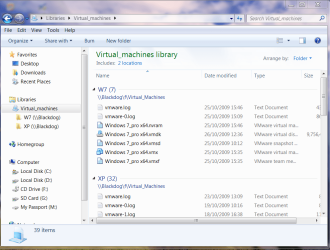
Here's a screenshot of showing a SIMPLE way of how useful they are.

On my laptop I want to run a Virtual Machine

so I look in the Library called Virtual_machines - where it shows me that the Virtual Machine Data store is on another machine on the network. I can just open vmware workstation on the laptop without having to search for where the data store actually IS on the network.

(I've deleted the standard libraries - those only confuse everyone -- better to start from scratch and make your own libraries).

Just add folders to it when you want to include more data.


Cheers
jimbo
 

Attachments

  • libs.png
    libs.png
    69.5 KB · Views: 441
Last edited:

My Computer My Computer

Computer type
PC/Desktop
Computer Manufacturer/Model Number
Custom built, several laptops HP/ASUS
OS
Linux CENTOS 7 / various Windows OS'es and servers
CPU
Intel i7 Intel i5
Memory
8GB, 16GB
Graphics Card(s)
On Motherboard
Sound Card
Realtek HD audio
Monitor(s) Displays
Apple Cinema display, Samsung LCD
Screen Resolution
1920 X 1080
Hard Drives
4 X 1TB SATA
Mouse
Toshiba wireless laser
Internet Speed
> 20MB up

My Computer My Computer

Computer Manufacturer/Model Number
Dell DXP061
OS
windows 7 RTM
CPU
Intel core 2 6400 @2.13GHz
Motherboard
Dell ??
Memory
2 Gig.
Graphics Card(s)
NVIDIA GeForce 7300 GT
Sound Card
High Definition Audio Device - Microsoft
Monitor(s) Displays
Dell LCD
Screen Resolution
1280 x 1024 75 hertz
Hard Drives
WDC WD2500JS-75NCB3 ATA Device

WDC WD5000AAKS-65YGA0 ATA Device
Keyboard
Logitech Cordless
Mouse
Logitech Cordless
Internet Speed
760k
I am not surprised to see people complaining about this feature. It is one of the best things about 7, but it is different than previous Windows OS's so of course there will be resistance. Being an Ubuntu user, I have always wondered why Windows never implemented this form of organization, as it is highly intuitive.

For those who are determined to disable this feature, I will offer this bit of advice; OS architecture is rapidly changing and you will have to adapt. Within 10 years the "OS" environment will no longer exist, and will be replaced with the browser-based operative environment. Windows is already moving in this direction (this is apparent with Silverlight and Live Mesh). As the technology advances we will see a rise in web-driven and semantic driven programs and environments.

This means that semantic database infrastructure will become the new standard for OS design. The most noticeable implementation of this will be in Google's new OS which is currently in development. With subsequent Windows OS environments we will see them moving away from the traditional architecture in favor of smaller web-driven environments.

in short, get use to the libraries feature because it is only the beginning of a whole new OS experience.
 

My Computer My Computer

OS
Windows 7
CPU
Intel Core 2 Quad Q6600 Kentsfield 2.4GHz LGA 775
Motherboard
MSI P6N SLI Platinum LGA 775 NVIDIA nForce 650i SLI ATX
Memory
OCZ 240-Pin DDR2 SDRAM DDR2 800 2GB
Graphics Card(s)
BFG Tech GeForce 8800 GTS
Hard Drives
Western Digital 500GB SATA 3.0 7200rpm
Western Digital 250GB IDE 7200rpm
+1 T34 at first i was a little overwhelemed with librarys, but as i learned more about them and i played with them, i'm starting to like the function. It just takes getting use to how they work.

Smitty
 

My Computer My Computer

Computer Manufacturer/Model Number
Dell XPS 730
OS
Windows 7 Home Premium 64 bit
CPU
Intel Core 2 quad Extreme Q9770 @ 3.2 GHz
Memory
4x2 GB Muskin 1600 MHz ram
Graphics Card(s)
NVidia GTX 250
Sound Card
Soundblaster X-Fi Fatality Champion
Monitor(s) Displays
2 Dell 2007WFP Ultrascans
Screen Resolution
3360 x 1050
Hard Drives
WD Black 1TB sata, 2-WD Black 500 sata, 2-Seagate 500 Go external
PSU
1000 Watt
Cooling
air
Keyboard
MS Natrual Keyboard Pro
Mouse
Logitech Wireless Trackball
Internet Speed
DSL Elite
I was making my own "libraries" with Vista before I even knew about Windows 7.

I was making a folder with various shortcuts to other folders so that I can have all the related files in one place. But now Windows 7 does it for me.

I love it.

Change can be hard to get used to sometimes, but don't dismiss it until you give it a chance.

My son likes to dismiss a new song when the song barely starts playing, but usually he ends up liking the son after listening to it.

Give it a try.
 

My Computer My Computer

Computer Manufacturer/Model Number
Custom
OS
Windows 7 Home Premium 64
CPU
Core i7 870 2.93 GHz
Motherboard
Gigabyte P55A-UD3
Memory
16 GB G-Skills DDR3 1333
Graphics Card(s)
ASUS GTX 680 DirectCu-II Top
Sound Card
Realtek 5.1 audio
Monitor(s) Displays
Samsung 23" widescreen
Screen Resolution
2048x1152
Hard Drives
OCZ Vertex III 128 GB (primary)
OCZ Vertex II 128 GB (data)
PSU
Corsair 650W
Case
CoolerMaster HAF 920
Cooling
Arctic Cooling Freezer 7 Pro
Keyboard
DAS Model S Ultimate keyboard
Mouse
Logitech G5 gaming mouse
Internet Speed
Cable
Browser
Chrome
Other Info
Built in December 2010
I'm not sure if this is the right place to post this, im somewhat new to the forums, but I thought I'd throw my 2 cents in about libraries.

Admittedly, i hated the libraries feature for a while. My biggest annoyance was that the start menu links pointed to libraries instead of actual folders since i keep all of my data within their corresponding folders, and because when veiwing through the library system, it would not display independent folder views.

For example, setting the library to display large icons sorted by name, would cause any folder/subfolder you navigate to to be displayed that way, compared to direct folders which retain independent view styles.

When i finally started seeing the light as it we're, was when i finally set "Arrange By" in the context menu to something other than folder. Having the library arranged by folder mimics the actual folder structure and provides minimal features over the actual folders, especially in my case where i only have 1 folder that i need to display in each library

For example, i now have my documents library to arrange by type, which will display a list of file types, and no longer seperates folder locations. Selecting a file type will display files of that type from all locations included in the library.

As far as documents being in two places, they are in only one place. Creating a file in, or moving a file onto a library window will put the file in the folder set as the library's default folder.

If you are completely adament about disabling libraries, there is an article on another site with a zip file containing 3 .reg files that modify the registry. 1 to remove libraries from the navigation pane in explorer. 1 to disable libraries completely. and 1 to restore the default settings.

I used this at one point but quickly restored the original settings for two major reasons. For one, it has the side effect of removing the Documents/Music/Pictures/Videos link from the start menu even if theyre set to show. It also has the side effect of making windows media player unable to manage the folders it includes in its media library

Edit: after having a problem setting my music library to display arranged by artist, where all my files we're listed as unspecified. After a quick search, i found out that the files needed to be indexed for it to work. http://www.sevenforums.com/music-pictures-video/30039-music-library-arrange.html


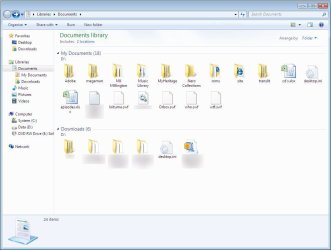
1. The default Arrange by:folder mimics the actual folder structures
2. Arrange by: Type combines folders included in the library

 

Attachments

  • byfolder.jpg
    byfolder.jpg
    79 KB · Views: 91
  • bytype.jpg
    bytype.jpg
    96.2 KB · Views: 100
Last edited:

My Computer My Computer

Computer Manufacturer/Model Number
Alienware
OS
Windows 7 x86
CPU
Intel P4 3.0ghz single core
Motherboard
Asus P5GD1-VM
Memory
1gb pc-3200
Graphics Card(s)
Integrated Intel 900
Sound Card
Integrated Realtek HD R2.37 driver
Monitor(s) Displays
Dell 19" Ultrasharp
Screen Resolution
1280x1024
Hard Drives
160gb Sata1.5
Mouse
Logitech Wireless Laser
Internet Speed
3mb dsl
Libraries

Libraries... what a miserable implementation... didn't like it in Vista and still don't like it in Win7.

I want all MY stuff in one folder with subfolders according to MY tastes and utilization. Libraries, as implemented, arbitrarily forced users into a particular organization of data. Yes, I know you can override it (somewhat) but every new folder has to be manually configured. JHC, as if I don't have enough to do.

Even Ubuntu uses 'Home' folders where I can put whatever I like there in any organization I wish. Ubuntu goes even further in that it puts all the user's application settings in their HOME folder. Easy to backup.

The flaw in the Ubuntu implementation is that HOME can't be stored on a SAMBA server -- the most common Linux / NAS server solution for homes and small offices.

As for libraries -- I've always just created links in 'My Documents' if I needed to store something remotely (Ubuntu users would know this as symbolic links).

Per usual -- Microsoft imposes a new schema for data management for advanced users that confuses the daylights out of average users -- it is not intuitive. 'Not Intuitive' is the very definition of bad design. For all it's 'cleverness' it is a pain to override and work around. There should be an option to turn off this library functionality for those of us who prefer a simpler, elegant solution.

Where does Microsoft get these ideas? I find it hard to believe that a focus group of average users would say -- 'Wow, what we really need is a library to force us to organize everything in terms of documents, music, and videos!!!'

I like a lot of Win7 but dumped it after playing around with library data management model.

Suggestion for WIN7 SP1 --

1. an option to turn off libraries in favour of the simpler 'My Documents' folder model.
2. an option to have user application settings stored as hidden files in the 'My Documents' folder for ease of transport/backup.
 

My Computer My Computer

OS
XP/Ubuntu
Libraries are the best thing since sliced bread for Windows. It keeps you from being restricted to one folder for pictures and one for documents, etc. You can have as many as you want and as long as you add them to the library, you're one click away from your stuff, no matter where you saved it.

Also, you can create your own libraries...want to keep up with all the pics of your kids? Make a library called KidPics and link every folder that has those pictures to that library. They can even be on external drives.

I think the people who don't like it don't understand what it is doing.

Uh...hate to burst your bubble but you could create folder links in 'My Documents' or your desktop to do the same thing. Libraries are little more sophisticated implemetation of the concept dating back to Win95.
 

My Computer My Computer

OS
XP/Ubuntu
I am not surprised to see people complaining about this feature. It is one of the best things about 7, but it is different than previous Windows OS's so of course there will be resistance. Being an Ubuntu user, I have always wondered why Windows never implemented this form of organization, as it is highly intuitive.

For those who are determined to disable this feature, I will offer this bit of advice; OS architecture is rapidly changing and you will have to adapt. Within 10 years the "OS" environment will no longer exist, and will be replaced with the browser-based operative environment. Windows is already moving in this direction (this is apparent with Silverlight and Live Mesh). As the technology advances we will see a rise in web-driven and semantic driven programs and environments.

This means that semantic database infrastructure will become the new standard for OS design. The most noticeable implementation of this will be in Google's new OS which is currently in development. With subsequent Windows OS environments we will see them moving away from the traditional architecture in favor of smaller web-driven environments.

in short, get use to the libraries feature because it is only the beginning of a whole new OS experience.

This was the subject of considerable conjecture in the Great Netscape / Internet Explorer War of '96. Didn't go anywhere then and won't go too far now. It flies in the face of basic human nature to 'own' their data. The notion that all data will be stored on ISP servers is likely 10-20 years away in my opinion. System security, reliability, and privacy issues are significant obstacles to overcome.
 

My Computer My Computer

OS
XP/Ubuntu

My Computer My Computer

Computer type
PC/Desktop
Computer Manufacturer/Model Number
Self built custom
OS
64-bit Windows 11 Pro for Workstations
CPU
Intel i7-8700K OC'd to 5 GHz
Motherboard
ASUS ROG Maximus XI Formula Z390
Memory
64 GB (4x16GB) G.SKILL TridentZ RGB DDR4 3600 MHz
Graphics Card(s)
ASUS ROG-STRIX-GTX1080TI-O11G-GAMING
Sound Card
Integrated
Monitor(s) Displays
2 x Samsung Odyssey G7 27"
Screen Resolution
2560x1440
Hard Drives
1TB Samsung 990 PRO M.2,
4TB Samsung 990 PRO PRO M.2,
TerraMaster F8 SSD Plus NAS
PSU
Seasonic Prime Titanium 850W
Case
Thermaltake Core P3
Cooling
Corsair Hydro H115i
Keyboard
Logitech wireless K800
Mouse
Logitech MX Master 4
Internet Speed
2 Gb/s Download and 100 Mb/s Upload
Antivirus
Malwarebyte Anti-Malware Premium
Browser
Google Chrome
Other Info
Logitech Z625 speaker system,
Logitech BRIO 4K Pro webcam,
HP Color LaserJet Pro MFP M477fdn,
APC SMART-UPS RT 1000 XL - SURT1000XLI,
Galaxy S23 Plus phone
Compromise?...

Apparently some people like the library and the new data storage structure being used in Win7/Vista. Personally, when I saw it in Vista I didn't like it -- seeing it retained in Win7 has been a disappointment.

I played around quite a bit with the new schema in Win7 yesterday (always willing to give sometime a second look) but was unable to configure it reasonably. A real shame since a lot of the other attributes of Win7 look like a real improvement over XP.

I want the old 'My Documents' folder schema back. Would it be too much to ask to have the user container ('Matthew' in my case) enabled with the right click option to change the location to another drive/location? Seems like such an easy fix.

Matthew.
 

My Computer My Computer

OS
XP/Ubuntu
Status
Not open for further replies.
Back
Top