Homegroup - Add or Remove from Navigation Pane

How to Add or Remove Homegroup from Navigation Pane in Windows 7


   Information
This will show you how to add or remove Homegroup in the Windows Explorer Navigation Pane in Windows 7.
   Warning

  • You can only do this while logged into an administrator account.
  • This will affect all user account's on the computer.
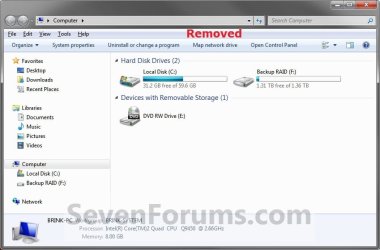
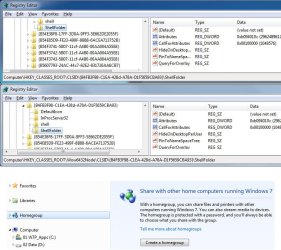
EXAMPLE: Homegroup in Navigation Pane
NOTE: This is Homegroup added (default) (left screenshot below) and removed (right screenshot below) from the Navigation Pane.
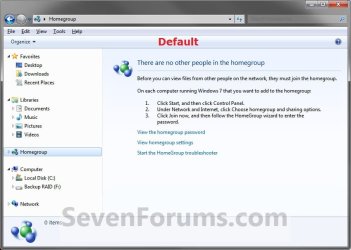
Default.jpg

Removed.jpg
Here's How:
1. Open the Start Menu and type regedit.exe in the search line, then press enter.

2. If prompted by UAC, then click on Yes.

3. In Regedit, go to the location below: (See screenshot below step 4)
Code:
HKEY_CLASSES_ROOT\CLSID\{B4FB3F98-C1EA-428d-A78A-D1F5659CBA93}\ShellFolder
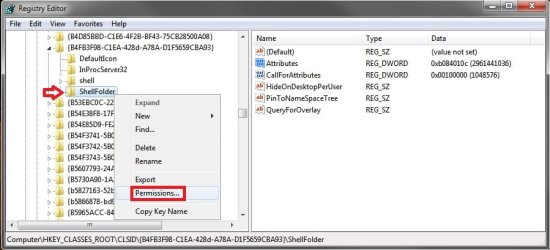
4. In the left pane of regedit, right click on the ShellFolder key and click on Permissions. (See screenshot below)
Step-A.jpg
5. At the top, select the Administrators group. At the bottom, check the Allow box to the right of Full Control and click on OK. (See screenshot below)
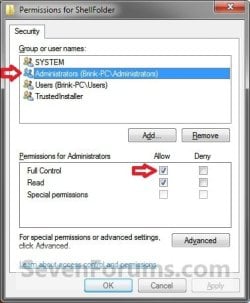
Step-B.jpg
6. In the right pane of regedit, right click on Attributes and click on Modify. (See screenshot below)
Step-C.jpg
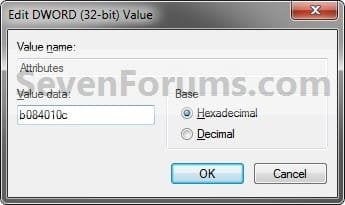
7. To Add Homegroup to the Navigation Pane
NOTE: This is the default setting.
A) Type in b084010c and click on OK. (see screenshot below)
Step-D.jpg
B) Go to step 9.
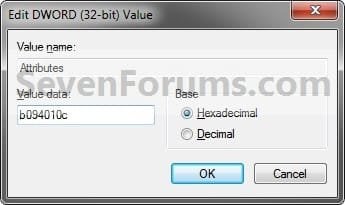
8. To Remove Homegroup from the Navigation Pane
A) Type in b094010c and click on OK. (see screenshot below)
Step-E.jpg
9. If you have 64-bit Windows 7 Installed

   Note
CREDIT TO: Kookster for this addition.

To also add or remove Homegroup from the "Open" and "Save as" type windows as well in 64-bit Windows 7, you will also need to do this step.

If you have a 32-bit Windows 7 installed, then skip this step since doing steps 1 to 7/8 will add or remove Homegroup from the "Open" and "Save as" type windows as well.

A) In Regedit, go to the location below:

Code:
HKEY_LOCAL_MACHINE\SOFTWARE\Wow6432Node\Classes\CLSID\{B4FB3F98-C1EA-428d-A78A-D1F5659CBA93}\ShellFolder

B) Repeat steps 4 to 7/8 above.
10. Close regedit.

11. Restart the computer to fully apply.
That's it,
Shawn


Last edited:
Hello BuckSkin, :)

No worries. Removing "Homegroup" from the navigation pane is only cosmetic, and will not affect any network abilities.
 

My Computer My Computer

Computer type
PC/Desktop
Computer Manufacturer/Model Number
Self built custom
OS
64-bit Windows 11 Pro for Workstations
CPU
Intel i7-8700K OC'd to 5 GHz
Motherboard
ASUS ROG Maximus XI Formula Z390
Memory
64 GB (4x16GB) G.SKILL TridentZ RGB DDR4 3600 MHz
Graphics Card(s)
ASUS ROG-STRIX-GTX1080TI-O11G-GAMING
Sound Card
Integrated
Monitor(s) Displays
2 x Samsung Odyssey G7 27"
Screen Resolution
2560x1440
Hard Drives
1TB Samsung 990 PRO M.2,
4TB Samsung 990 PRO PRO M.2,
TerraMaster F8 SSD Plus NAS
PSU
Seasonic Prime Titanium 850W
Case
Thermaltake Core P3
Cooling
Corsair Hydro H115i
Keyboard
Logitech wireless K800
Mouse
Logitech MX Master 4
Internet Speed
2 Gb/s Download and 100 Mb/s Upload
Antivirus
Malwarebyte Anti-Malware Premium
Browser
Google Chrome
Other Info
Logitech Z625 speaker system,
Logitech BRIO 4K Pro webcam,
HP Color LaserJet Pro MFP M477fdn,
APC SMART-UPS RT 1000 XL - SURT1000XLI,
Galaxy S23 Plus phone
Hello BuckSkin, :)

No worries. Removing "Homegroup" from the navigation pane is only cosmetic, and will not affect any network abilities.


Thanks ! I appreciate your patience in answering my many questions.

And, If I go the route described in the link below, and completely eliminate Homegroup from all of our machines, will our home network still function ?

Remove HomeGroup from Windows Explorer in Windows 7 - TechRepublic

I have had all four machines entered in our Homegroup for quite some time; and, regardless of which machine I am using, only two of them ever show up either in the navigation menu or in the right pane when I click on Homegroup; the regular Network suits my purposes better and also allows me access to things that never appear under Homegroup.

Thanks for reading.
 

My Computer My Computer

Computer type
PC/Desktop
Computer Manufacturer/Model Number
Dell Optiplex 780m "mini-tower"
OS
Windows 7 Pro x64
CPU
Intel Core Two Duo E8600 3.33 ghz
Motherboard
Whatever DELL put in it
Memory
8GB
Graphics Card(s)
Gigabyte Radeon R7 240
Monitor(s) Displays
HP 2159m
PSU
750 Watt Corsair CX750
Keyboard
Logitech Wireless
Mouse
Logitech Wireless
Browser
Chrome, Firefox, IE
Doing what they posted at that link will completely disable Homegroup causing it to no longer work or be available.
 

My Computer My Computer

Computer type
PC/Desktop
Computer Manufacturer/Model Number
Self built custom
OS
64-bit Windows 11 Pro for Workstations
CPU
Intel i7-8700K OC'd to 5 GHz
Motherboard
ASUS ROG Maximus XI Formula Z390
Memory
64 GB (4x16GB) G.SKILL TridentZ RGB DDR4 3600 MHz
Graphics Card(s)
ASUS ROG-STRIX-GTX1080TI-O11G-GAMING
Sound Card
Integrated
Monitor(s) Displays
2 x Samsung Odyssey G7 27"
Screen Resolution
2560x1440
Hard Drives
1TB Samsung 990 PRO M.2,
4TB Samsung 990 PRO PRO M.2,
TerraMaster F8 SSD Plus NAS
PSU
Seasonic Prime Titanium 850W
Case
Thermaltake Core P3
Cooling
Corsair Hydro H115i
Keyboard
Logitech wireless K800
Mouse
Logitech MX Master 4
Internet Speed
2 Gb/s Download and 100 Mb/s Upload
Antivirus
Malwarebyte Anti-Malware Premium
Browser
Google Chrome
Other Info
Logitech Z625 speaker system,
Logitech BRIO 4K Pro webcam,
HP Color LaserJet Pro MFP M477fdn,
APC SMART-UPS RT 1000 XL - SURT1000XLI,
Galaxy S23 Plus phone
Doing what they posted at that link will completely disable Homegroup causing it to no longer work or be available.

With Homegroup gone, will the normal Network still work ?

Thanks.
 

My Computer My Computer

Computer type
PC/Desktop
Computer Manufacturer/Model Number
Dell Optiplex 780m "mini-tower"
OS
Windows 7 Pro x64
CPU
Intel Core Two Duo E8600 3.33 ghz
Motherboard
Whatever DELL put in it
Memory
8GB
Graphics Card(s)
Gigabyte Radeon R7 240
Monitor(s) Displays
HP 2159m
PSU
750 Watt Corsair CX750
Keyboard
Logitech Wireless
Mouse
Logitech Wireless
Browser
Chrome, Firefox, IE
Yes, using workgroup will still work.
 

My Computer My Computer

Computer type
PC/Desktop
Computer Manufacturer/Model Number
Self built custom
OS
64-bit Windows 11 Pro for Workstations
CPU
Intel i7-8700K OC'd to 5 GHz
Motherboard
ASUS ROG Maximus XI Formula Z390
Memory
64 GB (4x16GB) G.SKILL TridentZ RGB DDR4 3600 MHz
Graphics Card(s)
ASUS ROG-STRIX-GTX1080TI-O11G-GAMING
Sound Card
Integrated
Monitor(s) Displays
2 x Samsung Odyssey G7 27"
Screen Resolution
2560x1440
Hard Drives
1TB Samsung 990 PRO M.2,
4TB Samsung 990 PRO PRO M.2,
TerraMaster F8 SSD Plus NAS
PSU
Seasonic Prime Titanium 850W
Case
Thermaltake Core P3
Cooling
Corsair Hydro H115i
Keyboard
Logitech wireless K800
Mouse
Logitech MX Master 4
Internet Speed
2 Gb/s Download and 100 Mb/s Upload
Antivirus
Malwarebyte Anti-Malware Premium
Browser
Google Chrome
Other Info
Logitech Z625 speaker system,
Logitech BRIO 4K Pro webcam,
HP Color LaserJet Pro MFP M477fdn,
APC SMART-UPS RT 1000 XL - SURT1000XLI,
Galaxy S23 Plus phone
I'd like to add an alternative way of removing homegroup :)


I'll have to give my vote to the alternative as the Registry edit approach didn't work for me. Just in case link goes bad:

  1. go to Control Panel --> Administrative Tools --> Services
  2. for both HomeGroup Listener and HomeGroup Provider: Right Click, select Properties, Stop (if started) and Disable
Change occurs immediately, no reboot required. Close Explorer and re-open. HomeGroup is gone.


Caveat: I've only one account on my computer and it is an Admin account so I don't if this will work without Admin permissions. If you're mucking about in the Registry, though, it's highly likely you've got an Admin account.
 

My Computer My Computer

Computer type
PC/Desktop
Computer Manufacturer/Model Number
Custom Build
OS
Win7 Pro x64 SP1
CPU
Intel i7-6700
Motherboard
Gigabyte Z270 HD3
Memory
16 gig (2x8)
Graphics Card(s)
MSI GTX 1660 Super
Monitor(s) Displays
AOC CQ27G2
Screen Resolution
1440p
Hard Drives
Internal:
Crucial MX500 500GB SATA SSD (OS/Apps)
WD10EZEX-00WN4A0 1TB (Data/Games)
WD10EZEX-00WN4A0 1TB (On-line backup/Testing)
External
WD 4TB USB3.1 EasyStore (off-line backup archive/"sandbox")
PSU
Cooler Master 650W Bronze
Case
Sharkoon BW9000-V tower housing
Cooling
Deep Cool Ice Blade
Internet Speed
fiber optic 2 res broadband
Antivirus
Kaspersky Free
Browser
Firefox
Hello Ritjesman, :-)

Just to verify, did you restart the computer after making changes in the registry using steps 8 and 9 to apply?
 

My Computer My Computer

Computer type
PC/Desktop
Computer Manufacturer/Model Number
Self built custom
OS
64-bit Windows 11 Pro for Workstations
CPU
Intel i7-8700K OC'd to 5 GHz
Motherboard
ASUS ROG Maximus XI Formula Z390
Memory
64 GB (4x16GB) G.SKILL TridentZ RGB DDR4 3600 MHz
Graphics Card(s)
ASUS ROG-STRIX-GTX1080TI-O11G-GAMING
Sound Card
Integrated
Monitor(s) Displays
2 x Samsung Odyssey G7 27"
Screen Resolution
2560x1440
Hard Drives
1TB Samsung 990 PRO M.2,
4TB Samsung 990 PRO PRO M.2,
TerraMaster F8 SSD Plus NAS
PSU
Seasonic Prime Titanium 850W
Case
Thermaltake Core P3
Cooling
Corsair Hydro H115i
Keyboard
Logitech wireless K800
Mouse
Logitech MX Master 4
Internet Speed
2 Gb/s Download and 100 Mb/s Upload
Antivirus
Malwarebyte Anti-Malware Premium
Browser
Google Chrome
Other Info
Logitech Z625 speaker system,
Logitech BRIO 4K Pro webcam,
HP Color LaserJet Pro MFP M477fdn,
APC SMART-UPS RT 1000 XL - SURT1000XLI,
Galaxy S23 Plus phone
Hello @Ritjesman, :-)

Just to verify, did you restart the computer after making changes in the registry using steps 8 and 9 to apply?


Yes I did. There was very odd aspect w/the regedit approach though: I thought I noticed some of the entries (located w/find) were identical to the values I was supposed to be changing them to ... hummmm, now I'll have double-check I was using the correct code.


Update: being as the only differences between Add & Delete are 8 or 9 in the third character I can't rely strictly on memory. I'll enable/start the services then re-do the regedit. Will have an Update2 shortly...
 

My Computer My Computer

Computer type
PC/Desktop
Computer Manufacturer/Model Number
Custom Build
OS
Win7 Pro x64 SP1
CPU
Intel i7-6700
Motherboard
Gigabyte Z270 HD3
Memory
16 gig (2x8)
Graphics Card(s)
MSI GTX 1660 Super
Monitor(s) Displays
AOC CQ27G2
Screen Resolution
1440p
Hard Drives
Internal:
Crucial MX500 500GB SATA SSD (OS/Apps)
WD10EZEX-00WN4A0 1TB (Data/Games)
WD10EZEX-00WN4A0 1TB (On-line backup/Testing)
External
WD 4TB USB3.1 EasyStore (off-line backup archive/"sandbox")
PSU
Cooler Master 650W Bronze
Case
Sharkoon BW9000-V tower housing
Cooling
Deep Cool Ice Blade
Internet Speed
fiber optic 2 res broadband
Antivirus
Kaspersky Free
Browser
Firefox
:thumbsup:
 

My Computer My Computer

Computer type
PC/Desktop
Computer Manufacturer/Model Number
Self built custom
OS
64-bit Windows 11 Pro for Workstations
CPU
Intel i7-8700K OC'd to 5 GHz
Motherboard
ASUS ROG Maximus XI Formula Z390
Memory
64 GB (4x16GB) G.SKILL TridentZ RGB DDR4 3600 MHz
Graphics Card(s)
ASUS ROG-STRIX-GTX1080TI-O11G-GAMING
Sound Card
Integrated
Monitor(s) Displays
2 x Samsung Odyssey G7 27"
Screen Resolution
2560x1440
Hard Drives
1TB Samsung 990 PRO M.2,
4TB Samsung 990 PRO PRO M.2,
TerraMaster F8 SSD Plus NAS
PSU
Seasonic Prime Titanium 850W
Case
Thermaltake Core P3
Cooling
Corsair Hydro H115i
Keyboard
Logitech wireless K800
Mouse
Logitech MX Master 4
Internet Speed
2 Gb/s Download and 100 Mb/s Upload
Antivirus
Malwarebyte Anti-Malware Premium
Browser
Google Chrome
Other Info
Logitech Z625 speaker system,
Logitech BRIO 4K Pro webcam,
HP Color LaserJet Pro MFP M477fdn,
APC SMART-UPS RT 1000 XL - SURT1000XLI,
Galaxy S23 Plus phone
Yes I did. There was very odd aspect w/the regedit approach though: I thought I noticed some of the entries (located w/find) were identical to the values I was supposed to be changing them to ... hummmm, now I'll have double-check I was using the correct code.


Update: being as the only differences between Add & Delete are 8 or 9 in the third character I can't rely strictly on memory. I'll enable/start the services then re-do the regedit. Will have an Update2 shortly...


Update2: The plot thickens. Using regedit find (& runassystem) for:
B4FB3F98-C1EA-428d-A78A-D1F5659CBA93


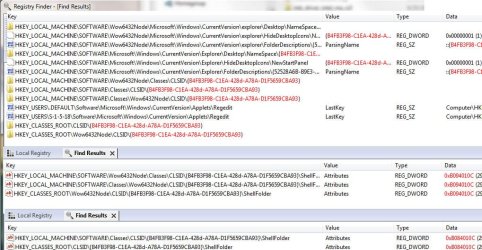
I find 4 instances with the Shell Folder\Attribute subs all set to 0xb094010c and HomeGroup is still showing in explorer. When I use a tool called Registry Finder (Registry Finder) it finds a plethora of entries for B4FB3F98-C1EA-428d-A78A-D1F5659CBA93. Searching for b094010c it only finds 3 instances. Searching for b084010c gets us 2 instances:
HomeGroup-Reg-Entries.jpg
So a total of 5 instances, one less of the Delete code than expected, 1 that this tool is showing with Add code that's displaying as a Delete code via regedit and 1 (HKEY_LOCAL_MACHINE) that I'm not seeing via regedit.


Searching for b094010c or b084010c using regedit find w/keys, values and data all checked results in "not found". I'll defer to you to interpret these findings.:sarc:


[Edit3] Woke up thinking about this. Here's some additional info.


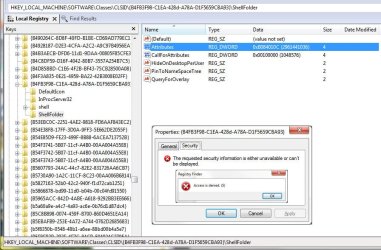
When editing the 2 remaining "8" codes via regedit and right clicking the context menu for the two records has Properties rather than expected Permissions and selecting Properties than Security tab results in following:
HomeGroup-Reg-Entries2.jpg
Since I am editing with System level permissions I guess that may indicate the 2 records are root level which could explain why they''re not being displayed in normal regedit window.


Lastly (don't know if it's relevant) my machine is configured with a single boot partition achieved with EasyBCD.
 
Last edited:

My Computer My Computer

Computer type
PC/Desktop
Computer Manufacturer/Model Number
Custom Build
OS
Win7 Pro x64 SP1
CPU
Intel i7-6700
Motherboard
Gigabyte Z270 HD3
Memory
16 gig (2x8)
Graphics Card(s)
MSI GTX 1660 Super
Monitor(s) Displays
AOC CQ27G2
Screen Resolution
1440p
Hard Drives
Internal:
Crucial MX500 500GB SATA SSD (OS/Apps)
WD10EZEX-00WN4A0 1TB (Data/Games)
WD10EZEX-00WN4A0 1TB (On-line backup/Testing)
External
WD 4TB USB3.1 EasyStore (off-line backup archive/"sandbox")
PSU
Cooler Master 650W Bronze
Case
Sharkoon BW9000-V tower housing
Cooling
Deep Cool Ice Blade
Internet Speed
fiber optic 2 res broadband
Antivirus
Kaspersky Free
Browser
Firefox
Update2: The plot thickens. Using regedit find (& runassystem) for:
B4FB3F98-C1EA-428d-A78A-D1F5659CBA93


I find 4 instances with the Shell Folder\Attribute subs all set to 0xb094010c and HomeGroup is still showing in explorer. When I use a tool called Registry Finder (Registry Finder) it finds a plethora of entries for B4FB3F98-C1EA-428d-A78A-D1F5659CBA93. Searching for b094010c it only finds 3 instances. Searching for b084010c gets us 2 instances:

So a total of 5 instances, one less of the Delete code than expected, 1 that this tool is showing with Add code that's displaying as a Delete code via regedit and 1 (HKEY_LOCAL_MACHINE) that I'm not seeing via regedit.


Searching for b094010c or b084010c using regedit find w/keys, values and data all checked results in "not found". I'll defer to you to interpret these findings.:sarc:

Usually, you will only need to do as outlined in the tutorial.
 

My Computer My Computer

Computer type
PC/Desktop
Computer Manufacturer/Model Number
Self built custom
OS
64-bit Windows 11 Pro for Workstations
CPU
Intel i7-8700K OC'd to 5 GHz
Motherboard
ASUS ROG Maximus XI Formula Z390
Memory
64 GB (4x16GB) G.SKILL TridentZ RGB DDR4 3600 MHz
Graphics Card(s)
ASUS ROG-STRIX-GTX1080TI-O11G-GAMING
Sound Card
Integrated
Monitor(s) Displays
2 x Samsung Odyssey G7 27"
Screen Resolution
2560x1440
Hard Drives
1TB Samsung 990 PRO M.2,
4TB Samsung 990 PRO PRO M.2,
TerraMaster F8 SSD Plus NAS
PSU
Seasonic Prime Titanium 850W
Case
Thermaltake Core P3
Cooling
Corsair Hydro H115i
Keyboard
Logitech wireless K800
Mouse
Logitech MX Master 4
Internet Speed
2 Gb/s Download and 100 Mb/s Upload
Antivirus
Malwarebyte Anti-Malware Premium
Browser
Google Chrome
Other Info
Logitech Z625 speaker system,
Logitech BRIO 4K Pro webcam,
HP Color LaserJet Pro MFP M477fdn,
APC SMART-UPS RT 1000 XL - SURT1000XLI,
Galaxy S23 Plus phone
Usually, you will only need to do as outlined in the tutorial.


Hi Shawn - I've just completed a fresh install (as at of prep for migration to Win10). The only non-standard aspect of this set up is consolidation of System an C: into a single partition boot disk using EasyBCD which I believe only copies boot required files.


Ran through the steps per the tutorial and rebooted. While having a fresh install eliminated all of the anomalies from above I've still got this situation:
HomeGroup-Reg-Entries3.jpg


So now I confidently state that -- for whatever reason -- the regedit approach does not work on this computer.


'Nuff said & 'nuff time spent on this for both of us.
 

My Computer My Computer

Computer type
PC/Desktop
Computer Manufacturer/Model Number
Custom Build
OS
Win7 Pro x64 SP1
CPU
Intel i7-6700
Motherboard
Gigabyte Z270 HD3
Memory
16 gig (2x8)
Graphics Card(s)
MSI GTX 1660 Super
Monitor(s) Displays
AOC CQ27G2
Screen Resolution
1440p
Hard Drives
Internal:
Crucial MX500 500GB SATA SSD (OS/Apps)
WD10EZEX-00WN4A0 1TB (Data/Games)
WD10EZEX-00WN4A0 1TB (On-line backup/Testing)
External
WD 4TB USB3.1 EasyStore (off-line backup archive/"sandbox")
PSU
Cooler Master 650W Bronze
Case
Sharkoon BW9000-V tower housing
Cooling
Deep Cool Ice Blade
Internet Speed
fiber optic 2 res broadband
Antivirus
Kaspersky Free
Browser
Firefox
Hi Shawn - I've just completed a fresh install (as at of prep for migration to Win10). The only non-standard aspect of this set up is consolidation of System an C: into a single partition boot disk using EasyBCD which I believe only copies boot required files.


Ran through the steps per the tutorial and rebooted. While having a fresh install eliminated all of the anomalies from above I've still got this situation:

So now I confidently state that -- for whatever reason -- the regedit approach does not work on this computer.


'Nuff said & 'nuff time spent on this for both of us.

Just to confirm, did you do both steps 8 and 9 and restart the computer afterwards?

Your screenshot shows the registry path for step 8, but the change must also be made below from step 9 in 64-bit Windows 10.

Code:
HKEY_LOCAL_MACHINE\SOFTWARE\Wow6432Node\Classes\CLSID\{B4FB3F98-C1EA-428d-A78A-D1F5659CBA93}\ShellFolder
 

My Computer My Computer

Computer type
PC/Desktop
Computer Manufacturer/Model Number
Self built custom
OS
64-bit Windows 11 Pro for Workstations
CPU
Intel i7-8700K OC'd to 5 GHz
Motherboard
ASUS ROG Maximus XI Formula Z390
Memory
64 GB (4x16GB) G.SKILL TridentZ RGB DDR4 3600 MHz
Graphics Card(s)
ASUS ROG-STRIX-GTX1080TI-O11G-GAMING
Sound Card
Integrated
Monitor(s) Displays
2 x Samsung Odyssey G7 27"
Screen Resolution
2560x1440
Hard Drives
1TB Samsung 990 PRO M.2,
4TB Samsung 990 PRO PRO M.2,
TerraMaster F8 SSD Plus NAS
PSU
Seasonic Prime Titanium 850W
Case
Thermaltake Core P3
Cooling
Corsair Hydro H115i
Keyboard
Logitech wireless K800
Mouse
Logitech MX Master 4
Internet Speed
2 Gb/s Download and 100 Mb/s Upload
Antivirus
Malwarebyte Anti-Malware Premium
Browser
Google Chrome
Other Info
Logitech Z625 speaker system,
Logitech BRIO 4K Pro webcam,
HP Color LaserJet Pro MFP M477fdn,
APC SMART-UPS RT 1000 XL - SURT1000XLI,
Galaxy S23 Plus phone
Just to confirm, did you do both steps 8 and 9 and restart the computer afterwards?

Your screenshot shows the registry path for step 8, but the change must also be made below from step 9 in 64-bit Windows 10.

Code:
HKEY_LOCAL_MACHINE\SOFTWARE\Wow6432Node\Classes\CLSID\{B4FB3F98-C1EA-428d-A78A-D1F5659CBA93}\ShellFolder


Hmmm ... I interpreted that as only needed for also removing from "open" and "save" dialogues; will give it a try ...
 

My Computer My Computer

Computer type
PC/Desktop
Computer Manufacturer/Model Number
Custom Build
OS
Win7 Pro x64 SP1
CPU
Intel i7-6700
Motherboard
Gigabyte Z270 HD3
Memory
16 gig (2x8)
Graphics Card(s)
MSI GTX 1660 Super
Monitor(s) Displays
AOC CQ27G2
Screen Resolution
1440p
Hard Drives
Internal:
Crucial MX500 500GB SATA SSD (OS/Apps)
WD10EZEX-00WN4A0 1TB (Data/Games)
WD10EZEX-00WN4A0 1TB (On-line backup/Testing)
External
WD 4TB USB3.1 EasyStore (off-line backup archive/"sandbox")
PSU
Cooler Master 650W Bronze
Case
Sharkoon BW9000-V tower housing
Cooling
Deep Cool Ice Blade
Internet Speed
fiber optic 2 res broadband
Antivirus
Kaspersky Free
Browser
Firefox
Hmmm ... I interpreted that as only needed for also removing from "open" and "save" dialogues; will give it a try ...


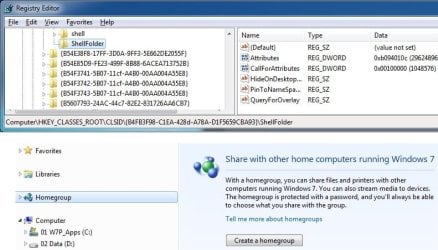
Actually, since I searched on B4FB3F98-C1EA-428d-A78A-D1F5659CBA93 in regedit (rather than navigating to the key) I had already done the WOW change also:
HomeGroup-Reg-Entries4.jpg


So, unfortunately, nope, regedit approach not working on my (obviously peculiar) setup & those are the only instances of B4FB3F98-C1EA-428d-A78A-D1F5659CBA93 with Shell Folders found.
 

My Computer My Computer

Computer type
PC/Desktop
Computer Manufacturer/Model Number
Custom Build
OS
Win7 Pro x64 SP1
CPU
Intel i7-6700
Motherboard
Gigabyte Z270 HD3
Memory
16 gig (2x8)
Graphics Card(s)
MSI GTX 1660 Super
Monitor(s) Displays
AOC CQ27G2
Screen Resolution
1440p
Hard Drives
Internal:
Crucial MX500 500GB SATA SSD (OS/Apps)
WD10EZEX-00WN4A0 1TB (Data/Games)
WD10EZEX-00WN4A0 1TB (On-line backup/Testing)
External
WD 4TB USB3.1 EasyStore (off-line backup archive/"sandbox")
PSU
Cooler Master 650W Bronze
Case
Sharkoon BW9000-V tower housing
Cooling
Deep Cool Ice Blade
Internet Speed
fiber optic 2 res broadband
Antivirus
Kaspersky Free
Browser
Firefox
Ritjesman,

I just tested on a Windows 7 VM on my system to see if anything may have changed, but it still works for me after making the two registry changes and restarting the computer to apply.

Odd why it's not working for you since you show the correct changes in your registry. :confused:
 

My Computer My Computer

Computer type
PC/Desktop
Computer Manufacturer/Model Number
Self built custom
OS
64-bit Windows 11 Pro for Workstations
CPU
Intel i7-8700K OC'd to 5 GHz
Motherboard
ASUS ROG Maximus XI Formula Z390
Memory
64 GB (4x16GB) G.SKILL TridentZ RGB DDR4 3600 MHz
Graphics Card(s)
ASUS ROG-STRIX-GTX1080TI-O11G-GAMING
Sound Card
Integrated
Monitor(s) Displays
2 x Samsung Odyssey G7 27"
Screen Resolution
2560x1440
Hard Drives
1TB Samsung 990 PRO M.2,
4TB Samsung 990 PRO PRO M.2,
TerraMaster F8 SSD Plus NAS
PSU
Seasonic Prime Titanium 850W
Case
Thermaltake Core P3
Cooling
Corsair Hydro H115i
Keyboard
Logitech wireless K800
Mouse
Logitech MX Master 4
Internet Speed
2 Gb/s Download and 100 Mb/s Upload
Antivirus
Malwarebyte Anti-Malware Premium
Browser
Google Chrome
Other Info
Logitech Z625 speaker system,
Logitech BRIO 4K Pro webcam,
HP Color LaserJet Pro MFP M477fdn,
APC SMART-UPS RT 1000 XL - SURT1000XLI,
Galaxy S23 Plus phone
Computers --- don't ya just love 'em?:-)
 

My Computer My Computer

Computer type
PC/Desktop
Computer Manufacturer/Model Number
Custom Build
OS
Win7 Pro x64 SP1
CPU
Intel i7-6700
Motherboard
Gigabyte Z270 HD3
Memory
16 gig (2x8)
Graphics Card(s)
MSI GTX 1660 Super
Monitor(s) Displays
AOC CQ27G2
Screen Resolution
1440p
Hard Drives
Internal:
Crucial MX500 500GB SATA SSD (OS/Apps)
WD10EZEX-00WN4A0 1TB (Data/Games)
WD10EZEX-00WN4A0 1TB (On-line backup/Testing)
External
WD 4TB USB3.1 EasyStore (off-line backup archive/"sandbox")
PSU
Cooler Master 650W Bronze
Case
Sharkoon BW9000-V tower housing
Cooling
Deep Cool Ice Blade
Internet Speed
fiber optic 2 res broadband
Antivirus
Kaspersky Free
Browser
Firefox
Back
Top