
Trouble accessing Internet after new SSD installation

dsscottage

New member
Member
Local time
1:27 PM
Messages
49
I've just installed a new SSD in my computer and completed a fresh install of Windows 7 Pro.

The install completed correctly but I'm having trouble connecting to some internet sites.

I can connect to Google and get search results but every other site I try fails. Even the AVG installation process and Windows update process fail apparently because there is no connection. I have a direct connection to the network (not WiFi) and Google works.

I have a vague recollection that I need to change a setting in the Security section of Internet options and I have fiddled with some settings but haven't had any success.

Can someone jog my memory?
 

My Computer My Computer

Computer type
PC/Desktop
Computer Manufacturer/Model Number
ASUS
OS
Windows 10 Pro
CPU
Intel Core i7-3770
Motherboard
ASUS CM6870
Memory
16MB
Graphics Card(s)
NVIDIA GeForce GT 640
Sound Card
Onboard HD Audio
Monitor(s) Displays
Hanns.G HZ281
Screen Resolution
1920x1200
Hard Drives
Samsung 850 EVO 512GB SSD and
ST2000DM 2TB HDD
Internet Speed
Gigabit
Antivirus
Windows Defender
Browser
Chrome
Other Info
Second desktop computer - Intel Core 2 Duo - Win 7 Ultimate,
Laptop - ASUS Intel Core i5-3317U - Win 10 Home
Open a cmd prompt type

ipconfig/all

post results so we can see whats going on
 

My Computer My Computer

Computer type
PC/Desktop
OS
win 8 32 bit
If you are using Google and getting search results you must be getting online.

Jack
 

My Computer My Computer

Computer type
PC/Desktop
Computer Manufacturer/Model Number
Home made Desktop
OS
Windows 10 Pro. 64/ version 1709 Windows 7 Pro/64
CPU
Intel i7-6800K @ 4.3
Motherboard
ASUS X-99 Deluxe II
Memory
Corsair Platinum 16 gig @2400
Graphics Card(s)
EVGA GTX 1070 OC
Monitor(s) Displays
Asus 27" LED LCD/VE278Q
Screen Resolution
1920-1080 or 1280-720 HDMI
Hard Drives
INTEL SSD 730-240 Gb Sata 3.0/
PSU
EVGA Platium 1200W
Case
Phanteks Luxe Tempered Glass 8 fans/ one radiator
Cooling
XSPC/ Water Cooled CPU
Keyboard
Das 4 Professional
Mouse
Logitech M705/MX Anywhere 2-S
Internet Speed
100 mbits
Antivirus
Microsoft Security Essentials/ Malwarebytes Premium 3.0/ SAS
Browser
I.E. 11 default/Firefox/ ISP Time Warner Cable/Spectrum
Other Info
LG BluRay Burner/
Sound system-KLipsch-THX/
Icy Dock ssd Hot Swap bays.
Open a cmd prompt type

ipconfig/all

post results so we can see whats going on

Here's the ipconfig

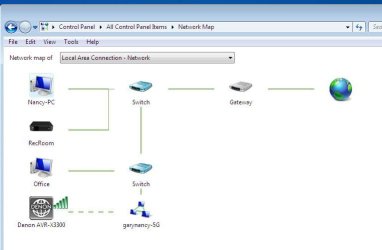
I've also posted a clip of the network map. It shows that I'm connected to the internet. I'm typing on the other computer on the LAN and it's working perfectly so the Internet is OK.
 

Attachments

  • Clipboard04.jpg
    Clipboard04.jpg
    41.8 KB · Views: 0
Last edited:

My Computer My Computer

Computer type
PC/Desktop
Computer Manufacturer/Model Number
ASUS
OS
Windows 10 Pro
CPU
Intel Core i7-3770
Motherboard
ASUS CM6870
Memory
16MB
Graphics Card(s)
NVIDIA GeForce GT 640
Sound Card
Onboard HD Audio
Monitor(s) Displays
Hanns.G HZ281
Screen Resolution
1920x1200
Hard Drives
Samsung 850 EVO 512GB SSD and
ST2000DM 2TB HDD
Internet Speed
Gigabit
Antivirus
Windows Defender
Browser
Chrome
Other Info
Second desktop computer - Intel Core 2 Duo - Win 7 Ultimate,
Laptop - ASUS Intel Core i5-3317U - Win 10 Home

My Computer My Computer

Computer type
PC/Desktop
Computer Manufacturer/Model Number
medionl/Aspire 6930G/acer x55a
OS
W7 home premium 32bit/W7HP 64bit/w10 tp insider ring
CPU
E5300 dual core
Motherboard
medion MS7366
Memory
3gb
Graphics Card(s)
Nvidia Geforce 7100 Nforce 630i
Monitor(s) Displays
avixc
Internet Speed
n (isp resticted to 72)
Antivirus
mse/pands
Browser
palemoon
Other Info
Belkin Fd7050 n USB using Railink RT2870 drivers, more upto date
Your not getting an ipv4 IP is the problem you get one starting 169 which means windows can't get an IP so it's cable or DHCP can't be reached try another cable port
 

My Computer My Computer

Computer type
PC/Desktop
OS
win 8 32 bit
Your not getting an ipv4 IP is the problem you get one starting 169 which means windows can't get an IP so it's cable or DHCP can't be reached try another cable port

I'm not sure how to do this. Can you point me in the right direction?
 

My Computer My Computer

Computer type
PC/Desktop
Computer Manufacturer/Model Number
ASUS
OS
Windows 10 Pro
CPU
Intel Core i7-3770
Motherboard
ASUS CM6870
Memory
16MB
Graphics Card(s)
NVIDIA GeForce GT 640
Sound Card
Onboard HD Audio
Monitor(s) Displays
Hanns.G HZ281
Screen Resolution
1920x1200
Hard Drives
Samsung 850 EVO 512GB SSD and
ST2000DM 2TB HDD
Internet Speed
Gigabit
Antivirus
Windows Defender
Browser
Chrome
Other Info
Second desktop computer - Intel Core 2 Duo - Win 7 Ultimate,
Laptop - ASUS Intel Core i5-3317U - Win 10 Home
Is the other pc close so you can plug in its cable which you know works
 

My Computer My Computer

Computer type
PC/Desktop
OS
win 8 32 bit
Is the other pc close so you can plug in its cable which you know works

Do you mean the Ethernet cable?

If so, it's not really close enough but I can always move the computer temporarily.

However, more info...
My old Win 7 installation has been working perfectly on that same Ethernet cable for quite some time.

However, I don't believe that the Ethernet cable or port is the problem. I'm upgrading from a HDD to a SSD. Before I installed the OS on the SSD, I disconnected the HDD SATA cable. As part of my problem solving (over 3 days!), I disconnected the SSD and reconnected the HDD (with the original Win 7). When I did that I still had the same problem on the HDD. But I rebooted the combination router/cable modem and then the internet works from the HDD.

Therefore, I suspect that somehow the new Win 7 installation on the SSD doesn't properly assign ipv4 to the port. When I return the HDD and reboot the router/modem, the correct ipv4 gets assigned. It seems that the problem is connected to the new Win 7 installation on the SSD not properly connecting (negotiating?) with the modem/router.

Does this help?
 

My Computer My Computer

Computer type
PC/Desktop
Computer Manufacturer/Model Number
ASUS
OS
Windows 10 Pro
CPU
Intel Core i7-3770
Motherboard
ASUS CM6870
Memory
16MB
Graphics Card(s)
NVIDIA GeForce GT 640
Sound Card
Onboard HD Audio
Monitor(s) Displays
Hanns.G HZ281
Screen Resolution
1920x1200
Hard Drives
Samsung 850 EVO 512GB SSD and
ST2000DM 2TB HDD
Internet Speed
Gigabit
Antivirus
Windows Defender
Browser
Chrome
Other Info
Second desktop computer - Intel Core 2 Duo - Win 7 Ultimate,
Laptop - ASUS Intel Core i5-3317U - Win 10 Home
A quick fix would be to give it a fixed IP see if that solves it
 

My Computer My Computer

Computer type
PC/Desktop
OS
win 8 32 bit
Resolved but not really fixed

Win 7 is now working on my new SSD. The problems aren't really fixed but the problem is solved.

To make a very long story less long.....
This is my 4th day attempting to get a fresh install of Win 7 on my SSD. I've made about 6 different attempts of different alternatives and each one failed in some way. I spent a lot of time searching the net for solutions including posting here. Nothing worked. Therefore, out of frustration I did what I didn't really want to do. I got EaseUS ToDo Backup Home and cloned my old Win 7 to the new SSD. This appears to be working.

Thank you to everyone who took their valuable time and provided me with suggestions.

OMG - As I'm typing this note, my wife came to me to say that her computer had frozen. (It's her computer that I was working on) A reboot got it working again but this worries me. I may be back with another post if the freezing continues.

Thanks again!
 

My Computer My Computer

Computer type
PC/Desktop
Computer Manufacturer/Model Number
ASUS
OS
Windows 10 Pro
CPU
Intel Core i7-3770
Motherboard
ASUS CM6870
Memory
16MB
Graphics Card(s)
NVIDIA GeForce GT 640
Sound Card
Onboard HD Audio
Monitor(s) Displays
Hanns.G HZ281
Screen Resolution
1920x1200
Hard Drives
Samsung 850 EVO 512GB SSD and
ST2000DM 2TB HDD
Internet Speed
Gigabit
Antivirus
Windows Defender
Browser
Chrome
Other Info
Second desktop computer - Intel Core 2 Duo - Win 7 Ultimate,
Laptop - ASUS Intel Core i5-3317U - Win 10 Home
The next chapter

The new SSD has been working fine but my ipv4 connection problem has returned.

I've attached a partial screen shot of a working and non working "ipconfig/all" result. When the internet is working the "Autoconfiguration Ipv4 Address is "192.168.0.16". When it is not working, it is "169.254.165.20(Preferred)". Therefore, I can't connect to Ipv4 addresses.

Sometimes, rebooting the computer will resolve the issue. Other times, rebooting the cable modem/router will resolve the issue.

The computer is directly connected to the router/modem through a 5 port switch.

My main computer (running Win 10 Pro) is connected directly to the modem/router using a 6 foot Ethernet cable. The problem has not happened on this main computer.

It is also interesting to note that when the Win 7 computer is unable to connect, I also have trouble signing on to WiFi from my tablet. A router reboot resolves the problem but it seems to randomly return.

As samuria suggested, I've moved the Ethernet cable (of the Win 7 computer) to a different port on the router to see if that helps.

In the meantime, can anyone suggest what the source of the problem might be?
 

Attachments

  • ipconfig_not_working.jpg
    ipconfig_not_working.jpg
    31.5 KB · Views: 24
  • ipconfig_working2.jpg
    ipconfig_working2.jpg
    26.6 KB · Views: 24

My Computer My Computer

Computer type
PC/Desktop
Computer Manufacturer/Model Number
ASUS
OS
Windows 10 Pro
CPU
Intel Core i7-3770
Motherboard
ASUS CM6870
Memory
16MB
Graphics Card(s)
NVIDIA GeForce GT 640
Sound Card
Onboard HD Audio
Monitor(s) Displays
Hanns.G HZ281
Screen Resolution
1920x1200
Hard Drives
Samsung 850 EVO 512GB SSD and
ST2000DM 2TB HDD
Internet Speed
Gigabit
Antivirus
Windows Defender
Browser
Chrome
Other Info
Second desktop computer - Intel Core 2 Duo - Win 7 Ultimate,
Laptop - ASUS Intel Core i5-3317U - Win 10 Home

If you remove the second switch does it wok it sounds like there is something else on the network giving out ips or the switchs are not passing dhcp
 

My Computer My Computer

Computer type
PC/Desktop
OS
win 8 32 bit
If you remove the second switch does it wok it sounds like there is something else on the network giving out ips or the switchs are not passing dhcp

It will take me some time to test this premise.

The Win 7 computer is a distance from the combination Router/Modem. I have a 65' cable from the modem/router to the switch. There are other devices close to the switch but the Win 7 computer is connected to the switch using a 35'cable. This gives me a total cable length of 100'. My research indicated that the maximum cable length for internet over Cat 5e is 328' so I though that this shouldn't be a problem. However, as you suggest maybe the addition of a switch causes a problem.

I'll order a 75' ethernet cable and wire it directly (different cable routing) but I'll have to order it on line so it will take a few days. Before I do this, would there be any advantage in ordering a cat 6 cable instead of a cat 5e? (I don't think that cat 7 would work because I understand that it needs different connectors.
 

My Computer My Computer

Computer type
PC/Desktop
Computer Manufacturer/Model Number
ASUS
OS
Windows 10 Pro
CPU
Intel Core i7-3770
Motherboard
ASUS CM6870
Memory
16MB
Graphics Card(s)
NVIDIA GeForce GT 640
Sound Card
Onboard HD Audio
Monitor(s) Displays
Hanns.G HZ281
Screen Resolution
1920x1200
Hard Drives
Samsung 850 EVO 512GB SSD and
ST2000DM 2TB HDD
Internet Speed
Gigabit
Antivirus
Windows Defender
Browser
Chrome
Other Info
Second desktop computer - Intel Core 2 Duo - Win 7 Ultimate,
Laptop - ASUS Intel Core i5-3317U - Win 10 Home
Which device is the Win7 computer on the diagram you posted a few days back as I can't figure that part out from your posts. What also is the garynancy 5g device? Some sort of Wifi extender? Looks to be from the diagram but if you could confirm that would be helpful.

Add to that the question of the cabling - the 100m (or 328 feet) relates to a single run from point A to point B so that is very unlikely to be an issue.
 
Last edited:

My Computer My Computer

Computer type
PC/Desktop
Computer Manufacturer/Model Number
Custom Build
OS
Windows 7 64bit
CPU
Intel(R) Core(TM) i7-4770K CPU @ 3.50GHz
Motherboard
Gigabyte Technology Co., Ltd. Z87-DS3H
Memory
Corsair XMS3 16GB kit (2x8GB) DDR3 1333MHz Unbuffered CL9 DI
Graphics Card(s)
(1) Intel(R) HD Graphics 4600 (2) NVIDIA GeForce GT 640
Hard Drives
(1) Samsung SSD 840 EVO 250G SCSI Disk Device (2) Samsung SSD 850 EVO 250G SCSI Disk Device (3) WDC WD10EZEX-00KUWA0 SCSI Disk Device
Antivirus
MSE
Browser
Pale Moon
Which device is the Win7 computer on the diagram you posted a few days back as I can't figure that part out from your posts. What also is the garynancy 5g device? Some sort of Wifi extender? Looks to be from the diagram but if you could confirm that would be helpful.

Add to that the question of the cabling - the 100m (or 328 feet) relates to a single run from point A to point B so that is very unlikely to be an issue.

The network diagram that I posted was generated on my Win 10 Pro computer ("Office" on the diagram). It is working perfectly. The diagram is not really complete probably because a number of devices on the LAN were turned off at the time the diagram was created.

The PC labeled "Nancy-PC" is the Win 7 computer that is giving me grief. As I mentioned in my previous post, that computer connects to a 5 port switch using a 35' cat 5e cable. The switch is connected to the cable combination router/modem using a 65' 5e cable.

"garynancy-5G" is the 5G WiFi band and my Denon A/V receiver connects via the 5G band (i.e.for internet radio).
 

My Computer My Computer

Computer type
PC/Desktop
Computer Manufacturer/Model Number
ASUS
OS
Windows 10 Pro
CPU
Intel Core i7-3770
Motherboard
ASUS CM6870
Memory
16MB
Graphics Card(s)
NVIDIA GeForce GT 640
Sound Card
Onboard HD Audio
Monitor(s) Displays
Hanns.G HZ281
Screen Resolution
1920x1200
Hard Drives
Samsung 850 EVO 512GB SSD and
ST2000DM 2TB HDD
Internet Speed
Gigabit
Antivirus
Windows Defender
Browser
Chrome
Other Info
Second desktop computer - Intel Core 2 Duo - Win 7 Ultimate,
Laptop - ASUS Intel Core i5-3317U - Win 10 Home
Thanks for that - it rules out the second switch probably being the issue at the minute to my way of thinking.

When the internet is working the "Autoconfiguration Ipv4 Address is "192.168.0.16". When it is not working, it is "169.254.165.20(Preferred)".

OK so when you have an issue getting a 192.xx.xxx.xxx address can you ping the router (default gateway address) from another device that already has an IP address assigned via DHCP (the Win 10 PC maybe). If yes can you access the internet?

It is also interesting to note that when the Win 7 computer is unable to connect, I also have trouble signing on to WiFi from my tablet. A router reboot resolves the problem but it seems to randomly return.

Given the above I suspect it is the router where the problem lies given a reload sorts the issue.

How old is the router? Is it somewhere where air flow is restricted and causing it to get too hot?
 

My Computer My Computer

Computer type
PC/Desktop
Computer Manufacturer/Model Number
Custom Build
OS
Windows 7 64bit
CPU
Intel(R) Core(TM) i7-4770K CPU @ 3.50GHz
Motherboard
Gigabyte Technology Co., Ltd. Z87-DS3H
Memory
Corsair XMS3 16GB kit (2x8GB) DDR3 1333MHz Unbuffered CL9 DI
Graphics Card(s)
(1) Intel(R) HD Graphics 4600 (2) NVIDIA GeForce GT 640
Hard Drives
(1) Samsung SSD 840 EVO 250G SCSI Disk Device (2) Samsung SSD 850 EVO 250G SCSI Disk Device (3) WDC WD10EZEX-00KUWA0 SCSI Disk Device
Antivirus
MSE
Browser
Pale Moon
OK so when you have an issue getting a 192.xx.xxx.xxx address can you ping the router (default gateway address) from another device that already has an IP address assigned via DHCP (the Win 10 PC maybe). If yes can you access the internet?
Yes the other computer is able to access the internet.

Given the above I suspect it is the router where the problem lies given a reload sorts the issue.

How old is the router? Is it somewhere where air flow is restricted and causing it to get too hot?

A router sounds logical given that WiFi access is also compromised at the same time. The combination router/modem is supplied by my ISP (Hitron_CODA-4582). It is less than a year old and is located in a well ventilated area.

Before I try to have the modem/router replaced, here is my troubleshooting plan:
  1. I have moved the Ethernet cable connecting the switch and problem PC to a different router port. So far it is working fine (2 days).
  2. If I get a failure on the new port, I'll move the modem/router to the location where the switch is currently located. This would allow me to connect the problem PC directly to the modem/router with a 35' Ethernet cord. (i.e. thereby eliminating the switch as a potential trouble spot.)

In the meantime, is there anything short of replacing the modem/router, that I could do to troubleshoot a potential router problem?
 

My Computer My Computer

Computer type
PC/Desktop
Computer Manufacturer/Model Number
ASUS
OS
Windows 10 Pro
CPU
Intel Core i7-3770
Motherboard
ASUS CM6870
Memory
16MB
Graphics Card(s)
NVIDIA GeForce GT 640
Sound Card
Onboard HD Audio
Monitor(s) Displays
Hanns.G HZ281
Screen Resolution
1920x1200
Hard Drives
Samsung 850 EVO 512GB SSD and
ST2000DM 2TB HDD
Internet Speed
Gigabit
Antivirus
Windows Defender
Browser
Chrome
Other Info
Second desktop computer - Intel Core 2 Duo - Win 7 Ultimate,
Laptop - ASUS Intel Core i5-3317U - Win 10 Home
Before I try to have the modem/router replaced, here is my troubleshooting plan:
  1. I have moved the Ethernet cable connecting the switch and problem PC to a different router port. So far it is working fine (2 days).
It did ultimately fail again.

  1. If I get a failure on the new port, I'll move the modem/router to the location where the switch is currently located. This would allow me to connect the problem PC directly to the modem/router with a 35' Ethernet cord. (i.e. thereby eliminating the switch as a potential trouble spot.)
I've had no problems since the router/modem was moved. Therefore, I'll assume that the problem was related to a total cable length of 100' with a switch in the middle.

A big thank-you to everyone who took the time and effort to make suggestions. You guys (gals?) are stars!
 

My Computer My Computer

Computer type
PC/Desktop
Computer Manufacturer/Model Number
ASUS
OS
Windows 10 Pro
CPU
Intel Core i7-3770
Motherboard
ASUS CM6870
Memory
16MB
Graphics Card(s)
NVIDIA GeForce GT 640
Sound Card
Onboard HD Audio
Monitor(s) Displays
Hanns.G HZ281
Screen Resolution
1920x1200
Hard Drives
Samsung 850 EVO 512GB SSD and
ST2000DM 2TB HDD
Internet Speed
Gigabit
Antivirus
Windows Defender
Browser
Chrome
Other Info
Second desktop computer - Intel Core 2 Duo - Win 7 Ultimate,
Laptop - ASUS Intel Core i5-3317U - Win 10 Home
Chapter 5

In case anyone finds this thread and accepts that the cable length and switch might be a problem, here's an update....

It probably was not the cable length and switch causing my problem.

With the router moved, I've had a failure again. I decided that it must be the router and got the cable company to agree to replace it. Before I replaced it, I looked at many of the router settings to be sure that I had the information to get the new router setup correctly. This was very revealing. There were many port forwarding settings in the router. I had not created these so I'm assuming that I had a "refurbished" router. i.e. probably one that someone else had intermittent problems with and exchanged it. Since the problems were sporadic, the cable provider probably couldn't replicate the problem in the short time that they spent testing and therefore decided to reintroduce it into the provisioning stream.

My new router did not have these port forwarding settings and the authorization mode for the 2.4Hz wireless channel was different. Therefore, I'm assuming that it is new and not refurbished.

So far, so good. No failures yet.

I don't think that I need any more help but just in case someone else is having a similar issue and finds this thread, I'll repost with a final update once all is working well for an extended period of time.
 

My Computer My Computer

Computer type
PC/Desktop
Computer Manufacturer/Model Number
ASUS
OS
Windows 10 Pro
CPU
Intel Core i7-3770
Motherboard
ASUS CM6870
Memory
16MB
Graphics Card(s)
NVIDIA GeForce GT 640
Sound Card
Onboard HD Audio
Monitor(s) Displays
Hanns.G HZ281
Screen Resolution
1920x1200
Hard Drives
Samsung 850 EVO 512GB SSD and
ST2000DM 2TB HDD
Internet Speed
Gigabit
Antivirus
Windows Defender
Browser
Chrome
Other Info
Second desktop computer - Intel Core 2 Duo - Win 7 Ultimate,
Laptop - ASUS Intel Core i5-3317U - Win 10 Home
Back
Top