Windows 7 not starting at all

Attempting to reformat as Fat32 and just directly copy over the files that went into the ISO to the USB stick. Those files already have \efi\boot.


This failed. "The file 'install.wim' is too large for the destination file system." That file is 4.14 GB. Seems like a file that size may need NTFS.
 

My Computer My Computer

Computer type
PC/Desktop
Computer Manufacturer/Model Number
custom
OS
Windows 7 Home Premium 64bit SP 1 (Version 6.1.7601)
CPU
Intel i7-5820K
Motherboard
ASUS X99-A (BIOS 3505)
Memory
16 GB
Graphics Card(s)
NVidia GeForce GTX 970
Sound Card
MB default (Crystal Sound 2)
Monitor(s) Displays
Dell 2408 WFP
Screen Resolution
1920x1280
Hard Drives
C:
Samsung 960 PRO 2 TB SSD
D:
Crucial M4 512GB SSD
PSU
Thermaltake Toughpower 750 W
Hi MrZork,

"The file 'install.wim' is too large for the destination file system."
That file is 4.14 GB.
Seems like a file that size may need NTFS.
What size is your USB?
 

My Computer My Computer

Computer type
Laptop
Computer Manufacturer/Model Number
Fujitsu LIFEBOOK
OS
Win 7 HP SP1 64-bit Vista HB SP2 32-bit Linux Mint 18.3
CPU
Intel(R) Pentium(R) CPU P6200 @ 2.13GHz
Motherboard
FUJITSU FJNBB06
Memory
4.00 GB
Graphics Card(s)
Intel(R) Graphics Media Accelerator HD
Sound Card
[1] Realtek High Definition Audio [2] Intel(R) Display Audio
Screen Resolution
1366 x 768 x 32 bits (4294967296 colors) @ 59 Hz
Hard Drives
TOSHIBA MK5076GSX
Antivirus
AVG FREE
As your 960 M.2 disk is GPT, you must create a Win 7 installation UEFI disk. It must be FAT32.
So my suggestion is to start over and add the MVMe drivers only to Boot.wim and to Install.wim (only to Win 7 HP). The size should be less than 4 G.
 

My Computers My Computers

System One System Two

  • Computer type
    PC/Desktop
    Computer Manufacturer/Model Number
    custom build
    OS
    Windows 7 HP 64
    CPU
    i5 6600K - 800MHz to 4200MHz
    Motherboard
    GA-Z170-HD3P
    Memory
    4+4G GSkill DDR4 3000
    Graphics Card(s)
    IG - Intel 530
    Monitor(s) Displays
    Samsung 226BW
    Screen Resolution
    1680x1050
    Hard Drives
    (1) -1 SM951 – 128GB M.2 AHCI PCIe SSD drive for Windows 7 and Lubuntu
    (2) -1 WD SATA 3 - 1T for Data
    (3) -1 WD SATA 3 - 1T for backup
    PSU
    Thermaltake 450W TR2 gold
    Keyboard
    Old and good Chicony mechanical keyboard
    Mouse
    Logitech mX performance - 9 buttons (had to disable some)
    Internet Speed
    500Mb/s
    Browser
    Firefox 64
    Other Info
    TinyWall firewall
  • Computer type
    Laptop
    System Manufacturer/Model Number
    Asus Q550LF
    OS
    Windows 7 Pro
    CPU
    i7-4500U 800MHz to 3.0GHz
    Motherboard
    Asus Q550LF
    Memory
    (4+4)G DDR3 1600
    Graphics Card(s)
    IG intel 4400 + NVIDIA GeForce GT 745M
    Sound Card
    Realtek
    Monitor(s) Displays
    LG Display LP156WF4-SPH1
    Screen Resolution
    1920 x 1080
    Hard Drives
    BX500 120G SSD for Windows and programs +
    1T HDD for data
    Internet Speed
    500 Mb/s
    Browser
    Firefox
    Other Info
    TinyWall firewall
Hi Megahertz07,

If you use UEFI:NTFS and temporarily disable Secure Boot work?
I know that exFAT can handle files larger than 4GB.
Will converting an install.wim to an install.esd using Dism work?
Rufus is normally good at doing this sort of thing! I wonder if any of the settings are wrong!
 

My Computer My Computer

Computer type
Laptop
Computer Manufacturer/Model Number
Fujitsu LIFEBOOK
OS
Win 7 HP SP1 64-bit Vista HB SP2 32-bit Linux Mint 18.3
CPU
Intel(R) Pentium(R) CPU P6200 @ 2.13GHz
Motherboard
FUJITSU FJNBB06
Memory
4.00 GB
Graphics Card(s)
Intel(R) Graphics Media Accelerator HD
Sound Card
[1] Realtek High Definition Audio [2] Intel(R) Display Audio
Screen Resolution
1366 x 768 x 32 bits (4294967296 colors) @ 59 Hz
Hard Drives
TOSHIBA MK5076GSX
Antivirus
AVG FREE
The USB stick I am using is 16 GB.
 

My Computer My Computer

Computer type
PC/Desktop
Computer Manufacturer/Model Number
custom
OS
Windows 7 Home Premium 64bit SP 1 (Version 6.1.7601)
CPU
Intel i7-5820K
Motherboard
ASUS X99-A (BIOS 3505)
Memory
16 GB
Graphics Card(s)
NVidia GeForce GTX 970
Sound Card
MB default (Crystal Sound 2)
Monitor(s) Displays
Dell 2408 WFP
Screen Resolution
1920x1280
Hard Drives
C:
Samsung 960 PRO 2 TB SSD
D:
Crucial M4 512GB SSD
PSU
Thermaltake Toughpower 750 W
As your 960 M.2 disk is GPT, you must create a Win 7 installation UEFI disk. It must be FAT32.
So my suggestion is to start over and add the MVMe drivers only to Boot.wim and to Install.wim (only to Win 7 HP). The size should be less than 4 G.
I was already only putting a copy of the NVMe driver (the Samsung_NVM_Express_Driver_3.0.exe file) into the drivers/Bootx64 and drivers/Installx64 folders of the working folder for SIW2's tool.

So, if I am understanding correctly, from your earlier post, the change this time will be in the last step. In SIW2's post, step 5, I should choose whatever number corresponds to Win 7 HP (2, for me), instead of *.
 

My Computer My Computer

Computer type
PC/Desktop
Computer Manufacturer/Model Number
custom
OS
Windows 7 Home Premium 64bit SP 1 (Version 6.1.7601)
CPU
Intel i7-5820K
Motherboard
ASUS X99-A (BIOS 3505)
Memory
16 GB
Graphics Card(s)
NVidia GeForce GTX 970
Sound Card
MB default (Crystal Sound 2)
Monitor(s) Displays
Dell 2408 WFP
Screen Resolution
1920x1280
Hard Drives
C:
Samsung 960 PRO 2 TB SSD
D:
Crucial M4 512GB SSD
PSU
Thermaltake Toughpower 750 W
Hi MrZork,

So, if I am understanding correctly, from your earlier post, the change this time will be in the last step. In SIW2's post, step 5, I should choose whatever number corresponds to Win 7 HP, instead of *.
I updated both a single image and ALL images when I tested the tool earlier this week. HOMEPREMIUM is image 2 by the way. The single image ended up at 4,498,442 KB’s, and ALL images ended up 4,720,996 KB’s.

I hope this helps!
 

My Computer My Computer

Computer type
Laptop
Computer Manufacturer/Model Number
Fujitsu LIFEBOOK
OS
Win 7 HP SP1 64-bit Vista HB SP2 32-bit Linux Mint 18.3
CPU
Intel(R) Pentium(R) CPU P6200 @ 2.13GHz
Motherboard
FUJITSU FJNBB06
Memory
4.00 GB
Graphics Card(s)
Intel(R) Graphics Media Accelerator HD
Sound Card
[1] Realtek High Definition Audio [2] Intel(R) Display Audio
Screen Resolution
1366 x 768 x 32 bits (4294967296 colors) @ 59 Hz
Hard Drives
TOSHIBA MK5076GSX
Antivirus
AVG FREE
Hi, Paul.


So, that makes it seem as though there isn't that much of a size difference between the all-versions approach and the just-Win-HP approach. If the latter doesn't bring the file install.wim below 2 GB (it was over 4 GB last time) then re-doing this process will not result in a system that can be put on a Fat32 drive.


I am not sure where to go from that point. Might I be doing something odd that is making that file huge? Is there a way to tell SIW2's tool to split that file up or something?
 

My Computer My Computer

Computer type
PC/Desktop
Computer Manufacturer/Model Number
custom
OS
Windows 7 Home Premium 64bit SP 1 (Version 6.1.7601)
CPU
Intel i7-5820K
Motherboard
ASUS X99-A (BIOS 3505)
Memory
16 GB
Graphics Card(s)
NVidia GeForce GTX 970
Sound Card
MB default (Crystal Sound 2)
Monitor(s) Displays
Dell 2408 WFP
Screen Resolution
1920x1280
Hard Drives
C:
Samsung 960 PRO 2 TB SSD
D:
Crucial M4 512GB SSD
PSU
Thermaltake Toughpower 750 W
SIW2's tool just completed the just-Win7-HP run and sources/install.wim is once again over 4 GB (it is 4,453,697,747 bytes). Obviously, that is not going on a normal FAT 32 USB stick.


It seems like either there is some way to boot from an NTFS USB stick, or some way to create a much smaller source/install.wim file.
 

My Computer My Computer

Computer type
PC/Desktop
Computer Manufacturer/Model Number
custom
OS
Windows 7 Home Premium 64bit SP 1 (Version 6.1.7601)
CPU
Intel i7-5820K
Motherboard
ASUS X99-A (BIOS 3505)
Memory
16 GB
Graphics Card(s)
NVidia GeForce GTX 970
Sound Card
MB default (Crystal Sound 2)
Monitor(s) Displays
Dell 2408 WFP
Screen Resolution
1920x1280
Hard Drives
C:
Samsung 960 PRO 2 TB SSD
D:
Crucial M4 512GB SSD
PSU
Thermaltake Toughpower 750 W
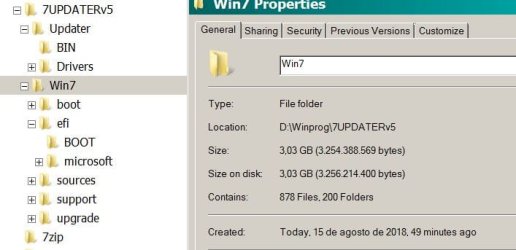
Just added the MVMe drivers to boot.wim (index 1 and 2) and to Install.wim (index 2 = HP)
The total size is 3.03G
 

Attachments

  • Updater.JPG
    Updater.JPG
    35.5 KB · Views: 21

My Computers My Computers

System One System Two

  • Computer type
    PC/Desktop
    Computer Manufacturer/Model Number
    custom build
    OS
    Windows 7 HP 64
    CPU
    i5 6600K - 800MHz to 4200MHz
    Motherboard
    GA-Z170-HD3P
    Memory
    4+4G GSkill DDR4 3000
    Graphics Card(s)
    IG - Intel 530
    Monitor(s) Displays
    Samsung 226BW
    Screen Resolution
    1680x1050
    Hard Drives
    (1) -1 SM951 – 128GB M.2 AHCI PCIe SSD drive for Windows 7 and Lubuntu
    (2) -1 WD SATA 3 - 1T for Data
    (3) -1 WD SATA 3 - 1T for backup
    PSU
    Thermaltake 450W TR2 gold
    Keyboard
    Old and good Chicony mechanical keyboard
    Mouse
    Logitech mX performance - 9 buttons (had to disable some)
    Internet Speed
    500Mb/s
    Browser
    Firefox 64
    Other Info
    TinyWall firewall
  • Computer type
    Laptop
    System Manufacturer/Model Number
    Asus Q550LF
    OS
    Windows 7 Pro
    CPU
    i7-4500U 800MHz to 3.0GHz
    Motherboard
    Asus Q550LF
    Memory
    (4+4)G DDR3 1600
    Graphics Card(s)
    IG intel 4400 + NVIDIA GeForce GT 745M
    Sound Card
    Realtek
    Monitor(s) Displays
    LG Display LP156WF4-SPH1
    Screen Resolution
    1920 x 1080
    Hard Drives
    BX500 120G SSD for Windows and programs +
    1T HDD for data
    Internet Speed
    500 Mb/s
    Browser
    Firefox
    Other Info
    TinyWall firewall
As your 960 M.2 disk is GPT, you must create a Win 7 installation UEFI disk. It must be FAT32.

BTW, just for my edification, why does the fact that the target boot drive is formatted GPT require that the installation media be FAT32? I am not seeing why the two are connected. If I were to buy a set of installation media from MS, would they need to know how my target drive is formatted before they could send me the DVDs?
 

My Computer My Computer

Computer type
PC/Desktop
Computer Manufacturer/Model Number
custom
OS
Windows 7 Home Premium 64bit SP 1 (Version 6.1.7601)
CPU
Intel i7-5820K
Motherboard
ASUS X99-A (BIOS 3505)
Memory
16 GB
Graphics Card(s)
NVidia GeForce GTX 970
Sound Card
MB default (Crystal Sound 2)
Monitor(s) Displays
Dell 2408 WFP
Screen Resolution
1920x1280
Hard Drives
C:
Samsung 960 PRO 2 TB SSD
D:
Crucial M4 512GB SSD
PSU
Thermaltake Toughpower 750 W
To install as UEFI-GPT (or repair) you must boot the installation disk as UEFI.
To boot as UEFI the boot loader must be on a FAT32 partition. If you ever looked at the 960 drive with disk manager you will see that the fist partition is 100M Fat32 and has the boot loader.
Did you see my post#30?
 

My Computers My Computers

System One System Two

  • Computer type
    PC/Desktop
    Computer Manufacturer/Model Number
    custom build
    OS
    Windows 7 HP 64
    CPU
    i5 6600K - 800MHz to 4200MHz
    Motherboard
    GA-Z170-HD3P
    Memory
    4+4G GSkill DDR4 3000
    Graphics Card(s)
    IG - Intel 530
    Monitor(s) Displays
    Samsung 226BW
    Screen Resolution
    1680x1050
    Hard Drives
    (1) -1 SM951 – 128GB M.2 AHCI PCIe SSD drive for Windows 7 and Lubuntu
    (2) -1 WD SATA 3 - 1T for Data
    (3) -1 WD SATA 3 - 1T for backup
    PSU
    Thermaltake 450W TR2 gold
    Keyboard
    Old and good Chicony mechanical keyboard
    Mouse
    Logitech mX performance - 9 buttons (had to disable some)
    Internet Speed
    500Mb/s
    Browser
    Firefox 64
    Other Info
    TinyWall firewall
  • Computer type
    Laptop
    System Manufacturer/Model Number
    Asus Q550LF
    OS
    Windows 7 Pro
    CPU
    i7-4500U 800MHz to 3.0GHz
    Motherboard
    Asus Q550LF
    Memory
    (4+4)G DDR3 1600
    Graphics Card(s)
    IG intel 4400 + NVIDIA GeForce GT 745M
    Sound Card
    Realtek
    Monitor(s) Displays
    LG Display LP156WF4-SPH1
    Screen Resolution
    1920 x 1080
    Hard Drives
    BX500 120G SSD for Windows and programs +
    1T HDD for data
    Internet Speed
    500 Mb/s
    Browser
    Firefox
    Other Info
    TinyWall firewall
Just added the MVMe drivers to boot.wim (index 1 and 2) and to Install.wim (index 2 = HP)
The total size is 3.03G
Okay, so I am doing something incorrectly somewhere when creating the installation files. But, as far as I can see, I am just following the instructions in SIW2's post.

Wait a minute! I just looked at the sources/install.wim directly from the 7601_24168_en-US_x64.iso file that I downloaded from the link in your earlier post. It is already well over 4 GB before I have run any other software on it! In other words, if I were to try and create a FAT32 USB stick from that ISO, even without trying to add any other drivers to it, it would already fail. Is that perhaps not the correct ISO I should be using for this?
 

My Computer My Computer

Computer type
PC/Desktop
Computer Manufacturer/Model Number
custom
OS
Windows 7 Home Premium 64bit SP 1 (Version 6.1.7601)
CPU
Intel i7-5820K
Motherboard
ASUS X99-A (BIOS 3505)
Memory
16 GB
Graphics Card(s)
NVidia GeForce GTX 970
Sound Card
MB default (Crystal Sound 2)
Monitor(s) Displays
Dell 2408 WFP
Screen Resolution
1920x1280
Hard Drives
C:
Samsung 960 PRO 2 TB SSD
D:
Crucial M4 512GB SSD
PSU
Thermaltake Toughpower 750 W
Hi Megahertz07,

Just added the MVMe drivers to boot.wim (index 1 and 2) and to Install.wim (index 2 = HP)
The total size is 3.03G
Was that adding the drivers to the downloaded ISO before applying any updates?
 

My Computer My Computer

Computer type
Laptop
Computer Manufacturer/Model Number
Fujitsu LIFEBOOK
OS
Win 7 HP SP1 64-bit Vista HB SP2 32-bit Linux Mint 18.3
CPU
Intel(R) Pentium(R) CPU P6200 @ 2.13GHz
Motherboard
FUJITSU FJNBB06
Memory
4.00 GB
Graphics Card(s)
Intel(R) Graphics Media Accelerator HD
Sound Card
[1] Realtek High Definition Audio [2] Intel(R) Display Audio
Screen Resolution
1366 x 768 x 32 bits (4294967296 colors) @ 59 Hz
Hard Drives
TOSHIBA MK5076GSX
Antivirus
AVG FREE
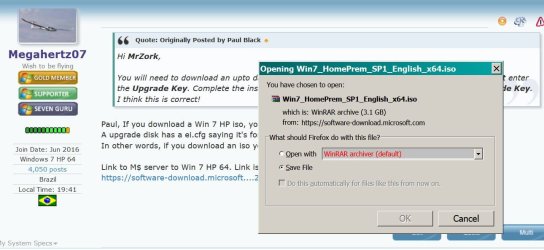
The Iso from the link is 3.1G Don't understand how yours is over 4G.
 

Attachments

  • Win 7_Iso.JPG
    Win 7_Iso.JPG
    90.3 KB · Views: 2

My Computers My Computers

System One System Two

  • Computer type
    PC/Desktop
    Computer Manufacturer/Model Number
    custom build
    OS
    Windows 7 HP 64
    CPU
    i5 6600K - 800MHz to 4200MHz
    Motherboard
    GA-Z170-HD3P
    Memory
    4+4G GSkill DDR4 3000
    Graphics Card(s)
    IG - Intel 530
    Monitor(s) Displays
    Samsung 226BW
    Screen Resolution
    1680x1050
    Hard Drives
    (1) -1 SM951 – 128GB M.2 AHCI PCIe SSD drive for Windows 7 and Lubuntu
    (2) -1 WD SATA 3 - 1T for Data
    (3) -1 WD SATA 3 - 1T for backup
    PSU
    Thermaltake 450W TR2 gold
    Keyboard
    Old and good Chicony mechanical keyboard
    Mouse
    Logitech mX performance - 9 buttons (had to disable some)
    Internet Speed
    500Mb/s
    Browser
    Firefox 64
    Other Info
    TinyWall firewall
  • Computer type
    Laptop
    System Manufacturer/Model Number
    Asus Q550LF
    OS
    Windows 7 Pro
    CPU
    i7-4500U 800MHz to 3.0GHz
    Motherboard
    Asus Q550LF
    Memory
    (4+4)G DDR3 1600
    Graphics Card(s)
    IG intel 4400 + NVIDIA GeForce GT 745M
    Sound Card
    Realtek
    Monitor(s) Displays
    LG Display LP156WF4-SPH1
    Screen Resolution
    1920 x 1080
    Hard Drives
    BX500 120G SSD for Windows and programs +
    1T HDD for data
    Internet Speed
    500 Mb/s
    Browser
    Firefox
    Other Info
    TinyWall firewall

My Computers My Computers

System One System Two

  • Computer type
    PC/Desktop
    Computer Manufacturer/Model Number
    custom build
    OS
    Windows 7 HP 64
    CPU
    i5 6600K - 800MHz to 4200MHz
    Motherboard
    GA-Z170-HD3P
    Memory
    4+4G GSkill DDR4 3000
    Graphics Card(s)
    IG - Intel 530
    Monitor(s) Displays
    Samsung 226BW
    Screen Resolution
    1680x1050
    Hard Drives
    (1) -1 SM951 – 128GB M.2 AHCI PCIe SSD drive for Windows 7 and Lubuntu
    (2) -1 WD SATA 3 - 1T for Data
    (3) -1 WD SATA 3 - 1T for backup
    PSU
    Thermaltake 450W TR2 gold
    Keyboard
    Old and good Chicony mechanical keyboard
    Mouse
    Logitech mX performance - 9 buttons (had to disable some)
    Internet Speed
    500Mb/s
    Browser
    Firefox 64
    Other Info
    TinyWall firewall
  • Computer type
    Laptop
    System Manufacturer/Model Number
    Asus Q550LF
    OS
    Windows 7 Pro
    CPU
    i7-4500U 800MHz to 3.0GHz
    Motherboard
    Asus Q550LF
    Memory
    (4+4)G DDR3 1600
    Graphics Card(s)
    IG intel 4400 + NVIDIA GeForce GT 745M
    Sound Card
    Realtek
    Monitor(s) Displays
    LG Display LP156WF4-SPH1
    Screen Resolution
    1920 x 1080
    Hard Drives
    BX500 120G SSD for Windows and programs +
    1T HDD for data
    Internet Speed
    500 Mb/s
    Browser
    Firefox
    Other Info
    TinyWall firewall
Megahertz07, I am re-downloading the linked ISO file. I can see that it will be 3.1 GB. I have no idea why it was different before. I am certain I clicked on the link in your post #7 earlier today when I first downloaded the file.

Once I have the new file, I will try again to create the installation disk USB.
 

My Computer My Computer

Computer type
PC/Desktop
Computer Manufacturer/Model Number
custom
OS
Windows 7 Home Premium 64bit SP 1 (Version 6.1.7601)
CPU
Intel i7-5820K
Motherboard
ASUS X99-A (BIOS 3505)
Memory
16 GB
Graphics Card(s)
NVidia GeForce GTX 970
Sound Card
MB default (Crystal Sound 2)
Monitor(s) Displays
Dell 2408 WFP
Screen Resolution
1920x1280
Hard Drives
C:
Samsung 960 PRO 2 TB SSD
D:
Crucial M4 512GB SSD
PSU
Thermaltake Toughpower 750 W
Hi Megahertz07,


Was that adding the drivers to the downloaded ISO before applying any updates?

Didn't added the updates. Only MVMe driver.
 

My Computers My Computers

System One System Two

  • Computer type
    PC/Desktop
    Computer Manufacturer/Model Number
    custom build
    OS
    Windows 7 HP 64
    CPU
    i5 6600K - 800MHz to 4200MHz
    Motherboard
    GA-Z170-HD3P
    Memory
    4+4G GSkill DDR4 3000
    Graphics Card(s)
    IG - Intel 530
    Monitor(s) Displays
    Samsung 226BW
    Screen Resolution
    1680x1050
    Hard Drives
    (1) -1 SM951 – 128GB M.2 AHCI PCIe SSD drive for Windows 7 and Lubuntu
    (2) -1 WD SATA 3 - 1T for Data
    (3) -1 WD SATA 3 - 1T for backup
    PSU
    Thermaltake 450W TR2 gold
    Keyboard
    Old and good Chicony mechanical keyboard
    Mouse
    Logitech mX performance - 9 buttons (had to disable some)
    Internet Speed
    500Mb/s
    Browser
    Firefox 64
    Other Info
    TinyWall firewall
  • Computer type
    Laptop
    System Manufacturer/Model Number
    Asus Q550LF
    OS
    Windows 7 Pro
    CPU
    i7-4500U 800MHz to 3.0GHz
    Motherboard
    Asus Q550LF
    Memory
    (4+4)G DDR3 1600
    Graphics Card(s)
    IG intel 4400 + NVIDIA GeForce GT 745M
    Sound Card
    Realtek
    Monitor(s) Displays
    LG Display LP156WF4-SPH1
    Screen Resolution
    1920 x 1080
    Hard Drives
    BX500 120G SSD for Windows and programs +
    1T HDD for data
    Internet Speed
    500 Mb/s
    Browser
    Firefox
    Other Info
    TinyWall firewall
BTW, complete side-issue but... Why does the forum software keep adding extra newline characters to my posts?
 

My Computer My Computer

Computer type
PC/Desktop
Computer Manufacturer/Model Number
custom
OS
Windows 7 Home Premium 64bit SP 1 (Version 6.1.7601)
CPU
Intel i7-5820K
Motherboard
ASUS X99-A (BIOS 3505)
Memory
16 GB
Graphics Card(s)
NVidia GeForce GTX 970
Sound Card
MB default (Crystal Sound 2)
Monitor(s) Displays
Dell 2408 WFP
Screen Resolution
1920x1280
Hard Drives
C:
Samsung 960 PRO 2 TB SSD
D:
Crucial M4 512GB SSD
PSU
Thermaltake Toughpower 750 W
Hi MrZork,

I think what Megahertz07 is suggesting is that you add the MVMe drivers to the ISO that you are downloading from post #7, and then create a bootable USB from that using Rufus. There is no need to run SIW2's tool to include ALL the updates.

Is that correct Megahertz07?
 

My Computer My Computer

Computer type
Laptop
Computer Manufacturer/Model Number
Fujitsu LIFEBOOK
OS
Win 7 HP SP1 64-bit Vista HB SP2 32-bit Linux Mint 18.3
CPU
Intel(R) Pentium(R) CPU P6200 @ 2.13GHz
Motherboard
FUJITSU FJNBB06
Memory
4.00 GB
Graphics Card(s)
Intel(R) Graphics Media Accelerator HD
Sound Card
[1] Realtek High Definition Audio [2] Intel(R) Display Audio
Screen Resolution
1366 x 768 x 32 bits (4294967296 colors) @ 59 Hz
Hard Drives
TOSHIBA MK5076GSX
Antivirus
AVG FREE
Back
Top