Solved Safe mode startup shows a CLASSPNP.SYS error and haults

Hi loninappleton,

. . . and then a blue screen with a not genuine message.

Download the MGADiag.exe Tool [direct download] => MGADiag Tool, Run it, and click Continue.

The M$ tool however, does not automatically create a log file. What you can do though, is click the COPY button and then PASTE it into your post, or COPY it into notepad and SAVE it. Then upload it into your post.
 

My Computer My Computer

At a glance

Win 7 HP SP1 64-bit Vista HB SP2 32-bit Linux...Intel(R) Pentium(R) CPU P6200 @ 2.13GHz4.00 GBIntel(R) Graphics Media Accelerator HD
Computer type
Laptop
Computer Manufacturer/Model Number
Fujitsu LIFEBOOK
OS
Win 7 HP SP1 64-bit Vista HB SP2 32-bit Linux Mint 18.3
CPU
Intel(R) Pentium(R) CPU P6200 @ 2.13GHz
Motherboard
FUJITSU FJNBB06
Memory
4.00 GB
Graphics Card(s)
Intel(R) Graphics Media Accelerator HD
Sound Card
[1] Realtek High Definition Audio [2] Intel(R) Display Audio
Screen Resolution
1366 x 768 x 32 bits (4294967296 colors) @ 59 Hz
Hard Drives
TOSHIBA MK5076GSX
Antivirus
AVG FREE
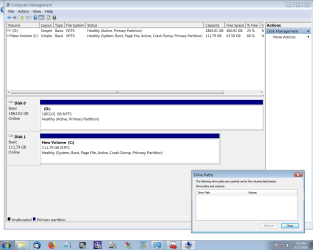
once more. I have no other idea on how to fix the image. I changed the screen res. That's the best I can do.
 

Attachments

  • disk management 2.png
    disk management 2.png
    36.4 KB · Views: 0

My Computer My Computer

At a glance

Windows 7 x64 UltimateAMD Athlon II x3 4502 GB
Computer type
PC/Desktop
Computer Manufacturer/Model Number
custom
OS
Windows 7 x64 Ultimate
CPU
AMD Athlon II x3 450
Motherboard
MSI 880GM
Memory
2 GB
Hard Drives
various
Browser
Firefox, Opera
Hi loninappleton,


Download the MGADiag.exe Tool [direct download] => MGADiag Tool, Run it, and click Continue.

The M$ tool however, does not automatically create a log file. What you can do though, is click the COPY button and then PASTE it into your post, or COPY it into notepad and SAVE it. Then upload it into your post.


I did a sample download of the MGADiag Tool. I saw something about where it copies the log
but it's all becoming complex. If I could re-run the Safe Mode I could confirm the hault point. Right now I fear that may have an error. What is it you are trying to get at?


We left off with Linux Mint Live DVD plus the problem drive.
 

My Computer My Computer

At a glance

Windows 7 x64 UltimateAMD Athlon II x3 4502 GB
Computer type
PC/Desktop
Computer Manufacturer/Model Number
custom
OS
Windows 7 x64 Ultimate
CPU
AMD Athlon II x3 450
Motherboard
MSI 880GM
Memory
2 GB
Hard Drives
various
Browser
Firefox, Opera
Progress. I dl'ed the MAGdiag to the my test system.


But it does not test the bad disk. And it displays key info. Perhaps we will move on to
seeing if the Linux Mint can open the Desktop folder of the problem HD. No more daigs for me.
However I did make a text file of it from the Copy command inside MAdiag.
 

My Computer My Computer

At a glance

Windows 7 x64 UltimateAMD Athlon II x3 4502 GB
Computer type
PC/Desktop
Computer Manufacturer/Model Number
custom
OS
Windows 7 x64 Ultimate
CPU
AMD Athlon II x3 450
Motherboard
MSI 880GM
Memory
2 GB
Hard Drives
various
Browser
Firefox, Opera
I am going to mark this solved. NoLinux lessons for Lon. Some time back I marled a thread closed when I found thatEverything.exe from Voidtools will open the desktop on the _non booting_ HD and I can extractthe things needed I already did a few I know it works. The goal here was to get a solution
to install repairs. I'll have to tackle that another day or express myself better on the topic.
 

My Computer My Computer

At a glance

Windows 7 x64 UltimateAMD Athlon II x3 4502 GB
Computer type
PC/Desktop
Computer Manufacturer/Model Number
custom
OS
Windows 7 x64 Ultimate
CPU
AMD Athlon II x3 450
Motherboard
MSI 880GM
Memory
2 GB
Hard Drives
various
Browser
Firefox, Opera
Hi loninappleton,

I am going to mark this solved. No Linux lessons for Lon. Some time back I marked a thread closed when I found that Everything.exe from Voidtools will open the desktop on the _non booting_ HD and I can extract the things needed I already did a few I know it works. The goal here was to get a solution to install repairs. I'll have to tackle that another day or express myself better on the topic.

OK.
 

My Computer My Computer

At a glance

Win 7 HP SP1 64-bit Vista HB SP2 32-bit Linux...Intel(R) Pentium(R) CPU P6200 @ 2.13GHz4.00 GBIntel(R) Graphics Media Accelerator HD
Computer type
Laptop
Computer Manufacturer/Model Number
Fujitsu LIFEBOOK
OS
Win 7 HP SP1 64-bit Vista HB SP2 32-bit Linux Mint 18.3
CPU
Intel(R) Pentium(R) CPU P6200 @ 2.13GHz
Motherboard
FUJITSU FJNBB06
Memory
4.00 GB
Graphics Card(s)
Intel(R) Graphics Media Accelerator HD
Sound Card
[1] Realtek High Definition Audio [2] Intel(R) Display Audio
Screen Resolution
1366 x 768 x 32 bits (4294967296 colors) @ 59 Hz
Hard Drives
TOSHIBA MK5076GSX
Antivirus
AVG FREE
Back
Top