Documents Library Not Functioning

Hi Baarod

Yah..Bags folders in there can be quite big, but that's something definitely destined for a TEST install 4 sure!!

Edit - Thanx Barrod! That was driving me bonkers with having to scroll to find the Reply box

One of the helpful mods got to it first ;)
 

My Computer

Computer type
Laptop
Computer Manufacturer/Model Number
Apple
OS
El Capitan / Windows 10
CPU
i7-4980HQ
Memory
16GB
Graphics Card(s)
Iris 5200
LOL..they're good ones!

Anyway, I got it figured out.
It's not the data in the SearchConnectorDescriptionList tag, it's all the info in the Serialized tags that needs to go. It's rebuilt machine specific automatically as soon as you close the file. It just took nother xml file to see what I needed to do and I found Brink still on line and he sent me his.
It's rebuilt and functioning now so if we run across others that have this issue, we can rebuild it for them rather easily now. We can get them to post their file and we can show them the edits and tell them how and where to find their own additions to make it work.

Great work and help Barrod! Your Rep has been upgraded!!

I tel ya tho...the more I use Libraries, the more I LIKE this new function of W7. It's handy and fast to access many different locations from one Library group, really makes findng things faster.
 

My Computer

Computer Manufacturer/Model Number
Personal Build
OS
Vista Ult 64bit - Windows 7 Ult 7264 64bit
CPU
Intel Core 2 Duo E6750
Motherboard
Asus Commando
Memory
4 G's Crucial Ballistix Tracer
Graphics Card(s)
BFG Nvidia 8800 GTS 340
Sound Card
Creative Sound Blaster X-FI Platinum FATAL1TY
Monitor(s) Displays
2-22" HP W2207 LCD
Screen Resolution
1920 x 1080
Hard Drives
3 x 500G WD Caviar SATA II
PSU
Enermax Noise Taker II 600W
Case
NZXT Lexa Classic (dual doored & windowed)
Cooling
Zalman 9700 CPU cooler - 4 x 120mm, 1 x 90mm fans
Keyboard
Logitech MX 5500
Mouse
Logitech MX Revolution
Internet Speed
Blazing...
I went ahead with the Repair Install as you suggested. (My reasoning against trying Fillups approach was that something clearly had gone wrong with the installation for me to have this problem in the first place, so my hope is that the Repair Install fixes anything else that did not install correctly with my original Upgrade install.) 4 1/2 hours later, the Repair Install completed and the Documents Library is now functioning correctly!

Thanks for your help!

Unfortunately, my other problem (X-Fi Crackling and Popping) still persists. Any ideas on that one?

That's great! Its good that you got the OS problem sorted out.

Have taken the time to look at the post you made and the forum threads on your X-Fi Crackling and Popping issue.

Will try to see if we can find other solutions for you and will be posting on that thread if I got something.

Cheers ;)
 

My Computer

Computer Manufacturer/Model Number
Custom Build
OS
Windows 7 Build 7048 x64
CPU
Athlon 64 X2 Dual Core 4600+
Motherboard
EMX-AMD750G-PRO
Memory
4 x 1GB Kingston 400MHz 6-6-6-18 (800MHz)
Graphics Card(s)
ATI Radeon 3650
Sound Card
Realtek HD Audio
Monitor(s) Displays
22" AOC 2216Vw
Screen Resolution
1680x1050
Cooling
Arctic Cooling Freezer 64 Pro PWM
Keyboard
Generic Enhanced Natural Keyboard
Mouse
Logitech VX Nano
Other Info
Edifier M1550
@Chappy:

Attached are ALL my Libraries for you to check whatever it is you wanted to check, as asked.

Hope this helps.
 

Attachments

My Computer

Computer type
PC/Desktop
Computer Manufacturer/Model Number
Virtual Machine
OS
Windows 7 Professional 32-bit SP1
CPU
AMD A4/A6
Motherboard
Intel Corporation 440BX Desktop Reference Platform
Memory
3.00GB EDO
Graphics Card(s)
VMware SVGA 3D
Sound Card
High Definition Audio Device
Monitor(s) Displays
Generic Non-PnP Monitor on VMware SVGA 3D
Screen Resolution
1440x900
Hard Drives
1 x 60GB VMware Virtual SATA Hard Drive ATA Device
Antivirus
Kaspersky Total Security
That's great! Its good that you got the OS problem sorted out.

Have taken the time to look at the post you made and the forum threads on your X-Fi Crackling and Popping issue.

Will try to see if we can find other solutions for you and will be posting on that thread if I got something.

Cheers ;)

Hey Nos

I remember some others had this issue with Creative cards too, I'll have to check my history and see where I read about them. Seems to me someone had a temp fix until Creative release a W7 driver. I'll read that post and see what we can find

@ Peter - Thanx again Bro!
As Barrod found, they are rather simple XML files and somewhat interchangeable (to a point). The resource pointers of course need to be specific to the library type so the icons are proper, and the User ID is user specific, but after that all you need do is delete the serialized tag info so it can be rebuilt when the file closes.
It's actually quite a simple but very effective little extensible file MS made for these libraries, and I'm thinking of some other things I can do with one of these as a template starter. There are some interesting possibilities
 

My Computer

Computer Manufacturer/Model Number
Personal Build
OS
Vista Ult 64bit - Windows 7 Ult 7264 64bit
CPU
Intel Core 2 Duo E6750
Motherboard
Asus Commando
Memory
4 G's Crucial Ballistix Tracer
Graphics Card(s)
BFG Nvidia 8800 GTS 340
Sound Card
Creative Sound Blaster X-FI Platinum FATAL1TY
Monitor(s) Displays
2-22" HP W2207 LCD
Screen Resolution
1920 x 1080
Hard Drives
3 x 500G WD Caviar SATA II
PSU
Enermax Noise Taker II 600W
Case
NZXT Lexa Classic (dual doored & windowed)
Cooling
Zalman 9700 CPU cooler - 4 x 120mm, 1 x 90mm fans
Keyboard
Logitech MX 5500
Mouse
Logitech MX Revolution
Internet Speed
Blazing...
Hmmm... Now that you mentioned it, I believe you're right Dave.
I can't remember what kind of issue that was with a that Creative card as well :o
 

My Computer

Computer Manufacturer/Model Number
Custom Build
OS
Windows 7 Build 7048 x64
CPU
Athlon 64 X2 Dual Core 4600+
Motherboard
EMX-AMD750G-PRO
Memory
4 x 1GB Kingston 400MHz 6-6-6-18 (800MHz)
Graphics Card(s)
ATI Radeon 3650
Sound Card
Realtek HD Audio
Monitor(s) Displays
22" AOC 2216Vw
Screen Resolution
1680x1050
Cooling
Arctic Cooling Freezer 64 Pro PWM
Keyboard
Generic Enhanced Natural Keyboard
Mouse
Logitech VX Nano
Other Info
Edifier M1550
Sound Problems Remain - Possible (or Not) Root Causes

Hey Nos

I remember some others had this issue with Creative cards too, I'll have to check my history and see where I read about them. Seems to me someone had a temp fix until Creative release a W7 driver. I'll read that post and see what we can find

Thanks Dave.

The first thing I did after I exhausted my own troubleshooting ideas was to search these forums for possible fixes. I tried all I could find (see my original post above). If you see any I've missed, please let me know.

In the mean time, I found Creative's bug list for these beta X-Fi drivers. One user isolated a similar problem on his system by reducing his RAM to 3 GB, at which point the problem disappeared. (However, he was running XP64 with different processers, motherboard, and X-Fi model.) I tried removing the ReadyBoost RAM on my system to no avail - not surprising since I still have 6 GB of RAM installed on my motherboard. So, my problems could possibly be related to driver bug in the addressing of system RAM above 3 GB, or latency in the handling of bus master memory requests on my nVidia nForce4 motherboard as noted in the Creative article referenced in my original post, some combination of the two, or something else entirely.

In the mean time, I'm soundless, since sound quits within 1-5 minutes, infrequently preceded by one or more very loud screeches.

Any ideas for temporary fixes/workarounds to restore undistorted sound? Otherwise I fear I will remain soundless until commercial release (hopefully containing fixed Creative and nVidia drivers)!

Thanks again for everyone's help.

Dale

P.S.
I've reported my issues and system details on the Creative Bug List.
 

My Computer

Computer Manufacturer/Model Number
Dell XPS/Dimension 600 /Model Dell DXG051
OS
Windows 7 Professional 64-bit
CPU
Pentium D 3.20 GHz (Intel64 Family 15 Model 4 Stepping 4)
Motherboard
nVidia nForce4 SLIx16; Dell Phoenix BIOS PLUS v1.10 A11
Memory
6GB 667 MHz DDR2 + ~4GB ReadyBoost
Graphics Card(s)
OEM nVidia Geoforce 6800 256MB
Sound Card
OEM X-Fi XtremeMusic (Model SB0467); OEM Realtek AC'97
Monitor(s) Displays
Dell 2007FP (21" Flat Screen)
Screen Resolution
1600 x 1200 x 32-bit
Hard Drives
3, Maxtor 7 L250S0 SCSI Disk Device 232.8Gb;
NVIDIA STRIPE 465.66G;
HL-DT-ST DVD+-RW GWA4164B ATA Device;
TSSTcorp DVD-ROM TS-H352C ATA Device
Internet Speed
Cable - 5164/3161 per recent DSL Reports test
Other Info
Pinnacle PCTV 800i; Logitech QuickCam Ultravision Pro
Thanks Dave.
One user isolated a similar problem on his system by reducing his RAM to 3 GB, at which point the problem disappeared. (However, he was running XP64 with different processers, motherboard, and X-Fi model.) I tried removing the ReadyBoost RAM on my system to no avail - not surprising since I still have 6 GB of RAM installed on my motherboard. So, my problems could possibly be related to driver bug in the addressing of system RAM above 3 GB, or latency in the handling of bus master memory requests on my nVidia nForce4 motherboard as noted in the Creative article referenced in my original post, some combination of the two, or something else entirely.

You could try reducing your RAM to 3GB temporarily to verify if that's the cause. If it is there used to be a way to limit driver address space that I think I could dig up again. Let's start by making sure that's the root cause. Open Start, type "msconfig", select Boot tab, click Advanced options, select Maximum memory and enter "3072". Reboot, see if the problem persists and post back, please.
 

My Computer

Computer type
Laptop
Computer Manufacturer/Model Number
Apple
OS
El Capitan / Windows 10
CPU
i7-4980HQ
Memory
16GB
Graphics Card(s)
Iris 5200
On Track to a Final Sound Solution

You could try reducing your RAM to 3GB temporarily to verify if that's the cause. If it is there used to be a way to limit driver address space that I think I could dig up again. Let's start by making sure that's the root cause. Open Start, type "msconfig", select Boot tab, click Advanced options, select Maximum memory and enter "3072". Reboot, see if the problem persists and post back, please.

THANK YOU, Baarod! Using msconfig to limit RAM virtually eliminated the interference and ultimate sound loss. (I can still hear an occasional crackle or pop or drop out.) (Note: I left ReadyBoost enabled.) Now, if you can only remember how to limit the memory address space for this driver so I still have all my RAM for application/multitasking use. :D

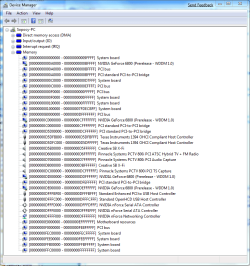
Device Manager is showing using an unshared IRQ (one of the first things I checked) and the Memory Ranges 00000000D5E00000 - 00000000D5FFFFFF and 00000000D8000000 - 00000000DBFFFFFF.

Thanks again,

Dale
 

My Computer

Computer Manufacturer/Model Number
Dell XPS/Dimension 600 /Model Dell DXG051
OS
Windows 7 Professional 64-bit
CPU
Pentium D 3.20 GHz (Intel64 Family 15 Model 4 Stepping 4)
Motherboard
nVidia nForce4 SLIx16; Dell Phoenix BIOS PLUS v1.10 A11
Memory
6GB 667 MHz DDR2 + ~4GB ReadyBoost
Graphics Card(s)
OEM nVidia Geoforce 6800 256MB
Sound Card
OEM X-Fi XtremeMusic (Model SB0467); OEM Realtek AC'97
Monitor(s) Displays
Dell 2007FP (21" Flat Screen)
Screen Resolution
1600 x 1200 x 32-bit
Hard Drives
3, Maxtor 7 L250S0 SCSI Disk Device 232.8Gb;
NVIDIA STRIPE 465.66G;
HL-DT-ST DVD+-RW GWA4164B ATA Device;
TSSTcorp DVD-ROM TS-H352C ATA Device
Internet Speed
Cable - 5164/3161 per recent DSL Reports test
Other Info
Pinnacle PCTV 800i; Logitech QuickCam Ultravision Pro
THANK YOU, Baarod! Using msconfig to limit RAM virtually eliminated the interference and ultimate sound loss. (I can still hear an occasional crackle or pop or drop out.) (Note: I left ReadyBoost enabled.) Now, if you can only remember how to limit the memory address space for this driver so I still have all my RAM for application/multitasking use. :D

Device Manager is showing using an unshared IRQ (one of the first things I checked) and the Memory Ranges 00000000D5E00000 - 00000000D5FFFFFF and 00000000D8000000 - 00000000DBFFFFFF.

Thanks again,

Dale

Dale,

Can I get a screenshot of device manager showing that information please?

Mike

P.S. Glenview? I'm down in Bradley -- near Kankakee...
 

My Computer

Computer type
Laptop
Computer Manufacturer/Model Number
Apple
OS
El Capitan / Windows 10
CPU
i7-4980HQ
Memory
16GB
Graphics Card(s)
Iris 5200
Xi-Fi Memory Allocation

Baarod -

I've attached a snapshot of Memory allocation reported by Device Manager after booting with the 3 GB constraint, as you requested.

Dale

P.S.
So you're in Bradley. Close enough to catch Bears' training camp come summer! :)
 

Attachments

  • Device Manager.PNG
    Device Manager.PNG
    151.1 KB · Views: 223

My Computer

Computer Manufacturer/Model Number
Dell XPS/Dimension 600 /Model Dell DXG051
OS
Windows 7 Professional 64-bit
CPU
Pentium D 3.20 GHz (Intel64 Family 15 Model 4 Stepping 4)
Motherboard
nVidia nForce4 SLIx16; Dell Phoenix BIOS PLUS v1.10 A11
Memory
6GB 667 MHz DDR2 + ~4GB ReadyBoost
Graphics Card(s)
OEM nVidia Geoforce 6800 256MB
Sound Card
OEM X-Fi XtremeMusic (Model SB0467); OEM Realtek AC'97
Monitor(s) Displays
Dell 2007FP (21" Flat Screen)
Screen Resolution
1600 x 1200 x 32-bit
Hard Drives
3, Maxtor 7 L250S0 SCSI Disk Device 232.8Gb;
NVIDIA STRIPE 465.66G;
HL-DT-ST DVD+-RW GWA4164B ATA Device;
TSSTcorp DVD-ROM TS-H352C ATA Device
Internet Speed
Cable - 5164/3161 per recent DSL Reports test
Other Info
Pinnacle PCTV 800i; Logitech QuickCam Ultravision Pro
Baarod -

I've attached a snapshot of Memory allocation reported by Device Manager after booting with the 3 GB constraint, as you requested.

Dale

P.S.
So you're in Bradley. Close enough to catch Bears' training camp come summer! :)

Same address ranges in use with 3GB. Is the IRQ doing the same thing with and without the memory constraint as well? If not we can hard map that IRQ to the X-Fi in your BIOS rather than letting ACPI do it.

Let's get an .nfo so I can look at the rest of it to make sure -- please run this command: msinfo32 /nfo %userprofile%\desktop\dale.nfo and post the file that appears on your desktop.

Da Bears: Yeah, we can hear them from here. Could have walked through the neighbor's backyard to see them if they wouldn't have put that fence up.
 
Last edited:

My Computer

Computer type
Laptop
Computer Manufacturer/Model Number
Apple
OS
El Capitan / Windows 10
CPU
i7-4980HQ
Memory
16GB
Graphics Card(s)
Iris 5200
System Configuration

Same address ranges in use with 3GB. Is the IRQ doing the same thing with and without the memory constraint as well? If not we can hard map that IRQ to the X-Fi in your BIOS rather than letting ACPI do it.

Let's get an .nfo so I can look at the rest of it to make sure -- please run this command: msinfo32 /nfo %userprofile%\desktop\dale.nfo and post the file that appears on your desktop.

The X-Fi is assigned IRQ 19 in both cases. Memory allocation space is the same as well. (Clarification: The memory addresses I posted earlier and the subsequent Device Manager screen captures were both with MSCONFIG limiting RAM to 3072 MB.)

I did a considerable amount of experimentation/testing this morning and found that no matter what RAM I set in MSCONFIG, only 2048 MB RAM is being recognized. Evidently the granularity of RAM control offered by MSCONFIG is limited to blocking/unblocking memory chips. (I have a pair of 2048 MB chips in the first paired slots and a pair of 4096 MB chips in the second paired slots.)

I have attached my system info files captured at both configurations, 6144 MB and limited to 3072 MB (actually 2048 MB). ReadyBoost is enabled in both configurations. The latter configuration has clear, undistorted sound, although I still get momentary drop outs - seemingly any time I initiate an action (e.g., launch an application, open a document in an open application, click on an IE link, etc.).

Thanks again for your help.

Dale

P.S.
What's with the weird IRQ assignment for PCI-to-PCI bridge?
 

Attachments

My Computer

Computer Manufacturer/Model Number
Dell XPS/Dimension 600 /Model Dell DXG051
OS
Windows 7 Professional 64-bit
CPU
Pentium D 3.20 GHz (Intel64 Family 15 Model 4 Stepping 4)
Motherboard
nVidia nForce4 SLIx16; Dell Phoenix BIOS PLUS v1.10 A11
Memory
6GB 667 MHz DDR2 + ~4GB ReadyBoost
Graphics Card(s)
OEM nVidia Geoforce 6800 256MB
Sound Card
OEM X-Fi XtremeMusic (Model SB0467); OEM Realtek AC'97
Monitor(s) Displays
Dell 2007FP (21" Flat Screen)
Screen Resolution
1600 x 1200 x 32-bit
Hard Drives
3, Maxtor 7 L250S0 SCSI Disk Device 232.8Gb;
NVIDIA STRIPE 465.66G;
HL-DT-ST DVD+-RW GWA4164B ATA Device;
TSSTcorp DVD-ROM TS-H352C ATA Device
Internet Speed
Cable - 5164/3161 per recent DSL Reports test
Other Info
Pinnacle PCTV 800i; Logitech QuickCam Ultravision Pro
I've tried digging in to this crackling and popping issue with X-Fi cards, the most notable suggestions for trying to resolve this are;

Set the PCI Latency to 96 or greater (in BIOS)
Overclock the PCI bus to 40 MHz instead of 33 MHz (in BIOS)

Unfortunately, it was sad to learn that Creative has not come up with a fix to this issue though it has affected some of it's users for several years now. Makes me have second thoughts on Creative's customer commitment.
 

My Computer

Computer Manufacturer/Model Number
Custom Build
OS
Windows 7 Build 7048 x64
CPU
Athlon 64 X2 Dual Core 4600+
Motherboard
EMX-AMD750G-PRO
Memory
4 x 1GB Kingston 400MHz 6-6-6-18 (800MHz)
Graphics Card(s)
ATI Radeon 3650
Sound Card
Realtek HD Audio
Monitor(s) Displays
22" AOC 2216Vw
Screen Resolution
1680x1050
Cooling
Arctic Cooling Freezer 64 Pro PWM
Keyboard
Generic Enhanced Natural Keyboard
Mouse
Logitech VX Nano
Other Info
Edifier M1550
I've tried digging in to this crackling and popping issue with X-Fi cards, the most notable suggestions for trying to resolve this are;

Set the PCI Latency to 96 or greater (in BIOS)
Overclock the PCI bus to 40 MHz instead of 33 MHz (in BIOS)

Unfortunately, it was sad to learn that Creative has not come up with a fix to this issue though it has affected some of it's users for several years now. Makes me have second thoughts on Creative's customer commitment.

NosferatuX -

Thanks for digging. My Phoenix BIOS settings function does not support changes to either setting. Do you know of a utility "safe" to use in Win 7 that will allow me to experiment with these PCI bus settings?

Dale

P.S.
While there is ample evidence that the PCI bus problem exists, it also seems probable that at least the current beta drivers also have a problem when more than 3 GB of RAM is present. In my case, crackling and popping completely subsides when I restrict RAM to 2 GB, in which case the only symptoms of the PCI bus problem are the sound drop outs that occur when I initiate a new process (see above postings).
 
Last edited:

My Computer

Computer Manufacturer/Model Number
Dell XPS/Dimension 600 /Model Dell DXG051
OS
Windows 7 Professional 64-bit
CPU
Pentium D 3.20 GHz (Intel64 Family 15 Model 4 Stepping 4)
Motherboard
nVidia nForce4 SLIx16; Dell Phoenix BIOS PLUS v1.10 A11
Memory
6GB 667 MHz DDR2 + ~4GB ReadyBoost
Graphics Card(s)
OEM nVidia Geoforce 6800 256MB
Sound Card
OEM X-Fi XtremeMusic (Model SB0467); OEM Realtek AC'97
Monitor(s) Displays
Dell 2007FP (21" Flat Screen)
Screen Resolution
1600 x 1200 x 32-bit
Hard Drives
3, Maxtor 7 L250S0 SCSI Disk Device 232.8Gb;
NVIDIA STRIPE 465.66G;
HL-DT-ST DVD+-RW GWA4164B ATA Device;
TSSTcorp DVD-ROM TS-H352C ATA Device
Internet Speed
Cable - 5164/3161 per recent DSL Reports test
Other Info
Pinnacle PCTV 800i; Logitech QuickCam Ultravision Pro
Ok. We're pushing the envelope now ;)

There's a software that can let you adjust the PCI bus speeds manually that works in 32 and 64 bit Windows XP but will run in Vista, thus can be run in Windows 7. This is the only software to my knowledge that specializes in these adjustments as most tools adjusts cpu and dram timings. I'd suggest you read up on this and proceed with extreme caution. The software can be downloaded here accompanied with instructions as well.

Adjusting PCI latency to improve sound quality and reduce/eliminate sound distortions are used by musicians to manage multiple interface devices (i.e. midi, amps, musical instruments, etc.)
 

My Computer

Computer Manufacturer/Model Number
Custom Build
OS
Windows 7 Build 7048 x64
CPU
Athlon 64 X2 Dual Core 4600+
Motherboard
EMX-AMD750G-PRO
Memory
4 x 1GB Kingston 400MHz 6-6-6-18 (800MHz)
Graphics Card(s)
ATI Radeon 3650
Sound Card
Realtek HD Audio
Monitor(s) Displays
22" AOC 2216Vw
Screen Resolution
1680x1050
Cooling
Arctic Cooling Freezer 64 Pro PWM
Keyboard
Generic Enhanced Natural Keyboard
Mouse
Logitech VX Nano
Other Info
Edifier M1550
Latency Adjustment a No Go

There's a software that can let you adjust the PCI bus speeds manually that works in 32 and 64 bit Windows XP but will run in Vista, thus can be run in Windows 7. This is the only software to my knowledge that specializes in these adjustments as most tools adjusts cpu and dram timings. I'd suggest you read up on this and proceed with extreme caution. The software can be downloaded here accompanied with instructions as well.

Adjusting PCI latency to improve sound quality and reduce/eliminate sound distortions are used by musicians to manage multiple interface devices (i.e. midi, amps, musical instruments, etc.)

I tried PCI Latency Tool as you suggested, but Windows 7 is too smart for it. It blocks loading, denying configuration space to the application. This happens even in compatibility mode and with UAC turned off.

My best hope appears to be finding some way to work around the X-Fi's memory management bug within the limitations of the limited configurability of my Phoenix BIOS.

Dale
 

My Computer

Computer Manufacturer/Model Number
Dell XPS/Dimension 600 /Model Dell DXG051
OS
Windows 7 Professional 64-bit
CPU
Pentium D 3.20 GHz (Intel64 Family 15 Model 4 Stepping 4)
Motherboard
nVidia nForce4 SLIx16; Dell Phoenix BIOS PLUS v1.10 A11
Memory
6GB 667 MHz DDR2 + ~4GB ReadyBoost
Graphics Card(s)
OEM nVidia Geoforce 6800 256MB
Sound Card
OEM X-Fi XtremeMusic (Model SB0467); OEM Realtek AC'97
Monitor(s) Displays
Dell 2007FP (21" Flat Screen)
Screen Resolution
1600 x 1200 x 32-bit
Hard Drives
3, Maxtor 7 L250S0 SCSI Disk Device 232.8Gb;
NVIDIA STRIPE 465.66G;
HL-DT-ST DVD+-RW GWA4164B ATA Device;
TSSTcorp DVD-ROM TS-H352C ATA Device
Internet Speed
Cable - 5164/3161 per recent DSL Reports test
Other Info
Pinnacle PCTV 800i; Logitech QuickCam Ultravision Pro
Just to let you know, I lost My Pictures Library yesterday and I've been trying to fix it ever since.
I was adding a folder to the Pictures library when it just kinda hung with the progress bar slowly moving thru the breadcrumb bar...and then it stopped. Now it's not recognized as a Library anymore and it won't open at all. Properties is unavailable thru normal channels and when I nav to the hidden folder for libraries, I can get a properties page but the Libraries Tab is missing so there's no "Restore Default Library" option available.

I've been trying to figure out a way to restore it without resorting to deleting it and rebuilding a new library for the Pictures...there has to be some way to do it.

I think it's just a Beta bug of course, and I've seen others that have posted about this on other sites, but no definitive answers anywhere..yet. I'm gonna figure this out the hard way come He[[ or high water (or until I get sick & tired of it..)

I'm not sure, but this post by Mark Russinovich to his technical blog may shed some light on this issue. Although it appears to be related to Vista, virtualized files are, I think, the conceptual basis for libraries.....

Mark's Blog : The Case of the Phantom Desktop Files
 

My Computer

Computer type
PC/Desktop
Computer Manufacturer/Model Number
Dell: XPS 420 (2), XPS M1330 (several), XPS 14z, Mini 9, Mini 10v
OS
W8 Pro, W7 Ultimate, XP Pro x64, Vista x64, Ubuntu
CPU
Q6600, Q6700, T7500, T7500, N270, N270
Motherboard
Dell
Memory
8GB, 8GB, 4GB, 4GB, 2GB, 2GB
Graphics Card(s)
ATI, nVidia, nVidia, nVidia, Intel, Intel
Monitor(s) Displays
Dell 2408WFP
Hard Drives
A drawer full. OCZ Vertex's in RAID 0. Vertex 3's, Vertex 4, Samsung 830's, Samsung 840's, Intel 330. Don't use dino drives any more except for servers.
Keyboard
Logitech Wave
Internet Speed
29 Mbps DL / .95 Mbps UL
Other Info
New project(2013)...Another low power server. Zotac H67ITX, i3-2100T, Windows Server 2012 Essentials on Samsung SSD.
Previous project...Low power (38-40 watts using Kill-a-Watt) Windows Home Server. Zotac ION (Atom 330, GeForce9400), 4GB RAM, 2x2TB WD Green, IN WIM miniITX Case. Fits on a shelf in laundry closet, practically silent.
I'm not sure, but this post by Mark Russinovich to his technical blog may shed some light on this issue. Although it appears to be related to Vista, virtualized files are, I think, the conceptual basis for libraries.....

Mark's Blog : The Case of the Phantom Desktop Files

Actually no, virtualized files have nothing to do with it. "Libraries", as implemented in Windows 7, are nothing more than an advanced form of searching, which is why it is important to always have your Search Index enabled and up-to-date in order for libraries to work properly.
 

My Computer

Computer type
PC/Desktop
Computer Manufacturer/Model Number
Virtual Machine
OS
Windows 7 Professional 32-bit SP1
CPU
AMD A4/A6
Motherboard
Intel Corporation 440BX Desktop Reference Platform
Memory
3.00GB EDO
Graphics Card(s)
VMware SVGA 3D
Sound Card
High Definition Audio Device
Monitor(s) Displays
Generic Non-PnP Monitor on VMware SVGA 3D
Screen Resolution
1440x900
Hard Drives
1 x 60GB VMware Virtual SATA Hard Drive ATA Device
Antivirus
Kaspersky Total Security
I tried PCI Latency Tool as you suggested, but Windows 7 is too smart for it. It blocks loading, denying configuration space to the application. This happens even in compatibility mode and with UAC turned off.

My best hope appears to be finding some way to work around the X-Fi's memory management bug within the limitations of the limited reconfigurability of my Phoenix BIOS.

Dale

Dale, please try disabling UAC and running it as administrator. On the issue you're encountering running the latency tool, please give more details so we can make it run on your system.

The reason I went back to this, to date, I've not found any other notable solutions to this "Crackling and Popping" that does not involve PCI Bus adjustments short of changing the Audio Card completely :(

I'm most willing to see what we can do with this issue of yours ;)
 

My Computer

Computer Manufacturer/Model Number
Custom Build
OS
Windows 7 Build 7048 x64
CPU
Athlon 64 X2 Dual Core 4600+
Motherboard
EMX-AMD750G-PRO
Memory
4 x 1GB Kingston 400MHz 6-6-6-18 (800MHz)
Graphics Card(s)
ATI Radeon 3650
Sound Card
Realtek HD Audio
Monitor(s) Displays
22" AOC 2216Vw
Screen Resolution
1680x1050
Cooling
Arctic Cooling Freezer 64 Pro PWM
Keyboard
Generic Enhanced Natural Keyboard
Mouse
Logitech VX Nano
Other Info
Edifier M1550
Back
Top