Your issue seems to be loading boot.wim into ram.
Couple of possibilities
1. Possibly it is a Rufus problem. I can't help with questions about Rufus.
2. The other possibilty is the drivers you added, maybe some are not suitable for boot.wim.
I have tested creation of the boot USB with only the original Win7Pro64.ISO (so <4 gig) and made it thru to the “missing drivers” step ok. So I think the boot USB creation process appear to be valid for a 3.2 gig ISO anyway.
FIRST_ copy the updated boot.wim to the sources folder of the usb stick that works. See if that loads.
( The updated boot.wim won't find the old setup files and install.wim. That is normal. ) We are just checking that boot.wim loads into ram ok.
If it doesn't then there is a problem with boot.wim - likely drivers.
Quick way to test by mounting boot.wim and removing the drivers you added. See if that loads ok.
You can use dism++ to mount image 2, delete drivers, save image, then unmount.
NOTE: If you do an incremental save, the new image will be number 3 in boot.wim, so you need to switch the boot flag to image number 3.
If you do direct save, no need to move the flag.
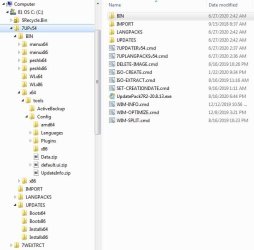
Dism++ is in BIN\x64\tools
You have a strange way of adding your drivers to the folder.
EITHER Start the 7updater.cmd and the driver folders are created. You can leave the command window open, or close it. Then add your drivers to the appropriate folders.
OR create the folders DRIVERS\bootx64 and DRIVERS\installx64 first. Add your drivers to those.
Then run 7updater.cmd and the drivers in bin\drivers.7z will be extracted to those same folders.


 Dude, I don't know if I'll be able to thank you enough! I've been trying to install Win7 for five days and finally, with a lot of your help, I succeeded. Thanks!