how do I find the working usb ports in my pc.

jraju

New member
Member
VIP
Local time
10:21 PM
Messages
759
Hi, I have 5 sub roothub, which show me 2 each ports in 4 of them, and 8 usb ports in the 5th usb root hub.
But I find that only 4 attached to the main are working. Others are said to be working in their properties windows. But not at all recongnising the pendrive if i connect.
what has happened to those which worked fine.
how do i fix them.
device connected only shows in device manager. why this
how do I find the fix for non working usb ports.
can I physically check.
As per my physical check, I have 2 usbs in front, 4 usbs near the ethernet port, and 4 usb ports extra, that i bought as additional. how to find which port is not working in device manager, as alll of them said to be working properly.
 

My Computer My Computer

At a glance

Microsoft Windows 7 Ultimate 64-bit 7601 Mult...Intel(R) Core(TM)2 Duo CPU E7200 @ 2.53GHz4.00 GBNVIDIA GeForce 210
Computer type
PC/Desktop
Computer Manufacturer/Model Number
custom build
OS
Microsoft Windows 7 Ultimate 64-bit 7601 Multiprocessor Free Service Pack 1
CPU
Intel(R) Core(TM)2 Duo CPU E7200 @ 2.53GHz
Motherboard
To be filled by O.E.M. To be filled by O.E.M.
Memory
4.00 GB
Graphics Card(s)
NVIDIA GeForce 210
Sound Card
(1) NVIDIA High Definition Audio (2) Realtek High Definiti
Screen Resolution
1920 x 1080 x 32 bits (4294967296 colors) @ 60 Hz
Hard Drives
ST3500312CS ATA Device
When you connect your USB flash drive to your external USB root hub, does your computer recognise the flash drive?

(Just wondering to see which device is having problems)
 

My Computer My Computer

At a glance

N/A
OS
N/A
The problem is while the main 4 are working, attached to the mother board, the other 4 as attached as a new card do not work. Previously working fine.
Recentlyl I changed the video card to nvidia geforce 210. Would that afffect the behaviour of connected usb drives.
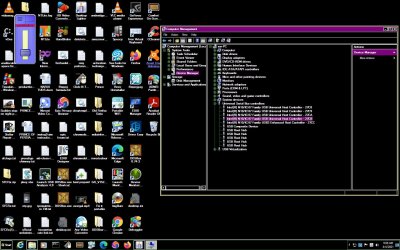
I am enclosing herewith the screen shot of the device manager.
I see so many ports , one root hub saying 8 ports, and others as lilsted above .
I see this device is working properly on all the items listed there
how to fix this.

are there any relation with pci express slot, where the video card was connected and the usb devices connection.
 

Attachments

  • usb controllers and number of ports.jpg
    usb controllers and number of ports.jpg
    202.3 KB · Views: 1

My Computer My Computer

At a glance

Microsoft Windows 7 Ultimate 64-bit 7601 Mult...Intel(R) Core(TM)2 Duo CPU E7200 @ 2.53GHz4.00 GBNVIDIA GeForce 210
Computer type
PC/Desktop
Computer Manufacturer/Model Number
custom build
OS
Microsoft Windows 7 Ultimate 64-bit 7601 Multiprocessor Free Service Pack 1
CPU
Intel(R) Core(TM)2 Duo CPU E7200 @ 2.53GHz
Motherboard
To be filled by O.E.M. To be filled by O.E.M.
Memory
4.00 GB
Graphics Card(s)
NVIDIA GeForce 210
Sound Card
(1) NVIDIA High Definition Audio (2) Realtek High Definiti
Screen Resolution
1920 x 1080 x 32 bits (4294967296 colors) @ 60 Hz
Hard Drives
ST3500312CS ATA Device
The problem is while the main 4 are working, attached to the mother board, the other 4 as attached as a new card do not work. Previously working fine.
Recentlyl I changed the video card to nvidia geforce 210. Would that afffect the behaviour of connected usb drives.
I am enclosing herewith the screen shot of the device manager.
I see so many ports , one root hub saying 8 ports, and others as lilsted above .
I see this device is working properly on all the items listed there
how to fix this.

are there any relation with pci express slot, where the video card was connected and the usb devices connection.

I honestly don't think it has anything to do with the PCI Express ports and your video card upgrade.

Have you checked if your external USB hub works?
 

My Computer My Computer

At a glance

N/A
OS
N/A
Hi, Thanks for the reply.

If it shown in usb , then it works. Is it not correct.
But the windows did not recognize the four ports that it has, which previously worked well.
I thought of uninstallilng, but i inadvertantlyl deleted a usb root hub, which stopeed the mouse from moving and i could not do any further.
I do not know, if it has any power and I do not see any voltage reading in bios.
But how do I know that it is defective or not connected .
I tried nirfost usbdeview, it only gives you connected device staus, but also the previous used devices status.
will you please give me clue . when i click, properties and power tab, some of the usbs have 0ma, where as some have 100ma in the tab.
 

My Computer My Computer

At a glance

Microsoft Windows 7 Ultimate 64-bit 7601 Mult...Intel(R) Core(TM)2 Duo CPU E7200 @ 2.53GHz4.00 GBNVIDIA GeForce 210
Computer type
PC/Desktop
Computer Manufacturer/Model Number
custom build
OS
Microsoft Windows 7 Ultimate 64-bit 7601 Multiprocessor Free Service Pack 1
CPU
Intel(R) Core(TM)2 Duo CPU E7200 @ 2.53GHz
Motherboard
To be filled by O.E.M. To be filled by O.E.M.
Memory
4.00 GB
Graphics Card(s)
NVIDIA GeForce 210
Sound Card
(1) NVIDIA High Definition Audio (2) Realtek High Definiti
Screen Resolution
1920 x 1080 x 32 bits (4294967296 colors) @ 60 Hz
Hard Drives
ST3500312CS ATA Device
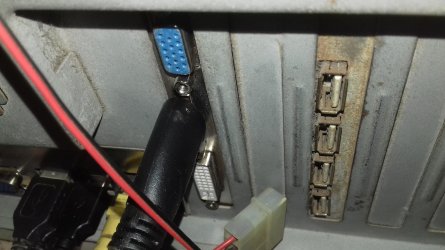
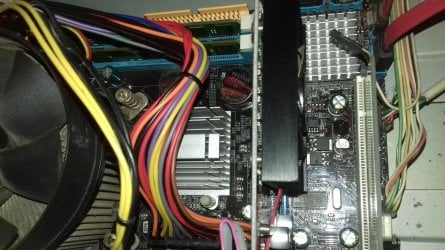
Hi, I am enclosing herewith the physical picture of the inner side and outer side of the usb ports.
I think that there is connection to the usb , or is that missing.
should I connect a power from smps to usb, i do not know.

Recentlly the technician, tried to connect all the older drives , that were working to the same system as storage, and in that process, has used all the power points to the drives. But ultimately it took too much time for boot and hence disconnnected the same.
Do the Usb need power from smps, as other drives or it will act without any power from smps.
i do not know much about the connection, but please see , if there is any missing on connection or anything on this device.
How do i know, how many usb ports are in my computer, connected or not connected from the device manager.
If there is no connection, or connection failure, then the usb ports would not show at all.
 

Attachments

  • usbone.jpg
    usbone.jpg
    512.2 KB · Views: 0
  • usbtwo.jpg
    usbtwo.jpg
    713.7 KB · Views: 0

My Computer My Computer

At a glance

Microsoft Windows 7 Ultimate 64-bit 7601 Mult...Intel(R) Core(TM)2 Duo CPU E7200 @ 2.53GHz4.00 GBNVIDIA GeForce 210
Computer type
PC/Desktop
Computer Manufacturer/Model Number
custom build
OS
Microsoft Windows 7 Ultimate 64-bit 7601 Multiprocessor Free Service Pack 1
CPU
Intel(R) Core(TM)2 Duo CPU E7200 @ 2.53GHz
Motherboard
To be filled by O.E.M. To be filled by O.E.M.
Memory
4.00 GB
Graphics Card(s)
NVIDIA GeForce 210
Sound Card
(1) NVIDIA High Definition Audio (2) Realtek High Definiti
Screen Resolution
1920 x 1080 x 32 bits (4294967296 colors) @ 60 Hz
Hard Drives
ST3500312CS ATA Device
Hi, I am enclosing herewith the physical picture of the inner side and outer side of the usb ports.
I think that there is connection to the usb , or is that missing.
should I connect a power from smps to usb, i do not know.

Recentlly the technician, tried to connect all the older drives , that were working to the same system as storage, and in that process, has used all the power points to the drives. But ultimately it took too much time for boot and hence disconnnected the same.
Do the Usb need power from smps, as other drives or it will act without any power from smps.
i do not know much about the connection, but please see , if there is any missing on connection or anything on this device.
How do i know, how many usb ports are in my computer, connected or not connected from the device manager.
If there is no connection, or connection failure, then the usb ports would not show at all.

I don't think that a USB connection would require a SMPS.

I heard that if you open Device Manager and press the + (plus button) next to Universal Serial Bus controllers, when you see "USB Root Hub" or something similar, that should mean 1 USB port on your machine.

I have 3 USB ports on my machine and in Device Manager it does show 3 USB controllers. Have a look at the screenshot that I have attached.

usb.PNG

1 USB 3.0 port and 2 USB 2.0 ports.

That adds up to 3 USB ports!
 

My Computer My Computer

At a glance

N/A
OS
N/A
Hi, userrandomname,
I have given you the picture of the device manager above your post.
Physical verification show, that I have 4 ports connected to the mother board, 4 ports connected separately with , which I showed in my picture above , which has no recognition, and 2 front ports which i never use or rarely use .
So total amounts to 10 ports.
The ports having self powered 500ma in device manager usb power tab, i think, are working.
The ports having no requirement of power in usb properties power tab are not working, but which shows, this device is working normally messages.
Could you , say, if all ports are accounted in my device manager shown above your post.
If shows in device manager as wroking properly, but not recognized, what are the fixes for that.
are there any software that could fix these.
Even if registry fixes please give me the fixes so that i could use those 4 ports,

one for mouse, one for key board , other for a hdmi splitter, onlyl one is now working . So, please help me .
 

My Computer My Computer

At a glance

Microsoft Windows 7 Ultimate 64-bit 7601 Mult...Intel(R) Core(TM)2 Duo CPU E7200 @ 2.53GHz4.00 GBNVIDIA GeForce 210
Computer type
PC/Desktop
Computer Manufacturer/Model Number
custom build
OS
Microsoft Windows 7 Ultimate 64-bit 7601 Multiprocessor Free Service Pack 1
CPU
Intel(R) Core(TM)2 Duo CPU E7200 @ 2.53GHz
Motherboard
To be filled by O.E.M. To be filled by O.E.M.
Memory
4.00 GB
Graphics Card(s)
NVIDIA GeForce 210
Sound Card
(1) NVIDIA High Definition Audio (2) Realtek High Definiti
Screen Resolution
1920 x 1080 x 32 bits (4294967296 colors) @ 60 Hz
Hard Drives
ST3500312CS ATA Device
Hi, No software solution could be found as I had already tried all the trouble shooting.
I call my technician, and he says, that I need to open the cpu, unscrew the usb hub, there was only one screw connected to the cpu , just removed the total usbhub, and then asked me to clean the yellow parts and also the outer parts .
i do not know anything about it and i unscrewed. But when I eased out the usb hub, i noticed there was a ram like slot in which this usbhub is resting. Just cleaned the yellow part, i never knew before and then the while slot on the motherboard on which this usbhub rests.
I just cleaned everything and then reseated it .
Now, bingo, when i tried to plug the usb, it was recognized.
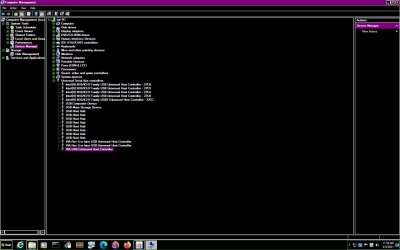
On seeing the device manager, there were more than the usb entries i posted before trying this .
saved me from lot of trouble of using devices.
I enclose the dm now
 

Attachments

  • present usb devuces in device manager.jpg
    present usb devuces in device manager.jpg
    98.2 KB · Views: 0

My Computer My Computer

At a glance

Microsoft Windows 7 Ultimate 64-bit 7601 Mult...Intel(R) Core(TM)2 Duo CPU E7200 @ 2.53GHz4.00 GBNVIDIA GeForce 210
Computer type
PC/Desktop
Computer Manufacturer/Model Number
custom build
OS
Microsoft Windows 7 Ultimate 64-bit 7601 Multiprocessor Free Service Pack 1
CPU
Intel(R) Core(TM)2 Duo CPU E7200 @ 2.53GHz
Motherboard
To be filled by O.E.M. To be filled by O.E.M.
Memory
4.00 GB
Graphics Card(s)
NVIDIA GeForce 210
Sound Card
(1) NVIDIA High Definition Audio (2) Realtek High Definiti
Screen Resolution
1920 x 1080 x 32 bits (4294967296 colors) @ 60 Hz
Hard Drives
ST3500312CS ATA Device
Hi, i tried all sorts of software. Microsoft has discontinued support to the win 7 and no fix it or hot fix available.
If at all , fixes are needed, there is no more fix it or hotfix or any update number concerning win 7.
Could any one just suggest , where i could download the fixes or hotfixes, offline stored .
here , there is available fixes , made by the forum members and contributors.

Even , i had not fully utlilised the win 7 features.
if there is any link for win 7 fixes available, that may be kindly be given
There was no problematic devices shown, and so you do not have choice of update of drivers etc.
 

My Computer My Computer

At a glance

Microsoft Windows 7 Ultimate 64-bit 7601 Mult...Intel(R) Core(TM)2 Duo CPU E7200 @ 2.53GHz4.00 GBNVIDIA GeForce 210
Computer type
PC/Desktop
Computer Manufacturer/Model Number
custom build
OS
Microsoft Windows 7 Ultimate 64-bit 7601 Multiprocessor Free Service Pack 1
CPU
Intel(R) Core(TM)2 Duo CPU E7200 @ 2.53GHz
Motherboard
To be filled by O.E.M. To be filled by O.E.M.
Memory
4.00 GB
Graphics Card(s)
NVIDIA GeForce 210
Sound Card
(1) NVIDIA High Definition Audio (2) Realtek High Definiti
Screen Resolution
1920 x 1080 x 32 bits (4294967296 colors) @ 60 Hz
Hard Drives
ST3500312CS ATA Device
Hi, i tried all sorts of software. Microsoft has discontinued support to the win 7 and no fix it or hot fix available.
If at all , fixes are needed, there is no more fix it or hotfix or any update number concerning win 7.
Could any one just suggest , where i could download the fixes or hotfixes, offline stored .
here , there is available fixes , made by the forum members and contributors.

Even , i had not fully utlilised the win 7 features.
if there is any link for win 7 fixes available, that may be kindly be given
There was no problematic devices shown, and so you do not have choice of update of drivers etc.

I am not sure why you need any hot fixes even though your hardware is fixed.

However, I can provide a download link. Here is a post on SevenForums: Single file with all updates - Simplix

And here is a direct download link: https://update7.simplix.info/UpdatePack7R2.exe

Run it and it will download another file that is bigger in the same directory, it should be about 800MB.

Run that and it should install all the available updates for your Windows 7 system.

Good luck!

Also, don't forget to mark this thread as solved once this is done.
 

My Computer My Computer

At a glance

N/A
OS
N/A
Back
Top