shrink partition and add free space to system/main partition

paparazzo79

New member
Member
Local time
12:17 AM
Messages
95
Hi guys.
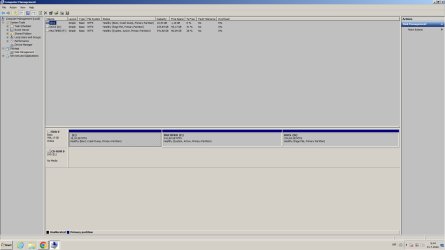
I want to shrink either of two partitions and add free space to my C: drive, where this partition is low on space.
Is it possible without deleting all partitions and how do I do it?
I'm low on space with C: drive as you can see on pics.
 

Attachments

  • particije.jpg
    particije.jpg
    87.5 KB · Views: 3

My Computer My Computer

At a glance

Windows 7 Ultimate 32bitamd athlon 64 3600+ X2Ati Radeon 3650 HD
OS
Windows 7 Ultimate 32bit
CPU
amd athlon 64 3600+ X2
Motherboard
Biostar NF520-TE
Graphics Card(s)
Ati Radeon 3650 HD
Monitor(s) Displays
Philips 227EL
The first think to do is back up your computer. There shouldn't be a problem but it is better to be safe.

I have used the free version of a program called PartionMaster to do this many times. You didn't give details of what you wanted to do. Here is a general way you can shrink both the 2nd and 3rd partition and using the reclaimed space to add it to the 1st partition. Note you can do the same thing and just shrink one partition if you want. It is up to you.

PartitionMaster has a graphical interface. Here are how to do some the things you need to do.
  • To shrink a partition use the mouse to select the end of a partition and drag it to the left. This leaves unallocated space after it.
  • To expand a partition use the mouse to select the end of a partition and drag it to the right. You can only do this if there is unallocated space.there.
  • To move a partition select the center of a partition and move it right or left. You can only do this if there is unallocated space.there.
 

Attachments

  • 2022-07-31 15_32_21-Document1 [Compatibility Mode] - Word.jpg
    2022-07-31 15_32_21-Document1 [Compatibility Mode] - Word.jpg
    26.7 KB · Views: 0

My Computers My Computers

  • At a glance

    Windows 7 Professional 64bit / Windows 10 Hom...AMD FX-8350GSKILL Ripjaw-X PC3 12800 12GB (2x4GB, 2x2GB)ASUS ENGTX560 DCII OC/2DI/1GD5 1GB
    Computer type
    PC/Desktop
    Computer Manufacturer/Model Number
    Custom build
    OS
    Windows 7 Professional 64bit / Windows 10 Home 64bit
    CPU
    AMD FX-8350
    Motherboard
    Gigabyte GA-990FXA-UD3 (AM3+) Rev. 4.0
    Memory
    GSKILL Ripjaw-X PC3 12800 12GB (2x4GB, 2x2GB)
    Graphics Card(s)
    ASUS ENGTX560 DCII OC/2DI/1GD5 1GB
    Sound Card
    Integrated
    Monitor(s) Displays
    Asus VE228H (21.5-in)
    Screen Resolution
    1920x1080 60Hz
    Hard Drives
    SAMSUNG 870 EVO 1TB (2.5" SATA SSD)
    SAMSUNG 870 EVO 500GB (2.5" SATA SSD)
    PSU
    Antec TruePower (new) TP-650 (650 watts)
    Case
    Antec Three Hundred
    Cooling
    AMD stock (plan to upgrade to Cooler Master Hyper 212 EVO)
    Keyboard
    Logitech K540 (wireless)
    Mouse
    Logitech M310 (wireless)
    Internet Speed
    Comcast Gigabit X2 Internet (2100Mbps down / 300Mbps up)
    Browser
    Firefox, Edge, Chrome
    Other Info
    Optical drive: ASUS DRW-24B3ST/BLK/G (Black) (24X)
    External hard drives: 2TB & 6TB
    Internet Gateway: Comcast XB8
  • Computer type
    PC/Desktop
Sonthing not right there you dont boot from c but boot from f which is the active parition
 

My Computer My Computer

At a glance

win 8 32 bit
Computer type
PC/Desktop
OS
win 8 32 bit
Sonthing not right there you dont boot from c but boot from f which is the active parition
You are right. I missed that. I think the OP should just reinstall Windows and let the setup create the proper partitioning. Besides having just one normal C: partition will simply everything.
 

My Computers My Computers

  • At a glance

    Windows 7 Professional 64bit / Windows 10 Hom...AMD FX-8350GSKILL Ripjaw-X PC3 12800 12GB (2x4GB, 2x2GB)ASUS ENGTX560 DCII OC/2DI/1GD5 1GB
    Computer type
    PC/Desktop
    Computer Manufacturer/Model Number
    Custom build
    OS
    Windows 7 Professional 64bit / Windows 10 Home 64bit
    CPU
    AMD FX-8350
    Motherboard
    Gigabyte GA-990FXA-UD3 (AM3+) Rev. 4.0
    Memory
    GSKILL Ripjaw-X PC3 12800 12GB (2x4GB, 2x2GB)
    Graphics Card(s)
    ASUS ENGTX560 DCII OC/2DI/1GD5 1GB
    Sound Card
    Integrated
    Monitor(s) Displays
    Asus VE228H (21.5-in)
    Screen Resolution
    1920x1080 60Hz
    Hard Drives
    SAMSUNG 870 EVO 1TB (2.5" SATA SSD)
    SAMSUNG 870 EVO 500GB (2.5" SATA SSD)
    PSU
    Antec TruePower (new) TP-650 (650 watts)
    Case
    Antec Three Hundred
    Cooling
    AMD stock (plan to upgrade to Cooler Master Hyper 212 EVO)
    Keyboard
    Logitech K540 (wireless)
    Mouse
    Logitech M310 (wireless)
    Internet Speed
    Comcast Gigabit X2 Internet (2100Mbps down / 300Mbps up)
    Browser
    Firefox, Edge, Chrome
    Other Info
    Optical drive: ASUS DRW-24B3ST/BLK/G (Black) (24X)
    External hard drives: 2TB & 6TB
    Internet Gateway: Comcast XB8
  • Computer type
    PC/Desktop
You are right. I missed that. I think the OP should just reinstall Windows and let the setup create the proper partitioning. Besides having just one normal C: partition will simply everything.
Yep but the issue is that I can not move copy documents from D: and F: drive, I want to keep them as they are on those partitions.
I just need to expand to C: partition to bigger size.
 

My Computer My Computer

At a glance

Windows 7 Ultimate 32bitamd athlon 64 3600+ X2Ati Radeon 3650 HD
OS
Windows 7 Ultimate 32bit
CPU
amd athlon 64 3600+ X2
Motherboard
Biostar NF520-TE
Graphics Card(s)
Ati Radeon 3650 HD
Monitor(s) Displays
Philips 227EL
I suggest run cleanmgr first to try and get a little more working space on partition 1.

Then make partition 1 active and system

from an administrator cmd prompt:

diskpart
sel vol c
act
exi
bcdboot c:\windows

then reboot and c should show as active system and boot.

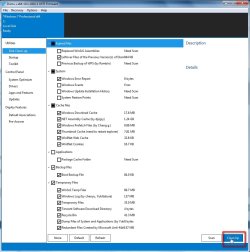
You could also get a bit more working space on C by running dism++ disk cleanup

disk-cleanup-scan.jpg

disk-cleanup-scan2.jpg

After that will then be a little easier for a decent 3rd party partition manager to do what you want.

Then use the Move/Resize partition function on a 3rd party partitioner to do what the talking horse suggested in his little diagram.
 

My Computers My Computers

  • At a glance

    7 X64i5 84002x8gb 3200mhz
    Computer type
    PC/Desktop
    OS
    7 X64
    CPU
    i5 8400
    Motherboard
    gigabyte b365m ds3h
    Memory
    2x8gb 3200mhz
    Hard Drives
    various
    PSU
    pure power 11 400w cm
    Case
    Coolermaster
    Cooling
    cryorig m9i
  • At a glance

    7x64g54008gb ddr4 2400
    Computer type
    PC/Desktop
    OS
    7x64
    CPU
    g5400
    Motherboard
    ga b365m ds3h
    Memory
    8gb ddr4 2400
    PSU
    xfx pro 450w
Back
Top