Please help me with a few tasks on my computer.

gagecalman

New member
Local time
7:19 PM
Messages
9
Hello,
I have a desktop running Windows 7 Pro and Intel RAID 1 with 2 Samsung 256GB SSD's. 76GB free.
System runs great and I don't have any issues except a few tasks that I want to address. Not sure if I want to upgrade OS.

Mainly use it for:
Email using Outlook 2016.
Word processing using Word.
Picture storage and some editing using MS Picture It.
Music storage, playing and making playlists using Windows media player12.
Web browsing using Firefox.

This is what I need help with:
1. I need a better backup plan. I'm looking for a plan that will get me up and running without too much technical effort on my part.
I have an older 1TB WD My Passport that I use. I just bought 2 new 4TB WD My Passports.
Right now I running backups using Windows, Western digital (came with My Passport), and Norton.
I started doing a Windows "system image" and restore points. Too much effort and I don't know what I actually need.

2. Is there a way to protect the data on the two internal SSD's in case someone got hold of them without the computer?
I've seen encryption mentioned but I don't think I want to go that route. Someone also mentioned passwords in BIOS as well as "it's hard to get data off a RAID drive".

3. Is there a way to use the WD My Passports without their software? I just need a way to protect the data from others.

Thanks for reading and any help!
Jim
 

My Computers My Computers

System One System Two

  • Computer type
    PC/Desktop
    Computer Manufacturer/Model Number
    Custom build
    OS
    Windows 7 Professional SP1 64-bit
    CPU
    Intel Xeon E3 1231V3 3.5GHz LGA 1150
    Motherboard
    ASUS Z97-AR USB 3.1
    Memory
    EVGA 16GB DDR3-1600 (PC3-12800) CL 9 (2x8)
    Graphics Card(s)
    EVGA GeForce GTX 750Ti SC 2GB GDDR5
    Hard Drives
    QTY 2 Samsung 850 EVO Series 250GB SATA III 6Gb/s 2.5" Internal SSD MZ-75E250B/AM
    Running RAID 1 using Intel RST in BIOS
    Antivirus
    Norton
    Browser
    Firefox
  • Computer type
    PC/Desktop
Well, I use a technical way of backups, but it's not really that difficult to do, just learning is all. Unfortunately, the easy way means you probably pay up for software. I use FreeFileSync and run the batch file that can be generated via the software via the Windows Task Manager. Windows Task Manager fires off the batch file and commences with the backup every hour. I can show you in a video how to do exactly that for the external hard drives. Can be every hour or day or week...

No, a BIOS password won't stop someone from reading your drives external to the computer. Not even a Windows password. You'll have to use FDE (Full Disk Encryption) and with that there are lots of things to consider if you wanna go full on paranoid. But I doubt your needing to hide super TOP SECRET government files or something. For this, Bitlocker would probably be the easiest. If you want to learn then look into Veracrypt or the old now defunct Truecrypt which does have some flaws, but can be mitigated against. I followed the open source Truecrypt audit and the code is good in terms of no backdoors and whatnot. I used to use the fork of Truecrypt called Veracrypt, but it was painfully slow on boot up after entering the password and I just couldn't stand that crap so still use the tried and True Truecrypt. Reading the ENTIRE manual for Truecrypt or Veracrypt is essential however. Again, just more of that learning thing. Also, Truecrypt can't be used in UEFI. It can in a traditional BIOS. If that all sounds waaaay above your pay grade, then Bitlocker would be the easiest and is free depending on your OS (Operating System) version.
 

My Computer My Computer

Computer type
PC/Desktop
OS
Windows 7 Ultimate x64
I hope your Passports hold out. A BIOS pw can be annoying. I shut mine off. It's just a way to make an extra hurdle so that someone can't access your stuff from your keyboard when your PC is turned off by booting back into it. A genuine BIOS can be a very handy thing to have but an Administrative pw will not protect your data or even protect you from root kits. I won't recommend Bitlocker for reasons I won't go into here. I'm thinking the sort of RAID you may be referring to is the sort that comes with your Passport. You might have been better off with a NAS if you wanted to mirror data. System images are generally easy to make and restore points are even easier. Feel free to send me a personal message and I'll send you a copy of the best way I know to back up data and operating systems.
 

My Computers My Computers

System One System Two

  • Computer type
    PC/Desktop
    Computer Manufacturer/Model Number
    ASUS CUSTOM BUILD IN THERMALTAKE LEVEL 10 GT CASE
    OS
    Windows 7 Ultimate, Windows 8.1 Pro, Linux Mint/Cinnimon (Triple Boot)
    CPU
    INTEL 6900K
    Motherboard
    X99-E WS USB 3.1
    Memory
    CORSAIR DOMINATOR PLATINUM 128GB
    Graphics Card(s)
    EVGA GTX 1070 FTW
    Sound Card
    Onboard Crystal Sound - very nice ;)
    Monitor(s) Displays
    SAMSUNG 4K 28"
    Screen Resolution
    3140 x 2160 - A little extreme. Need to change it.
    Hard Drives
    1) LSI LOGICAL VOLUME RAID 10 (250 GBX4) SSD ARRAY
    2) INTEL RAID 0 KINGSTON (2) SSD ARRAY
    3) INTEL RAID 1 SEAGATE (2) 1TB ARRAY (secured backup)
    4) INTEL RAID 1 SEAGATE HYBRID (2) (secure secured backup)
    5) AHCI SEAGATE 3TB (1) BACKUP & STORAGE (back
    PSU
    CORSAIR HX 1000i
    Case
    THERMAL TAKE LEVEL 10 GT
    Cooling
    NOCTUA TOWER COOLING - PUSH/PULL
    Keyboard
    LOGITECH PRODIGY (One day I'll get a real keyboard.)
    Mouse
    LOGITECH (One day I'll get a real mouse.)
    Internet Speed
    300 Gb down 12 up Intel(R) I210 Gigabit Network Connection
    Antivirus
    several - Network implementing vs from other PCs - ask me
    Browser
    Mostly FireFox these days
    Other Info
    NOT ENOUGH ROOM TO LIST ALL HARD DRIVES HERE. Cuts me off at 5. Did you know that if you run a network you can scan your PC for viruses via other PCs using several different virus scanners? No virus scanner gets it all. This is narrows down the window for contracting a virus. By using multiple operating systems you can use different virus scanners with no risk of conflict.
  • Antivirus
    KASPERSKY
Thanks for the reply. I'll PM you in a minute.

I actually sent the 4TB Passports back. I'm still looking for external drives for backup but wonder if SSD's would be better.

The RAID 1 that I'm running is Intel Rapid Storage Technology that came in the BIOS.

I'll leave the internals alone as far as passwords go. It probably doesn't make sense.

Thanks again for the replies.
 

My Computers My Computers

System One System Two

  • Computer type
    PC/Desktop
    Computer Manufacturer/Model Number
    Custom build
    OS
    Windows 7 Professional SP1 64-bit
    CPU
    Intel Xeon E3 1231V3 3.5GHz LGA 1150
    Motherboard
    ASUS Z97-AR USB 3.1
    Memory
    EVGA 16GB DDR3-1600 (PC3-12800) CL 9 (2x8)
    Graphics Card(s)
    EVGA GeForce GTX 750Ti SC 2GB GDDR5
    Hard Drives
    QTY 2 Samsung 850 EVO Series 250GB SATA III 6Gb/s 2.5" Internal SSD MZ-75E250B/AM
    Running RAID 1 using Intel RST in BIOS
    Antivirus
    Norton
    Browser
    Firefox
  • Computer type
    PC/Desktop
Windows system image has the advantage of being in vhd (x) format.The basic restore interface MS provides for consumers is limited and not without potential issues. Fortunately, because of the format you could use other programs or even disk management on a different machine to either access your data or do a restore if necessary.

3rd party imaging programs usually have proprietary formats which are not easily accessible by anything else and not writeable.

They all aim to perform the same basic function, but some have extra features, some are simpler to use etc.

It depends what the user expects\requires.
 

My Computers My Computers

System One System Two

  • Computer type
    PC/Desktop
    OS
    7 X64
    CPU
    i5 8400
    Motherboard
    gigabyte b365m ds3h
    Memory
    2x8gb 3200mhz
    Hard Drives
    various
    PSU
    pure power 11 400w cm
    Case
    Coolermaster
    Cooling
    cryorig m9i
  • Computer type
    PC/Desktop
    OS
    7x64
    CPU
    g5400
    Motherboard
    ga b365m ds3h
    Memory
    8gb ddr4 2400
    PSU
    xfx pro 450w
Thanks for the reply. I'll PM you in a minute.

I actually sent the 4TB Passports back. I'm still looking for external drives for backup but wonder if SSD's would be better.

The RAID 1 that I'm running is Intel Rapid Storage Technology that came in the BIOS.

I'll leave the internals alone as far as passwords go. It probably doesn't make sense.

Thanks again for the replies.

:thumbsup:
Good man! Bravo, for sending back those crappy Western Digital mechanical klunk drives. I actually cut out something that I sent to you in my missive because I didn't want to offend you for buying Western Digital mechanical drives. Ya dun good! You're using your noodle. An extra kudos for choosing Intel Rapid Storage Technology instead of some dubious third party mod job for your software RAID. You're on the right track. I recommend getting the software for IRST that you can use on your desktop as well. You can find this on Intel's web site if you're diligent or, if you happen to have the correct net framework you might still be able to use the software that originally came with your PC. Intel's software will allow you to make a RAID 1 mirror of your data without having to remove all your data from the original drive first. I've been using IRST for decades. My Win 7 has been running in RAID 0 now for nearly a decade without issue while practically every other drive in my unit has cratered at least one time (with the exception of my LSI hardware array). I would suggest that if you are doing it right you won't even need a NAS.

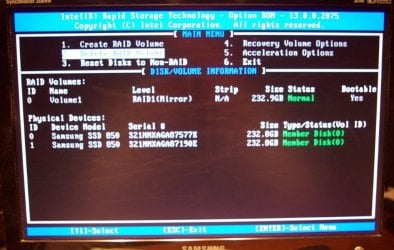
I don't recommend raiding conventional external hard drives. (Just sayin'.) A good NAS can eliminate much of your need for mirroring data, but as you're already using IRST (with the pretty green text in your BIOS when you boot) you'll likely not need to mirror your data externally. Get the Intel GUI for your IRST. You'll love it.

Yes, over all, SSDs are better. But they are also more costly. Better off just cloning your drives and tucking away those clones for a rainy day unless you don't mind forking out hundreds of dollars for SSDs. If you insist on using mechanical hard drives for your external backup I highly suggest getting your hands on some CMR drives (like Seagate Iron Wolf) and running them in USB enclosures via Windows Manager. IMO SMR is a recipe for disaster. They also run slower in RAID. Opting for an enclosure bay will afford you the benefit of running a quality mechanical drive for your eternal backup that you can replace any time you desire, without purchasing any of those slick looking boxes with garbage drives inside that are essentially non-servicable.

I hope this helps :)
 

My Computers My Computers

System One System Two

  • Computer type
    PC/Desktop
    Computer Manufacturer/Model Number
    ASUS CUSTOM BUILD IN THERMALTAKE LEVEL 10 GT CASE
    OS
    Windows 7 Ultimate, Windows 8.1 Pro, Linux Mint/Cinnimon (Triple Boot)
    CPU
    INTEL 6900K
    Motherboard
    X99-E WS USB 3.1
    Memory
    CORSAIR DOMINATOR PLATINUM 128GB
    Graphics Card(s)
    EVGA GTX 1070 FTW
    Sound Card
    Onboard Crystal Sound - very nice ;)
    Monitor(s) Displays
    SAMSUNG 4K 28"
    Screen Resolution
    3140 x 2160 - A little extreme. Need to change it.
    Hard Drives
    1) LSI LOGICAL VOLUME RAID 10 (250 GBX4) SSD ARRAY
    2) INTEL RAID 0 KINGSTON (2) SSD ARRAY
    3) INTEL RAID 1 SEAGATE (2) 1TB ARRAY (secured backup)
    4) INTEL RAID 1 SEAGATE HYBRID (2) (secure secured backup)
    5) AHCI SEAGATE 3TB (1) BACKUP & STORAGE (back
    PSU
    CORSAIR HX 1000i
    Case
    THERMAL TAKE LEVEL 10 GT
    Cooling
    NOCTUA TOWER COOLING - PUSH/PULL
    Keyboard
    LOGITECH PRODIGY (One day I'll get a real keyboard.)
    Mouse
    LOGITECH (One day I'll get a real mouse.)
    Internet Speed
    300 Gb down 12 up Intel(R) I210 Gigabit Network Connection
    Antivirus
    several - Network implementing vs from other PCs - ask me
    Browser
    Mostly FireFox these days
    Other Info
    NOT ENOUGH ROOM TO LIST ALL HARD DRIVES HERE. Cuts me off at 5. Did you know that if you run a network you can scan your PC for viruses via other PCs using several different virus scanners? No virus scanner gets it all. This is narrows down the window for contracting a virus. By using multiple operating systems you can use different virus scanners with no risk of conflict.
  • Antivirus
    KASPERSKY
Thanks again for the replies and suggestions. It's a lot to comprehend but I'll eventually get it.

:thumbsup:
I recommend getting the software for IRST that you can use on your desktop as well. You can find this on Intel's web site if you're diligent or, if you happen to have the correct net framework you might still be able to use the software that originally came with your PC.

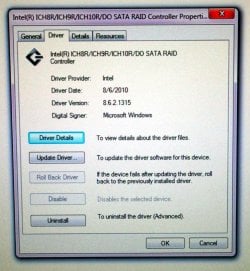
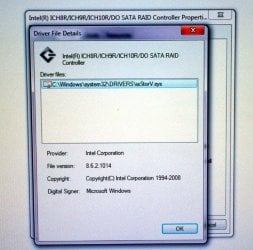
I tried to load the IRST software but kept getting the message "The following application requires Microsoft .NET Framework 4.5:Intel Rapid Storage Technology.
I checked in the registry and it shows 461814 which should be 4.7.2,
I asked for help on Intel's site but got nowhere.
Should I have Rapid Storage Technology on my computer? - Intel Communities
As far as I know I am running RAID 1 and it was set up in the BIOS.
 

Attachments

  • PC basement 045.jpg
    PC basement 045.jpg
    103.1 KB · Views: 0
  • PC basement 046.jpg
    PC basement 046.jpg
    95.1 KB · Views: 0
  • PC basement 047.jpg
    PC basement 047.jpg
    94.6 KB · Views: 0
  • PC basement 048.jpg
    PC basement 048.jpg
    91 KB · Views: 0

My Computers My Computers

System One System Two

  • Computer type
    PC/Desktop
    Computer Manufacturer/Model Number
    Custom build
    OS
    Windows 7 Professional SP1 64-bit
    CPU
    Intel Xeon E3 1231V3 3.5GHz LGA 1150
    Motherboard
    ASUS Z97-AR USB 3.1
    Memory
    EVGA 16GB DDR3-1600 (PC3-12800) CL 9 (2x8)
    Graphics Card(s)
    EVGA GeForce GTX 750Ti SC 2GB GDDR5
    Hard Drives
    QTY 2 Samsung 850 EVO Series 250GB SATA III 6Gb/s 2.5" Internal SSD MZ-75E250B/AM
    Running RAID 1 using Intel RST in BIOS
    Antivirus
    Norton
    Browser
    Firefox
  • Computer type
    PC/Desktop
What I would do with that

Good ole, Intel at it again. :-) Okay. I'm not going to tell you what to do. I'm going to tell you what I would do if that were my PC.

You can then decide for yourself what you will do with it.

1. First of all, I would clone that RAID1 array onto a single SSD. I would make certain that the clone booted by shutting down the PC and disconnecting the RAID drives, and connecting my freshly made clone. After booting it up with the clone and confirming my clone worked I would move to the next step. This would be my insurance drive.

2. Step two: I would shut off my computer. I would disconnect the clone drive and put it in a nice, safe place, but near by for just in case. I would reconnect the two drives exactly as they were originally connected (A to A, B to B) and restart my PC. IF I had exact brand new SSDs of the same make, model, and capacity handy, as an extra measure I would pull one of the RAID drives for added insurance to keep in that safe place of mine. If not, I would have an external drive to move all my personal and valuable files and folders to and proceed with reformatting my RAID.

3. As soon as my screen popped up with the pretty green text as you show in the picture, I would press CNTRL + I and delete the drive (s). (I would not be worried as I already would have at least one working copy of the operating system at my disposal.)

4. Now comes the fun part. I would reinstall Windows 7 on a completely separate drive, fresh, from scratch, making all the required updates etc. Once this was done and all my drivers were updated I would go to that Intel site to find the Intel software that most best suits my version of Windows and reinstall IRST. (I would also make sure to check my BIOS to be positive that it was set in RAID mode because stuff happens.)

5. Once I located the correct IRST software that actually works with my PC (it can be a bit of search as Win 7 has long been past EOL) I would check to see if my drive showed up in the IRST user interface (the one you use while you're still in your operating system) after having booted to my newly installed Windows 7. (I'd also pin a shortcut to this IRST on my taskbar.)

6. Knowing that my IRST GUI that can be used in my operating system now functions correctly, I would proceed with making a restore point, a Windows Backup, an additional System Image, and a repair disc if possible. (Some BIOS won't let you make repairs via USB). I would make my Windows Backup and System Image on an external hard drive, preferably one with a switch on it to turn off when not in use. It would not be a huge drive. It would be small because I would use it strictly for system image backups and nothing else. I would not partition it any further than it was originally partitioned when it was formatted. I would not use third party software to partition it. I would format it myself and use it strictly for a separate, external, backup drive. It would be no more than 500 GB in size and it would be turned off at least 90% of the time.

7. Having two drives, one with my operating system and the other reserved for backups, I would proceed to make my ARCHIVE drive. This is where I would keep my important stuff, my pictures, videos, documents etc. as copies for in the event of a system failure. To do this, I would first disconnect my external drive and take two SATA drives of precisely the same capacity and more importantly, the same brand and model, and connect them to my system board. (At this point I would have a total of three drives connected directly to my system board: One with the operating system and two for RAID 1). I would configure them in the IRST BIOS (the one with the green text when you boot) to RAID 1. Having done this, I would reboot my PC and check to see if those two drives showed in Disk Management as one single drive as they should. They will likely need to be initialized and perhaps even reformatted via Windows Disk Management. This is an easy task.

8. Having verified that I now have a RAID 1 data drive I would make a shortcut to it on my desktop. The shortcut would say "Archives". I could immediately open that drive this way and drag and drop, or copy and paste all my important files to it and the drive would mirror all that I moved to it. I could even connect that old clone to my PC and drag and drop all my valuable data from the old clone onto my Archives drive. I do recommend that your RAID1 ARCHIVES should not be any smaller than 1TB. It's amazing how quickly it can fill up over use.

9. Once all my important data was migrated to my newly installed OS and all my valuable files were copied onto my RAID 1 ARCHIVES I would reconnect my external hard drive and proceed to back up all my data. I would also make another restore point.

And there you have it: A simple system, using one single operating system, one RAID 1 data array, and an external backup drive. I do not endorse putting an operating system on RAID 1. That doesn't mean it can't be done because I've done it. It really, really slows down your operating system because it has to mirror your work and it is frequently subject to error. RAID 10, on the other hand, is an entirely different matter. (But then we begin moving from simple to complexity.) This simple system will provide you the redundancy you need to secure your files and keep your data backed up safely. Your operating system will run smoothly and less sluggish because media files and other valuable stuff can be stored in your Archives. You will be able to keep a clean and organized desktop much easier. You'll even have room on your 256 GB hard drive for a game or two. In fact, all your programs will be more responsive because your operating system is no longer running in RAID 1.

Feel free to ask me any questions.

I hope this helps.

- - - Updated - - -

Oh, right. The version of IRST that is currently running on a ASUS Z97 system board here, on the home front, is ver 14.5.0.1081. This software should work provided your O/S is up to date. Make sure IRST is turned on in "services".
 

My Computers My Computers

System One System Two

  • Computer type
    PC/Desktop
    Computer Manufacturer/Model Number
    ASUS CUSTOM BUILD IN THERMALTAKE LEVEL 10 GT CASE
    OS
    Windows 7 Ultimate, Windows 8.1 Pro, Linux Mint/Cinnimon (Triple Boot)
    CPU
    INTEL 6900K
    Motherboard
    X99-E WS USB 3.1
    Memory
    CORSAIR DOMINATOR PLATINUM 128GB
    Graphics Card(s)
    EVGA GTX 1070 FTW
    Sound Card
    Onboard Crystal Sound - very nice ;)
    Monitor(s) Displays
    SAMSUNG 4K 28"
    Screen Resolution
    3140 x 2160 - A little extreme. Need to change it.
    Hard Drives
    1) LSI LOGICAL VOLUME RAID 10 (250 GBX4) SSD ARRAY
    2) INTEL RAID 0 KINGSTON (2) SSD ARRAY
    3) INTEL RAID 1 SEAGATE (2) 1TB ARRAY (secured backup)
    4) INTEL RAID 1 SEAGATE HYBRID (2) (secure secured backup)
    5) AHCI SEAGATE 3TB (1) BACKUP & STORAGE (back
    PSU
    CORSAIR HX 1000i
    Case
    THERMAL TAKE LEVEL 10 GT
    Cooling
    NOCTUA TOWER COOLING - PUSH/PULL
    Keyboard
    LOGITECH PRODIGY (One day I'll get a real keyboard.)
    Mouse
    LOGITECH (One day I'll get a real mouse.)
    Internet Speed
    300 Gb down 12 up Intel(R) I210 Gigabit Network Connection
    Antivirus
    several - Network implementing vs from other PCs - ask me
    Browser
    Mostly FireFox these days
    Other Info
    NOT ENOUGH ROOM TO LIST ALL HARD DRIVES HERE. Cuts me off at 5. Did you know that if you run a network you can scan your PC for viruses via other PCs using several different virus scanners? No virus scanner gets it all. This is narrows down the window for contracting a virus. By using multiple operating systems you can use different virus scanners with no risk of conflict.
  • Antivirus
    KASPERSKY
Hi

just a silly comment regarding the IRST drivers,
if thier corrupt it will turn your system non genuine, seen many of them over the years
 

My Computer My Computer

Computer type
PC/Desktop
Computer Manufacturer/Model Number
medionl/Aspire 6930G/acer x55a
OS
W7 home premium 32bit/W7HP 64bit/w10 tp insider ring
CPU
E5300 dual core
Motherboard
medion MS7366
Memory
3gb
Graphics Card(s)
Nvidia Geforce 7100 Nforce 630i
Monitor(s) Displays
avixc
Internet Speed
n (isp resticted to 72)
Antivirus
mse/pands
Browser
palemoon
Other Info
Belkin Fd7050 n USB using Railink RT2870 drivers, more upto date
Wow. That explains so much! I remember having to call Microsoft because the version of Windows 8 that I had purchased directly from their store was reported as NOT GENUINE. We had to re-assign a rather long sequence of numbers to my OS to bring it back to snuff and I had to reinstall the operating system. Needless to say I was not pleased. I do recall that my IRST was on the blink at the time so that might explain the mystery. There is also an issue with Optane memory where System Restore will fail with IRST and I don't recommend making backups to Optane based QLC NVME because the IaNVMe.sys file can mysteriously vanish resulting in catastrophic system failure when attempting a backup. Just sayin'.
 

My Computers My Computers

System One System Two

  • Computer type
    PC/Desktop
    Computer Manufacturer/Model Number
    ASUS CUSTOM BUILD IN THERMALTAKE LEVEL 10 GT CASE
    OS
    Windows 7 Ultimate, Windows 8.1 Pro, Linux Mint/Cinnimon (Triple Boot)
    CPU
    INTEL 6900K
    Motherboard
    X99-E WS USB 3.1
    Memory
    CORSAIR DOMINATOR PLATINUM 128GB
    Graphics Card(s)
    EVGA GTX 1070 FTW
    Sound Card
    Onboard Crystal Sound - very nice ;)
    Monitor(s) Displays
    SAMSUNG 4K 28"
    Screen Resolution
    3140 x 2160 - A little extreme. Need to change it.
    Hard Drives
    1) LSI LOGICAL VOLUME RAID 10 (250 GBX4) SSD ARRAY
    2) INTEL RAID 0 KINGSTON (2) SSD ARRAY
    3) INTEL RAID 1 SEAGATE (2) 1TB ARRAY (secured backup)
    4) INTEL RAID 1 SEAGATE HYBRID (2) (secure secured backup)
    5) AHCI SEAGATE 3TB (1) BACKUP & STORAGE (back
    PSU
    CORSAIR HX 1000i
    Case
    THERMAL TAKE LEVEL 10 GT
    Cooling
    NOCTUA TOWER COOLING - PUSH/PULL
    Keyboard
    LOGITECH PRODIGY (One day I'll get a real keyboard.)
    Mouse
    LOGITECH (One day I'll get a real mouse.)
    Internet Speed
    300 Gb down 12 up Intel(R) I210 Gigabit Network Connection
    Antivirus
    several - Network implementing vs from other PCs - ask me
    Browser
    Mostly FireFox these days
    Other Info
    NOT ENOUGH ROOM TO LIST ALL HARD DRIVES HERE. Cuts me off at 5. Did you know that if you run a network you can scan your PC for viruses via other PCs using several different virus scanners? No virus scanner gets it all. This is narrows down the window for contracting a virus. By using multiple operating systems you can use different virus scanners with no risk of conflict.
  • Antivirus
    KASPERSKY
Thanks again for all of the replies and suggestions. I'm going to reread this and come up with a plan.
 

My Computers My Computers

System One System Two

  • Computer type
    PC/Desktop
    Computer Manufacturer/Model Number
    Custom build
    OS
    Windows 7 Professional SP1 64-bit
    CPU
    Intel Xeon E3 1231V3 3.5GHz LGA 1150
    Motherboard
    ASUS Z97-AR USB 3.1
    Memory
    EVGA 16GB DDR3-1600 (PC3-12800) CL 9 (2x8)
    Graphics Card(s)
    EVGA GeForce GTX 750Ti SC 2GB GDDR5
    Hard Drives
    QTY 2 Samsung 850 EVO Series 250GB SATA III 6Gb/s 2.5" Internal SSD MZ-75E250B/AM
    Running RAID 1 using Intel RST in BIOS
    Antivirus
    Norton
    Browser
    Firefox
  • Computer type
    PC/Desktop
It's really quite simple:

1. Keep your operating system on a single, non-raided drive.
2. Archive personal files and valuable data onto a RAID 1 array. (In other words make copies of those files you value in RAID 1).
3. Clone the drive with the operating system and put the cloned drive in a nice safe place free from moisture, heat, and electricity.
4. Make a backup of your operating system and system image on a separate drive and make several restore points. Leave this connected in your PC.
5. Make a system repair disc if you have this option.

Your cloned drive will ensure that you never lose your operating system even if backup and restore fails. (You simply swap out the failed drive for your cloned drive.) Your archived files will ensure that you never lose any personal data. Any files that you failed to archive can still be pulled from the failed drive (the one with the broken operating system on it) via an enclosure. Just remember to disconnect the failed drive once you reboot your PC to avoid a driver conflict. You won't need to do any of this if your repair disc does what it should, but in the event that you cannot repair your system you will be better prepared to restore it with the method I have described. Always keep a clone of your operating system on hand, so if you use your cone make sure to make a replacement immediately afterwards. I hope this helps. :)
 

My Computers My Computers

System One System Two

  • Computer type
    PC/Desktop
    Computer Manufacturer/Model Number
    ASUS CUSTOM BUILD IN THERMALTAKE LEVEL 10 GT CASE
    OS
    Windows 7 Ultimate, Windows 8.1 Pro, Linux Mint/Cinnimon (Triple Boot)
    CPU
    INTEL 6900K
    Motherboard
    X99-E WS USB 3.1
    Memory
    CORSAIR DOMINATOR PLATINUM 128GB
    Graphics Card(s)
    EVGA GTX 1070 FTW
    Sound Card
    Onboard Crystal Sound - very nice ;)
    Monitor(s) Displays
    SAMSUNG 4K 28"
    Screen Resolution
    3140 x 2160 - A little extreme. Need to change it.
    Hard Drives
    1) LSI LOGICAL VOLUME RAID 10 (250 GBX4) SSD ARRAY
    2) INTEL RAID 0 KINGSTON (2) SSD ARRAY
    3) INTEL RAID 1 SEAGATE (2) 1TB ARRAY (secured backup)
    4) INTEL RAID 1 SEAGATE HYBRID (2) (secure secured backup)
    5) AHCI SEAGATE 3TB (1) BACKUP & STORAGE (back
    PSU
    CORSAIR HX 1000i
    Case
    THERMAL TAKE LEVEL 10 GT
    Cooling
    NOCTUA TOWER COOLING - PUSH/PULL
    Keyboard
    LOGITECH PRODIGY (One day I'll get a real keyboard.)
    Mouse
    LOGITECH (One day I'll get a real mouse.)
    Internet Speed
    300 Gb down 12 up Intel(R) I210 Gigabit Network Connection
    Antivirus
    several - Network implementing vs from other PCs - ask me
    Browser
    Mostly FireFox these days
    Other Info
    NOT ENOUGH ROOM TO LIST ALL HARD DRIVES HERE. Cuts me off at 5. Did you know that if you run a network you can scan your PC for viruses via other PCs using several different virus scanners? No virus scanner gets it all. This is narrows down the window for contracting a virus. By using multiple operating systems you can use different virus scanners with no risk of conflict.
  • Antivirus
    KASPERSKY
It's really quite simple:
3. Clone the drive with the operating system and put the cloned drive in a nice safe place free from moisture, heat, and electricity.
4. Make a backup of your operating system and system image on a separate drive and make several restore points. Leave this connected in your PC. QUOTE]

I'm sorry if this is redundant. Sometimes my brain freezes.

For step 3 am I using an internal SSD like my Samsung [FONT=&quot]850 EVO?

For step 4 I want a portable SSD. Am I looking for something like the [/FONT]SanDisk 500GB Extreme Portable SSD External Solid State Drive - SDSSDE61-500G-G25 or
SAMSUNG T7 Shield 1TB, Portable SSD, MU-PE1T0S/AM?
Is there a better one?

Thanks!


My Computers My Computers

System One System Two

  • Computer type
    PC/Desktop
    Computer Manufacturer/Model Number
    Custom build
    OS
    Windows 7 Professional SP1 64-bit
    CPU
    Intel Xeon E3 1231V3 3.5GHz LGA 1150
    Motherboard
    ASUS Z97-AR USB 3.1
    Memory
    EVGA 16GB DDR3-1600 (PC3-12800) CL 9 (2x8)
    Graphics Card(s)
    EVGA GeForce GTX 750Ti SC 2GB GDDR5
    Hard Drives
    QTY 2 Samsung 850 EVO Series 250GB SATA III 6Gb/s 2.5" Internal SSD MZ-75E250B/AM
    Running RAID 1 using Intel RST in BIOS
    Antivirus
    Norton
    Browser
    Firefox
  • Computer type
    PC/Desktop
IF you are proficient with hardware you can do this without using an enclosure. If you do not feel comfortable with connecting SATA cables in your PC then you can use an enclosure or a 'docking station'. Step three requires that you remove the drive from your PC immediately after you finish cloning it. Of course, you can test your clone to see if it works by disconnecting your main drive (the one with the operating system) first and try booting from your clone. If the clone boots turn off your PC and reconnect your main drive. Put the clone in a nice safe place for in the event of a system failure that you cannot recover. In your case, because you're running your operating system in RAID 1, to test to see if your clone works you would have to disconnect both Samsung drives. (One more reason not to run your OS in RAID 1. ) Non-member disks will still boot an operating system as AHCI when the BIOS is in RAID mode (provided that you don't add it to the array) so make sure your BIOS remains in RAID mode when you clone your operating system.

I already stated what I would do if your PC was my PC. In that case, once the clone booted I would keep that as my main. I would then take one of those already disconnected Samsung drives and put it in an enclosure (preferably one that uses USB and has hot plug capability) and connect it while the PC was yet running. Then I would go to MANAGEMENT and Disk Manager and open that SSD in a separate window. I would make a folder on my desktop and name it 'rescued files' and I would drag and drop all data that I wanted to keep from that SSD into that folder. Then I would completely format the SSD. After formatting that SSD I would clone my functioning operating system to it so that I would always have a clone on hand. Then I would proceed to delete and format the second Samsung drive. I would use the second Samsung drive for my 'backup and restore' drive. I would turn my PC off. I would open my PC up. I would connect it and make sure that it was no longer a member to a RAID array after turning my PC back on. The IRST software would give me all the information I needed to determine this. It would read as a non-member drive. After doing this I would shut my PC off again and connect two more identical drives for my RAID array. Once those were installed and connected. I would format them and configure them with the IRST software. I would put them both in RAID 1. This would be my Archives. All my personal files and huge files that I considered valuable would go here. This would help immensely in keeping my main drive free of clutter.
That is what I would do if that PC were mine. Too much work!*

If you want to use a portable for step 4 that is completely your prerogative. I would advise that if you are going to use it for your backup and the drive is large that you partition the drive and use the first partition for your backup and restore. I realize Windows recommends using an external drive for backups but from my experience it makes little difference. Even USB drives fail. Either the backup works or it fails. Windows backups frequently fail. That's why having a clone on hand is a very prudent thing. That's why archiving your personal files (on a separate drive) on a regular basis is a very wise thing to do. Because hard drives fail often that's why putting your archives in RAID 1 (mirror) is using foresight. I can't tell you what is better. What is better is what works best for you. Everyone has different preferences. I can only tell you what I would do. One thing I would most certainly NOT do is make my backups on any Western Digital mechanical hard drives. IMO that is akin to flirting with disaster. I hope this helps. :)

- - - Updated - - -

*You know what? Cancel that. - You're running Windows 7. I just had a second thought: I likely would do all of the above with one exception. OR, I likely would do all of the above and then be very unhappy with myself for making too much work for myself for absolutely no good reason. I wouldn't clone the raided drive. That's just plain dumb. I'd reinstall the operating system on a fresh, clean drive, a nice, brand new drive, because it's Windows 7 and Windows 7 is worthy of only the very best treatment. After my fresh install of Windows 7 I would re-configure my old Samsung RAID1 array by reformatting it and leaving that original Samsung array as it is, without an operating system on it, with a shortcut to it on my desk top. Then I would clone my brand new, non-raided, Windows 7 operating system and put the clone in the closet.

Let me be clear:

I would completely delete all the data, including the old operating system, after saving what files I wanted from it via Windows Manager or Explorer. After stripping all the files off that old, RAID 1 array and reformatting it, I would name, label it "Archives". Okay, maybe that's pushing it. 256 GB is just too tiny for me for an "Archive" drive. I'd prob use it for Windows Backup. Nothing wrong with BU on RAID 1. Might even be a good idea. I would then be able to argue the case that RAID IS ALSO BACKUP. (Sometimes) ;)

One thing I most certainly would not do my friend: I would NOT keep my operating system on that RAID array. RAID 1 is used for backing up valuable data via mirroring and a mirrored operating system running on your PC is trouble unless you want to go into some advanced sort of RAID, or at least RAID 10 on a hardware RAID card like LSI, or Broadcom, or Avago, or whatever they call themselves these days. (This can get expensive, but if you have the means and wherewithal, by all means do it. I ran my Windows 8.1 in RAID 10 for years and years because Windows 8.1 was so unreliable I needed a dependable format for holding onto my data. My system repair CD always worked after that and Win 8.1 ran fine until EOL. After that it went completely kaput and I was locked out of my array.) SO. Brief overview:

1) Non-raided, reliable drive with Windows 7 installed on it.
2) Non-raided (or raided if you wish) reliable drive with Windows Backup and System Image on it.
3) RAID 1 array with archived personal data and valuable files on it.
4) A clone in the closet.

I don't know how to put it plainer.
 
Last edited:

My Computers My Computers

System One System Two

  • Computer type
    PC/Desktop
    Computer Manufacturer/Model Number
    ASUS CUSTOM BUILD IN THERMALTAKE LEVEL 10 GT CASE
    OS
    Windows 7 Ultimate, Windows 8.1 Pro, Linux Mint/Cinnimon (Triple Boot)
    CPU
    INTEL 6900K
    Motherboard
    X99-E WS USB 3.1
    Memory
    CORSAIR DOMINATOR PLATINUM 128GB
    Graphics Card(s)
    EVGA GTX 1070 FTW
    Sound Card
    Onboard Crystal Sound - very nice ;)
    Monitor(s) Displays
    SAMSUNG 4K 28"
    Screen Resolution
    3140 x 2160 - A little extreme. Need to change it.
    Hard Drives
    1) LSI LOGICAL VOLUME RAID 10 (250 GBX4) SSD ARRAY
    2) INTEL RAID 0 KINGSTON (2) SSD ARRAY
    3) INTEL RAID 1 SEAGATE (2) 1TB ARRAY (secured backup)
    4) INTEL RAID 1 SEAGATE HYBRID (2) (secure secured backup)
    5) AHCI SEAGATE 3TB (1) BACKUP & STORAGE (back
    PSU
    CORSAIR HX 1000i
    Case
    THERMAL TAKE LEVEL 10 GT
    Cooling
    NOCTUA TOWER COOLING - PUSH/PULL
    Keyboard
    LOGITECH PRODIGY (One day I'll get a real keyboard.)
    Mouse
    LOGITECH (One day I'll get a real mouse.)
    Internet Speed
    300 Gb down 12 up Intel(R) I210 Gigabit Network Connection
    Antivirus
    several - Network implementing vs from other PCs - ask me
    Browser
    Mostly FireFox these days
    Other Info
    NOT ENOUGH ROOM TO LIST ALL HARD DRIVES HERE. Cuts me off at 5. Did you know that if you run a network you can scan your PC for viruses via other PCs using several different virus scanners? No virus scanner gets it all. This is narrows down the window for contracting a virus. By using multiple operating systems you can use different virus scanners with no risk of conflict.
  • Antivirus
    KASPERSKY
Thanks again for the replies and suggestions. Time to get to work!
 

My Computers My Computers

System One System Two

  • Computer type
    PC/Desktop
    Computer Manufacturer/Model Number
    Custom build
    OS
    Windows 7 Professional SP1 64-bit
    CPU
    Intel Xeon E3 1231V3 3.5GHz LGA 1150
    Motherboard
    ASUS Z97-AR USB 3.1
    Memory
    EVGA 16GB DDR3-1600 (PC3-12800) CL 9 (2x8)
    Graphics Card(s)
    EVGA GeForce GTX 750Ti SC 2GB GDDR5
    Hard Drives
    QTY 2 Samsung 850 EVO Series 250GB SATA III 6Gb/s 2.5" Internal SSD MZ-75E250B/AM
    Running RAID 1 using Intel RST in BIOS
    Antivirus
    Norton
    Browser
    Firefox
  • Computer type
    PC/Desktop
Let us know how it worked out for you. Share pictures if you can. :)
 

My Computers My Computers

System One System Two

  • Computer type
    PC/Desktop
    Computer Manufacturer/Model Number
    ASUS CUSTOM BUILD IN THERMALTAKE LEVEL 10 GT CASE
    OS
    Windows 7 Ultimate, Windows 8.1 Pro, Linux Mint/Cinnimon (Triple Boot)
    CPU
    INTEL 6900K
    Motherboard
    X99-E WS USB 3.1
    Memory
    CORSAIR DOMINATOR PLATINUM 128GB
    Graphics Card(s)
    EVGA GTX 1070 FTW
    Sound Card
    Onboard Crystal Sound - very nice ;)
    Monitor(s) Displays
    SAMSUNG 4K 28"
    Screen Resolution
    3140 x 2160 - A little extreme. Need to change it.
    Hard Drives
    1) LSI LOGICAL VOLUME RAID 10 (250 GBX4) SSD ARRAY
    2) INTEL RAID 0 KINGSTON (2) SSD ARRAY
    3) INTEL RAID 1 SEAGATE (2) 1TB ARRAY (secured backup)
    4) INTEL RAID 1 SEAGATE HYBRID (2) (secure secured backup)
    5) AHCI SEAGATE 3TB (1) BACKUP & STORAGE (back
    PSU
    CORSAIR HX 1000i
    Case
    THERMAL TAKE LEVEL 10 GT
    Cooling
    NOCTUA TOWER COOLING - PUSH/PULL
    Keyboard
    LOGITECH PRODIGY (One day I'll get a real keyboard.)
    Mouse
    LOGITECH (One day I'll get a real mouse.)
    Internet Speed
    300 Gb down 12 up Intel(R) I210 Gigabit Network Connection
    Antivirus
    several - Network implementing vs from other PCs - ask me
    Browser
    Mostly FireFox these days
    Other Info
    NOT ENOUGH ROOM TO LIST ALL HARD DRIVES HERE. Cuts me off at 5. Did you know that if you run a network you can scan your PC for viruses via other PCs using several different virus scanners? No virus scanner gets it all. This is narrows down the window for contracting a virus. By using multiple operating systems you can use different virus scanners with no risk of conflict.
  • Antivirus
    KASPERSKY
Back
Top