A newer ITX MB from a generic China source with no support.
This is one of a very few that has onboard M.2 PCIe WiFi port and M.2 PCIe 2230 gen3 ( default format is xFAT )
The board is ( Jingsha H61S ) This is LGA 1155 intel with HDMI with compatible CPU with GPU The BIOS is AMI (American Megatrends ) The AMI support page does not support end users.
Current CPU Intel i-7 with 16G of ram
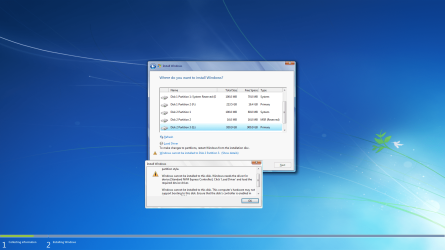
I wanted to install Win 7 to the NVMe with no success . The 2 SSD HDD that I have running on the system will only work with the RJ45
That was my first problem the ( Realtek PCIe HE Family controller was found to work.
The main issue is the failure to recognize the M.2 PCIe 1TB PNY 2230 from within the running win7 os
The PNY NVMe does show in the BIOS.
The final solution was to boot to USB Win10 UEFI and install This was not what I wanted. All my attempts to create Win 7 Media using 7upv64P and install would not recognize the NVMe
So now I do have an NVMe drive function But only through the win 10 installation
I can not see what relevance the board has to the media creation to supply the NVMe drivers for a win7 installation. I must have made a mistake creating the media. I am still looking for the resolution. If win 10 can see it and supply the drivers, it can not be anything to do with the MB
I wanted to discuss what I was doing wrong, creating media. I used Rufus 3.10 to make UEFI USB
It would not see the copy pasted revised media. It will only work with ISO image. I created standard rufus media and wrote over the files with copy past of revised media. ( did not work ) meaning the NVMe drivers did not show at isntall
As I said in the beginning I tried from the SSD HDD first, then creating the UEFI USB
All this to have the win7 and the virtual XP environment for older software at the speed of NVMe .
This is one of a very few that has onboard M.2 PCIe WiFi port and M.2 PCIe 2230 gen3 ( default format is xFAT )
The board is ( Jingsha H61S ) This is LGA 1155 intel with HDMI with compatible CPU with GPU The BIOS is AMI (American Megatrends ) The AMI support page does not support end users.
Current CPU Intel i-7 with 16G of ram
I wanted to install Win 7 to the NVMe with no success . The 2 SSD HDD that I have running on the system will only work with the RJ45
That was my first problem the ( Realtek PCIe HE Family controller was found to work.
The main issue is the failure to recognize the M.2 PCIe 1TB PNY 2230 from within the running win7 os
The PNY NVMe does show in the BIOS.
The final solution was to boot to USB Win10 UEFI and install This was not what I wanted. All my attempts to create Win 7 Media using 7upv64P and install would not recognize the NVMe
So now I do have an NVMe drive function But only through the win 10 installation
I can not see what relevance the board has to the media creation to supply the NVMe drivers for a win7 installation. I must have made a mistake creating the media. I am still looking for the resolution. If win 10 can see it and supply the drivers, it can not be anything to do with the MB
I wanted to discuss what I was doing wrong, creating media. I used Rufus 3.10 to make UEFI USB
It would not see the copy pasted revised media. It will only work with ISO image. I created standard rufus media and wrote over the files with copy past of revised media. ( did not work ) meaning the NVMe drivers did not show at isntall
As I said in the beginning I tried from the SSD HDD first, then creating the UEFI USB
All this to have the win7 and the virtual XP environment for older software at the speed of NVMe .
My Computer
At a glance
windows 7 pro 64bitintel 78 gig Skill ddr3 2133intel integrated
- Computer type
- PC/Desktop
- Computer Manufacturer/Model Number
- custom
- OS
- windows 7 pro 64bit
- CPU
- intel 7
- Motherboard
- ASUS Z97-A
- Memory
- 8 gig Skill ddr3 2133
- Graphics Card(s)
- intel integrated
- Hard Drives
- 1 tb ssd 6gbps
- Antivirus
- none
- Browser
- Firefox